How to Check Authenticity of Email: A 2026 Verification Guide
Fake senders, spoofed domains, and dead addresses all look identical in your inbox. Here are seven checks — header analysis, SPF/DKIM/DMARC, and SMTP validation — that separate real email from noise.
TL;DR
- "Authenticity" means two different things: is this sender who they claim to be (anti-phishing), and does this address actually exist and receive mail (list hygiene). You need different checks for each.
- For inbound mail, read the raw headers:
Authentication-Resultstells you whether SPF, DKIM, and DMARC passed in under ten seconds. - For outbound lists, syntax → MX record → SMTP handshake → catch-all handling is the sequence that matters. Skipping the last step is why "verified" lists still bounce.
- Free single checks are fine for one-off doubts; anything over a few hundred addresses needs a bulk verifier with catch-all logic.
- No tool hits 100%. Treat any vendor claiming perfect accuracy as a red flag, and budget for a 2-3% bounce floor.
What does "authentic email" actually mean?#
Two completely different questions get filed under the same phrase, and conflating them is the most common mistake.
The first is sender authenticity. An email landed in your inbox claiming to be from your CFO, a vendor, or Stripe. Is it? This is a security question, answered by cryptographic authentication records and header forensics.
The second is address authenticity. You scraped, bought, or generated a list of prospect emails. Do those mailboxes exist, and will mail to them be delivered? This is a data-quality question, answered by DNS lookups and SMTP conversations.
Think of it like a package delivery. Sender authenticity asks whether the return address on the box is real. Address authenticity asks whether the destination address is a real house someone lives in. Both matter, and neither answers the other.
The rest of this guide handles both, starting with inbound because that's where the damage is fastest.
How do you check if an incoming email is legitimate?#
Skip the "look for typos" advice. Modern phishing is written by the same models that write your marketing copy. Go to the headers.
The seven-step inbound check:
- Open the raw headers. In Gmail: three-dot menu → "Show original." In Outlook: File → Properties → Internet headers. In Apple Mail: View → Message → All Headers. Everything below depends on this.
- Read
Authentication-Resultsfirst. You want to seespf=pass,dkim=pass, anddmarc=pass. Admarc=failon a domain that publishes a strict policy is close to conclusive — the mail is not from who it says. - Compare the
Return-Pathto theFrom. Legitimate bulk senders often differ here (a sending platform's bounce domain), but a mismatch on a supposedly personal email from a colleague is a strong signal. - Walk the
Receivedchain bottom-up. The bottom-most entry is the origin. A message claiming to be from a US bank that entered the chain via an unrelated hosting provider in another region deserves scrutiny. - Check the display-name trick.
Accounts Payable <random@gmail.com>renders as "Accounts Payable" on mobile. Always expand the actual address string. - Inspect the domain, character by character. Homoglyph attacks swap Latin characters for lookalikes —
paypa1.com,rnform, Cyrillic а for Latin a. Copy the domain into a plain text editor if you're unsure. - Verify the reply address out-of-band. If the mail asks for money or credentials, confirm through a channel you already trust — a known phone number, not the one in the signature.
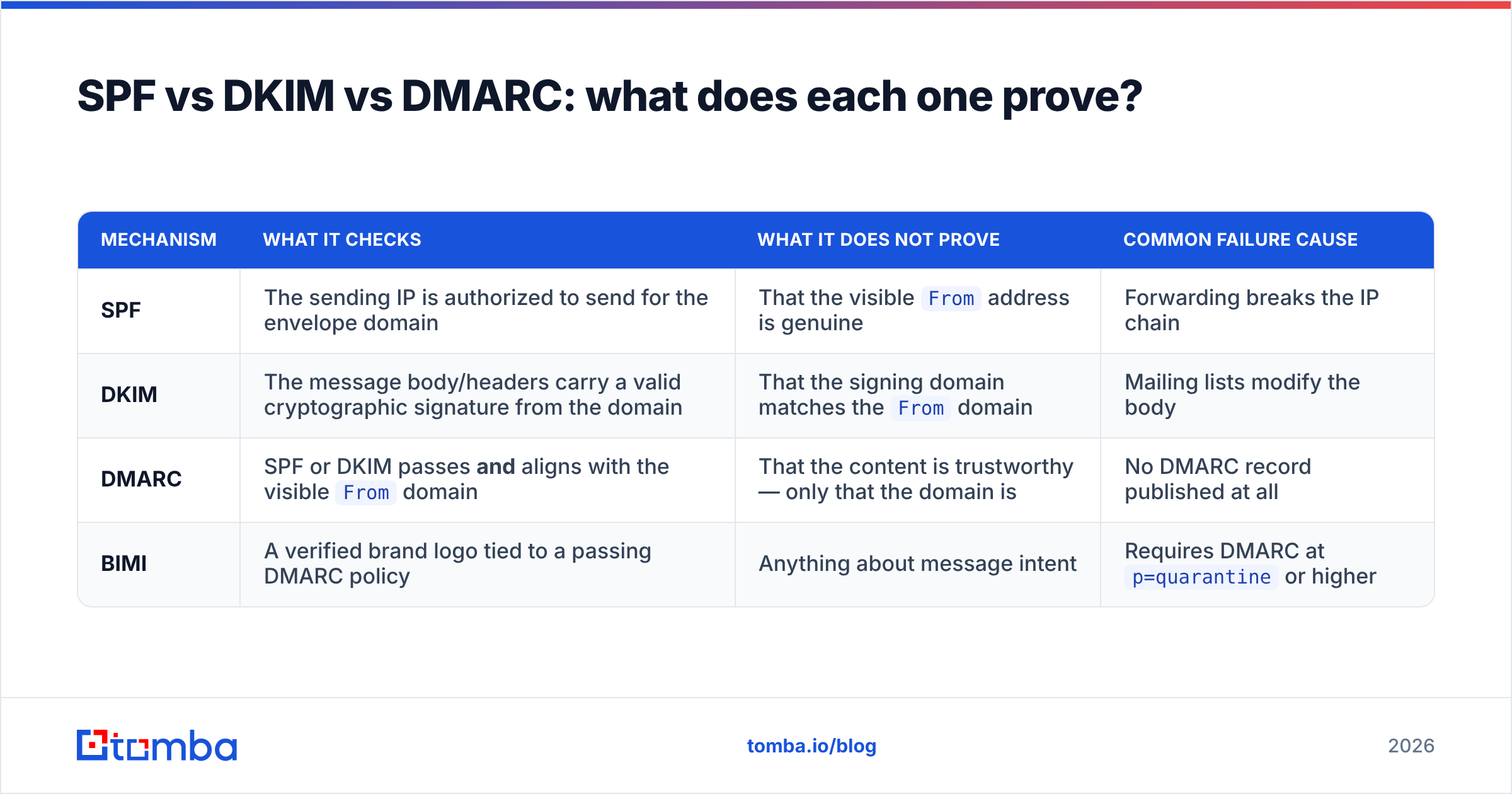
The Authentication-Results header does most of the work, but it's worth understanding what each mechanism actually proves — because they prove different things and phishers exploit the gaps.
SPF vs DKIM vs DMARC: what does each one prove?#
| Mechanism | What it checks | What it does NOT prove | Common failure cause |
|---|---|---|---|
| SPF | The sending IP is authorized to send for the envelope domain | That the visible From address is genuine |
Forwarding breaks the IP chain |
| DKIM | The message body/headers carry a valid cryptographic signature from the domain | That the signing domain matches the From domain |
Mailing lists modify the body |
| DMARC | SPF or DKIM passes and aligns with the visible From domain |
That the content is trustworthy — only that the domain is | No DMARC record published at all |
| BIMI | A verified brand logo tied to a passing DMARC policy | Anything about message intent | Requires DMARC at p=quarantine or higher |
The critical column is the third one. SPF alone can pass while the From header shows a completely different domain — this is exactly how "SPF passed, so it's safe" reasoning fails. DMARC exists to close that gap by requiring alignment.
If you're auditing your own domain rather than someone else's mail, start with an SPF checker to confirm your record is syntactically valid and doesn't exceed the ten-lookup limit. Then confirm your domain isn't listed anywhere it shouldn't be with a blacklist checker. Google's own Postmaster Tools will show you authentication pass rates across your actual sending volume, which is more useful than any single-message test.
One caveat worth internalizing: passing authentication means the domain owner authorized the send. It does not mean the message is honest. A phisher who registers microsoft-billing-support.com and configures SPF, DKIM, and DMARC correctly will pass every check. Authentication proves provenance, not intent.
How do you check whether an email address actually exists?#
Now the outbound side. You have an address — sarah.chen@acmecorp.com — and you need to know whether sending to it will bounce.
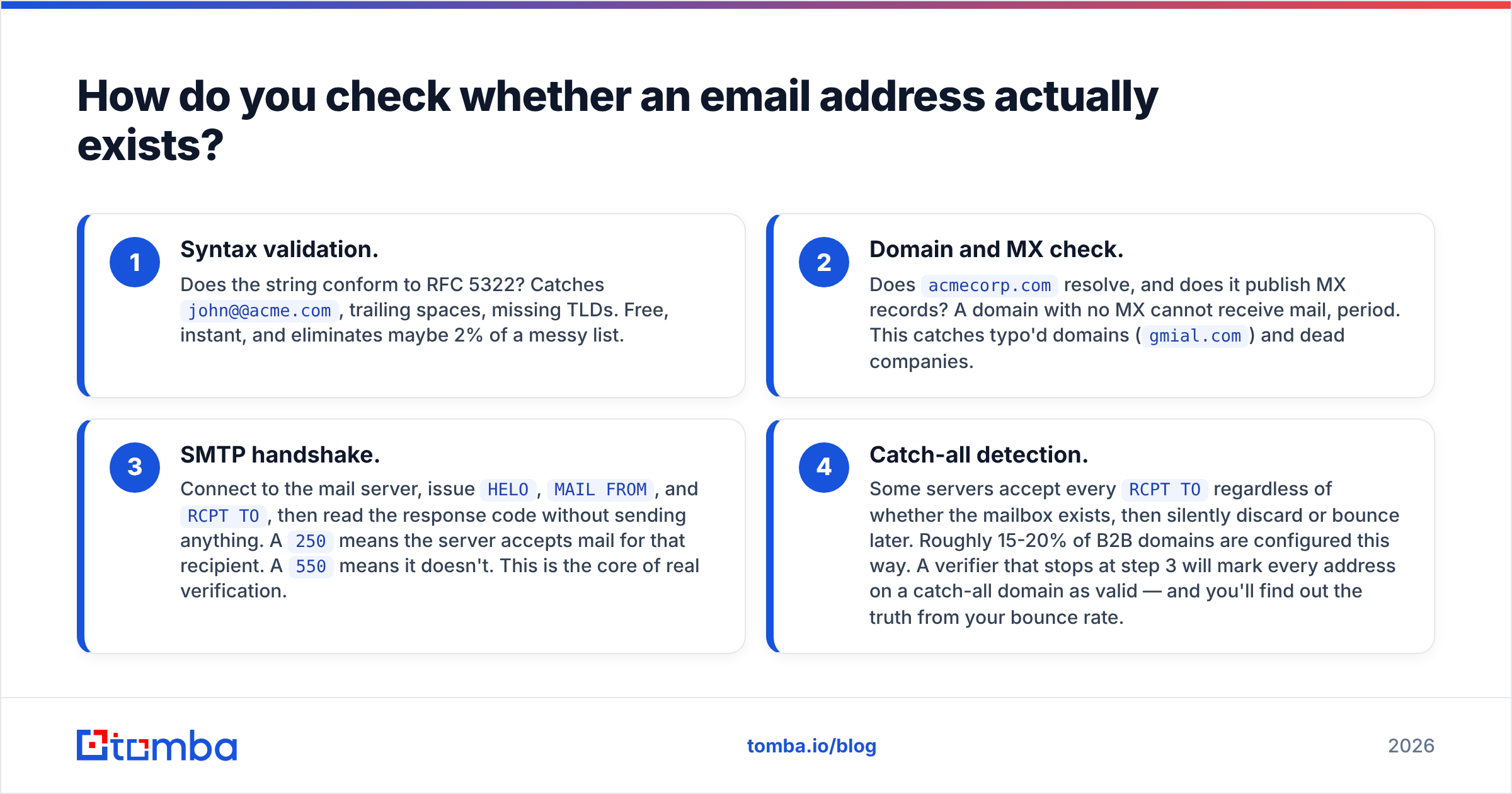
There are four layers, and each one filters out a different kind of garbage:
- Syntax validation. Does the string conform to RFC 5322? Catches
john@@acme.com, trailing spaces, missing TLDs. Free, instant, and eliminates maybe 2% of a messy list. - Domain and MX check. Does
acmecorp.comresolve, and does it publish MX records? A domain with no MX cannot receive mail, period. This catches typo'd domains (gmial.com) and dead companies. - SMTP handshake. Connect to the mail server, issue
HELO,MAIL FROM, andRCPT TO, then read the response code without sending anything. A250means the server accepts mail for that recipient. A550means it doesn't. This is the core of real verification. - Catch-all detection. Some servers accept every
RCPT TOregardless of whether the mailbox exists, then silently discard or bounce later. Roughly 15-20% of B2B domains are configured this way. A verifier that stops at step 3 will mark every address on a catch-all domain as valid — and you'll find out the truth from your bounce rate.
Step 4 is where verification tools genuinely diverge. Cheap tools return "valid" or "unknown" and leave you to guess. Better ones use pattern confidence, historical engagement data, and secondary signals to score catch-all addresses rather than shrugging. Tomba splits this into a dedicated catch-all verifier precisely because the generic yes/no answer isn't useful on those domains.
You can also work backwards. If you have an address and want to know who's behind it, a reverse email lookup maps the address to a name, company, and role — which is often the fastest way to confirm a supposed contact is real before you reply.
Which tools check email authenticity, and what do they cost?#
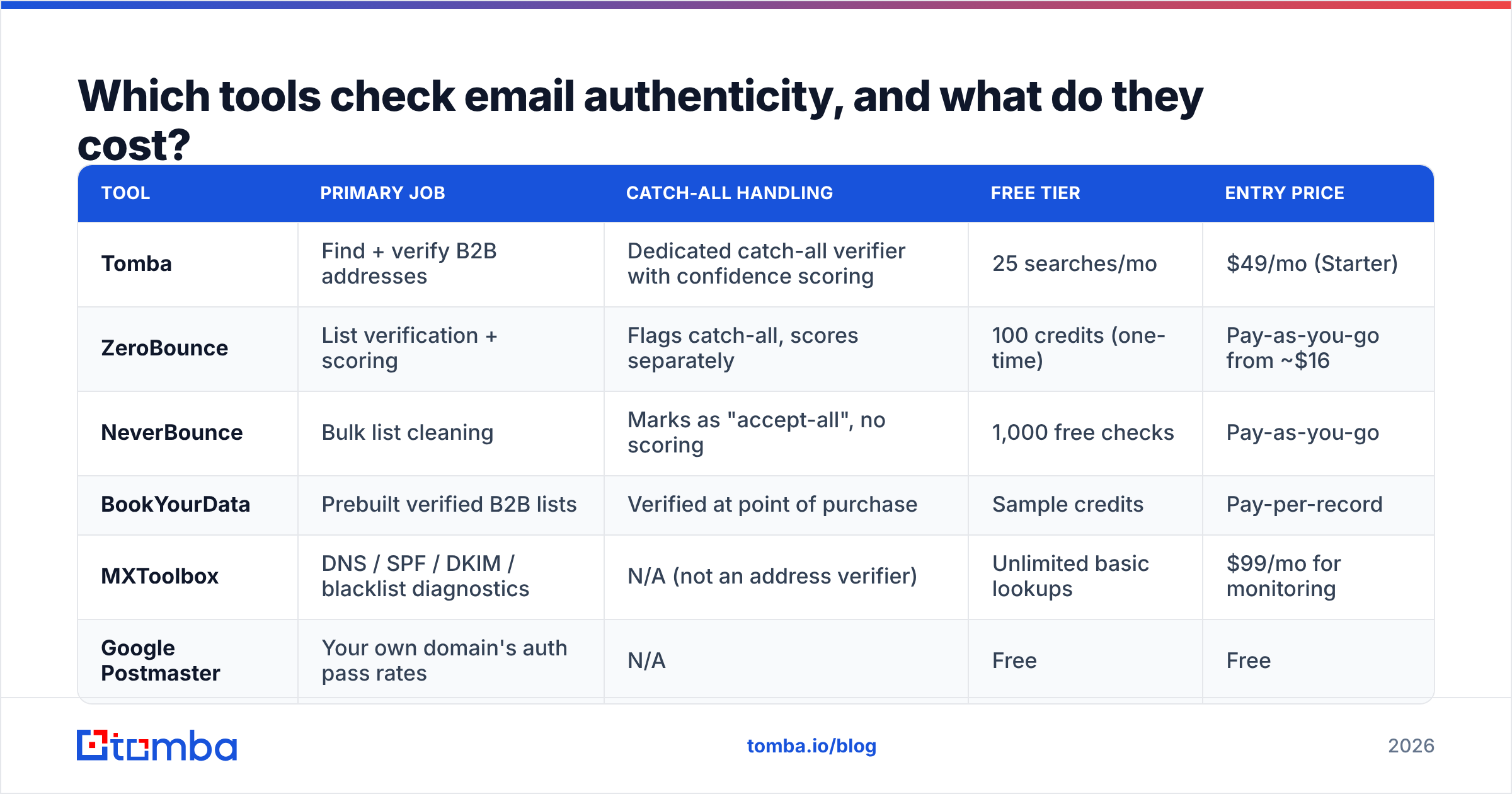
Different jobs, different tools. Here's how the main categories compare on the checks that matter.
| Tool | Primary job | Catch-all handling | Free tier | Entry price |
|---|---|---|---|---|
| Tomba | Find + verify B2B addresses | Dedicated catch-all verifier with confidence scoring | 25 searches/mo | $49/mo (Starter) |
| ZeroBounce | List verification + scoring | Flags catch-all, scores separately | 100 credits (one-time) | Pay-as-you-go from ~$16 |
| NeverBounce | Bulk list cleaning | Marks as "accept-all", no scoring | 1,000 free checks | Pay-as-you-go |
| BookYourData | Prebuilt verified B2B lists | Verified at point of purchase | Sample credits | Pay-per-record |
| MXToolbox | DNS / SPF / DKIM / blacklist diagnostics | N/A (not an address verifier) | Unlimited basic lookups | $99/mo for monitoring |
| Google Postmaster | Your own domain's auth pass rates | N/A | Free | Free |
A few honest notes on that table. MXToolbox and Postmaster Tools solve the inbound/domain problem and don't verify individual addresses — pairing one of them with a verifier covers both halves. BookYourData takes a different approach entirely: instead of verifying a list you already have, you buy records that were verified at the point of sale, which suits teams without an existing data source. And pay-as-you-go pricing looks cheaper than a subscription until you're checking every week, at which point the per-credit math flips.
If your workflow is "find the address, then confirm it," a combined finder-and-verifier avoids paying two vendors for one contact. Tomba's email verifier runs on the same infrastructure as the finder, so a found address arrives pre-scored rather than needing a second round-trip. Full Tomba pricing runs Free (25 searches), Starter $49/mo, Growth $99/mo, and Pro $249/mo.
How accurate can email verification actually be?#
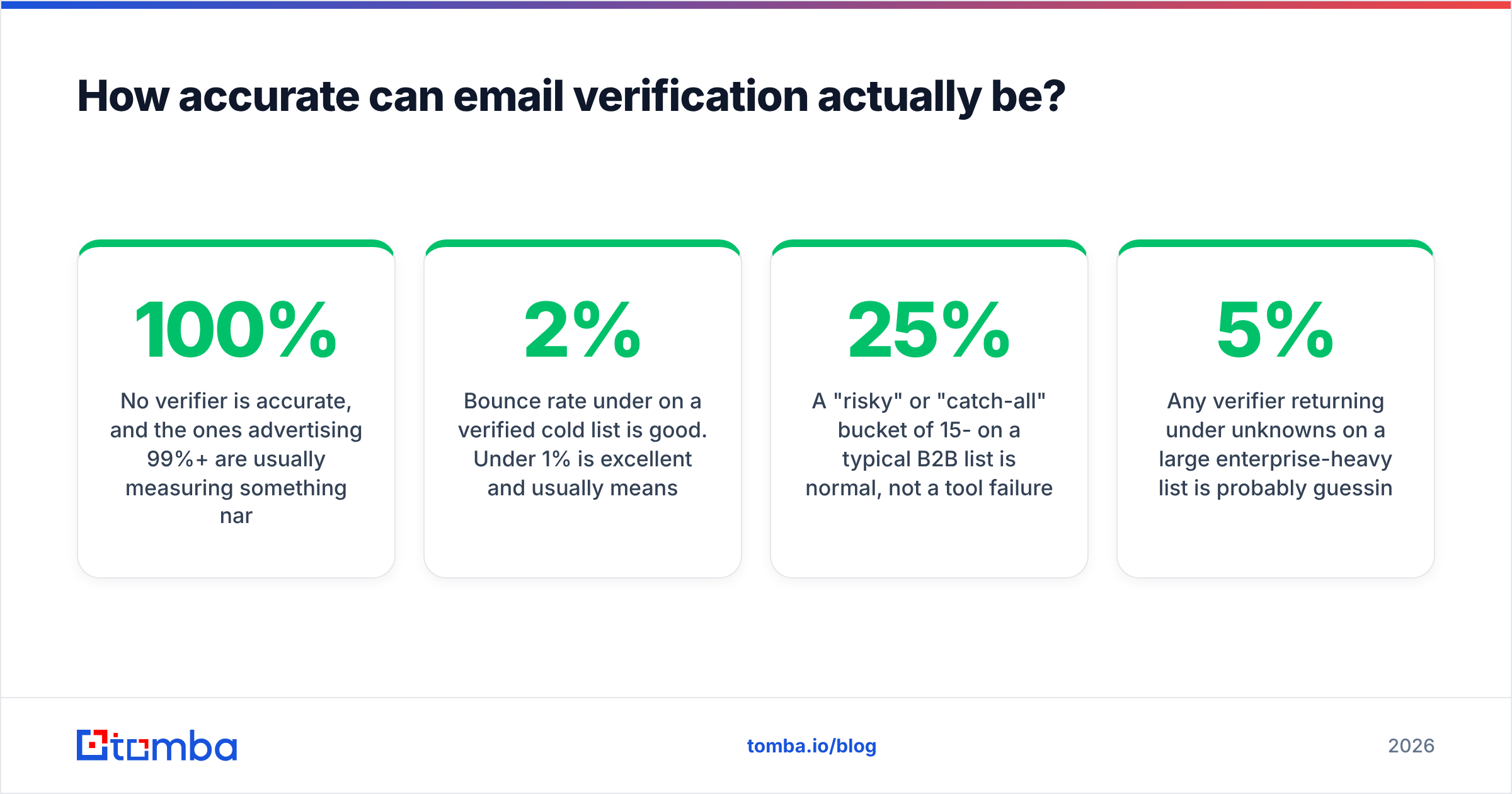
No verifier is 100% accurate, and the ones advertising 99%+ are usually measuring something narrow.
Here's why. Major providers — Microsoft 365 and Google Workspace in particular — have progressively hardened against SMTP probing. Microsoft's servers frequently return ambiguous responses to RCPT TO regardless of mailbox existence, specifically to defeat enumeration. Yahoo and several regional providers throttle or greylist repeated probes from the same IP range. That means the SMTP layer, which used to be near-definitive, now returns "unknown" on a meaningful share of addresses.
Vendors compensate with pattern data (does first.last@ match the company's dominant format?), historical bounce records, and engagement signals. That's inference, not proof, which is why confidence scores beat binary verdicts.
Practical benchmarks to hold yourself to:
- Bounce rate under 2% on a verified cold list is good. Under 1% is excellent and usually means you're only mailing known-good domains.
- A "risky" or "catch-all" bucket of 15-25% on a typical B2B list is normal, not a tool failure.
- Any verifier returning under 5% unknowns on a large enterprise-heavy list is probably guessing rather than admitting uncertainty.
Anything above a 3% bounce rate puts you in mailbox-provider penalty territory. Gmail's bulk sender guidelines set a hard spam-complaint ceiling of 0.3% and require authentication for anyone sending over 5,000 messages a day, so weak verification now costs you sender reputation directly, not just wasted sends.
What should your verification workflow look like?#
Put the pieces in the right order and the whole thing takes minutes rather than hours.
For inbound mail you're suspicious of:
- Show original / view headers.
- Read
Authentication-Results— a DMARC fail on a domain with a strict policy ends the investigation. - Expand the actual
Fromaddress, not the display name. - Check the registration age of the domain if it's unfamiliar (a domain registered eleven days ago sending invoices is not a coincidence).
- Confirm anything financial through a separate channel.
For an outbound list before a campaign:
- Deduplicate first — you pay per credit, and duplicates are pure waste. A remove duplicates pass costs nothing.
- Strip role accounts (
info@,sales@,support@) unless they're genuinely your target. They inflate complaint rates. - Run the list through a bulk verifier.
- Segment the output: send to valid, discard invalid, and hold catch-all/risky addresses for a separate low-volume warm-up send.
- Re-verify anything older than 90 days. B2B data decays at roughly 2-2.5% per month through job changes alone, per Gartner's long-running data-quality research.
- Monitor bounces on the first send and feed the results back into your suppression list.
Step 5 is the one teams skip. A list verified in January and mailed in June is not a verified list — it's a six-month-old snapshot with a quarter of its contacts moved on.
What are the limits of every check on this page?#
Being honest about the ceiling:
- Authentication proves domain control, not honesty. A well-funded phisher passes DMARC. Header checks eliminate the lazy 90% of attacks and none of the sophisticated 10%.
- SMTP verification is degrading. Provider defenses against enumeration are getting stronger every year, and the "unknown" bucket grows accordingly. Any tool selling certainty is selling inference with the uncertainty hidden.
- Catch-all domains are a probabilistic call. Scoring is better than guessing, but it is still a probability, not a fact.
- Verification doesn't check whether the person still works there. An address can be technically deliverable and belong to someone who left in March. Only contact enrichment with fresh employment data catches that.
- Nothing here evaluates content. A perfectly authenticated email from a real, deliverable address can still be a scam. Authentication and verification are necessary, not sufficient.
Use these checks to eliminate noise cheaply, then apply judgment to what survives. That's the realistic goal — not certainty.
Getting the address right in the first place#
Most verification pain traces back to bad sourcing. If your addresses come from scrapers, guessed permutations, or a list purchased three years ago, you'll spend your credits confirming what you already suspect.
The cheaper path is finding addresses that are already verified. Tomba Email Finder searches by name, company, or domain and returns each result with a confidence score and verification status attached — so the address you get is already through the syntax, MX, and SMTP layers before it hits your CRM. The free tier gives you 25 searches a month to test it against contacts you can independently confirm, which is the only benchmark that actually tells you anything. Start there, check the results against people you know, and scale up only if the numbers hold.
Related guides#
// get started
Find, verify and enrich your first contacts today
Start on the free plan with 25 searches a month, then scale when your team is ready.
Free plan · No credit card required · GDPR & CCPA
// about the author