How to Check Domain Reputation in 2026: A 6-Step Guide
Your domain reputation decides whether cold email lands in the inbox or the spam folder. Here are six checks — most of them free — that show you exactly where your sending domain stands and what to fix first.
TL;DR
- Domain reputation is not a single score. It is a bundle of signals — blocklist status, authentication records, spam-complaint rate, bounce rate, and engagement — that each mailbox provider weighs differently.
- The fastest free stack: Google Postmaster Tools for Gmail placement, Cisco Talos and Spamhaus for blocklist status, and an SPF/DKIM/DMARC check for authentication.
- A domain with no history at all is not "clean" — it is unknown, which for Microsoft and Gmail filters is effectively suspicious until proven otherwise.
- Bounce rate is the single input you control most directly. Verifying your list before you send is cheaper than repairing a burned domain.
- Budget one hour for the first full audit, then 10 minutes a week. Reputation damage takes days to appear and weeks to undo.
What is domain reputation, exactly?#
Domain reputation is a mailbox provider's running judgment of whether mail from your domain is wanted. Think of it like a credit score at a bank that never publishes its formula: you can see the inputs, you can see the consequences, but you never see the number itself.
The confusion most senders have is between domain reputation and IP reputation. IP reputation attaches to the server that sends the mail. If you use Google Workspace, Microsoft 365, or a shared ESP, you are on a pool of IPs alongside thousands of other senders, and you have almost no control over that pool. Domain reputation attaches to the From: domain and the domains in your links — and it follows you everywhere. Move to a new ESP and your domain reputation moves with you.
That is why domain reputation matters more every year. Since the February 2024 Gmail and Yahoo bulk-sender rules, authentication and complaint thresholds are enforced at the domain level, not the IP level. Your sender reputation is portable, and so is the damage.
Five signals drive it:
- Authentication alignment — do SPF, DKIM, and DMARC pass, and does the DKIM domain align with the visible
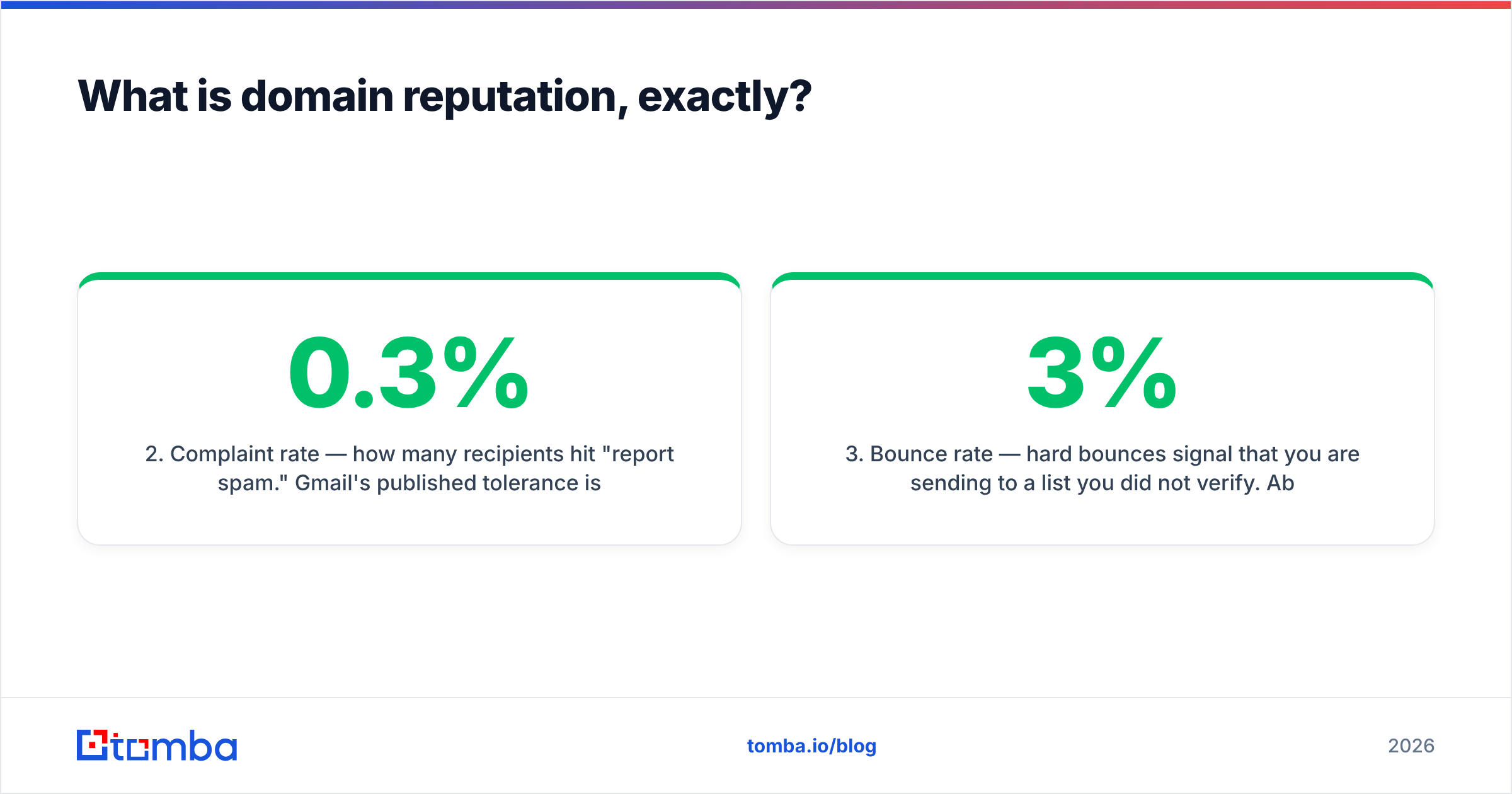
From:domain? A fail here caps everything else. - Complaint rate — how many recipients hit "report spam." Gmail's published tolerance is under 0.3%, and the practical danger zone starts around 0.1%.
- Bounce rate — hard bounces signal that you are sending to a list you did not verify. Above roughly 3% and filters start treating your volume as scraped.
- Engagement — opens are noisy post-MPP, but replies, forwards, moves-out-of-spam, and time-in-inbox are strong positive signals.
- Blocklist presence — appearing on Spamhaus DBL, SURBL, or a Talos "Poor" rating is a hard signal that overrides most of the above.
How do you check domain reputation step by step?#
Work through these in order. Each takes a few minutes and the earlier ones explain the later ones.
Step 1 — Verify your DNS authentication records. Before anything else, confirm SPF, DKIM, and DMARC resolve correctly. A broken SPF record with more than 10 DNS lookups silently fails and drags placement down for months. Run your domain through an SPF checker and confirm you have exactly one SPF record, a published DKIM selector, and a DMARC policy of at least p=none with an rua address collecting reports.
Step 2 — Read your DMARC aggregate reports. These XML files tell you which servers are sending mail as your domain and whether they pass alignment. This is where you discover the forgotten marketing tool sending unauthenticated mail from yourdomain.com and poisoning your reputation.
Step 3 — Check Gmail placement in Google Postmaster Tools. Verify your domain at Google Postmaster Tools, and after a few days of volume you get a Domain Reputation dashboard rated High, Medium, Low, or Bad, plus spam-rate and authentication charts. This is the closest thing to an official score that exists. Note that it requires meaningful daily volume to Gmail addresses — a few hundred sends a day will show "no data."
Step 4 — Query the major blocklists. Check your sending domain and your link domains against Spamhaus DBL, SURBL, and Cisco Talos. A blacklist checker queries dozens of lists in one pass. Pay attention to which list flags you: Spamhaus DBL is severe and widely consumed; a small unmaintained regional list often is not.
Step 5 — Audit your list quality. Pull your last 90 days of sending and compute hard-bounce rate, complaint rate, and unsubscribe rate per campaign. If bounces are over 3%, the reputation fix is upstream — in your data — not in your DNS.
Step 6 — Send a seed test. Send your actual template to a spread of Gmail, Outlook, Yahoo, and corporate-domain inboxes you control. Record where it lands: Primary, Promotions, or Spam. This is the only check that measures the combination of domain reputation and content.
Which domain reputation checkers should you use?#
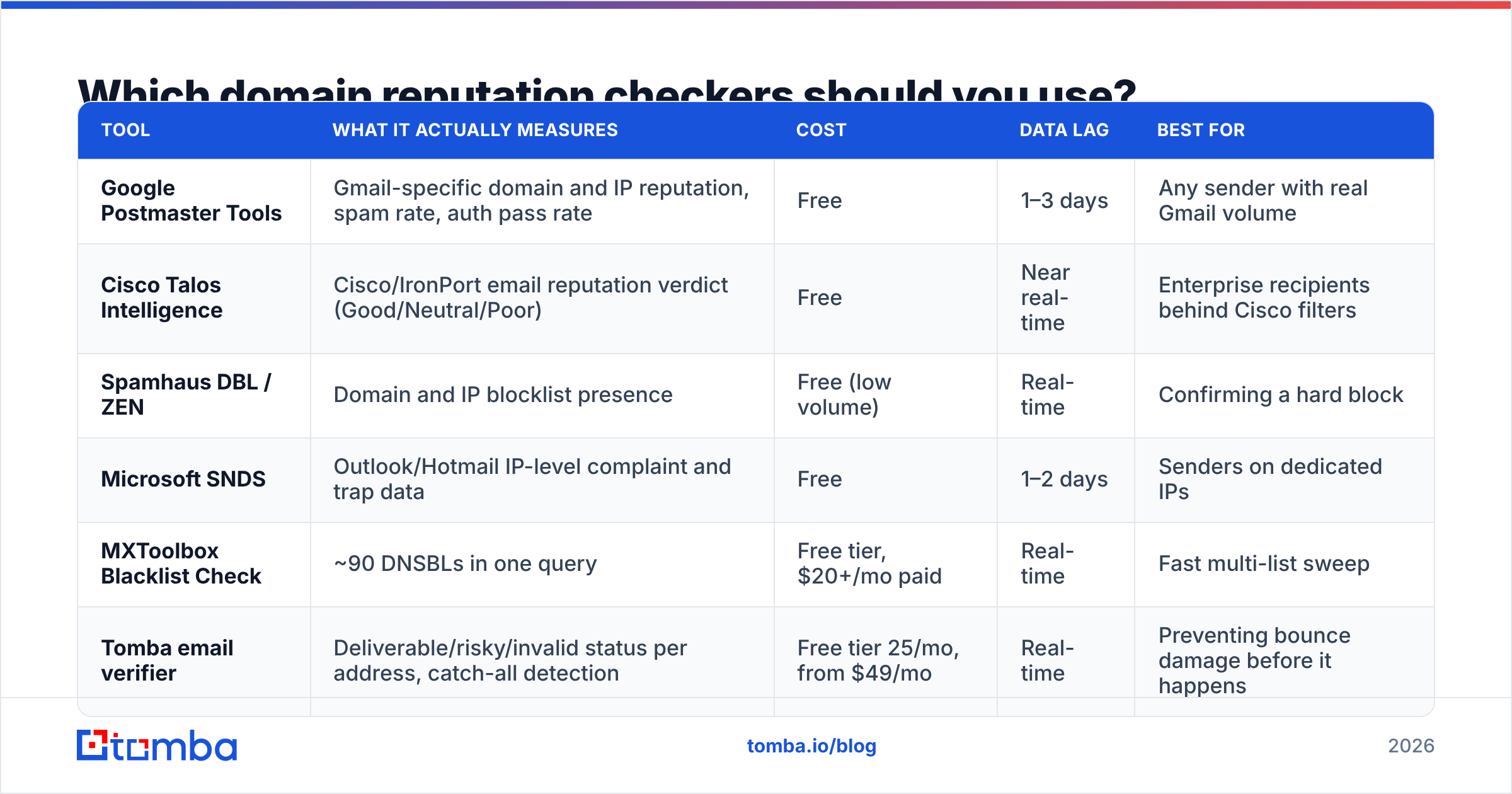
No single tool sees the whole picture, because each mailbox provider keeps its own ledger. Here is how the main free and paid options compare.
| Tool | What it actually measures | Cost | Data lag | Best for |
|---|---|---|---|---|
| Google Postmaster Tools | Gmail-specific domain and IP reputation, spam rate, auth pass rate | Free | 1–3 days | Any sender with real Gmail volume |
| Cisco Talos Intelligence | Cisco/IronPort email reputation verdict (Good/Neutral/Poor) | Free | Near real-time | Enterprise recipients behind Cisco filters |
| Spamhaus DBL / ZEN | Domain and IP blocklist presence | Free (low volume) | Real-time | Confirming a hard block |
| Microsoft SNDS | Outlook/Hotmail IP-level complaint and trap data | Free | 1–2 days | Senders on dedicated IPs |
| MXToolbox Blacklist Check | ~90 DNSBLs in one query | Free tier, $20+/mo paid | Real-time | Fast multi-list sweep |
| Tomba email verifier | Deliverable/risky/invalid status per address, catch-all detection | Free tier 25/mo, from $49/mo | Real-time | Preventing bounce damage before it happens |
The pattern worth noticing: every tool in the first five rows is diagnostic. They tell you what already happened. Only the last row is preventive. Most teams over-invest in monitoring and under-invest in the input that causes 80% of reputation damage — sending to addresses that do not exist.
Why does a "clean" new domain still land in spam?#
Because clean and trusted are different states. A domain registered last month has no sending history, which filters treat as risk, not neutrality. Combine that with a fresh domain's typical profile — sudden volume, cold recipients, links to an unknown host — and you have the exact fingerprint of a throwaway spam domain.
There are four common causes of the "new domain, instant spam folder" problem:
- No warmup ramp. Going from zero to 200 sends a day in week one is the fastest way to get filtered. Ramp gradually and check your projected schedule with an email warmup calculator before you start.
- Domain age under 30 days. Some corporate filters apply a blanket penalty to domains registered within the last month. Buy the domain, set up DNS, and let it sit.
- Inherited history. If you bought an expired domain, you inherited whatever the previous owner did. Check archive.org and the blocklists before you commit.
- Link domain mismatch. Your
From:domain may be spotless while the tracking or landing-page domain in your links is flagged. Filters check both.
Also worth checking: whether the root domain and the sending subdomain are treated separately. Many teams send cold outreach from mail.company.com specifically so a reputation hit does not contaminate transactional mail on the root. That separation works, but only if DMARC alignment is configured on the subdomain properly.
How do you fix a damaged domain reputation?#
Recovery is slower than damage, and there is no shortcut. The realistic sequence:
Stop sending to the affected segment immediately. Continuing to send while reputation is low compounds the problem — more spam-folder deliveries means more non-engagement signals.
Clean the list, hard. Remove every address that hard-bounced, every address that has not engaged in 180 days, and every role account (info@, sales@, admin@) unless it is genuinely your buyer. Run the remainder through an email verifier and drop anything returning invalid. For lists over a few thousand rows, a bulk verify pass is faster than doing it address by address.
Delist where possible. Spamhaus, SURBL, and most major lists have a removal request form. Delisting only sticks if you fixed the underlying behavior — request removal after the cleanup, not before.
Re-warm at 20% of your previous volume. Send only to your most engaged segment for two to three weeks. You are rebuilding a positive signal history, and engaged recipients are the only source of it.
Audit content and links. Run your template through a spam checker and strip anything that reads as bulk mail: heavy HTML, multiple tracking pixels, shortened URLs, image-only bodies.

Expect four to eight weeks for Postmaster Tools to move from Low back to High, assuming clean behavior throughout. Teams that panic and switch to a fresh domain mid-recovery usually end up managing two damaged domains instead of one.
How often should you check domain reputation?#
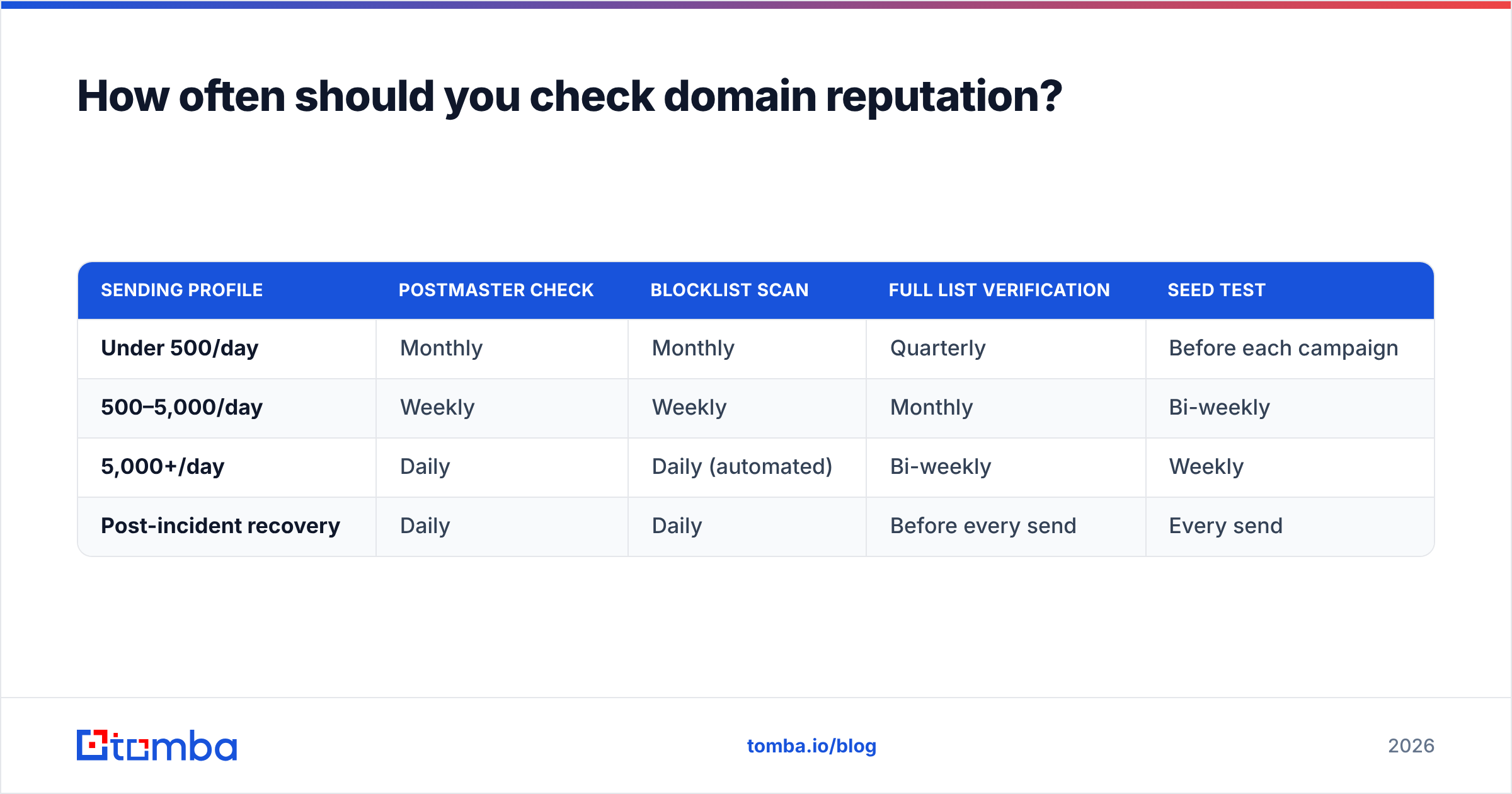
Match the cadence to your volume. A weekly 10-minute check catches problems while they are still cheap to fix.
| Sending profile | Postmaster check | Blocklist scan | Full list verification | Seed test |
|---|---|---|---|---|
| Under 500/day | Monthly | Monthly | Quarterly | Before each campaign |
| 500–5,000/day | Weekly | Weekly | Monthly | Bi-weekly |
| 5,000+/day | Daily | Daily (automated) | Bi-weekly | Weekly |
| Post-incident recovery | Daily | Daily | Before every send | Every send |
Two triggers should override the schedule entirely: a sudden reply-rate drop of more than 30%, and a bounce-rate spike above 5% on a single campaign. Both usually precede a visible reputation change by several days, which gives you a window to act before the dashboards catch up.
Does list quality matter more than DNS configuration?#
Yes — once your DNS is correct. Authentication is a gate, not a lever. SPF, DKIM, and DMARC either pass or they do not; getting them right earns you the right to be evaluated, and nothing more. After that, your reputation is almost entirely a function of who you send to.
Consider the arithmetic. A 10,000-address list scraped without verification typically contains 15–25% invalid addresses. Send to it once and you produce roughly 2,000 hard bounces in a single afternoon. No DMARC policy, warmup schedule, or subject-line rewrite survives that. The same list verified down to 7,800 deliverable addresses produces a bounce rate under 2% and leaves your reputation intact.
This is also why the source of your data matters as much as the verification step. Addresses built from a real-time domain search against a company's live email pattern behave very differently from addresses guessed by a permutation tool and never checked. Reputable providers publish where their data comes from — if a vendor will not tell you, treat the list as unverified regardless of what the dashboard claims.
A useful sanity check before any large send: what percentage of your list is catch-all? Catch-all domains accept everything at the SMTP layer, so they look deliverable while hiding invalid addresses. A catch-all verifier separates genuinely-resolvable catch-all addresses from the ones that will silently bounce later.
What does good look like?#
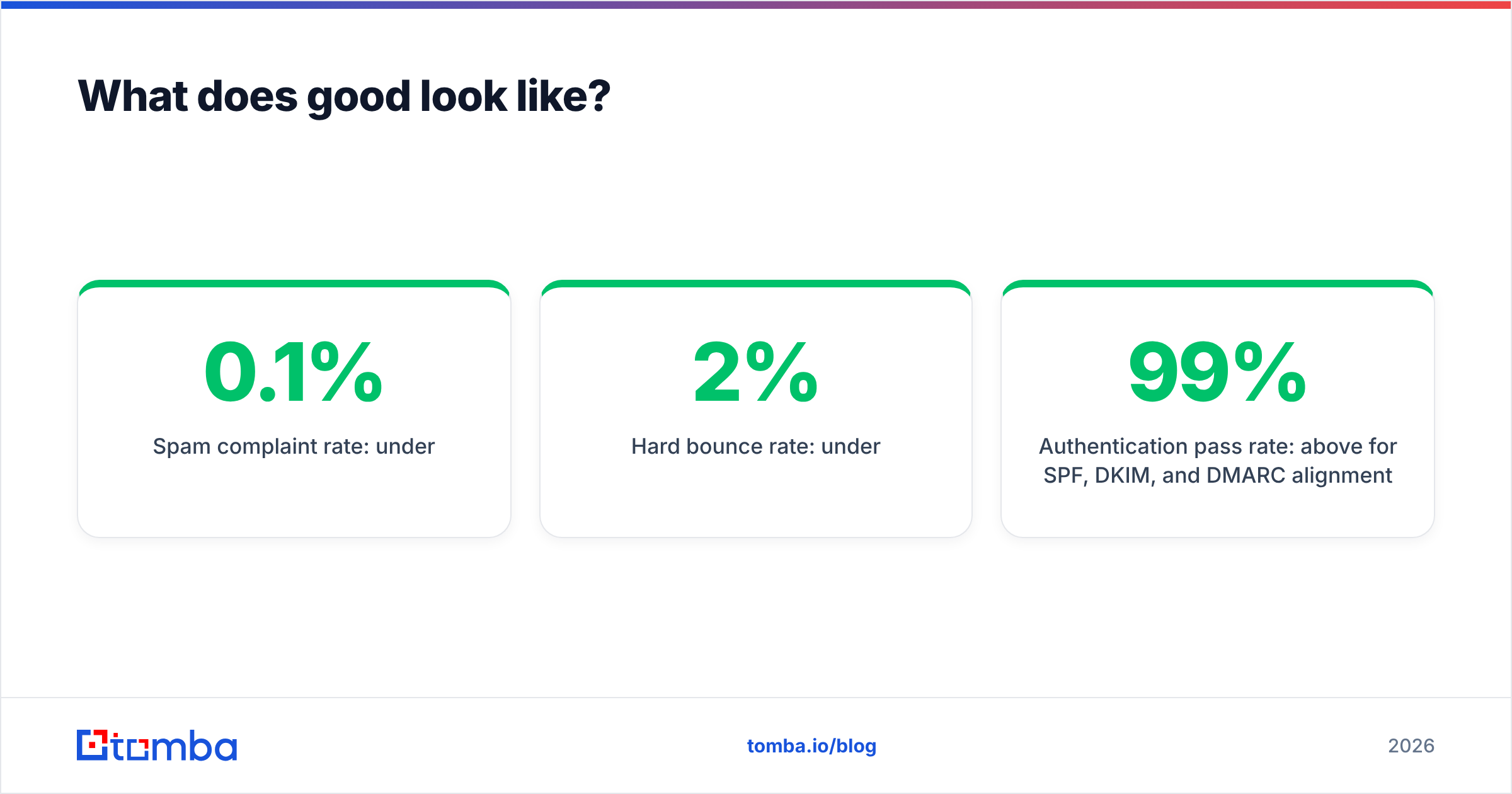
Use these as your target thresholds. If all six hold, your email deliverability is in good shape and you can focus on copy and targeting instead.
- Postmaster domain reputation: High (Medium is acceptable, Low needs action this week)
- Spam complaint rate: under 0.1%
- Hard bounce rate: under 2%
- Authentication pass rate: above 99% for SPF, DKIM, and DMARC alignment
- Blocklist status: zero listings on Spamhaus, SURBL, or a Talos "Poor" verdict
- Seed test placement: Primary or Promotions across Gmail, Outlook, and Yahoo — never Spam
Check them against the actual sources rather than a third-party summary: Spamhaus publishes both its lists and its removal process, and Cisco Talos exposes its verdict for any domain with no signup required.
Where to start this week#
Run the six checks in order, write down the numbers, and fix the worst one. In most audits, the worst number is bounce rate — and that is fixed upstream, in the data, not in DNS.
If your list came from a scrape, an export you inherited, or a vendor you cannot audit, start there. The Tomba Email Finder returns verified professional addresses with a confidence score and source attribution on every result, so you know what you are sending to before it costs you a reputation you spent months building. The free tier covers 25 searches a month, and paid plans start at $49/mo — see Tomba pricing for the full breakdown. Clean input first, then the dashboards take care of themselves.
Related guides#
// get started
Find, verify and enrich your first contacts today
Start on the free plan with 25 searches a month, then scale when your team is ready.
Free plan · No credit card required · GDPR & CCPA
// about the author