How to Check If an Email ID Is Correct or Not (2026 Guide)
Six ways to check whether an email ID is correct before you hit send — from free syntax checks to SMTP-level verification — plus what each method actually proves and where it fails.
TL;DR
- "Correct" means four different things: valid syntax, a real domain with MX records, an inbox that actually accepts mail, and a person who still works there. Most free checkers only test the first two.
- A free syntax + MX check takes two seconds and catches roughly the obvious garbage — typos, dead domains, fake TLDs. It cannot tell you whether the mailbox exists.
- SMTP-level verification (what real verifiers do) opens a conversation with the receiving mail server and asks whether the address is deliverable. This is the only method that meaningfully predicts a bounce.
- Catch-all domains break SMTP verification by accepting every address. You need a separate catch-all check plus pattern confidence scoring to handle them.
- Verify in bulk before a campaign, not one at a time after bounces start. A list above 3% bounce rate puts your sending domain at risk.
You typed an email into a form, or scraped it off a website, or a colleague wrote it on a sticky note. Now you need to know: is this address real, or will it bounce and drag your sender reputation down with it?
The honest answer is that "check if an email ID is correct" isn't one question. It's four stacked questions, and each one needs a different tool. This guide walks through all four, tells you what each method proves, and — more usefully — tells you where each one lies to you.
What does "correct email ID" actually mean?#
Before you check anything, get clear on what you're checking. An email address can fail in four distinct ways, and confusing them is why people trust broken lists.
- Syntax validity — Does it match the RFC 5322 format?
john@@acme.comandjohn doe@acme.comfail here. So doesjohn@acme(no TLD). This is a pure string check, no network required. - Domain existence — Does
acme.comresolve, and does it have MX records pointing at a mail server? A domain with no MX record cannot receive email, period. This is a DNS lookup. - Mailbox existence — Does
john@acme.comspecifically exist on that mail server? This requires talking to the server over SMTP. It's where most free tools stop being free. - Person accuracy — Is John still at Acme? An address can be perfectly deliverable and still be the wrong person, or an abandoned inbox nobody reads.
Here's the trap: a tool that says "valid" after checking only steps 1 and 2 is technically honest and practically useless. definitely-not-a-real-person@gmail.com passes both. Gmail's domain exists, the syntax is fine, and the address will bounce.
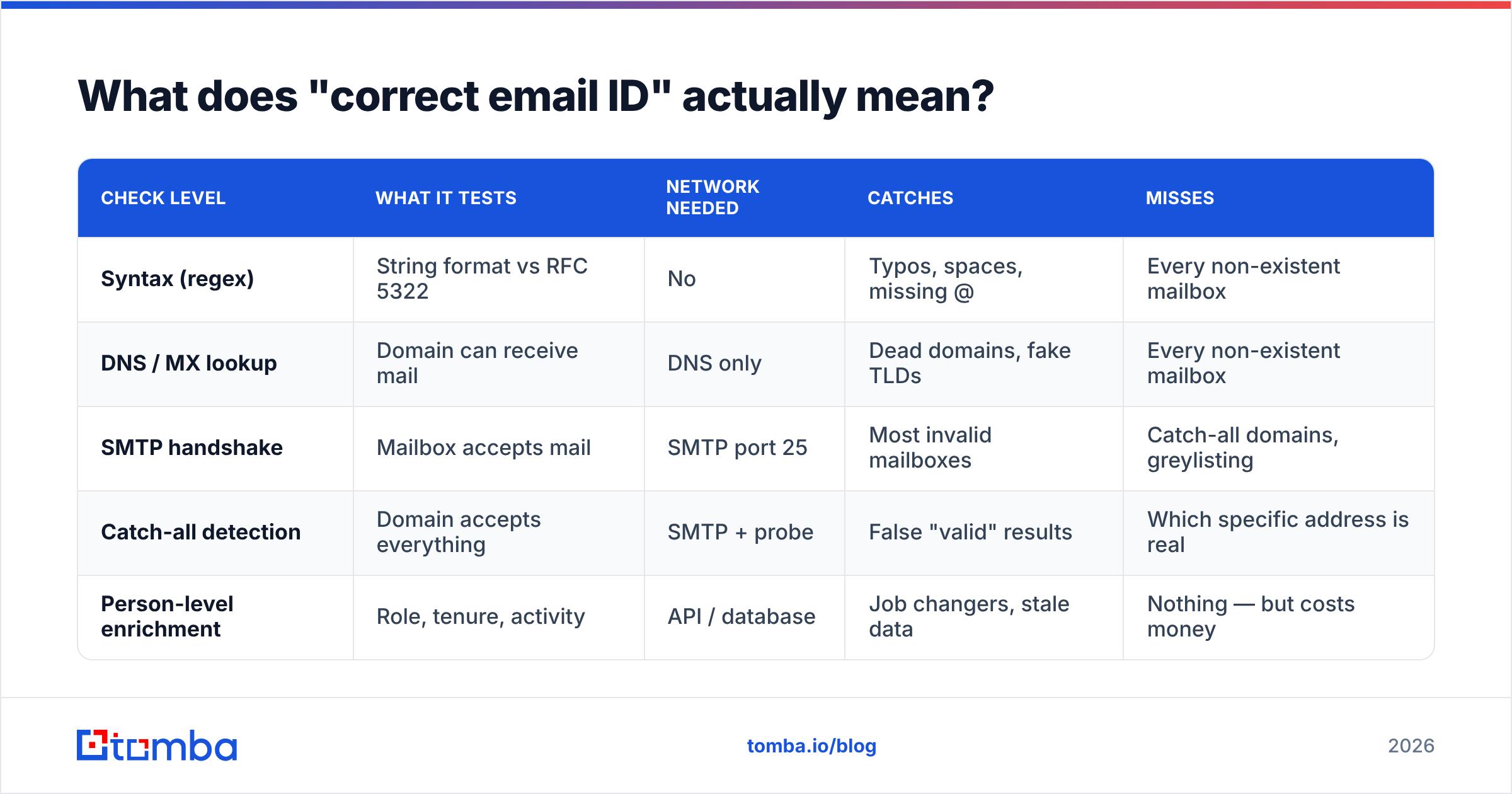
| Check level | What it tests | Network needed | Catches | Misses |
|---|---|---|---|---|
| Syntax (regex) | String format vs RFC 5322 | No | Typos, spaces, missing @ | Every non-existent mailbox |
| DNS / MX lookup | Domain can receive mail | DNS only | Dead domains, fake TLDs | Every non-existent mailbox |
| SMTP handshake | Mailbox accepts mail | SMTP port 25 | Most invalid mailboxes | Catch-all domains, greylisting |
| Catch-all detection | Domain accepts everything | SMTP + probe | False "valid" results | Which specific address is real |
| Person-level enrichment | Role, tenure, activity | API / database | Job changers, stale data | Nothing — but costs money |

How do you check an email ID for free right now?#
Three methods, ranked by how much they actually tell you.
Method 1: Eyeball the syntax. Look for the obvious. One @, no spaces, a dot in the domain, a real TLD (.com, .io, .co.uk — not .con or .cmo). Check for the classic typo domains: gmial.com, yahho.com, hotmial.com. If you're processing a list, a regex catches these in bulk. This takes seconds and costs nothing, and it will clean maybe 5-10% of a messy list.
Method 2: Run a DNS/MX lookup. On any Unix machine: dig MX acme.com +short. If nothing comes back, the domain cannot receive email. This kills dead company domains, parked domains, and squatted lookalikes. Still free, still takes seconds.
Method 3: Use a free email checker. A browser-based free email checker bundles syntax, MX, disposable-domain detection, and a basic SMTP probe into one lookup. This is the fastest way to check a single address properly, and for one-off checks it's genuinely all you need. Tomba's free tier covers 25 searches a month, which is fine if you're checking the occasional address rather than cleaning a list.
What you should not do: send a test email and see if it bounces. That's not a check, it's a gamble with your sender reputation. Hard bounces are logged by mailbox providers, and repeated bounces from the same sending domain are one of the fastest routes to the spam folder. Google's own Postmaster Tools documentation is explicit that list hygiene is a ranking input for inbox placement.
How does SMTP verification actually work?#
SMTP verification is the only method that meaningfully predicts whether an address will bounce. Here's the sequence, in plain terms.
Think of it like calling a company's front desk and asking "does Sarah Chen work here?" without asking to be put through. You learn what you need without bothering Sarah.
Technically, the verifier:
- Looks up the MX records for the domain to find the receiving mail server.
- Opens a TCP connection on port 25 and says
HELO. - Declares a sender address with
MAIL FROM. - Names the target address with
RCPT TO: <john@acme.com>. - Reads the server's response code.
250means the server will accept mail for that address.550means no such mailbox. - Sends
QUITand disconnects — no message is ever transmitted.
The recipient never sees anything. No email arrives, no notification fires.
Where this breaks down, and every honest vendor will tell you the same things:
- Catch-all domains return
250for every address, real or not. Roughly a fifth of business domains are configured this way. - Greylisting temporarily rejects unknown senders with a
4xxcode, which looks like a failure but isn't. - Microsoft 365 and some enterprise setups deliberately return uniform responses to defeat exactly this technique.
- Rate limiting — hammer one domain with hundreds of RCPT TO probes and you'll get blocked, which is why bulk verification needs distributed IPs and throttling.
This is why verification tools differ wildly in accuracy despite all "doing SMTP checks." The handshake is the easy part. Handling the twenty edge cases around it is the product.
What do you do about catch-all domains?#
Catch-all is the single biggest reason email verification results disagree with each other.
A catch-all (or "accept-all") domain is configured to accept mail addressed to any username, then sort it out internally — or dump it in a junk folder nobody reads. From the outside, ceo@acme.com and asdkjhasd@acme.com both return 250. SMTP verification tells you nothing.
Three ways to handle it, in order of rigor:
- Skip them. Some verifiers mark catch-all addresses "risky" and let you exclude them. Safe, but you may be throwing away a third of your enterprise prospects, since large companies disproportionately run catch-all.
- Pattern-confidence scoring. If you know Acme uses
first.last@acme.comacross 400 known-good employees, thensarah.chen@acme.comis very likely real even though SMTP won't confirm it. A company email pattern lookup gives you that base rate. - Source-backed verification. The strongest signal is finding the address published somewhere — a bylined article, a GitHub commit, a conference page, a press release. Tomba's data sources approach attaches the public source to each result, so a catch-all address with three independent sightings is treated very differently from one that was pattern-guessed.
A dedicated catch-all verifier combines the second and third: it detects the catch-all condition, then scores the specific address against known patterns and source evidence rather than shrugging.
Which method should you use for your situation?#
Match the tool to the job. Checking one address before a job application is a different problem from cleaning a 50,000-row list before a campaign.
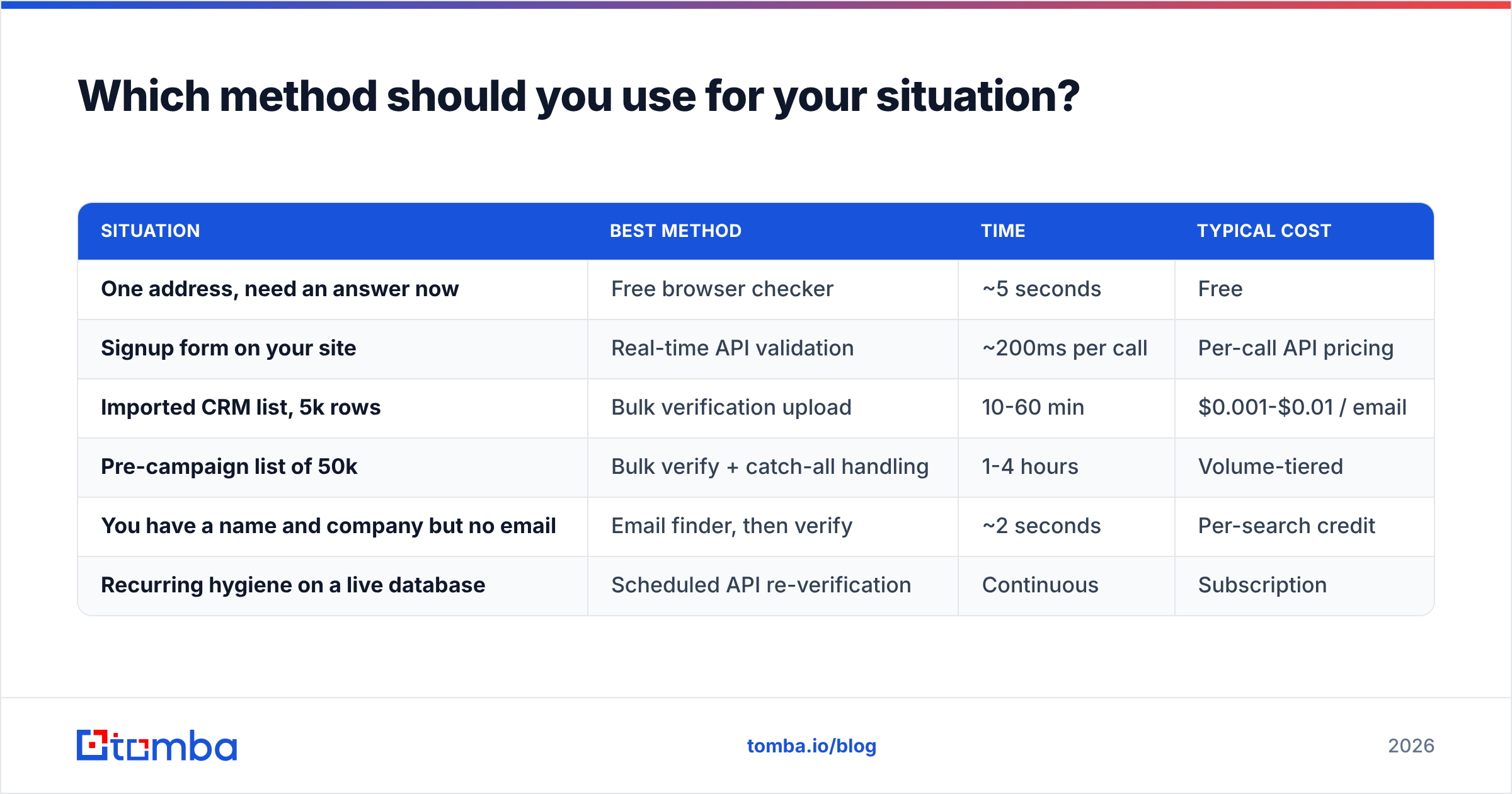
| Situation | Best method | Time | Typical cost |
|---|---|---|---|
| One address, need an answer now | Free browser checker | ~5 seconds | Free |
| Signup form on your site | Real-time API validation | ~200ms per call | Per-call API pricing |
| Imported CRM list, 5k rows | Bulk verification upload | 10-60 min | $0.001-$0.01 / email |
| Pre-campaign list of 50k | Bulk verify + catch-all handling | 1-4 hours | Volume-tiered |
| You have a name and company but no email | Email finder, then verify | ~2 seconds | Per-search credit |
| Recurring hygiene on a live database | Scheduled API re-verification | Continuous | Subscription |
Note the second-to-last row. If you don't have an address to check, verification is the wrong tool entirely — you need an email finder that constructs and confirms the address from a name plus domain, which is a different pipeline that ends in verification rather than starting there.
For lists, the bulk email finder path handles both: upload a CSV of names and companies, get back verified addresses with confidence scores, skip the manual one-by-one grind entirely.

How accurate is email verification, really?#
Set expectations honestly, because vendor marketing does not.
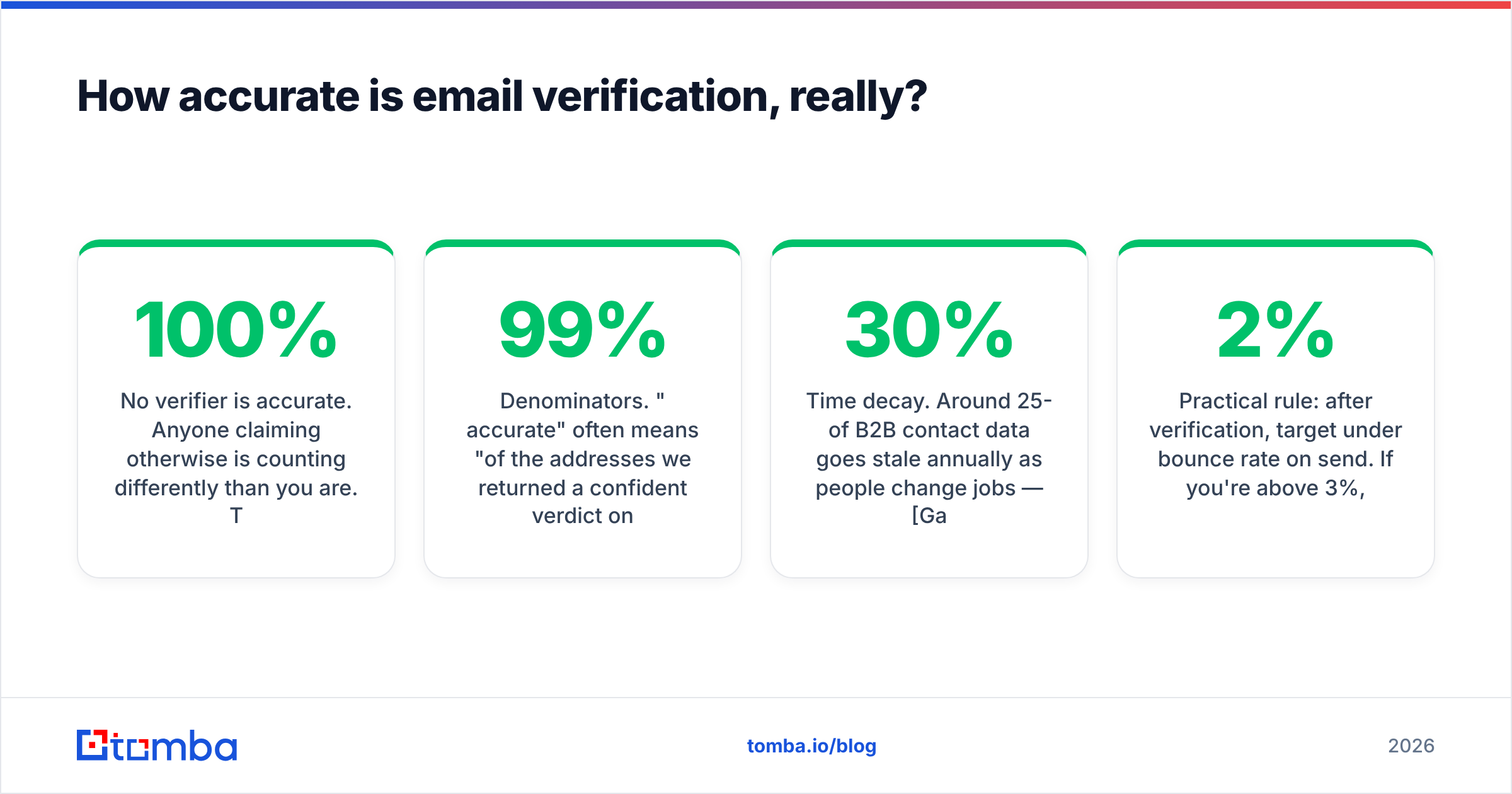
No verifier is 100% accurate. Anyone claiming otherwise is counting differently than you are. The realistic ceiling on a mixed B2B list is somewhere in the mid-to-high 90s for deliverable/undeliverable classification, and it drops on lists heavy with catch-all or Microsoft-hosted domains.
What accuracy claims usually hide:
- Denominators. "99% accurate" often means "of the addresses we returned a confident verdict on" — excluding everything marked risky or unknown. If a tool marks 30% unknown and is 99% accurate on the rest, its real coverage is far worse than a tool that's 94% accurate on 95% of the list.
- List composition. Verification on a Gmail-heavy consumer list is far easier than on a list of Fortune 500 corporate domains. Benchmarks run on the easy list.
- Time decay. Around 25-30% of B2B contact data goes stale annually as people change jobs — Gartner and other analyst firms have flagged this repeatedly. An address verified six months ago is not verified now.
Practical rule: after verification, target under 2% bounce rate on send. If you're above 3%, either your verifier is underperforming or your list is older than you think. Cross-check a sample of 100 addresses against a second tool before you blame the campaign.
For ongoing quality, use an email verifier as a scheduled pass rather than a one-time cleanup — re-verify anything older than 90 days before it goes into a sequence.
What should you check beyond "does it exist"?#
A deliverable address isn't automatically a good address. Four extra checks worth running:
- Role-based detection.
info@,sales@,support@,admin@are shared inboxes. They're deliverable, and they're terrible for cold outreach — low engagement, high spam-complaint risk. Most verifiers flag them; most people ignore the flag. - Disposable domain detection.
mailinator.com,guerrillamail.com, and thousands of rotating throwaway domains. Valid today, gone next week. Filter these hard on signup forms. - Domain reputation. Is the sending or receiving domain on a blocklist? An email reputation checker tells you whether the domain has deliverability problems independent of the specific mailbox.
- Your own sending setup. Half the "the address must be wrong" complaints are actually authentication failures on the sender side. Run an SPF checker and confirm your DKIM and DMARC records are in order before assuming the list is at fault. Bad email deliverability on your end looks identical to bad addresses on theirs.
Point 4 matters more than people expect. If your SPF record has more than ten DNS lookups, or your DMARC policy is misconfigured, perfectly valid addresses will silently fail — and you'll spend a week blaming your data vendor.
How do you check email IDs at scale without doing it manually?#
Manual checking stops scaling around fifty addresses. Past that, you want one of three patterns:
Spreadsheet add-on. If your list lives in a spreadsheet, a Google Sheets add-on or an Excel email finder add-in verifies in place with a formula. Zero export/import cycle, which is where most list-hygiene workflows die.
API integration. Wire verification into your signup form, CRM import, or enrichment job. A single call to an email verification API returns status, score, and the reason code. This is the right pattern for anything continuous — you verify at the moment of capture rather than in a periodic panic before a campaign.
CRM-native. If contacts flow into HubSpot or Salesforce, verify there. A HubSpot integration can validate on record creation so bad data never enters the system. Preventing bad rows is roughly ten times cheaper than cleaning them later — HubSpot's own data hygiene guidance makes the same point about duplicates, and it applies equally to invalid addresses.
Whichever you pick, the principle is the same: verification should be a step in a pipeline, not a task someone remembers to do.
What does the checking workflow look like end to end?#
Here's the sequence that produces the fewest bounces, in order:
- Normalize. Trim whitespace, lowercase the domain, strip mailto: prefixes and trailing punctuation. A shocking share of "invalid" addresses are just dirty strings.
- Deduplicate. Same person, three formats. Run a remove duplicates pass before you pay to verify the same address three times.
- Syntax + MX. Free, fast, kills the obvious failures. Do this before spending credits.
- SMTP verify. The real check. Batch it, respect rate limits, use a tool that distributes across IPs.
- Handle catch-all separately. Don't lump "accept-all" in with "valid." Score them or segment them.
- Flag role-based and disposable. Decide per-campaign whether to include them. For cold outbound, exclude.
- Re-verify on a schedule. Ninety days is a reasonable default for B2B. Shorter for high-churn industries.
Steps 1-3 cost nothing and remove a meaningful chunk of the list. Do them first and your verification bill drops accordingly.
Which tool should you use to check email IDs?#
If you're checking one address occasionally, the free browser tools are genuinely sufficient — use them and don't overthink it.
If you're checking addresses as part of a sales or marketing workflow, you want a platform that does finding and verification in one place, because the two problems are inseparable: you find an address, you verify it, you enrich it, you send. Splitting that across three vendors means three integrations, three bills, and three sets of confidence scores that don't agree.
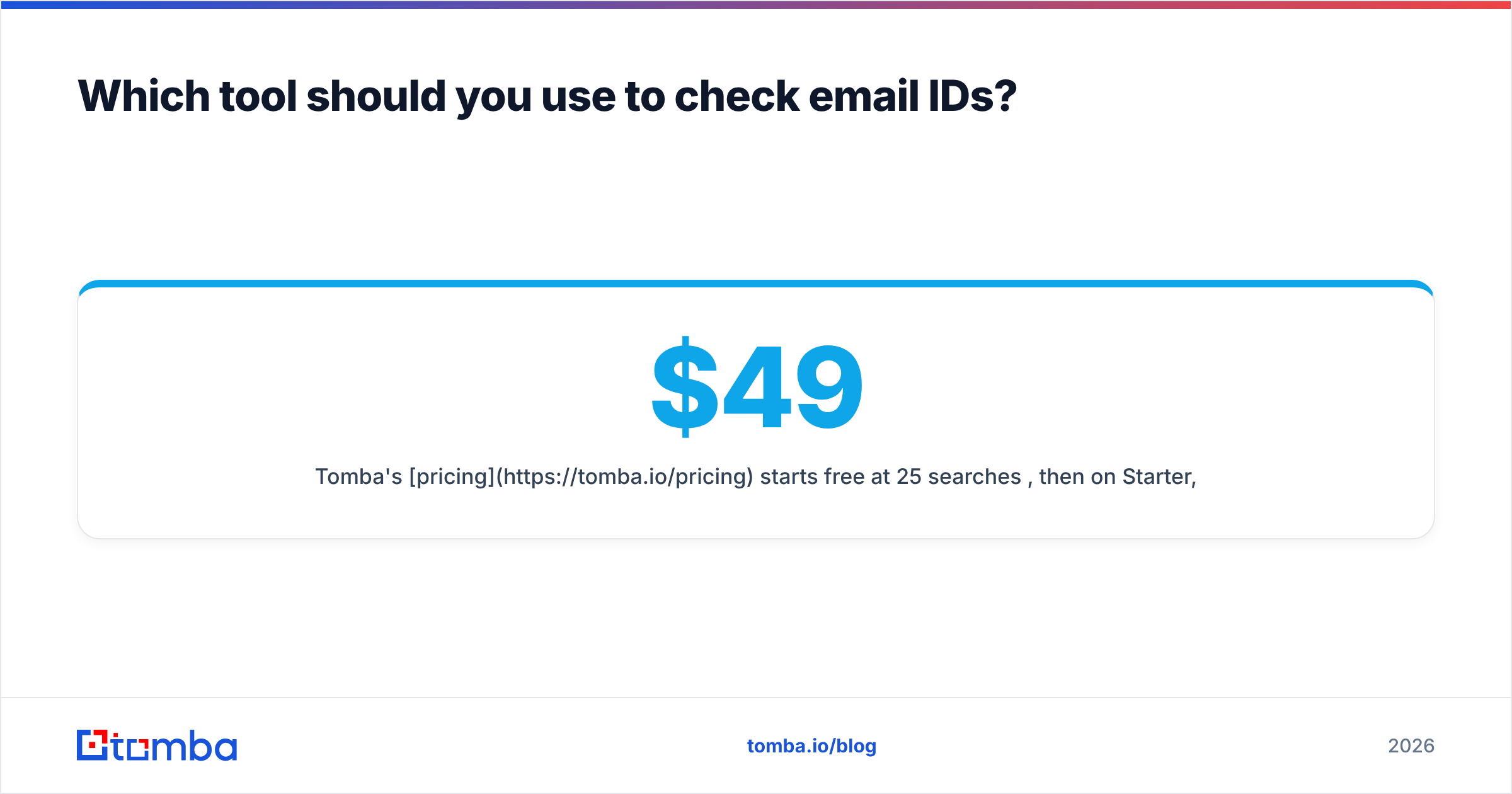
Tomba's pricing starts free at 25 searches/month, then $49/mo on Starter, $99/mo on Growth, and $249/mo on Pro — with finding, verification, catch-all handling, and enrichment on the same credit pool rather than sold separately. Compare that against the alternatives on G2 before you commit; the right answer depends on your volume and whether you need finding at all.
Start with the Tomba Email Finder if you're working from names and companies rather than a list you already have. It constructs the address, runs the SMTP check, scores catch-all domains against known patterns, and hands you the public source behind each result — so "is this email ID correct?" comes back with evidence attached rather than a green checkmark you have to take on faith. The free tier is enough to test it against a handful of addresses you already know the answer to, which is exactly how you should evaluate any verification tool.
Related guides#
// get started
Find, verify and enrich your first contacts today
Start on the free plan with 25 searches a month, then scale when your team is ready.
Free plan · No credit card required · GDPR & CCPA
// about the author