How to Check If an Email Domain Is Valid (2026 Guide)
A valid-looking domain can still bounce every message you send it. Here are seven checks — MX records, SPF, catch-all behavior, disposable lists — that tell you whether a domain can actually receive mail.
TL;DR
- A domain is "valid" for email only if it resolves in DNS, publishes MX records, and accepts mail on those MX hosts. Registration alone proves nothing.
- The fastest manual check is a DNS lookup:
dig MX example.com. No MX answer means no inbox — stop there. - Parked domains, disposable providers, catch-all servers, and recently expired domains are the four traps that pass a naive check and still burn your sender reputation.
- Free web tools handle one-off lookups. For lists over a few hundred rows, use an API-backed verifier that runs DNS, SMTP, and risk scoring in one pass.
- Domain validity is necessary but not sufficient — a live domain can still reject the specific mailbox. Validate the domain first, then the address.
What does a "valid" email domain actually mean?#
There are three different questions hiding inside the phrase "valid domain," and mixing them up is why so many verified lists still bounce.
1. Is the syntax valid? Does acme-corp.com follow RFC 1035 label rules — allowed characters, label length under 64, total length under 253, a real public suffix? This is a regex check and takes microseconds.
2. Is the domain registered and resolving? Does it exist in DNS at all? A domain can be registered but have no A, AAAA, or MX record — a placeholder someone bought and never configured.
3. Can it receive email? Does it publish MX records, and do those MX hosts answer on port 25? This is the only definition that matters for outbound campaigns.
A domain can pass 1 and 2 and fail 3. That happens constantly with brand-defensive registrations (companies buying typo domains they never use) and with domains whose email is handled by a redirect that no longer exists. If your verification only checks syntax and DNS resolution, you are shipping bounces.

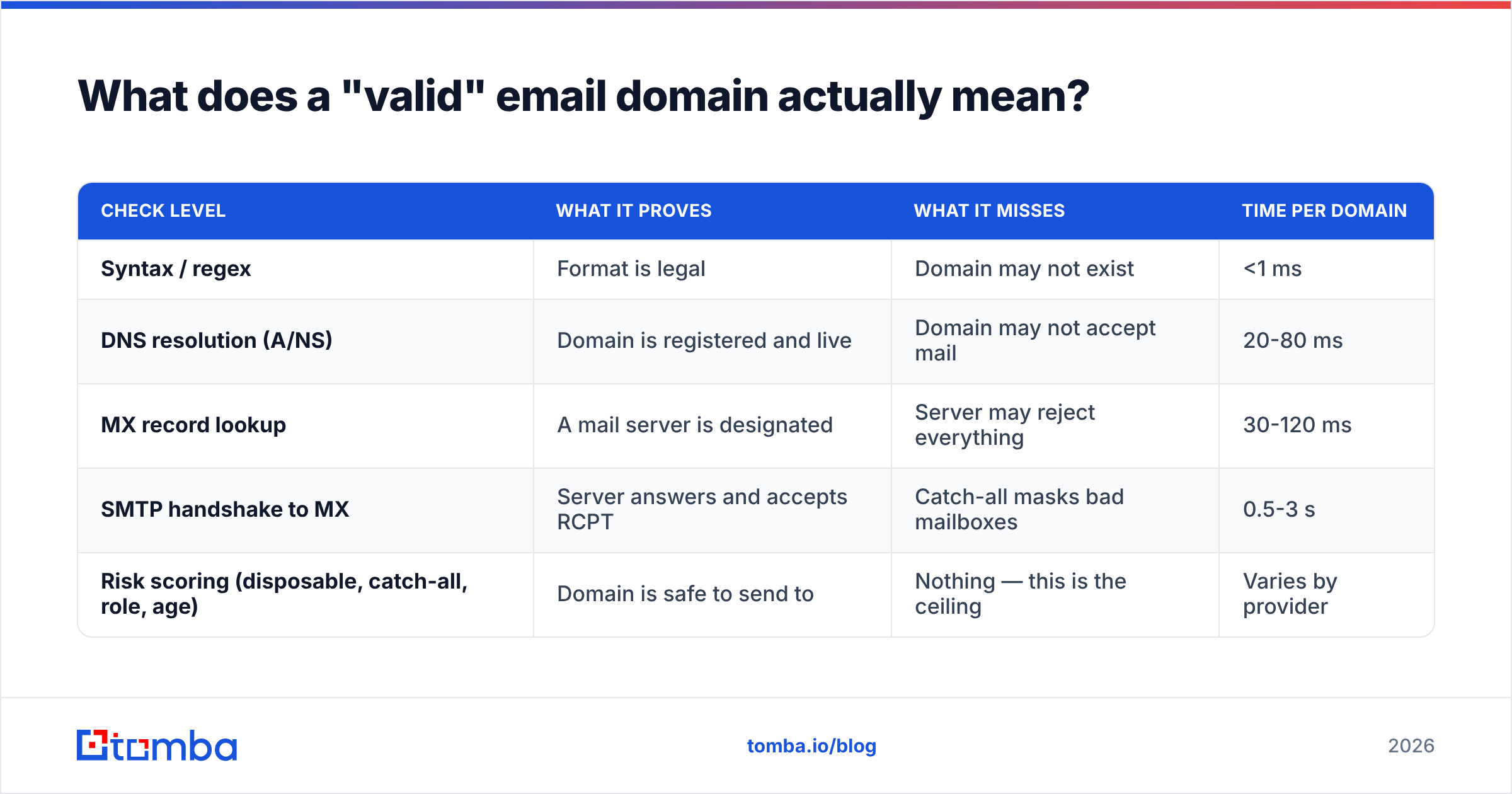
The practical hierarchy looks like this:
| Check level | What it proves | What it misses | Time per domain |
|---|---|---|---|
| Syntax / regex | Format is legal | Domain may not exist | <1 ms |
| DNS resolution (A/NS) | Domain is registered and live | Domain may not accept mail | 20-80 ms |
| MX record lookup | A mail server is designated | Server may reject everything | 30-120 ms |
| SMTP handshake to MX | Server answers and accepts RCPT | Catch-all masks bad mailboxes | 0.5-3 s |
| Risk scoring (disposable, catch-all, role, age) | Domain is safe to send to | Nothing — this is the ceiling | Varies by provider |
Most "free domain checkers" stop at level 2 or 3. The gap between level 3 and level 5 is where bounce rates come from.
How do you check if an email domain is valid manually?#
Seven checks, in the order that eliminates the most bad domains for the least effort.
Run an MX lookup. On macOS or Linux:
dig MX example.com +short. On Windows:nslookup -type=mx example.com. If you get nothing back, the domain cannot receive mail through normal routing. Some hosts fall back to the A record per RFC 5321, but in practice a no-MX domain in a B2B list is dead weight.Check the A/NS records.
dig NS example.com +shorttells you whether the domain is delegated at all. An NXDOMAIN response means the domain is unregistered or expired — the highest-confidence "delete this row" signal you can get.Look up WHOIS creation and expiry dates. A domain created eleven days ago and a domain expiring in nine days are both risky. Free WHOIS lookups are available through ICANN's lookup service. Domains under 30 days old skew heavily toward spam traps and throwaway registrations.
Verify SPF and DMARC exist. Run an SPF record check. This is not strictly a validity test — it tells you whether the domain is professionally managed. A company with SPF, DKIM, and DMARC published is running real email infrastructure. A domain with MX but no SPF is often a forwarding stub. Tomba's free SPF checker does this in one query.
Test the SMTP handshake. Connect to the MX host on port 25, issue
HELO,MAIL FROM, andRCPT TO, and read the response code. A250means accepted;550means rejected. Do this sparingly and never at volume from your sending IP — repeated probing gets you rate-limited or blocked. This is the strongest argument for using a verification API instead of rolling your own.Compare against a disposable-domain list. Mailinator, Guerrilla Mail, 10MinuteMail and roughly 40,000 lesser-known throwaway domains all publish valid MX records and accept everything. They pass every check above and are worthless. Any serious verifier maintains this list; if you're doing it manually you'll need to pull an open-source one.
Detect catch-all behavior. Send an SMTP probe to a mailbox that cannot exist —
zzq7x-nonexistent@example.com. If the server returns250for that, the domain accepts everything and per-address verification is impossible from the outside. Roughly 15-20% of business domains are configured this way.
Why do catch-all domains break normal validation?#
Because a catch-all server answers "yes" to every address you ask about, so a 250 response carries zero information.
Think of it like a mailroom in a large office building. A normal mailroom checks the name on the envelope against a directory and returns anything it doesn't recognize. A catch-all mailroom accepts every envelope regardless of name and dumps unrecognized mail into a bin nobody reads. From the outside, both look identical — the courier gets a signature either way.
This matters more than most guides admit. If 18% of your target domains are catch-alls, and you treat every 250 as a verified address, you're pushing a large batch of guesses into your sequences. Those guesses land in the bin, generate no opens, and drag your engagement metrics down — which is what mailbox providers actually score you on in 2026.
Three workable approaches:
- Segment and throttle. Tag catch-all domains separately and send to them at lower volume from a secondary domain.
- Use pattern confidence. If you know a company uses
first.last@, a pattern-derived address at a catch-all domain is a reasonable bet. If the pattern is unknown, it isn't. - Use a probabilistic catch-all verifier. Tools that combine SMTP behavior with historical engagement data and pattern databases can score catch-all addresses well above coin-flip odds. Tomba's catch-all verifier is built for exactly this case.
Ignoring catch-alls entirely is the safe default, but on enterprise-heavy target lists it can cut your reachable universe by a fifth. Scoring them is usually the better trade.
Which tools check email domain validity fastest?#
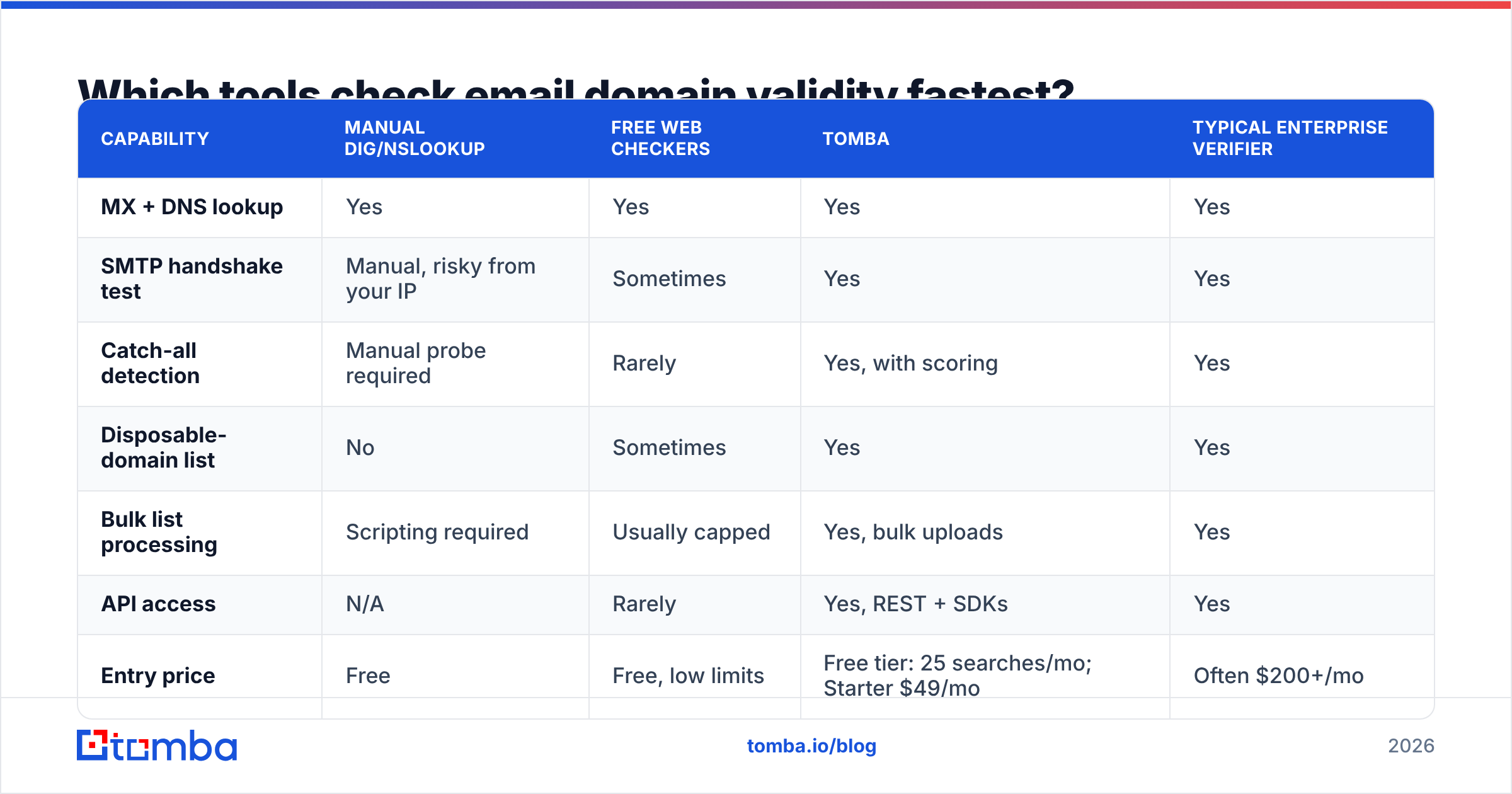
Manual DNS work is fine for a handful of domains. Past that, you want tooling. Here's how the common options compare on what actually differs between them.
| Capability | Manual dig/nslookup | Free web checkers | Tomba | Typical enterprise verifier |
|---|---|---|---|---|
| MX + DNS lookup | Yes | Yes | Yes | Yes |
| SMTP handshake test | Manual, risky from your IP | Sometimes | Yes | Yes |
| Catch-all detection | Manual probe required | Rarely | Yes, with scoring | Yes |
| Disposable-domain list | No | Sometimes | Yes | Yes |
| Bulk list processing | Scripting required | Usually capped | Yes, bulk uploads | Yes |
| API access | N/A | Rarely | Yes, REST + SDKs | Yes |
| Entry price | Free | Free, low limits | Free tier: 25 searches/mo; Starter $49/mo | Often $200+/mo |
| Finds addresses too | No | No | Yes, email finder included | Varies |
Two things worth calling out honestly. First, free web checkers are genuinely good enough if you're validating five domains before a demo — don't pay for that. Second, if your workflow is purely verification of an existing list and you never need to find addresses, a dedicated verification-only vendor may cost less per credit than a combined platform. Tomba's advantage shows up when finding and verifying happen in the same workflow, which for most outbound teams they do.
For prebuilt B2B lists where domains come pre-screened, providers like BookYourData handle validation upstream as part of their data delivery — a different model that suits teams who'd rather buy verified contacts than build and clean their own list.

How do you validate domains at scale without getting blocked?#
The failure mode nobody warns you about: running your own SMTP probes across 50,000 domains from a single IP gets that IP throttled by Google and Microsoft within hours, and possibly listed.
Rules that keep you safe:
- Never probe from your sending IP. Verification traffic and campaign traffic must originate from different infrastructure. This alone is why most teams outsource verification.
- Rate-limit per destination. Hitting one MX host with 500 RCPT commands in a minute looks exactly like a directory harvest attack, because it is one.
- Cache aggressively, but expire. MX records change rarely; mailbox existence changes constantly. Cache domain-level results for 30 days, address-level results for 7-14.
- Re-verify before every send, not once at import. B2B contact data decays at roughly 25-30% annually, and domain changes cluster around acquisitions and rebrands.
- Batch through an API. A bulk email finder or verification endpoint handles concurrency, retries, and IP rotation for you. The Tomba API exposes domain-level and address-level checks separately so you can run the cheap domain filter first and only spend address credits on domains that survive.
That last point is the real cost optimization. Filter at the domain level, discard the dead ones, then verify individual mailboxes only on domains that passed. On a typical scraped list this cuts address-verification spend by 20-40% because a meaningful chunk of rows share a handful of dead domains.
How does domain validity affect deliverability?#
Directly and measurably. Every message sent to a non-existent domain produces a hard bounce, and hard bounce rate is one of the clearest negative signals in a mailbox provider's reputation model.
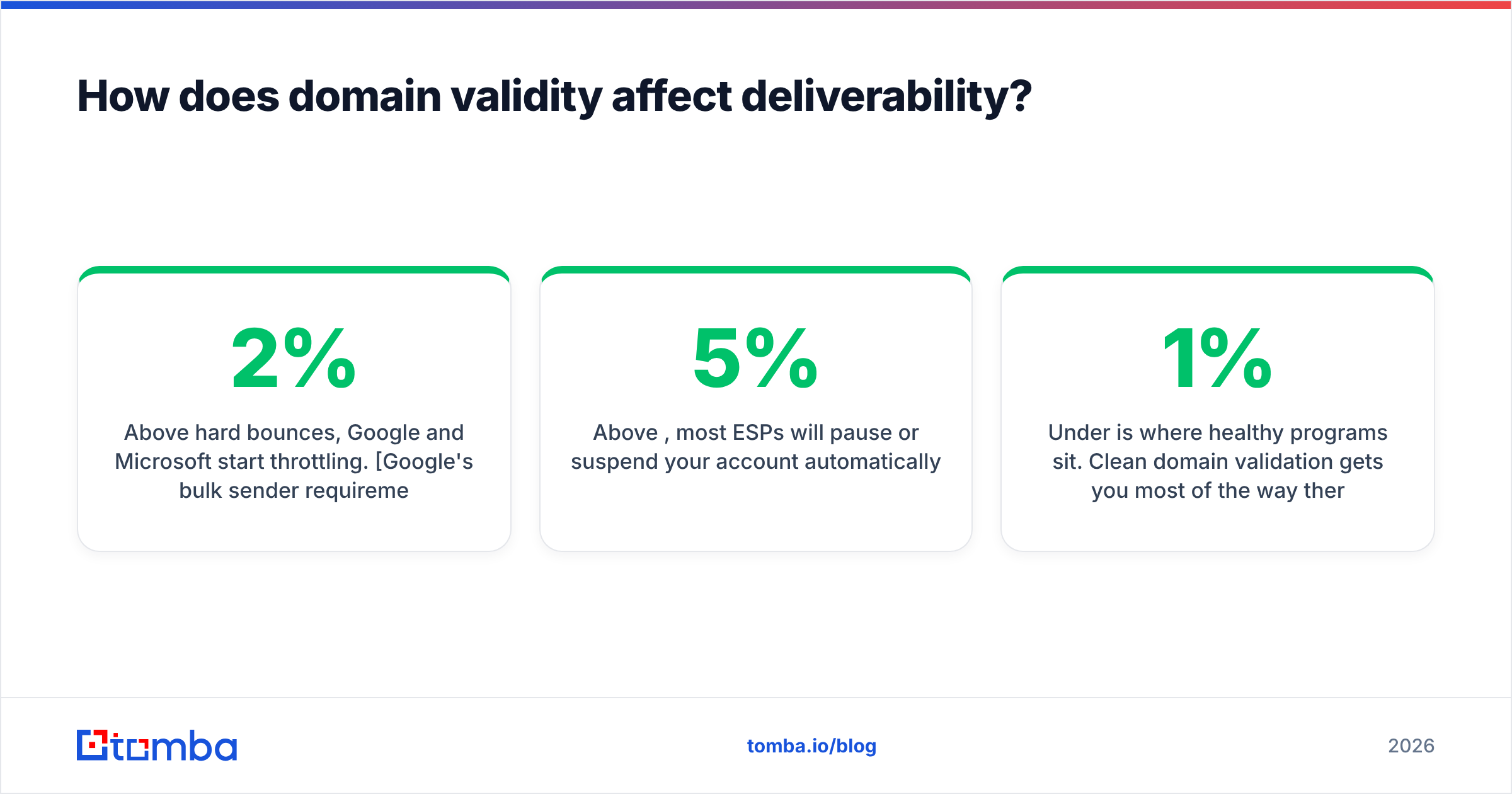
The thresholds that matter in 2026:
- Above 2% hard bounces, Google and Microsoft start throttling. Google's bulk sender requirements put the spam-complaint ceiling at 0.3%, and bounce behavior is scored alongside it.
- Above 5%, most ESPs will pause or suspend your account automatically.
- Under 1% is where healthy programs sit. Clean domain validation gets you most of the way there before you even check individual mailboxes.
There's also a slower-burning cost. Sending repeatedly to dead domains signals that you're working from stale or purchased data, and that pattern correlates with spam filtering independent of your bounce numbers. Your sender reputation is built on the aggregate quality of your list, not just its bounce rate.
The sequencing that works: validate domains → verify addresses → warm the sending domain → send. Skipping the first step makes the third one much harder, because you're asking a new domain to absorb bounces it hasn't earned the reputation to survive.
What are the common mistakes when checking domain validity?#
- Treating "domain resolves" as "domain accepts mail." A domain with an A record and no MX is a website, not a mailbox. Check MX specifically.
- Trusting a single check for a whole list. Domain validity is per-domain, but mailbox validity is per-address. A valid domain with a wrong mailbox still bounces.
- Skipping the disposable check. Throwaway domains pass every technical test and poison your engagement metrics.
- Validating once at import. Data decays. A domain valid in January can be parked by June after an acquisition.
- Ignoring subdomain mail routing. Some enterprises route mail through
mail.corp.example.comwhile the apex domain has no MX. Check both when a large account looks dead. - Assuming international domains behave the same. IDN and newer gTLDs sometimes need punycode conversion before DNS lookup. If a
.みんなor.shopdomain returns unexpected NXDOMAIN, convert first.
For a quick sanity check on individual addresses rather than domains, Tomba's free email checker runs syntax, DNS, MX, and disposable checks in one request without a signup.
What's the fastest workflow for a real list?#
If someone hands you a 10,000-row CSV tomorrow, here's the sequence that costs the least and catches the most:
- Deduplicate by domain. 10,000 rows often collapse to 1,200 unique domains. Use a duplicate remover or a spreadsheet formula.
- Batch-check MX on unique domains only. You're now running 1,200 lookups instead of 10,000.
- Drop the NXDOMAIN and no-MX rows entirely. Typically 3-8% of a scraped list.
- Flag disposable and catch-all domains into separate segments.
- Verify individual addresses only on the surviving clean domains.
- Enrich the gaps. For rows where the domain is healthy but the address is unknown or invalid, run a domain search to pull known-good contacts at that company rather than guessing patterns.
- Re-run steps 2-5 quarterly on any list you keep.
Steps 1 through 3 take ten minutes with a script and eliminate most of your bounce risk. The remaining steps are where a verification platform earns its price.
Worth reading alongside this: G2's email verification category is a useful cross-check on vendor claims, since the reviews there tend to surface accuracy complaints that marketing pages don't.
Ready to stop guessing which domains are live?#
Domain validation is the cheapest quality gate in outbound — a few DNS queries that prevent a category of bounces you can't recover from once they've hit your reputation. Run the MX check first, drop the dead rows, then spend your verification budget on domains that can actually receive mail.
If you want the whole chain in one place — domain checks, MX and SMTP validation, catch-all scoring, and finding the right contacts at the domains that survive — start with the Tomba Email Finder. The free tier gives you 25 searches a month to test it against your own list; paid plans start at $49/mo on Starter, with Growth at $99/mo and Pro at $249/mo. Full Tomba pricing is public, and everything is available through the API if you'd rather wire it into your existing pipeline.
Related guides#
// get started
Find, verify and enrich your first contacts today
Start on the free plan with 25 searches a month, then scale when your team is ready.
Free plan · No credit card required · GDPR & CCPA
// about the author