How to Check if an Email Is Valid: 7 Methods That Work
Bounces kill sender reputation before your copy ever gets read. Here are seven ways to check if an email is valid — from free syntax checks to SMTP-level verification — and when each one actually holds up.
TL;DR
- There is no single "is this email valid?" test. Validity is a stack of four checks: syntax, domain/MX, mailbox existence (SMTP), and risk classification (role, disposable, catch-all).
- Free syntax and MX checks cost nothing and catch roughly the obvious 20-30% of bad addresses — typos, dead domains, fake TLDs. They cannot tell you whether the mailbox exists.
- SMTP-level verification is the only method that probes the actual mailbox, and it is the one you should never build yourself in 2026 — major providers throttle, greylist, and lie.
- Catch-all domains (very common at enterprises) accept every address at the SMTP layer, so any tool that returns "valid" for them without flagging the catch-all status is misleading you.
- Keep bounce rate under 2%. Above 5%, Google and Microsoft start throttling your domain regardless of how good your copy is.
Why does checking if an email is valid matter at all?#
Because a bounce is a permanent tax on every email you send afterward.
Think of your sending domain like a credit score. Every hard bounce is a missed payment. Nobody cares about a single one, but a pattern of them means the bank — in this case Gmail and Outlook — stops extending you the benefit of the doubt. Your next campaign lands in Promotions or Junk, and you never see a bounce notification for that, because filtering is silent.
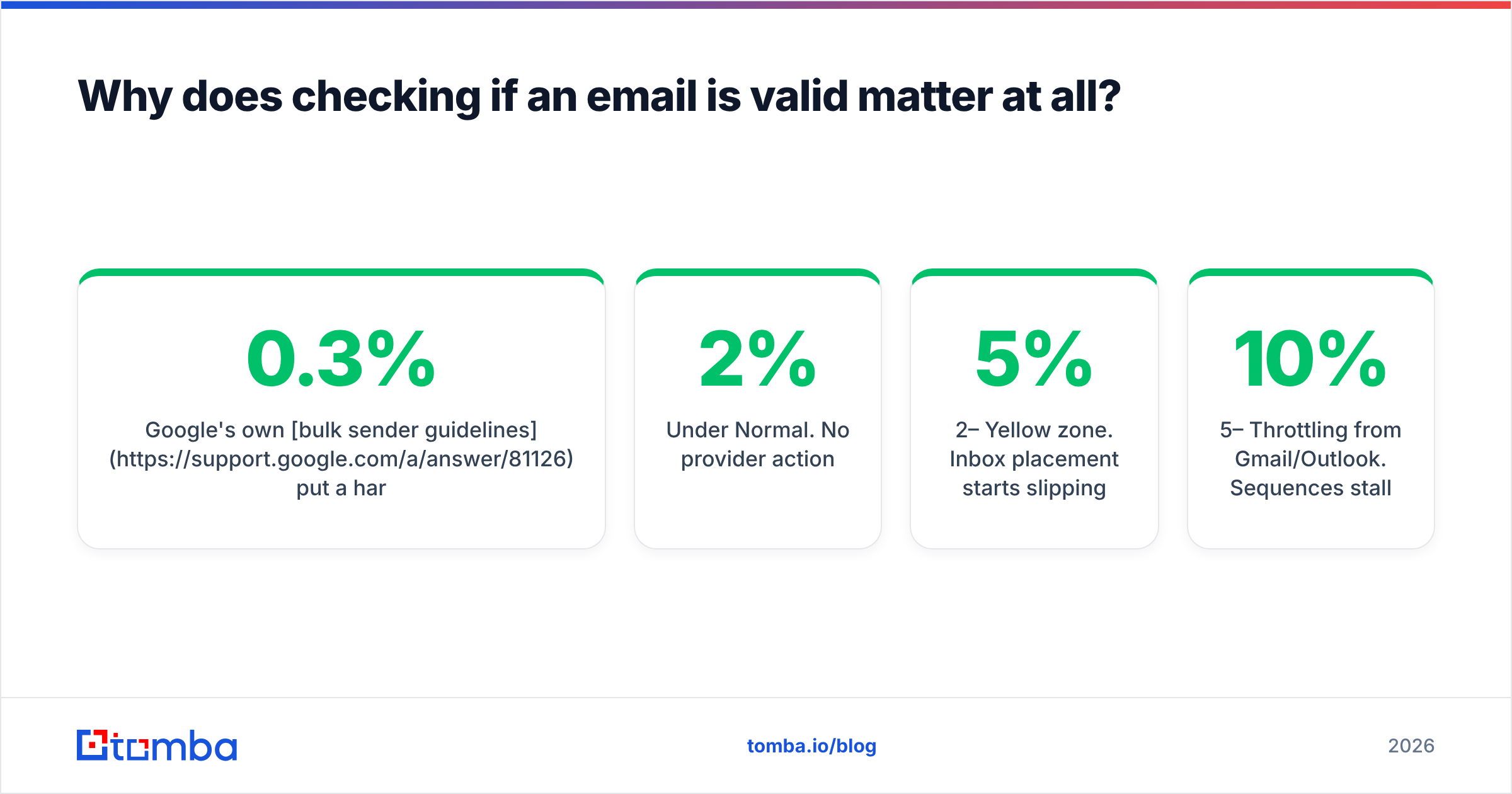
Google's own bulk sender guidelines put a hard spam-complaint ceiling at 0.3% and explicitly call out sending to non-existent addresses as a reputation signal. Microsoft's SNDS scoring works similarly. The practical threshold most deliverability teams use:
| Bounce rate | What happens |
|---|---|
| Under 2% | Normal. No provider action. |
| 2–5% | Yellow zone. Inbox placement starts slipping. |
| 5–10% | Throttling from Gmail/Outlook. Sequences stall. |
| Over 10% | Domain reputation damage that takes weeks to unwind. |
The other cost is quieter: your reply-rate math is wrong. If 12% of a 1,000-contact list never existed, you didn't get a 4% reply rate on 1,000 — you got 4.5% on 880, and you burned two weeks of a rep's time on ghosts.

What are the four layers of email validation?#
Every real verification tool runs the same pipeline. Understanding the layers tells you exactly what a "valid" result does and does not guarantee.
- Syntax check (RFC 5322) — Does the string parse as an address? Catches
john@@acme,jane.doe@acme,bob@acme..com. Instant, free, zero network calls. Catches typos, nothing else. - Domain and MX record lookup — Does
acme.comexist, and does it publish mail exchanger records? A domain with no MX record cannot receive mail, period. This kills dead companies, parked domains, and fake TLDs. Takes ~50ms via DNS. - SMTP mailbox probe — Open a connection to the mail server, issue
MAIL FROMandRCPT TO, and read the response code without ever sending the message. A250suggests the mailbox exists;550means it doesn't. This is the layer that separates real verification from guessing. - Risk classification — Is it a role address (
info@,sales@), a disposable domain (mailinator.com), a known spam trap pattern, or a catch-all domain that accepts everything? Technically deliverable, strategically dangerous.
Most free web tools stop at layer 2 and present the result as if it were layer 3. That gap is where bounce rates come from.
How do you check if an email is valid for free?#
Three methods, in ascending order of usefulness. All of them are free and take under a minute.
Method 1 — Syntax + MX in a browser. Paste the address into a free email checker and read the result. You get format validation, domain resolution, MX presence, and disposable-domain detection in one shot. Good for a single address you're about to email a proposal to.
Method 2 — Manual DNS lookup. If you're on a terminal, dig MX acme.com +short tells you in one line whether the domain accepts mail at all. Empty output means no mailbox on that domain can be valid. It's crude but it's ground truth, and it costs nothing.
Method 3 — The provider's own signal. Send a calendar invite or use a CRM's contact-lookup. Gmail, in particular, will often surface a profile photo and full name for a real Workspace address inside the compose window. Not scalable, but for one high-value contact it's a decent tiebreaker.
Method 4 — Confirm the company's pattern first. Before verifying firstname.lastname@, check what format the company actually uses. A company email pattern lookup tells you whether Acme runs f.last@, first@, or firstlast@ — and stops you from verifying an address that was never going to exist.
What free methods can't do: confirm a specific mailbox exists behind a valid domain. For that you need SMTP access at scale, and every major mailbox provider rate-limits anonymous probes hard. That's the paid tier's entire reason to exist.
Is SMTP verification still reliable in 2026?#
Mostly yes, with three well-known blind spots you need to plan around.
SMTP verification works by starting a conversation with the recipient's mail server and stopping just before the message body. The server tells you whether it would accept mail for that address. It's the closest thing to asking the mailbox directly.
The blind spots:
Catch-all domains. Configured to accept mail for any local part — asdlkfj@acme.com returns the same 250 as the CEO's real address. Roughly a third of enterprise domains run catch-all, and it's rising. A tool that returns a plain "valid" here is telling you nothing. You want the result explicitly labeled, then resolved with pattern intelligence and historical data. Tomba's catch-all verifier separates the two cases instead of collapsing them into one green checkmark.
Greylisting. The server returns a temporary 4xx on first contact to defeat spambots, expecting a legitimate sender to retry minutes later. Single-shot verifiers read this as "unknown" and move on. Good verifiers queue a retry.
Provider-level opacity. Microsoft 365 in particular has moved toward accept-then-bounce behavior on some tenants, meaning the SMTP handshake says yes and the bounce arrives asynchronously. No verifier can beat this deterministically — the honest ones return a confidence score rather than a binary.

The takeaway: a verifier that returns only "valid" or "invalid" is hiding information. You want four buckets — deliverable, undeliverable, risky/catch-all, and unknown — plus a numeric confidence score you can threshold against your own risk tolerance.
Which email verification tools should you compare?#
Here's how the common options stack up on the checks that matter. Prices are entry-tier as published in 2026; check each vendor for current terms.
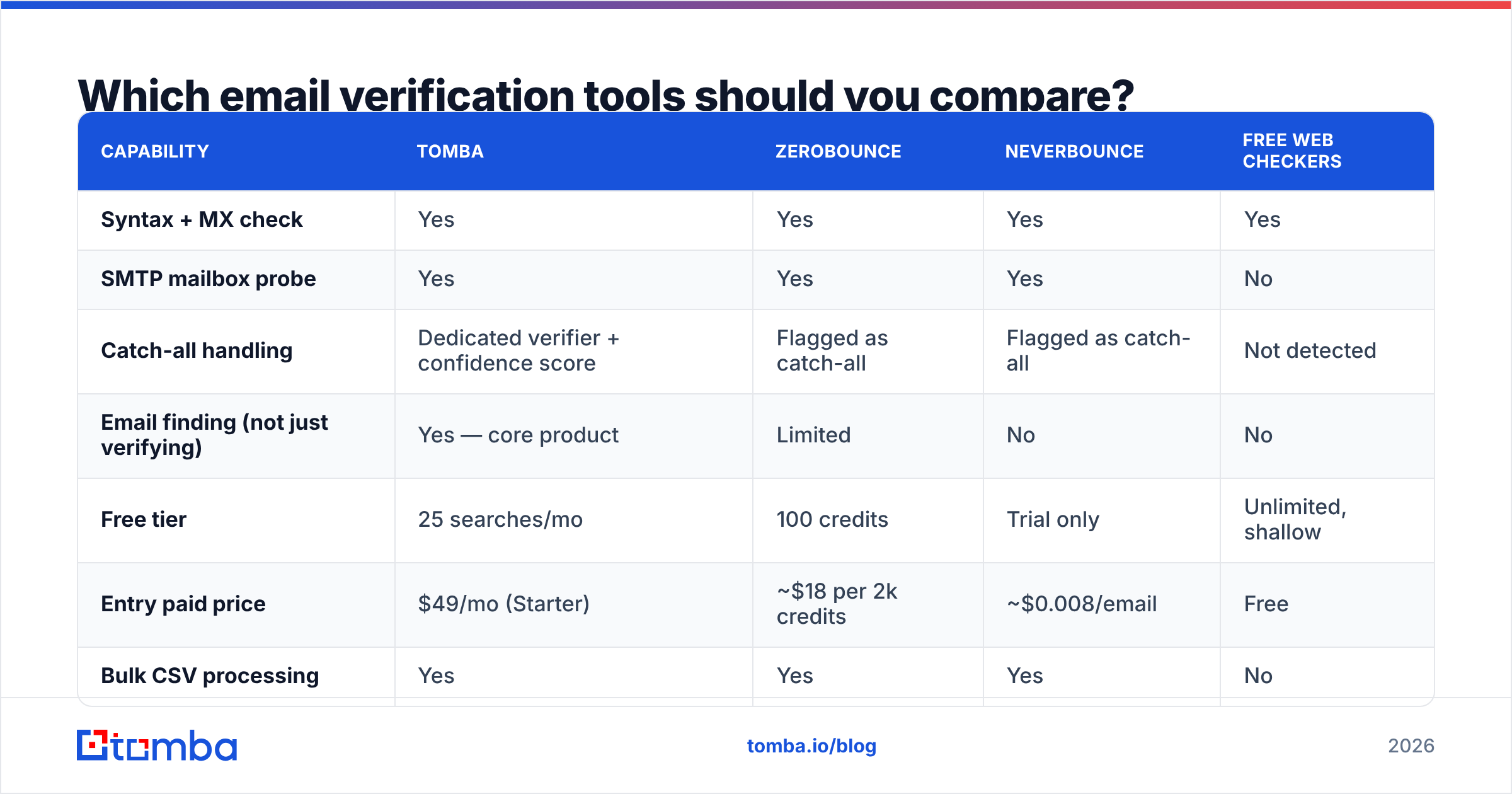
| Capability | Tomba | ZeroBounce | NeverBounce | Free web checkers |
|---|---|---|---|---|
| Syntax + MX check | Yes | Yes | Yes | Yes |
| SMTP mailbox probe | Yes | Yes | Yes | No |
| Catch-all handling | Dedicated verifier + confidence score | Flagged as catch-all | Flagged as catch-all | Not detected |
| Email finding (not just verifying) | Yes — core product | Limited | No | No |
| Free tier | 25 searches/mo | 100 credits | Trial only | Unlimited, shallow |
| Entry paid price | $49/mo (Starter) | ~$18 per 2k credits | ~$0.008/email | Free |
| Bulk CSV processing | Yes | Yes | Yes | No |
| API + CLI | REST API, CLI, MCP server | REST API | REST API | No |
| Native spreadsheet add-ons | Sheets, Excel, Airtable | Limited | Limited | No |

Two structural differences worth naming. First, pure verifiers (ZeroBounce, NeverBounce) only check addresses you already have — they won't tell you the address in the first place. If your workflow starts from a name and a company, you need finding and verification in the same pass, which is why Tomba's email finder and email verifier share one credit pool.
Second, pricing models differ in kind, not just amount. Credit-pack pricing (ZeroBounce, NeverBounce) is cheaper for one-off list cleans. Subscription pricing is cheaper for continuous prospecting where you verify a few hundred addresses weekly. Look at Tomba pricing against your actual monthly volume rather than the sticker price.
For independent signal on any of these, G2's email verification category has volume-weighted reviews that are harder to game than vendor case studies.
How do you verify a whole list without wrecking your credits?#
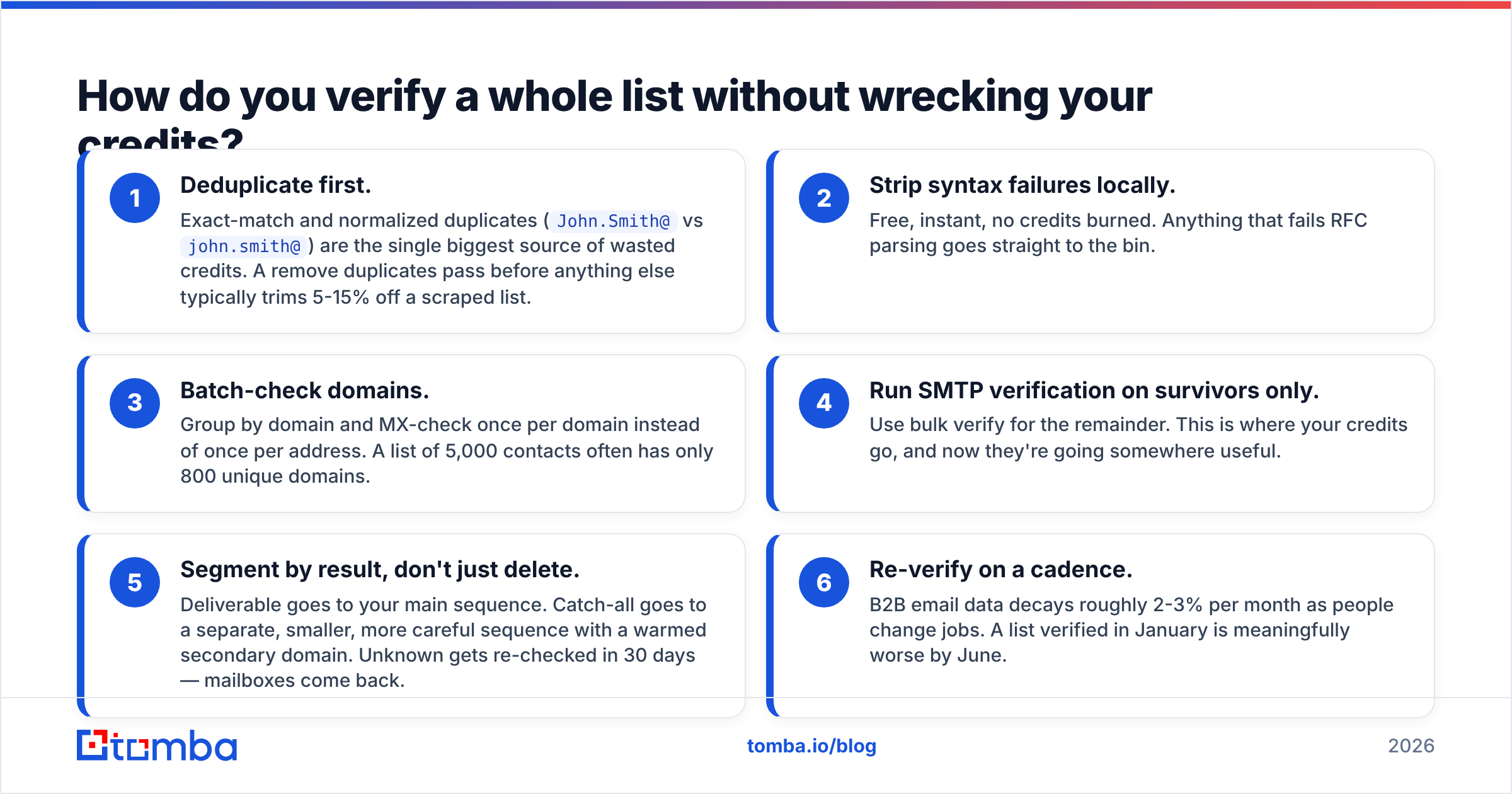
Verify in stages. Running 10,000 addresses through full SMTP verification when 3,000 of them fail syntax is money set on fire.
- Deduplicate first. Exact-match and normalized duplicates (
John.Smith@vsjohn.smith@) are the single biggest source of wasted credits. A remove duplicates pass before anything else typically trims 5-15% off a scraped list. - Strip syntax failures locally. Free, instant, no credits burned. Anything that fails RFC parsing goes straight to the bin.
- Batch-check domains. Group by domain and MX-check once per domain instead of once per address. A list of 5,000 contacts often has only 800 unique domains.
- Run SMTP verification on survivors only. Use bulk verify for the remainder. This is where your credits go, and now they're going somewhere useful.
- Segment by result, don't just delete. Deliverable goes to your main sequence. Catch-all goes to a separate, smaller, more careful sequence with a warmed secondary domain. Unknown gets re-checked in 30 days — mailboxes come back.
- Re-verify on a cadence. B2B email data decays roughly 2-3% per month as people change jobs. A list verified in January is meaningfully worse by June.
That staged approach usually cuts verification spend by half versus running everything through the deepest check.
What should you do about catch-all and risky addresses?#
Don't delete them, and don't blast them. Catch-all addresses are frequently your best prospects — large companies with real budgets are the ones most likely to run catch-all.
Practical policy:
- Deliverable (95%+ confidence): send normally.
- Catch-all with a matching company pattern: send from a secondary domain, small daily volume, monitor bounces for the first 50 sends. If bounces stay under 3%, promote the segment.
- Catch-all with no pattern match: enrich first. A reverse email lookup or LinkedIn cross-reference either confirms the person exists at that company or tells you to drop it.
- Role addresses (
info@,support@): exclude from cold outreach entirely. High complaint rates, low reply rates, and some are converted spam traps. - Disposable domains: delete. No exceptions.
- Unknown/greylisted: re-queue for a second check in 24-72 hours before deciding.
One more thing that has nothing to do with verification but shows up in the same bug report: if your bounce rate looks fine and your inbox placement still doesn't, check your authentication before you blame the list. A missing or malformed SPF record will sink perfectly valid sends. Run an SPF checker and confirm DKIM and DMARC alignment while you're in there. HubSpot's email deliverability guide covers the authentication side in more depth than most vendor docs do.
How often should you re-check a validated list?#
Tie the cadence to how the data was acquired, not to the calendar.
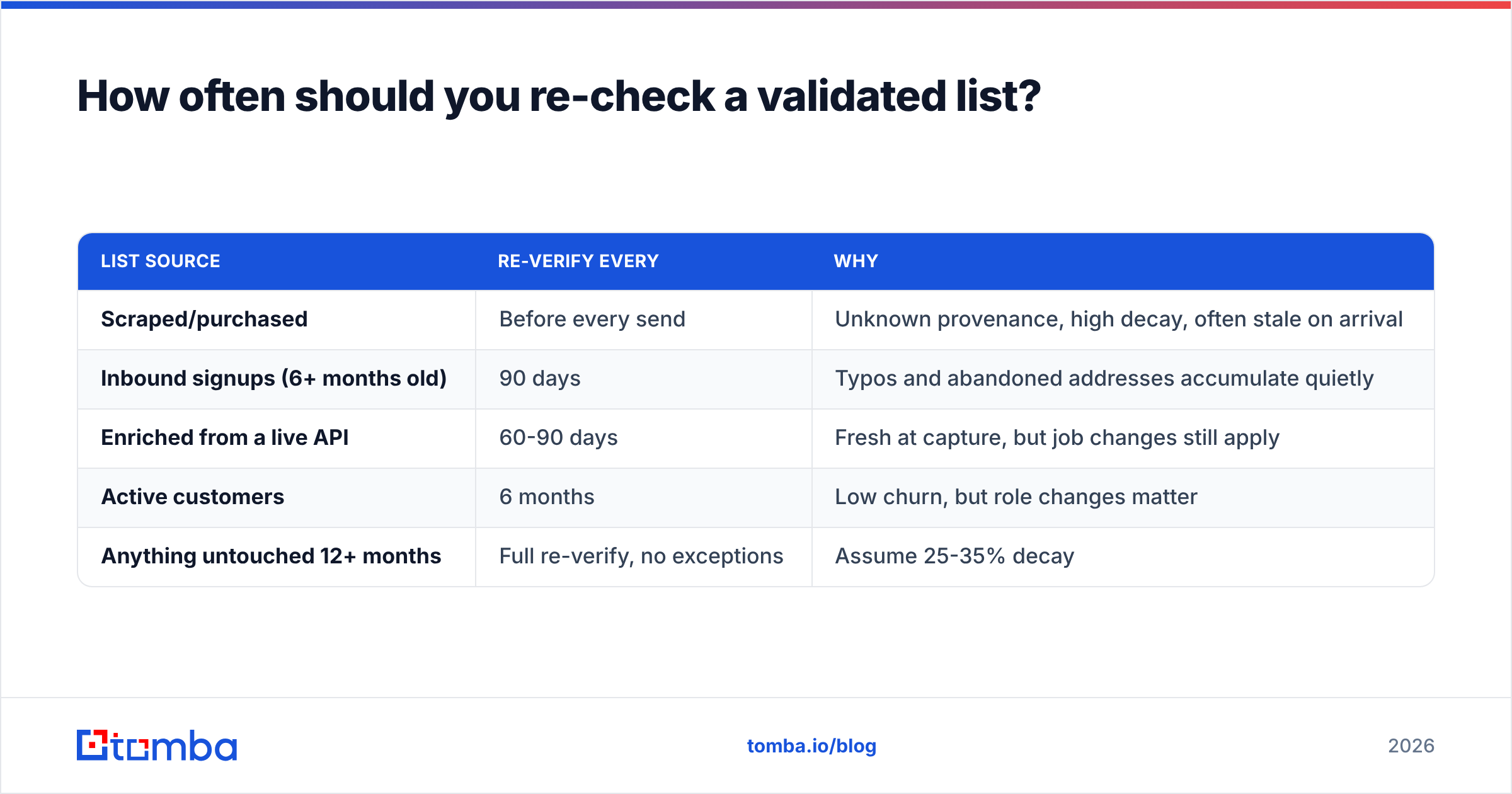
| List source | Re-verify every | Why |
|---|---|---|
| Scraped/purchased | Before every send | Unknown provenance, high decay, often stale on arrival |
| Inbound signups (6+ months old) | 90 days | Typos and abandoned addresses accumulate quietly |
| Enriched from a live API | 60-90 days | Fresh at capture, but job changes still apply |
| Active customers | 6 months | Low churn, but role changes matter |
| Anything untouched 12+ months | Full re-verify, no exceptions | Assume 25-35% decay |
The industry rule of thumb is 22-30% annual B2B contact decay, and it accelerates during hiring and layoff cycles. If a list has been sitting in a spreadsheet since last year, treat it as unverified regardless of what the last check said.
Automating this matters more than the exact interval. If you're pulling contacts into a CRM, wire verification into the intake path — Tomba's HubSpot integration and Tomba API both let you verify at the moment of capture rather than in a panicked cleanup the night before a campaign.
What's the fastest workflow that actually works?#
If you want one process to copy, this is it:
- Single address, right now: free checker → read syntax + MX + disposable flags → send if clean.
- Small batch (under 100): Sheets or Excel add-in → verify in place → filter to deliverable → export.
- Full list (1,000+): dedupe → syntax filter → domain grouping → bulk SMTP verify → segment by result bucket → send.
- Continuous prospecting: verify at capture via API, re-verify quarterly, never let an unverified address reach a sequence.
The common failure isn't picking the wrong tool. It's treating verification as a one-time cleanup instead of a permanent step in the pipeline. Teams that verify at intake basically stop thinking about bounce rate; teams that verify before campaigns are always fixing the same problem.
Ready to stop guessing?#
Start with the Tomba Email Finder if your workflow begins with a name and a company — it finds the address and verifies it in the same call, so you never hand a sequence something you haven't checked. The free tier gives you 25 searches a month with no card, which is enough to test it against a list you already know the answers to. When you scale up, Starter is $49/mo and Growth is $99/mo, both with the same verification depth, bulk processing, and API access.
Run your worst list through it. If the results match what your bounce reports have been telling you all along, you've found your problem — and your fix.
Related guides#
// get started
Find, verify and enrich your first contacts today
Start on the free plan with 25 searches a month, then scale when your team is ready.
Free plan · No credit card required · GDPR & CCPA
// about the author