How to Clean Email List Data in 2026: A 7-Step Guide
Dirty lists burn your sender reputation before your copy ever gets read. Here is the exact 7-step process for cleaning an email list, what each step costs, and how often to repeat it.
A dirty list costs you more than a few bounces. It costs your sender reputation, and that is much harder to win back. This guide covers how to clean email list data step by step: what to cut, what to keep, what each step costs, and how often to run it.
TL;DR
- Clean your list before every major send, and do a deep clean every 90 days. Bounce rate above 2% is the line where Google and Microsoft start throttling you.
- The order matters: deduplicate → syntax check → remove role and spam-trap patterns → MX/SMTP verify → segment catch-alls → suppress unengaged → re-verify at send time.
- Verification is cheap insurance. Cleaning 10,000 contacts costs roughly $30-$70 depending on the vendor; one blacklisting costs weeks of pipeline.
- Do not delete catch-all domains outright. Segment them, send to them separately, and judge them by reply data rather than by validation status.
- Suppression beats deletion. Keep a permanent suppression list of hard bounces, complainers, and unsubscribes so a re-import never resurrects them.
What does it actually mean to clean an email list?#
Cleaning an email list means removing addresses that cannot receive your mail, should not receive your mail, or will actively damage your sender reputation if you try. That is three different problems, and most people only solve the first one.
Think of your list like a delivery route. Undeliverable addresses are houses that were demolished — the mail comes straight back. Role accounts and spam traps are the addresses where a complaint gets filed with the post office every single time. Unengaged contacts are real houses where nobody has opened the door in two years, and the postal service has started noticing that most of your route goes nowhere.
Mailbox providers score you on all three. Gmail and Microsoft both weigh bounce rate, complaint rate, and engagement signals when deciding whether your mail lands in the inbox, in Promotions, or in spam. Google's bulk sender requirements put the spam complaint threshold at 0.30%, with 0.10% as the target you should actually operate under. A list that has not been cleaned in a year will typically blow past that on the first send.
Why does a dirty list hurt more in 2026 than it did in 2022?#
Because the enforcement changed. Before 2024, a 6% bounce rate was tolerated by most providers as background noise. Then Google and Yahoo rolled out enforced sender requirements — authentication, one-click unsubscribe, and complaint-rate ceilings — and the tolerance dropped hard. Microsoft followed with its own high-volume sender rules in 2025.
The practical effects on a dirty list:
- Throttling before filtering. Providers slow your delivery rate before they ever mark you as spam. You see it as "sent" in your ESP and near-zero opens in reality.
- Domain-level reputation damage. Reputation attaches to your sending domain, not just the mailbox. Burn it on a cold campaign and your invoices and support replies suffer too.
- Spam traps are cheap to hit and expensive to recover from. Recycled traps are abandoned real addresses that providers reactivate as monitors. A list older than 12 months almost certainly contains some.
- ESP account risk. Most sending platforms auto-suspend accounts that cross a bounce threshold on a single campaign. You lose the campaign and the sending history.
- Skewed metrics. If 15% of your list is dead, every open rate, reply rate, and A/B result you report is measured against a denominator that is partly fictional.
How to clean email list data in 7 steps#
Run these in order. Each step removes work from the next one, which is how you keep verification costs down.
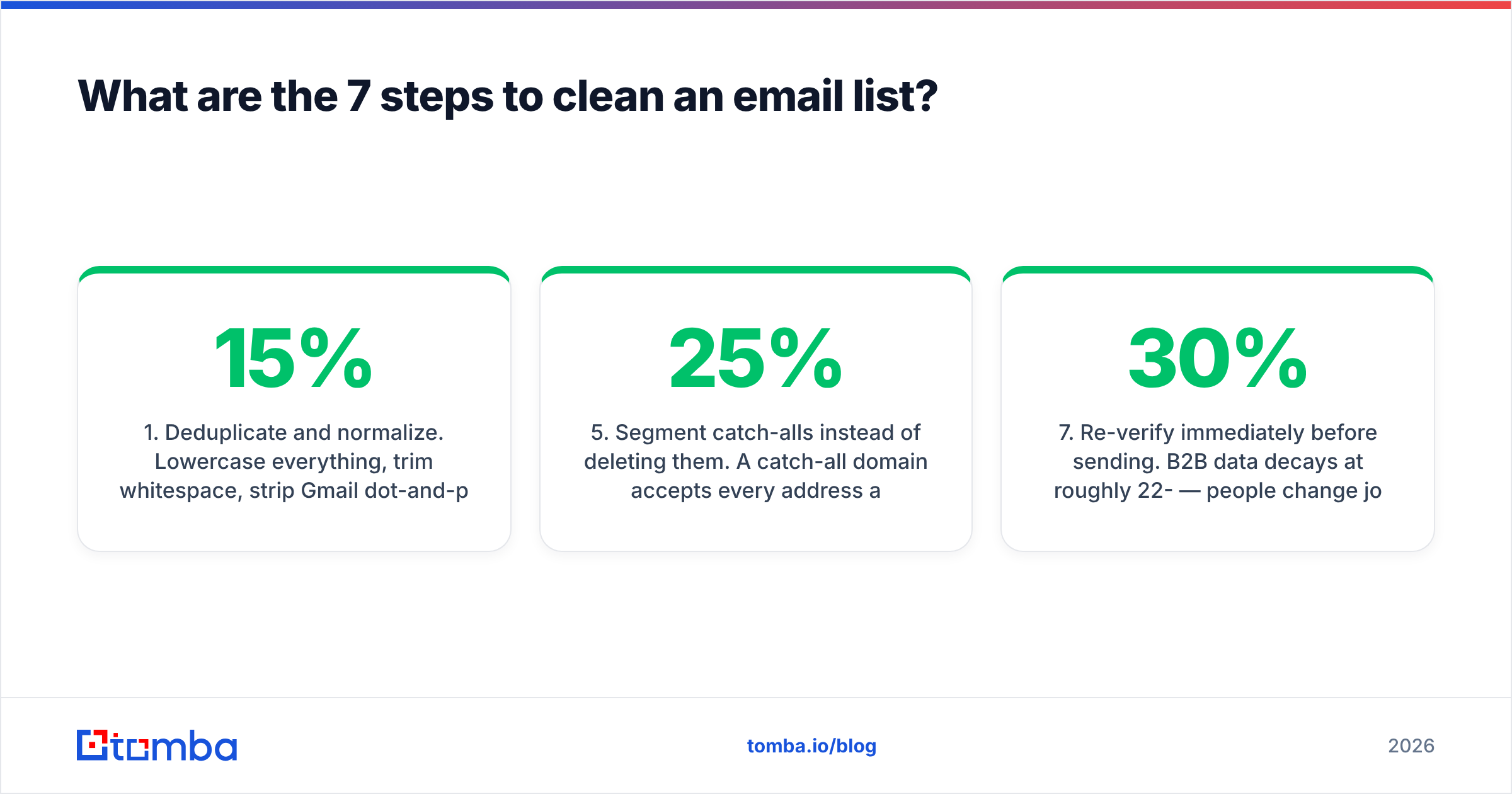
1. Deduplicate and normalize. Lowercase everything, trim whitespace, strip Gmail dot-and-plus aliases (j.doe+news@gmail.com and jdoe@gmail.com are the same mailbox), and collapse exact duplicates. On a merged list from three sources, this alone usually cuts 8-15% of rows. A remove duplicates pass costs nothing and shrinks everything downstream.
2. Syntax and domain sanity check. Kill malformed addresses, obvious typos (@gmial.com, @yaho.com), and domains that no longer resolve. Free-tier tools handle this fine — a free email checker will catch the structural failures before you spend a verification credit on them.
3. Strip role accounts and known risk patterns. info@, sales@, admin@, support@, abuse@, postmaster@. These are shared inboxes with high complaint rates and low reply rates, and abuse@/postmaster@ are functionally spam traps. Remove them from cold campaigns entirely. Keep them only if they opted in deliberately.
4. MX and SMTP verification. This is the real work: check that the domain accepts mail, then probe whether the specific mailbox exists. Every serious email verifier does an MX lookup followed by an SMTP handshake and returns a status — valid, invalid, catch-all/accept-all, or unknown.
5. Segment catch-alls instead of deleting them. A catch-all domain accepts every address at the SMTP layer, so verification cannot confirm a specific mailbox. Roughly 20-25% of B2B domains are configured this way, and a lot of them are your best accounts. Pull them into their own segment, send at lower volume from a secondary domain, and let reply and bounce data grade them. A catch-all verifier narrows the guesswork by scoring pattern confidence rather than returning a flat "unknown".
6. Suppress the unengaged, do not just delete them. Any contact with zero opens and zero clicks across 6+ months of consistent sending is dead weight for deliverability even if the address is technically valid. Move them to a sunset segment, run one re-permission campaign, then suppress. Keep a permanent suppression file of hard bounces, complainers, and unsubscribes so a future CSV import cannot resurrect them.
7. Re-verify immediately before sending. B2B data decays at roughly 22-30% per year — people change jobs constantly. A list you verified in March is meaningfully worse in September. Re-run verification on any segment older than 60-90 days before it goes into a campaign.
How often should you clean your list?#
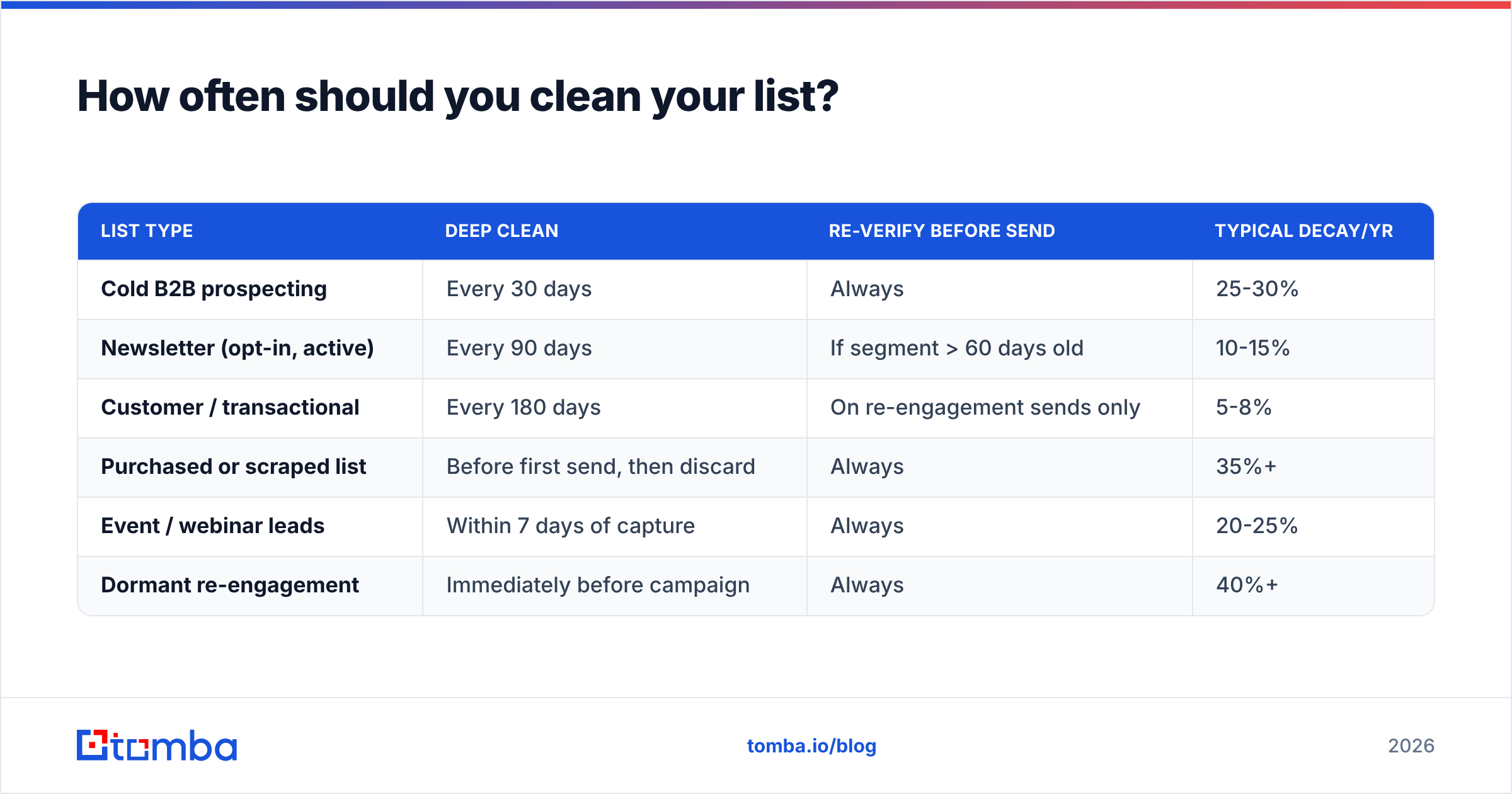
Cadence depends on how fast your data decays and how hard you send.
| List type | Deep clean | Re-verify before send | Typical decay/yr |
|---|---|---|---|
| Cold B2B prospecting | Every 30 days | Always | 25-30% |
| Newsletter (opt-in, active) | Every 90 days | If segment > 60 days old | 10-15% |
| Customer / transactional | Every 180 days | On re-engagement sends only | 5-8% |
| Purchased or scraped list | Before first send, then discard | Always | 35%+ |
| Event / webinar leads | Within 7 days of capture | Always | 20-25% |
| Dormant re-engagement | Immediately before campaign | Always | 40%+ |
The rule of thumb: the colder the acquisition source, the more often you verify, and the less you should trust a verification older than a month.
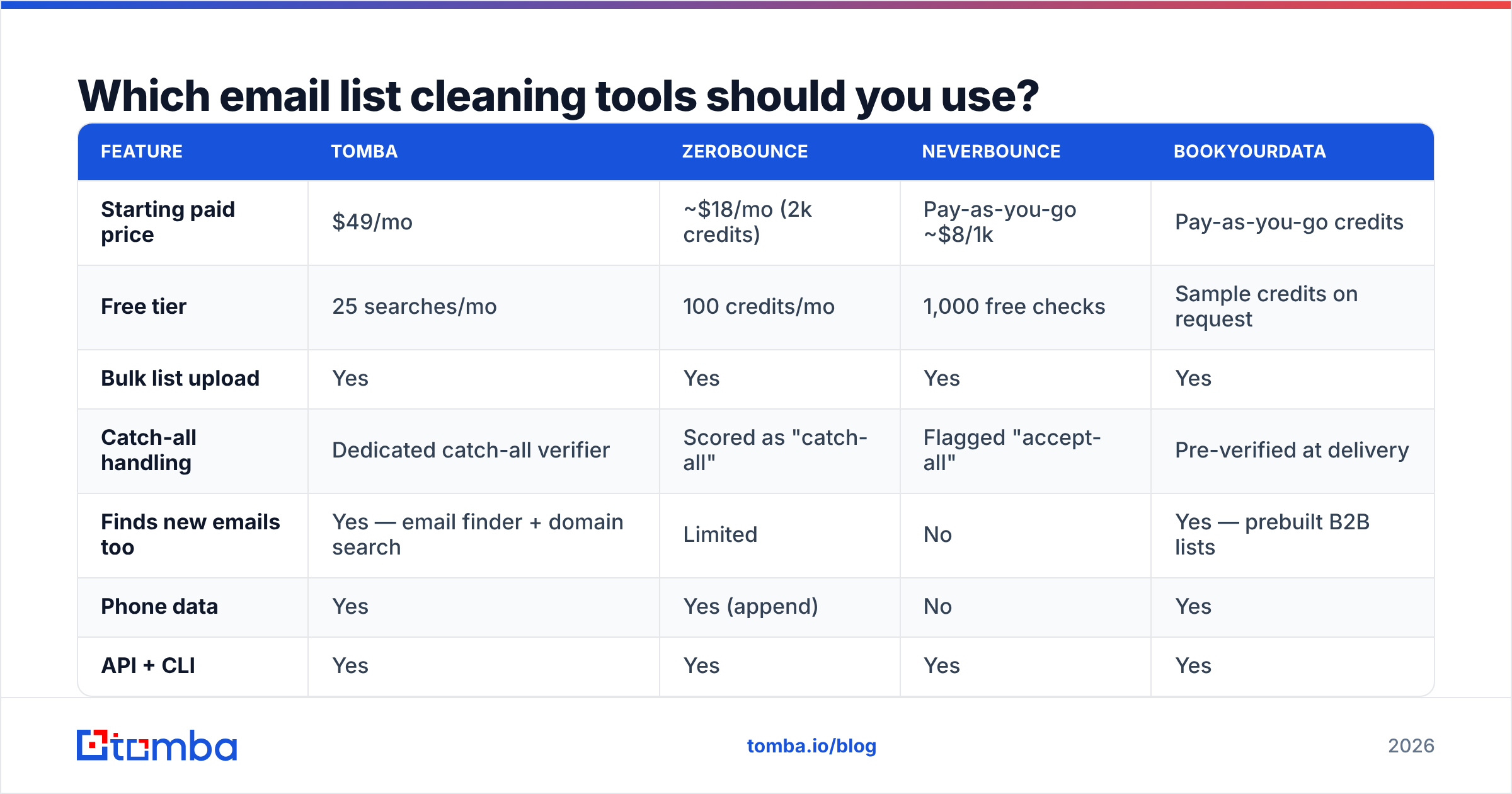
Which email list cleaning tools should you use?#
There are two categories that people conflate. Pure verifiers only check addresses you already have. Finder-plus-verifier platforms also replace the dead ones — which matters, because a cleaned list that lost 18% of its rows is a smaller list unless you re-source those contacts.
| Feature | Tomba | ZeroBounce | NeverBounce | BookYourData |
|---|---|---|---|---|
| Starting paid price | $49/mo | ~$18/mo (2k credits) | Pay-as-you-go ~$8/1k | Pay-as-you-go credits |
| Free tier | 25 searches/mo | 100 credits/mo | 1,000 free checks | Sample credits on request |
| Bulk list upload | Yes | Yes | Yes | Yes |
| Catch-all handling | Dedicated catch-all verifier | Scored as "catch-all" | Flagged "accept-all" | Pre-verified at delivery |
| Finds new emails too | Yes — email finder + domain search | Limited | No | Yes — prebuilt B2B lists |
| Phone data | Yes | Yes (append) | No | Yes |
| API + CLI | Yes | Yes | Yes | Yes |
| Best for | Clean + replace dead contacts | High-volume verification | Cheap one-off cleans | Buying pre-verified lists |
Pricing changes; check each vendor's page before you commit. Tomba pricing runs Free (25 searches/mo), Starter $49/mo, Growth $99/mo, Pro $249/mo, and Enterprise custom.
The honest read: if all you need is a one-time scrub of a 50,000-row list, a pay-as-you-go verifier is the cheapest path. If your list bleeds contacts every quarter because people change jobs, a platform that both verifies and re-finds is better economics. You replace the 20% you deleted instead of watching your list shrink. BookYourData is a solid option when you would rather start from a pre-verified list than clean a decayed one. It solves the problem upstream rather than downstream.

How do you replace the contacts you just deleted?#
This is the step everyone skips, and it is why "cleaning" often feels like a punishment. You spend money to make your list smaller.
The fix is to treat deletion as a re-sourcing trigger. When a contact at acme.com bounces because they left the company, you still want someone at Acme. Run a domain search on the company to pull current addresses and the domain's email pattern, then use the email finder to resolve the specific replacement contact by name. For volume, a bulk email finder run against your bounced-domain list turns a 3,000-row deletion into a 2,400-row recovery.
A practical loop:
- Export hard bounces, grouped by domain.
- Filter to domains you still care about (ICP fit, existing pipeline, past engagement).
- Domain search each one to get the current roster and confirm the email pattern.
- Find the replacement contact by role, not by name — you want whoever holds the job now.
- Verify the new address before it enters the sending pool.
- Log the churn. Domains that churn contacts every quarter tell you something about the account.
Enrich the recovered rows with data enrichment so the new contact arrives with title, seniority, and company data attached, instead of as a bare address you have no context for.
What should you check after cleaning?#
Cleaning the list fixes the addresses. It does not fix the sending setup, and a clean list sent from a broken domain still lands in spam.
Before your first post-clean campaign, confirm the plumbing:
- Authentication is complete. SPF, DKIM, and DMARC should all be published and passing. Run an SPF checker if you have not touched DNS in a while. One syntax error can fail every message you send.
- You are not on a blacklist. Check your sending IP and domain against the major RBLs with a blacklist checker. Cleaning alone will not delist you. You have to request removal.
- Your content is not the problem. Run the campaign through a spam checker before send. Link-heavy HTML, spam-trigger phrases, and image-only emails hurt even a clean list.
Then watch the trend for the next two weeks:
- Sender reputation is trending up. Watch Google Postmaster Tools after the clean. Domain reputation moving from "Low" to "Medium" is the signal that it worked.
- Volume ramps gradually. Do not go from zero to 50,000 sends the day after cleaning. Ramp over 2-3 weeks so the improved metrics register as a trend, not a spike.
For the underlying concepts, email deliverability and sender reputation are worth reading in full if you are the person responsible for the domain.
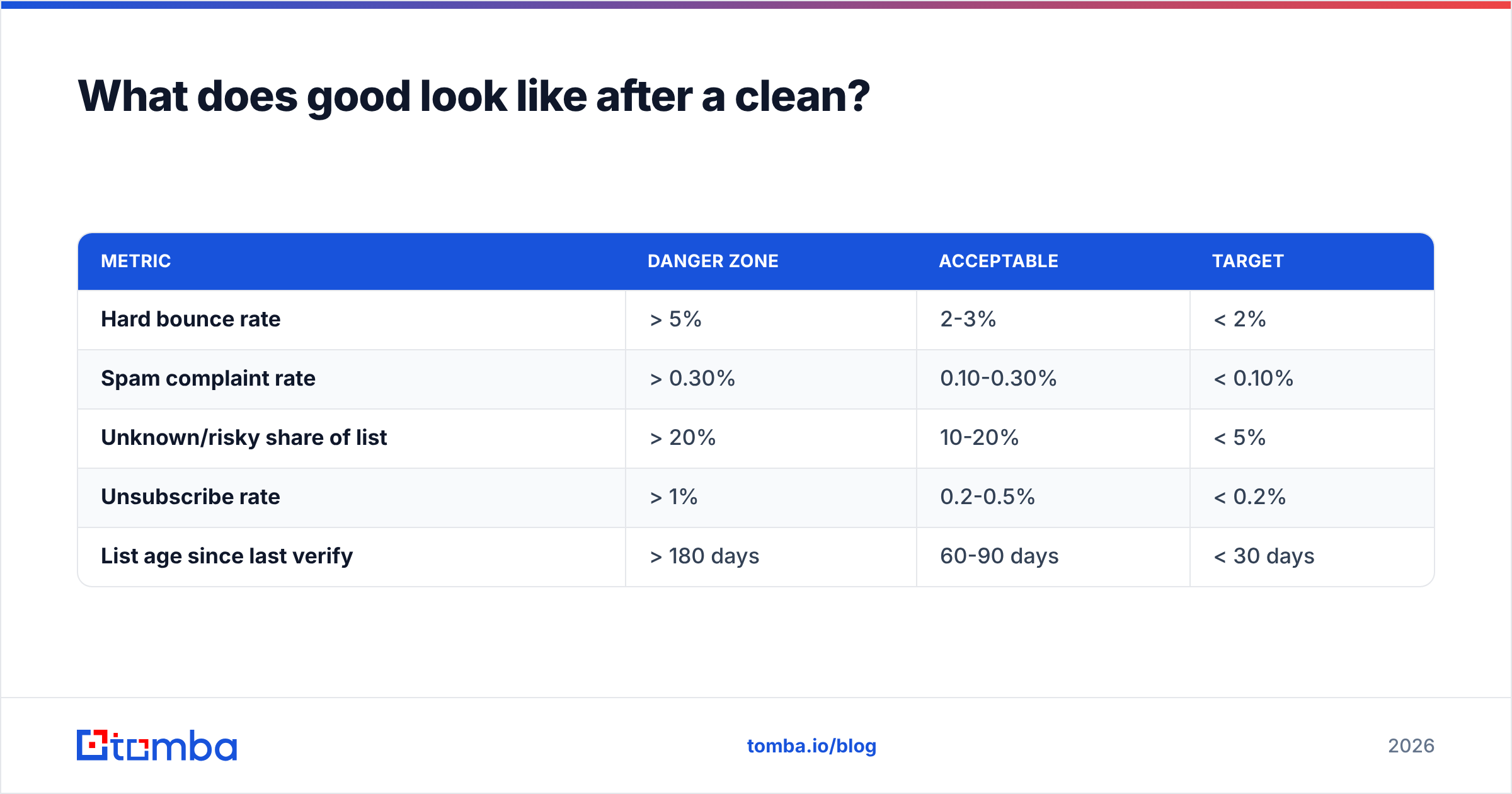
What does good look like after a clean?#
Benchmarks vary by industry, but these are the thresholds that matter to mailbox providers rather than to your dashboard:
| Metric | Danger zone | Acceptable | Target |
|---|---|---|---|
| Hard bounce rate | > 5% | 2-3% | < 2% |
| Spam complaint rate | > 0.30% | 0.10-0.30% | < 0.10% |
| Unknown/risky share of list | > 20% | 10-20% | < 5% |
| Unsubscribe rate | > 1% | 0.2-0.5% | < 0.2% |
| List age since last verify | > 180 days | 60-90 days | < 30 days |
If you clean a badly decayed list and your bounce rate is still above 3%, the problem is upstream — usually a lead capture form without double opt-in, or a data source that sells the same stale records to everyone. Fix the intake, not just the output. G2's email verification category is a reasonable place to compare intake and verification vendors on real user reviews rather than vendor claims.
What mistakes should you avoid?#
Deleting every catch-all. You will delete a meaningful share of your enterprise accounts. Segment instead.
Verifying once and calling it done. Verification is a snapshot, not a state. A verified address is only verified as of that timestamp.
Cleaning without a suppression list. If your bounces are not written to a permanent suppression file, your next CSV import puts them right back in.
Using bounce rate as your only metric. You can have a 0.5% bounce rate and still be in spam if your complaint rate is high or your engagement is flat. Bounces measure the address; complaints and engagement measure whether people want your mail.
Buying a "verified" list and skipping your own verification. Vendors verify against their own standards, at their own timestamp. Run it through your verifier before it touches your sending domain. This is not a knock on any specific vendor — it is basic hygiene, the same way you would re-check any data entering your system.
Cleaning right before a big send with no ramp. A sudden volume change on a domain with a fresh reputation history looks exactly like a compromised account. Ramp.
Where should you start?#
Start with step one on your single worst list — the one you have been avoiding. Deduplicate it, run a free syntax pass, and see what percentage survives. That number tells you whether you have a data problem, a sourcing problem, or both.
Then close the loop: verify what remains, and re-find the contacts you had to delete. The Tomba Email Finder is built for exactly that second half — you feed it the domains where contacts bounced, and it returns current, verified addresses for the people who hold those roles now. The free tier gives you 25 searches a month to test it against your own bounced-domain list before you spend anything, and Starter at $49/mo covers most teams running monthly cleans. That is the whole of how to clean email list data: cut what is dead, keep what is real, and replace what you lost. A shrinking list is not a clean list. A clean list is one where every address is both deliverable and current.
Related guides#
// get started
Find, verify and enrich your first contacts today
Start on the free plan with 25 searches a month, then scale when your team is ready.
Free plan · No credit card required · GDPR & CCPA
// about the author