How to Create an Email Campaign That Actually Converts
A step-by-step build for your next email campaign: list sourcing, segmentation, sequence structure, send infrastructure, and the metrics that tell you when to kill it.
TL;DR
- An email campaign is not one email — it's a list, a segment, a sequence, a sending setup, and a measurement loop. Weak links break the whole thing, and the list is the link that breaks most often.
- Build the list before you write a word. Verified, role-matched contacts beat clever copy every time; a 15% bounce rate will sink a campaign no subject line can rescue.
- Segment into groups of 50–300 contacts that share one problem. One message per segment, not one message for everyone.
- Four to five touches over 14–18 days is the sweet spot for cold B2B. Marketing newsletters run on a different clock — don't mix the two playbooks.
- Track reply rate and positive reply rate as your primary metrics. Open rate has been unreliable since Apple Mail Privacy Protection landed, and it hasn't gotten better.
What is an email campaign, exactly?#
An email campaign is a coordinated series of emails sent to a defined audience with one measurable goal. That definition sounds obvious until you count how many "campaigns" are really just one email fired at a spreadsheet.
Think of it like opening a restaurant. The recipe (your copy) matters, but it matters less than sourcing ingredients (your list), knowing who's walking in the door (segmentation), and having a kitchen that doesn't burn down (your sending infrastructure). Most people spend 80% of their effort on the recipe.
There are three campaign types, and they follow different rules:
- Cold outbound — contacts who have never heard of you. Highest risk, highest control. Small volumes, heavy personalization, strict deliverability discipline.
- Warm nurture — inbound leads, trial signups, event attendees. They know you. Higher volumes are safe, copy can be softer.
- Broadcast / newsletter — opted-in subscribers. Volume is high, personalization is low, and your main job is not being boring enough to get unsubscribed.
This guide covers all three but leans on cold outbound, because it's the hardest and the one where mistakes cost you a domain.
How do you build the contact list?#
Start here. Always start here. A campaign to 400 verified, well-matched contacts will beat a campaign to 4,000 scraped ones, and it will do it while keeping your domain alive.
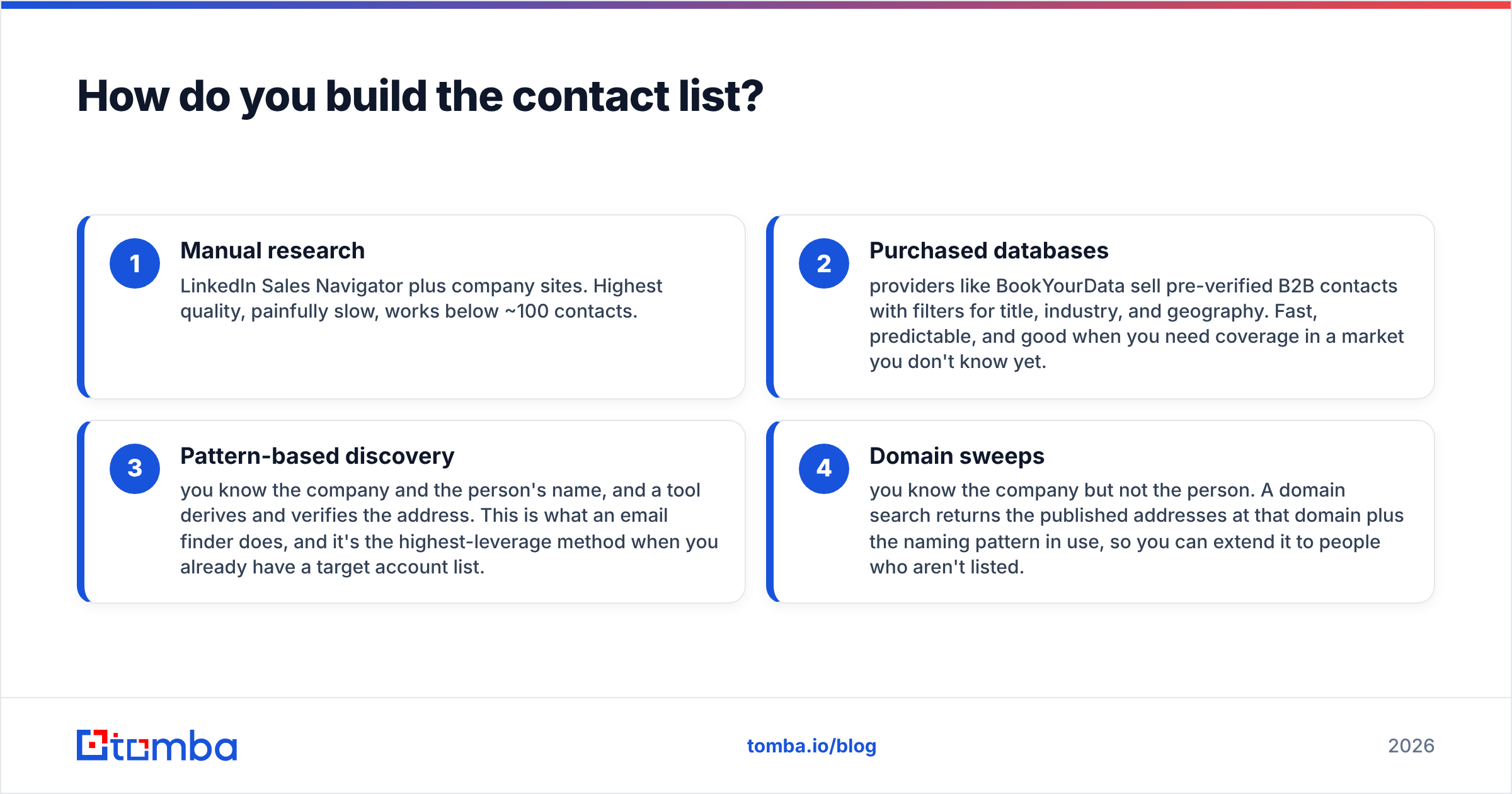
You have four realistic sourcing paths:
- Manual research — LinkedIn Sales Navigator plus company sites. Highest quality, painfully slow, works below ~100 contacts.
- Purchased databases — providers like BookYourData sell pre-verified B2B contacts with filters for title, industry, and geography. Fast, predictable, and good when you need coverage in a market you don't know yet.
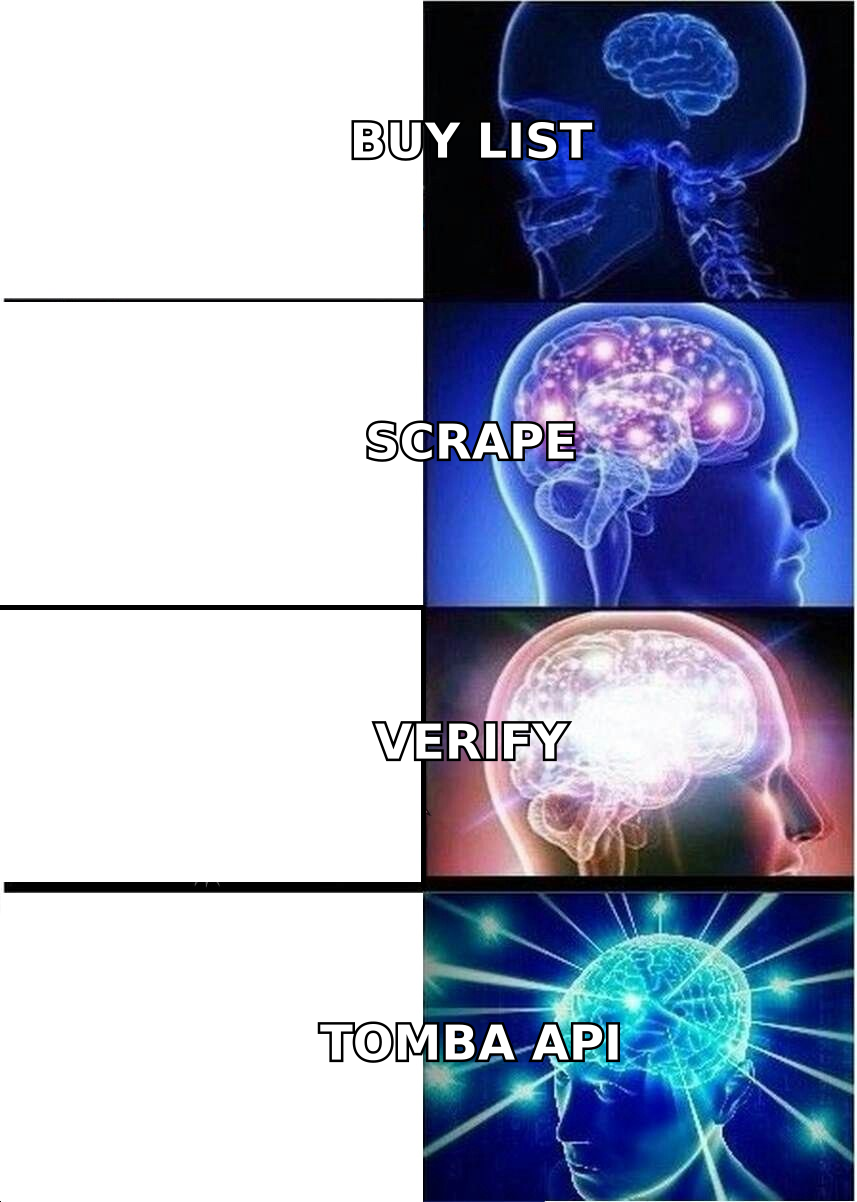
- Pattern-based discovery — you know the company and the person's name, and a tool derives and verifies the address. This is what an email finder does, and it's the highest-leverage method when you already have a target account list.
- Domain sweeps — you know the company but not the person. A domain search returns the published addresses at that domain plus the naming pattern in use, so you can extend it to people who aren't listed.
Whatever path you take, verification is not optional. Run every address through an email verifier before it enters a sequence. The economics are brutal and simple: mailbox providers read bounce rate as a spam signal, and once you cross roughly 3–5% your inbox placement starts degrading for every campaign after — not just the bad one.
Catch-all domains deserve a separate note. A catch-all server accepts every address at the domain, so standard SMTP verification returns "unknown" rather than valid or invalid. Roughly a fifth of B2B domains are configured this way. Either exclude them, or route them through a catch-all verifier that uses secondary signals instead of guessing.
How should you segment before writing?#
Segment until every group shares one specific, nameable problem. If you can't finish the sentence "everyone on this list is currently struggling with ___," the segment is too broad.
Practical segment sizes for cold outbound: 50–300 contacts. Small enough that one message genuinely fits all of them, large enough that reply-rate numbers mean something. Below 50 contacts, a single enthusiastic reply looks like a 4% reply rate and tells you nothing.
Useful segmentation axes, roughly in order of how much they lift replies:
- Trigger events — new funding, a relevant job posting, a leadership change, a technology install. Strongest, because it gives you a non-generic reason to be writing today.
- Tech stack — companies running a specific tool you integrate with or replace.
- Role and seniority — a VP of Sales and an SDR manager care about different halves of the same problem.
- Company size band — a 40-person company and a 4,000-person company have almost nothing in common operationally.
- Geography and language — mostly matters for send timing and compliance, not messaging.
Enrich each segment before you write. Firmographic and technographic fields from a data enrichment pass give you the raw material for a first line that isn't "I saw your company is growing fast."
What does the sequence structure look like?#
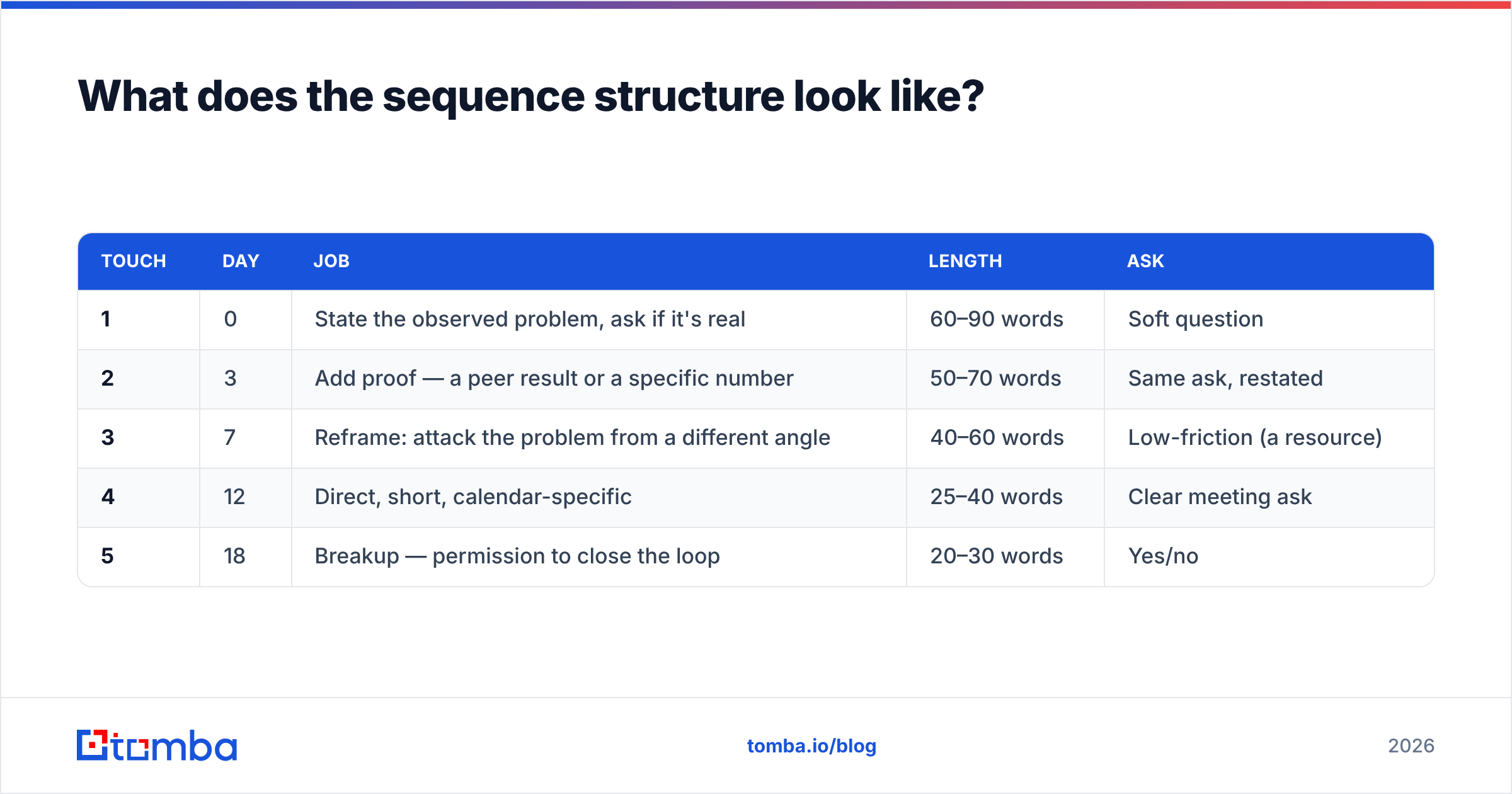
Four to five emails over 14–18 days, with each touch doing a different job. Repeating "just bumping this up" four times is not a sequence — it's four opportunities to get marked as spam.
| Touch | Day | Job | Length | Ask |
|---|---|---|---|---|
| 1 | 0 | State the observed problem, ask if it's real | 60–90 words | Soft question |
| 2 | 3 | Add proof — a peer result or a specific number | 50–70 words | Same ask, restated |
| 3 | 7 | Reframe: attack the problem from a different angle | 40–60 words | Low-friction (a resource) |
| 4 | 12 | Direct, short, calendar-specific | 25–40 words | Clear meeting ask |
| 5 | 18 | Breakup — permission to close the loop | 20–30 words | Yes/no |
A few structural rules that hold up across most B2B cold campaigns:
- One idea per email. If you're describing two benefits, you're writing two emails.
- No attachments, no images, no tracking pixels on touch one. Every one of those is a deliverability tax on a recipient who doesn't know you.
- Plain text formatting. HTML templates look like marketing, and marketing gets filed under Promotions.
- One link maximum, and preferably zero before touch three.
- Subject lines under 45 characters, lowercase, no punctuation gymnastics. If you're stuck, a subject line generator will get you unstuck faster than staring at the field.
For nurture and broadcast campaigns, loosen these. Opted-in subscribers expect design, images, and a clear CTA button. HubSpot's email marketing research is a reasonable baseline for what benchmarks look like on that side of the fence.
What sending setup do you need?#
This is the section most guides skip, and it's the reason most campaigns fail quietly.
Never send cold campaigns from your primary domain. Buy a lookalike domain — get-yourcompany.com, yourcompany-hq.com — and route outbound through that. If deliverability degrades, your actual corporate mail stays untouched.
Authenticate everything before the first send:
- SPF — lists which servers may send for your domain. Check yours with an SPF checker.
- DKIM — cryptographically signs each message so receivers can confirm it wasn't altered.
- DMARC — tells receiving servers what to do when SPF or DKIM fails, and gets you reporting. Google and Yahoo both made this effectively mandatory for bulk senders in 2024, and enforcement has only tightened since.
Then warm up. A brand-new domain sending 300 emails on day one looks exactly like a spammer, because that is exactly what spammers do. Ramp gradually — 10–20 sends daily in week one, roughly doubling weekly until you reach your target volume, which should top out around 30–50 per mailbox per day. A warmup calculator will map the ramp for you.
Scale with mailboxes, not with volume per mailbox. Need 500 sends a day? That's 12 mailboxes at 40 each, not 2 mailboxes at 250. And before your first real send, push a draft through a spam checker to catch the trigger words and formatting problems you stopped noticing three drafts ago.
Which tools do you actually need?#
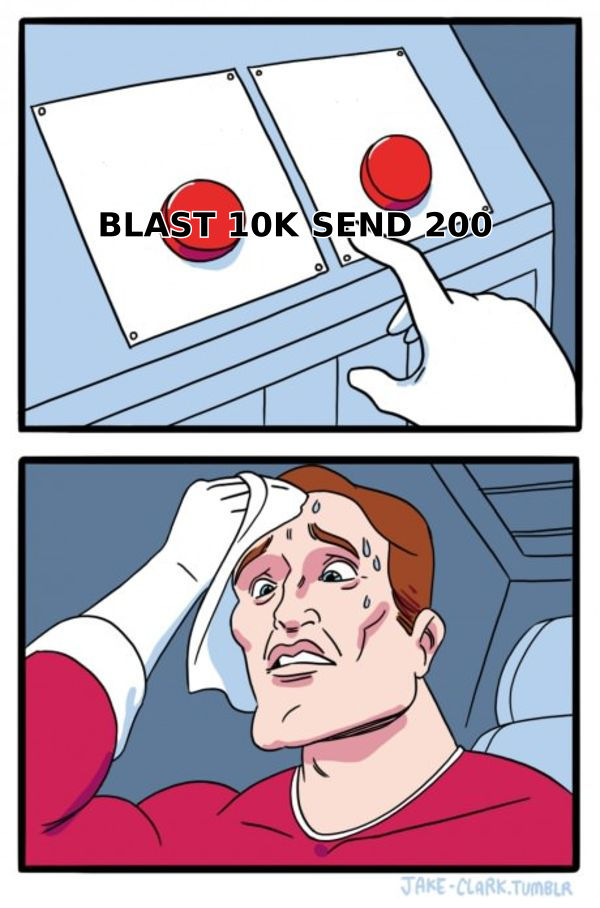
Four categories, and you can't skip any of them. What varies is whether you buy four tools or two that overlap.
| Layer | What it does | Typical cost | Skip it if... |
|---|---|---|---|
| Data sourcing | Finds and verifies contact addresses | $49–$99/mo | You have fewer than 50 targets and time to research manually |
| Verification | Removes invalid and risky addresses pre-send | Often bundled with sourcing | Never — this is the one that protects your domain |
| Sending platform | Sequences, throttling, mailbox rotation, replies | $30–$100/mo | You're sending under 20 emails a week |
| Measurement | Reply tracking, deliverability monitoring | Bundled or free (Postmaster Tools) | Never |
On the data layer specifically, here's how the common options compare:
| Tomba | Purchased database | Manual research | |
|---|---|---|---|
| Entry price | Free tier (25 searches/mo), then $49/mo | Per-record or bulk credit packs | Your time |
| Best for | Named target accounts you already picked | Fast coverage in an unfamiliar market | Under ~100 highly strategic contacts |
| Verification | Built in, catch-all handling included | Pre-verified at purchase, re-verify before send | Manual |
| Speed at 1,000 contacts | Minutes via bulk or API | Immediate | Weeks |
| Freshness risk | Verified at query time | Depends on provider refresh cycle | Current by definition |
Both paths are legitimate, and plenty of teams run them together — a database for breadth, pattern-based discovery for the accounts that actually matter. If you're pulling volume, bulk email finder processing and the Tomba API let you fold sourcing and verification into one step in your own pipeline rather than exporting CSVs between four tabs. Full Tomba pricing runs Free (25 searches/mo), Starter $49/mo, Growth $99/mo, and Pro $249/mo.
For the sending layer, compare options on G2 rather than on vendor landing pages — the deliverability complaints show up in reviews long before they show up in feature comparisons.
How do you measure whether it worked?#
Reply rate and positive reply rate. Everything else is diagnostic.
Open rate stopped being trustworthy when Apple Mail Privacy Protection began pre-fetching tracking pixels, which inflates opens for a large and unknowable share of your list. Use it to spot relative changes between variants, never as an absolute number, and never as the metric you report.
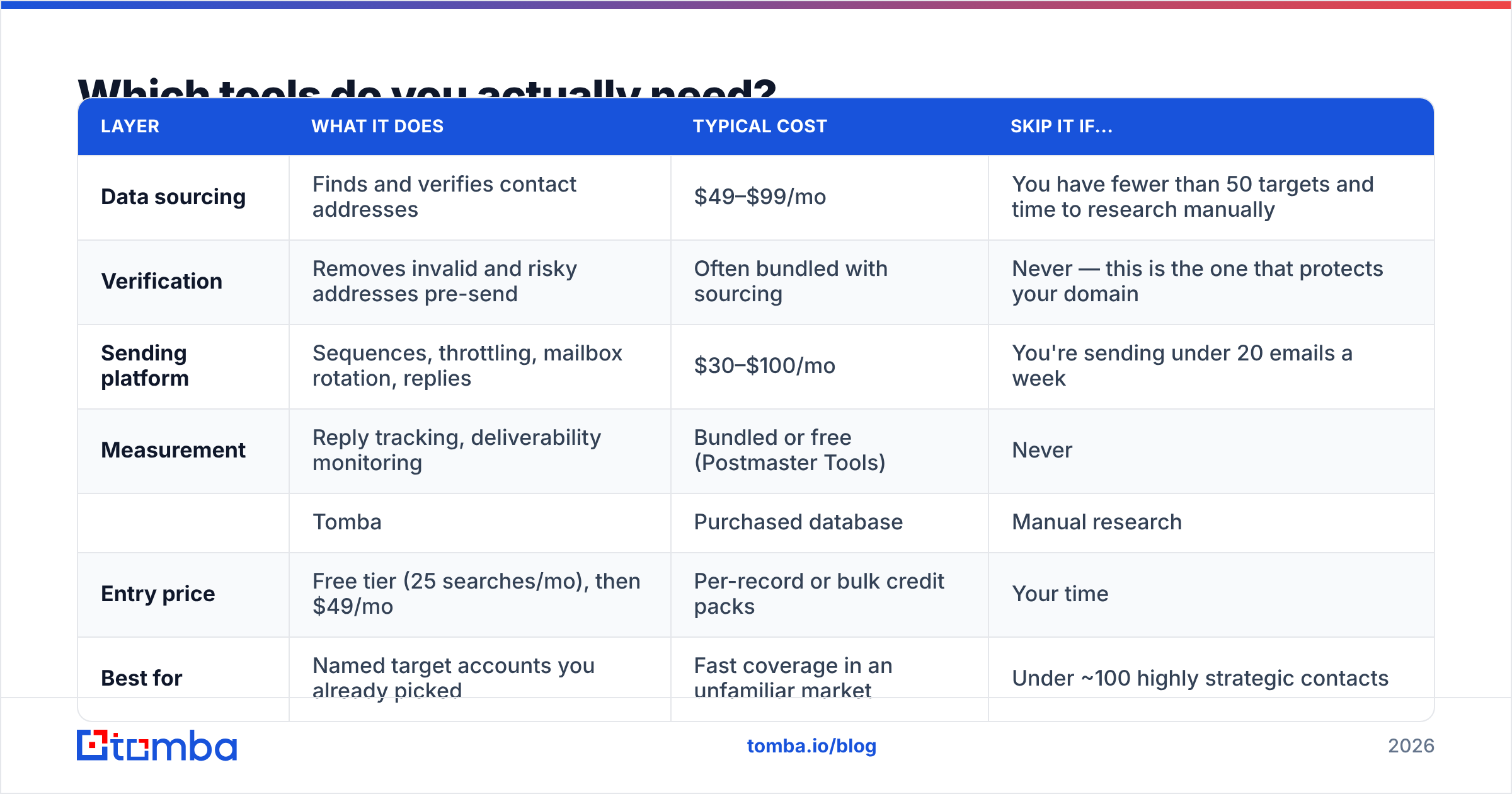
Benchmarks worth measuring against for cold B2B outbound:
| Metric | Weak | Acceptable | Strong |
|---|---|---|---|
| Bounce rate | Over 5% | 2–5% | Under 2% |
| Reply rate | Under 3% | 3–8% | Over 8% |
| Positive reply rate | Under 1% | 1–3% | Over 3% |
| Meeting booked rate | Under 0.5% | 0.5–1.5% | Over 1.5% |
| Unsubscribe / opt-out | Over 2% | 0.5–2% | Under 0.5% |
Diagnose in order, because fixes upstream invalidate the measurements downstream:
- High bounce rate → list problem. Fix verification before touching anything else.
- Low reply, low bounce → targeting or offer problem. Your segment doesn't have the problem you claim, or doesn't care about it yet.
- Replies but no meetings → offer or CTA problem. You're asking for too much too early.
- High opt-out rate → tone or relevance problem. You sound like a broadcast, so people treat you like one.
Give a campaign at least 200 sends per variant before drawing conclusions. Below that you're reading noise, and the temptation to rewrite everything after 40 sends has killed more good campaigns than bad copy has.
Also watch signals outside your sending tool. Google Postmaster Tools shows your domain reputation and spam-complaint rate directly from Gmail's side, which is the only place you'll see trouble before it shows up as a collapsing reply rate. A blacklist checker run monthly catches the rest.
What's the actual step-by-step build?#
Compressed into a checklist you can run this week:
- Define one goal and one audience. Write it as a sentence: "Book 12 demos with heads of RevOps at 100–500 person SaaS companies who just hired an SDR."
- Buy and warm a sending domain. Two to three weeks of warmup before real sends. Start this first because it's the only step with an unavoidable waiting period.
- Build the target account list. 100–500 companies matching the profile. Company-level first, people second.
- Find and verify contacts. Names and roles, then addresses via domain search or pattern discovery, then verification on every single one.
- Segment into groups of 50–300 sharing one problem.
- Write one sequence per segment. Five touches, 18 days, one idea per email.
- Configure sending. Multiple mailboxes, 30–50/day each, randomized intervals, auto-stop on reply.
- Launch to one segment only. Measure at 200 sends. Fix the biggest diagnostic gap.
- Roll out to remaining segments with the fix applied. Refresh the list quarterly — B2B contact data decays somewhere around 2–3% monthly as people change jobs.
Step four is where most campaigns are won or lost, and it's the step people rush hardest.
Where to start#
If you already know which companies you want to reach and just need the people and their verified addresses, that's the Tomba Email Finder. Feed it a domain and a name, get back a verified address with a confidence score and the sources behind it, then push the whole segment through bulk verification before your first send. The free tier gives you 25 searches a month — enough to build one real test segment, launch it, and find out whether your targeting hypothesis holds before you commit budget to a full campaign.
Build the list first. The copy gets easier once you know exactly who's reading it.
Related guides#
// get started
Find, verify and enrich your first contacts today
Start on the free plan with 25 searches a month, then scale when your team is ready.
Free plan · No credit card required · GDPR & CCPA
// about the author