How To Do Cold Outreach in 2026: A Step-by-Step Playbook
Cold outreach still works in 2026 — but only if you fix targeting, data quality, and sending infrastructure before you write a single line of copy. Here is the full sequence.
TL;DR
- Cold outreach fails at the list stage far more often than at the copy stage. Fix targeting and data hygiene first, then worry about subject lines.
- Verify every address before it enters a sequence. A bounce rate above 3% will drag your whole domain down, and no amount of clever writing recovers it.
- Send from a separate domain, warm it for 3-4 weeks, and cap volume at 30-50 emails per inbox per day.
- Multichannel (email + LinkedIn + phone) roughly doubles connect rates versus email alone, but only when the sequencing is deliberate.
- Track reply rate and positive reply rate, not open rate. Apple Mail Privacy Protection made open rate close to useless in 2026.
What is cold outreach, and does it still work in 2026?#
Cold outreach is contacting a person who has never interacted with you, with a specific, relevant ask. That is the whole definition. It is not spray-and-pray, and it is not a numbers game in the way it was in 2018.
It still works. What changed is the cost of doing it badly. Google and Yahoo's bulk-sender requirements — authentication, one-click unsubscribe, and a spam-complaint rate under 0.3% — turned sloppy sending into a domain-level death sentence. You can read the current requirements straight from Google's postmaster documentation. Meanwhile, the average B2B prospect gets more cold email than ever, so the bar for relevance climbed.
The result is a market that punishes volume and rewards precision. Teams sending 200 well-researched emails a week now routinely beat teams sending 5,000 generic ones. That is the whole thesis of this guide.
Think of it like fishing. In 2018 you could drag a net through the ocean and pull in enough to eat. In 2026 the ocean is netted out, the coast guard fines you for the net, and the only people still eating are the ones who learned which fish live under which rock.
How do you build a target list that is actually worth emailing?#
Start with the account, not the person. Most failed campaigns pick a job title first ("VP of Sales"), pull 10,000 of them, and email them all. That produces a list with no common problem, which means no message can be relevant to more than 2% of it.
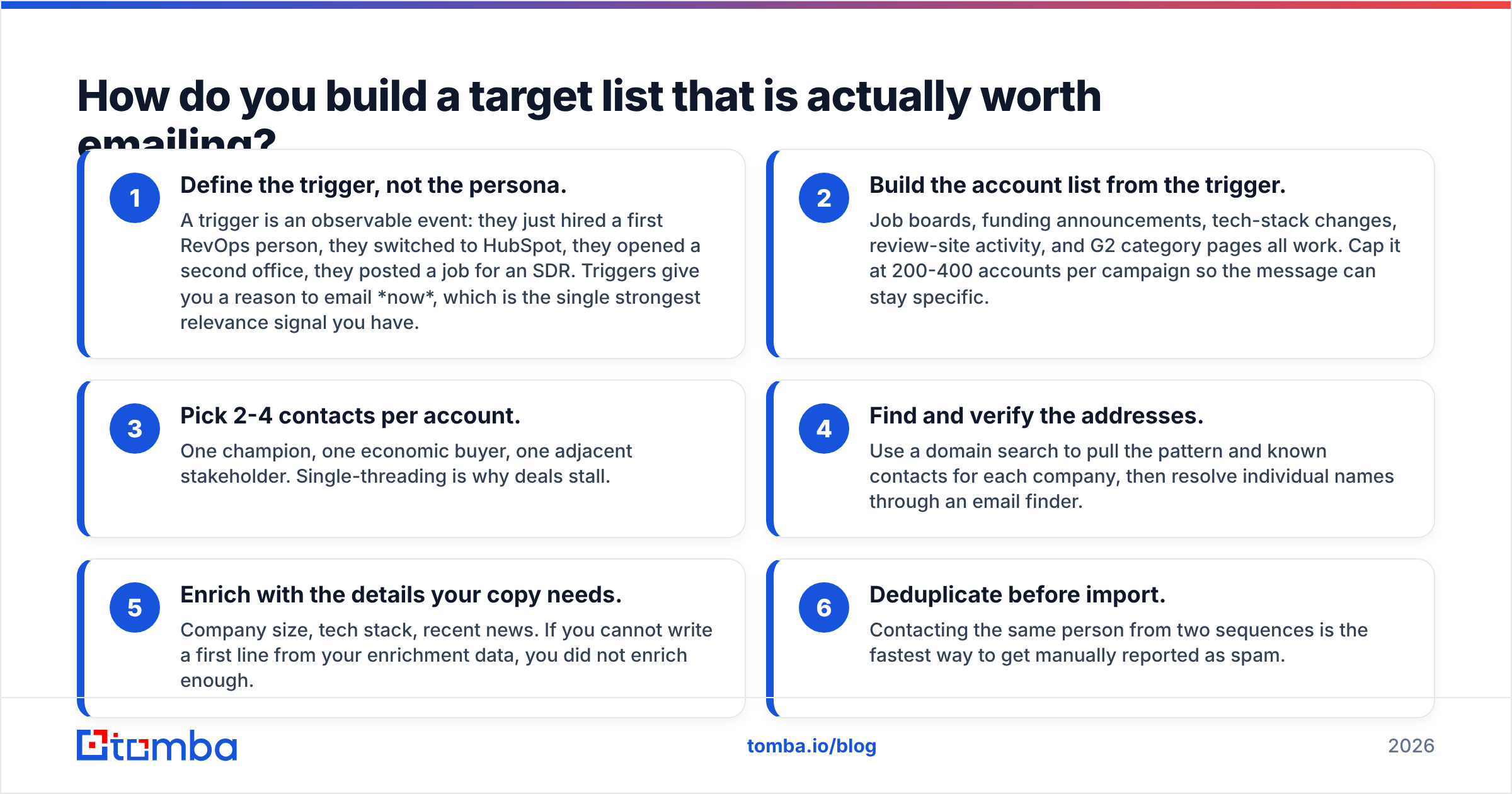
Work in this order:
- Define the trigger, not the persona. A trigger is an observable event: they just hired a first RevOps person, they switched to HubSpot, they opened a second office, they posted a job for an SDR. Triggers give you a reason to email now, which is the single strongest relevance signal you have.
- Build the account list from the trigger. Job boards, funding announcements, tech-stack changes, review-site activity, and G2 category pages all work. Cap it at 200-400 accounts per campaign so the message can stay specific.
- Pick 2-4 contacts per account. One champion, one economic buyer, one adjacent stakeholder. Single-threading is why deals stall.
- Find and verify the addresses. Use a domain search to pull the pattern and known contacts for each company, then resolve individual names through an email finder.
- Enrich with the details your copy needs. Company size, tech stack, recent news. If you cannot write a first line from your enrichment data, you did not enrich enough.
- Deduplicate before import. Contacting the same person from two sequences is the fastest way to get manually reported as spam.
That is the unglamorous 60% of cold outreach. Skip it and everything downstream degrades.
Why does email verification matter more than copy?#
Because bounces are scored against your domain, and copy is not.
Mailbox providers treat a high bounce rate as evidence that you acquired your list badly. Under 2% is healthy. Above 3% and providers start throttling. Above 5% and you are in reputation-repair territory that takes months to exit. A scraped or purchased list that has aged 12 months routinely sits at 25-40% invalid.
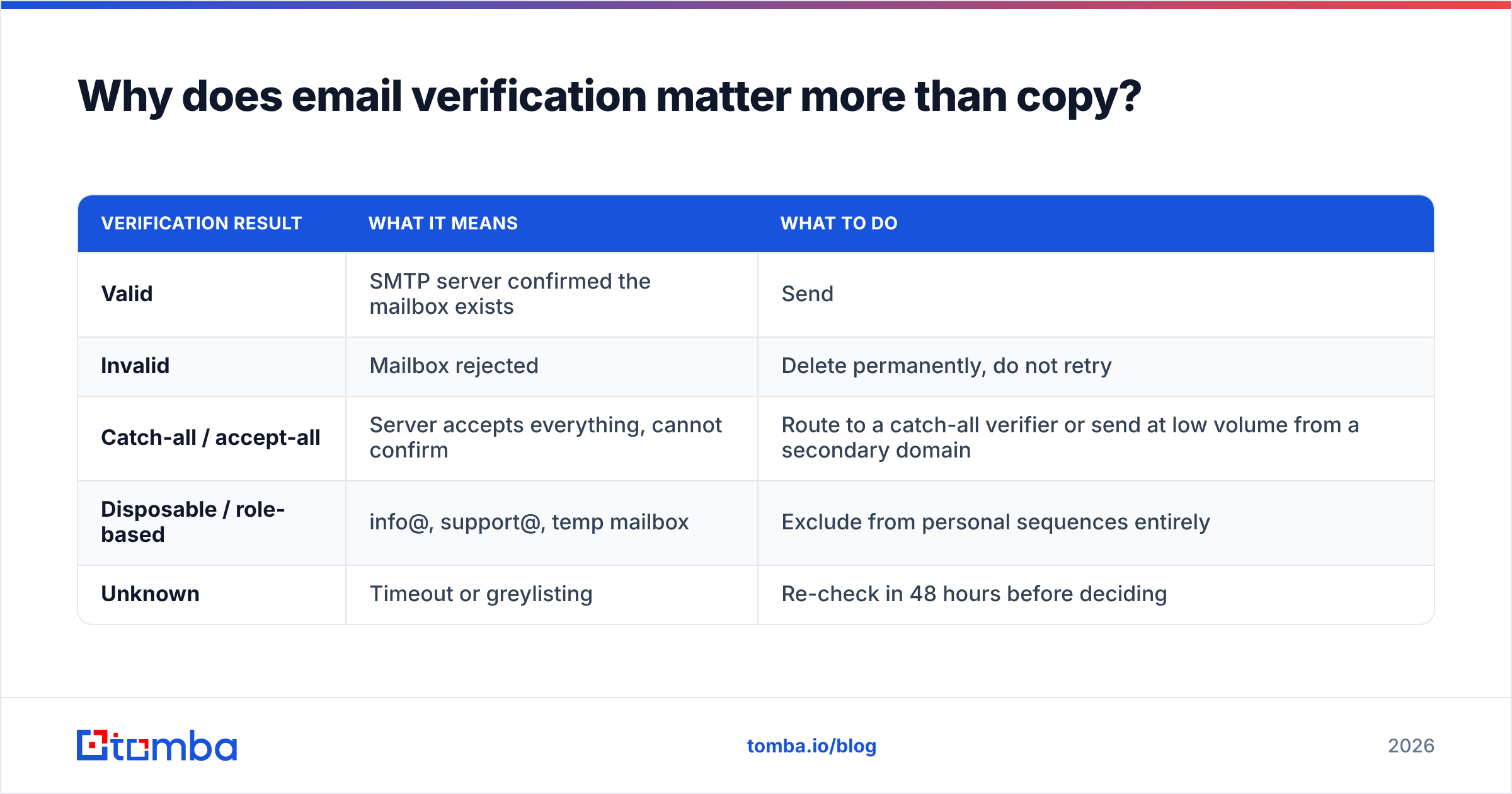
Verification is also where most people quietly waste money. There are three distinct outcomes you need to handle differently:
| Verification result | What it means | What to do |
|---|---|---|
| Valid | SMTP server confirmed the mailbox exists | Send |
| Invalid | Mailbox rejected | Delete permanently, do not retry |
| Catch-all / accept-all | Server accepts everything, cannot confirm | Route to a catch-all verifier or send at low volume from a secondary domain |
| Disposable / role-based | info@, support@, temp mailbox | Exclude from personal sequences entirely |
| Unknown | Timeout or greylisting | Re-check in 48 hours before deciding |
Catch-all domains are the interesting case. Roughly 15-20% of B2B domains are configured this way, and most teams either delete them all (throwing away real prospects, often at enterprise accounts) or send to them all (inflating bounce risk). The correct answer is to isolate them onto a separate sending domain where a bad outcome cannot damage your primary reputation.
Run every list through an email verifier immediately before import — not at purchase time. Contact data decays at roughly 22-30% per year, so a list verified in January is meaningfully worse by June.
Which cold outreach tools should you actually pay for?#
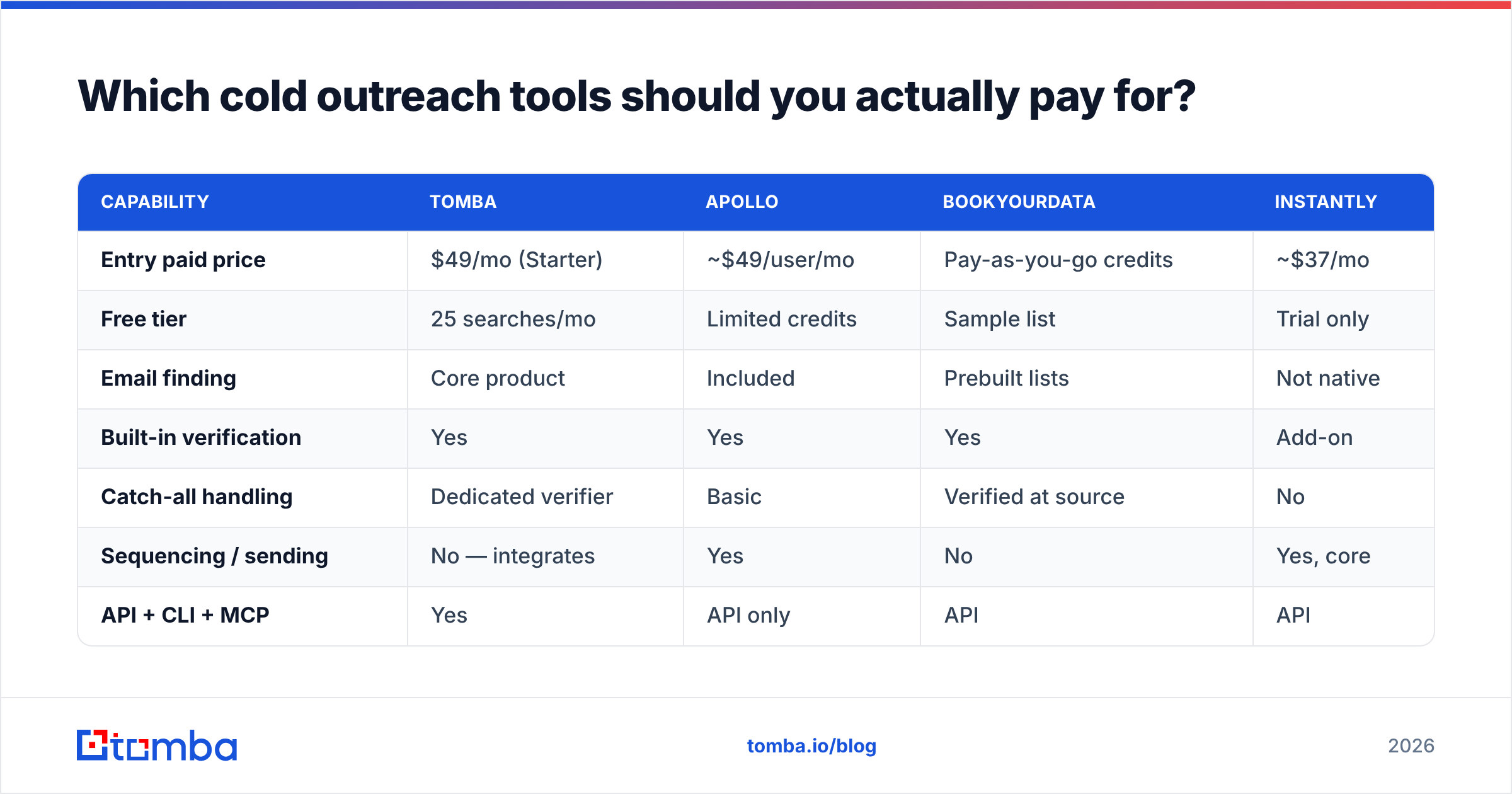
Your stack needs four jobs covered: finding contacts, verifying them, sending sequences, and monitoring deliverability. Some tools blur the lines. Here is how the common options compare on the dimensions that matter for outreach specifically.
| Capability | Tomba | Apollo | BookYourData | Instantly |
|---|---|---|---|---|
| Entry paid price | $49/mo (Starter) | ~$49/user/mo | Pay-as-you-go credits | ~$37/mo |
| Free tier | 25 searches/mo | Limited credits | Sample list | Trial only |
| Email finding | Core product | Included | Prebuilt lists | Not native |
| Built-in verification | Yes | Yes | Yes | Add-on |
| Catch-all handling | Dedicated verifier | Basic | Verified at source | No |
| Sequencing / sending | No — integrates | Yes | No | Yes, core |
| API + CLI + MCP | Yes | API only | API | API |
| Best for | Precision list building | All-in-one prospecting | Prebuilt targeted lists | High-volume sending |
The honest read: no single tool wins every column. Sending platforms like Instantly are built for inbox rotation and warmup, not for data accuracy. Data platforms are built for accuracy, not for sequencing. BookYourData is a strong fit when you want a ready-made list handed over rather than assembled contact by contact — different workflow, same goal. Tomba sits on the data side, which is why teams typically pair it with a sender rather than replacing one.
If you are consolidating rather than adding, the Apollo alternative comparison covers the tradeoffs in more detail. Full Tomba pricing runs Free (25 searches), Starter $49/mo, Growth $99/mo, Pro $249/mo, and Enterprise.

How do you set up sending infrastructure that does not burn your domain?#
Never send cold email from your primary domain. This is non-negotiable and it is the mistake that costs companies the most.
Buy a lookalike domain — if you are acme.com, buy getacme.com or acme-hq.com. Point it at your ESP, configure SPF, DKIM, and DMARC, and let it sit. If your DNS records are unclear, an SPF checker will tell you in ten seconds whether your record is valid and within the ten-lookup limit.
Then warm it:
- Weeks 1-2: 5-10 emails per inbox per day, mostly to warmup networks and colleagues. Reply to everything.
- Week 3: 15-25 per day, introduce real prospects at low volume.
- Week 4+: 30-50 per day per inbox, steady state. Do not exceed this even when the numbers look good.
- Ongoing: keep warmup running at ~20% of volume permanently. Reputation is a decaying score, not a badge you earn once.
Scale by adding inboxes, not by raising per-inbox volume. Three inboxes at 40/day beats one inbox at 120/day by a wide margin, because per-mailbox volume is itself a spam signal. Watch your sender reputation in Google Postmaster Tools weekly, and check your sending IP against blocklists with a blacklist checker before you scale anything.
One more infrastructure detail people forget: plain-text emails outperform HTML-heavy ones in cold outreach, and images or tracking pixels in a first touch actively hurt deliverability. Strip them. Your first email should look like something a human typed in Gmail, because that is exactly what you want it to be mistaken for.
What should a cold outreach sequence look like?#
Four to six touches over 14-21 days, mixing channels. Here is the structure that consistently performs:
Day 1 — Email 1. Trigger-based opener. Reference the observable event, state one specific problem it creates, ask a low-friction question. Under 90 words. No calendar link.
Day 3 — LinkedIn view + follow. No connection request yet. This puts you in their notifications passively.
Day 5 — Email 2. New angle, not a "just bumping this." Share a relevant proof point — a comparable customer, a specific number. Still under 90 words.
Day 8 — LinkedIn connection request. Short note referencing the email topic. Acceptance rates here are 2-3x cold requests because they have now seen your name twice.
Day 12 — Call. If you have a direct line. A phone finder that returns mobile numbers rather than switchboards makes this step viable; switchboard numbers rarely do.
Day 18 — Email 3, the breakup. "Assuming this is not a priority — should I close the file?" This gets a disproportionate share of replies, partly because it is genuinely easy to answer.
Two rules that matter more than the schedule itself. First, every touch must add new information; a follow-up that only says "circling back" trains people to ignore you. Second, keep the whole thread in one email chain rather than starting new threads — it reads as persistence rather than as separate campaigns.
Which metrics tell you if cold outreach is working?#
Open rate is dead. Apple's Mail Privacy Protection pre-fetches images for a large share of recipients, which means your open numbers include phantom opens you cannot separate out. Stop optimizing against it.
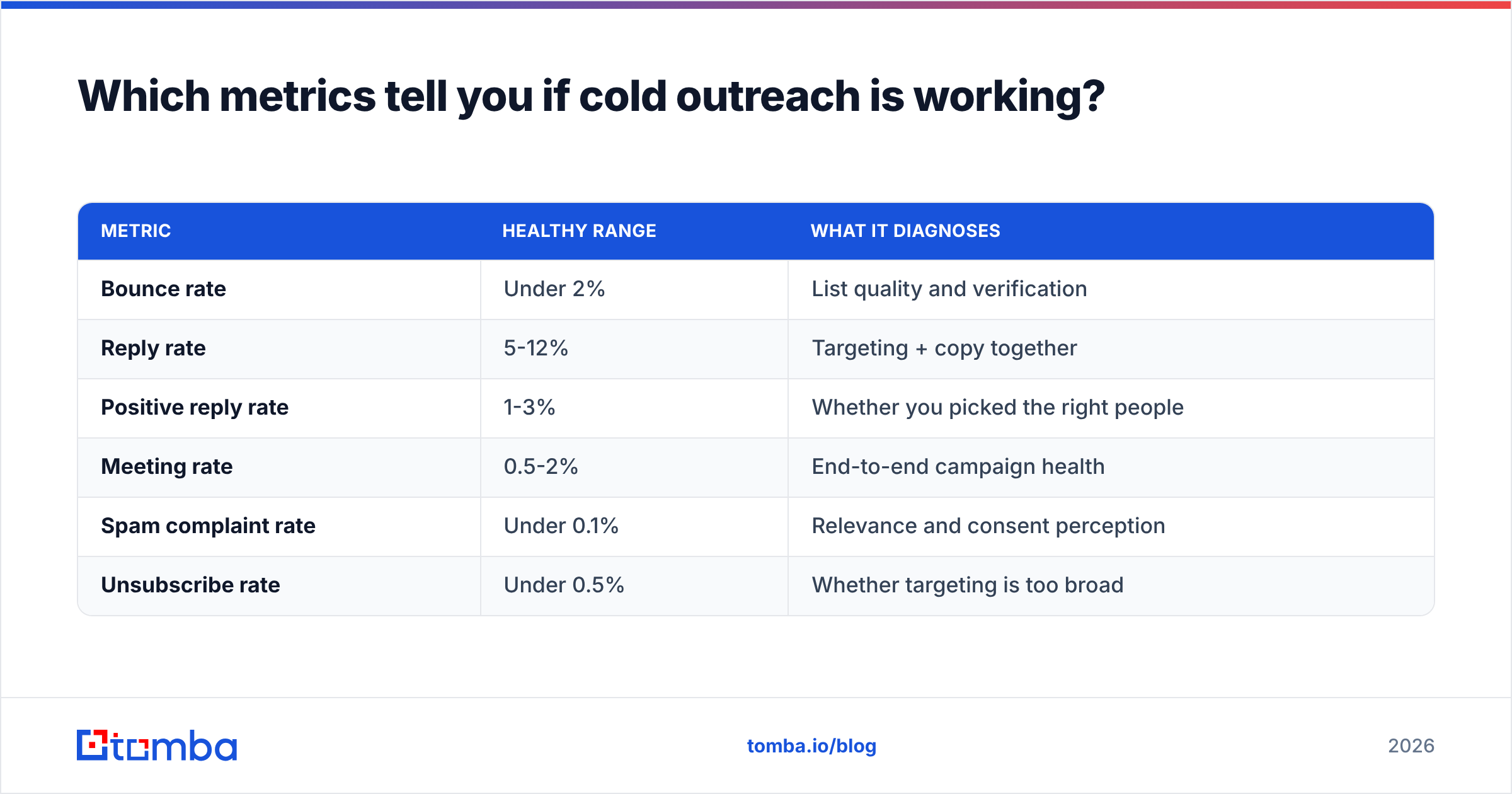
Track these instead:
| Metric | Healthy range | What it diagnoses |
|---|---|---|
| Bounce rate | Under 2% | List quality and verification |
| Reply rate | 5-12% | Targeting + copy together |
| Positive reply rate | 1-3% | Whether you picked the right people |
| Meeting rate | 0.5-2% | End-to-end campaign health |
| Spam complaint rate | Under 0.1% | Relevance and consent perception |
| Unsubscribe rate | Under 0.5% | Whether targeting is too broad |
The diagnostic logic is straightforward. High bounces mean a data problem. High reply rate but low positive replies means you are reaching the wrong seniority — people answer politely but cannot buy. Low reply rate with clean deliverability means the offer or the trigger is wrong, not the subject line. Good response rate benchmarks vary by industry, but if you are under 3% with verified data and good infrastructure, the problem is almost always relevance.
Measure per segment, not per campaign. A campaign averaging 6% reply rate might be one segment at 14% and three at 2%. The average hides the only insight worth having.
What are the legal rules you cannot ignore?#
Cold outreach is legal in most jurisdictions for B2B, but the constraints are real and they differ by region.
In the United States, CAN-SPAM permits cold B2B email as long as you use accurate headers and subject lines, disclose a physical address, and honor opt-outs within ten business days. The FTC's compliance guide is the authoritative source.
In the EU and UK, GDPR requires a lawful basis. For B2B outreach, legitimate interest usually applies, but you must document the balancing test, target role-relevant individuals only, and provide opt-out in every message. Personal-format addresses at small businesses in some member states are treated closer to consumer data — check locally.
In Canada, CASL is stricter: it requires either express or implied consent, with implied consent typically resting on a conspicuously published business address relevant to the recipient's role.
Practical compliance is not complicated: use real identity, real address, one-click unsubscribe, honor opt-outs immediately, and never email a role account you scraped from a "contact us" page. Most of what people call "legal risk" in cold email is actually just bad targeting wearing a costume.
Where should you start this week?#
Pick one trigger. Build 100 accounts around it. Pull 2-3 contacts per account, verify all of them, and write one sequence specific to that trigger. Send 30 a day from a warmed secondary domain. Measure reply rate by segment after two weeks.
That is a real experiment with a real answer at the end. Compare it to what most teams do — buy 20,000 contacts and send a generic template — and it will feel absurdly slow. It also converts several times better, and it does not cost you a domain.
The part most teams get wrong is the data layer, because it is invisible until it fails. If you want to fix that first, start with the Tomba Email Finder — find verified professional addresses by name, domain, or company, with catch-all handling built in and a free tier of 25 searches a month to test accuracy on your own target accounts before you commit. Run 25 known contacts through it, check the hit rate yourself, and decide from evidence rather than from a vendor's claim.
Related guides#
// get started
Find, verify and enrich your first contacts today
Start on the free plan with 25 searches a month, then scale when your team is ready.
Free plan · No credit card required · GDPR & CCPA
// about the author