How to Find a Persons Email Address in 2026: 9 Methods
Nine tested ways to find anyone's email address — from free guesswork to verified lookups — plus how to tell which results will actually land in an inbox.
TL;DR — how to find a persons email address, fast
- The reliable path is pattern plus verification: work out the company's email format, build the candidate address, then confirm it with an SMTP-level check before you send.
- Free manual methods (Google operators, personal sites, GitHub commits, WHOIS, X/Twitter bios) work for a handful of contacts. Past about 20 people they collapse.
- Dedicated finders — Tomba, Hunter, Findymail, BookYourData — cost a monthly fee and hit 85-95% on business domains.
- Never send to an unverified guess. A 6% bounce rate on a cold campaign can damage your sender reputation at Google and Microsoft.
- Personal Gmail and Outlook addresses are hard to find and rarely worth the chase. Go after the work address instead.
You need one person's email. Maybe it's a hiring manager, a journalist who covers your space, a founder you want to partner with, or a prospect your CRM lists as "name + company" and nothing else.
This guide covers how to find a persons email address in 2026, method by method. There are about a dozen ways to get one, and they differ a lot in speed, cost, and hit rate. We list them in the order you should try them, give the real success rate of each, and show how to confirm an address before you send anything.
What are you actually looking for: work email or personal email?#
Start here, because it decides everything downstream.
Work emails (firstname@company.com) are semi-public data. They follow predictable patterns. They also show up in press releases, GitHub commits, WHOIS records, and academic papers, so they are fair to look up. Every tool and technique below targets them.
Personal emails (@gmail.com, @outlook.com, @proton.me) are not patterned, not indexed, and not held by any legitimate provider. If someone has not published theirs, no tool will find it. Anything that advertises "find anyone's personal Gmail" is either scraping breach dumps or lying. Skip it. Under GDPR, a personal address also carries far more risk than a role-based business contact.
For B2B outreach, the work address is the better target anyway. It is where the person makes buying decisions, and it is the mailbox with a legitimate-interest case behind it.
How to find a persons email address for free#
If you need fewer than ten addresses, manual methods work fine. Here are the six that return results, roughly in order of hit rate.
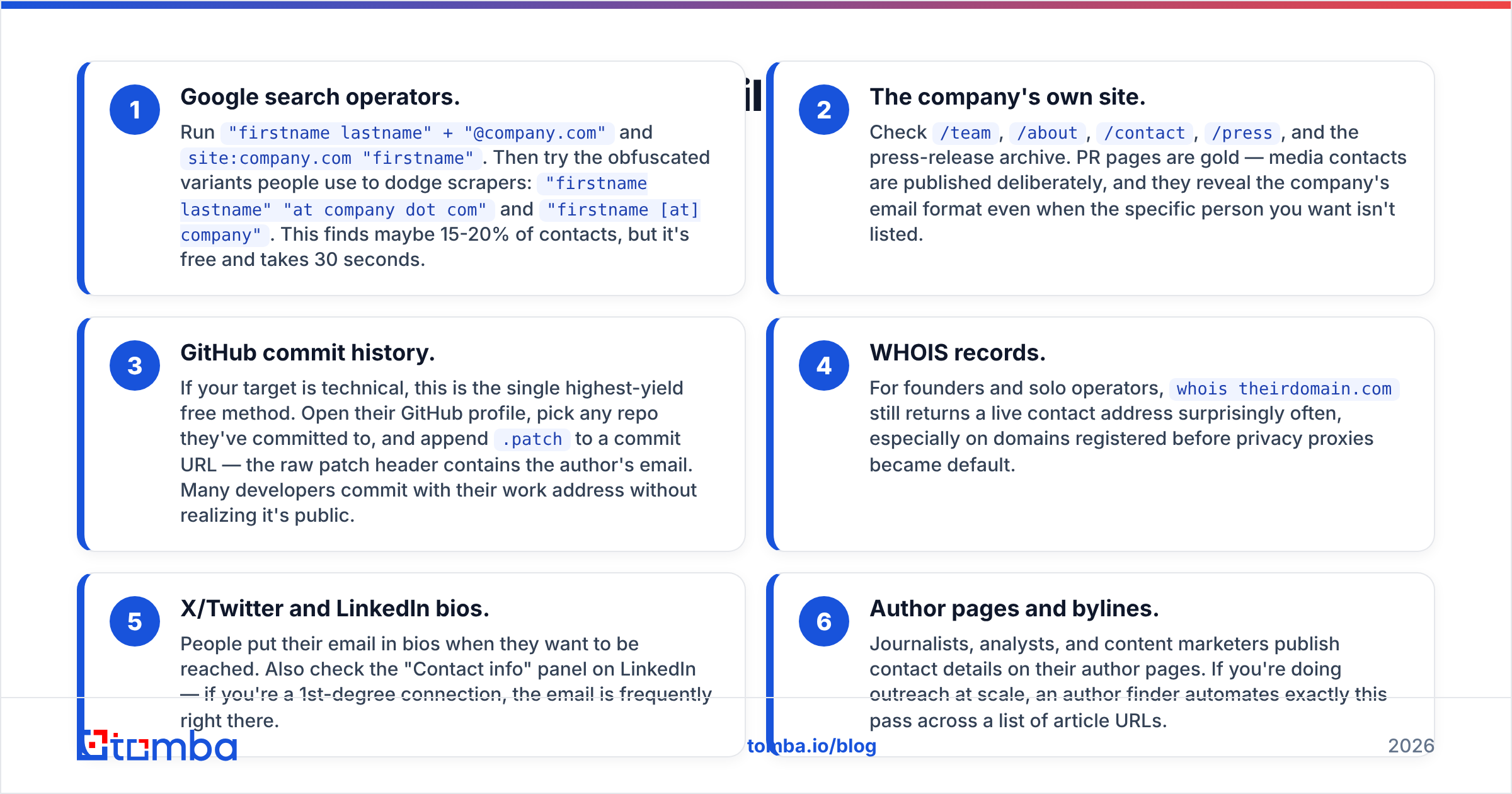
- Google search operators. Run
"firstname lastname" + "@company.com"andsite:company.com "firstname". Then try the variants people use to dodge scrapers:"firstname lastname" "at company dot com"and"firstname [at] company". This finds maybe 15-20% of contacts. It is free and takes 30 seconds. - The company's own site. Check
/team,/about,/contact,/press, and the press-release archive. PR pages are gold. Media contacts are published on purpose, and they reveal the company's email format even when your target is not listed.
Those two are the quick wins. The next pair digs into public records.
- GitHub commit history. If your target is technical, this is the highest-yield free method. Open their GitHub profile, pick any repo they have committed to, and add
.patchto a commit URL. The raw patch header holds the author's email. Many developers commit with their work address without realizing it is public. - WHOIS records. For founders and solo operators,
whois theirdomain.comstill returns a live contact address more often than you would expect. It works best on domains registered before privacy proxies became the default.
The last two rely on people publishing the address themselves.
- X/Twitter and LinkedIn bios. People put their email in a bio when they want to be reached. Check the "Contact info" panel on LinkedIn too. If you are a 1st-degree connection, the address is often right there.
- Author pages and bylines. Journalists, analysts, and content marketers publish contact details on their author pages. For outreach at scale, an author finder runs that pass across a list of article URLs for you.
None of these prove the address is still active. The next sections close that gap.

How does the pattern method work — and how accurate is it?#
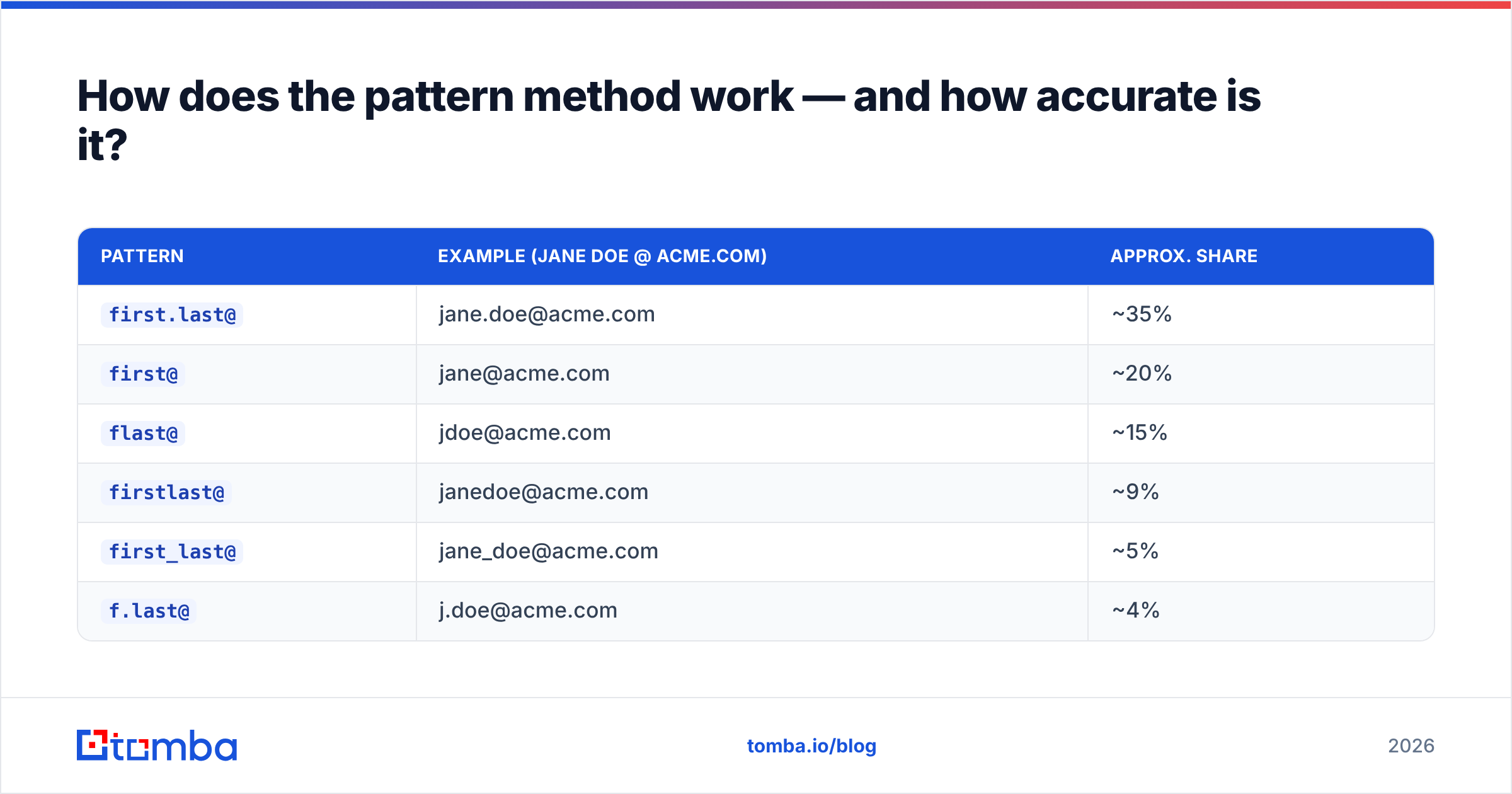
Roughly 80% of companies use one of six email formats. Once you know which one a company uses, you can build any employee's address from their name.
The six dominant patterns, with rough share of B2B domains:
| Pattern | Example (Jane Doe @ acme.com) | Approx. share |
|---|---|---|
first.last@ |
jane.doe@acme.com | ~35% |
first@ |
jane@acme.com | ~20% |
flast@ |
jdoe@acme.com | ~15% |
firstlast@ |
janedoe@acme.com | ~9% |
first_last@ |
jane_doe@acme.com | ~5% |
f.last@ |
j.doe@acme.com | ~4% |
The workflow is simple. Find any confirmed address at the target domain — a support@, a press contact, a colleague's address from a press release. Infer the pattern from it, then apply that pattern to your target's name. A company email pattern checker does the inference step for you, and an email permutator builds every plausible variant when you want to test them all.
Two things break the pattern method:
- Name collisions. Two Jane Does at a 5,000-person company means one of them is
jane.doe2@orjaned@. Patterns cannot tell you which. - Legacy hires. Companies that changed format keep old employees on the old one. A 2011 hire at a company that switched to
first.lastin 2018 may still bejdoe@.
So pattern generation alone gets you to about 70-75% accuracy. That is good, but not good enough to send on. Pair it with verification and you are at 90%+.

Which email finder tools are worth paying for?#
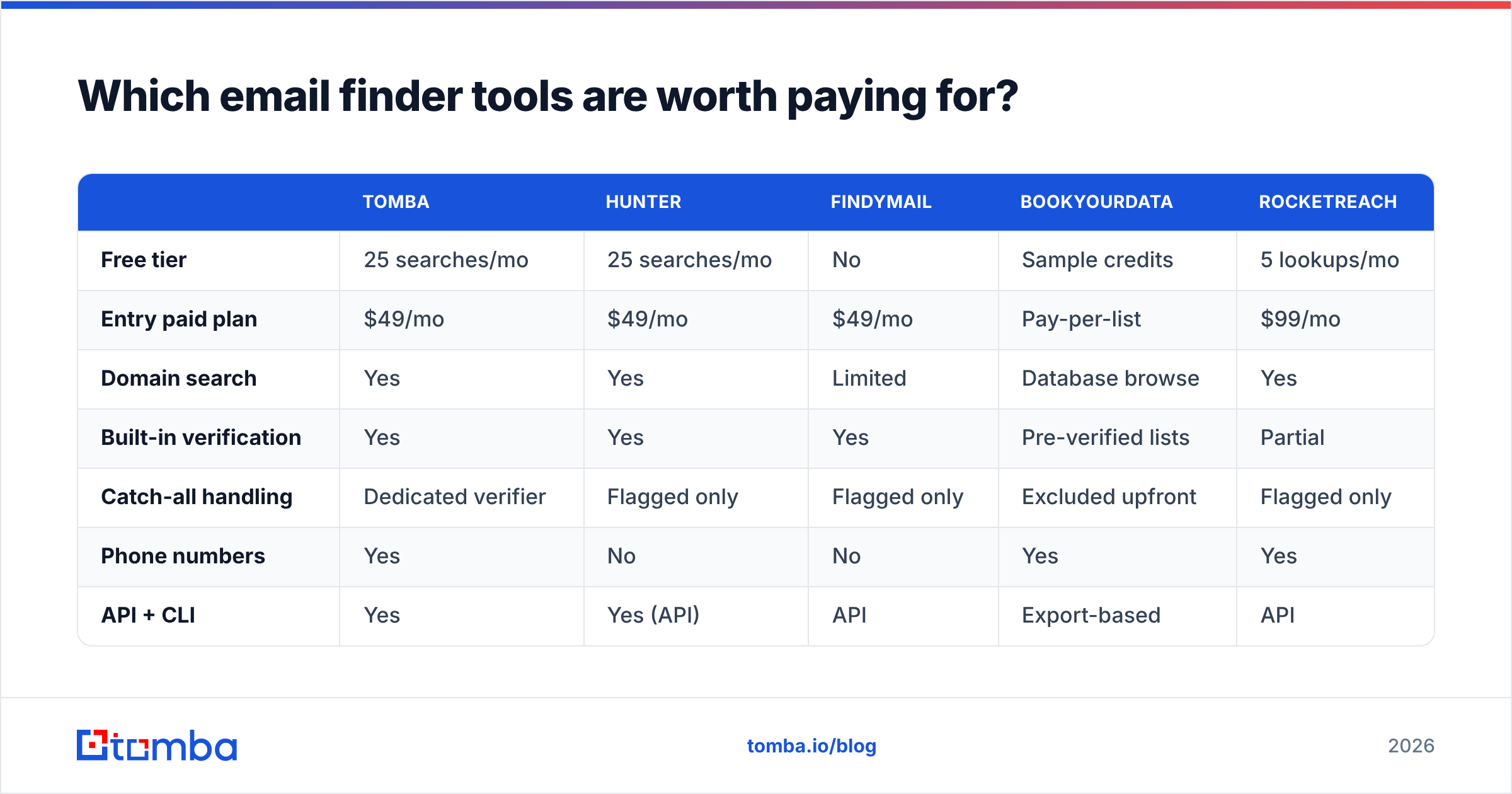
Once you need more than about 20 addresses a month, manual work costs more in time than a tool costs in money. Here is how the main options compare on the things that matter.
| Tomba | Hunter | Findymail | BookYourData | RocketReach | |
|---|---|---|---|---|---|
| Free tier | 25 searches/mo | 25 searches/mo | No | Sample credits | 5 lookups/mo |
| Entry paid plan | $49/mo | $49/mo | $49/mo | Pay-per-list | $99/mo |
| Domain search | Yes | Yes | Limited | Database browse | Yes |
| Built-in verification | Yes | Yes | Yes | Pre-verified lists | Partial |
| Catch-all handling | Dedicated verifier | Flagged only | Flagged only | Excluded upfront | Flagged only |
| Phone numbers | Yes | No | No | Yes | Yes |
| API + CLI | Yes | Yes (API) | API | Export-based | API |
| Best for | Finding + verifying at once | Simple domain lookups | Sales-rep workflows | Buying targeted lists outright | Recruiting / people search |
A few honest notes on that table.
Tomba is strongest when you want find-and-verify in one pass instead of stitching two vendors together. The email finder returns a confidence score with the address, and Tomba pricing runs Free (25/mo), Starter $49/mo, Growth $99/mo, Pro $249/mo, and Enterprise. The catch-all verifier matters more than it sounds. Catch-all domains accept every address at SMTP level, so most tools just flag them and leave you to guess.
Hunter (hunter.io) is the best-known name in the category and its domain search is excellent. Feature parity with Tomba is close at the entry tier. The real difference is how each one treats catch-alls, and whether you need phone data.
BookYourData (bookyourdata.com) works differently. Instead of looking up individuals, you filter a pre-verified database by title, industry, and geography, then buy the resulting list outright. If you need 3,000 contacts matching a firmographic profile rather than 30 named people, that beats per-lookup pricing. Their accuracy guarantee is also one of the more concrete ones on the market.
RocketReach leans toward recruiting, with broader people-search coverage but a higher entry price. If your work is more "sourcing candidates" than "prospecting accounts," it earns its keep. There is a fuller breakdown in our RocketReach alternative comparison.

How do you verify an email address before sending?#
This is the step people skip, and it is the one that costs them.
Verification runs a sequence of checks without sending a real email:
- Syntax check — is the address valid per RFC 5322?
- Domain and MX check — does the domain exist, and does it have mail exchanger records?
- Disposable/role detection — is it a burner domain, or
info@/sales@/admin@? - SMTP handshake — connect to the mail server, ask whether the mailbox exists, then disconnect before sending.
- Catch-all detection — does the server accept every address at this domain? If so, the SMTP result means nothing on its own.
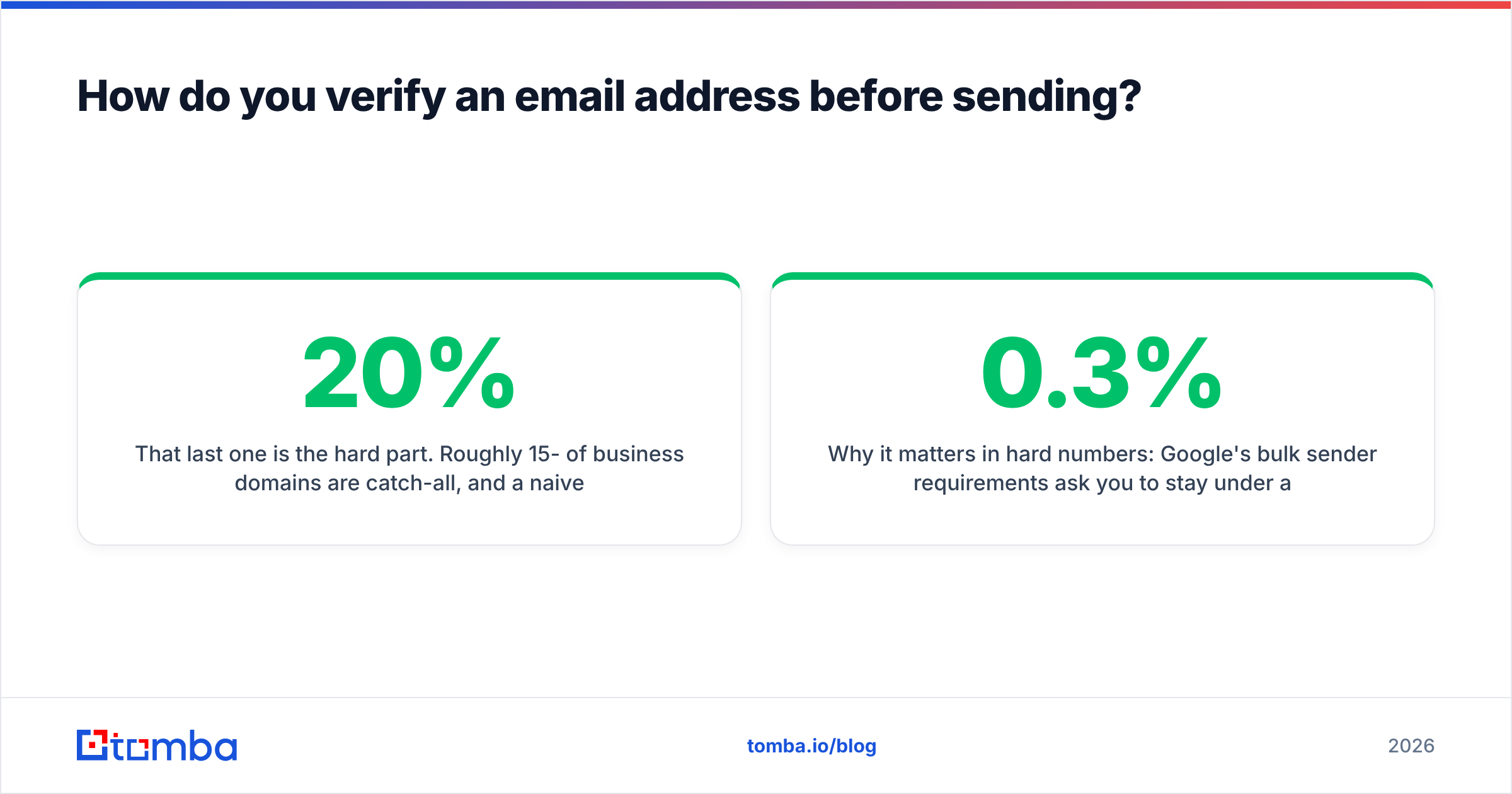
That last one is the hard part. About 15-20% of business domains are catch-all, and a naive verifier returns "valid" for asdkjhasd@theirdomain.com on those. Tools that handle it well use other signals: pattern consistency across known-good addresses at the domain, engagement history, and provider-specific behavior. Run candidates through an email verifier before they reach your sequencer, and use a catch-all finder when a domain flags as accept-all.
Here is why it matters in hard numbers. Google's bulk sender rules ask you to stay under a 0.3% spam complaint rate, and mailbox providers read high bounce rates as a strong negative signal on sender reputation. A list at 8% bounce does not just lose you 8% of sends. It drags down inbox placement for the other 92%. Google's bulk sender guidelines spell out the thresholds you are expected to meet.

What's the fastest workflow for finding emails at scale?#
For anything over 50 contacts, stop working one at a time. The efficient pipeline looks like this.
- Start from the domain, not the person. A domain search returns every discoverable address at a company plus the dominant pattern, in one call. From there you match names to a known format instead of guessing from zero.
- Batch the lookups. Upload your name+domain CSV to a bulk email finder instead of running searches one by one. Same credits, a fraction of the time.
- Verify in the same pass. Do not export, wait, then re-import. Find and verify together so the output is send-ready.
Those three steps get you a clean list. The next three keep it useful.
- Enrich what you keep. Job title, seniority, company size, and tech stack turn a bare address into something you can personalize against. Data enrichment fills those columns.
- Push straight to your stack. The Tomba API or a HubSpot integration removes the CSV shuffle. A new contact lands in the CRM, and the address is found and verified for you.
- Re-verify quarterly. B2B email data decays at roughly 22-30% a year as people change jobs. A list you verified in January is stale by July.
If you are a developer, the Tomba CLI does the same job from a terminal. There is also an MCP server if you want an AI agent running the lookups inside your own tooling.
Is it legal to find someone's email address?#
Short answer: yes for business contacts, with conditions that vary by country.
United States (CAN-SPAM). Finding and emailing a business address is legal. You must not use deceptive headers or subject lines. You must mark the message as an ad where that applies, include a physical postal address, and honor opt-outs within 10 business days. Prior consent is not required.
EU/UK (GDPR + PECR). A work email tied to a named person is personal data. B2B outreach can run under "legitimate interest," but you need a documented balancing test, a clear privacy notice, real business relevance to the person's role, and an easy opt-out. Generic role addresses such as info@ sit in a lighter category. Personal Gmail addresses are much harder to justify.
Canada (CASL). The strictest of the three. It requires express or implied consent before the first message, and implied consent has to come from an existing relationship or a published address with no "no unsolicited email" notice.
The practical takeaway: target work addresses, record where each one came from, make your opt-out one click, and leave personal mailboxes alone. The G2 grid for lead intelligence is a good place to check whether a vendor documents its compliance posture before you buy.
What should you do right after you find the address?#
Finding it is the easy half. Three things decide whether it converts.
- Warm the sending domain. A brand-new domain that blasts 200 cold emails on day one lands in spam, however clean the list is. Ramp up over 3-4 weeks. The email warmup calculator gives you a schedule.
- Check your authentication. SPF, DKIM, and DMARC all need to pass. Run an SPF checker before your first send, not after your first bounce report.
- Write like someone who did the research. A verified address gets you delivered. A specific, relevant first line gets you a reply. Reference something concrete: a launch, a hire, a post they wrote.
Ready to stop guessing?#
That is how to find a persons email address without guesswork. The fastest route from "I know their name and company" to "I have a verified address" is one tool that does both steps. Tomba Email Finder returns the address, the confidence score, and the verification status in a single call — by name, by domain, or in bulk from a CSV. The free tier gives you 25 searches a month, so you can test the hit rate on your own target accounts before you pay. Starter runs $49/mo when you outgrow it.
Try it on ten contacts you already know the answers for. That is the only benchmark that matters.
Related guides#
// get started
Find, verify and enrich your first contacts today
Start on the free plan with 25 searches a month, then scale when your team is ready.
Free plan · No credit card required · GDPR & CCPA
// about the author