How to Find HR Email Addresses: 9 Methods That Work in 2026
HR inboxes are gatekept, aliased, and rotated more than any other department. Here are nine tested methods for finding a real HR email address — plus what to do when only careers@ exists.
TL;DR
- HR teams hide behind aliases (
careers@,hr@,jobs@) more than any other department, so the generic-inbox route has the worst reply rate of every method here. - The fastest reliable path: identify the specific HR person on LinkedIn → confirm the company's email pattern → generate and verify the address → send.
- Pattern guessing alone is a coin flip. Verification is what turns a guess into a deliverable address, and it costs almost nothing compared to a bounce.
- Large enterprises (5,000+ employees) often route all HR mail through an ATS, so a personal address gets you past the queue that a
careers@never escapes. - Budget roughly 60–90 seconds per contact if you do it manually, or seconds per contact with a bulk workflow.
Why is an HR email address harder to find than a sales contact?#
Because HR is the one department that is actively defended.
Think of a company's inbound mail like a building's front desk. Sales and marketing leave their direct lines taped to the window — they want inbound. HR is the office on the fourth floor with a keycard door, because they get resumes, vendor pitches, benefits brokers, recruiting-tool demos, and compliance mail all day. So companies funnel it: one alias, one ATS, one queue.
That creates three practical problems:
- Aliases dominate the public web. Search "company + HR email" and you will find
careers@on the jobs page. That address is monitored by an ATS parser, not a person. - HR titles are wildly inconsistent. "People Operations Lead," "Chief People Officer," "Head of Talent," "HR Business Partner," "Director of Total Rewards" — all HR, none sharing a searchable title string.
- Turnover is high. HR and talent roles churn faster than most functions, so a contact you scraped eight months ago has a meaningful chance of bouncing today.
Which is why the method you pick matters more here than for almost any other function.

What are the fastest ways to find an HR email address?#
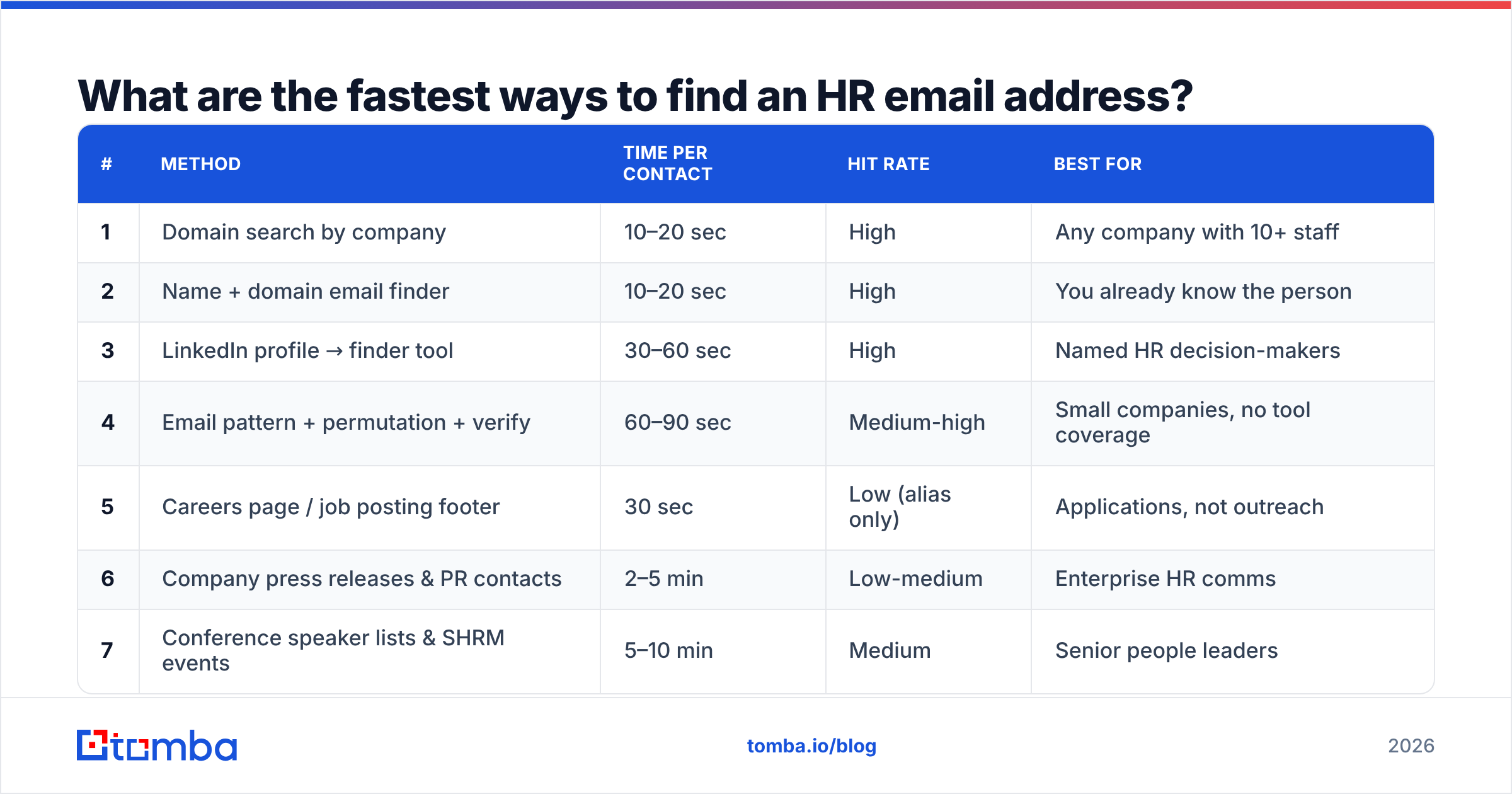
Here are the nine methods that actually produce a working address, ordered roughly by speed-to-result.
| # | Method | Time per contact | Hit rate | Best for |
|---|---|---|---|---|
| 1 | Domain search by company | 10–20 sec | High | Any company with 10+ staff |
| 2 | Name + domain email finder | 10–20 sec | High | You already know the person |
| 3 | LinkedIn profile → finder tool | 30–60 sec | High | Named HR decision-makers |
| 4 | Email pattern + permutation + verify | 60–90 sec | Medium-high | Small companies, no tool coverage |
| 5 | Careers page / job posting footer | 30 sec | Low (alias only) | Applications, not outreach |
| 6 | Company press releases & PR contacts | 2–5 min | Low-medium | Enterprise HR comms |
| 7 | Conference speaker lists & SHRM events | 5–10 min | Medium | Senior people leaders |
| 8 | Mutual-connection intro | Days | Very high | High-value enterprise deals |
| 9 | Website form / general inbox | 1 min | Very low | Last resort |
The first four are what you'll use 90% of the time. The rest are situational.
Method 1: Domain search (start here)#
Domain search flips the question. Instead of "what is Sarah Chen's email at Acme?", you ask "who works at acme.com and what do their addresses look like?" You get back a list of known addresses at that domain, usually with names, job titles, departments, and sources.
Two things make this the strongest opener:
- You discover people you didn't know existed. You may be hunting for a CHRO and find a VP of People Ops who is a better fit.
- You learn the company's email pattern for free. Once you see three addresses at the same domain, the format is obvious —
first.last@,flast@,first@, etc.
Run a domain search on the target company, filter results to HR/People/Talent titles, and you're usually done in under 30 seconds.
Method 2: Name plus domain#
If you already have a name — from LinkedIn, a job posting byline, a press release, a webinar panel — go straight to an email finder. You input "Sarah Chen" + "acme.com" and get back the most probable address with a confidence score and the sources it was seen on.
The confidence score is the part people skip. A 95%+ score with multiple public sources is safe to send. A 60% score with no sources is a pattern guess wearing a suit — verify it before it touches your sending domain.
Method 3: LinkedIn to email#
LinkedIn is where HR people are most findable and least contactable. Search filters make this fast:
- Filter by company and set the keyword to
people OR talent OR "human resources" OR recruiting - Filter by title for the specific seniority you need (Manager vs. Director vs. VP)
- Check "Posted about" — HR leaders who post about hiring are more likely to answer cold mail
Once you have the profile, a LinkedIn finder resolves the profile URL to a business email. This is the workhorse for talent-tool vendors, benefits brokers, and recruiting agencies.
Method 4: Pattern plus permutation plus verify#
For small companies with thin data coverage, do it manually:
- Find one known address at the domain. Any address. A support ticket, a press contact, a GitHub commit, a PDF footer.
- Extract the pattern.
jane.doe@acme.commeansfirst.last@. - Apply it to your target's name. Use an email permutator to generate all plausible variants if you're unsure.
- Verify before sending. Run each candidate through an email verifier and only keep the deliverable ones.
Skipping step 4 is the single most common cause of the "my HR outreach campaign got blocked" post you see on r/sales. Bounces above roughly 3% start damaging your sender reputation, and HR domains at large companies are exactly the kind of well-defended infrastructure that punishes sloppy lists.
Should you ever email careers@ or hr@?#
Only if you're applying for a job, and even then, not exclusively.
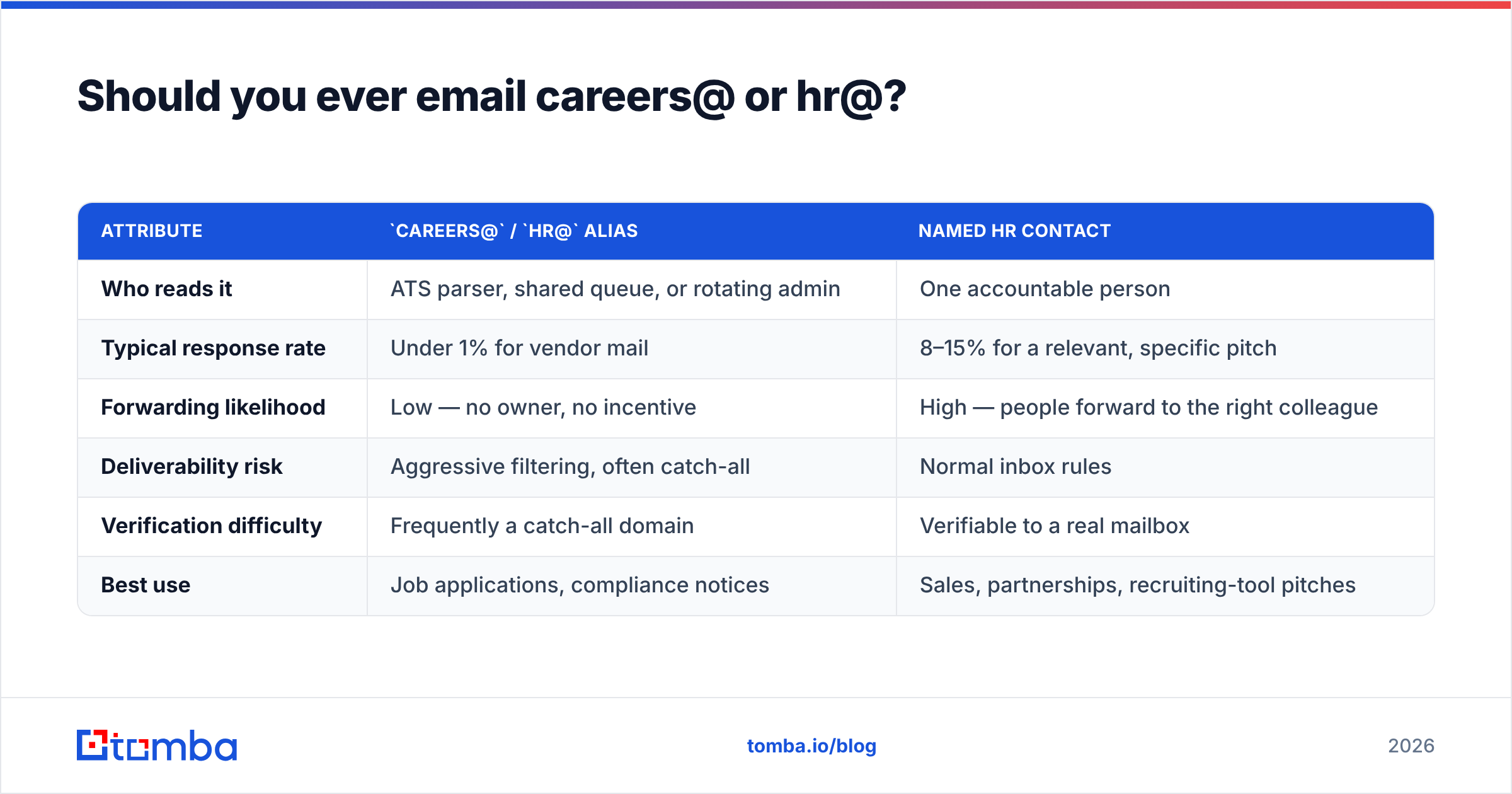
Generic HR aliases have three problems for anyone doing outreach:
| Attribute | careers@ / hr@ alias |
Named HR contact |
|---|---|---|
| Who reads it | ATS parser, shared queue, or rotating admin | One accountable person |
| Typical response rate | Under 1% for vendor mail | 8–15% for a relevant, specific pitch |
| Forwarding likelihood | Low — no owner, no incentive | High — people forward to the right colleague |
| Deliverability risk | Aggressive filtering, often catch-all | Normal inbox rules |
| Verification difficulty | Frequently a catch-all domain | Verifiable to a real mailbox |
| Best use | Job applications, compliance notices | Sales, partnerships, recruiting-tool pitches |
One nuance: many alias inboxes sit on catch-all domains, which accept every address at the domain and sort it later. Standard verification returns "unknown" for those. That's what a catch-all verifier is for — it applies additional signals to estimate whether the specific mailbox exists rather than just confirming the domain swallows everything.
If the only address you can get is an alias, do this: send to the alias and find one named person in the department. The alias covers your compliance base; the named person is who actually replies.
How do you verify an HR email address before you send?#
Treat verification as a three-layer check, not a single yes/no.
- Syntax and domain. Does the address parse correctly and does the domain have valid MX records? Free tools handle this — a free email checker covers it in one click.
- Mailbox existence. An SMTP-level check that confirms the specific mailbox accepts mail. This is where most bad guesses die.
- Risk classification. Is it a role account (
hr@), a disposable domain, a catch-all, or a known spam trap? Role accounts aren't invalid, but they behave differently and should be segmented away from your main sending domain.
Run all three before a campaign, not after. And re-verify anything older than about 90 days — HR turnover means a list that was 96% valid in January can be 88% valid by April.

What tools actually help with HR contact discovery?#
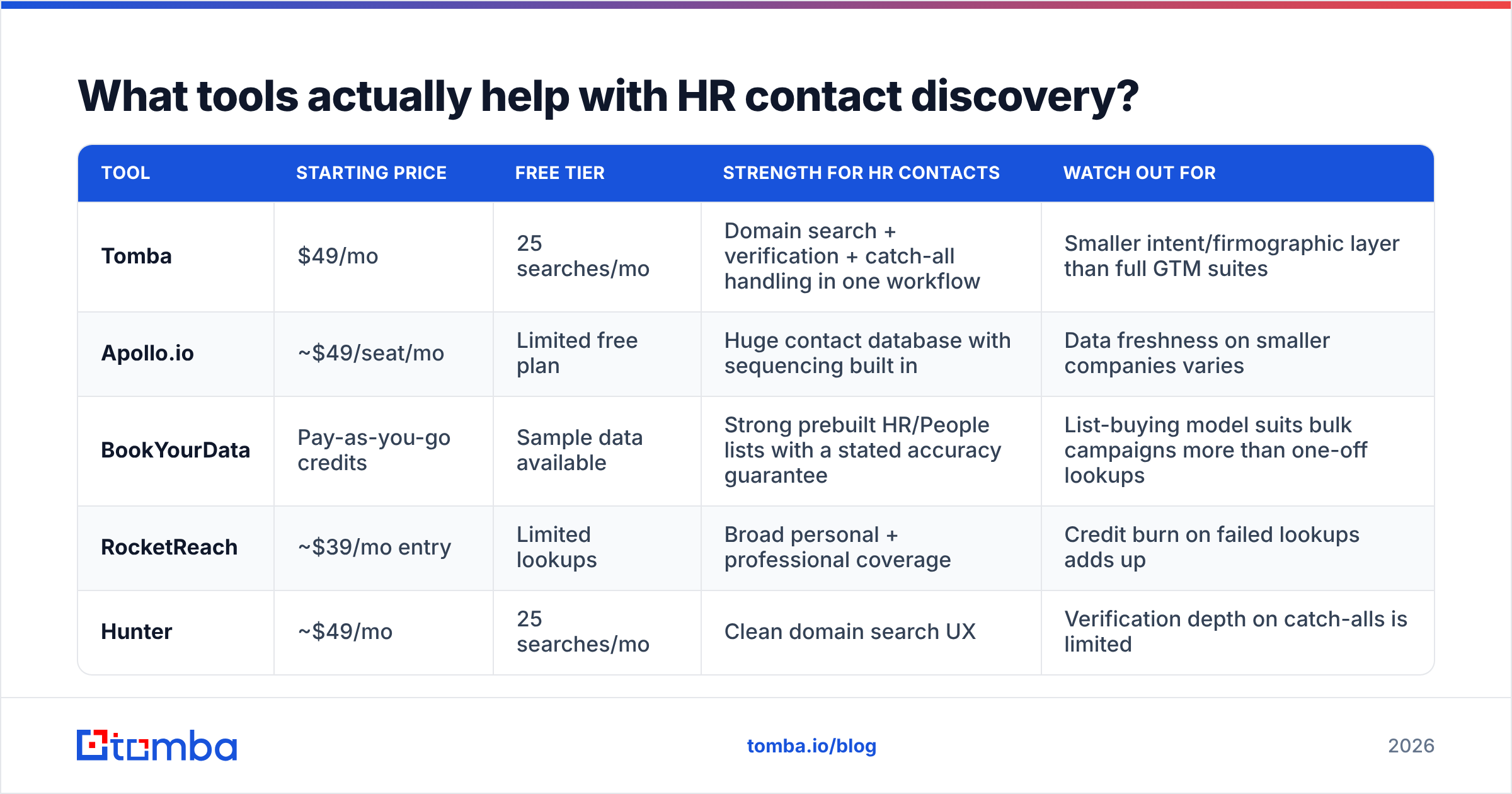
Most B2B contact tools will find an HR email. They differ on coverage, verification depth, and price. Here's an honest read on the main options.
| Tool | Starting price | Free tier | Strength for HR contacts | Watch out for |
|---|---|---|---|---|
| Tomba | $49/mo | 25 searches/mo | Domain search + verification + catch-all handling in one workflow | Smaller intent/firmographic layer than full GTM suites |
| Apollo.io | ~$49/seat/mo | Limited free plan | Huge contact database with sequencing built in | Data freshness on smaller companies varies |
| BookYourData | Pay-as-you-go credits | Sample data available | Strong prebuilt HR/People lists with a stated accuracy guarantee | List-buying model suits bulk campaigns more than one-off lookups |
| RocketReach | ~$39/mo entry | Limited lookups | Broad personal + professional coverage | Credit burn on failed lookups adds up |
| Hunter | ~$49/mo | 25 searches/mo | Clean domain search UX | Verification depth on catch-alls is limited |
A few honest notes on this table:
- Tomba is the tool I'd reach for when the job is "find and verify a specific person's work email fast." Tomba pricing runs Free (25 searches/mo), Starter $49/mo, Growth $99/mo, Pro $249/mo, and Enterprise custom, and every plan includes verification rather than charging for it separately. If you already use another platform, the Apollo alternative comparison covers the trade-offs in more depth.
- BookYourData is genuinely good at what it does differently — if you want 5,000 HR directors in the US mid-market as a one-time purchase rather than looking them up one at a time, that model fits better than a search-credit model. Different job, different tool.
- Apollo wins when you need the sequencing engine and the contact data in the same seat. It loses when you need surgical accuracy on a specific hard-to-find person.
Whatever you choose, check third-party reviews on G2 rather than vendor-published accuracy claims. Every vendor's own benchmark shows that vendor winning.
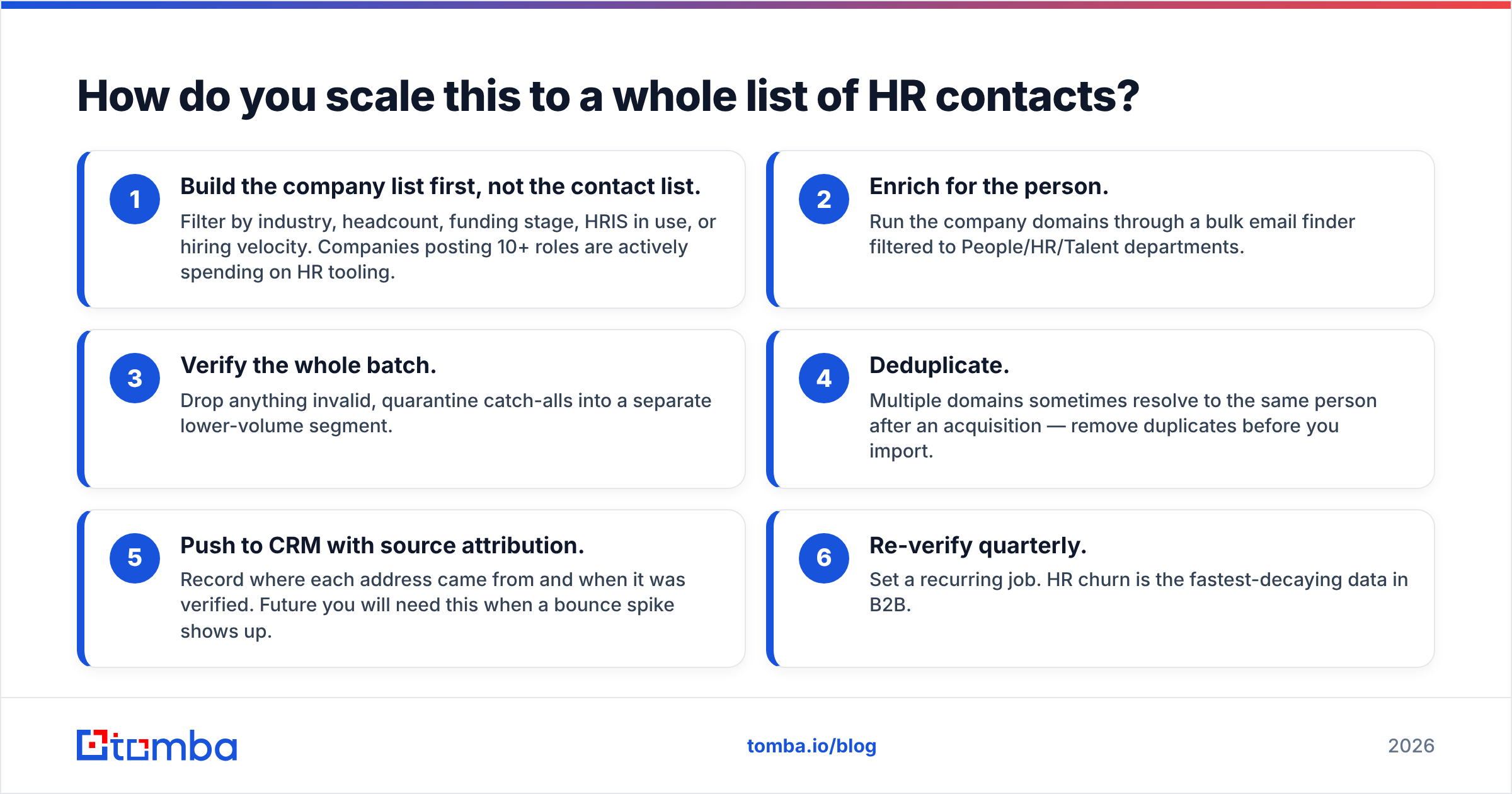
How do you scale this to a whole list of HR contacts?#
Manual lookup works to about 50 contacts. Past that, switch to a batch workflow.
- Build the company list first, not the contact list. Filter by industry, headcount, funding stage, HRIS in use, or hiring velocity. Companies posting 10+ roles are actively spending on HR tooling.
- Enrich for the person. Run the company domains through a bulk email finder filtered to People/HR/Talent departments.
- Verify the whole batch. Drop anything invalid, quarantine catch-alls into a separate lower-volume segment.
- Deduplicate. Multiple domains sometimes resolve to the same person after an acquisition — remove duplicates before you import.
- Push to CRM with source attribution. Record where each address came from and when it was verified. Future you will need this when a bounce spike shows up.
- Re-verify quarterly. Set a recurring job. HR churn is the fastest-decaying data in B2B.
If you're running this from a spreadsheet, the Google Sheets add-on and the Tomba API both handle the same job — pick based on whether your team lives in a sheet or in code.
What are the legal and compliance limits?#
Short version: finding a business email is legal in most jurisdictions; what you do next is regulated.
- GDPR (EU/UK). Business contact data is personal data. You need a lawful basis — legitimate interest usually works for B2B outreach if the message is relevant to the person's job, but you must be able to document the assessment, honor deletion requests, and disclose your source. The ICO's direct marketing guidance is the readable primary source.
- CAN-SPAM (US). Requires accurate headers, a real physical address, and a working unsubscribe. It does not require prior consent for B2B mail.
- CASL (Canada). Stricter — generally requires express or implied consent before the first message.
Practical rule: if you couldn't explain to the recipient in one sentence why your message is relevant to their actual job, don't send it. That standard keeps you compliant and improves reply rates at the same time.
What should your first email to an HR contact say?#
Three things separate HR outreach that works from the noise in the careers@ queue:
- Reference a hiring signal, not a generic pain point. "You've posted 14 engineering roles this quarter" beats "struggling with retention?"
- Name the metric they own. Time-to-fill, offer-acceptance rate, first-year attrition, benefits cost per employee. HR leaders are measured on specific numbers; speak to one.
- Keep it under 90 words with one ask. HR inboxes are the most cluttered in the building.
If you need a starting structure, the cold email templates library has HR-specific frames you can adapt, and it's worth running your draft through a spam checker before the first send — recruiting and benefits language triggers filters more often than most categories.
Get the right HR address on the first try#
Finding an HR email address comes down to a simple sequence: identify the person, confirm the domain pattern, verify the mailbox, then send something worth reading. Skip the verification step and you spend your sender reputation on guesses. Skip the person-identification step and you're writing to an ATS parser.
The Tomba Email Finder handles the first three steps in one place — search by domain to surface the HR team, resolve a specific name to an address with a confidence score and sources, and verify the mailbox before it enters your sequence. The free tier gives you 25 searches a month, which is enough to test the workflow against a handful of target companies before committing to a plan.
Find the person. Verify the address. Then earn the reply.
Related guides#
// get started
Find, verify and enrich your first contacts today
Start on the free plan with 25 searches a month, then scale when your team is ready.
Free plan · No credit card required · GDPR & CCPA
// about the author