How to Find Leads in 2026: 9 Methods That Still Work
Nine tested ways to find B2B leads in 2026 — from intent signals to domain search — with a cost-per-lead comparison and the exact stack that turns a name into a verified inbox.
TL;DR
- Most teams do not have a lead-finding problem — they have a lead-qualifying problem. Finding 5,000 contacts takes an afternoon; finding 300 who can actually buy takes a method.
- The nine methods below split into three buckets: signal-based (highest intent, lowest volume), database-based (highest volume, needs filtering), and manual/relationship (lowest volume, highest conversion).
- Cost per qualified lead is the only number worth tracking. A $0.02 scraped contact that bounces costs more than a $0.40 verified one.
- Verify before you send. Bounce rate above 3% starts damaging your sending domain, and no amount of clever copy fixes a burned domain.
- The practical 2026 stack: one intent source + one database source + one enrichment/verification layer. Three tools, not eleven.
What does "finding leads" actually mean in 2026?#
A lead is a person who (a) fits your ICP, (b) has a reachable contact point, and (c) has some plausible reason to care right now. Miss any of the three and you don't have a lead — you have a row in a spreadsheet.
That distinction matters more in 2026 than it did five years ago, because the supply of raw contact data has collapsed in price while the supply of attention has not. Anyone can pull 10,000 CFOs at manufacturing companies. Almost nobody can pull 200 CFOs at manufacturing companies who just posted a job for an FP&A analyst, changed ERP vendors, or opened your pricing page twice last week.
So when you ask how to find leads, you're really asking three sub-questions:
- Where does the raw list come from? (databases, scrapers, directories, communities)
- How do I narrow it to people with a trigger? (intent signals, hiring data, tech stack changes, funding)
- How do I get a contact point that actually delivers? (email finding, verification, phone lookup)
Skip step 2 and you're doing spray-and-pray. Skip step 3 and your best-targeted campaign lands in a spam folder.

Which lead-finding methods actually work?#
Here are the nine that still produce pipeline in 2026, ranked loosely by intent quality rather than volume.
1. Website visitor identification. Someone read your pricing page for four minutes and left without filling anything in. That is the highest-intent, lowest-effort lead in existence, and roughly 97% of traffic leaves anonymous. Reverse-IP and pixel-based tools resolve a portion of that traffic to companies (and sometimes people). Volume is small; conversion is the best of any channel.
2. Job-posting signals. Hiring is the cheapest public proxy for budget. A company posting three SDR roles is buying sales tooling. A company posting a "Head of Data" is about to rebuild its warehouse. Scrape boards, filter to your triggers, then find the hiring manager — not the recruiter.
3. Technographic triggers. If your product replaces or complements a specific tool, finding companies that use that tool is the whole game. Site-tag detection reveals what's running on a domain, and a tech-stack change within the last 90 days is a strong buying window.
4. Funding and expansion news. Series A and B announcements still work, but everyone runs the same play, so the inbox is crowded. The better version: filter for funding plus a second signal (new office, new exec hire, new market).
5. B2B database search. The workhorse. Filter a contact database by industry, headcount, title, geography, and technology, then export. Volume is effectively unlimited; quality depends entirely on the vendor's refresh cadence.
6. Domain search. You know the company, you need the people. A domain search returns the verified addresses at a domain along with the company's email pattern, which is how you go from "we want to sell to Acme" to "here are Acme's six decision-makers."
7. LinkedIn sourcing. Sales Navigator remains the best filter in B2B, and a poor contact source — it deliberately hides email. The workflow that works is Navigator for targeting, then a LinkedIn finder to resolve profiles to business inboxes.
8. Communities, Slack groups, and events. Slow, unscalable, and the highest-converting channel most teams ignore. Attendee lists, speaker rosters, and public member directories are legitimate sources — the value is that you have a real reason to reach out.
9. Content and author sourcing. If you sell to marketers, developers, or analysts, the people publishing in your space are pre-qualified. An author finder pulls the contact behind a byline, which beats guessing at a generic editor@ address.
How do these methods compare on cost and effort?#
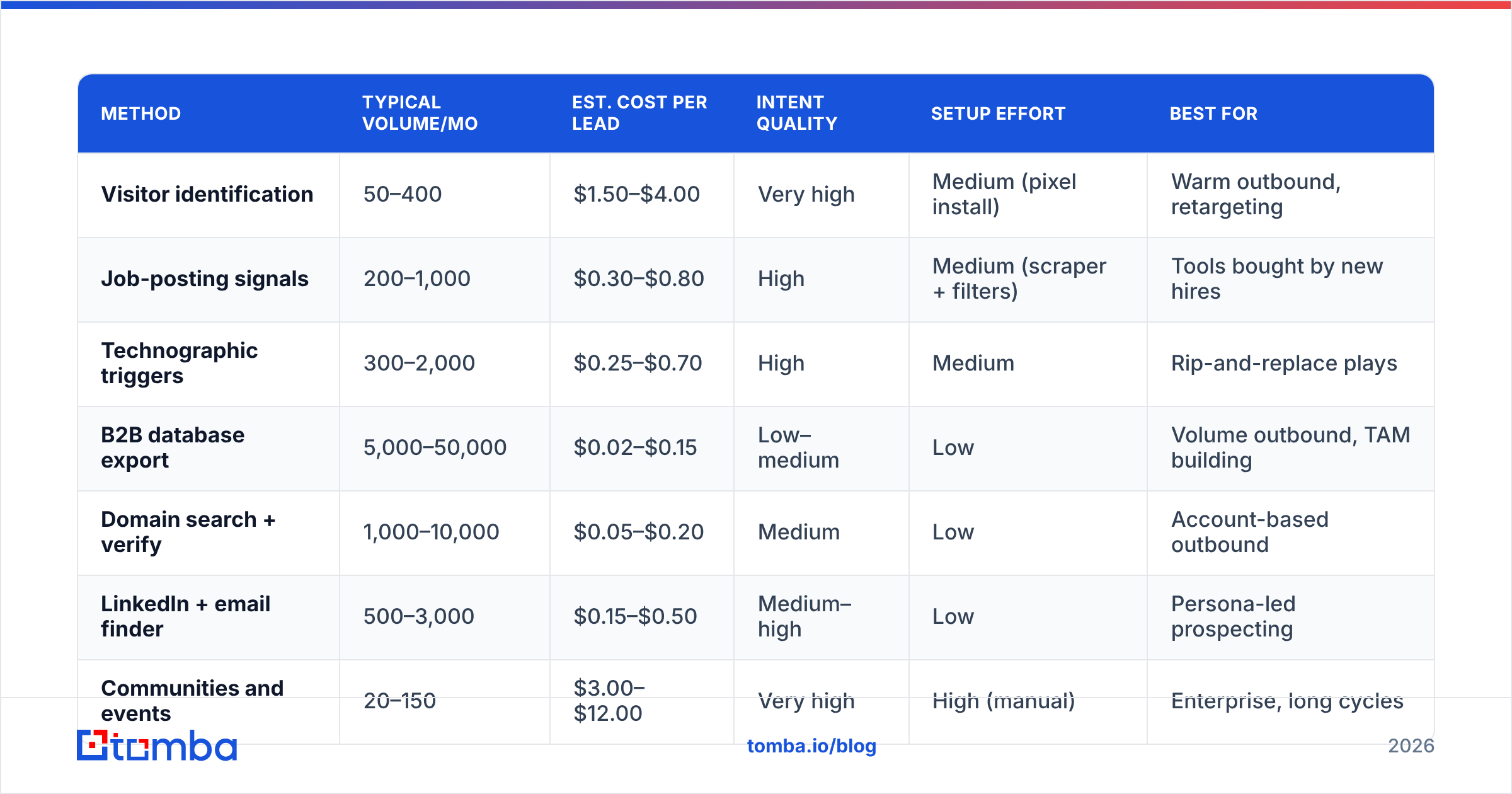
Raw contact cost is misleading. What matters is cost per qualified, deliverable, replied-to lead. Here's how the main approaches stack up in practice for a typical B2B SaaS team.
| Method | Typical volume/mo | Est. cost per lead | Intent quality | Setup effort | Best for |
|---|---|---|---|---|---|
| Visitor identification | 50–400 | $1.50–$4.00 | Very high | Medium (pixel install) | Warm outbound, retargeting |
| Job-posting signals | 200–1,000 | $0.30–$0.80 | High | Medium (scraper + filters) | Tools bought by new hires |
| Technographic triggers | 300–2,000 | $0.25–$0.70 | High | Medium | Rip-and-replace plays |
| B2B database export | 5,000–50,000 | $0.02–$0.15 | Low–medium | Low | Volume outbound, TAM building |
| Domain search + verify | 1,000–10,000 | $0.05–$0.20 | Medium | Low | Account-based outbound |
| LinkedIn + email finder | 500–3,000 | $0.15–$0.50 | Medium–high | Low | Persona-led prospecting |
| Communities and events | 20–150 | $3.00–$12.00 | Very high | High (manual) | Enterprise, long cycles |
| Purchased static list | 10,000+ | $0.01–$0.05 | Very low | Low | Almost nothing — see below |
Two things jump out. First, the cheapest row is also the worst row. Static purchased lists decay at roughly 2–2.5% per month as people change jobs, which means a list that's a year old is about a quarter dead before you send anything. Second, the highest-converting methods are the ones you cannot fully automate. That is not a coincidence.
The pragmatic answer is a barbell: run one high-intent, low-volume method (visitor ID or job signals) alongside one high-volume method (database or domain search), and let the enrichment layer serve both.
How do you turn a name into a contact that actually delivers?#
This is the step where most lead-gen efforts quietly fail. You have a name and a company. You need an inbox that accepts mail.
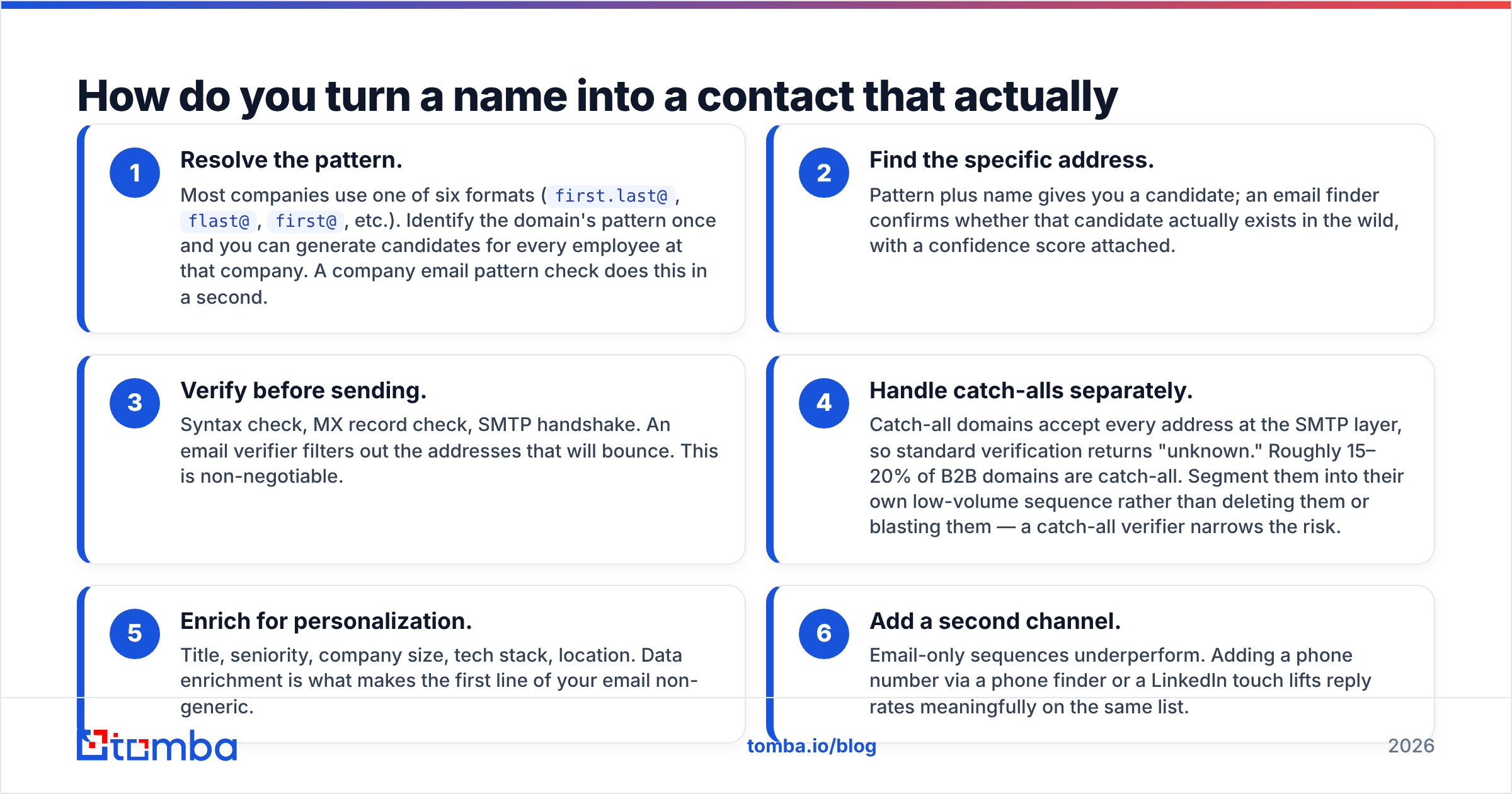
The workflow, in order:
- Resolve the pattern. Most companies use one of six formats (
first.last@,flast@,first@, etc.). Identify the domain's pattern once and you can generate candidates for every employee at that company. A company email pattern check does this in a second. - Find the specific address. Pattern plus name gives you a candidate; an email finder confirms whether that candidate actually exists in the wild, with a confidence score attached.
- Verify before sending. Syntax check, MX record check, SMTP handshake. An email verifier filters out the addresses that will bounce. This is non-negotiable.
- Handle catch-alls separately. Catch-all domains accept every address at the SMTP layer, so standard verification returns "unknown." Roughly 15–20% of B2B domains are catch-all. Segment them into their own low-volume sequence rather than deleting them or blasting them — a catch-all verifier narrows the risk.
- Enrich for personalization. Title, seniority, company size, tech stack, location. Data enrichment is what makes the first line of your email non-generic.
- Add a second channel. Email-only sequences underperform. Adding a phone number via a phone finder or a LinkedIn touch lifts reply rates meaningfully on the same list.

Why does verification matter more than list size?#
Because your sending domain is a finite, damageable asset.
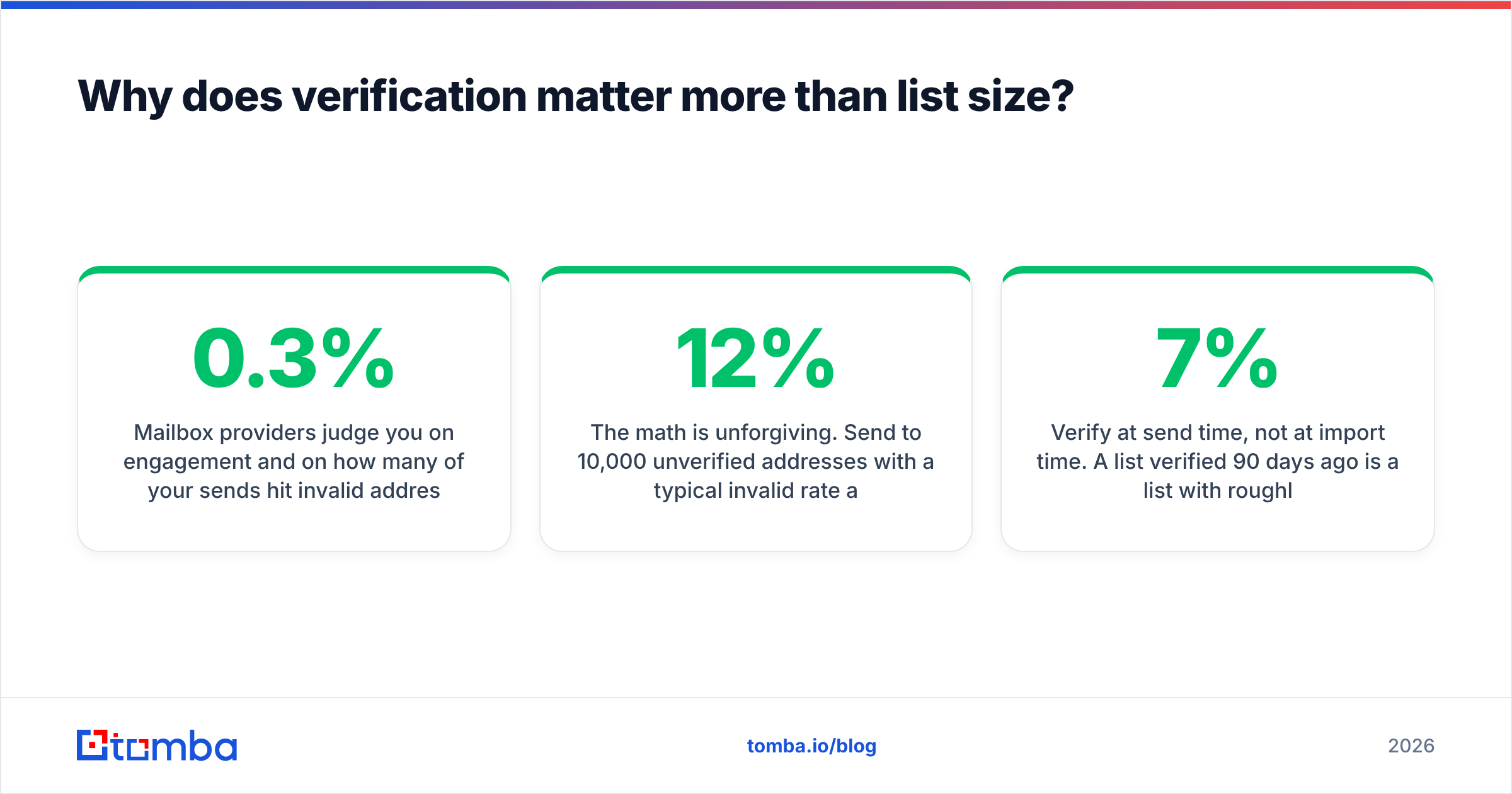
Mailbox providers judge you on engagement and on how many of your sends hit invalid addresses. Google and Yahoo's bulk sender requirements — which took effect in 2024 and have only tightened since — put a hard spam-complaint ceiling of 0.3% on high-volume senders and require authenticated sending. Bounce rates above roughly 3% are treated as a signal that you don't know who you're mailing.
The math is unforgiving. Send to 10,000 unverified addresses with a typical 12% invalid rate and you've generated 1,200 bounces on one campaign. That single send can knock your domain into filtered territory for weeks — and every subsequent campaign, including to your good addresses, underperforms. You didn't save money by skipping verification; you paid for it in inbox placement.
Three habits that protect the asset:
- Verify at send time, not at import time. A list verified 90 days ago is a list with roughly 7% rot.
- Warm new domains properly before volume sending, and keep an eye on authentication with an SPF checker and a blacklist checker.
- Cap daily volume per mailbox. More mailboxes at low volume beats one mailbox at high volume, every time.
If you want the underlying mechanics, Google's own sender guidelines are the primary source, and HubSpot's research on email benchmarks is a reasonable sanity check on what "normal" looks like.
Which tools should you actually pay for?#
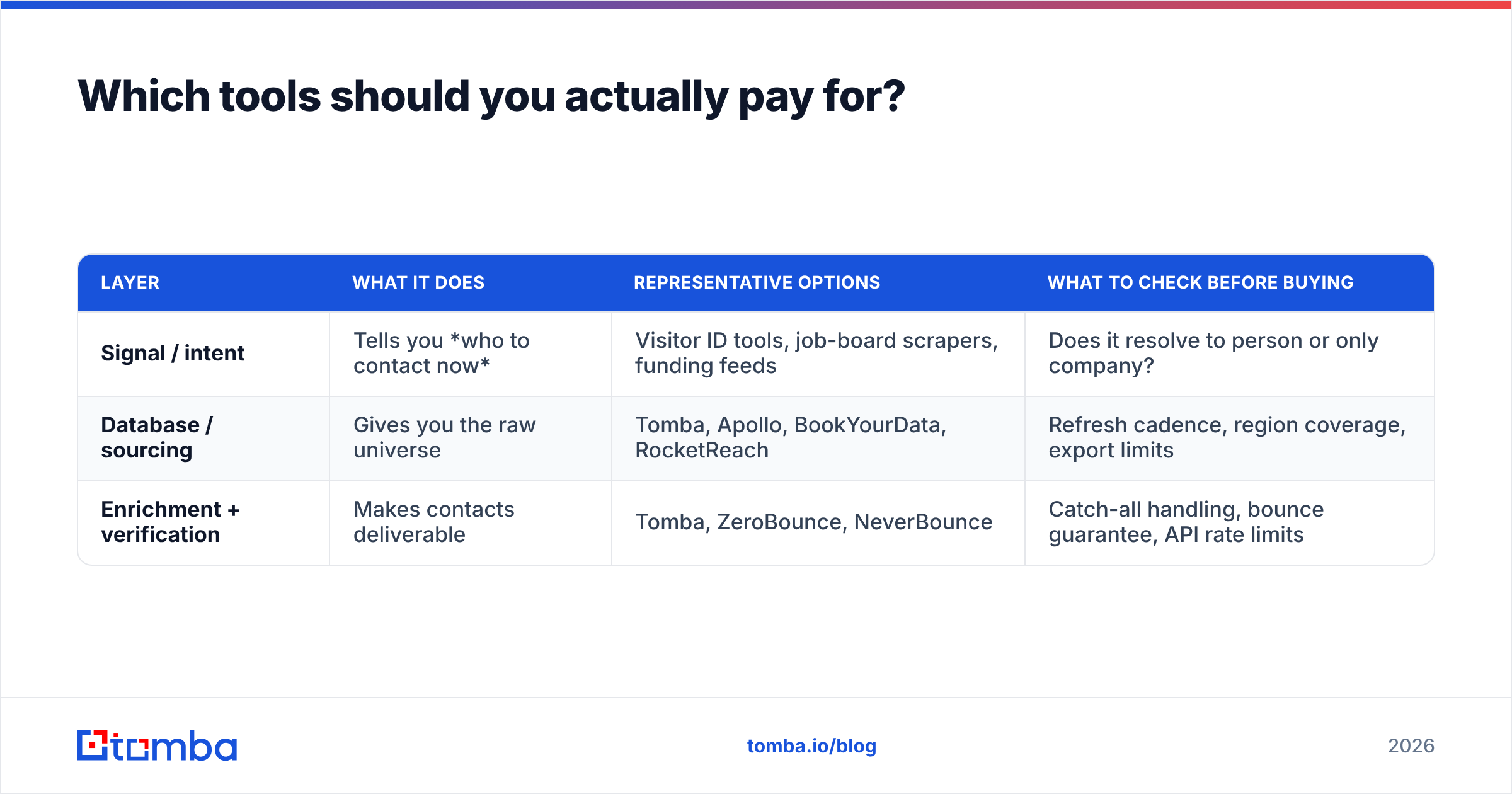
Ignore the 40-tool stack diagrams. Most teams need three layers, and one tool can often cover two of them.
| Layer | What it does | Representative options | What to check before buying |
|---|---|---|---|
| Signal / intent | Tells you who to contact now | Visitor ID tools, job-board scrapers, funding feeds | Does it resolve to person or only company? |
| Database / sourcing | Gives you the raw universe | Tomba, Apollo, BookYourData, RocketReach | Refresh cadence, region coverage, export limits |
| Enrichment + verification | Makes contacts deliverable | Tomba, ZeroBounce, NeverBounce | Catch-all handling, bounce guarantee, API rate limits |
A few honest notes on the sourcing layer. Apollo bundles a database with a sequencer, which is convenient if you want one bill and acceptable if you don't mind that the data and the sending are coupled; teams that outgrow the sequencer often look for an Apollo alternative rather than paying for a feature set they've replaced. BookYourData takes a different approach — pay-as-you-go, prebuilt lists with a stated accuracy guarantee — which suits teams that want a defined list for a defined campaign without a recurring seat cost. RocketReach is strong on individual lookups and person-level coverage, less so on bulk economics.
Tomba sits in the sourcing-plus-verification lane: domain search, email finding, verification, catch-all handling, phone lookup, and enrichment behind one API, with a free tier at 25 searches/month and paid plans starting at $49/mo (Growth $99/mo, Pro $249/mo). The reason to consolidate sourcing and verification is boring but real: when finding and verifying happen in one pass, you don't pay twice for the same contact, and you don't re-import CSVs between vendors.
Whatever you pick, run the same test before committing budget: take 100 contacts you already know are correct — current customers, past deals, people in your CRM — and run them through the tool's finder. Measure match rate and accuracy against ground truth. Vendor-published accuracy numbers are marketing; your own 100-row test is data. Compare shortlists on G2 if you want third-party review volume, but treat the test as the deciding vote.
What does a working weekly lead-finding routine look like?#
Volume without rhythm produces nothing. Here's a cadence that a two-person outbound team can actually sustain.
Monday — build the list. Pull the week's signals first: new job postings matching your triggers, last week's visitor-ID resolutions, any funding or tech-stack changes. That's your priority tier, usually 30–80 accounts. Then top up with a database or bulk email finder pull to reach your weekly account target.
Tuesday — enrich and verify. Run the full list through finding and verification in one pass. Segment into three buckets: valid, catch-all, invalid. Delete invalid. Route catch-all to a low-volume, high-personalization track.
Wednesday — write, don't template. Priority-tier accounts get a real first line referencing the actual signal. Volume tier gets a strong template with two variable fields. If you can't name why you're emailing someone, they're not a lead yet.
Thursday — send and add the second channel. Email goes out; the priority tier also gets a LinkedIn view or connection and, where you have one, a call attempt.
Friday — measure and prune. Track bounce rate, reply rate, and positive-reply rate by source. Any source with a bounce rate above 3% or a positive-reply rate below 0.5% gets cut or fixed next week. This is the step everyone skips, and it's the one that compounds.
Run that for six weeks and you'll know exactly which of the nine methods works for your specific ICP — which is a better answer than any blog post, including this one, can give you.
Common mistakes worth avoiding#
- Optimizing for list size. A 20,000-contact list with 40% junk performs worse than a 4,000-contact verified list, because the junk poisons deliverability for the good contacts.
- Buying a static list and treating it as an asset. Contact data is a subscription, not a purchase. It decays whether or not you use it.
- Sourcing before defining the trigger. If you don't know what event makes someone need you, no amount of filtering will help.
- One channel. Email-only, LinkedIn-only, and phone-only all cap out. Two channels roughly doubles connect rates on the same list.
- No feedback loop. If you're not tracking reply quality by lead source, you're paying for all nine methods and learning from none of them.
Where should you start?#
Start with the layer that unblocks everything else: getting from a company or a name to a verified, deliverable contact. Signals are useless if you can't reach the person, and databases are useless if half the exports bounce.
Tomba's Email Finder covers that layer directly — find addresses by domain, name, or company, verify them in the same pass, handle catch-all domains explicitly, and push everything through an API or the Chrome extension into whatever CRM you already run. The free tier gives you 25 searches a month, which is enough to run the 100-contact accuracy test on a subset and see the match rate for your own market before you commit to a plan. Check Tomba pricing when you're ready to scale past that.
Pick two methods from the nine. Verify everything. Measure by source. That's the whole discipline.
Related guides#
// get started
Find, verify and enrich your first contacts today
Start on the free plan with 25 searches a month, then scale when your team is ready.
Free plan · No credit card required · GDPR & CCPA
// about the author