How to Find People's Email Address: 9 Methods That Work
Nine tested ways to find anyone's professional email address in 2026 — from free manual tricks to bulk API lookups — plus which methods actually survive verification.
TL;DR
- How to find people's email address, fastest path: a domain-pattern lookup. Work out how a company builds its addresses, apply that to your target's name, then verify before you send.
- Free manual methods (Google operators, GitHub commits, WHOIS, personal sites) work but rarely scale past a handful of contacts per hour.
- Dedicated email finders return an address in about a second, plus a confidence score. That score is the part that protects your sender reputation.
- Never send to an unverified guess. A 5% bounce rate is enough to get a fresh domain throttled by Google and Microsoft.
- For one-off lookups, use free tools and manual research. For 50+ contacts, use bulk lookup or an API.
How to find people's email address is a solved problem for about 80% of B2B targets. The other 20% stay genuinely hard. This guide covers both halves: the free methods that cost you time, the paid methods that cost you money, and how to tell which one your case calls for.
What does "finding an email address" actually mean?#
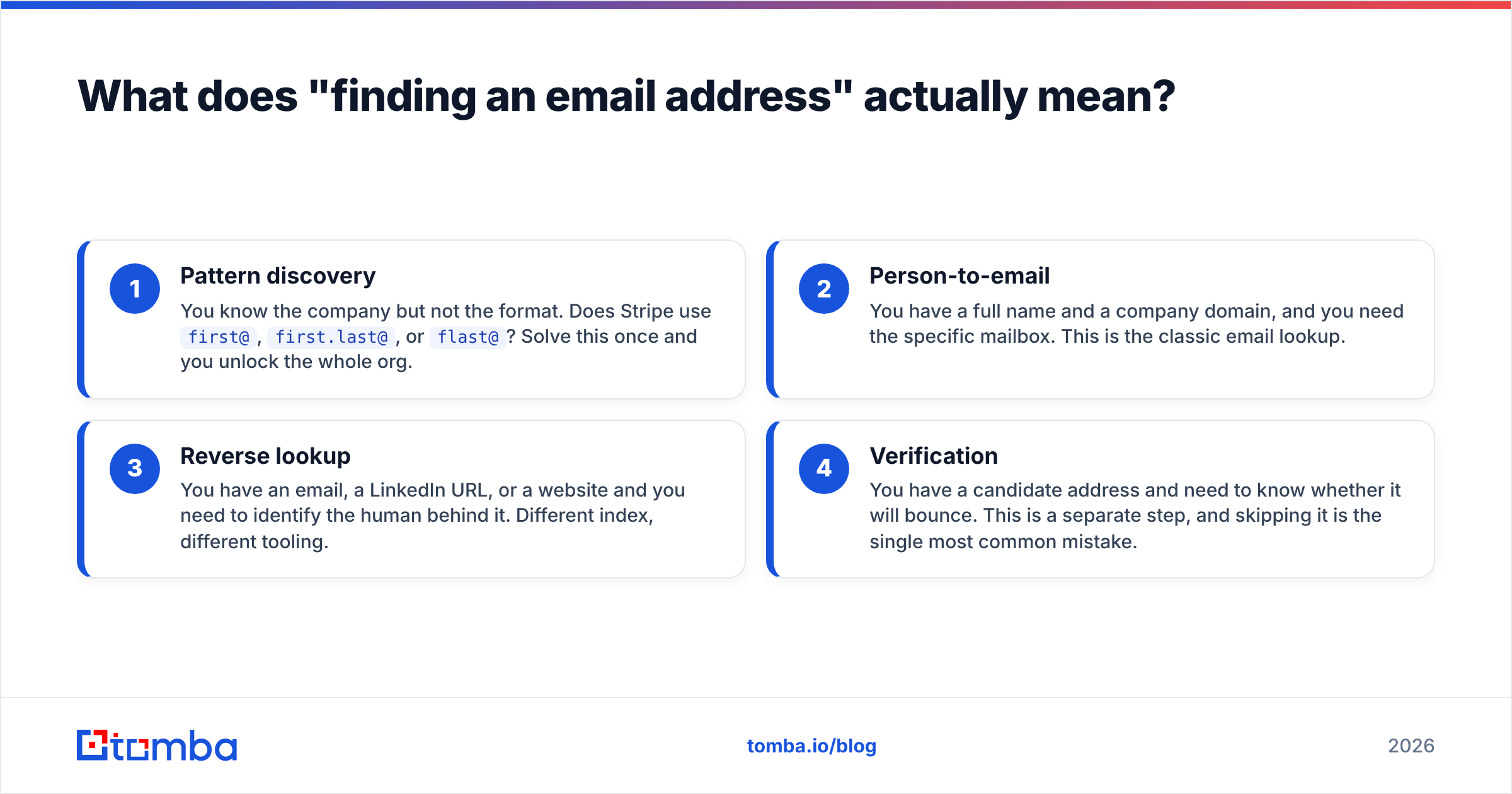
You are doing one of four different jobs, and they need different tools.
- Pattern discovery — You know the company but not the format. Does Stripe use
first@,first.last@, orflast@? Solve this once and you unlock the whole org. - Person-to-email — You have a full name and a company domain, and you need the specific mailbox. This is the classic email lookup.
- Reverse lookup — You have an email, a LinkedIn URL, or a website and you need to identify the human behind it. Different index, different tooling.
- Verification — You have a candidate address and need to know whether it will bounce. This is a separate step, and skipping it is the single most common mistake.
Most people conflate steps 2 and 4. They find a plausible address, send, and discover a week later that a third of their list never existed. Treat verification as mandatory, not optional.

How to find people's email address for free#
These cost nothing but your time. They work best when you need fewer than ten contacts.
Google search operators. Search site:companydomain.com "@companydomain.com" to surface published addresses. Add "firstname" to narrow it. Press pages, PDFs, and job listings leak addresses constantly. Also try "firstname lastname" email -site:linkedin.com.
GitHub commit history. If your target is technical, their commit metadata often contains a work email. Visit github.com/username, open any repository they contributed to, and append .patch to a commit URL. The From: header shows the address they committed with. This is public data by design.
WHOIS records. For smaller companies and personal domains, WHOIS still returns a registrant contact. GDPR redaction killed this for most EU domains, but plenty of .com registrations remain open. Check via ICANN's lookup.
Personal sites and newsletters. Founders, consultants, and writers publish contact addresses on their own sites more often than you'd expect. Check the /about, /contact, and footer. Newsletter reply-to headers frequently expose a real human mailbox rather than a no-reply.
Twitter/X and LinkedIn bios. People write addresses with (at) and (dot) to dodge scrapers. Search the bio field, not just posts.
The author byline route. If your target publishes articles, an author finder resolves a byline on any article URL to the writer's address. This is the highest-hit-rate free method for content, PR, and link-building outreach.
Email permutation. Generate the likely combinations (jane@, jane.doe@, jdoe@, j.doe@, janed@) with an email permutator, then verify each. A paid finder automates this same work. Doing it by hand works, but it is slow and burns verification credits on wrong guesses.
How accurate is guessing an email pattern?#
Better than most people assume, and worse than you need. Roughly 60-70% of companies under 500 employees use one of three formats: first.last@, first@, or flast@. If you guess first.last@ blindly across a mid-market list, you'll be right maybe half the time.
Half is not good enough. Mailbox providers judge you on aggregate bounce rate. Google's bulk sender guidelines treat high bounces and spam complaints as reputation signals. A list built from unverified guesses bounces at 30-50%. That is enough to get a new sending domain filtered within one campaign.
The fix is cheap: run every candidate through an email verifier before it enters your sequence. Verification is an SMTP-level check, not a guess, and it costs a fraction of a cent per address.

Verification gives one ambiguous answer: the catch-all domain. That server is set up to accept mail at any address, so asdfgh@company.com comes back "valid." Roughly one in five B2B domains is catch-all. Use a dedicated catch-all verifier that reads secondary signals instead of SMTP handshakes alone. Without one, you are guessing again with extra steps.
Which email finder tools should you compare?#
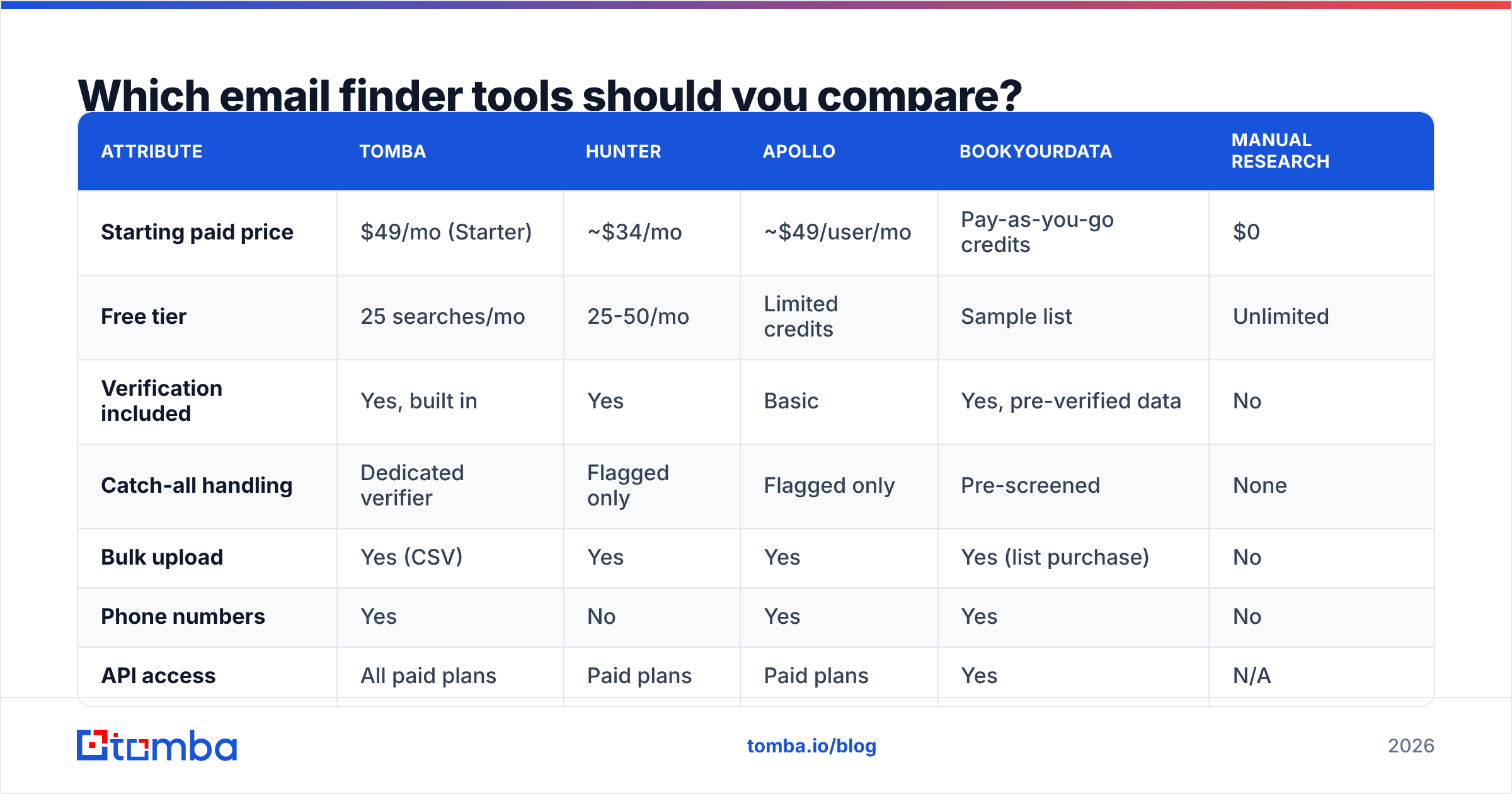
Once you're doing this more than a few times a week, manual research stops making financial sense. Here's how the main categories compare on the attributes that actually affect your workflow.
| Attribute | Tomba | Hunter | Apollo | BookYourData | Manual research |
|---|---|---|---|---|---|
| Starting paid price | $49/mo (Starter) | ~$34/mo | ~$49/user/mo | Pay-as-you-go credits | $0 |
| Free tier | 25 searches/mo | 25-50/mo | Limited credits | Sample list | Unlimited |
| Verification included | Yes, built in | Yes | Basic | Yes, pre-verified data | No |
| Catch-all handling | Dedicated verifier | Flagged only | Flagged only | Pre-screened | None |
| Bulk upload | Yes (CSV) | Yes | Yes | Yes (list purchase) | No |
| Phone numbers | Yes | No | Yes | Yes | No |
| API access | All paid plans | Paid plans | Paid plans | Yes | N/A |
| Best for | Finder + verify in one stack | Simple domain lookups | Full sales engagement suite | Buying ready-made lists | Ad-hoc, low volume |
A few honest notes on this table. Apollo is a sales engagement platform that happens to include data. If you want sequencing, dialing, and CRM sync in one place, its price is fair for that scope. BookYourData works differently. You buy a pre-verified list filtered by title, industry, and geography instead of looking up contacts one at a time. That suits teams who want a ready-made list without running lookups themselves. Hunter is the closest direct analogue to a pure email finder and is genuinely good at domain search.
Tomba's argument is stack consolidation. Finder, verifier, catch-all verifier, phone finder, and enrichment run off one credit pool. You never have to reconcile three vendors' definitions of "valid." Check Tomba pricing against your real monthly volume. At low volume the free tiers are close enough that price should not decide it.

How do you find an email from a LinkedIn profile?#
LinkedIn is where you identify the person. It is almost never where you get the address. The platform hides contact info unless you are connected, and scraping profiles breaks its user agreement.
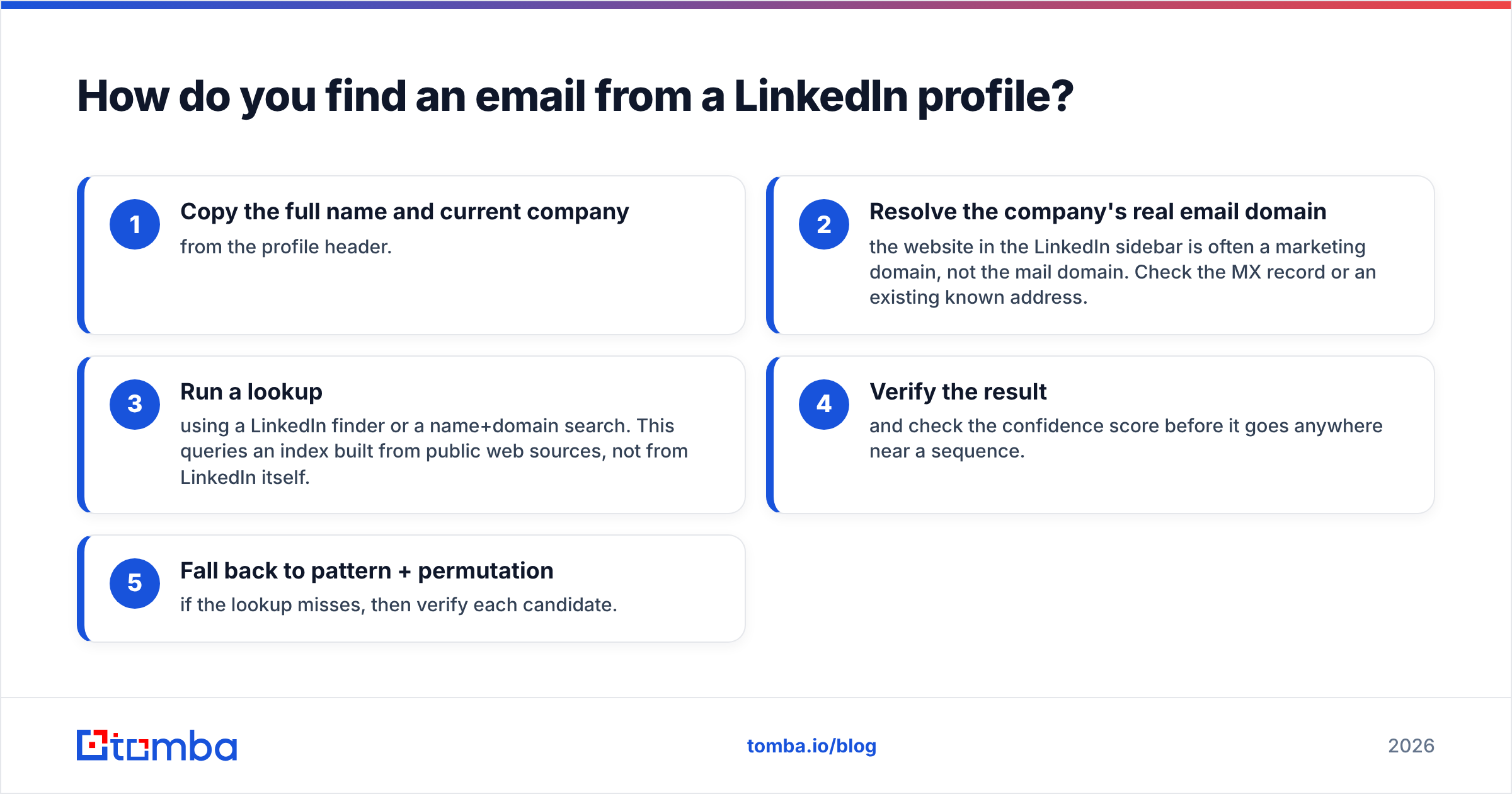
The compliant workflow is a bridge: take the name and company from the profile, then resolve the address from public sources.
- Copy the full name and current company from the profile header.
- Resolve the company's real email domain — the website in the LinkedIn sidebar is often a marketing domain, not the mail domain. Check the MX record or an existing known address.
- Run a lookup using a LinkedIn finder or a name+domain search. This queries an index built from public web sources, not from LinkedIn itself.
- Verify the result and check the confidence score before it goes anywhere near a sequence.
- Fall back to pattern + permutation if the lookup misses, then verify each candidate.
Titles and companies on LinkedIn go stale. People change jobs and update the profile months later. A lookup that returns an address at their old employer is usually a data-freshness problem in the index, not a bug. Cross-check the company against a recent post or the company's own team page.
How do you find emails at scale?#
Manual research tops out around 10-15 verified contacts per hour for a fast researcher. Past a few hundred contacts, you need one of two approaches.
Bulk CSV upload. Prepare a file with first_name, last_name, and domain columns, upload it to a bulk email finder, and get back a file with addresses plus confidence scores. Expect 60-85% coverage depending on company size — enterprise domains index better than 5-person startups. Budget a few minutes per thousand rows.
API integration. If lookups need to happen inside your own product or workflow, hit the email finder API directly. Typical patterns: enrich a form submission the moment it lands, backfill missing contact fields in your CRM nightly, or resolve addresses inside a Zapier or Make automation. The HubSpot integration handles the CRM case without any code.
A note on cost per contact. At $99/mo on the Growth plan, a full allotment puts your cost per verified contact well under a cent. Compare that with a researcher's hourly rate at 12 contacts an hour. The math stops being close very fast.
What should you do after you find the address?#
Finding is the easy half. Three things determine whether the email lands and gets a reply.
Verify, then segment by confidence. Send to high-confidence addresses first. Park anything below your threshold or flagged catch-all in a separate, slower list. Do not mix them into a large volume send.
Warm the domain before volume. A new sending domain that goes from zero to 500 emails a day gets filtered. Ramp over 3-4 weeks. Use a warmup calculator to plan the curve. Get SPF, DKIM, and DMARC right before the first send, and check yours with an SPF checker.
Enrich before you write. An address alone gives you nothing to personalize with. Contact enrichment adds title, seniority, company size, and tech stack. Those details turn a template into something that reads like it was written for one person. Real attributes lift response rate. A bare {{first_name}} merge tag does not.
Respect the legal frame. GDPR allows B2B outreach under legitimate interest in most EU countries. You still need a documented basis, a real opt-out, and accurate sender details. CAN-SPAM in the US is looser, but it still requires a physical address and a working unsubscribe link. Check G2's category reviews for how vendors document their compliance before you commit.
Which method should you pick?#
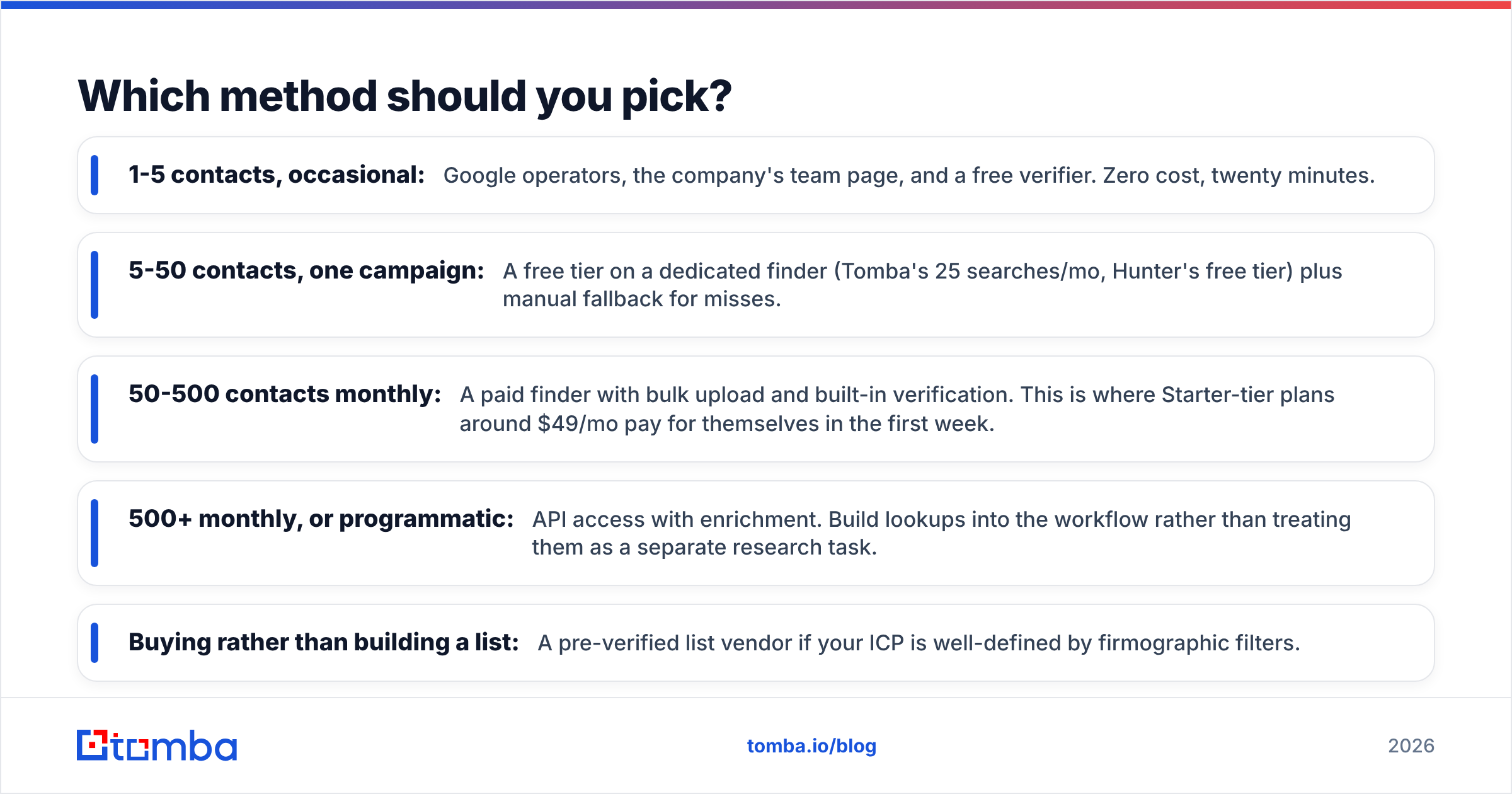
Match the method to the volume, not to the price tag.
- 1-5 contacts, occasional: Google operators, the company's team page, and a free verifier. Zero cost, twenty minutes.
- 5-50 contacts, one campaign: A free tier on a dedicated finder (Tomba's 25 searches/mo, Hunter's free tier) plus manual fallback for misses.
- 50-500 contacts monthly: A paid finder with bulk upload and built-in verification. This is where Starter-tier plans around $49/mo pay for themselves in the first week.
- 500+ monthly, or programmatic: API access with enrichment. Build lookups into the workflow rather than treating them as a separate research task.
- Buying rather than building a list: A pre-verified list vendor if your ICP is well-defined by firmographic filters.
The mistake that costs the most isn't picking the wrong tool. It's skipping verification on whatever tool you picked. A 200-contact list with a 40% bounce rate does more damage to your domain than sending nothing at all.
Start with the free tier#
If you want one repeatable answer to how to find people's email address, start with the Tomba Email Finder instead of stitching together five browser tabs. The free tier gives you 25 searches a month with verification included. That is enough to test hit rate against a list of prospects you already know before you commit to anything. Paid plans start at $49/mo. The finder, verifier, catch-all check, and enrichment all draw from the same credits, so you are not paying three vendors to answer one question.
Related guides#
// get started
Find, verify and enrich your first contacts today
Start on the free plan with 25 searches a month, then scale when your team is ready.
Free plan · No credit card required · GDPR & CCPA
// about the author