How to Fix Email Bounce Back: A Complete 2026 Guide
Bounced emails burn your sender reputation before your best prospects ever see the message. Here is how to read bounce codes, fix the root cause, and keep your bounce rate under 2%.
TL;DR
- A bounce is a rejection receipt, not a mystery. The SMTP code in the message tells you exactly what broke —
550 5.1.1means the mailbox doesn't exist,421 4.7.0means you're being throttled. - Hard bounces are a list-quality problem. Soft bounces are usually a reputation, volume, or DNS problem. The fixes are completely different.
- Keep your hard bounce rate under 2%. Above 5%, Google and Microsoft start routing your mail to spam regardless of content quality.
- The single highest-leverage fix is verifying addresses before you send. It removes 90%+ of hard bounces at the source.
- Authentication (SPF, DKIM, DMARC) prevents a whole category of
550 5.7.xpolicy bounces that no amount of list cleaning will solve.
What Does It Mean When an Email Bounces Back?#
A bounce is a receiving mail server telling your sending server, in machine-readable form, "I will not deliver this." Think of it like a returned package: the courier hands it back with a sticker explaining why — wrong address, recipient moved, box refused at the door. Your job is to read the sticker instead of just re-sending the same package.
Every bounce arrives as a Non-Delivery Report (NDR) containing an SMTP status code. That code is the diagnosis. Everything else in this guide follows from reading it correctly.
Bounces fall into two families:
- Hard bounces — permanent failures. The address doesn't exist, the domain doesn't resolve, or the server has blocked you outright. Never retry these.
- Soft bounces — temporary failures. Mailbox full, server down, rate limit hit, greylisting in effect. Your sending platform will typically retry for 24-72 hours.
- Policy bounces — a subset of hard bounces where the server accepted your connection but rejected the message on content, authentication, or reputation grounds.
- Silent failures — technically not a bounce at all. The server accepts the message and drops it. Catch-all domains and aggressive spam filters do this, which is why bounce rate alone never tells the full deliverability story.
How Do You Read SMTP Bounce Codes?#
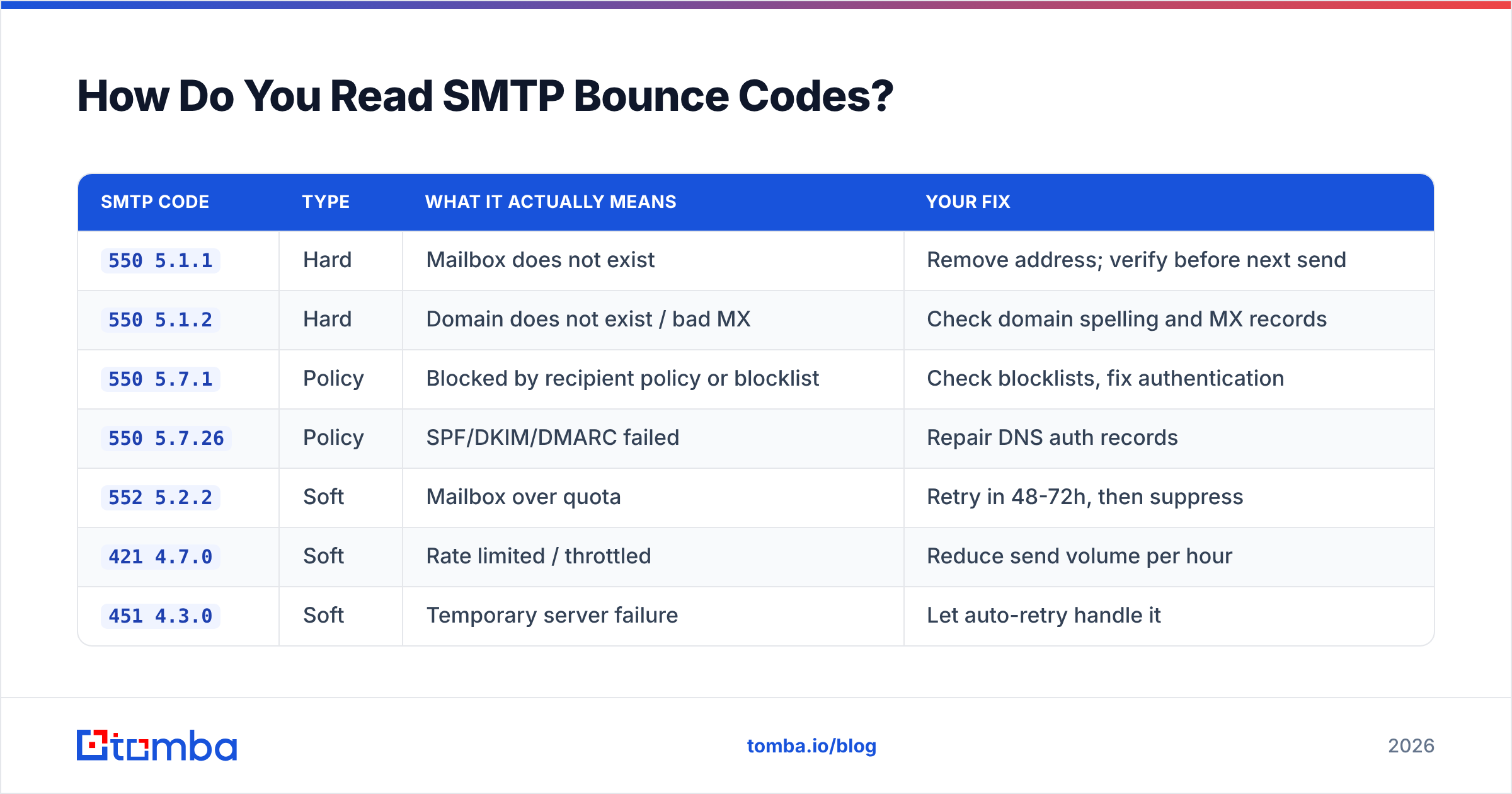
The three-digit code plus the enhanced status code (the 5.1.1-style number) narrows the cause to one of a handful of fixable problems. Here's the decoder you'll use most:
| SMTP Code | Type | What It Actually Means | Your Fix |
|---|---|---|---|
550 5.1.1 |
Hard | Mailbox does not exist | Remove address; verify before next send |
550 5.1.2 |
Hard | Domain does not exist / bad MX | Check domain spelling and MX records |
550 5.7.1 |
Policy | Blocked by recipient policy or blocklist | Check blocklists, fix authentication |
550 5.7.26 |
Policy | SPF/DKIM/DMARC failed | Repair DNS auth records |
552 5.2.2 |
Soft | Mailbox over quota | Retry in 48-72h, then suppress |
421 4.7.0 |
Soft | Rate limited / throttled | Reduce send volume per hour |
451 4.3.0 |
Soft | Temporary server failure | Let auto-retry handle it |
554 5.7.1 |
Policy | Message rejected as spam | Rewrite copy, check links, warm domain |
Two practical rules. First, any code starting with 5 is permanent — suppress the address immediately, because retrying permanent failures is one of the fastest ways to torch a domain. Second, any code starting with 4 is temporary — let your ESP retry, but if the same address soft-bounces three sends in a row, treat it as hard and suppress it.
Why Is Your Bounce Rate So High?#
Bounce rate is (bounced emails / emails sent) × 100. The benchmarks that matter in 2026:
- Under 2% — healthy. This is where B2B outbound should sit.
- 2-5% — warning zone. Something in your sourcing or DNS is broken.
- Above 5% — Gmail and Microsoft begin actively filtering you. Google's bulk sender requirements explicitly name spam rate and authentication as gating factors for inbox placement.
The root causes, in rough order of how often they're the actual culprit:
Stale or scraped data. B2B contact data decays roughly 22-30% per year through job changes, layoffs, and rebrands. A list you bought or scraped 18 months ago is already a third dead. Scraped LinkedIn exports are worse — they guess at email patterns rather than confirming them.
Guessed email patterns. firstname.lastname@company.com is a reasonable guess, but plenty of companies use flast@, first@, or legacy formats from an acquired brand. Guessing produces a predictable stream of 550 5.1.1 bounces. Use a company email pattern check instead of assuming.
Broken authentication. If your SPF record doesn't include your sending platform, or your DKIM key rotated and nobody updated DNS, strict receivers reject on policy. This produces bounces that look like list-quality problems but aren't.
Cold domain sending at volume. A brand-new domain that sends 500 emails on day one gets throttled (421) and then blocked. Warm up over 3-4 weeks.
Typos and role accounts. Manual entry produces @gmial.com. Role addresses like info@ and support@ bounce or auto-reply at high rates and skew your metrics.
How Do You Fix Email Bounce Back Problems, Step by Step?#
Work these in order. Each step removes a class of bounces the next step can't touch.
Step 1 — Export and classify your bounces. Pull the last 30-90 days of bounce logs from your ESP. Group them by SMTP code using the table above. If 70% are 550 5.1.1, you have a data problem. If 70% are 550 5.7.x, you have a DNS or reputation problem. Don't guess which one you have.
Step 2 — Suppress every hard bounce immediately. Add them to a global suppression list, not just the campaign list. Re-sending to a known-dead address is the clearest possible signal to a receiving server that you're not maintaining your list.
Step 3 — Fix your DNS authentication. Publish an SPF record that includes every service that sends on your behalf, enable DKIM signing on your sending platform, and publish a DMARC record starting at p=none so you get reports before you start enforcing. Validate the SPF syntax with an SPF checker — a single typo or exceeding the 10-lookup limit silently breaks the whole record. If you need a refresher on the mechanics, the email deliverability glossary entry covers the full stack.
Step 4 — Verify the list you already have. Run every remaining address through an email verifier before your next send. Verification does SMTP-level checks — syntax, domain MX lookup, mailbox existence — and returns a deliverability status per address. For large lists, bulk verify in one pass rather than trickling addresses through manually.
Step 5 — Handle catch-all domains deliberately. Catch-all servers accept mail for any address at the domain, so standard verification returns "unknown" rather than valid or invalid. That's not a bug — it's the server refusing to leak information. A dedicated catch-all verifier applies pattern confidence and secondary signals to grade these. Send to high-confidence catch-alls only, and keep them in a separate segment so they don't distort your main metrics.
Step 6 — Check whether you're on a blocklist. If your bounces are concentrated on one provider (all Microsoft, or all Gmail), reputation is the likely cause. Run your sending IP and domain through a blacklist checker and follow each listing's delisting process.
Step 7 — Throttle and warm. If you're seeing 421 codes, you're sending too fast for your current reputation. Cut volume by half, ramp back over two weeks, and use an email warmup calculator to plan the schedule rather than eyeballing it.
Step 8 — Verify at the point of capture, not at send time. The permanent fix is preventing bad addresses from entering your system at all. Validate on form submit, validate on CRM import, validate on enrichment.
Which Bounce Fixes Actually Move the Needle?#
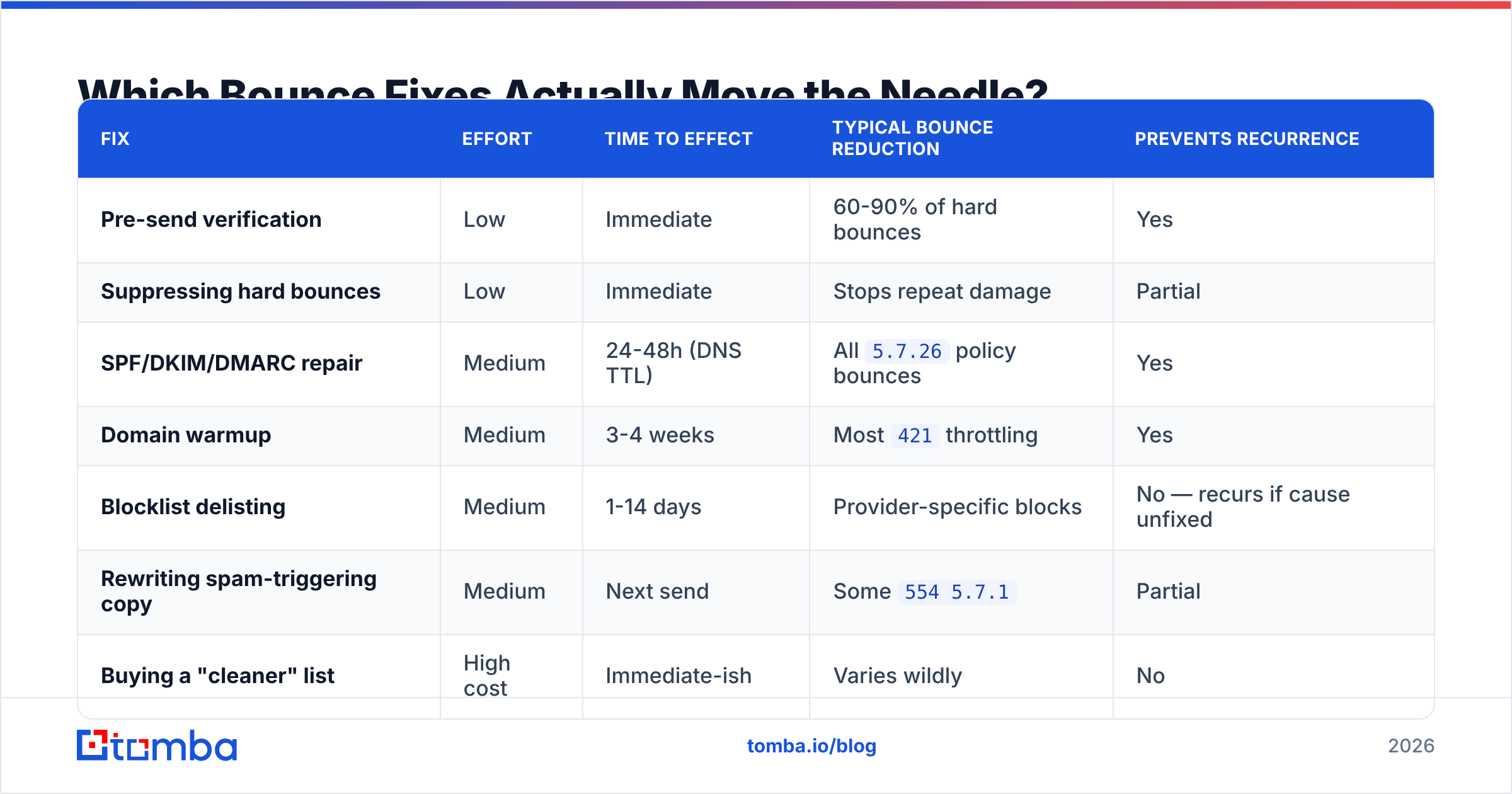
Not every fix has the same payoff. Here's how the common interventions compare on effort versus impact:
| Fix | Effort | Time to Effect | Typical Bounce Reduction | Prevents Recurrence |
|---|---|---|---|---|
| Pre-send verification | Low | Immediate | 60-90% of hard bounces | Yes |
| Suppressing hard bounces | Low | Immediate | Stops repeat damage | Partial |
| SPF/DKIM/DMARC repair | Medium | 24-48h (DNS TTL) | All 5.7.26 policy bounces |
Yes |
| Domain warmup | Medium | 3-4 weeks | Most 421 throttling |
Yes |
| Blocklist delisting | Medium | 1-14 days | Provider-specific blocks | No — recurs if cause unfixed |
| Rewriting spam-triggering copy | Medium | Next send | Some 554 5.7.1 |
Partial |
| Buying a "cleaner" list | High cost | Immediate-ish | Varies wildly | No |
The pattern is clear: verification and authentication are the two fixes that are cheap, fast, and permanent. Everything else is either slow, temporary, or both.
How Do You Prevent Bounces Before They Happen?#
Fixing bounces reactively is firefighting. The durable version is building verification into the moment contacts enter your pipeline.
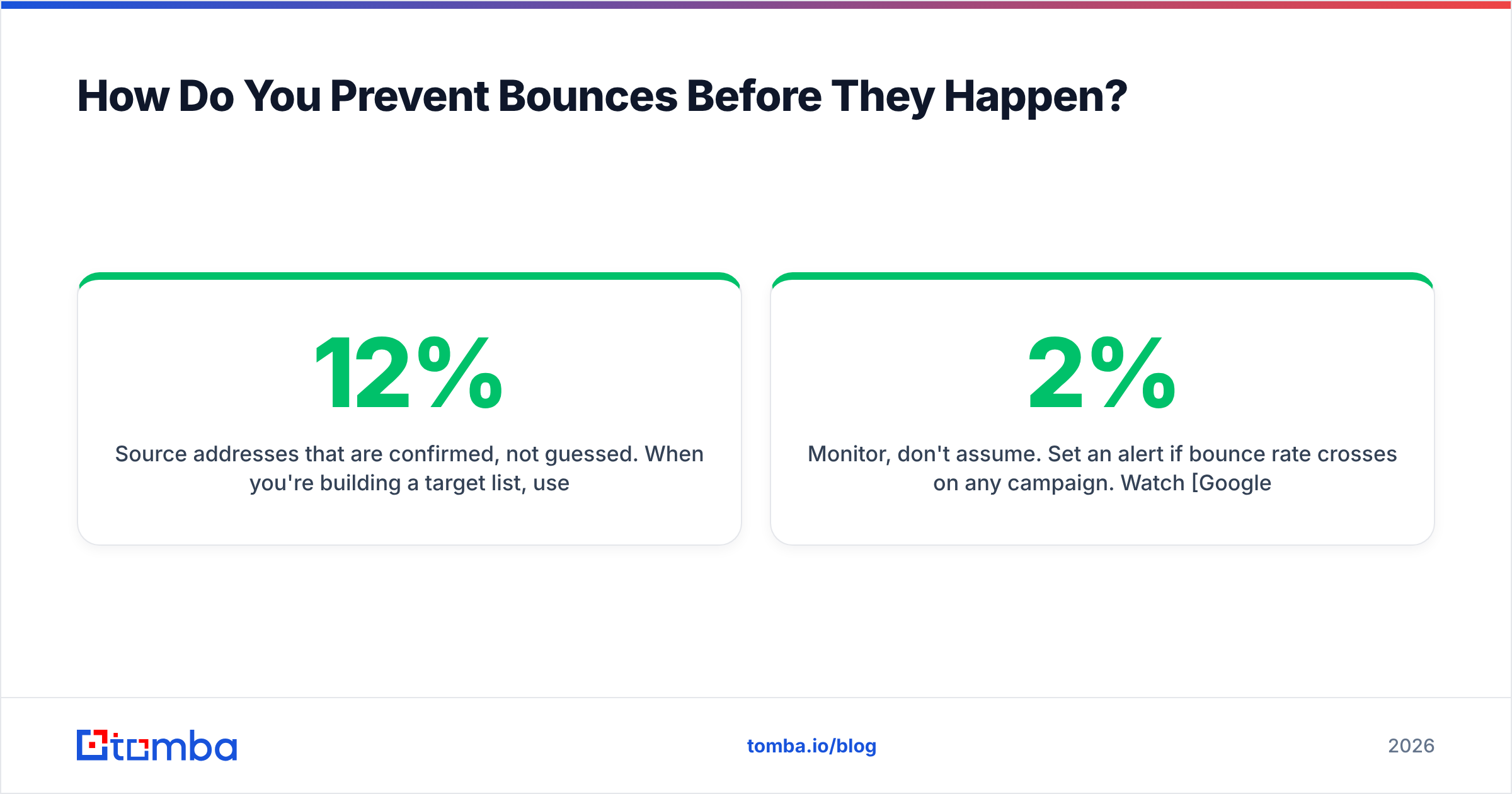
Source addresses that are confirmed, not guessed. When you're building a target list, use an email finder that returns a confidence score and cites its sources, rather than a permutator that generates plausible-looking guesses. The difference between "this pattern probably works" and "this address was observed in a public source and passes an SMTP check" is the difference between a 12% bounce rate and a 1% one. Tomba publishes its data sources so you can audit where a given address came from.
Enrich on a schedule. Contact data decays continuously, so treat re-verification as maintenance, not a one-time project. Re-verify any segment you haven't mailed in 90 days before you mail it again. Contact enrichment can also catch job changes — a contact who moved companies is a lost address and a new opportunity at the same time.
Validate at the form. Add real-time verification to your demo request and newsletter forms. A free email checker catches typos and disposable domains at submit time, before they reach your CRM.
Segment by risk. Keep verified-valid, catch-all, and unknown addresses in separate segments. Send to verified first, warm the domain, then layer in catch-alls once your reputation can absorb the variance.
Monitor, don't assume. Set an alert if bounce rate crosses 2% on any campaign. Watch Google Postmaster Tools for domain reputation and spam rate, and Microsoft SNDS if you send meaningful volume to Outlook domains. Reputation degrades gradually and then fails suddenly — the early warning is worth having.
What About Bounces That Aren't Really Bounces?#
Three edge cases trip up teams that have otherwise done everything right.
Auto-replies counted as bounces. Out-of-office messages sometimes get classified as soft bounces by less sophisticated platforms. Check whether your reported bounce rate is inflated by vacation responders before you panic.
Greylisting. Some servers deliberately reject the first delivery attempt from an unknown sender with a 4xx code, expecting a legitimate server to retry. Real mail servers retry; spam cannons usually don't. If your platform doesn't retry properly, you'll see phantom soft bounces. This is a platform configuration issue, not a list issue.
Accept-then-discard. The riskiest category. The server returns 250 OK, your dashboard shows a delivered message, and the mail lands in a spam folder or a black hole. Your bounce rate looks perfect while your reply rate craters. The tell is a delivery rate near 100% paired with a response rate near zero. When you see that combination, stop optimizing bounces and start investigating reputation and content — G2's deliverability tool category is a reasonable starting point for monitoring tooling.
Feedback loops. Register for provider feedback loops where available so spam complaints route back to you and can be suppressed. A complaint is worse than a bounce; it directly damages your sender reputation.
What Bounce Rate Should You Target in 2026?#
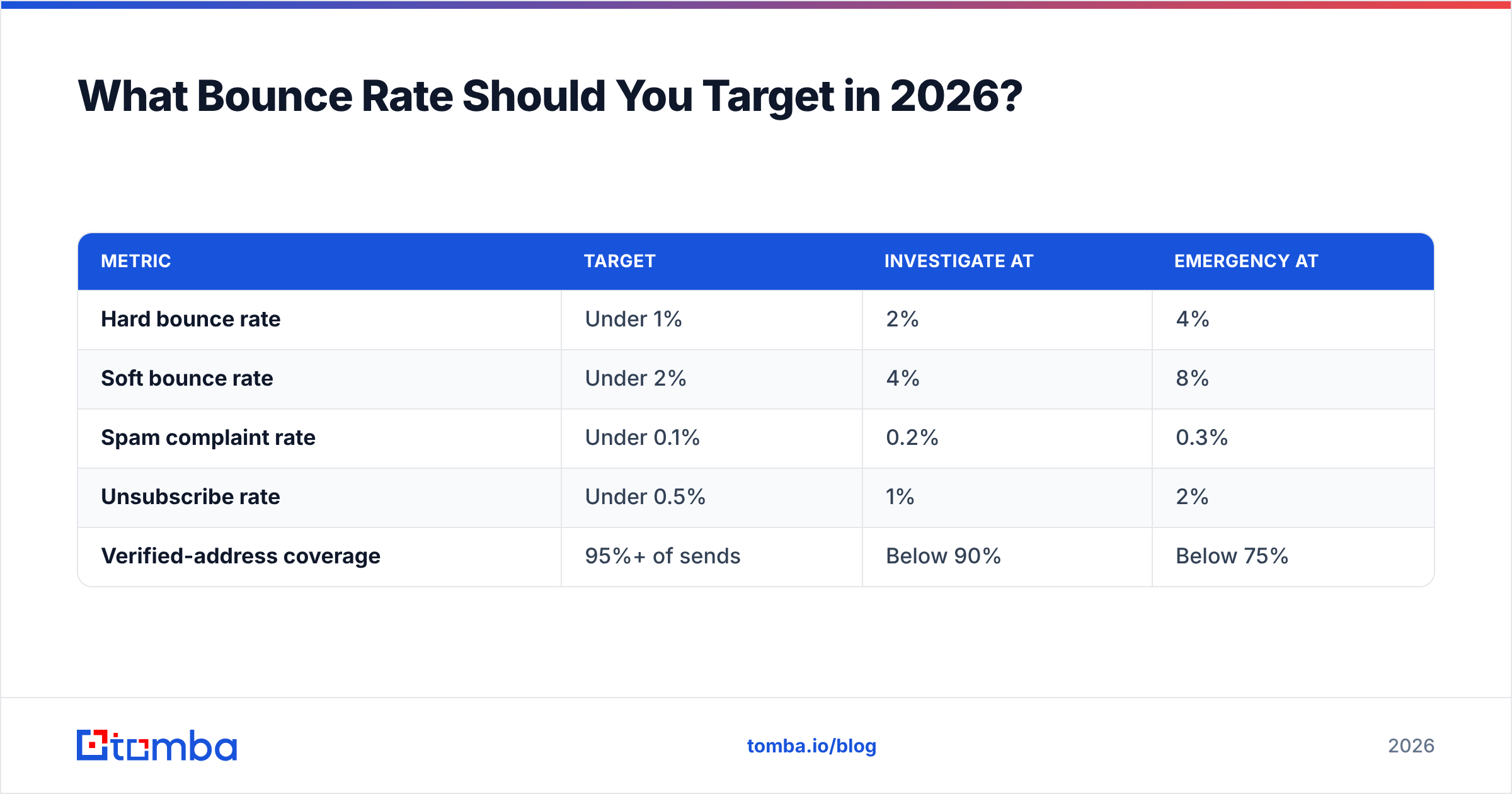
Set your internal thresholds tighter than the provider limits, so you have room to react:
| Metric | Target | Investigate At | Emergency At |
|---|---|---|---|
| Hard bounce rate | Under 1% | 2% | 4% |
| Soft bounce rate | Under 2% | 4% | 8% |
| Spam complaint rate | Under 0.1% | 0.2% | 0.3% |
| Unsubscribe rate | Under 0.5% | 1% | 2% |
| Verified-address coverage | 95%+ of sends | Below 90% | Below 75% |
If you're above the investigate column on any row, pause the campaign and diagnose. Sending through a degrading reputation is how a two-week problem becomes a two-quarter problem.
Fix the Root Cause, Not the Symptom#
Bounces are a downstream symptom. Upstream, there are two causes: addresses that were never valid, and a sending setup receivers don't trust. Verification fixes the first. Authentication and warmup fix the second. Everything else on the list is cleanup.
If most of your bounces carry 550 5.1.1, the fastest path forward is sourcing addresses that were confirmed rather than guessed. The Tomba Email Finder returns verified professional addresses with confidence scores and source citations, and it's backed by an email verification API you can wire directly into your CRM or form handler so bad data never lands in your database. The free tier includes 25 searches per month, and paid plans start at $49/mo — see Tomba pricing for the full breakdown. Start by verifying the list you already have, then change how the next one gets built.
Related guides#
// get started
Find, verify and enrich your first contacts today
Start on the free plan with 25 searches a month, then scale when your team is ready.
Free plan · No credit card required · GDPR & CCPA
// about the author