How To Format A Professional Email: Structure That Gets Replies
A professional email has seven parts, and most people get three of them wrong. Here is the exact structure, line lengths, signature rules, and formatting mistakes that quietly kill reply rates.
TL;DR
- A professional email has seven parts: subject line, greeting, opening line, body, call to action, sign-off, and signature. Miss one and the email reads as either rushed or robotic.
- Format for the preview pane, not the desktop window. More than half of B2B email is opened on mobile, where anything past ~90 characters of subject line and ~40 characters of preview text is invisible.
- Keep paragraphs to 1-3 sentences, total body under 125 words, and exactly one call to action. Long emails do not fail because they are long — they fail because they hide the ask.
- Rich HTML, tracking pixels, and image-heavy signatures suppress deliverability on cold sends. Plain text with a three-line signature outperforms almost every time.
- Formatting cannot save a bad address. Verify recipients before you send, or your carefully formatted email lands on a hard bounce.
What are the seven parts of a professional email?#
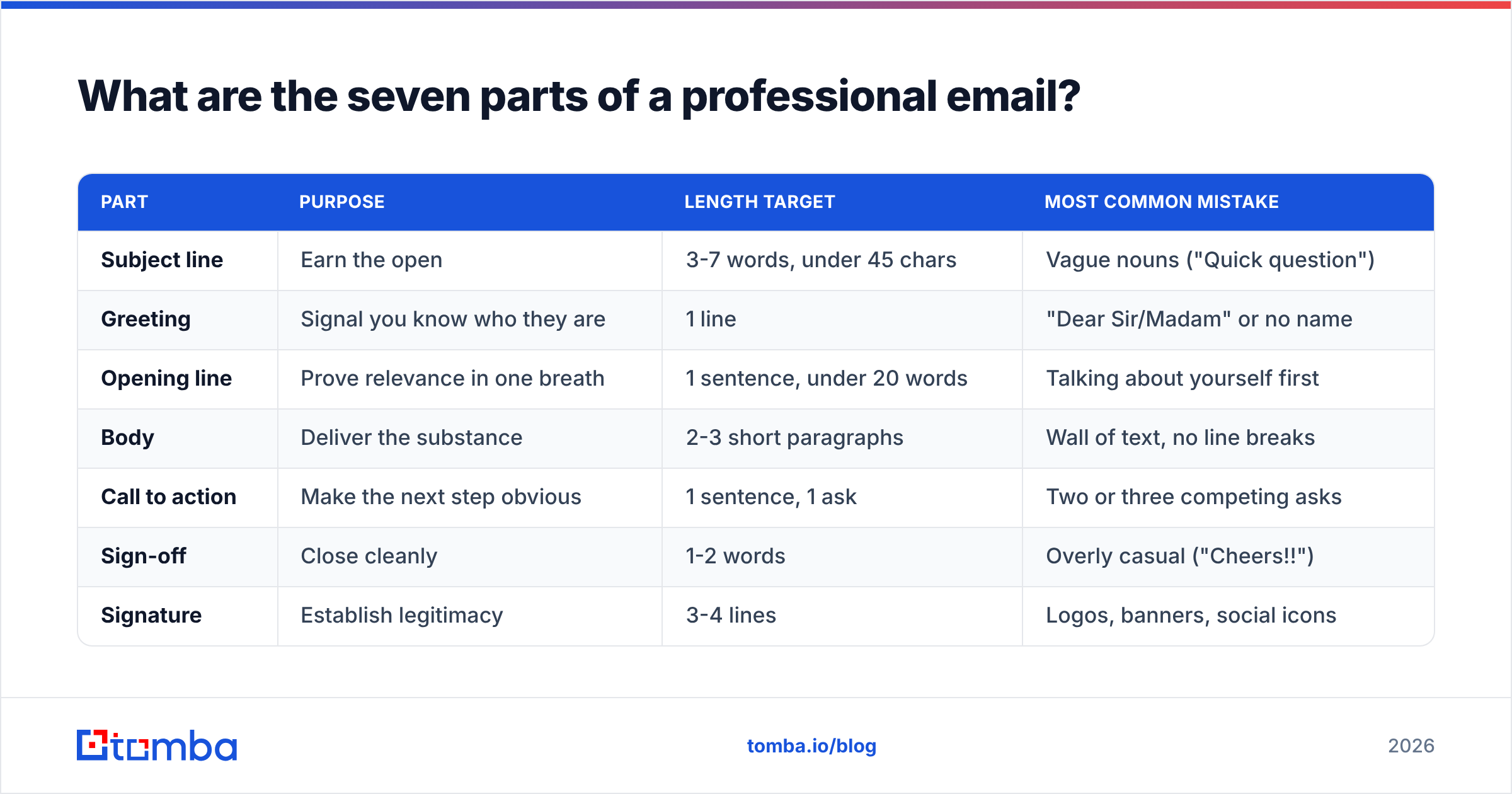
Every professional email — cold outreach, internal update, client follow-up — is built from the same seven components. The difference between a reply and a delete is usually formatting, not vocabulary.
| Part | Purpose | Length target | Most common mistake |
|---|---|---|---|
| Subject line | Earn the open | 3-7 words, under 45 chars | Vague nouns ("Quick question") |
| Greeting | Signal you know who they are | 1 line | "Dear Sir/Madam" or no name |
| Opening line | Prove relevance in one breath | 1 sentence, under 20 words | Talking about yourself first |
| Body | Deliver the substance | 2-3 short paragraphs | Wall of text, no line breaks |
| Call to action | Make the next step obvious | 1 sentence, 1 ask | Two or three competing asks |
| Sign-off | Close cleanly | 1-2 words | Overly casual ("Cheers!!") |
| Signature | Establish legitimacy | 3-4 lines | Logos, banners, social icons |
The order is non-negotiable. Readers scan top-to-bottom in a fixed pattern, and every element that appears out of sequence costs you attention you cannot get back.
How should you format the subject line?#
Write it last, and write it for a phone screen.
Gmail on iOS truncates subject lines around 35-40 characters in portrait mode. Outlook desktop shows roughly 60. Anything after that only exists for the search index, not the human. So front-load the meaningful words.
Rules that hold up across contexts:
- Sentence case, not Title Case. "Question about your Q3 hiring plan" reads like a person. "Question About Your Q3 Hiring Plan" reads like a newsletter template.
- No punctuation clutter. Skip exclamation points, all-caps, and brackets like [URGENT]. Spam filters weight these, and recipients discount them.
- Specific noun beats a clever hook. "Onboarding doc for Tuesday" outperforms "You're going to love this."
- Under 7 words. Analysis of large send volumes consistently shows short subjects win on mobile-dominant lists.
- Never repeat the subject in the first body line. You waste the preview snippet, which is your second headline.
If you write a lot of these, run drafts through a subject line generator and then sanity-check the winner with a subject line tester before you commit to a send.
What is the correct greeting and opening line?#
The greeting is one line. Use "Hi [First Name]," for almost everything in B2B. "Hello [First Name]," works if your industry skews formal — legal, finance, government, academia. "Dear [First Name]," is now reserved for cover letters and formal correspondence.
Three greetings to retire permanently:
- "Dear Sir/Madam" — signals you did not find out who they are.
- "To whom it may concern" — same problem, older font.
- "Hey!" with no name — reads as a blast, because it usually is one.
The opening line is where most professional emails fall apart. The default instinct is to introduce yourself: "My name is X and I work at Y." That sentence is about you, and the reader has not yet decided to care about you.
Flip it. Lead with the reason you are in their inbox:
Weak: "My name is Dana and I'm a solutions consultant at Northwind Analytics."
Strong: "You mentioned on the Q2 earnings call that reporting latency is the blocker for your EU rollout."
The second version earns the next sentence. You can introduce yourself in the body, once you have a reason to.
How should you structure the body?#
Short paragraphs, generous white space, one idea per block.
The functional constraint is the preview pane. On a laptop in split view, a reader sees roughly 8-10 lines before scrolling. If your ask sits below that line, you are betting on a scroll that often does not happen.
A body structure that survives contact with real inboxes:
- Paragraph 1 — the hook (1-2 sentences). Why this email, why them, why now.
- Paragraph 2 — the substance (2-3 sentences). The proof, the detail, the number. One concrete claim beats three vague ones.
- Paragraph 3 — the ask (1 sentence). A single, low-friction question.
Formatting mechanics that matter more than people expect:
- Line length under 80 characters. Long lines wrap unpredictably across clients and become unreadable on mobile.
- Blank line between every paragraph. Not an indent — email clients render indents inconsistently.
- Bullets only when listing three or more parallel items. A bulleted list of two items looks like a formatting accident.
- Bold sparingly — one phrase maximum. Bold everything and you have bolded nothing.
- No coloured text, no unusual fonts. Both increase spam scoring and look broken in dark mode.
Keep the whole body under 125 words for cold outreach. For internal or warm threads you have more latitude, but the discipline still helps.
What is the right call to action?#
One ask. One.
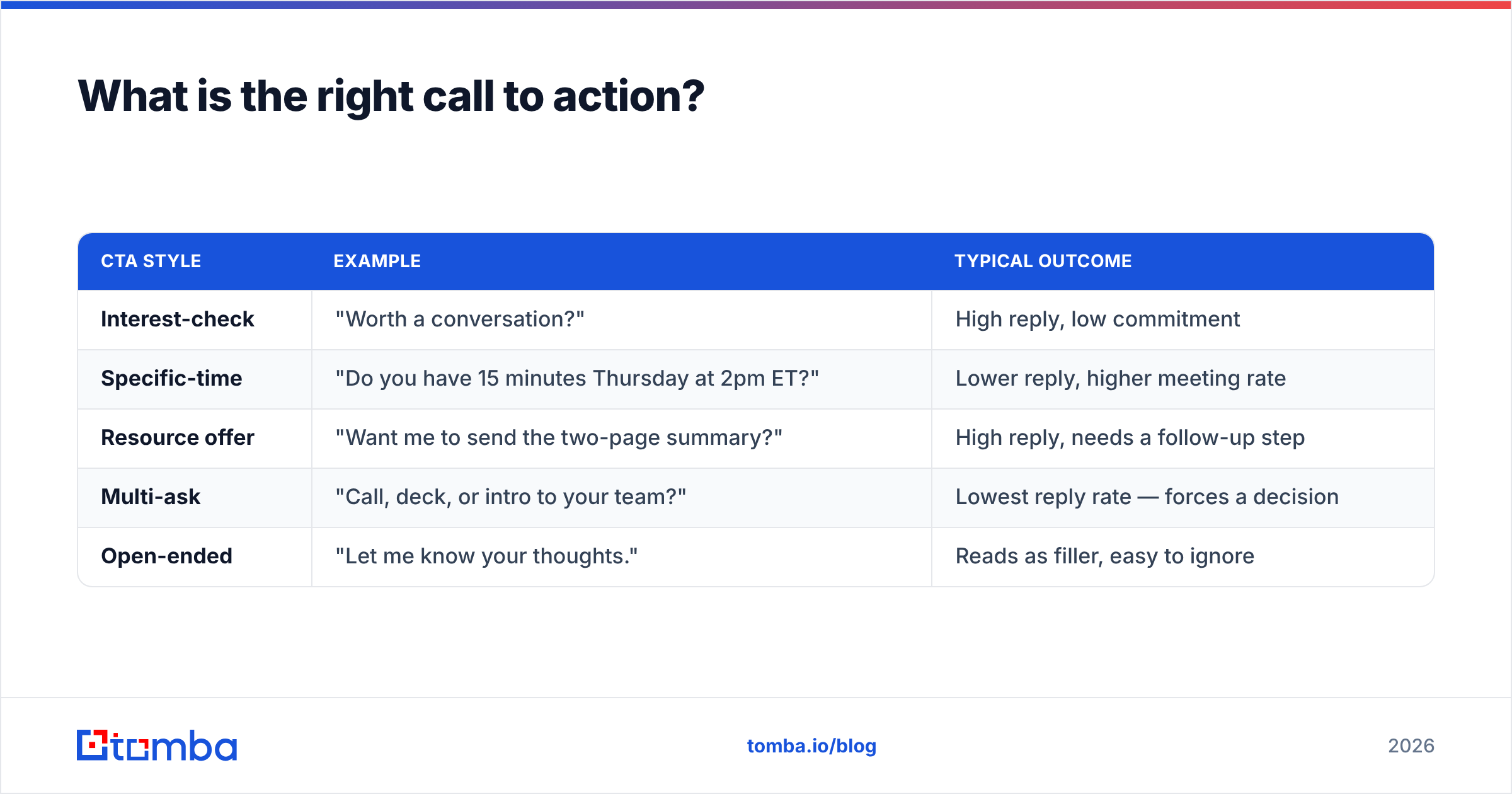
The most common professional-email failure is stacking requests: "Let me know if you'd like the deck, or if a call works better, or feel free to forward this to whoever handles procurement." That is three decisions dressed as politeness, and the reader resolves the ambiguity by closing the tab.
| CTA style | Example | Typical outcome |
|---|---|---|
| Interest-check | "Worth a conversation?" | High reply, low commitment |
| Specific-time | "Do you have 15 minutes Thursday at 2pm ET?" | Lower reply, higher meeting rate |
| Resource offer | "Want me to send the two-page summary?" | High reply, needs a follow-up step |
| Multi-ask | "Call, deck, or intro to your team?" | Lowest reply rate — forces a decision |
| Open-ended | "Let me know your thoughts." | Reads as filler, easy to ignore |
Pick based on where the relationship sits. First touch on a cold contact: interest-check. Third touch after engagement: specific-time. Never mix.
End the ask as a question with a question mark. Statements ("Happy to chat whenever.") do not create the small social obligation that a direct question does, and response rate drops accordingly.
How do you format the sign-off and signature?#
The sign-off is one word or two. "Best," "Thanks," and "Regards," cover essentially every professional context. HubSpot's own email etiquette guidance lands in the same place: the sign-off should be invisible, not memorable.
The signature is where people over-build. A signature with a logo image, a headshot, three social icons, a banner ad for a webinar, and a legal disclaimer does three bad things at once: it inflates message size, it adds image-to-text ratio that spam filters penalise, and on cold sends it screams "marketing."
The three-line signature that works everywhere:
Dana Okafor
Solutions Consultant, Northwind Analytics
northwind.example.com | +1 555 0142
That is it. Add a fourth line only if you need a scheduling link, and only on warm threads. If you want something more polished for internal or client-facing use, an email signature generator will produce clean HTML without the bloat.
For cold outreach specifically: no tracking pixel, no image, no more than one link. Every additional element is another signal a filter can score against you, and email deliverability is far more fragile than most senders assume. Google's own sender guidelines spell out how much authentication and content hygiene now matter for bulk senders.
Plain text or HTML — which format should you use?#
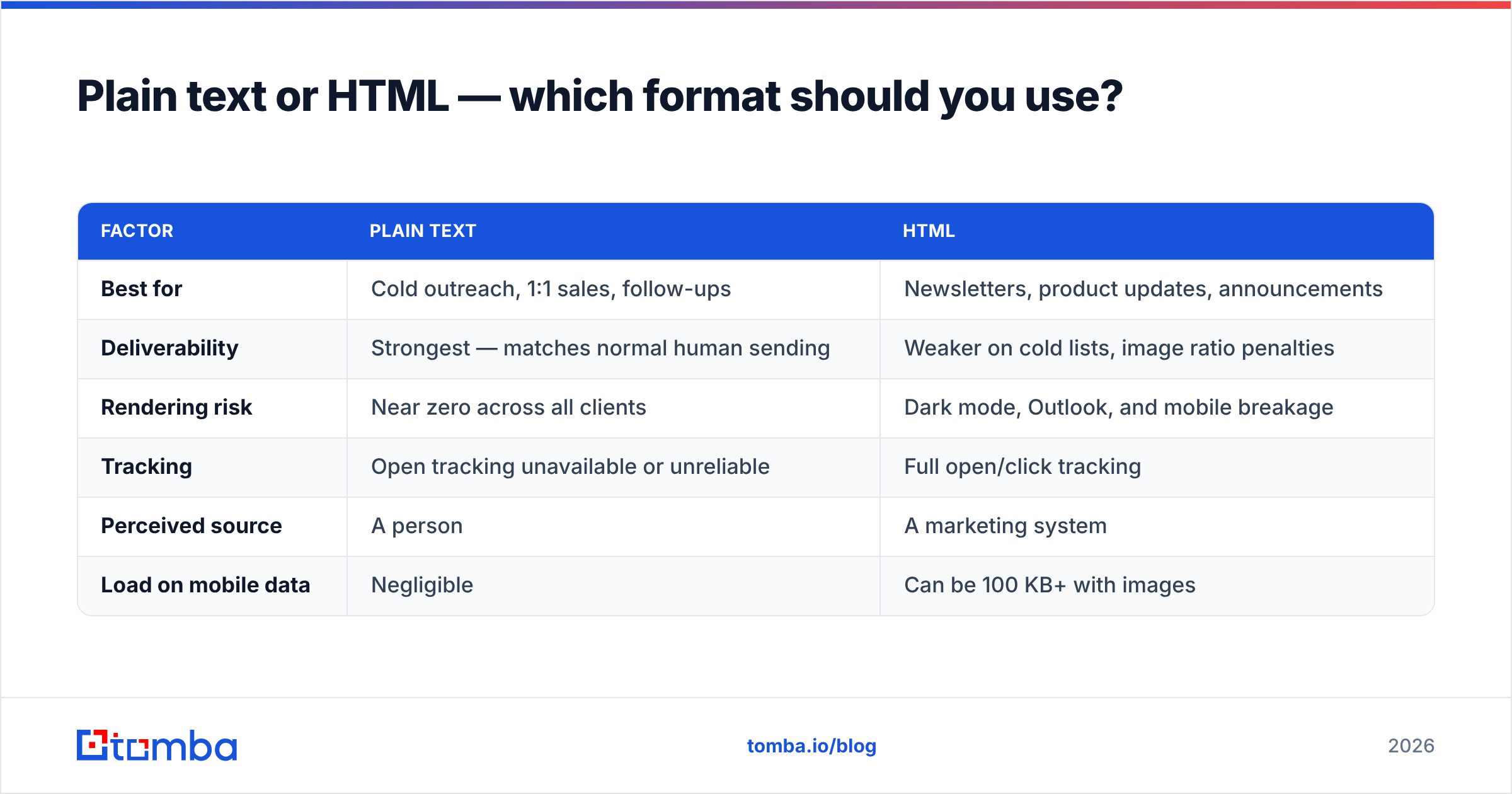
Depends entirely on whether the recipient already knows you.
| Factor | Plain text | HTML |
|---|---|---|
| Best for | Cold outreach, 1:1 sales, follow-ups | Newsletters, product updates, announcements |
| Deliverability | Strongest — matches normal human sending | Weaker on cold lists, image ratio penalties |
| Rendering risk | Near zero across all clients | Dark mode, Outlook, and mobile breakage |
| Tracking | Open tracking unavailable or unreliable | Full open/click tracking |
| Perceived source | A person | A marketing system |
| Load on mobile data | Negligible | Can be 100 KB+ with images |
The practical rule: if the email would look strange coming from a colleague, it is too HTML-heavy for one-to-one sending. Save the designed template for opt-in audiences who expect it.
If you already have a template library, run it through a spam checker before rollout. Formatting choices that look harmless — a giant hero image, four CTA buttons, a "click here" anchor — routinely add a full point to spam score.
What formatting mistakes kill reply rates?#
Ranked by how much damage they do relative to how often they appear:
- The wall of text. Five sentences in one block with no line breaks. Readers skim, find no entry point, and leave.
- Two or more asks. Covered above, but it is the single most common reply-rate killer in otherwise good emails.
- Broken merge fields. "Hi {{first_name}}," is unrecoverable. Always send a test to yourself and one colleague first.
- Attachments on first contact. Filters flag them, and recipients rarely open files from strangers. Link instead, or offer to send.
- Signature bigger than the message. When the disclaimer runs longer than the ask, the ratio itself is the message.
- Mismatched reply-to. Sending from a domain the recipient cannot verify, with a reply-to on a different domain, is a classic phishing pattern. Filters treat it as one.
Check your authentication before you blame formatting. An SPF record misconfiguration will bury a perfectly formatted email in spam, and no amount of white space fixes that. Run an SPF checker on your sending domain if you have never audited it.
Does formatting matter if the address is wrong?#
No. This is the part most formatting guides skip.
A professional email that lands on an invalid address does not get a reply, get filtered, or get read — it hard bounces. And bounces above roughly 2-3% start damaging your sender reputation, which then suppresses delivery of the messages that were going to the right people.
So the sequence matters:
- Find the address correctly. Guessing at first.last@company.com works about half the time and generates bounces the other half. Use a real email finder or a domain search to pull verified addresses from a company domain.
- Verify before you send. An email verifier catches invalid, disposable, and role-based addresses before they cost you reputation.
- Handle catch-all domains deliberately. Catch-all servers accept everything, so standard verification returns "unknown." A catch-all verifier resolves the ambiguity instead of leaving you guessing.
- Clean the list before every campaign. Data decays at roughly 25-30% per year as people change jobs — a list verified last quarter is already partly stale. Independent reviews on G2 reflect the same pattern across every vendor in the category.
Formatting is the last 10% of the job. The first 90% is sending to a real human at a real address.
How do you adapt the format to different email types?#
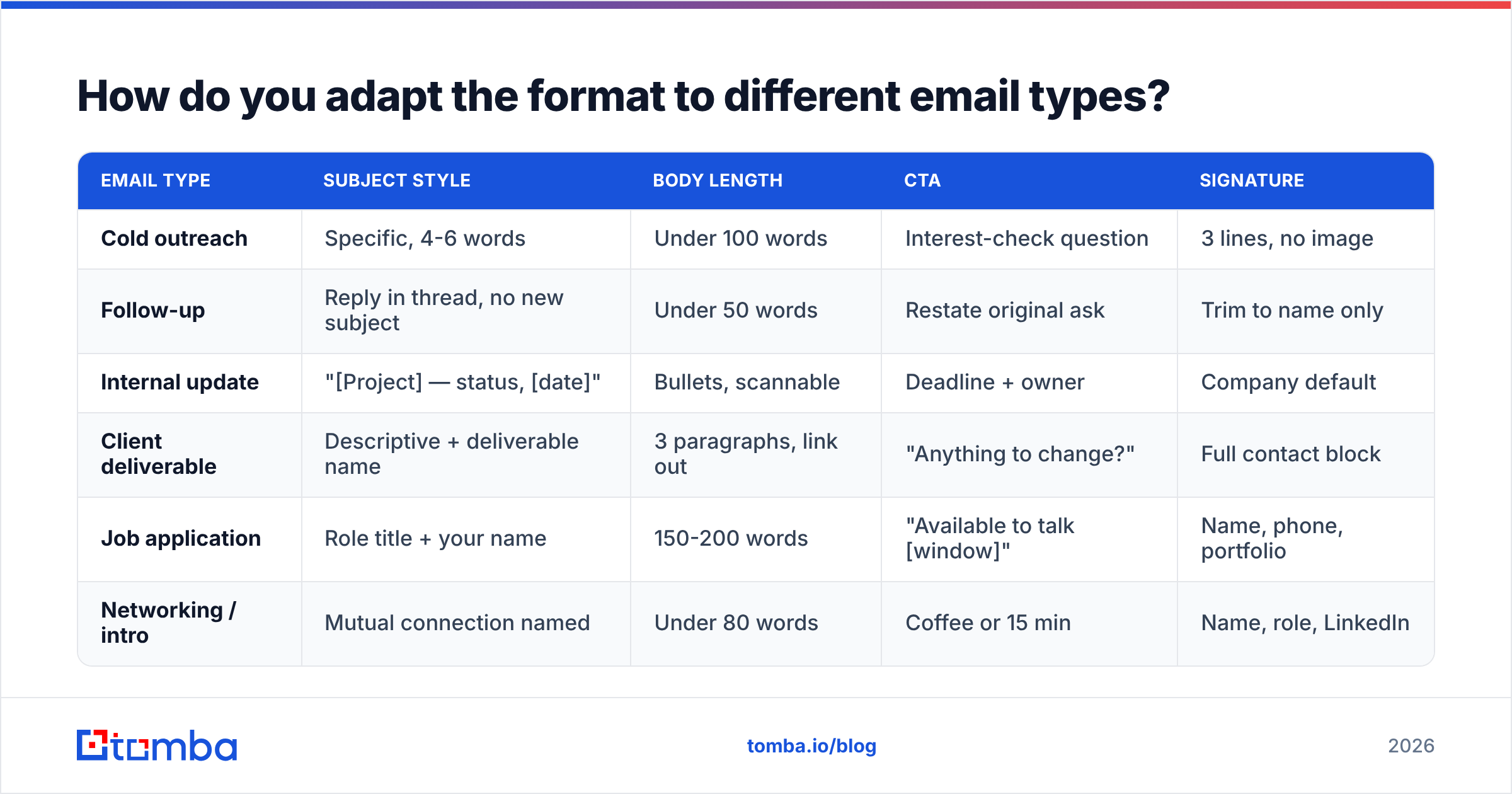
The seven parts stay constant. The proportions shift.
| Email type | Subject style | Body length | CTA | Signature |
|---|---|---|---|---|
| Cold outreach | Specific, 4-6 words | Under 100 words | Interest-check question | 3 lines, no image |
| Follow-up | Reply in thread, no new subject | Under 50 words | Restate original ask | Trim to name only |
| Internal update | "[Project] — status, [date]" | Bullets, scannable | Deadline + owner | Company default |
| Client deliverable | Descriptive + deliverable name | 3 paragraphs, link out | "Anything to change?" | Full contact block |
| Job application | Role title + your name | 150-200 words | "Available to talk [window]" | Name, phone, portfolio |
| Networking / intro | Mutual connection named | Under 80 words | Coffee or 15 min | Name, role, LinkedIn |
The follow-up row is the one people get wrong most. Reply inside the existing thread rather than starting a new one — it preserves context, keeps the original formatting visible, and avoids the "did they even read my last email" problem. Keep the follow-up shorter than the original. Every subsequent message should shrink.
Put the format to work#
Formatting is a solved problem: seven parts, short paragraphs, one ask, three-line signature, plain text unless the recipient opted into design. Apply that and you are ahead of most of the inbox.
What is not solved is the address. The best-formatted email in the world does nothing if it goes to a mailbox that closed eight months ago.
Start with Tomba Email Finder to pull verified professional addresses by name, company, or domain, then verify them before your first send. The free tier gives you 25 searches a month to test it against contacts you already know, and paid plans start at $49/mo on Tomba pricing when you need volume. Get the address right, then let the formatting do its job.
Related guides#
// get started
Find, verify and enrich your first contacts today
Start on the free plan with 25 searches a month, then scale when your team is ready.
Free plan · No credit card required · GDPR & CCPA
// about the author