How to Generate Leads at Events: A 2026 Playbook
Badge scans are not leads. Here is the pre-event, on-floor, and post-event system that turns a $12,000 booth into a pipeline you can actually forecast.
TL;DR
- A badge scan is not a lead. Most event "leads" are anonymous attendees who walked past a candy bowl — treat them as raw data, not pipeline.
- The pipeline is won in three phases: pre-event targeting (4-6 weeks out), on-floor qualification (a 90-second script), and 72-hour follow-up (personalized, not blasted).
- Book meetings before you fly. Teams that pre-book 15-25 meetings from the attendee list beat teams relying on booth walk-ups by a wide margin.
- Your scanner exports names and companies but often junk or personal emails. Enrich the list against work domains before your first send, or your follow-up sequence lands in spam.
- Measure cost-per-qualified-meeting, not lead count. A 400-scan haul that produces 6 meetings is worse than a 60-conversation haul that produces 22.
Events are the most expensive lead source most B2B teams buy. A mid-tier booth at a US industry conference runs $8,000-$20,000 before travel, swag, staffing, and the two weeks of team time that vanish around it. Then somebody exports the badge scanner, drops 600 rows into the CRM, and marketing declares victory.
Six weeks later, sales has booked four meetings and nobody wants to talk about the spreadsheet again.
This post is the operational fix. Not "have good conversations" advice — the specific sequence, scripts, data steps, and timing that turn event attendance into forecastable pipeline.
What actually counts as an event lead?#
Start by killing the vocabulary problem, because it is the root cause of every bad event ROI report.
A badge scan captures that a human with a lanyard stood near your device. That is an impression with contact data attached. It tells you nothing about fit, authority, timing, or intent. When you dump 600 of those into your CRM as "leads," you corrupt your conversion math and burn your sending domain on people who never asked to hear from you.
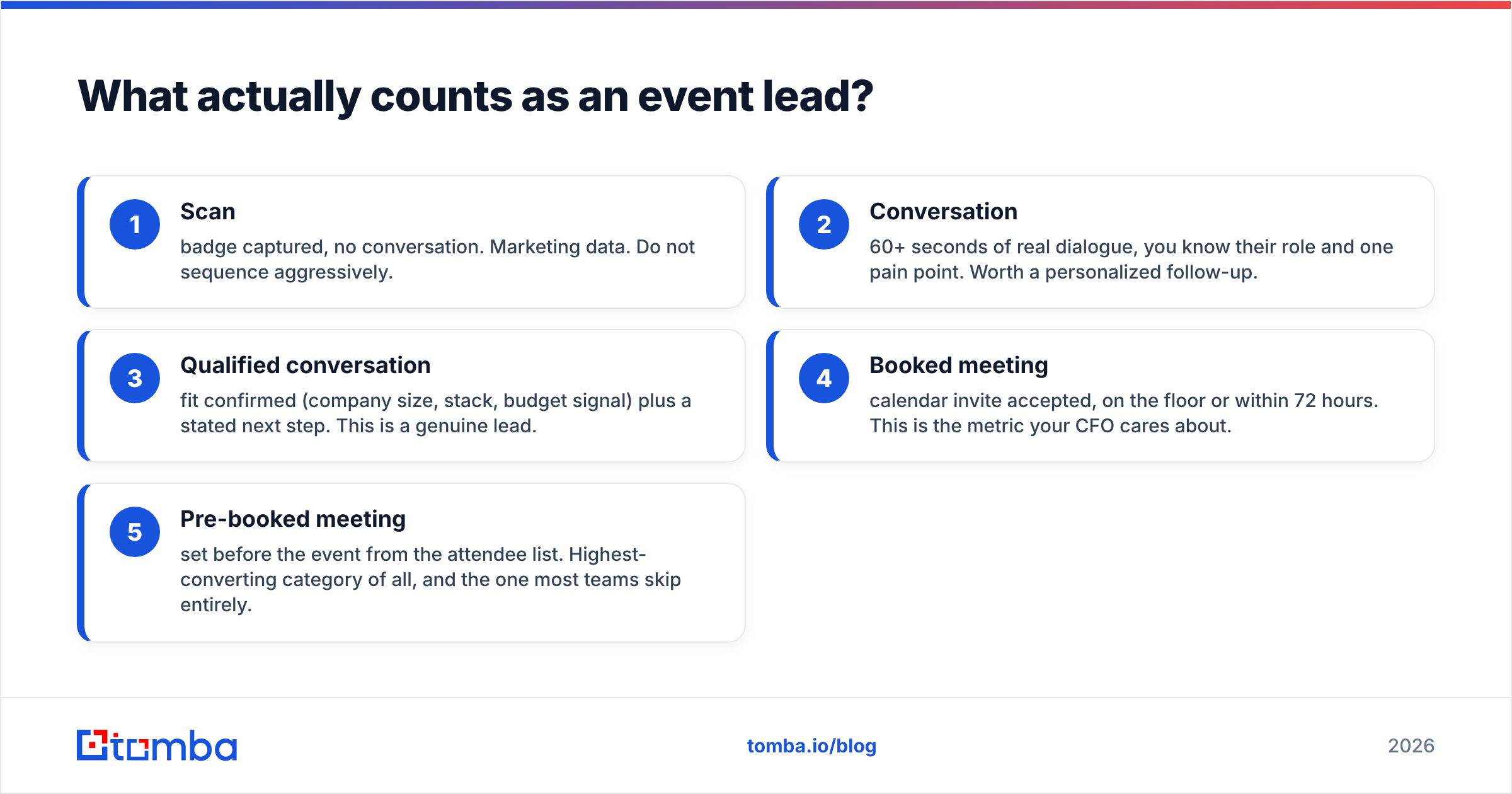
Here is the tier structure worth using:
- Scan — badge captured, no conversation. Marketing data. Do not sequence aggressively.
- Conversation — 60+ seconds of real dialogue, you know their role and one pain point. Worth a personalized follow-up.
- Qualified conversation — fit confirmed (company size, stack, budget signal) plus a stated next step. This is a genuine lead.
- Booked meeting — calendar invite accepted, on the floor or within 72 hours. This is the metric your CFO cares about.
- Pre-booked meeting — set before the event from the attendee list. Highest-converting category of all, and the one most teams skip entirely.
Track all five separately. The moment you report only "leads generated," you have lost the ability to improve.
Sorry — corrected embed below.
How do you generate leads before the event even starts?#
Everything good that happens at an event was set up 4-6 weeks earlier. This is the highest-leverage phase and the one most teams treat as optional.
Step 1 — Get the attendee or exhibitor list. Most conferences publish an exhibitor directory publicly, and many publish speaker rosters, sponsor lists, and session panels. Those are your seed lists. Attendee lists are rarer, but sponsorship packages often include them, and event apps frequently expose attending companies.
Step 2 — Filter to a real ICP shortlist. From 3,000 attending companies, maybe 180 fit your profile. Cut ruthlessly. You cannot pre-book 3,000 people, and trying makes your outreach generic.
Step 3 — Find the right humans at those companies. Company names are not contacts. This is where a domain search earns its keep: feed in acmecorp.com, get back the people and email patterns at that org, then narrow by role. For a 180-company shortlist you want 2-3 contacts each — the economic buyer and the practitioner who will actually feel the pain.
Step 4 — Verify before you send. Conference outreach compresses into a tight window, which means high daily volume from your domain. A 12% bounce rate during that window damages sender reputation right when you need inboxing most. Run the list through an email verifier and drop anything that is not deliverable.
Step 5 — Send the pre-event sequence. Three touches, spaced across two weeks:
- T-21 days: "I saw you're attending [Event]. We're at booth 412 — here's the one thing we're showing that's relevant to [specific role problem]." No pitch. One question.
- T-10 days: Value drop. A short teardown, a benchmark, a session recommendation. Reference their company specifically.
- T-3 days: Direct ask. "I have Tuesday 2:15 and Wednesday 10:00 open. Either work?"
Ten to twenty-five booked meetings before you board the plane changes the entire economics of the trip. The booth becomes a bonus channel instead of the only channel.
Which pre-event channels perform best?#
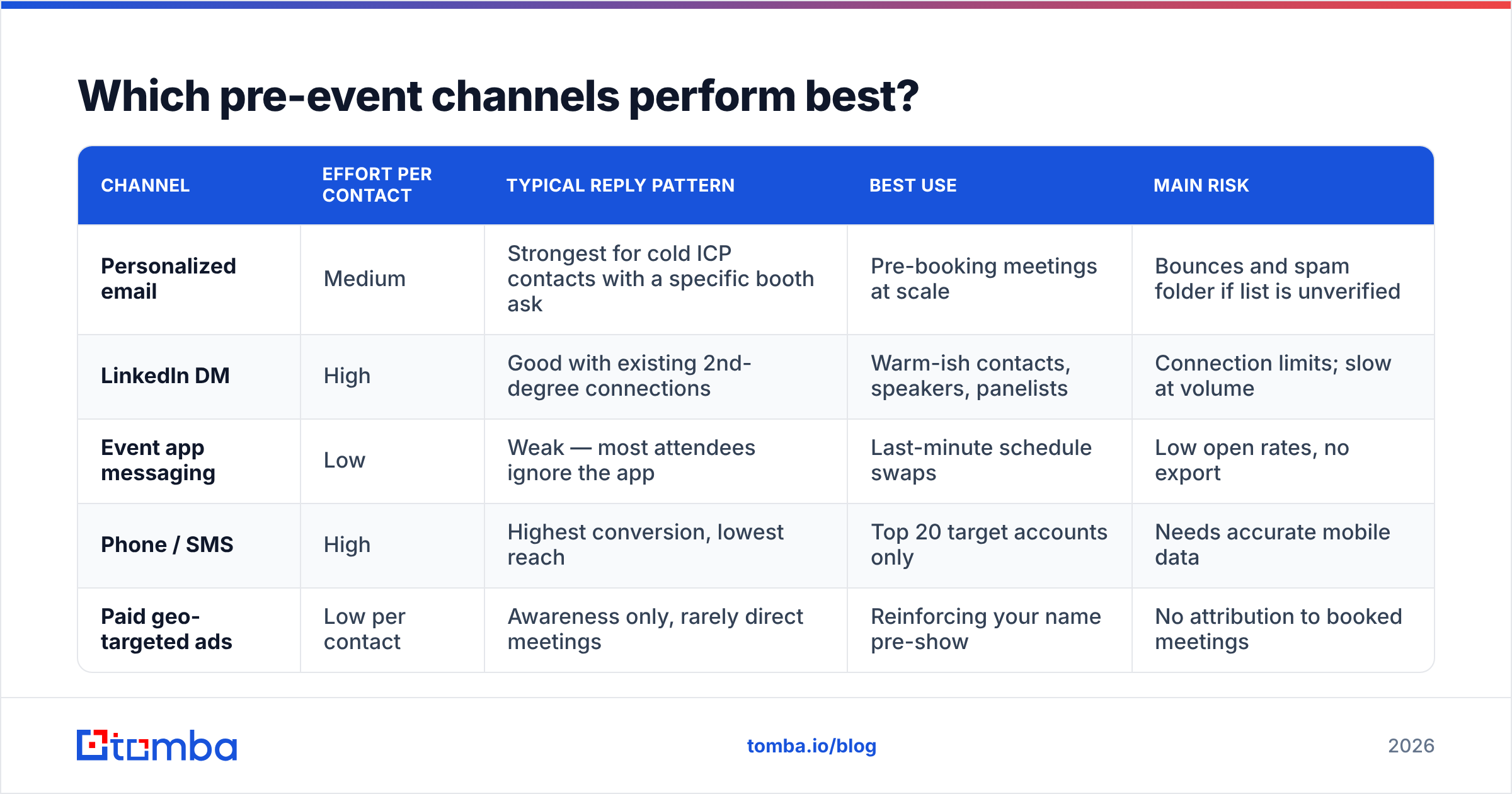
Not all outreach carries equal weight in the run-up. Here is how the main channels compare for pre-event meeting-setting:
| Channel | Effort per contact | Typical reply pattern | Best use | Main risk |
|---|---|---|---|---|
| Personalized email | Medium | Strongest for cold ICP contacts with a specific booth ask | Pre-booking meetings at scale | Bounces and spam folder if list is unverified |
| LinkedIn DM | High | Good with existing 2nd-degree connections | Warm-ish contacts, speakers, panelists | Connection limits; slow at volume |
| Event app messaging | Low | Weak — most attendees ignore the app | Last-minute schedule swaps | Low open rates, no export |
| Phone / SMS | High | Highest conversion, lowest reach | Top 20 target accounts only | Needs accurate mobile data |
| Paid geo-targeted ads | Low per contact | Awareness only, rarely direct meetings | Reinforcing your name pre-show | No attribution to booked meetings |
Email plus phone on your top accounts is the combination that actually fills a calendar. Use phone finder data only for the accounts worth a live call — twenty well-researched calls beat two hundred sloppy ones.
How do you qualify leads on the floor without killing the conversation?#
Booth conversations fail in two directions: the rep pitches for eight minutes and learns nothing, or the rep chats pleasantly and captures nothing usable.
Use a 90-second frame:
- Open with a disqualifying question (15s). "What brings you to the show?" — not "Can I tell you about our product?" Their answer sorts them into buyer, browser, or job-seeker in one sentence.
- Mirror their problem (20s). Repeat their pain in your words. This is the moment they decide whether you understand their world.
- Show one thing (30s). One screen, one number, one before/after. Not a demo. A demo is what the follow-up meeting is for.
- Ask for the next step (15s). "Worth 20 minutes next week with your ops lead?" Get a yes/no, not a maybe.
- Capture context immediately (10s). Scan the badge, then type a 10-word note into your phone before the next person arrives.
That last step is the one everybody skips and everybody regrets. A scan with no note is indistinguishable from a scan you got while handing out a t-shirt. Note the pain point, the tool they currently use, and the exact next step you agreed to. Ten words is enough.
Staffing rule: never have all reps at the booth. Rotate one person through sessions, hallways, and sponsor parties. Hallway conversations convert better than booth conversations because nobody feels sold to in a hallway.
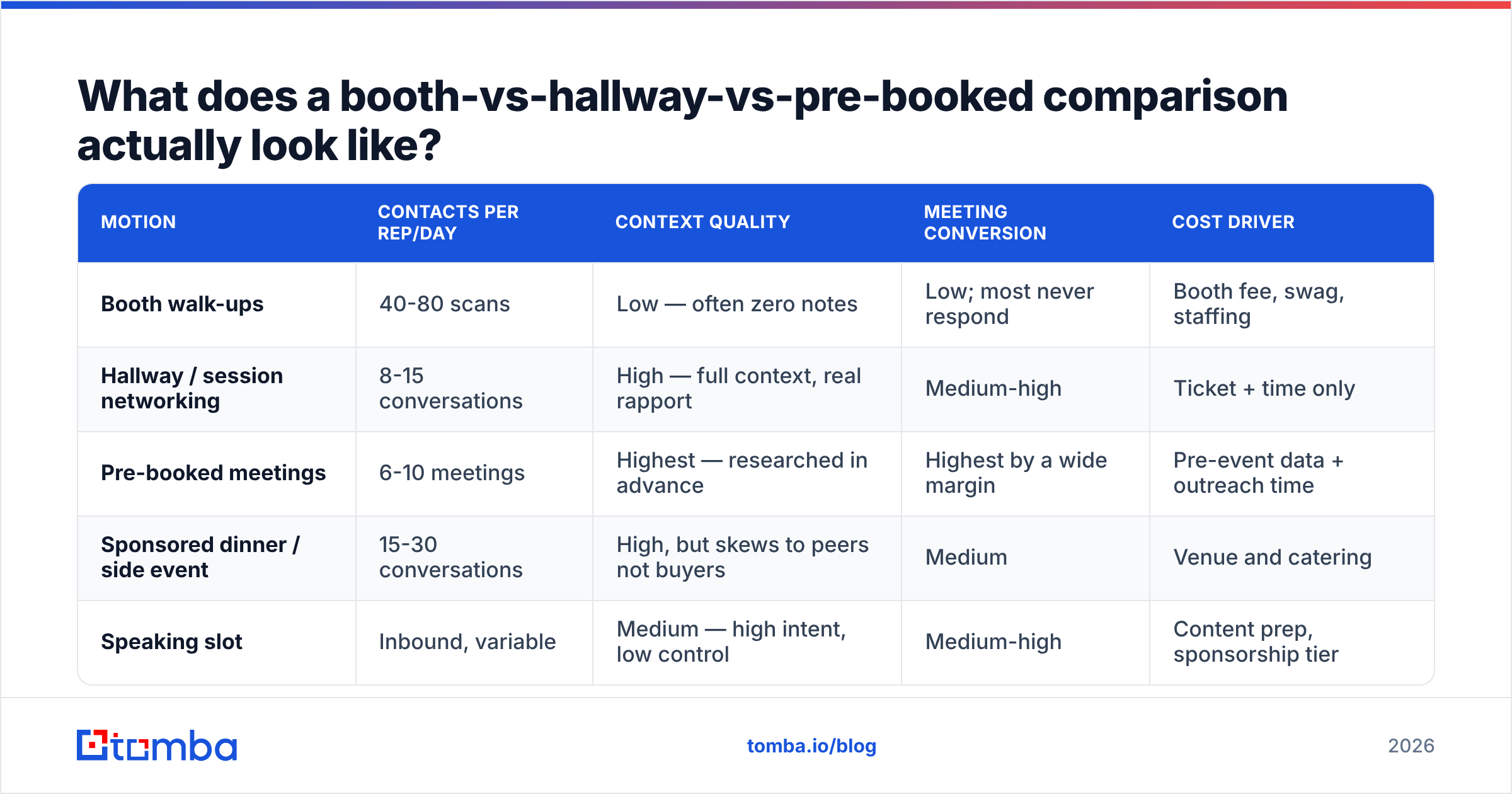
What does a booth-vs-hallway-vs-pre-booked comparison actually look like?#
Different event motions produce structurally different outcomes. Use this to decide where your headcount goes:
| Motion | Contacts per rep/day | Context quality | Meeting conversion | Cost driver |
|---|---|---|---|---|
| Booth walk-ups | 40-80 scans | Low — often zero notes | Low; most never respond | Booth fee, swag, staffing |
| Hallway / session networking | 8-15 conversations | High — full context, real rapport | Medium-high | Ticket + time only |
| Pre-booked meetings | 6-10 meetings | Highest — researched in advance | Highest by a wide margin | Pre-event data + outreach time |
| Sponsored dinner / side event | 15-30 conversations | High, but skews to peers not buyers | Medium | Venue and catering |
| Speaking slot | Inbound, variable | Medium — high intent, low control | Medium-high | Content prep, sponsorship tier |
The pattern is consistent: fewer, better-prepared conversations beat volume every time. If your event plan is "stand at the booth for three days and scan," you have chosen the lowest-converting motion available.
How do you handle event data so your follow-up actually lands?#
This is the phase where most event ROI quietly dies, and it is a data problem before it is a messaging problem.
Badge scanner exports are notoriously messy. Depending on the registration vendor you get some mix of: personal Gmail addresses attendees used to register, role-based catch-alls like info@, typos from handwritten registration, stale addresses from someone who changed jobs between registering and attending, and rows where the company field is a free-text nightmare (acme corp., ACME Corporation, Acme).
Run this cleanup before a single send:
- Deduplicate. The same person scanned at your booth and your dinner is one lead, not two. A remove duplicates pass takes seconds.
- Normalize company to domain. Free-text company names are useless for enrichment. Map each to a real domain first.
- Replace personal emails with work emails. Someone who registered with
jsmith88@gmail.comshould be reached at their company address. Resolve the work email from name plus domain using an email finder. - Verify everything. Especially anything you inferred. Unverified guesses are how a follow-up campaign turns into a blocklist entry.
- Enrich for personalization. Title, seniority, and company size decide which of your three follow-up templates each person gets. Data enrichment fills those gaps automatically.
Roughly a third of a typical badge export is unusable as-is. Cleaning it is not optional busywork — it is the difference between a 4% and a 20% reply rate.
What should the post-event follow-up sequence look like?#
Speed is the single strongest variable. HubSpot's research on lead response time has long shown that responsiveness within the first hours dramatically outperforms slower follow-up — and after a conference, your competitors are emailing the same people from the same badge list. Being fourth in the inbox is being invisible.
Hour 0-24 (send from the show floor or your hotel room): Every qualified conversation gets a manual, one-to-one email. Reference the specific thing you discussed. No template smell, no marketing images, no PDF attachment. Two sentences and a calendar link.
Day 2-3: Segmented sequences by tier. Qualified conversations get a three-touch personalized track. Plain scans get a single, low-pressure "we met at [Event]" note with an easy unsubscribe — and honestly, one polite touch is all a cold scan has earned.
Day 7: Value follow-up to non-responders. Send the thing you promised on the floor — the benchmark, the teardown, the recording. Not "just bumping this up."
Day 14-21: Break-up email or move to nurture. Do not sequence a badge scan for eight weeks. That is how you end up on G2 reviews complaining about your own reputation.
Three practical rules that separate teams who convert from teams who spam:
- Segment by tier, not by event. "Everyone who attended SaaStr" is not a segment. "VPs of Ops at 200-1000 person companies who told me their onboarding is manual" is.
- Warm your domain before the spike. If you normally send 50 emails a day and suddenly send 600, your provider notices. Ramp two weeks out. The warmup calculator will tell you the ramp schedule.
- Route to the right rep instantly. A qualified lead sitting unassigned for four days is a lost lead. Push clean data straight into your CRM via a HubSpot integration or equivalent, with the floor notes attached.
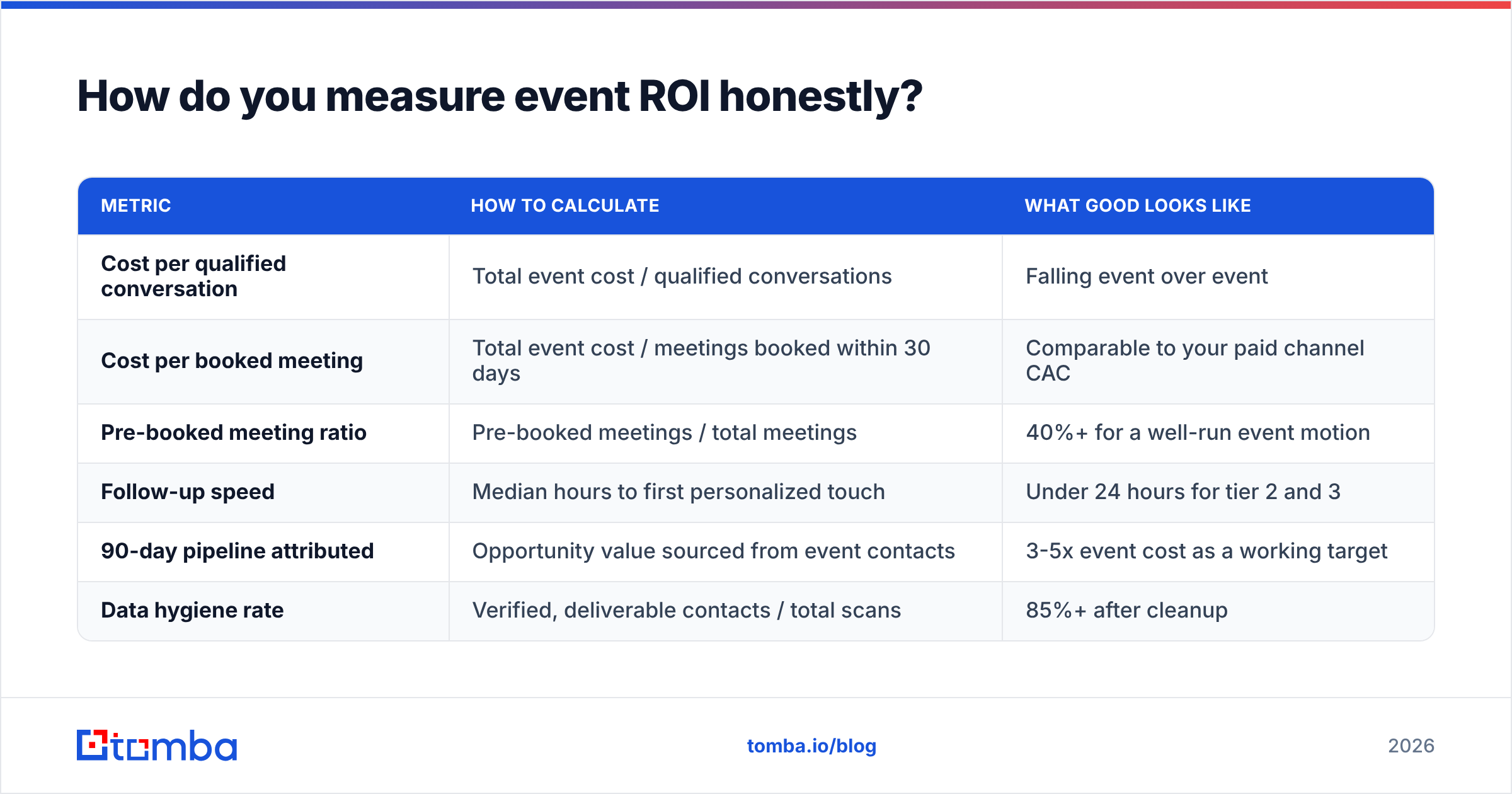
How do you measure event ROI honestly?#
Replace "leads generated" with a small metric set that survives scrutiny:
| Metric | How to calculate | What good looks like |
|---|---|---|
| Cost per qualified conversation | Total event cost / qualified conversations | Falling event over event |
| Cost per booked meeting | Total event cost / meetings booked within 30 days | Comparable to your paid channel CAC |
| Pre-booked meeting ratio | Pre-booked meetings / total meetings | 40%+ for a well-run event motion |
| Follow-up speed | Median hours to first personalized touch | Under 24 hours for tier 2 and 3 |
| 90-day pipeline attributed | Opportunity value sourced from event contacts | 3-5x event cost as a working target |
| Data hygiene rate | Verified, deliverable contacts / total scans | 85%+ after cleanup |
Total event cost means everything: booth, sponsorship, travel, hotels, swag, shipping, and a fair estimate of staff time. Teams that exclude labor consistently overstate their event ROI and keep buying booths that lose money.
Run this scorecard within 45 days while the data is still clean, and bring it to next year's budget conversation. It is the only way to argue for a bigger booth — or to kill an event that has quietly been a loss for three years running. If you want a broader frame for how these numbers feed forecasting, the revenue operations view ties event spend to the same pipeline model as every other channel.
What are the most common event lead-gen mistakes?#
- Treating the booth as the strategy. The booth is a meeting room, not a lead engine. The engine is your pre-event list work.
- Scanning without notes. Ten words per scan. Non-negotiable.
- Blasting the whole export. Uniform messaging to a mixed list guarantees low reply rates and high complaint rates.
- Waiting for the "official" attendee list. It often arrives after the event, when it is worth a fraction of its pre-event value. Build your own from the exhibitor and speaker directories.
- No same-week debrief. Context evaporates fast. Hold a 45-minute debrief within five days: what worked, which messaging landed, which accounts to escalate.
- Ignoring the losers. The people who said no on the floor told you something valuable. Log the reason. It is the cheapest competitive research you will get all year.
If you buy a booth for the logo placement, buy it for the logo placement and say so. Just do not report it as lead generation.
Where do you go from here?#
Pick your next event and work backwards from the date. Six weeks out, build the target list. Four weeks out, find and verify the contacts. Three weeks out, start the sequence. On the floor, run the 90-second script and take the notes. Within 24 hours, send the personalized touches. Within 45 days, run the scorecard.
The teams that consistently pull pipeline out of conferences are not better at talking to strangers. They are better at knowing who to talk to before they arrive, and better at reaching those people afterward with data that actually works.
That second part starts with contacts you can trust. Tomba Email Finder turns an exhibitor directory or a messy badge export into verified, work-domain contacts you can sequence without wrecking your sender reputation — free tier covers 25 searches a month to test it on your next event list, with Starter at $49/mo and Growth at $99/mo when you scale. Check the full Tomba pricing and run your next attendee list through it before you book the flight.
Related guides#
// get started
Find, verify and enrich your first contacts today
Start on the free plan with 25 searches a month, then scale when your team is ready.
Free plan · No credit card required · GDPR & CCPA
// about the author