How To Get Responses From Cold Emails: A 2026 Playbook
Most cold emails die from bad data, bad timing, and bad asks — not bad copy. Here is the exact sequence that moves reply rates from 2% to 12%, with benchmarks, templates, and a diagnostic table.
TL;DR
- Reply rate is a data problem before it is a copy problem. A list with 18% invalid addresses caps your ceiling no matter how good the writing is.
- The single highest-leverage change most teams can make this quarter: cut send volume by 60%, spend the saved time on research, and make the ask smaller.
- Personalization that works is observable and recent — a hire, a launch, a job post — not "I loved your website."
- Follow-ups produce roughly half of all replies. Three to four touches over 12–15 days is the sweet spot; after that you're annoying people for diminishing returns.
- Benchmarks to hold yourself to in 2026: 40–60% open, 5–12% reply, 1–3% positive reply. Below that, the diagnostic table in this post tells you which stage is broken.
Why do most cold emails get zero responses?#
Because the sender optimized the wrong variable. Teams obsess over subject lines while three upstream problems quietly kill 90% of the campaign:
- The address is wrong or dead. Bounces above 3% get you throttled by mailbox providers, and every bounce is a prospect who was never going to reply anyway.
- The person doesn't own the problem. You emailed a marketing coordinator about a procurement decision. No amount of clever writing fixes a role mismatch.
- The ask is too big. "Do you have 30 minutes Thursday?" asks a stranger to give you a chunk of their calendar before you've earned a single second of attention.
Everything below attacks those three in order. Copy is the last thing you should tune, not the first.

What reply rate should you actually expect in 2026?#
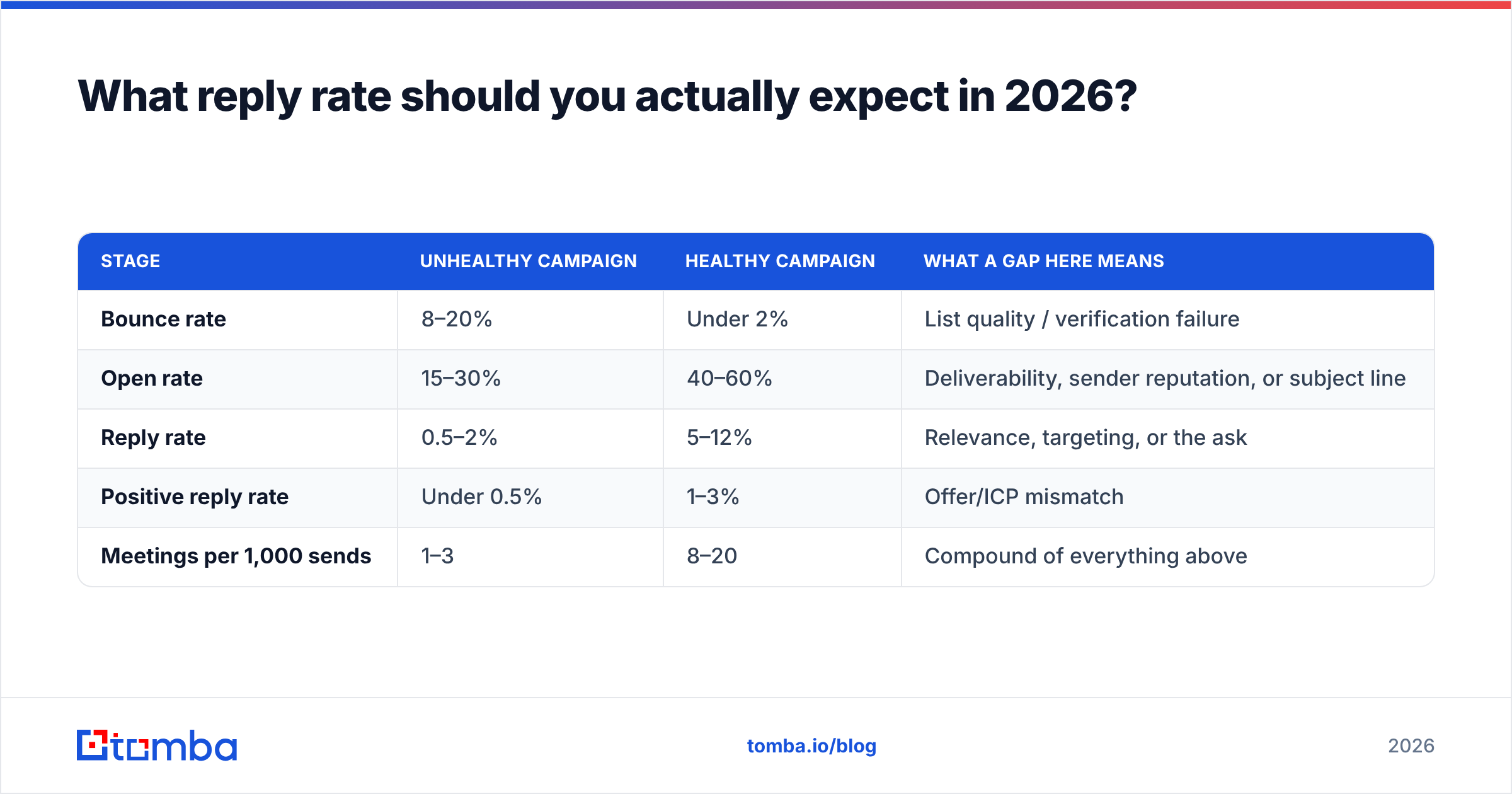
Set the target before you diagnose. Here's what the stages look like across a healthy versus an unhealthy campaign, based on aggregated outbound benchmarks and what teams report on G2 review threads:
| Stage | Unhealthy campaign | Healthy campaign | What a gap here means |
|---|---|---|---|
| Bounce rate | 8–20% | Under 2% | List quality / verification failure |
| Open rate | 15–30% | 40–60% | Deliverability, sender reputation, or subject line |
| Reply rate | 0.5–2% | 5–12% | Relevance, targeting, or the ask |
| Positive reply rate | Under 0.5% | 1–3% | Offer/ICP mismatch |
| Meetings per 1,000 sends | 1–3 | 8–20 | Compound of everything above |
Read that table top-down. If bounces are high, nothing below it means anything — fix the list first. If bounces are clean and opens are fine but replies are flat, you have a message problem, not a deliverability problem. Most people diagnose in the wrong order and rewrite copy when the real issue was a stale CSV.
How do you fix the list before you fix the copy?#
Think of your prospect list like ingredients in a kitchen. You can be a brilliant chef, but if a third of the produce is rotten, the dish fails and you'll blame your technique.
Four steps, in order:
- Define the trigger, not just the title. Instead of "VP Marketing at 50–200 person SaaS," define "VP Marketing at a SaaS company that posted a demand-gen job in the last 30 days." Triggers give you a reason to write that isn't "I found you on LinkedIn."
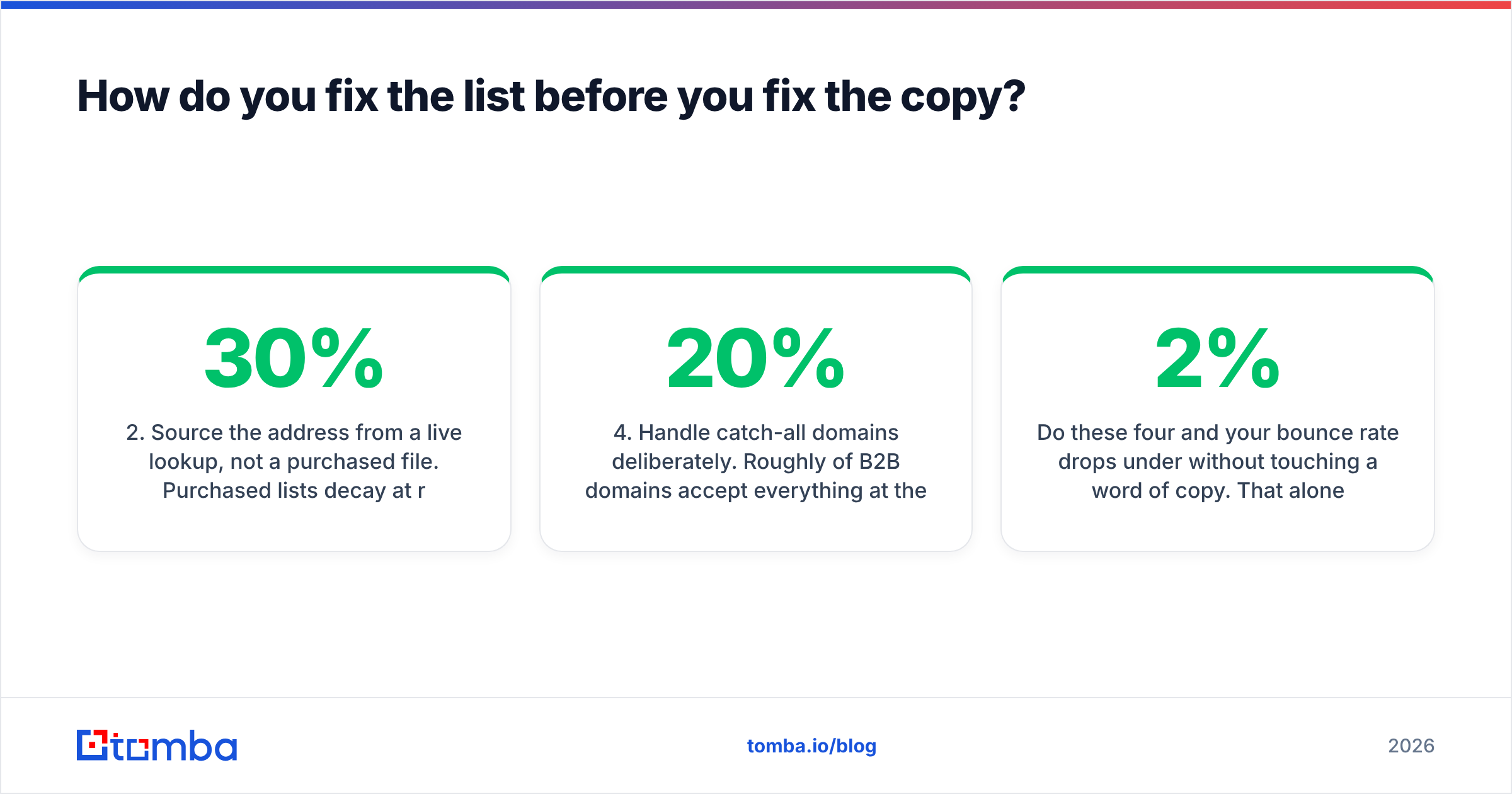
- Source the address from a live lookup, not a purchased file. Purchased lists decay at roughly 22–30% per year as people change jobs. Running a domain search against the company at send time gives you a current pattern and current people.
- Verify every address before it enters the sequence. An email verifier run costs a fraction of a cent per record and protects the domain reputation you spent months building.
- Handle catch-all domains deliberately. Roughly 20% of B2B domains accept everything at the SMTP layer, which means standard verification returns "unknown." A catch-all verifier uses pattern confidence and secondary signals instead of guessing — send to unresolved catch-alls in a separate, low-volume segment so they can't damage your main sending domain.
Do these four and your bounce rate drops under 2% without touching a word of copy. That alone typically lifts reply rate by 1–3 points, because you're no longer diluting the denominator with addresses that never existed.
Which parts of the email actually drive replies?#
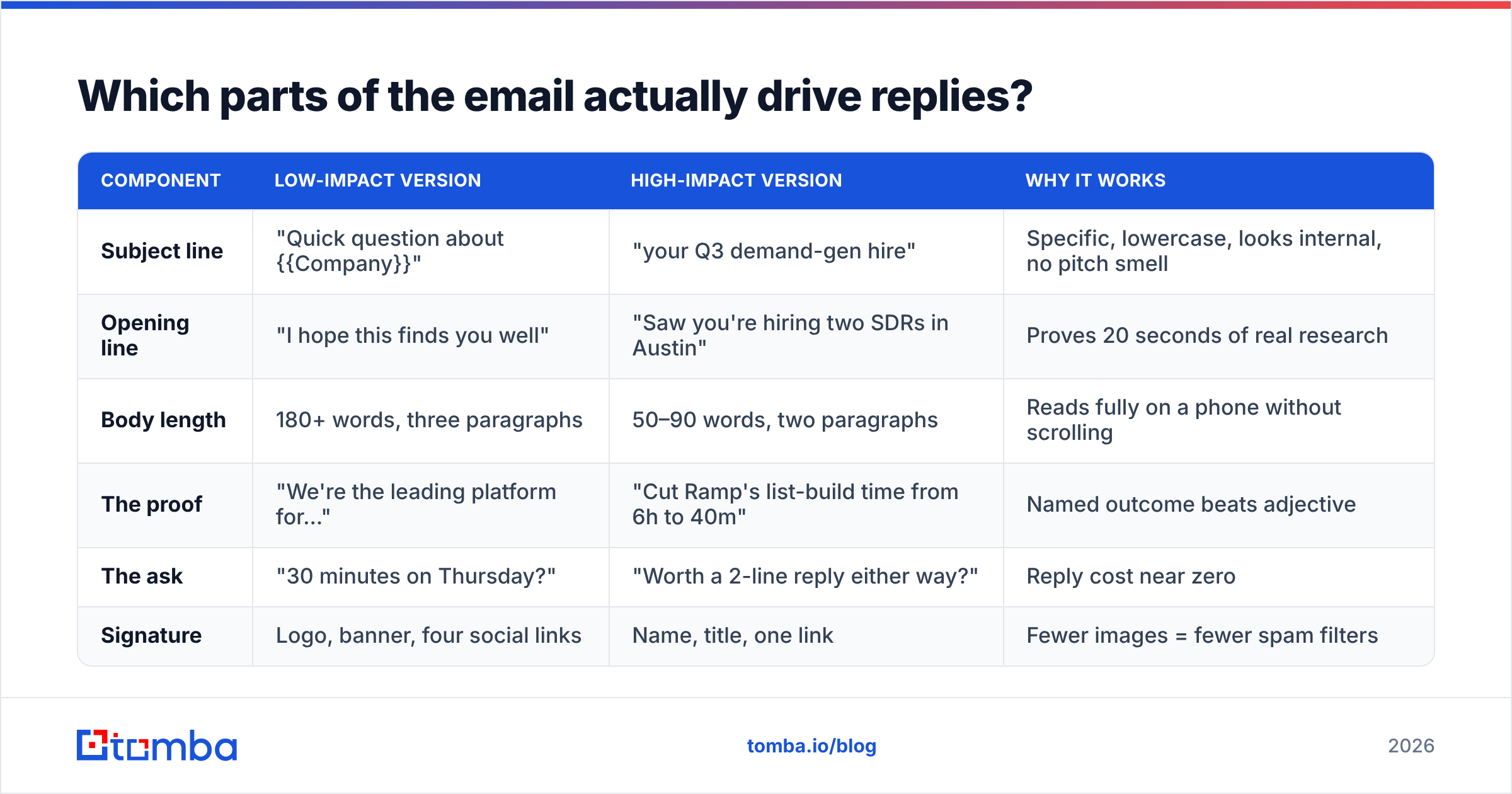
Now the message. Here's a component-by-component breakdown of what moves the number and what doesn't:
| Component | Low-impact version | High-impact version | Why it works |
|---|---|---|---|
| Subject line | "Quick question about {{Company}}" | "your Q3 demand-gen hire" | Specific, lowercase, looks internal, no pitch smell |
| Opening line | "I hope this finds you well" | "Saw you're hiring two SDRs in Austin" | Proves 20 seconds of real research |
| Body length | 180+ words, three paragraphs | 50–90 words, two paragraphs | Reads fully on a phone without scrolling |
| The proof | "We're the leading platform for…" | "Cut Ramp's list-build time from 6h to 40m" | Named outcome beats adjective |
| The ask | "30 minutes on Thursday?" | "Worth a 2-line reply either way?" | Reply cost near zero |
| Signature | Logo, banner, four social links | Name, title, one link | Fewer images = fewer spam filters |
The pattern across every row: reduce the cost of replying. A prospect answers when responding takes less effort than deleting. "Worth a look?" costs three seconds. "Book 30 minutes" costs a calendar negotiation with a stranger.
Two rules that consistently outperform in testing:
- One idea per email. If you mention pricing, a case study, and an integration, you've given the reader three things to evaluate and they'll evaluate none.
- No links in email one. Link-free first touches land in the primary tab more often, and you're not asking for a click before you've earned attention. Save links for touch two or three.
How much personalization is enough?#
Enough to prove you knew who you were writing to, and no more. There's a real tradeoff between depth and volume, and most teams pick badly.
The workable middle is tiered personalization:
- Tier 1 (top 50 accounts): 10–15 minutes of research each. Reference a specific initiative, a podcast appearance, a product change. Expect 15–25% reply rates.
- Tier 2 (next 300): One dynamic line pulled from a shared signal — funding round, hiring pattern, tech stack. Expect 6–10%.
- Tier 3 (long tail): Segment-level relevance only, i.e. one email written well for "Shopify Plus stores doing 8-figures." Expect 3–5%.
Bad personalization is worse than none. "I love what you're doing at {{Company}}" is a tell that the sender did nothing, and experienced buyers pattern-match it instantly. If the merge field would embarrass you when it renders wrong, cut it.
Where enrichment earns its keep is Tier 2. Pulling headcount, funding stage, tech stack, and role into the record with data enrichment lets one well-written template render 300 genuinely relevant variants without 300 hours of manual research. HubSpot's own sales research has repeatedly found relevance beats volume, and this is the mechanism.
What does the follow-up sequence look like?#
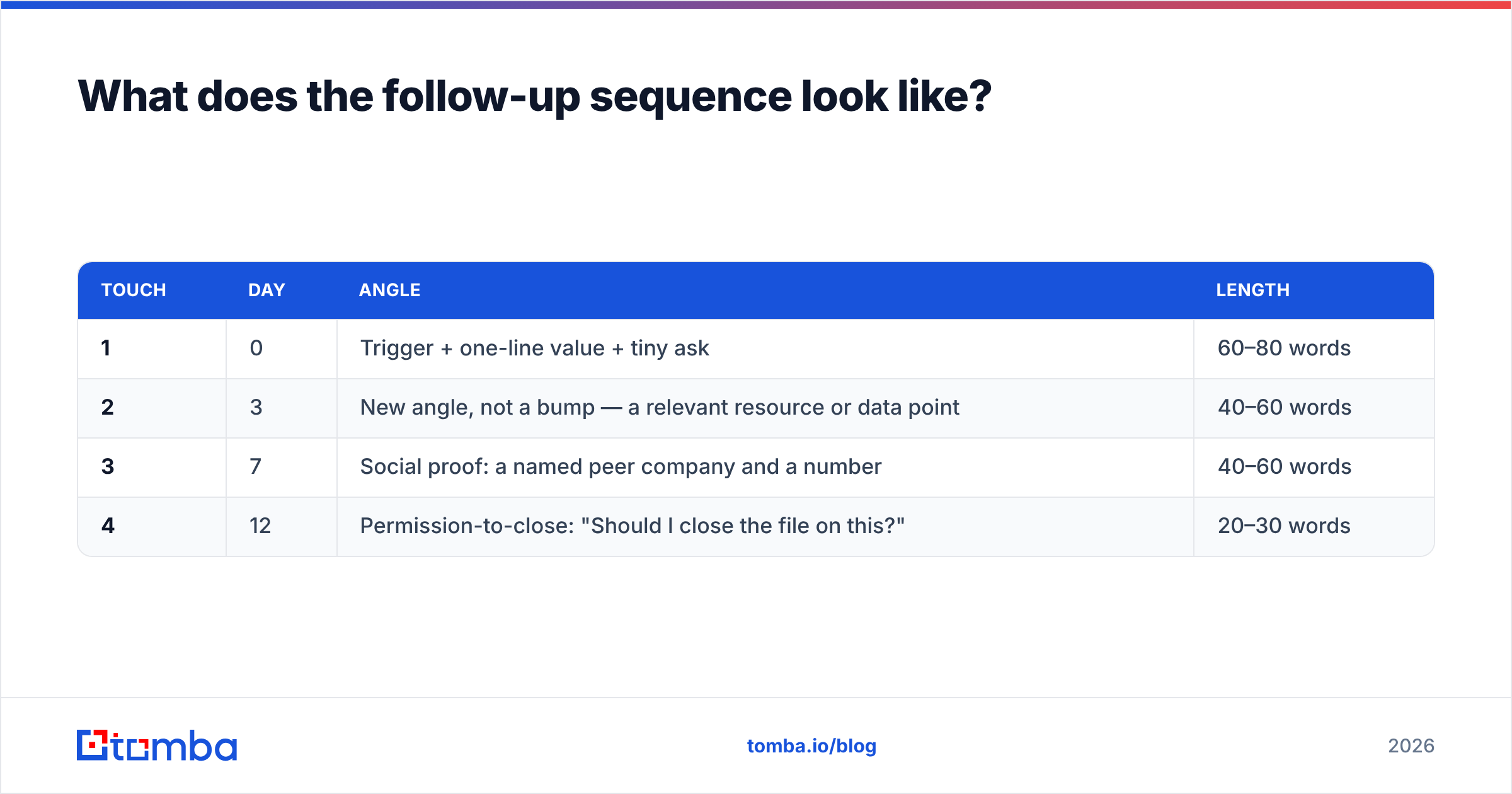
About half your total replies arrive after email one. Yet most teams either stop at one touch or grind out eight and torch their domain.
A sequence that works:
| Touch | Day | Angle | Length |
|---|---|---|---|
| 1 | 0 | Trigger + one-line value + tiny ask | 60–80 words |
| 2 | 3 | New angle, not a bump — a relevant resource or data point | 40–60 words |
| 3 | 7 | Social proof: a named peer company and a number | 40–60 words |
| 4 | 12 | Permission-to-close: "Should I close the file on this?" | 20–30 words |
Notes that matter more than the table:
- Never reply-bump with "just following up." It adds zero information and trains the reader to ignore your thread.
- The breakup email genuinely works. "Sounds like this isn't a priority — want me to close the file?" gets a reply because it offers relief. Ask for a no and you'll frequently get a yes.
- Change the send time between touches. Same-time sends look automated. Vary by a few hours.
- Cap at four. Beyond touch four, incremental replies fall off sharply while spam complaints keep climbing — and complaints are the metric that actually gets your domain blocked.
Does deliverability still matter if the copy is good?#
Yes, and it's the failure mode people notice last because it's invisible. If your email sits in Promotions or Spam, a perfect message gets a 0% reply rate and you'll wrongly blame the writing.
The non-negotiables in 2026:
- Authenticate properly. SPF, DKIM, and DMARC all aligned. Google and Yahoo made DMARC mandatory for bulk senders in 2024 and enforcement has only tightened — see Google's sender guidelines for the current requirements. Check yours with an SPF checker before you send anything.
- Send from a separate domain. Never run cold outbound from your primary corporate domain. Use a lookalike (
get-yourbrand.com) so a reputation hit doesn't take down your billing and support email. - Warm up for 3–4 weeks minimum. Start at 10–20 sends/day per mailbox, ramp 10–15% weekly, cap around 40–50/day per mailbox. Use an email warmup calculator to plan the ramp instead of guessing.
- Watch spam complaints, not open rates. Apple Mail Privacy Protection inflates opens; complaint rate above 0.3% is the number that actually gets you blocked.
- Scrub before every send. Re-verify lists older than 60 days. Contacts rot continuously, not on a schedule that suits you.
Deliverability isn't a one-time setup. It's a maintenance habit — check reputation monthly, and treat any bounce spike above 3% as a stop-the-line event.
How do you diagnose a campaign that isn't working?#
Run this in order and stop at the first failing check. Diagnosing out of order is how teams spend three weeks rewriting copy on a campaign that was bouncing 14%.
- Bounce rate above 3%? → List problem. Verify and re-source. Stop here.
- Open rate below 30% with clean bounces? → Deliverability or subject line. Test authentication first, subject second.
- Opens fine, replies below 3%? → Relevance. Your targeting or your ask is off. Cut the ask in half before rewriting anything else.
- Replies coming but all negative? → ICP mismatch. You're reaching real humans who genuinely don't have the problem. Re-segment.
- Positive replies but no meetings? → Handoff problem. Your response-to-booking flow is leaking; reply within one hour and offer two concrete slots.
Most campaigns fail at step 1 or step 3, and almost everyone tries to fix step 2.
What's the fastest way to build a list that actually replies?#
Build it fresh, per campaign, from a trigger. The workflow that takes about an hour for 200 contacts:
- Define the trigger and pull a company list that matches it (job posts, funding, tech-stack change, new office).
- Identify the right role at each company — the person who owns the problem, not the person with the impressive title.
- Find the address with an email finder by name and domain, or run a domain search when you want to see the full team and the company's email pattern.
- Verify in bulk and drop anything that isn't valid or high-confidence.
- Enrich with the two or three fields your template actually uses. Not fifteen fields you'll never merge.
- Load into your sequencer in batches of 50 per mailbox per day.
If your team lives in a spreadsheet, the Google Sheets add-on does steps 3–5 inside the sheet, and the Tomba API covers it if you'd rather script the whole thing into your CRM. Either way, the principle holds: fresh, verified, small, and triggered beats large, purchased, and stale every single time.
Ready to fix the input before the output?#
You cannot write your way out of a bad list. Start by making sure every address in your next campaign is real and current — then spend your energy on the ask, the trigger, and the follow-up sequence.
Tomba's Email Finder finds verified professional addresses by name, domain, or company, with verification built into the same lookup so bounces never reach your sequencer. The free tier gives you 25 searches a month to test the workflow on a real campaign, and paid plans start at $49/mo on Starter with 99%-confidence scoring and bulk processing — full Tomba pricing is on the site. Build one 200-contact list the right way, run the four-touch sequence above, and measure the reply rate against the benchmark table. The difference will not be subtle.
Related guides#
// get started
Find, verify and enrich your first contacts today
Start on the free plan with 25 searches a month, then scale when your team is ready.
Free plan · No credit card required · GDPR & CCPA
// about the author