How to Grow Your Email List in 2026: 9 Tactics That Work
Most email list growth advice is recycled 2015 blog fodder. Here are nine tactics that still compound in 2026 — with the numbers, tradeoffs, and tools behind each.
TL;DR
- List size is a vanity metric. Deliverable, permissioned, segmented contacts are the only ones that produce revenue — a 5,000-contact list at 45% open rate beats a 50,000-contact list at 3%.
- The three highest-ROI growth channels in 2026 are gated utility content (not gated PDFs), website visitor identification, and partner/newsletter swaps.
- Popups still work, but only with exit-intent or scroll-depth triggers and a single field. Multi-field forms cost you 8–12% conversion per extra field.
- Never buy a list. If you need outbound contacts, build them from verified first-party research using an email finder plus verification, and keep that segment separate from your opt-in list.
- Verify at capture, not at send. Bad addresses entering your ESP is the number one cause of quiet deliverability decay.
Why does list growth still matter in 2026?#
Because you rent every other audience you have. Algorithm changes, ad cost inflation, and platform deprecations all bite the same way: the reach you built yesterday is not the reach you get tomorrow. Email is the only channel where the distribution list is an asset you own outright.
The catch is that the bar has risen. Google and Yahoo's bulk-sender requirements — spam complaint rates under 0.3%, enforced one-click unsubscribe, authenticated sending domains — mean a sloppily grown list now actively harms you. Twenty thousand scraped addresses is not a head start; it is a liability that gets your domain filtered for the next eight months.
So the question "how to grow your email list" has two halves that most guides collapse into one. Half one: acquisition volume. Half two: acquisition quality. Optimize only for the first and you buy yourself a slow-motion email deliverability failure.
What actually drives list growth — a channel comparison#
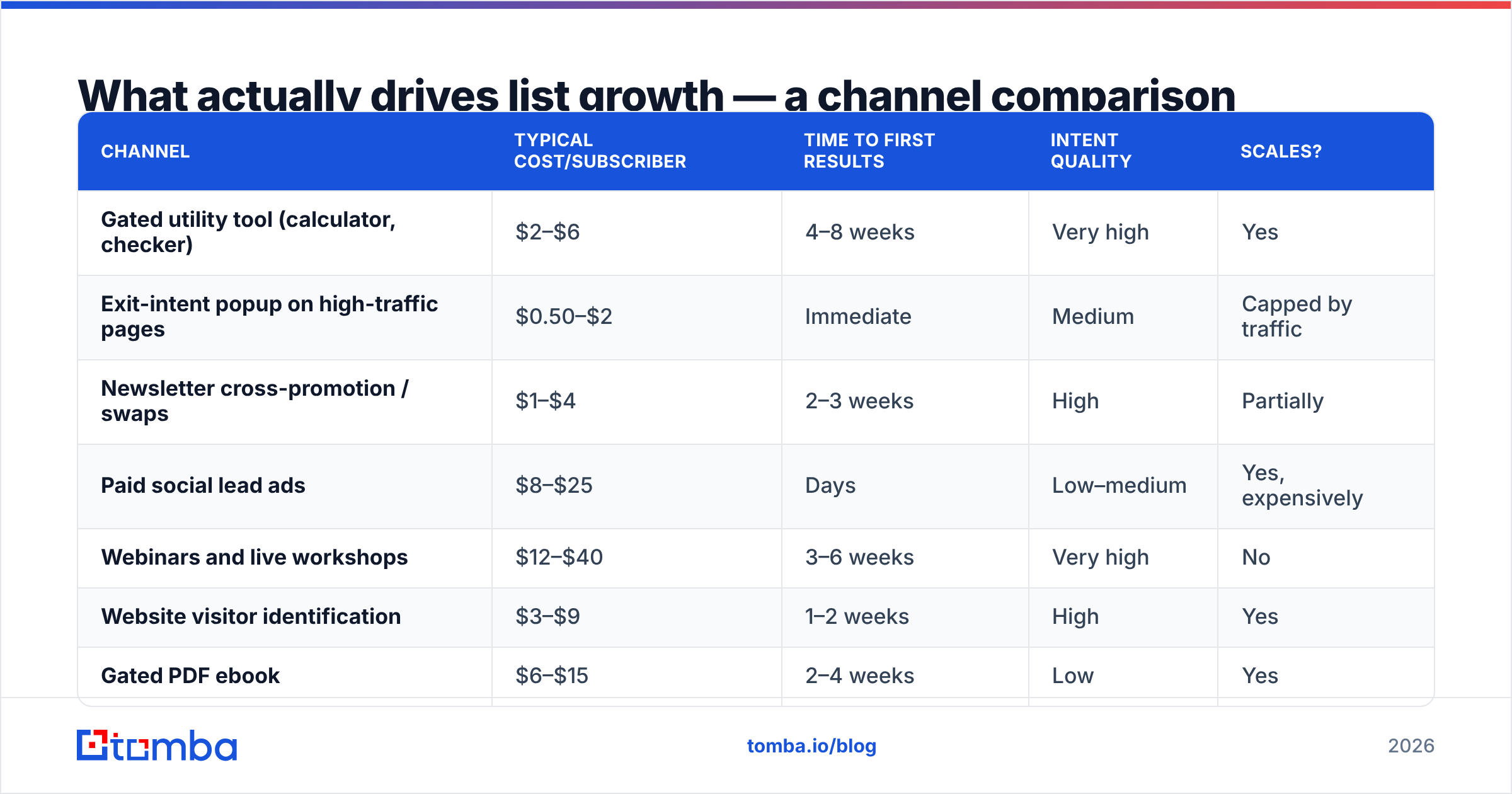
Here's how the main acquisition channels stack up, based on typical B2B SaaS and services benchmarks. "Cost per subscriber" assumes fully loaded cost including content production time.
| Channel | Typical cost/subscriber | Time to first results | Intent quality | Scales? |
|---|---|---|---|---|
| Gated utility tool (calculator, checker) | $2–$6 | 4–8 weeks | Very high | Yes |
| Exit-intent popup on high-traffic pages | $0.50–$2 | Immediate | Medium | Capped by traffic |
| Newsletter cross-promotion / swaps | $1–$4 | 2–3 weeks | High | Partially |
| Paid social lead ads | $8–$25 | Days | Low–medium | Yes, expensively |
| Webinars and live workshops | $12–$40 | 3–6 weeks | Very high | No |
| Website visitor identification | $3–$9 | 1–2 weeks | High | Yes |
| Gated PDF ebook | $6–$15 | 2–4 weeks | Low | Yes |
| Purchased list | "$0.10" | Immediate | Near zero | Catastrophically |
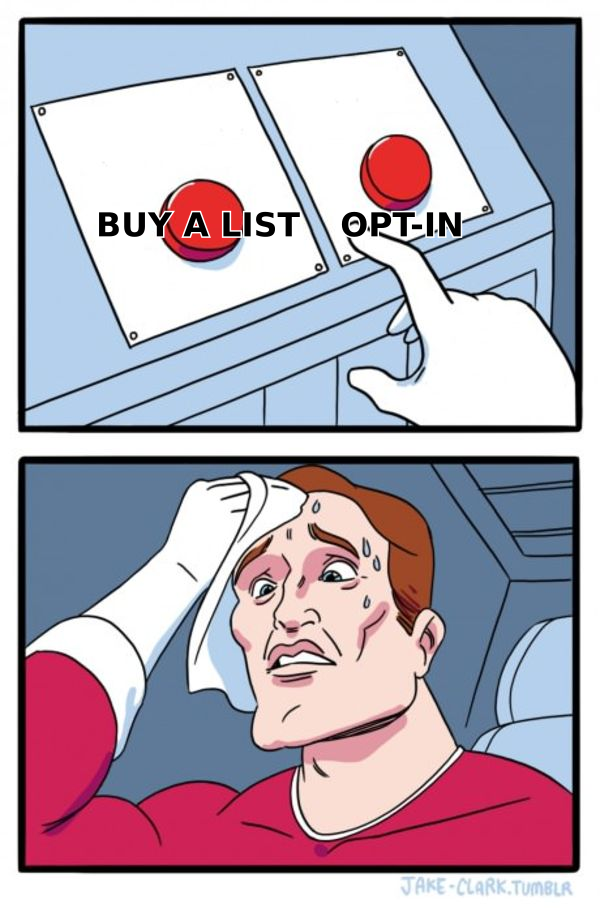
Two things jump out. Gated PDFs — the default tactic for a decade — are now among the worst performers because everyone has one and nobody reads them. And the "cheapest" option on the table, buying a list, is the only one with negative expected value once you price in domain reputation damage.
Sorry, formatting fix:
How do you build a lead magnet people actually want?#
Stop writing ebooks. Build something that does work for the reader.
The pattern that consistently outperforms in 2026 is gated utility — a small tool, template, or dataset that solves one narrow problem in under two minutes. It converts because the value is verifiable before the reader commits, and it keeps converting because it earns backlinks and search traffic that a PDF never will.
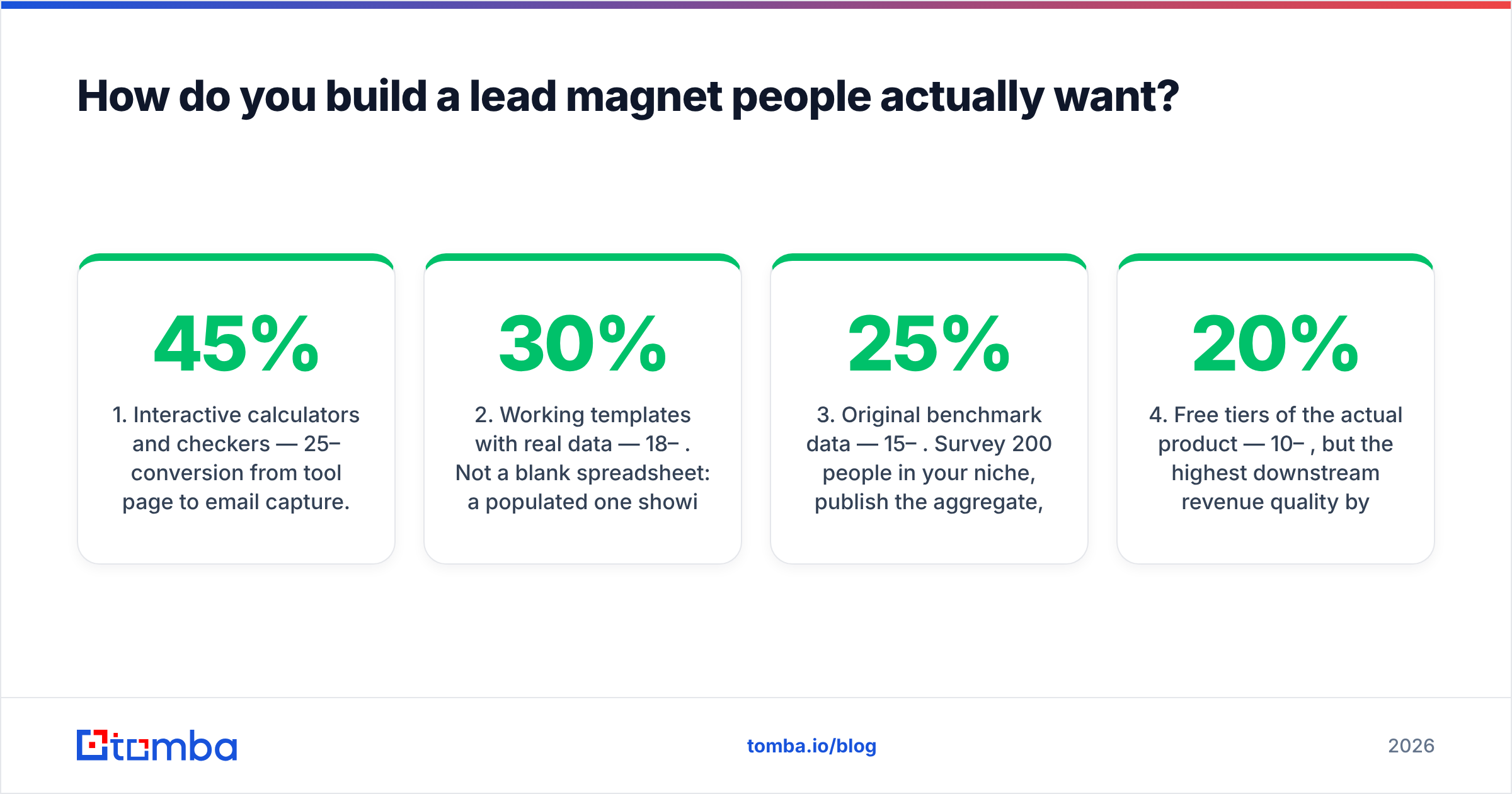
Five lead-magnet formats ranked by observed conversion rate:
- Interactive calculators and checkers — 25–45% conversion from tool page to email capture. A pricing calculator, an email warmup calculator, an ROI model. Cost to build: one to three engineering days.
- Working templates with real data — 18–30%. Not a blank spreadsheet: a populated one showing how a real team uses it. Financial models, outreach sequence libraries, QBR decks.
- Original benchmark data — 15–25%. Survey 200 people in your niche, publish the aggregate, gate the full cut. Also the single best backlink generator on this list.
- Free tiers of the actual product — 10–20%, but the highest downstream revenue quality by a wide margin. If your product can support a free tier, this beats every content asset you will ever produce.
- Curated resource lists — 8–15%. Cheap to make, easy to update, low differentiation. Fine as a secondary magnet, weak as a primary one.
Notice what's absent: the 40-page whitepaper. It still has a place in enterprise ABM, where the download is a sales trigger rather than a list-growth play. For list growth, it underperforms every option above.
Where should you place capture forms?#
Placement beats copy. A mediocre form on a high-intent page outperforms brilliant copy in the footer.
The pages that convert best are almost never your homepage. They're your top three organic blog posts, your pricing page, and your comparison/alternatives pages — because those readers are already in evaluation mode. Pull your analytics, sort landing pages by sessions, and check which ones have a capture form at all. Most sites find that half their top-ten traffic pages have nothing but a footer signup.
Trigger rules that hold up across tests:
- Exit intent on desktop, 60% scroll depth on mobile. Mobile exit-intent detection is unreliable; scroll depth is the honest proxy for engagement.
- One field. Email only. Every additional field costs roughly 8–12% of conversions. Collect name, company, and role later through progressive profiling or data enrichment.
- Frequency cap of once per 14 days per visitor. Beyond that you're training people to dismiss reflexively.
- Inline forms mid-article outperform popups on long-form content by 15–20%, and generate zero annoyance complaints.
One more placement most teams skip: your email signature and your team's. If twelve people send 40 emails a day each, that's roughly 10,000 monthly impressions of a newsletter link at zero cost. Standardize it with an email signature generator so the link is actually there.
Should you use website visitor identification?#
Yes, if your traffic is B2B and above roughly 5,000 monthly sessions — with one caveat about consent.
Visitor identification resolves anonymous company traffic into named accounts, and in some cases contactable people. The mechanic is simple: reverse-IP lookup against a firmographic database, matched to page-level behavior. If a director at a target account read your pricing page three times this week, you know before they ever fill in a form.
The caveat: under GDPR, identifying an individual without consent is a problem. Company-level identification is defensible; person-level identification of EU visitors without a lawful basis is not. Most teams run company-level resolution globally, then use website visitor reveal data to prioritize which accounts to research manually rather than auto-adding anyone to a nurture sequence.
That distinction matters for list hygiene too. Identified visitors are research leads, not subscribers. They belong in your CRM and your outbound sequence, not in your opt-in newsletter list. Mixing the two is how a clean list develops a complaint rate problem.
How do you grow an outbound list without buying one?#
Build it, contact by contact, from verified sources — then keep it structurally separate from your marketing list.
The workflow that holds up:
- Define the account list first. Firmographic filters — industry, headcount, tech stack, funding stage. Fifty right-fit accounts beat five thousand random ones.
- Identify the specific human. Title, tenure, and a reason they'd care. If you can't articulate why this person specifically, you're not prospecting, you're spraying.
- Find the address. Use pattern detection against the company domain rather than guessing. A domain search returns known addresses and the dominant format for that company, which you can then apply to named contacts.
- Verify before sending. Every address, every time. SMTP-level verification catches the majority of dead addresses; catch-all domains need separate handling via a catch-all verifier.
- Segment and suppress. Outbound prospects live in their own segment, with their own sending domain, separate from the domain that carries your newsletter.
That last point is the one teams learn expensively. Your newsletter domain has years of accumulated reputation. Cold outbound — even excellent cold outbound — carries higher complaint rates. Run it on a separate subdomain with its own warmup, and your marketing list stays insulated.
For scale, bulk workflows matter: a bulk email finder processing a CSV of names and companies is the difference between 30 contacts a day manually and 3,000 in an afternoon.
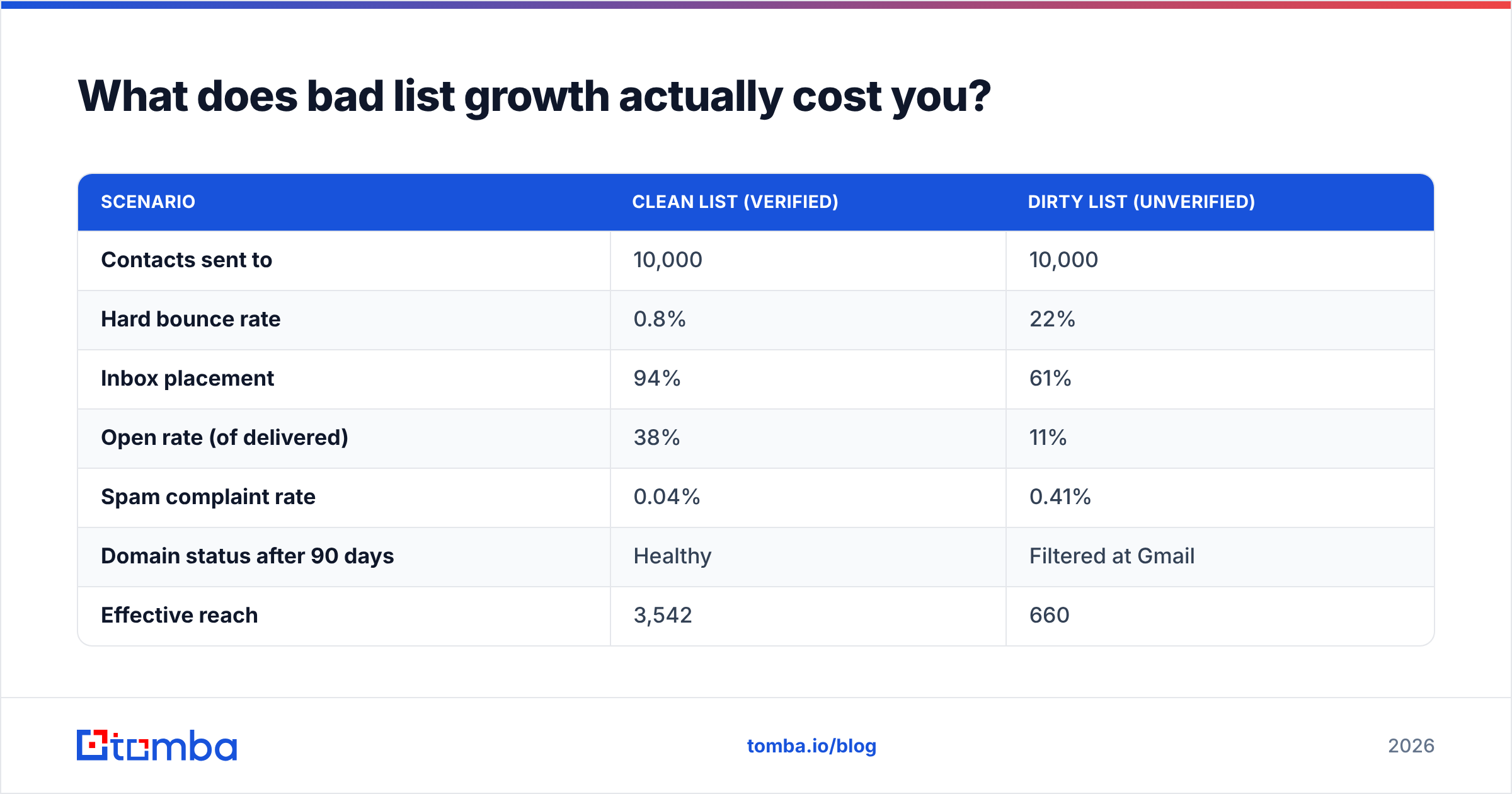
What does bad list growth actually cost you?#
More than the wasted spend. Here's the arithmetic that most teams never run.
| Scenario | Clean list (verified) | Dirty list (unverified) |
|---|---|---|
| Contacts sent to | 10,000 | 10,000 |
| Hard bounce rate | 0.8% | 22% |
| Inbox placement | 94% | 61% |
| Open rate (of delivered) | 38% | 11% |
| Spam complaint rate | 0.04% | 0.41% |
| Domain status after 90 days | Healthy | Filtered at Gmail |
| Effective reach | 3,542 | 660 |
The dirty list has the same nominal size and delivers 19% of the reach. Then it keeps costing you: once Gmail starts filtering a domain, recovery takes months of reduced-volume sending, and every campaign in between underperforms.

This is why verification belongs at the point of capture, not as a quarterly cleanup. Real-time validation on your signup form rejects typos and disposable addresses before they enter your ESP. A quarterly scrub only tells you how much damage already happened. Run new captures through an email verifier at submission and your bounce rate stays under 1% permanently.
Which tools do you actually need?#
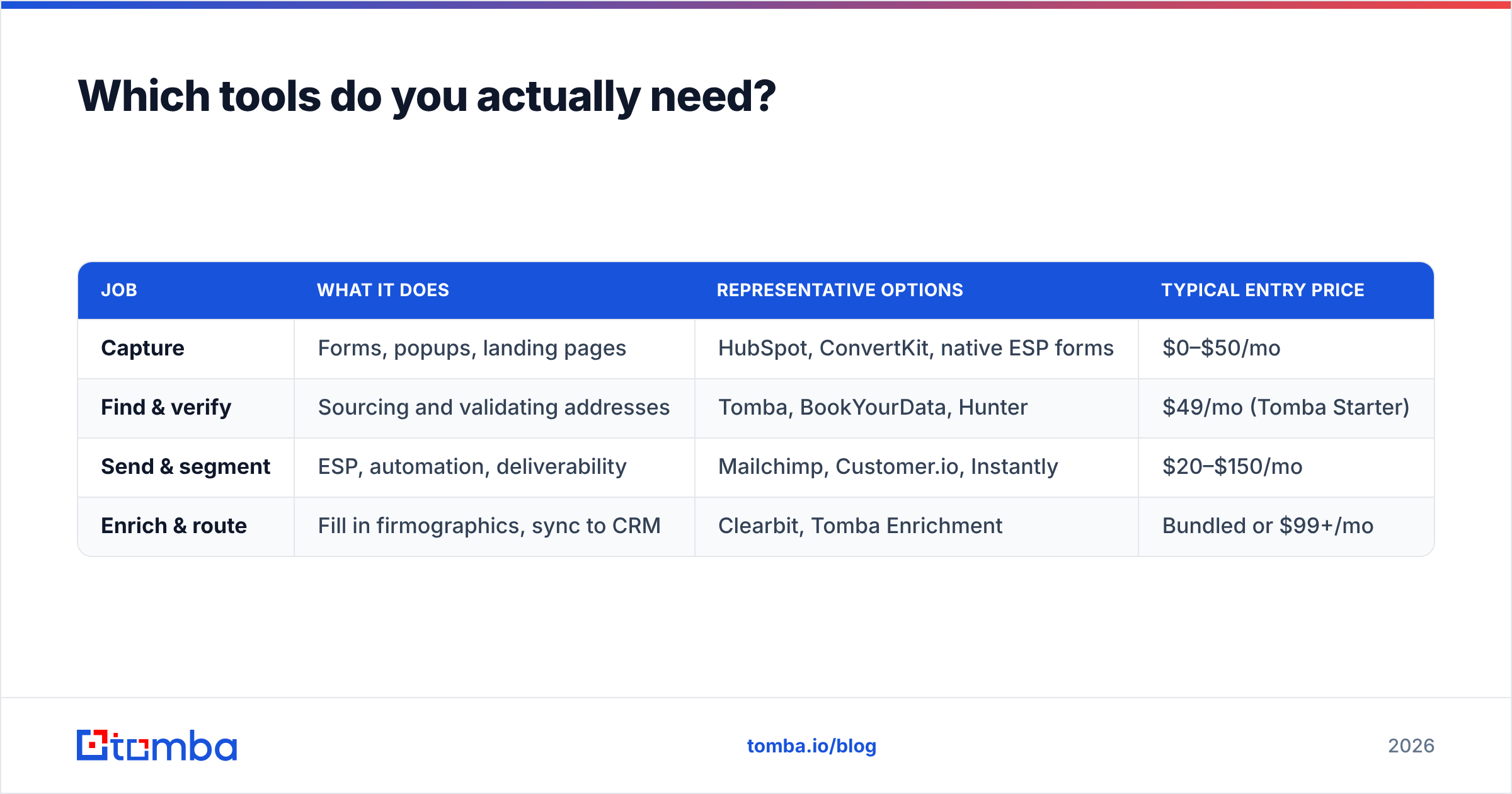
Fewer than the market wants to sell you. The stack breaks into four jobs.
| Job | What it does | Representative options | Typical entry price |
|---|---|---|---|
| Capture | Forms, popups, landing pages | HubSpot, ConvertKit, native ESP forms | $0–$50/mo |
| Find & verify | Sourcing and validating addresses | Tomba, BookYourData, Hunter | $49/mo (Tomba Starter) |
| Send & segment | ESP, automation, deliverability | Mailchimp, Customer.io, Instantly | $20–$150/mo |
| Enrich & route | Fill in firmographics, sync to CRM | Clearbit, Tomba Enrichment | Bundled or $99+/mo |
On the find-and-verify layer specifically: Tomba pricing starts with a free tier at 25 searches per month, then Starter at $49/mo, Growth at $99/mo, and Pro at $249/mo, with API access across paid plans. BookYourData takes a different approach — pay-per-record purchasing of pre-built B2B contact data with an accuracy guarantee, which suits teams who want a ready list rather than a research workflow. Both are legitimate answers to different questions: build-your-own versus buy-verified-records.
If you're integrating list growth into an existing stack, check that your finder writes back to your CRM natively. A HubSpot integration or Salesforce sync removes the CSV shuffle that quietly eats an hour a week.
For benchmarking vendor claims independently, G2's email marketing category and HubSpot's annual State of Marketing report are the two least-biased public sources. Vendor-published accuracy numbers are marketing until a third party reproduces them.
How do you keep the list you grew?#
Growth without retention is a bucket with a hole. Standard B2B list decay runs 22–30% annually — people change jobs, companies fold, addresses die. If you add 500 subscribers a month and lose 400 to decay and unsubscribes, you've built a treadmill.
Four habits that fix it:
- Re-permission at 12 months of inactivity. One email: "still want this?" Everyone who doesn't respond gets suppressed, not deleted. Painful once, cheap forever.
- Re-verify quarterly. Job changes are invisible until the bounce. A quarterly pass through verification catches decayed addresses before they hit your metrics.
- Segment by engagement, send by segment. Your most engaged 20% can take weekly. Your dormant tail should get monthly at most. Uniform frequency is what drives complaint rates up.
- Track response rate, not open rate. Apple Mail Privacy Protection made opens directional at best. Clicks, replies, and downstream pipeline are the honest metrics now.
One underrated retention tactic: make the unsubscribe generous. Offer "fewer emails" and "pause for 90 days" alongside "unsubscribe." A meaningful share of people who would have hit spam will take the pause instead, and roughly a third of pausers come back engaged.
What should you do in your first 30 days?#
If you're starting from a small or stale list, sequence it like this:
- Week 1 — Audit. Run your existing list through verification. Suppress everything that fails. Measure your real deliverable count, not your ESP's contact count.
- Week 2 — Fix capture. Add an inline form to your top five traffic pages and one exit-intent popup. One field. Real-time verification on submit.
- Week 3 — Ship one utility magnet. Pick the simplest calculator or template you can build in three days. Gate it lightly — email only, instant delivery.
- Week 4 — Open one outbound lane. Fifty right-fit accounts, researched and verified addresses, separate sending subdomain, warmed up.
That sequence front-loads the unglamorous work because everything downstream compounds on it. Growing a list you can't deliver to is the most expensive form of busywork in marketing.
Ready to build a list that actually lands? Start with the addresses. The Tomba Email Finder finds professional email addresses by domain, name, or company, with verification built into the same workflow — so nothing dirty reaches your ESP in the first place. The free tier gives you 25 searches a month to test the accuracy against contacts you can already confirm; Starter runs $49/mo when you're ready to scale. Verify first, send second, and the list you grow in 2026 will still be delivering in 2028.
Related guides#
// get started
Find, verify and enrich your first contacts today
Start on the free plan with 25 searches a month, then scale when your team is ready.
Free plan · No credit card required · GDPR & CCPA
// about the author