How To Improve Cold Email Campaigns: A 2026 Playbook
Reply rates are down and inbox filters are stricter than ever. Here are seven fixes — ranked by impact — that actually lift cold email performance in 2026, plus the numbers to benchmark against.
TL;DR
- Most cold email campaigns fail on inputs, not copy. Bad data caps your ceiling before the first subject line is written.
- The single highest-leverage fix is list hygiene: verified, role-appropriate contacts cut bounces below 2% and protect your domain reputation.
- Volume per inbox matters more than total volume. 20–40 sends per mailbox per day with real warmup beats 500 from one domain every time.
- Follow-ups produce 40–55% of total replies in most sequences. Three to four touches is the sweet spot; seven is spam.
- Measure reply rate and positive reply rate — not open rate. Apple Mail Privacy Protection has made opens directionally useless since 2021.
Why do most cold email campaigns underperform?#
Because teams optimize the last 10% and ignore the first 90%. Copy gets rewritten five times while the contact list — scraped, unverified, half-stale — never gets touched. That is backwards.
Think of a cold email campaign like a restaurant. Your copy is the plating. Your list is the ingredients. No amount of plating rescues spoiled produce. When a campaign returns a 0.4% reply rate, the cause is almost never a weak second sentence. It is one of four things: you emailed people who do not exist, you emailed people who cannot buy, you landed in spam, or you gave up after one touch.
Here is the honest breakdown of where performance is won and lost, based on how experienced outbound teams sequence their fixes:
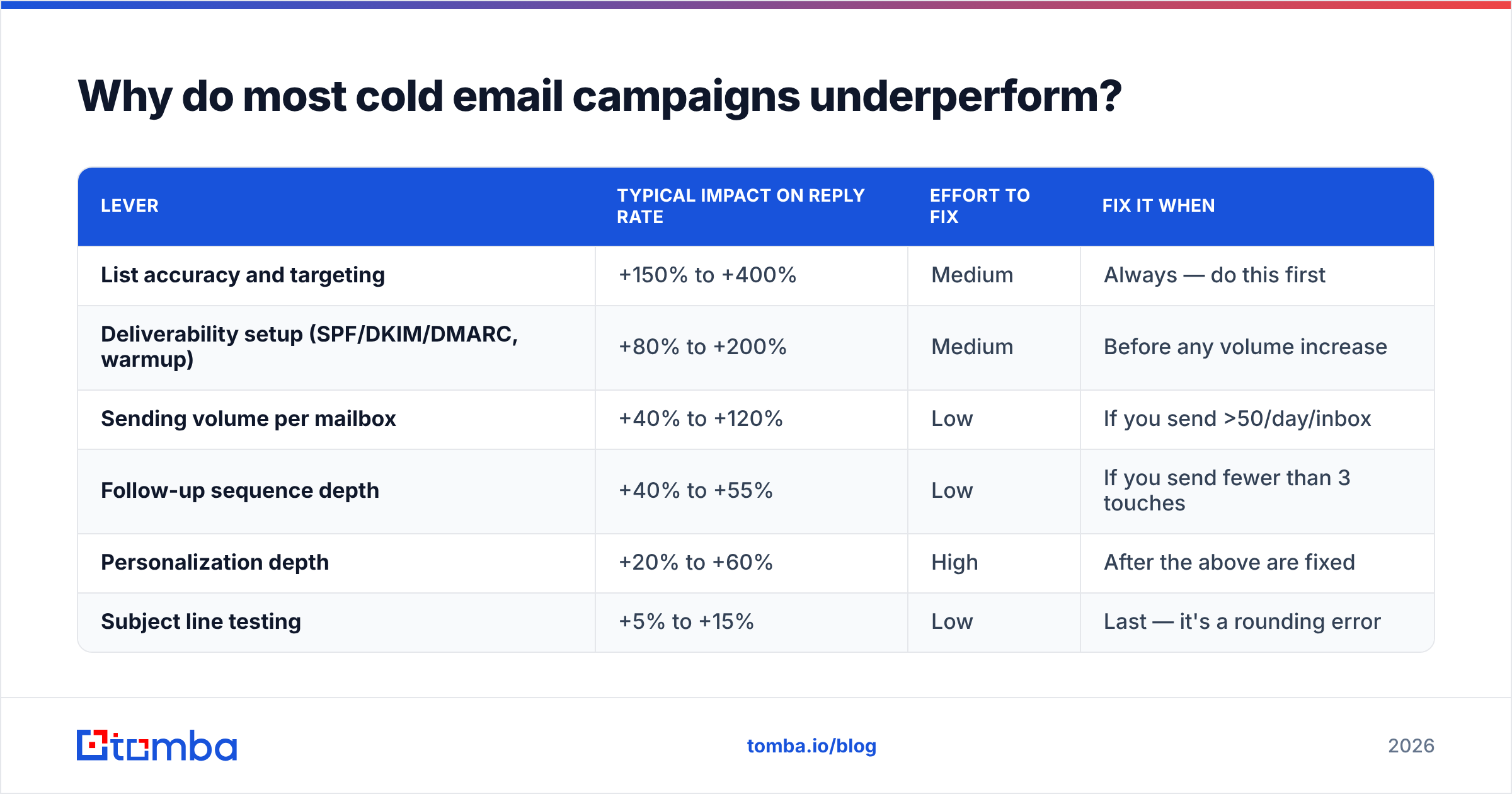
| Lever | Typical impact on reply rate | Effort to fix | Fix it when |
|---|---|---|---|
| List accuracy and targeting | +150% to +400% | Medium | Always — do this first |
| Deliverability setup (SPF/DKIM/DMARC, warmup) | +80% to +200% | Medium | Before any volume increase |
| Sending volume per mailbox | +40% to +120% | Low | If you send >50/day/inbox |
| Follow-up sequence depth | +40% to +55% | Low | If you send fewer than 3 touches |
| Personalization depth | +20% to +60% | High | After the above are fixed |
| Subject line testing | +5% to +15% | Low | Last — it's a rounding error |
Notice the ordering. Subject lines sit at the bottom. That is not because they do not matter; it is because a 10% swing on a broken foundation is still a broken campaign.

How do you fix your list before writing a single email?#
Three steps, in order.
1. Define the buying trigger, not the persona. "VP of Sales at 50–200 employee SaaS companies" is a filter, not a reason to email. "VP of Sales who posted two SDR roles in the last 30 days" is a reason. Triggers — funding rounds, hiring signals, tech-stack changes, leadership moves — raise reply rates because your first line writes itself.
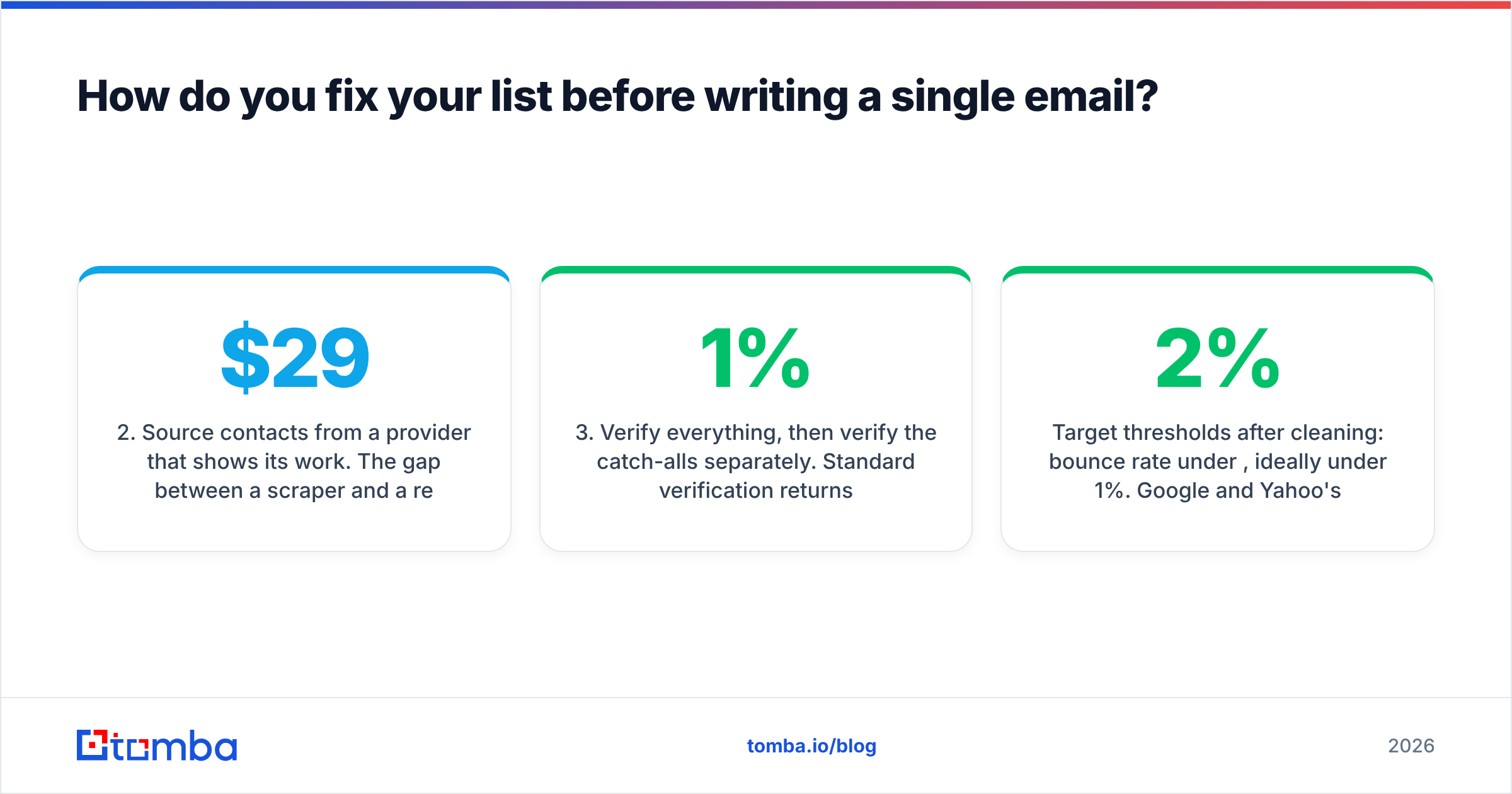
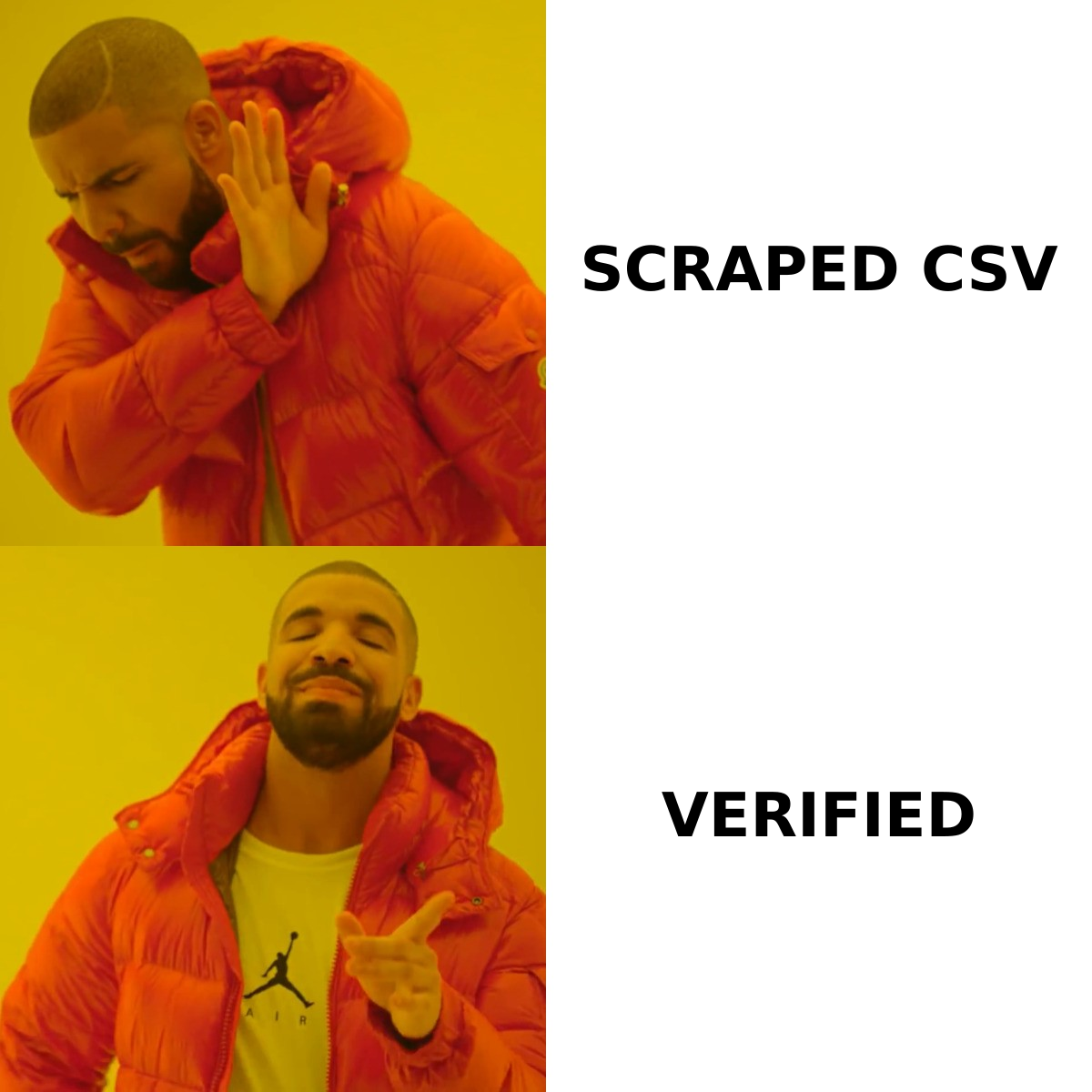
2. Source contacts from a provider that shows its work. The gap between a $29 scraper and a real B2B data provider shows up in your bounce rate three days later. Look for vendors that publish verification methodology and confidence scores rather than a raw "we have 700M contacts" number. Tomba's data sources page is one example of the transparency you should demand from any vendor before you buy credits.
3. Verify everything, then verify the catch-alls separately. Standard verification returns valid, invalid, or unknown. That "unknown" bucket is mostly catch-all domains — servers that accept any address at SMTP time. Blindly mailing them is how a 1% bounce rate becomes 6%. Run them through a dedicated catch-all verifier instead of guessing, and suppress what still comes back uncertain.
Target thresholds after cleaning: bounce rate under 2%, ideally under 1%. Google and Yahoo's bulk sender requirements, in effect since February 2024, put the spam complaint ceiling at 0.3% — and both providers have kept tightening enforcement since. You can read the current rules directly in Google's bulk sender guidelines.
What sending setup keeps you out of spam?#
Deliverability is infrastructure, not a growth hack. Get these five right and you have solved 80% of inbox placement:
- Authenticate everything. SPF, DKIM, and DMARC on every sending domain. DMARC at
p=noneis the minimum bar now — move top=quarantineonce you have two weeks of clean reports. Check your record with an SPF checker before you launch, not after replies dry up. - Use separate sending domains. Never send cold outbound from your primary company domain. Buy lookalikes (
get-yourbrand.com,yourbrand-hq.com), point them at your main site, and keep the corporate domain clean. - Warm up for 3–4 weeks minimum. New domains need aged sending history. Ramp from 5 emails/day to your target over roughly 21 days. A warmup calculator removes the guesswork on the ramp curve.
- Cap at 20–40 sends per mailbox per day. More mailboxes, not more volume per mailbox. This is the single most-ignored rule in outbound.
- Watch reputation, not just replies. Google Postmaster Tools gives you domain reputation, spam rate, and authentication pass rates for free. Check it weekly.
Screenshot placeholder: Google Postmaster Tools domain reputation dashboard showing a "High" reputation band and spam rate under 0.1% over a 30-day window.
One caveat teams miss: email deliverability degrades gradually, then collapses. You will not get a warning email. By the time reply rate halves, you have been in Promotions or spam for two weeks. Weekly monitoring is not optional.
How long should a cold email actually be?#
Between 50 and 125 words for the first touch. Below 50 and you look automated; above 150 and mobile readers bail.
Structure that consistently works:
- Line 1 — the reason. Why this person, why now. One specific, verifiable detail. Not "I loved your website."
- Line 2–3 — the relevance. A problem you see companies in their exact position hitting, stated as an observation, not a pitch.
- Line 4 — the proof. One concrete number from a comparable customer. "Cut SDR ramp from 90 to 45 days" beats "trusted by industry leaders."
- Line 5 — the ask. Low-friction and singular. "Worth a look?" outperforms "Do you have 15 minutes Tuesday at 2pm ET?" because it requires a yes/no, not a calendar check.
What to cut: your company boilerplate, three links, an image signature, the word "just," and any sentence starting with "I wanted to reach out." If you need a starting frame, the cold email templates library is a reasonable place to steal structure from — then rewrite the specifics, because the templates everyone uses stop working the moment everyone uses them.
How many follow-ups should you send?#
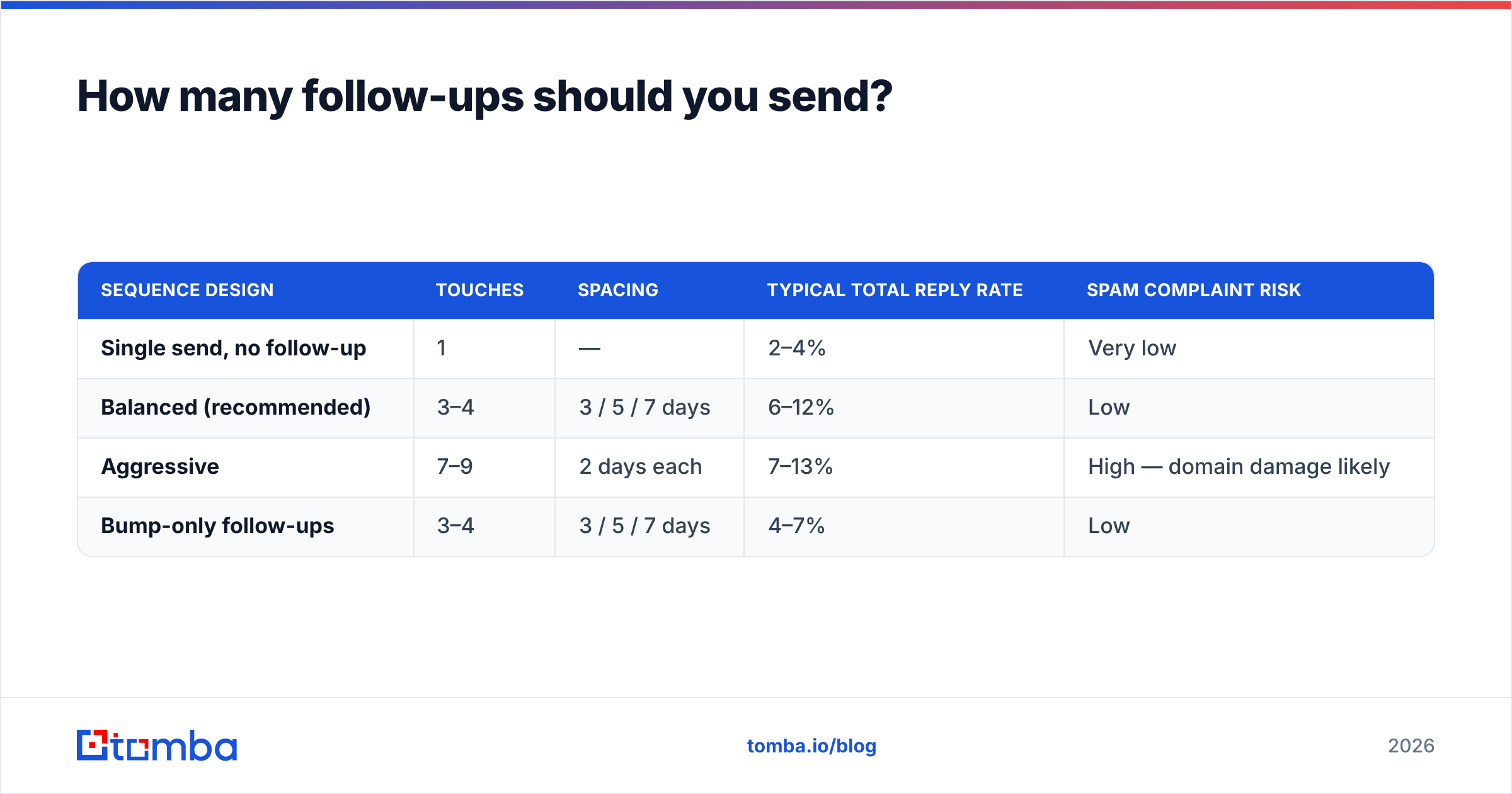
Three to four total touches, spaced 3, 5, and 7 days apart. Here is what a well-shaped sequence looks like against the two failure modes:
| Sequence design | Touches | Spacing | Typical total reply rate | Spam complaint risk |
|---|---|---|---|---|
| Single send, no follow-up | 1 | — | 2–4% | Very low |
| Balanced (recommended) | 3–4 | 3 / 5 / 7 days | 6–12% | Low |
| Aggressive | 7–9 | 2 days each | 7–13% | High — domain damage likely |
| Bump-only follow-ups | 3–4 | 3 / 5 / 7 days | 4–7% | Low |
The "bump-only" row is worth flagging. Replying "Just bumping this up" adds nothing. Each follow-up should carry a new angle: a different pain point, a customer story, a relevant article, a genuine breakup email. Same ask, new reason to care.
Also: send follow-ups in-thread for touches 2 and 3, then start a fresh thread for the final one. In-thread keeps context; a new thread escapes a buried conversation.
Which metrics should you actually track in 2026?#
Open rate is dead as a decision-making metric. Apple's Mail Privacy Protection pre-loads tracking pixels, which inflates opens for a large and unknowable share of your list. Tracking pixels also slightly hurt deliverability. Turn them off.
Track these instead:
- Bounce rate — target under 2%. This is your data quality score.
- Reply rate — target 5–10% for well-targeted B2B outbound.
- Positive reply rate — target 20–35% of total replies. This is your targeting and messaging score.
- Meetings booked per 1,000 sends — target 5–15. This is the only number your CFO cares about.
- Spam complaint rate — must stay under 0.1%, hard ceiling 0.3%.
- Unsubscribe rate — under 1%. Above that, your targeting is off, not your copy.
The relationship between these matters more than any single value. High reply rate with low positive reply rate means you are provoking, not resonating. Low reply rate with high positive reply rate means your targeting is right but your list is too small — scale it, do not rewrite it. You can benchmark response rate expectations by segment before setting internal targets.
What tools do you need, and what can you skip?#
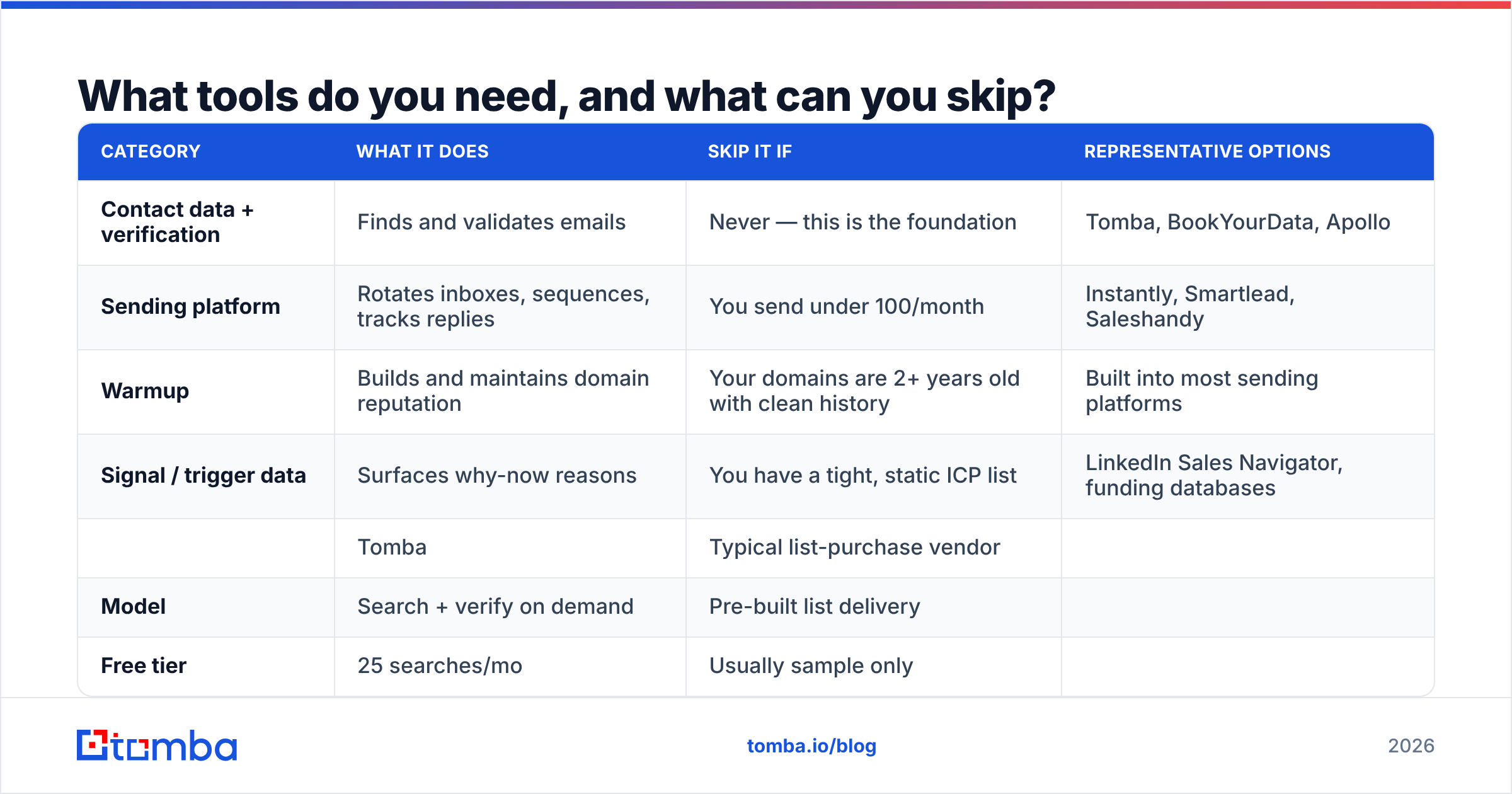
You need four categories. Everything else is optional.
| Category | What it does | Skip it if | Representative options |
|---|---|---|---|
| Contact data + verification | Finds and validates emails | Never — this is the foundation | Tomba, BookYourData, Apollo |
| Sending platform | Rotates inboxes, sequences, tracks replies | You send under 100/month | Instantly, Smartlead, Saleshandy |
| Warmup | Builds and maintains domain reputation | Your domains are 2+ years old with clean history | Built into most sending platforms |
| Signal / trigger data | Surfaces why-now reasons | You have a tight, static ICP list | LinkedIn Sales Navigator, funding databases |
On the data layer specifically: this is where budget should concentrate. A sending platform is largely commoditized — they all rotate inboxes and schedule follow-ups. Contact data is not commoditized, and accuracy differences of 10–15 percentage points translate directly into bounce rate and domain risk.
Two providers worth comparing head to head are Tomba and BookYourData. They solve the problem differently: BookYourData leans toward pre-built, human-verified list purchases with a strong accuracy guarantee, which suits teams that want a clean file delivered rather than a search workflow. Tomba leans toward on-demand lookup and enrichment — domain search, bulk email finder runs, and an API for pipeline use — which suits teams building lists continuously from their own signals. Neither is universally better; the question is whether you buy lists or build them.
| Tomba | Typical list-purchase vendor | |
|---|---|---|
| Model | Search + verify on demand | Pre-built list delivery |
| Free tier | 25 searches/mo | Usually sample only |
| Entry paid plan | $49/mo (Starter) | Per-record or per-list pricing |
| Mid tier | $99/mo (Growth) | Volume-tiered |
| Best for | Continuous, trigger-based sourcing | One-off campaign lists |
| API access | Yes, on paid plans | Varies |
Full Tomba pricing runs Free (25 searches/mo), Starter at $49/mo, Growth at $99/mo, Pro at $249/mo, and custom Enterprise.
If you want third-party signal before committing, category reviews on G2 are more useful than vendor case studies — filter for reviews from companies your size.
What does a fixed campaign look like end to end?#
Concrete example. A 12-person B2B SaaS company selling to RevOps leaders:
- Trigger list built weekly — companies that posted a RevOps or Sales Ops role in the last 21 days. Roughly 120 companies/week.
- Contacts sourced — 2–3 per company via domain search, filtered to Director+ in RevOps, Sales Ops, or Sales leadership. ~300 contacts/week.
- Verified — standard verification plus catch-all resolution. ~255 survive. Bounce rate lands at 0.8%.
- Split across 6 mailboxes on 3 secondary domains — 30 sends/mailbox/day, all warmed for 30 days prior.
- Four-touch sequence — trigger-led opener, problem angle, customer proof, breakup. Days 0, 3, 8, 15.
- Result range — 8–11% reply rate, ~28% of replies positive, 9–14 meetings per 1,000 sends.
Nothing in that workflow is clever. It is boring execution on the inputs, which is precisely why it works. The teams posting 0.5% reply rates are almost always skipping steps 1 through 3.
What should you fix this week?#
In order, if you only have five working days:
- Day 1 — Export your current list, run it through verification, suppress everything invalid and unresolved-catch-all.
- Day 2 — Audit SPF, DKIM, and DMARC on every sending domain. Fix failures.
- Day 3 — Drop per-mailbox volume to 30/day. Add mailboxes if you need the throughput.
- Day 4 — Extend every sequence to at least three touches with distinct angles.
- Day 5 — Turn off open tracking. Rebuild your dashboard around reply rate, positive reply rate, and meetings per 1,000.
Then leave it alone for three weeks. Cold email results are noisy at low volume; changing five variables weekly guarantees you learn nothing. Set a baseline, run it, then test one thing at a time.
Start with the layer that caps everything else. If your bounce rate is above 2% or you are not sure where your contact data came from, no copy rewrite will move the number. Run your next list through the Tomba Email Finder — it finds verified professional addresses by domain, name, or company, and the free tier gives you 25 searches a month to test accuracy against your existing source before you commit a dollar. Verify first, then write.
Related guides#
// get started
Find, verify and enrich your first contacts today
Start on the free plan with 25 searches a month, then scale when your team is ready.
Free plan · No credit card required · GDPR & CCPA
// about the author