How to Improve Email Deliverability in 2026: A Practical Guide
Most cold email problems are not copy problems, they are infrastructure problems. Here is the exact order to fix authentication, list quality, warmup, and sending patterns so more of your emails reach the primary inbox.
TL;DR
- Deliverability is decided before you write a single word: authentication, list quality, and sending history account for most of the outcome.
- Fix in this order: SPF/DKIM/DMARC → list verification → domain and mailbox warmup → volume and cadence → copy and links → monitoring.
- Keep hard bounces under 2% and spam complaints under 0.10%. Above 0.30%, Gmail and Outlook start filtering you by default.
- A verified list is the single cheapest lever. Bounces damage reputation faster than any subject line ever will.
- Monitor with Google Postmaster Tools and Microsoft SNDS weekly. If you are not measuring reputation, you are guessing.
Your reply rate dropped 60% last month and nothing about your copy changed. That is almost never a messaging problem. It is a deliverability problem, and it compounds quietly: a few hundred bad addresses, a domain with no sending history, an SPF record with two include statements too many, and suddenly your carefully written sequence is landing in Promotions or nowhere at all.
This guide covers how to improve email deliverability in the order that actually matters, with the thresholds mailbox providers use in 2026.
What is email deliverability, and how is it different from delivery rate?#
Delivery rate is whether the receiving server accepted your message. Deliverability is whether a human ever sees it.
You can have a 99% delivery rate and 12% inbox placement. The server accepted everything, then quietly filed it into Spam or the Promotions tab. Most sending tools report the first number because it looks good. Only seed testing and provider dashboards report the second.
Three parties decide the outcome:
- Your sending domain — its age, authentication records, historical complaint rate, and whether it appears on blocklists.
- The mailbox provider's filter — Gmail, Outlook, and Yahoo each weigh engagement, authentication, and content differently. Gmail leans heavily on recipient engagement; Outlook leans on IP and domain reputation.
- The recipient — opens, replies, and "move to inbox" actions push you up. Deletes without opening, and especially "report spam" clicks, push you down hard.
The practical implication: you cannot fix deliverability with better subject lines. You fix it by making the first two parties trust you, then giving the third a reason to engage. For the underlying definitions, Tomba's glossary entry on email deliverability is a useful reference.
Why do your emails land in spam?#
In roughly the order of frequency we see across B2B senders:
- Invalid addresses in your list. Every hard bounce is a signal you do not know who you are emailing. Above 2%, filtering starts. Above 5%, some providers throttle the domain outright.
- Broken or missing authentication. No DKIM signature, an SPF record exceeding the 10-lookup DNS limit, or a DMARC policy stuck at
p=nonewith nobody reading the reports. - A cold domain sending at scale. A domain registered three weeks ago that sends 400 emails on day one is the single loudest spam signal available.
- Complaint rate above threshold. Gmail's stated ceiling is 0.30%, and you should treat 0.10% as your real limit. Three complaints per thousand sends is enough to trigger degradation.
- Link and content patterns. Link shorteners, tracking domains that share reputation with thousands of other senders, image-only emails, and unsubscribe-free bulk sends.
- Sending from your primary domain. If your cold outbound and your invoices leave from the same domain, one bad campaign takes down your billing email too.
Notice that four of the six are infrastructure, not writing. That ratio holds in practice.
How do you set up SPF, DKIM, and DMARC correctly?#
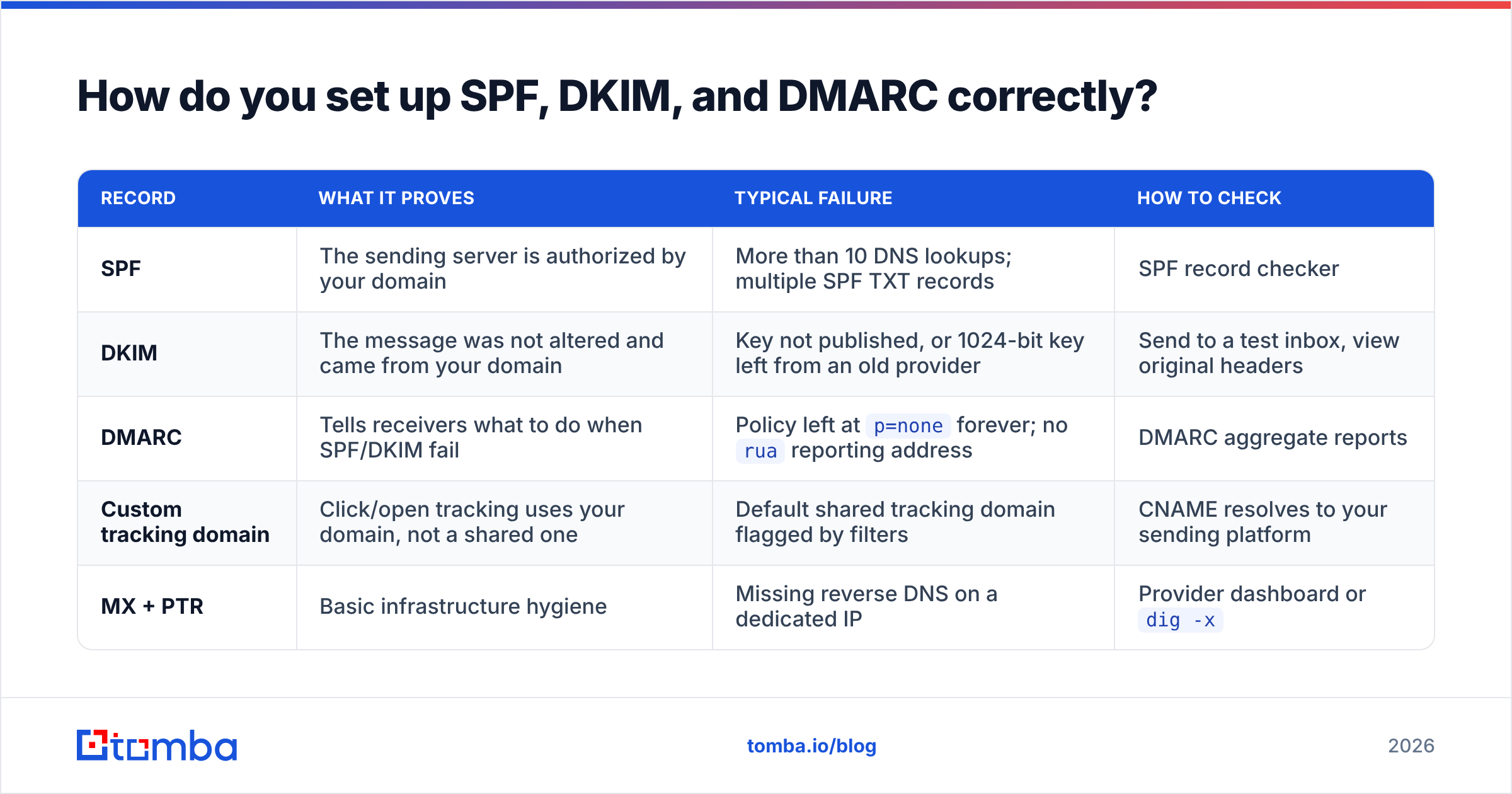
Authentication is table stakes since Google and Yahoo tightened bulk-sender requirements. All three records must exist and align. Here is what each one does and how to verify it:
| Record | What it proves | Typical failure | How to check |
|---|---|---|---|
| SPF | The sending server is authorized by your domain | More than 10 DNS lookups; multiple SPF TXT records | SPF record checker |
| DKIM | The message was not altered and came from your domain | Key not published, or 1024-bit key left from an old provider | Send to a test inbox, view original headers |
| DMARC | Tells receivers what to do when SPF/DKIM fail | Policy left at p=none forever; no rua reporting address |
DMARC aggregate reports |
| Custom tracking domain | Click/open tracking uses your domain, not a shared one | Default shared tracking domain flagged by filters | CNAME resolves to your sending platform |
| MX + PTR | Basic infrastructure hygiene | Missing reverse DNS on a dedicated IP | Provider dashboard or dig -x |
Start DMARC at p=none with reporting enabled, read the aggregate reports for two to four weeks, fix every legitimate source that fails alignment, then move to p=quarantine and eventually p=reject. Skipping the observation window is how teams accidentally block their own invoicing system.
One detail people miss: SPF alignment requires the Return-Path domain to match your From domain. Many sending platforms default to their own bounce domain, which passes SPF but fails DMARC alignment. Check it explicitly.
Google's official sender guidelines spell out the current thresholds and are worth reading in full before you change anything.
Does list quality matter more than copy?#
Yes, and it is not close.
A 3,000-contact list with 8% invalid addresses produces 240 hard bounces. Those 240 events tell every receiving provider the same thing: this sender scrapes. No subject line recovers from that.
The fix is boring and mechanical:
- Verify before every campaign, not once per quarter. B2B data decays roughly 22-30% per year through job changes alone. A list verified in January is measurably worse in June.
- Remove role accounts.
info@,sales@,support@, andadmin@addresses generate complaints at several times the rate of individual mailboxes and rarely reply. - Handle catch-all domains deliberately. Catch-all servers accept everything, so standard SMTP checks return "unknown." Either use a catch-all verifier that applies pattern and source confidence, or segment them into a lower-volume send.
- Deduplicate across sequences. The same person receiving three campaigns from three reps in one month is a complaint waiting to happen.
- Suppress non-openers after the sequence ends. Repeated sends to people who never open drag engagement metrics down, which matters most at Gmail.
Running a list through an email verifier before each send costs a fraction of what a burned domain costs. For larger lists, bulk verify handles the same job in one upload.
How should you warm up a new domain and mailbox?#
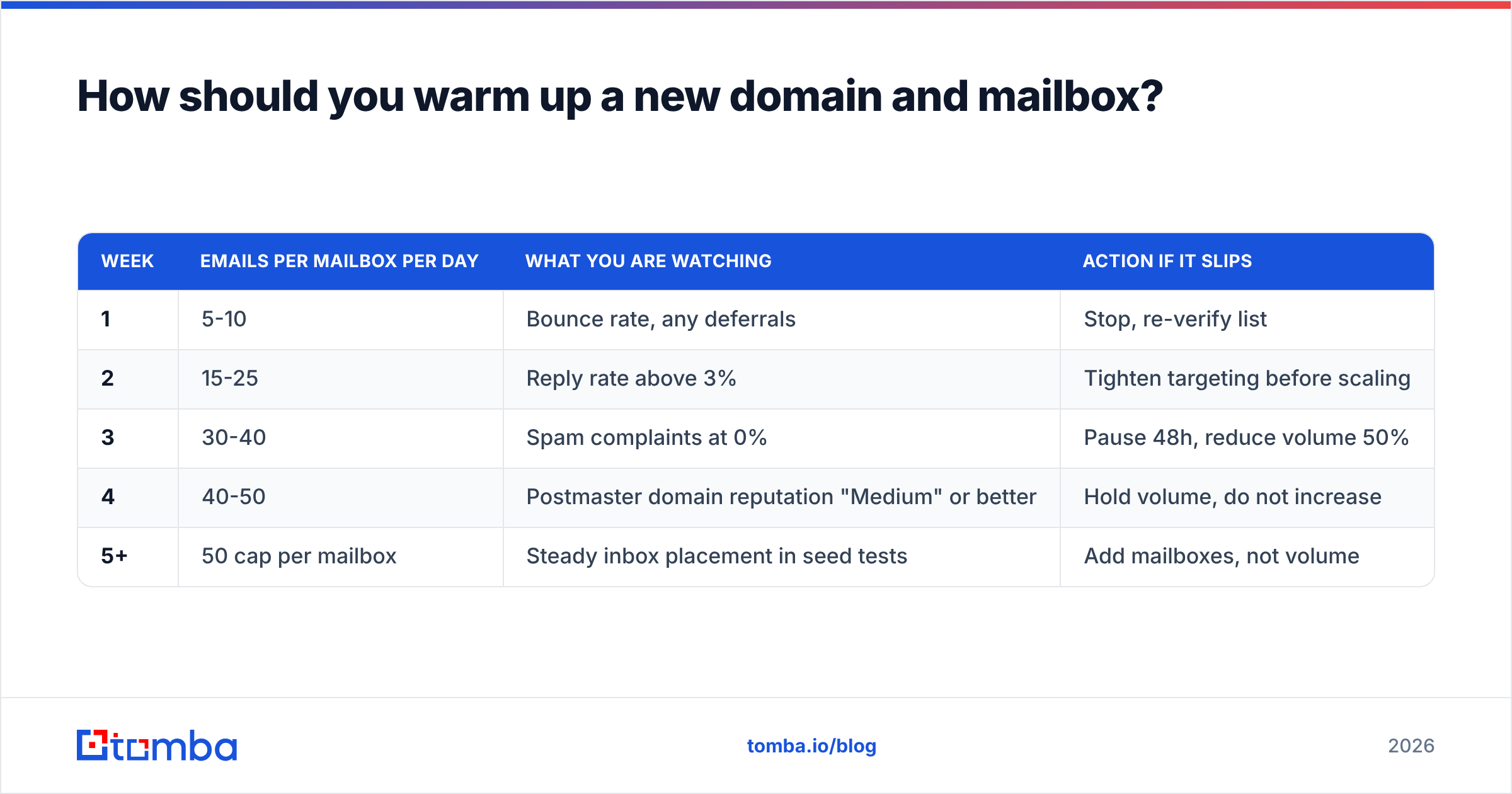
Warmup means building a sending history that looks human. New domain, new mailbox, or a domain returning from a reputation hit — the process is the same, only the starting volume differs.
| Week | Emails per mailbox per day | What you are watching | Action if it slips |
|---|---|---|---|
| 1 | 5-10 | Bounce rate, any deferrals | Stop, re-verify list |
| 2 | 15-25 | Reply rate above 3% | Tighten targeting before scaling |
| 3 | 30-40 | Spam complaints at 0% | Pause 48h, reduce volume 50% |
| 4 | 40-50 | Postmaster domain reputation "Medium" or better | Hold volume, do not increase |
| 5+ | 50 cap per mailbox | Steady inbox placement in seed tests | Add mailboxes, not volume |
Hard rules that apply regardless of week:
- Cap each mailbox at 50 sends per day. Scale by adding mailboxes and domains, never by raising per-mailbox volume.
- Buy separate domains for outbound. Keep your primary corporate domain out of cold email entirely.
- Give a new domain at least 14 days of age plus a working website before the first send.
- Randomize send intervals. Fifty emails at exactly 60-second intervals is a machine signature.
If you want a volume ramp mapped to your target send count, the warmup calculator will produce the schedule for you.
What copy and formatting choices actually affect placement?#
Content matters less than infrastructure, but it is not zero. Filters in 2026 are behavioral more than lexical, so the old "never say free" advice is mostly obsolete. What still moves the needle:
- Plain text beats HTML. No tracking pixels, no image headers, no styled buttons. It reads like a person wrote it, which is also the point.
- One link maximum, on your own domain. No shorteners, no shared tracking domains, no PDF attachments in a first touch.
- Short messages. Under 125 words gets read on a phone. Long messages get archived, and archived-without-reply is a negative engagement signal.
- A real reply path. Cold outbound from
noreply@is both bad practice and a filter trigger. - Consistent sending identity. Same From name, same signature, same domain. Rotating identities to dodge filters is a strategy that works for two weeks.
Before launching, run a draft through a spam checker to catch structural issues like missing plain-text alternatives or excessive link density.
How do you monitor deliverability once you are sending?#
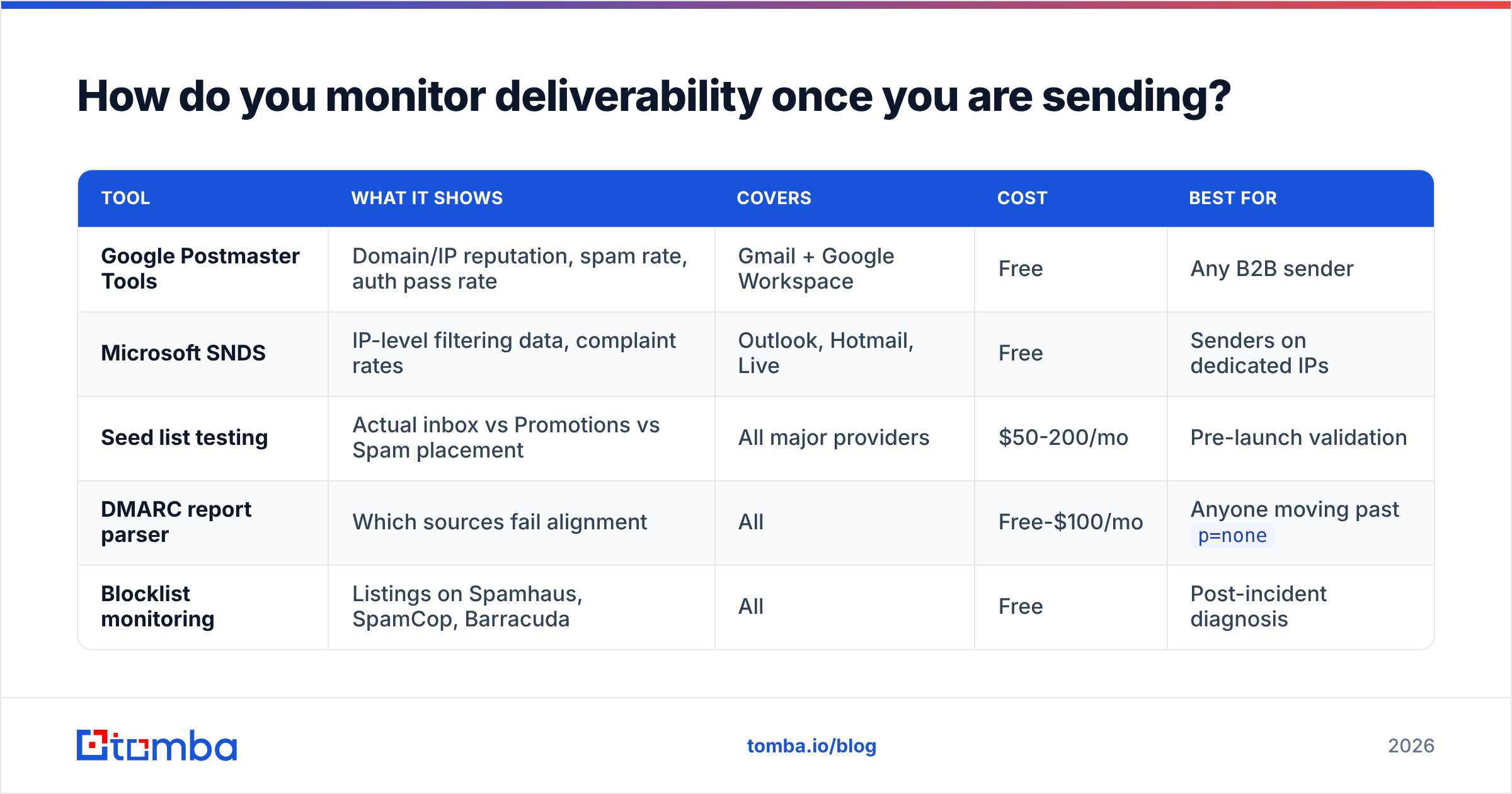
You need three views, and they answer different questions:
| Tool | What it shows | Covers | Cost | Best for |
|---|---|---|---|---|
| Google Postmaster Tools | Domain/IP reputation, spam rate, auth pass rate | Gmail + Google Workspace | Free | Any B2B sender |
| Microsoft SNDS | IP-level filtering data, complaint rates | Outlook, Hotmail, Live | Free | Senders on dedicated IPs |
| Seed list testing | Actual inbox vs Promotions vs Spam placement | All major providers | $50-200/mo | Pre-launch validation |
| DMARC report parser | Which sources fail alignment | All | Free-$100/mo | Anyone moving past p=none |
| Blocklist monitoring | Listings on Spamhaus, SpamCop, Barracuda | All | Free | Post-incident diagnosis |
Google Postmaster Tools is the non-negotiable one. It requires DNS verification of your sending domain and needs a minimum daily volume before it shows data, which is another reason to consolidate outbound onto a small number of domains rather than spreading across twenty.
Check weekly. Domain reputation dropping from High to Medium is a two-week warning, not an emergency, and it is much easier to recover from than a Low rating.

What does a 30-day deliverability recovery plan look like?#
If you are already in trouble, stop sending first. Continuing to send while reputation is falling is the most common mistake.
Days 1-3: diagnose. Pull Postmaster data. Check blocklists. Validate SPF, DKIM, and DMARC alignment on a live message header. Export the last 90 days of bounces and complaints and look for the campaign that caused it.
Days 4-10: clean. Re-verify the entire database. Remove every hard bounce, role account, and unengaged contact from the last two sequences. Expect to delete 15-30% of your list. Then remove it from the CRM too, not just the sending tool.
Days 11-20: rebuild. If reputation is Low, move to fresh domains rather than trying to rehabilitate. Set up authentication properly on the new domains, add a real landing page, and start the warmup schedule above at week-one volumes.
Days 21-30: resume carefully. Send only to contacts with confirmed engagement or freshly verified addresses. Target a reply rate above 5% on the first campaigns — high engagement is what rebuilds reputation fastest. Keep daily volume at half of your previous level for a full month.
The teams that recover fastest are the ones that treat data quality as a permanent process rather than a cleanup task. Sourcing accurate contacts at the point of entry, using verified sources and contact enrichment instead of scraped exports, prevents the problem from recurring.
What should you do first?#
If you only do three things this week: verify your list, confirm DMARC alignment on a live message, and cap every mailbox at 50 sends per day. Those three cover the majority of B2B deliverability failures.
Deliverability starts with where the address came from. If your contacts arrive already validated against live mail servers, your bounce rate stays under 2% by default and you never have to run a recovery plan. Tomba's Email Finder returns professional email addresses with a confidence score and verification status attached, so you are not choosing between volume and list health. The free tier gives you 25 searches per month to test it against a domain you already know; paid plans start at $49/mo. Check the full Tomba pricing if you need bulk volume or API access.
Related guides#
// get started
Find, verify and enrich your first contacts today
Start on the free plan with 25 searches a month, then scale when your team is ready.
Free plan · No credit card required · GDPR & CCPA
// about the author