How to Improve Email Reputation: A 2026 Sender Playbook
Your sender reputation decides whether cold email lands in the inbox or the spam folder. Here is the concrete, step-by-step repair playbook for 2026 — with timelines, benchmarks, and the fixes that actually move the number.
TL;DR
- Email reputation is a per-domain, per-IP score that mailbox providers compute from your complaint rate, bounce rate, spam-trap hits, and engagement — not from anything you self-declare.
- The fastest wins are mechanical: authenticate (SPF, DKIM, DMARC), get bounce rate under 2%, and get complaint rate under 0.3% — Google and Microsoft both publish this threshold.
- List hygiene beats volume tricks. Verifying contacts before send removes the single biggest reputation killer: invalid addresses and recycled spam traps.
- Recovery is not instant. Expect 2-4 weeks of disciplined sending to move a damaged domain, and 6-8 weeks if you have been blocklisted.
- Track your progress with Google Postmaster Tools and Microsoft SNDS. If you are not measuring, you are guessing.
What is email reputation, and who decides it?#
Email reputation is the trust score mailbox providers assign to your sending domain and IP address. Think of it like a credit score for your outbox: you never see the raw number, lenders (Gmail, Outlook, Yahoo) all keep their own version, and one bad stretch takes months to undo.
Nobody at Google hand-grades your emails. Reputation is computed from behavioral signals aggregated across millions of recipients:
- Complaint rate — how often recipients hit "Report spam." Gmail's published ceiling is 0.3%, with a target under 0.1%.
- Bounce rate — how many messages hit addresses that do not exist. Above 2-3% and filters assume you bought or scraped your list.
- Spam-trap hits — pristine traps (never-used addresses seeded on the web) and recycled traps (abandoned real addresses reactivated as traps). One pristine trap hit can tank a domain.
- Engagement — opens, replies, "move to inbox," and forwarding push you up. Deletes-without-reading and long silences push you down.
- Authentication and infrastructure — valid SPF, DKIM, and a DMARC policy. Since 2024, bulk senders to Gmail and Yahoo must have all three.
- Consistency — erratic volume spikes look like a compromised account. Steady, predictable sending looks like a business.
The critical distinction most teams miss: domain reputation and IP reputation are separate. On shared sending infrastructure your IP reputation is partly hostage to your neighbors, but your domain reputation is entirely yours. Since 2023, mailbox providers have weighted domain reputation more heavily precisely because it is harder to launder by rotating IPs.

Why did my email reputation drop in the first place?#
Reputation rarely collapses for one reason. In practice, four patterns cause the overwhelming majority of drops:
You scaled volume too fast. Going from 50 sends a day to 800 on a fresh domain is the single most common self-inflicted wound. Providers read this as a signal of a compromised or throwaway domain.
Your list was stale or unverified. Roughly 22-30% of B2B contact data decays annually as people change jobs. A list you bought or exported 18 months ago is now a bounce generator, and a meaningful share of those dead addresses have already been recycled into spam traps.
Your content triggered complaints, not filters. Modern filters care far less about the word "free" than about whether people mark you as spam. Irrelevant targeting produces complaints; complaints produce reputation damage. Spammy phrasing is a distant third-order issue.
You never set up authentication properly. A missing DKIM signature or a DMARC policy stuck at p=none with no monitoring means you have no defense when someone spoofs your domain — and no reputation floor.
Diagnosing which one hit you matters, because the remedies differ. A volume-spike problem is fixed by throttling. A list-quality problem is not.
How do I improve email reputation step by step?#
Here is the sequence that works, ordered by impact per hour spent.
Step 1: Fix authentication before anything else#
Run your domain through an SPF checker and confirm three things: a single SPF record with fewer than 10 DNS lookups, a valid DKIM signature on outbound mail, and a DMARC record published. Start DMARC at p=none with rua reporting enabled, read the reports for two weeks, then move to p=quarantine.
This step costs an afternoon and is non-negotiable. Google's sender guidelines make authentication a hard requirement for bulk senders.
Step 2: Purge invalid addresses from your list#
Every bounce is a withdrawal from your reputation account. Run your entire list through an email verifier before the next campaign, and remove anything flagged invalid. For domains that accept everything, use a catch-all verifier to separate the genuinely deliverable from the black holes.
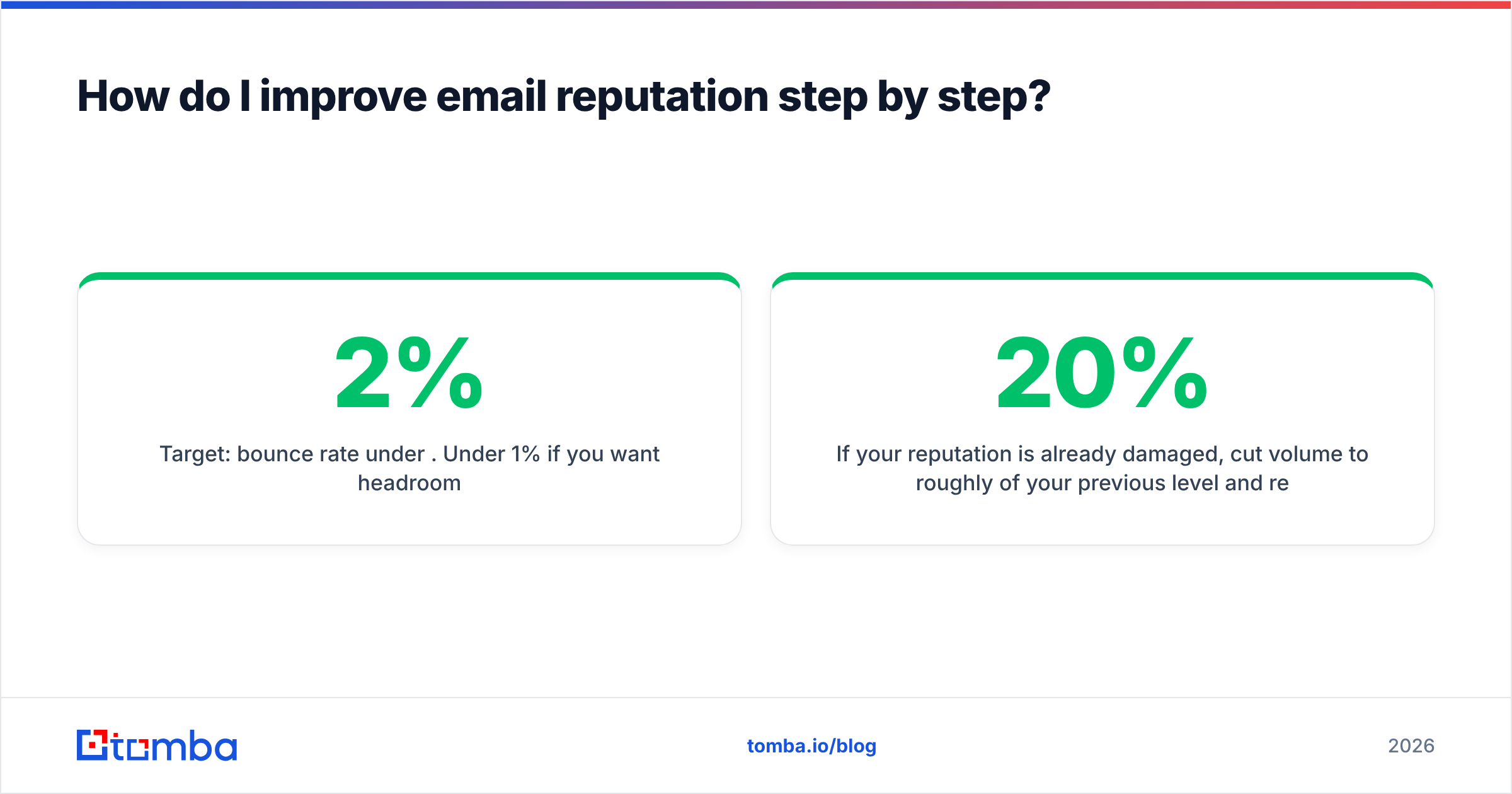
Target: bounce rate under 2%. Under 1% if you want headroom.
Step 3: Re-warm the domain#
If your reputation is already damaged, cut volume to roughly 20% of your previous level and rebuild over 3-4 weeks. Send to your most engaged segment first — the people who reply. Positive engagement is the only signal that actively repairs a score; simply sending less just stops the bleeding.
A warmup calculator gives you a ramp schedule instead of guesswork.
Step 4: Tighten targeting so complaints fall#
The most reliable complaint-rate reduction is relevance. Segment by industry, role, and trigger event. If you cannot articulate why a specific person should care about this specific email, they will report it.
Step 5: Make unsubscribing effortless#
Add a one-click list-unsubscribe header (RFC 8058) plus a visible text link. Counterintuitive but true: an unsubscribe is dramatically cheaper than a spam complaint. You want to give people the cheap exit.
Step 6: Monitor weekly, not quarterly#
Enroll in Google Postmaster Tools and Microsoft SNDS. Check domain reputation, spam rate, and authentication pass rates every week. A blacklist checker run against your sending IP and domain catches listings before they compound.
Step 7: Stabilize your send pattern#
Pick a daily ceiling and hold it. Consistent volume across weekdays reads as legitimate business mail. Bursts followed by silence read as campaigns from a burner domain.
What are the target benchmarks for each reputation metric?#
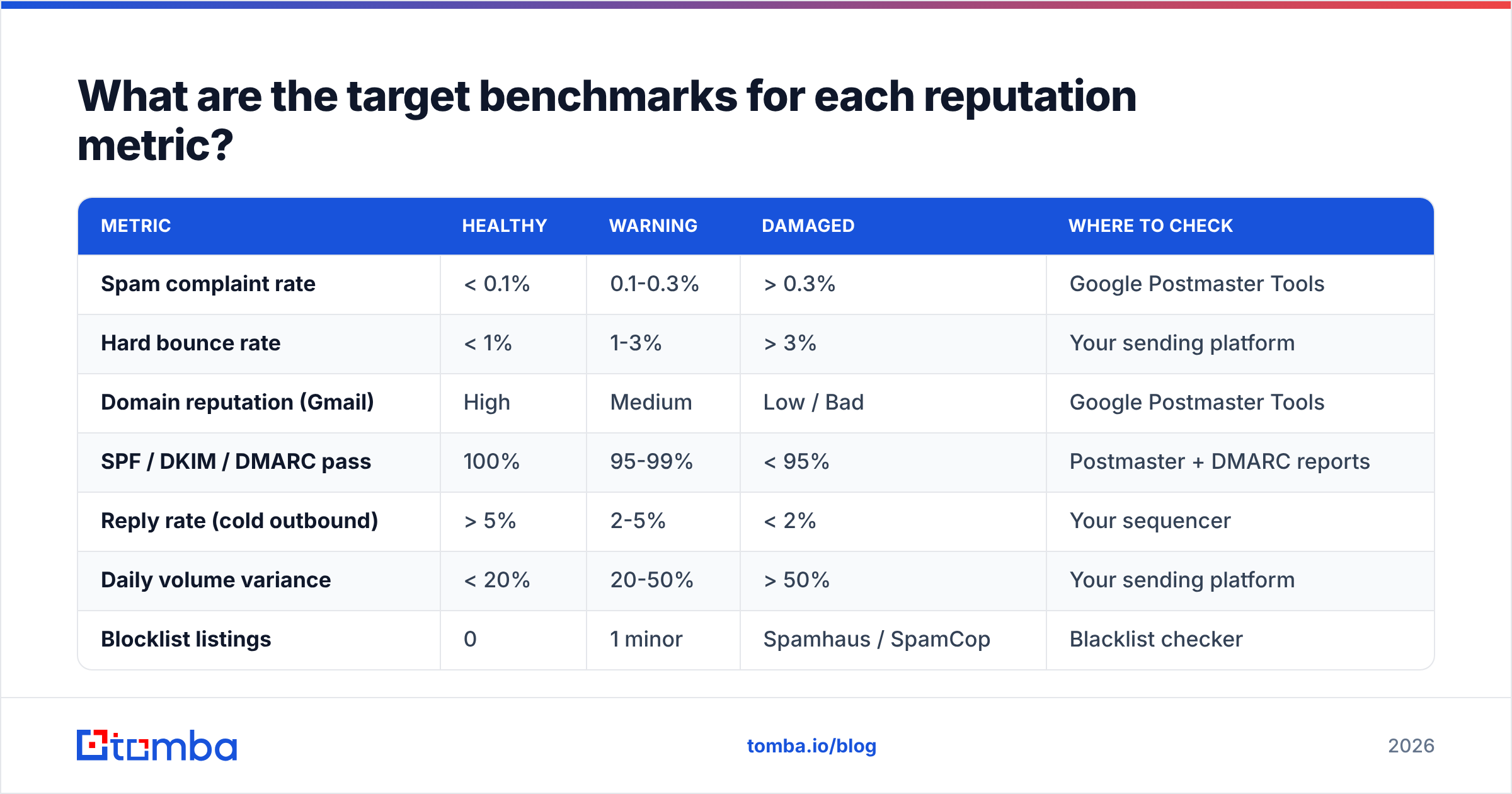
Use this as your dashboard. If a metric is red, fix it before touching anything else.
| Metric | Healthy | Warning | Damaged | Where to check |
|---|---|---|---|---|
| Spam complaint rate | < 0.1% | 0.1-0.3% | > 0.3% | Google Postmaster Tools |
| Hard bounce rate | < 1% | 1-3% | > 3% | Your sending platform |
| Domain reputation (Gmail) | High | Medium | Low / Bad | Google Postmaster Tools |
| SPF / DKIM / DMARC pass | 100% | 95-99% | < 95% | Postmaster + DMARC reports |
| Reply rate (cold outbound) | > 5% | 2-5% | < 2% | Your sequencer |
| Daily volume variance | < 20% | 20-50% | > 50% | Your sending platform |
| Blocklist listings | 0 | 1 minor | Spamhaus / SpamCop | Blacklist checker |
Two notes on reading this table. First, Gmail's domain reputation label is coarse — "Medium" already means a meaningful share of your mail is going to spam. Second, reply rate belongs on a reputation dashboard even though no provider publishes it: replies are the strongest positive engagement signal available to you, and cold-email programs that generate real conversations recover faster than ones that only generate opens.
Which tools actually help with reputation repair?#
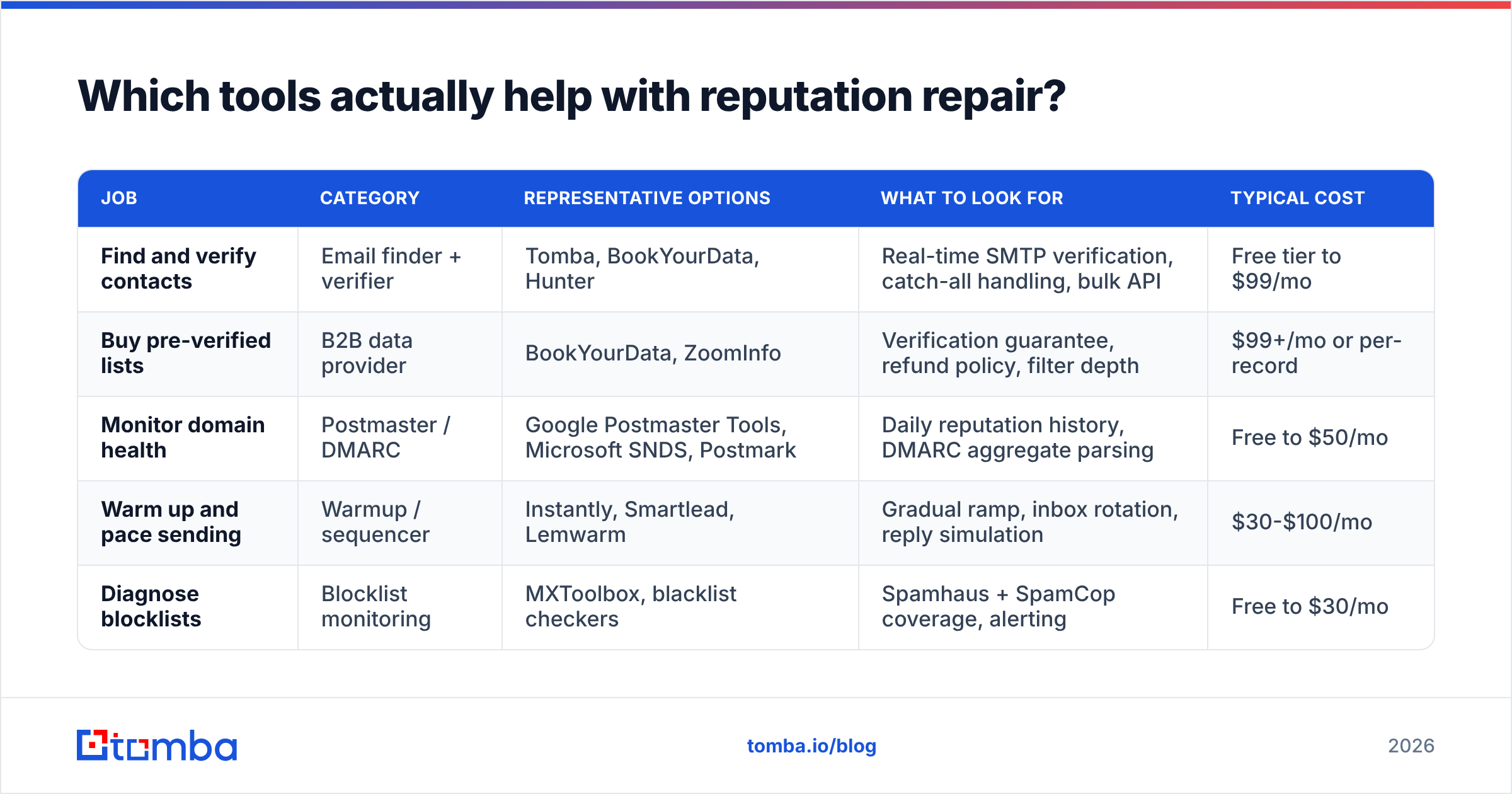
Reputation work splits into three jobs: cleaning the list, authenticating and monitoring the domain, and pacing the send. Different categories of tool own each job, and most teams need two of the three.
| Job | Category | Representative options | What to look for | Typical cost |
|---|---|---|---|---|
| Find and verify contacts | Email finder + verifier | Tomba, BookYourData, Hunter | Real-time SMTP verification, catch-all handling, bulk API | Free tier to $99/mo |
| Buy pre-verified lists | B2B data provider | BookYourData, ZoomInfo | Verification guarantee, refund policy, filter depth | $99+/mo or per-record |
| Monitor domain health | Postmaster / DMARC | Google Postmaster Tools, Microsoft SNDS, Postmark | Daily reputation history, DMARC aggregate parsing | Free to $50/mo |
| Warm up and pace sending | Warmup / sequencer | Instantly, Smartlead, Lemwarm | Gradual ramp, inbox rotation, reply simulation | $30-$100/mo |
| Diagnose blocklists | Blocklist monitoring | MXToolbox, blacklist checkers | Spamhaus + SpamCop coverage, alerting | Free to $30/mo |
A few honest observations. Google Postmaster Tools is free, mandatory, and the only source of Gmail's actual verdict on you — no third-party "sender score" substitutes for it. Warmup tools help a new domain but cannot rescue a domain that keeps sending to bad addresses; they treat the symptom. And on the data side, BookYourData is a solid choice when you want pre-verified lists delivered ready to send, while a finder-plus-verifier stack like Tomba fits better when you are building lists from specific target accounts rather than buying in bulk.
For pricing context on the finder side, Tomba pricing runs a free tier at 25 searches a month, Starter at $49/mo, Growth at $99/mo, and Pro at $249/mo — worth comparing against per-record list pricing if your monthly contact volume is modest.

How long does it take to repair a damaged sender reputation?#
Set expectations honestly, because impatience is what causes second collapses.
- Authentication fixes: effect visible in 24-72 hours. DNS propagates, filters re-evaluate quickly.
- Bounce-rate improvement: 1-2 weeks. Providers need a few send cycles of clean data before the average moves.
- Complaint-rate improvement: 2-4 weeks. Complaint history is weighted over a rolling window, so old complaints keep dragging.
- Gmail domain reputation Low → Medium: 3-6 weeks of consistent, clean, engaged sending.
- Gmail domain reputation Medium → High: 6-10 weeks. This is the slow stretch where most teams give up and start spiking volume again.
- Blocklist delisting (Spamhaus): 1-4 weeks after the underlying cause is fixed, assuming you submit a removal request with an explanation.
The single most common mistake during recovery is treating week three as "recovered" and immediately tripling volume. Ramp increases at no more than 20-30% per week, and hold flat any week your complaint rate ticks up.
If reputation is badly damaged and you are on a deadline, moving to a fresh sending subdomain (mail.yourcompany.com) is legitimate — but only if you fix the underlying list and targeting problems first. Otherwise you burn the new subdomain in six weeks and have two damaged assets instead of one.
Does contact data quality really affect reputation that much?#
Yes, and it is the most under-appreciated lever in the whole discipline.
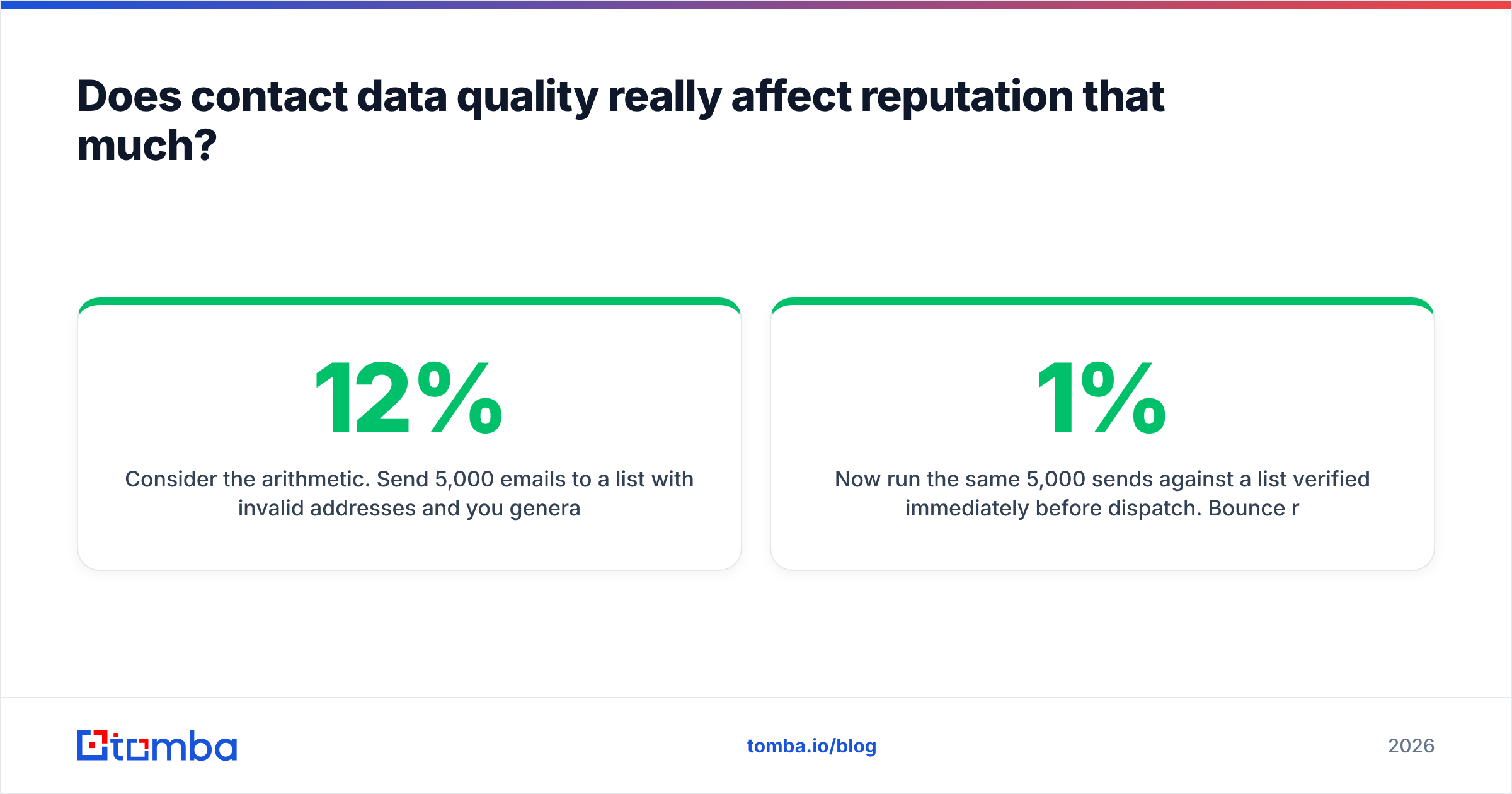
Consider the arithmetic. Send 5,000 emails to a list with 12% invalid addresses and you generate 600 hard bounces — a 12% bounce rate that is four to six times the danger threshold. Providers do not need to read a single word of your copy to conclude you are sending to a purchased list. Meanwhile, some fraction of those dead addresses are recycled spam traps, and a trap hit carries penalty weight far beyond a normal bounce.
Now run the same 5,000 sends against a list verified immediately before dispatch. Bounce rate lands under 1%, no trap hits, and every engagement signal you generate counts for you instead of being diluted.
The practical workflow:
- Source contacts against real domains rather than exporting a stale CRM segment. A domain search pulls current addresses at a target company along with the pattern that company uses.
- Verify at the moment of send, not at the moment of purchase. Data decays between the two.
- Route catch-all domains separately — send them lower volume and watch bounce behavior before scaling.
- Suppress aggressively. Anyone who has not engaged in 90 days is costing you more in reputation than they are worth in pipeline.
- Re-verify quarterly for any list you send to repeatedly.
Industry reviews on G2 consistently show that the teams with the best deliverability are not the ones with the cleverest copy — they are the ones with the strictest list hygiene. That is not a coincidence.
Worth also checking your sender reputation definition against how your ESP reports it; several platforms show a proprietary score that correlates loosely, at best, with what Gmail actually thinks.
What should you do this week?#
Pick the three highest-impact items and execute them in order:
- Today: verify SPF, DKIM, and DMARC are all passing. Publish DMARC if it is missing.
- This week: run your full active list through verification and delete every invalid address. Enroll in Google Postmaster Tools so you have a baseline.
- Next 30 days: hold volume flat, send only to segments you can justify, and check your reputation dashboard every Monday.
Reputation is a lagging indicator of discipline. There is no setting to flip, no vendor that sells a fix, and no copywriting trick that outruns a 10% bounce rate. What works is boring: clean data, honest targeting, steady volume, and weekly measurement.
Start with the data layer. Most reputation problems trace back to sending at addresses that no longer exist. Tomba Email Finder sources current, verified professional email addresses by domain, name, or company — so your next campaign starts with a list that will not bounce. The free tier gives you 25 searches a month to test it against your own target accounts before committing to a plan.
Related guides#
// get started
Find, verify and enrich your first contacts today
Start on the free plan with 25 searches a month, then scale when your team is ready.
Free plan · No credit card required · GDPR & CCPA
// about the author