How to Increase Email Open Rates in Sales: 2026 Playbook
Open rates collapsed after Gmail and Yahoo tightened bulk-sender rules. Here are the seven levers that still move the number, ranked by how much lift each one actually delivers.
TL;DR
- List quality beats subject-line cleverness by a wide margin. A list with 8% invalid addresses drags your whole domain reputation down, and reputation decides whether your mail reaches the inbox at all.
- Authentication is table stakes since the Google and Yahoo bulk-sender requirements took effect: SPF, DKIM, DMARC, and a one-click unsubscribe on anything resembling a bulk send.
- Sender name and the first 40 characters of the subject line carry more weight than the rest of the subject combined, because that is all a mobile preview shows.
- Send volume per mailbox matters more than send timing. Three hundred a day across three warmed mailboxes beats 900 from one, every time.
- Apple Mail Privacy Protection inflates open rates by 30-60% depending on your audience mix. Track reply rate alongside opens or you are optimizing a fake number.
Why did your email open rates drop even though nothing changed?#
Because the rules changed underneath you. In February 2024 Google and Yahoo began enforcing bulk sender requirements — authenticated domains, a spam complaint rate under 0.3%, and one-click unsubscribe headers. Enforcement has tightened every year since. Mailbox providers now weigh domain reputation, engagement history, and complaint velocity before they decide whether your message lands in Primary, Promotions, or spam.
If your open rate fell from 45% to 22% without a change to your copy, the copy is not the problem. Something upstream — your list, your domain, your volume curve — tripped a filter.
There is a second distortion. Apple Mail Privacy Protection pre-fetches tracking pixels for every message, whether or not the recipient looks at it. If a big chunk of your list reads mail on an iPhone, your reported open rate is inflated by roughly 30-60%. That inflation is not uniform month to month, which means a "drop" can just be an audience mix shift.
So before you touch anything, establish two baselines: reported open rate and reply rate. Reply rate cannot be faked by a pre-fetched pixel.
What actually determines whether your email gets opened?#
Four things, in descending order of impact:
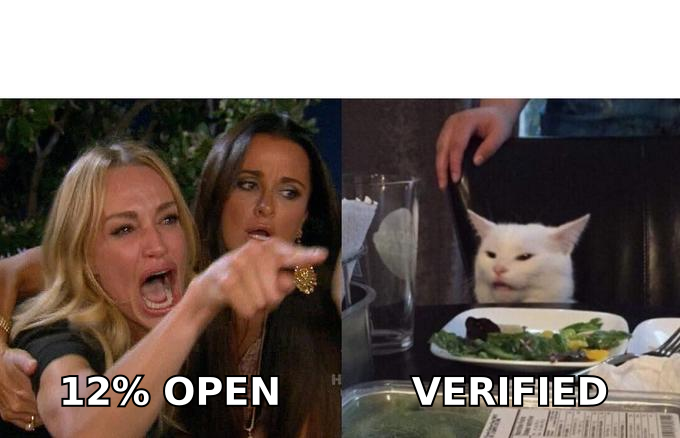
- Deliverability — Did it reach the inbox at all? An email in the spam folder has a near-zero open rate. This is 60-70% of the outcome and almost nobody measures it directly.
- Sender name — The recipient reads "Sarah from Acme" before they read anything else. A recognizable human name outperforms a company name; a company name outperforms "no-reply."
- Subject line — Specifically the first 40 characters, since that is what renders on a phone. Everything after that is a bonus.
- Preview text — The snippet after the subject. Left empty, mail clients pull the first line of your body, which is often "Hi {{FirstName}}," — a wasted 60 characters of prime screen real estate.
Most teams spend 90% of their optimization effort on item three. That is backwards. The fix order should mirror the impact order.
How do you fix deliverability before touching the copy?#
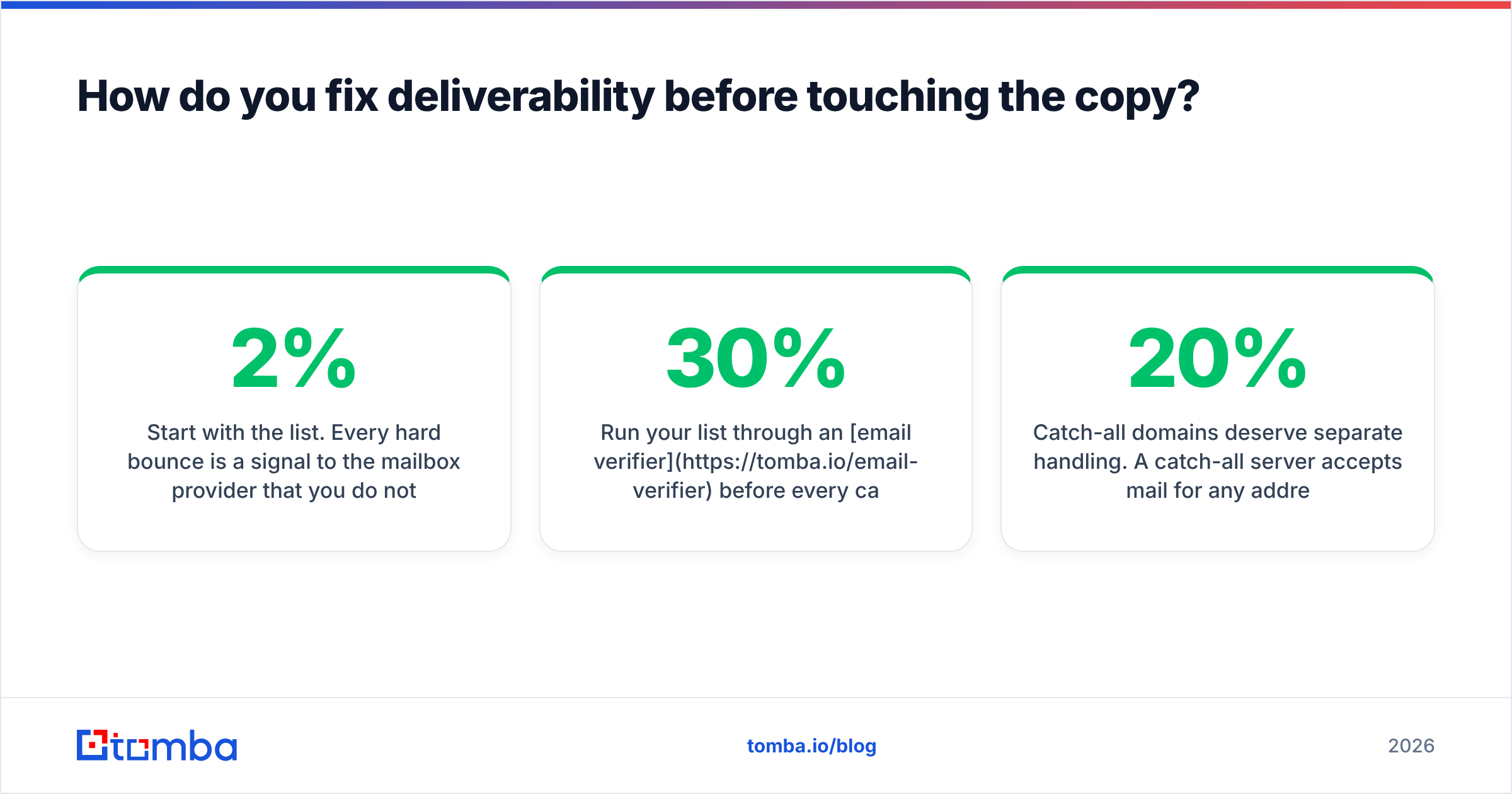
Start with the list. Every hard bounce is a signal to the mailbox provider that you do not know who you are mailing. Bounce rates above 2% put you in the danger zone; above 5% and providers start throttling you regardless of how good your content is.
Run your list through an email verifier before every campaign, not once a quarter. B2B data decays at roughly 22-30% per year — people change jobs, companies rebrand domains, aliases get retired. A list you verified in January is measurably worse by June.
Catch-all domains deserve separate handling. A catch-all server accepts mail for any address at the domain, so a standard SMTP check returns "valid" for garbage. Roughly 20% of B2B domains are configured this way. Use a catch-all verifier that goes beyond the SMTP handshake, or segment catch-alls into their own low-volume campaign so a bad guess does not poison your main domain.
Then handle authentication. Three records, all DNS-level:
- SPF — lists which servers may send on your behalf. Check yours with a SPF checker and confirm you are under the 10-lookup limit.
- DKIM — cryptographically signs each message so the receiver can verify it was not tampered with.
- DMARC — tells receivers what to do when SPF or DKIM fails. Start at
p=noneto collect reports, then move top=quarantineonce you have clean data.
Finally, check whether your sending IP or domain sits on a blocklist. A blacklist checker takes 30 seconds and occasionally explains an entire quarter of bad numbers.
What is a realistic open rate benchmark in 2026?#
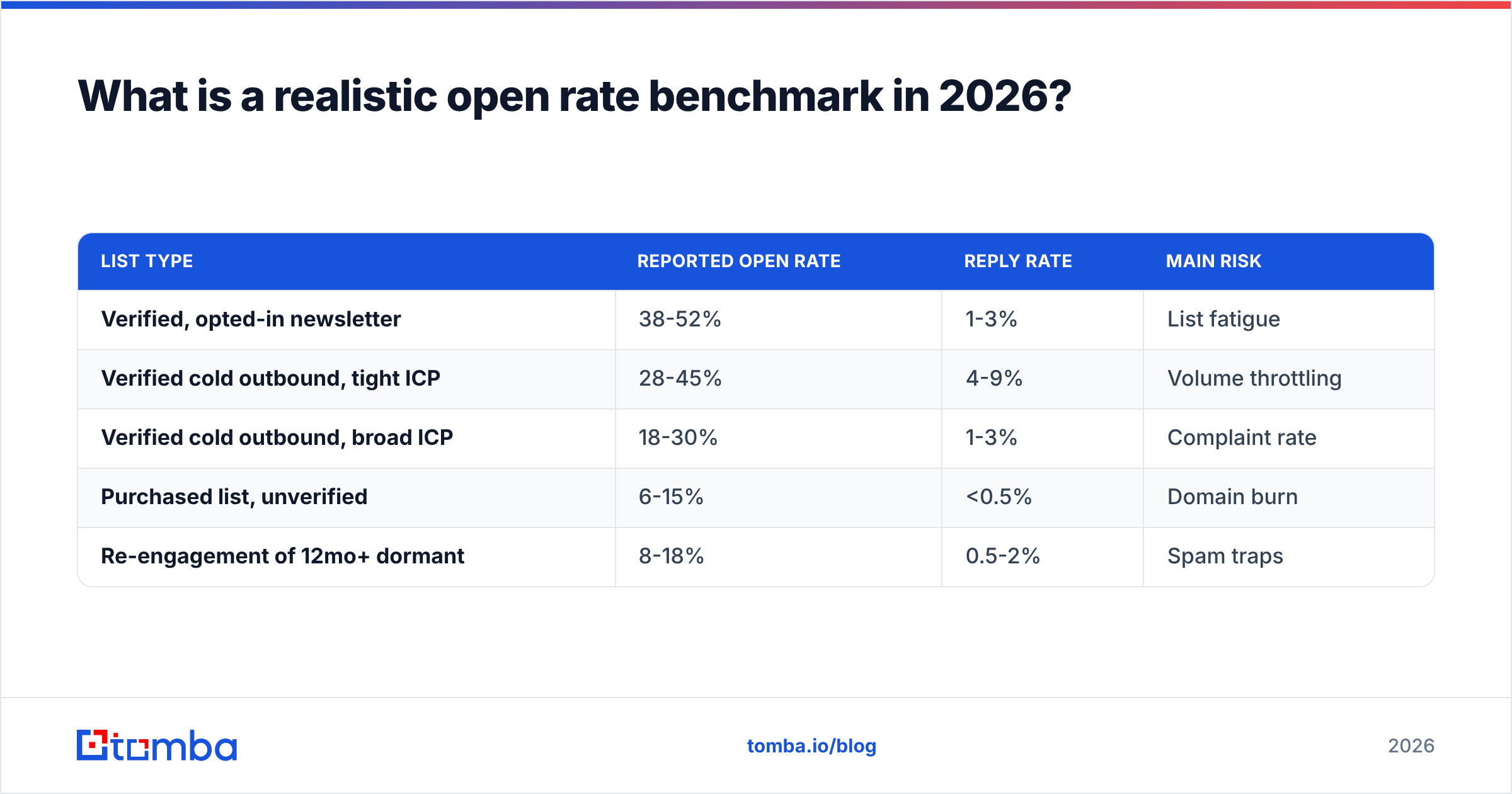
Depends entirely on list type. Here is what the ranges look like across common B2B scenarios:
| List type | Reported open rate | Reply rate | Main risk |
|---|---|---|---|
| Verified, opted-in newsletter | 38-52% | 1-3% | List fatigue |
| Verified cold outbound, tight ICP | 28-45% | 4-9% | Volume throttling |
| Verified cold outbound, broad ICP | 18-30% | 1-3% | Complaint rate |
| Purchased list, unverified | 6-15% | <0.5% | Domain burn |
| Re-engagement of 12mo+ dormant | 8-18% | 0.5-2% | Spam traps |
Two things stand out. First, the gap between a verified tight-ICP list and an unverified purchased list is roughly 3x on opens and 10x on replies. Second, reply rate and open rate do not move together — broad targeting can produce respectable opens with near-zero replies, which tells you the subject line worked and the offer did not.
If you are buying data rather than building it, providers vary sharply in how they source and refresh records. BookYourData is one of the better-known options for pre-built B2B lists with verification built into the purchase flow, and it suits teams that want volume without running their own enrichment. Teams building lists from a known target account list usually get better economics from a domain search approach — start from the company, pull the people, verify on the way out.
Which subject line patterns still work?#
The ones that read like a human wrote them to one person. Everything else has been pattern-matched into oblivion by both filters and recipients.
What consistently performs:
- Lowercase, short, specific. "quick question about your Q3 hiring" outperforms "Unlock 3X Pipeline Growth Today" by a wide margin in B2B.
- Reference something verifiable. A recent funding round, a job posting, a conference talk. This proves a human did research, which is the entire premise of cold outreach.
- No brackets, no emoji, no ALL CAPS. These are legacy marketing-email signals and they get you sorted into Promotions.
- Under 45 characters. Mobile truncation is unforgiving, and roughly 60% of B2B email is first opened on a phone.
- Never use the word "free," "guarantee," or a currency symbol in the subject. Run drafts through a spam checker before you commit.
What has stopped working: fake "Re:" prefixes, "Following up" on a thread that never existed, and any subject that implies a prior relationship you do not have. These do generate opens. They also generate complaints, and complaints cost more than the opens are worth.
If you want variations fast, a subject line generator will produce candidates you can then cut down by hand. Generated lines almost always run too long — treat the output as raw material, not a finished asset.
How much does send volume affect open rates?#
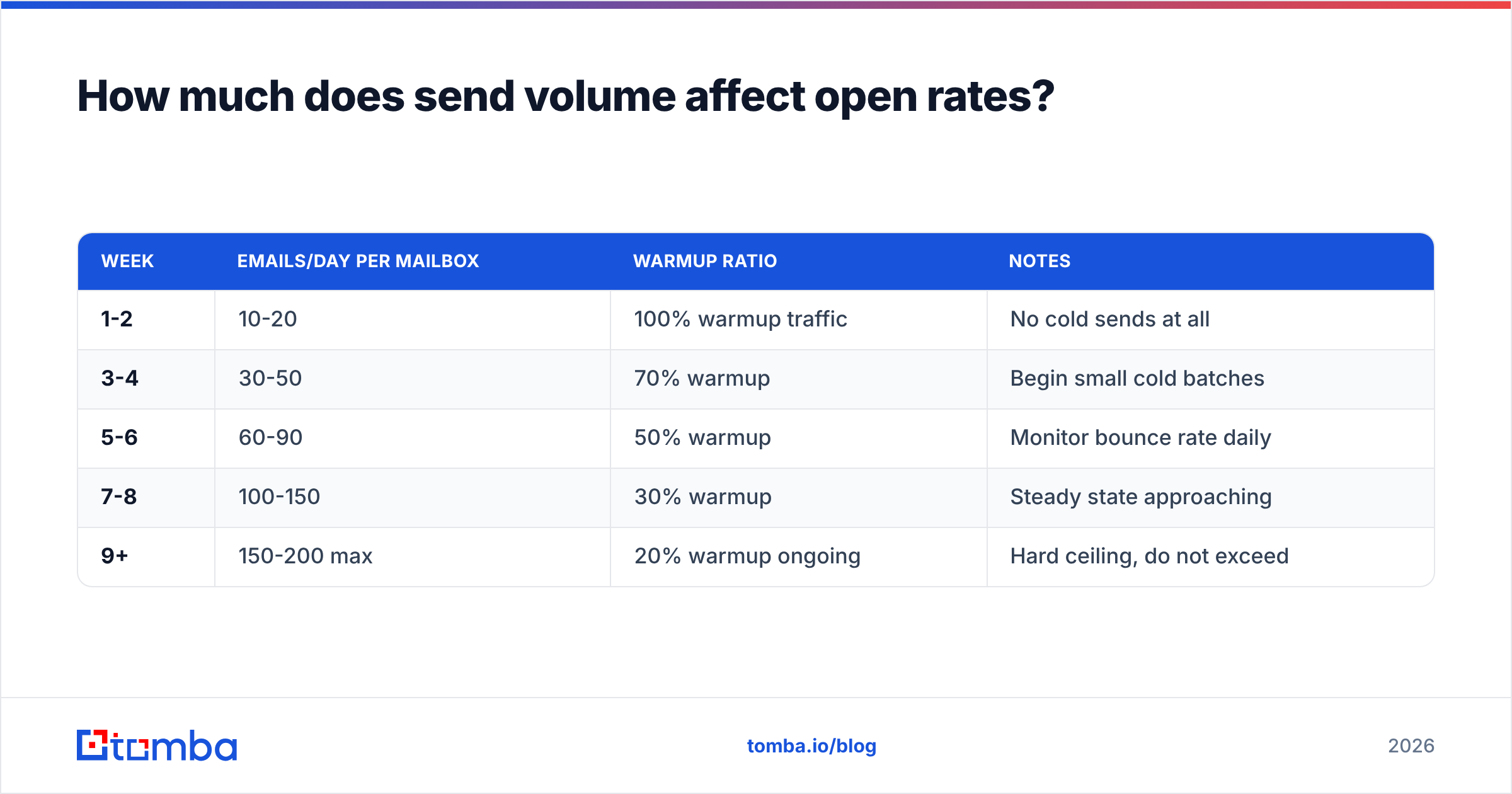
More than send timing, which is the thing most teams obsess over. Mailbox providers evaluate volume patterns per sending mailbox. A brand-new mailbox that sends 500 emails on day one gets throttled or blocked outright.
The workable pattern:
| Week | Emails/day per mailbox | Warmup ratio | Notes |
|---|---|---|---|
| 1-2 | 10-20 | 100% warmup traffic | No cold sends at all |
| 3-4 | 30-50 | 70% warmup | Begin small cold batches |
| 5-6 | 60-90 | 50% warmup | Monitor bounce rate daily |
| 7-8 | 100-150 | 30% warmup | Steady state approaching |
| 9+ | 150-200 max | 20% warmup ongoing | Hard ceiling, do not exceed |
Two hundred per mailbox per day is a practical ceiling for cold outbound, and many teams see better numbers holding at 120-150. If you need 900 sends a day, you need five or six warmed mailboxes across two or three sending domains — never your primary company domain. Burn a subdomain, not the domain your invoices go out from.
A warmup calculator will map the ramp for your target volume. The important discipline is not skipping ahead when a campaign is behind schedule. Ramping fast is how domains die.
Should you A/B test subject lines or fix targeting first?#
Targeting first, and it is not close.
A/B testing a subject line on a poorly targeted list produces a statistically significant answer to the wrong question. You will learn that variant B lifts opens from 14% to 17% among people who were never going to buy. That is a 3-point win on a metric that does not connect to revenue.
Tighten the list first. Cut it by half using firmographic and role filters until every name on it could plausibly say yes. A 400-person list where every contact fits the ICP will beat a 4,000-person list on absolute reply count, and it will do it without risking your domain.
Once targeting is tight and deliverability is clean, then A/B test — and test the sender name before the subject line. Sender name changes routinely produce larger deltas than subject-line changes, and almost nobody tests them.
Test discipline that actually holds up:
- One variable at a time. Subject OR sender OR send time, never two.
- Minimum 300 sends per variant. Below that you are reading noise.
- Measure reply rate, not open rate, as the tiebreaker — pixel inflation makes opens unreliable.
- Run for at least 72 hours before calling it. B2B recipients check email on weird schedules.
- Kill the loser permanently. Do not keep re-testing a pattern that lost twice.
What tooling stack supports high open rates?#
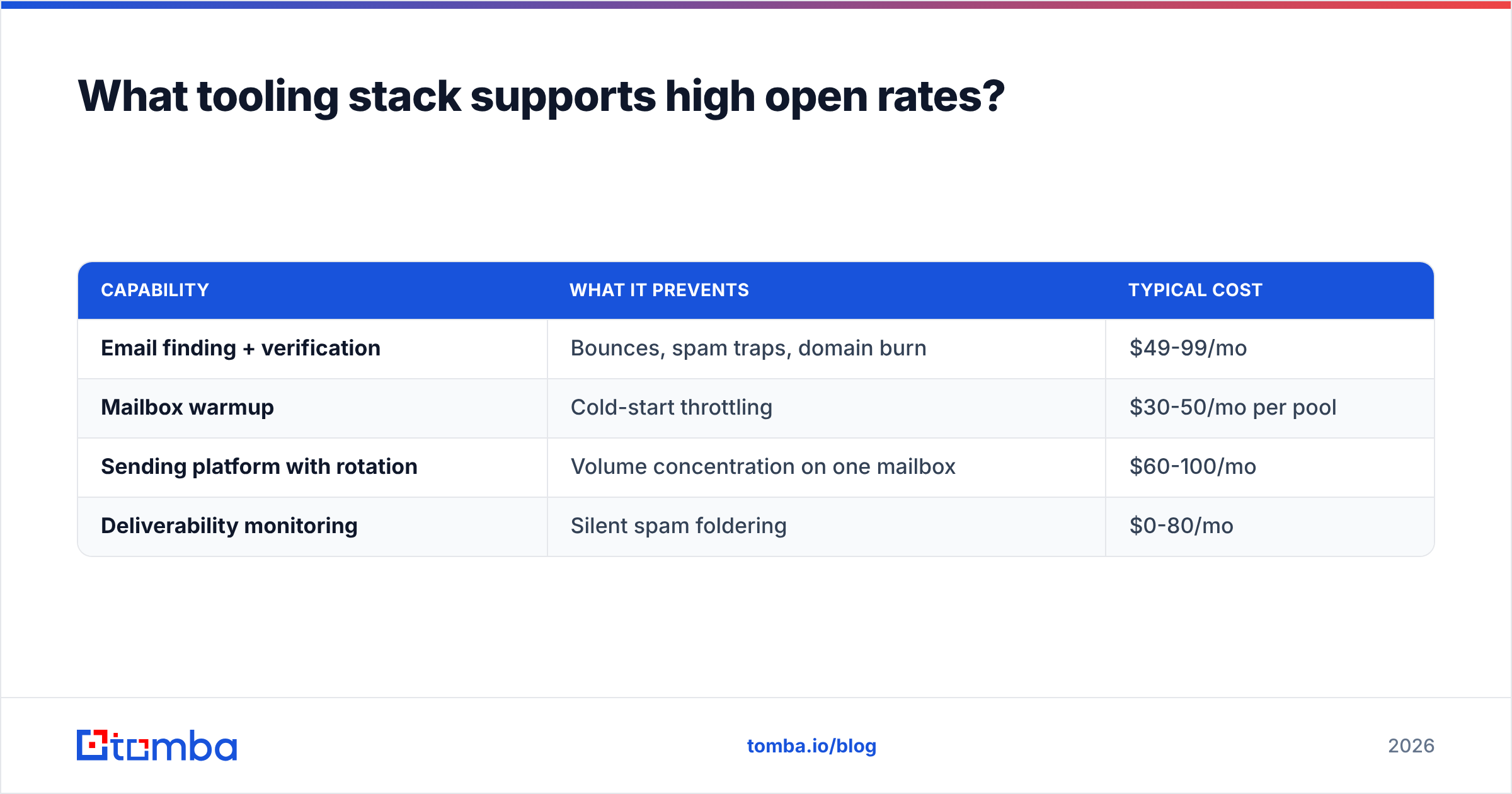
You need four capabilities, and they do not have to come from one vendor:
| Capability | What it prevents | Typical cost |
|---|---|---|
| Email finding + verification | Bounces, spam traps, domain burn | $49-99/mo |
| Mailbox warmup | Cold-start throttling | $30-50/mo per pool |
| Sending platform with rotation | Volume concentration on one mailbox | $60-100/mo |
| Deliverability monitoring | Silent spam foldering | $0-80/mo |
The verification layer is where teams under-invest most consistently, because a bounce feels cheap in the moment. It is not — the reputation damage from a 6% bounce campaign takes weeks of clean sending to repair, and during those weeks every campaign underperforms.
For finding and verifying in one pass, Tomba pricing starts free at 25 searches a month, with the Starter plan at $49/mo and Growth at $99/mo. That covers the find-and-verify half of the stack; you still need a warmup service and a sender.
For deliverability monitoring, Google Postmaster Tools is free and shows your domain reputation and spam complaint rate directly from Gmail's perspective. If you send meaningful volume to Gmail addresses — and in B2B you do — this is the single most useful free signal available. Check it weekly.
What should you do in the next 30 days?#
A sequence that produces measurable movement:
Week 1 — Verify your entire active list. Remove hard bounces and risky addresses. Set up SPF, DKIM, and DMARC if any are missing. Register for Google Postmaster Tools and record your starting reputation.
Week 2 — Cut sending volume per mailbox to 100/day. Add a second and third sending domain if you need the throughput. Start warmup on any mailbox under 60 days old.
Week 3 — Rewrite sender names to a real person at your company. Write preview text explicitly for every template instead of letting the client auto-fill it. Shorten every subject line to under 45 characters.
Week 4 — Measure. Compare reply rate week over week, not open rate. If reply rate moved and open rate did not, you fixed something real. If open rate moved and reply rate did not, you probably just shifted your audience mix.
Expect the reputation repair to lag the behavior change by two to three weeks. Domain reputation is a trailing indicator, and mailbox providers weight recent history heavily but not instantly.
Where does this leave you?#
Open rate is a diagnostic, not a goal. It tells you whether your mail reached a human inbox and whether the sender name and subject earned two seconds of attention. It does not tell you whether the offer landed — reply rate does that.
The compounding lever, the one that makes every other fix work better, is list quality. Clean data means low bounces, low bounces mean good reputation, good reputation means inbox placement, and inbox placement is what an open rate is actually measuring. Skip that and the rest is decoration.
Start there. Run your target accounts through the Tomba Email Finder to build a verified list from company domains rather than buying one blind, and verify every address before it enters a sequence. The free tier gives you 25 searches to see whether the data holds up against your own known-good contacts — which is exactly how you should evaluate any data vendor before committing budget.
Related guides#
// get started
Find, verify and enrich your first contacts today
Start on the free plan with 25 searches a month, then scale when your team is ready.
Free plan · No credit card required · GDPR & CCPA
// about the author