How to Know if an Email Is Active: 7 Ways to Check in 2026
Seven practical ways to tell if an email address is still active before you send — from free syntax checks to SMTP pings, catch-all handling, and bulk API verification.
TL;DR
- An "active" email address means three things at once: the domain accepts mail, the mailbox exists, and a human still reads it. Most tools only check the first two.
- The fastest free check is a syntax + MX record lookup — it catches roughly 20-30% of dead addresses in a typical scraped list and costs nothing.
- SMTP-level verification (the "ping") is the most accurate single-address method, but Gmail, Outlook, and Yahoo have made it noisier since 2023, so treat "unknown" as a real result, not a failure.
- Catch-all domains accept everything and confirm nothing. You need a separate catch-all strategy — not a bigger verifier.
- For lists over a few hundred rows, bulk API verification is the only sane option. Budget roughly $0.001-$0.01 per address depending on vendor and volume.
What does "active email address" actually mean?#
Three separate conditions, and people confuse them constantly.
- The domain resolves and accepts mail. There are MX records published in DNS and a mail server answers on port 25. If this fails, nothing else matters.
- The mailbox exists on that server.
sarah@acme.comis a real inbox, not a typo or a deleted employee. - Someone actually reads it. The mailbox exists but forwards to a black hole, or belongs to a person who left in 2023 and whose auto-forward was never removed.
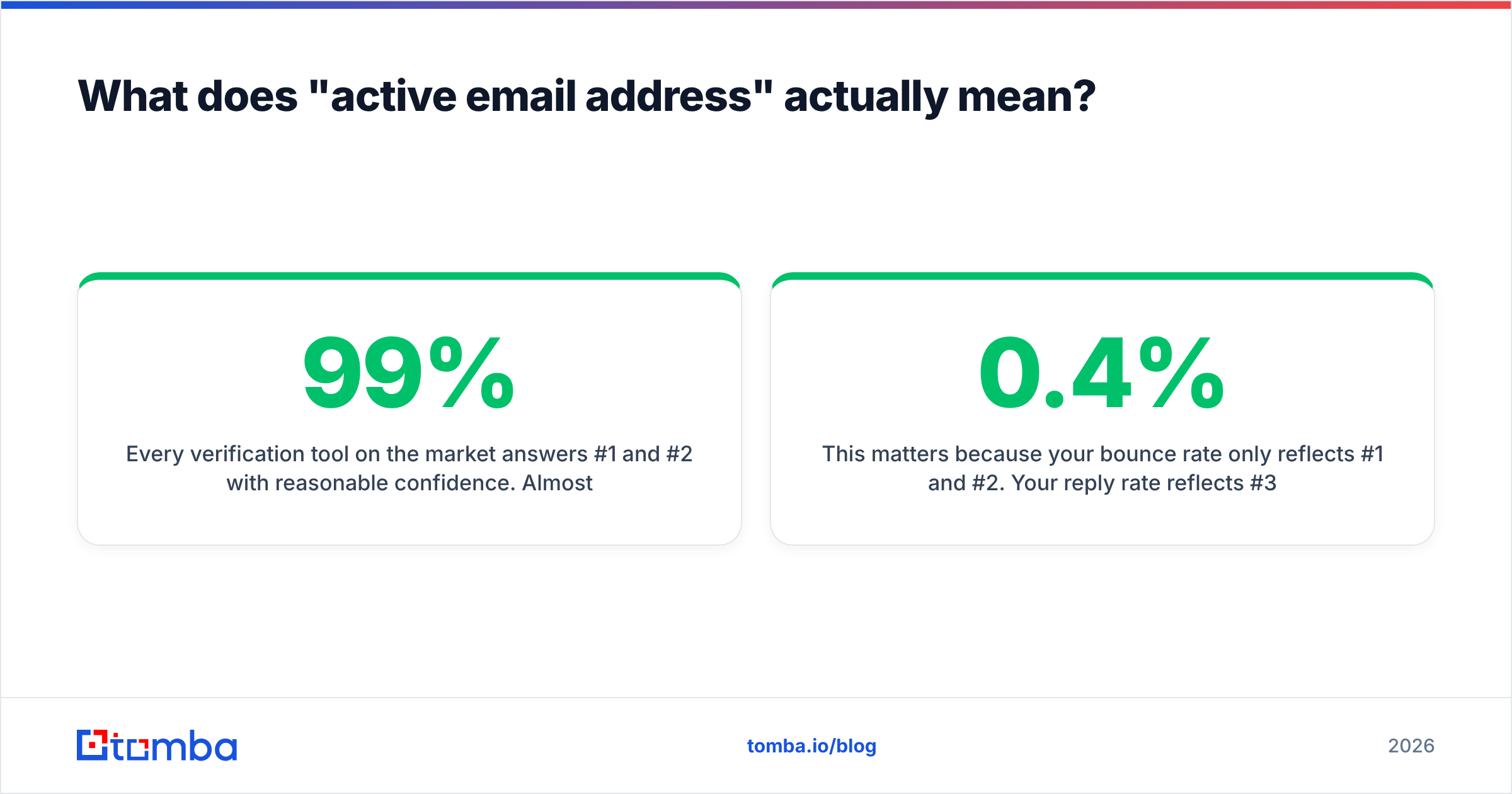
Every verification tool on the market answers #1 and #2 with reasonable confidence. Almost none answer #3 — that requires engagement signals (opens, replies, prior activity) that only the sender accumulates over time. When a vendor promises "99% accuracy," they mean accuracy on questions 1 and 2.
This matters because your bounce rate only reflects #1 and #2. Your reply rate reflects #3. You can have a 0.4% bounce rate and still email 40% ghosts.
How do you check if an email is active for free?#
Four methods you can run right now without paying anyone.
1. Syntax validation. Check the address against RFC 5322 rules — one @, no leading dots, valid TLD, no spaces. This is trivially automatable and catches copy-paste damage like john.smith@acme,com. A free email checker does this instantly, and so does a regex if you're comfortable writing one.
2. MX record lookup. Query the domain's DNS for mail exchanger records:
dig MX acme.com +short
10 aspmx.l.google.com.
20 alt1.aspmx.l.google.com.
No MX records means the domain cannot receive mail at all. Every address at that domain is dead. This single check kills a surprising share of old scraped lists — companies fold, domains lapse, and nobody updates the CRM.
3. Manual SMTP handshake. Open a telnet session to the mail server and walk through the conversation:
telnet aspmx.l.google.com 25
HELO example.com
MAIL FROM: <you@yourdomain.com>
RCPT TO: <target@acme.com>
A 250 OK response after RCPT TO suggests the mailbox exists. A 550 means it doesn't. This works from a clean IP, but your residential or office IP will get rate-limited or blocked fast — which is exactly why verification services exist.
4. Gmail / Google Workspace tricks. Type the address into a Google Contacts field or a Google Doc share dialog. If Google returns a profile photo or name, the account exists. This only works for Gmail-hosted addresses, but a large chunk of B2B mail sits on Google Workspace.
Free methods are fine for one-off checks. They fall apart at 50 addresses and become actively counterproductive at 500 — you will get your IP flagged before you finish.
Which method should you use for your situation?#
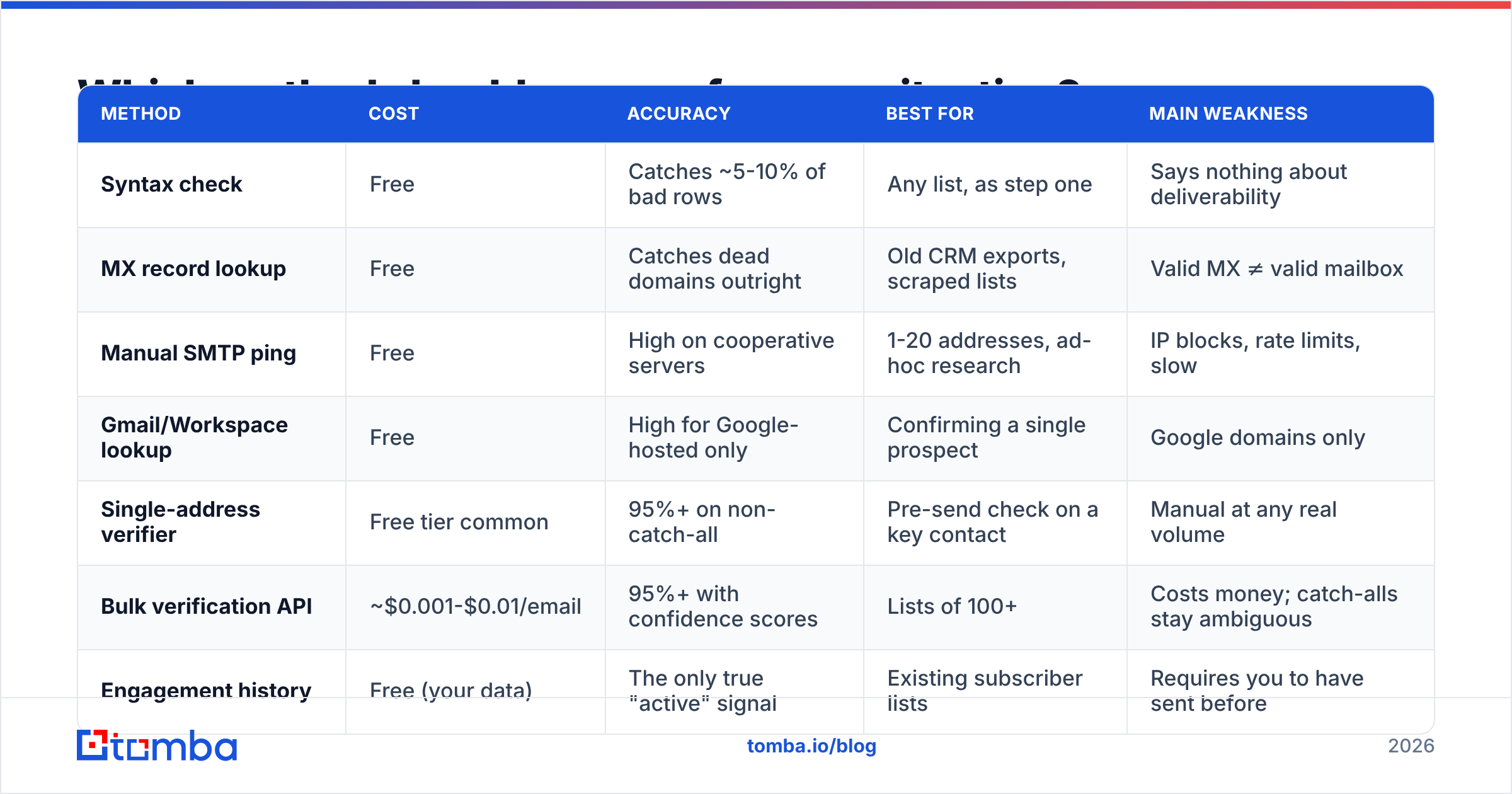
| Method | Cost | Accuracy | Best for | Main weakness |
|---|---|---|---|---|
| Syntax check | Free | Catches ~5-10% of bad rows | Any list, as step one | Says nothing about deliverability |
| MX record lookup | Free | Catches dead domains outright | Old CRM exports, scraped lists | Valid MX ≠ valid mailbox |
| Manual SMTP ping | Free | High on cooperative servers | 1-20 addresses, ad-hoc research | IP blocks, rate limits, slow |
| Gmail/Workspace lookup | Free | High for Google-hosted only | Confirming a single prospect | Google domains only |
| Single-address verifier | Free tier common | 95%+ on non-catch-all | Pre-send check on a key contact | Manual at any real volume |
| Bulk verification API | ~$0.001-$0.01/email | 95%+ with confidence scores | Lists of 100+ | Costs money; catch-alls stay ambiguous |
| Engagement history | Free (your data) | The only true "active" signal | Existing subscriber lists | Requires you to have sent before |
The practical stack for most teams: MX lookup as a free pre-filter, then a paid verifier on whatever survives, then engagement data to prune over time.
How does SMTP verification actually work?#
An SMTP verifier impersonates the opening moves of a real email delivery, then hangs up before sending anything.
Think of it like calling a large office building's front desk, asking "does Sarah Chen still work there?", and hanging up when they answer. You never leave a message. The recipient never sees the call. But you learn whether the extension exists.
The sequence, in order:
- DNS resolution — find the MX records for the domain.
- TCP connection — open port 25 to the highest-priority mail server.
- HELO/EHLO — introduce the sending host.
- MAIL FROM — declare a return-path address.
- RCPT TO — name the target mailbox. This is the question that matters.
- QUIT — disconnect without
DATA, so no message is ever transmitted.
The server's response to step 5 is the verdict. 250 = accepted, 550 = no such user, 4xx = temporarily deferred, try later.
Here's what changed. Since roughly 2023, the biggest providers deliberately obscure step 5. Yahoo and Microsoft's consumer infrastructure return 250 for nearly everything and bounce later. Google throttles aggressively by IP reputation. The result: a verifier's honest answer on a large share of addresses is now "unknown," and the vendors that report a clean binary valid/invalid on every single row are hiding a guess inside a confident label.
Read the confidence score, not just the label. A tool that tells you 8% of your list is genuinely unresolvable is more useful than one that pretends 100% certainty.

What about catch-all domains?#
Catch-all domains are the single biggest hole in every accuracy claim you'll read.
A catch-all (or "accept-all") server is configured to say 250 OK to every recipient address, valid or not, and sort it out internally afterward. ceo@acme.com, sarah@acme.com, and asdfjkl@acme.com all return the same green light. Roughly 15-25% of B2B domains are configured this way, and the rate skews higher among enterprises and agencies.
Standard verification is useless here. Three things that do work:
- Pattern inference. If you know Acme uses
first.last@, and you have a confirmed first and last name from LinkedIn, afirst.lastconstruction is far more likely to be real than a guess. A company email pattern check tells you the dominant format at a domain. - Dedicated catch-all logic. Some providers run additional signals — historical send data, secondary MX probing, provider-specific quirks — to score catch-all addresses instead of shrugging. Tomba's catch-all verifier exists specifically for this bucket, and so do comparable features at BookYourData and other data vendors.
- Sending policy. Segment catch-alls into their own campaign, send at low volume from a secondary domain, and let the actual bounce data tell you what the verifier couldn't.
Do not merge catch-all addresses into your "verified" segment and blast them. That's how a clean domain earns a spam-folder reputation in one week.
How do you check thousands of addresses at once?#
Automate it, and stop touching individual addresses.
For a list of any real size, the workflow looks like this:
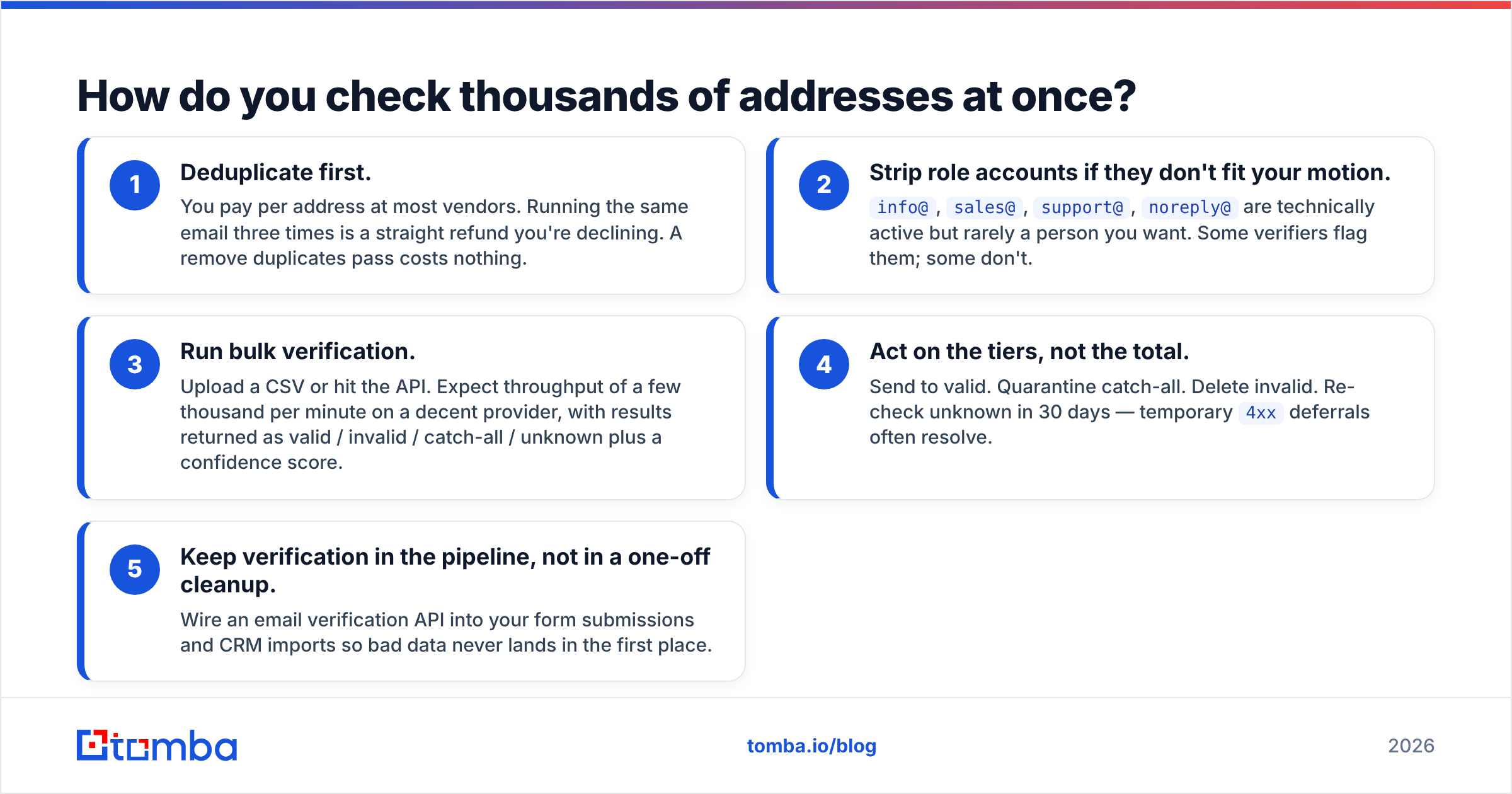
- Deduplicate first. You pay per address at most vendors. Running the same email three times is a straight refund you're declining. A remove duplicates pass costs nothing.
- Strip role accounts if they don't fit your motion.
info@,sales@,support@,noreply@are technically active but rarely a person you want. Some verifiers flag them; some don't. - Run bulk verification. Upload a CSV or hit the API. Expect throughput of a few thousand per minute on a decent provider, with results returned as valid / invalid / catch-all / unknown plus a confidence score.
- Act on the tiers, not the total. Send to valid. Quarantine catch-all. Delete invalid. Re-check unknown in 30 days — temporary
4xxdeferrals often resolve. - Keep verification in the pipeline, not in a one-off cleanup. Wire an email verification API into your form submissions and CRM imports so bad data never lands in the first place.
On decay rates: B2B email data degrades at roughly 22-30% per year according to widely cited industry figures, driven by job changes and company churn. HubSpot's own marketing statistics reflect the same pattern — contact databases rot whether or not you look at them. That means a list you verified in January is materially worse by July. Quarterly re-verification is the floor, not a nice-to-have.
If you're sourcing rather than cleaning, verification should be built into the discovery step. Tools that find an address and confirm it in the same call save you a second vendor and a second bill.
Does an "active" email guarantee delivery?#
No, and this trips up a lot of teams who verify diligently and still land in spam.
Verification confirms the mailbox exists. It says nothing about whether your mail is welcome there. Delivery depends on your side of the equation:
- Authentication. SPF, DKIM, and DMARC records must be published and aligned. Since Google and Yahoo's February 2024 bulk-sender requirements, unauthenticated mail to those providers is filtered or rejected outright — the rules are documented publicly and they are not optional. Check yours with an SPF checker.
- Sender reputation. Your domain and IP carry a history. A clean list protects it; a dirty one burns it in days. Read up on sender reputation if you're new to the concept.
- Content and volume. Spam-trigger phrasing, heavy link density, and sudden volume spikes get filtered regardless of how valid the recipient is.
- Engagement. Providers weight replies and opens heavily. Consistently ignored mail eventually gets routed to Promotions or Spam even when every address is real.
The honest framing: verification is necessary but not sufficient. It removes one failure mode — hard bounces — and hard bounces are the failure mode that damages your email deliverability fastest. Fix it first, then fix the rest.
What's the practical checklist?#
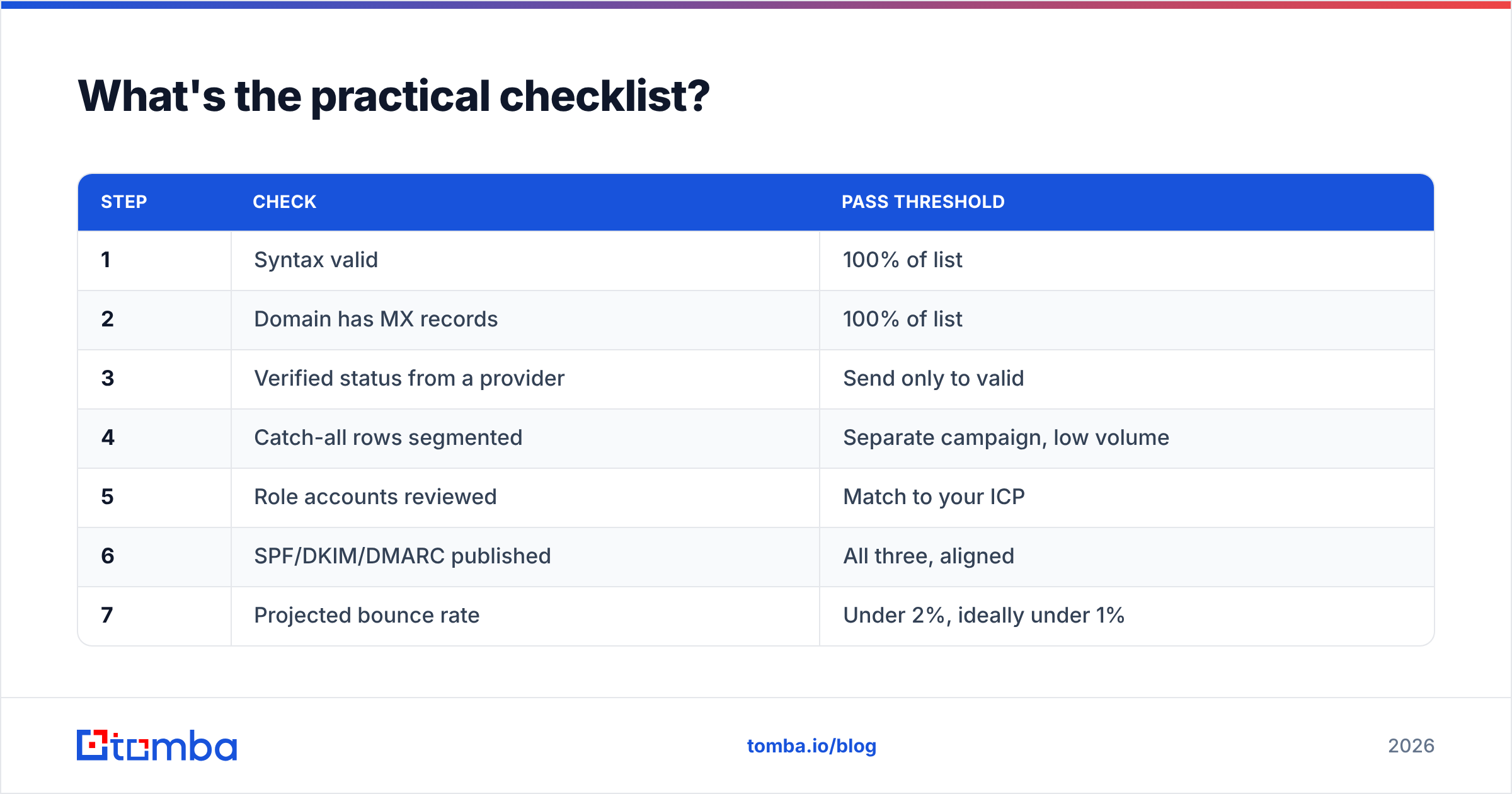
Run this in order, top to bottom, before any campaign:
| Step | Check | Pass threshold |
|---|---|---|
| 1 | Syntax valid | 100% of list |
| 2 | Domain has MX records | 100% of list |
| 3 | Verified status from a provider | Send only to valid |
| 4 | Catch-all rows segmented | Separate campaign, low volume |
| 5 | Role accounts reviewed | Match to your ICP |
| 6 | SPF/DKIM/DMARC published | All three, aligned |
| 7 | Projected bounce rate | Under 2%, ideally under 1% |
| 8 | List age since last verification | Under 90 days |
If step 7 comes out above 3%, do not send. Re-verify, cut the unknowns, and try again. Mailbox providers treat a high bounce rate as evidence you bought a list, and the reputation damage takes months to undo.
For sourcing addresses in the first place — rather than cleaning ones you already have — start with a domain-level sweep. Tomba's domain search returns the known addresses at a company along with the dominant email pattern, which gives you both the contact and the format rule for constructing others. Compare vendor options on G2 before committing to an annual plan; pricing and accuracy claims vary widely and the free tiers exist for exactly this kind of testing.
Getting started#
Check one address by hand to understand the mechanics. Then automate everything above ten.
If you want the sourcing and the verification in one place, run your next prospect list through the Tomba Email Finder — it returns the address plus a confidence score in the same call, so you're not exporting a CSV into a second tool just to find out half the rows are dead. The free tier gives you 25 searches a month to test accuracy on domains you already know the answers for, which is the only fair way to benchmark any vendor. Paid plans start at $49/mo on Starter and scale to $99/mo on Growth; full Tomba pricing is public, including bulk and API allowances.
Verify before you send. It's the cheapest insurance in outbound.
Related guides#
// get started
Find, verify and enrich your first contacts today
Start on the free plan with 25 searches a month, then scale when your team is ready.
Free plan · No credit card required · GDPR & CCPA
// about the author