How to Look Up Someone's Email Address: 9 Proven Ways
Nine ways to look up someone's email address in 2026 — free manual tricks, pattern guessing, and paid finders — with accuracy data and a verification step that keeps your bounce rate under 2%.
TL;DR
- Free manual methods (Google operators, X/Twitter and GitHub profiles, personal sites, WHOIS) work for maybe 3 in 10 people and take 5-10 minutes each.
- Pattern-based lookup — figure out the company's format, then apply it to the name — is the highest-leverage manual trick, but it produces guesses, not confirmed addresses.
- Dedicated email finders resolve most B2B contacts in under two seconds and return a confidence score instead of a guess.
- Never send to an address you haven't verified. An unverified list at 12% bounce rate will damage your sending domain faster than any subject line can save it.
- Personal Gmail/Yahoo addresses are the hardest category. Work emails at companies with a website are the easiest.
What does it actually mean to look up someone's email address?#
There are two very different jobs hiding behind that phrase, and mixing them up is why most people waste an afternoon.
Job one: find a work email. The person has a role at a company with a domain. Their address almost certainly follows a predictable pattern like first.last@company.com. This is a solvable problem with a high success rate, and it's what every B2B tool on the market is built for.
Job two: find a personal email. The person has a Gmail, Outlook, or ISP address that isn't tied to any public record. There's no pattern to derive, no domain to search, no MX host that will confirm anything useful. Hit rates here are low, and the tools that claim otherwise are usually reselling breach data — which is a legal and reputational problem you don't want.
Everything below assumes job one unless stated otherwise. If you need a personal address, the honest answer is: ask the person, or find them through a mutual contact.
How does email lookup actually work under the hood?#
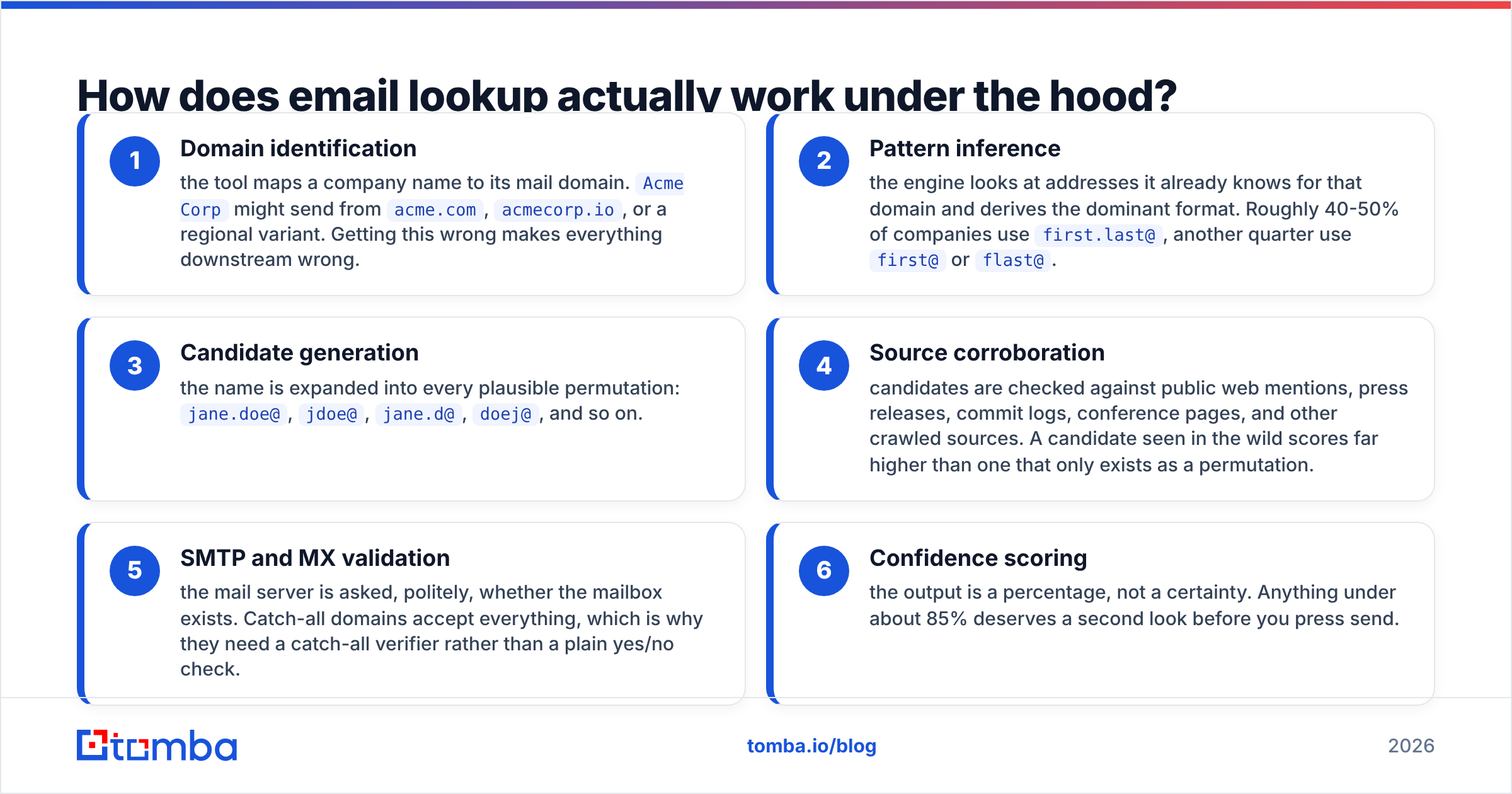
Understanding the mechanics tells you which method to reach for and how much to trust the result. Think of it like finding an apartment number: you know the building (the domain), you know the resident's name, and you need the numbering scheme.
- Domain identification — the tool maps a company name to its mail domain.
Acme Corpmight send fromacme.com,acmecorp.io, or a regional variant. Getting this wrong makes everything downstream wrong. - Pattern inference — the engine looks at addresses it already knows for that domain and derives the dominant format. Roughly 40-50% of companies use
first.last@, another quarter usefirst@orflast@. - Candidate generation — the name is expanded into every plausible permutation:
jane.doe@,jdoe@,jane.d@,doej@, and so on. - Source corroboration — candidates are checked against public web mentions, press releases, commit logs, conference pages, and other crawled sources. A candidate seen in the wild scores far higher than one that only exists as a permutation.
- SMTP and MX validation — the mail server is asked, politely, whether the mailbox exists. Catch-all domains accept everything, which is why they need a catch-all verifier rather than a plain yes/no check.
- Confidence scoring — the output is a percentage, not a certainty. Anything under about 85% deserves a second look before you press send.
The Wikipedia entry on email address syntax covers the RFC rules that constrain what a valid local part can even look like — worth ten minutes if you're building your own permutator.
What are the fastest free ways to look up someone's email address?#
These cost nothing but your time. Ranked by how often they actually land.
1. Google search operators. The workhorse. Try each of these:
"jane doe" "@acme.com"
site:acme.com "jane doe" email
"jane doe" "email me at" OR "contact me at"
site:linkedin.com/in "jane doe" acme
Hit rate is decent for anyone who has spoken at a conference, published a paper, or been quoted in a press release.
2. The company's own website. Team pages, press kits, /contact, and investor-relations pages leak addresses constantly. So do PDFs — search site:acme.com filetype:pdf "jane doe".
3. GitHub commit history. If your target is technical, this is close to a cheat code. Open any repo they've committed to and append .patch to a commit URL — the raw patch header contains the author's configured email. Many developers never scrub this.
4. X/Twitter, Mastodon, and personal sites. People who publish put their address in the bio, the footer, or an obfuscated form like jane [at] acme [dot] com. An email extractor will pull the addresses out of a pasted page in one step instead of you squinting at HTML.
5. WHOIS lookups. Useful only when the person owns a domain personally and didn't buy privacy protection. That's maybe one in five registrations now, down sharply since GDPR. Still free, still worth thirty seconds.

6. Email pattern guessing. Find any one address at the company — from a press release, a support page, an invoice — and you've got the format. Apply it to your target's name. An email permutator generates all the variants in a click, and a company email pattern check tells you the dominant format for a domain before you start guessing.
The catch with all six: they produce candidates, not confirmations. Step seven is non-negotiable.
7. Verification. Run every candidate through a validator before it touches a mailbox. A free email checker handles one-offs; bulk lists need a proper email verifier.
Which paid tools find the emails you can't guess?#
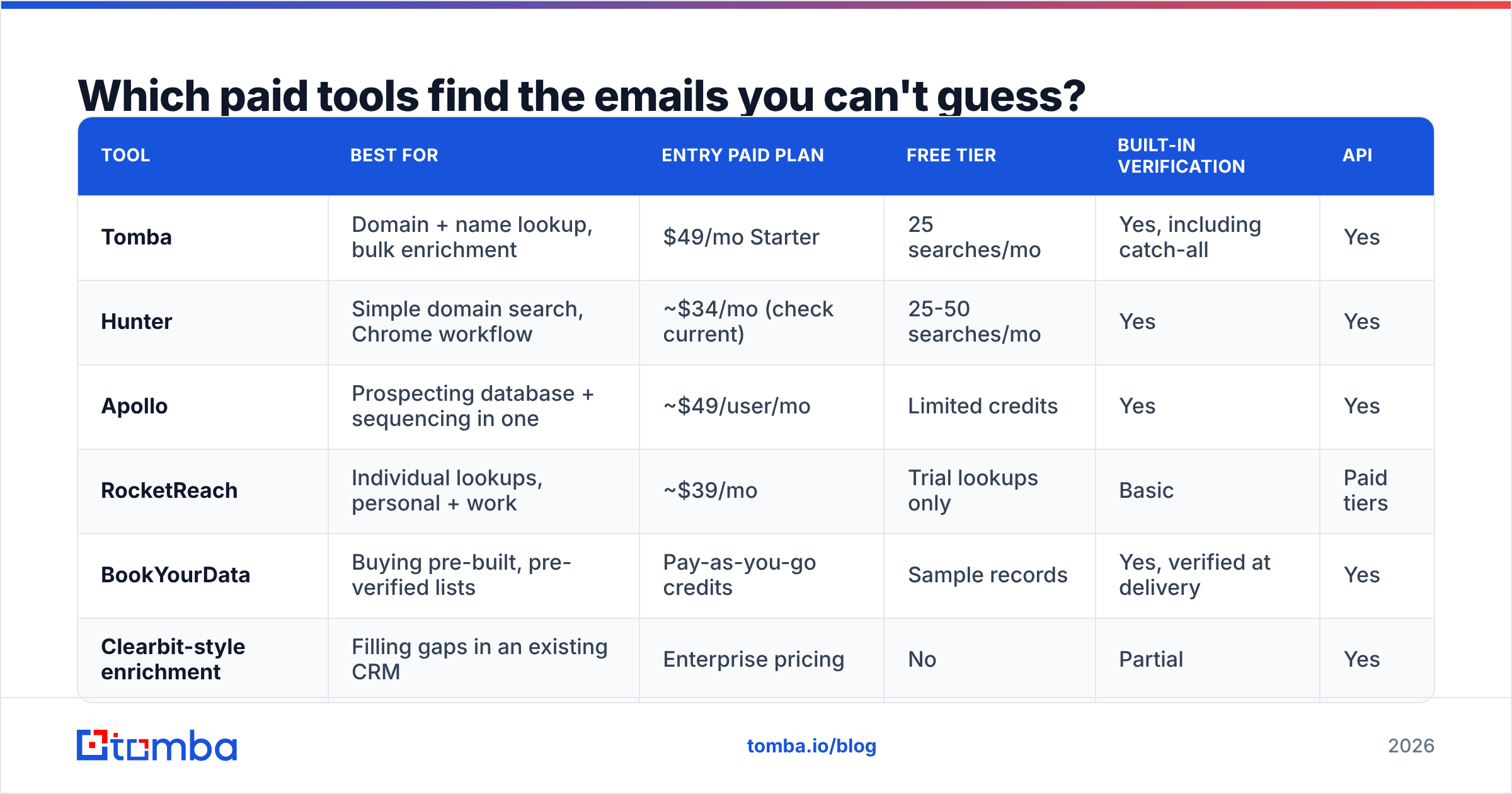
Manual methods cap out fast. If you need more than about ten addresses a week, a finder pays for itself in recovered hours. Here's how the main categories compare.

| Tool | Best for | Entry paid plan | Free tier | Built-in verification | API |
|---|---|---|---|---|---|
| Tomba | Domain + name lookup, bulk enrichment | $49/mo Starter | 25 searches/mo | Yes, including catch-all | Yes |
| Hunter | Simple domain search, Chrome workflow | ~$34/mo (check current) | 25-50 searches/mo | Yes | Yes |
| Apollo | Prospecting database + sequencing in one | ~$49/user/mo | Limited credits | Yes | Yes |
| RocketReach | Individual lookups, personal + work | ~$39/mo | Trial lookups only | Basic | Paid tiers |
| BookYourData | Buying pre-built, pre-verified lists | Pay-as-you-go credits | Sample records | Yes, verified at delivery | Yes |
| Clearbit-style enrichment | Filling gaps in an existing CRM | Enterprise pricing | No | Partial | Yes |
Two notes on reading this table. First, competitor pricing changes constantly — treat these as directional and confirm on the vendor's own site. Tomba pricing is public: Free (25 searches/mo), Starter $49/mo, Growth $99/mo, Pro $249/mo, Enterprise custom.
Second, the categories aren't interchangeable. BookYourData is a strong pick when you want a clean, verified list handed to you rather than assembled — different job from a per-lookup finder, and often faster if your ICP is broad and well-defined. Apollo bundles sequencing, which matters if you don't already have an outbound stack. A pure finder like Tomba or Hunter wins when you're enriching contacts you've already identified.
If you're evaluating replacements for a specific incumbent, the Apollo alternative and RocketReach alternative breakdowns go deeper than a table can. G2's lead intelligence category is also worth a scan for current user reviews rather than vendor claims.
How accurate are these methods, really?#
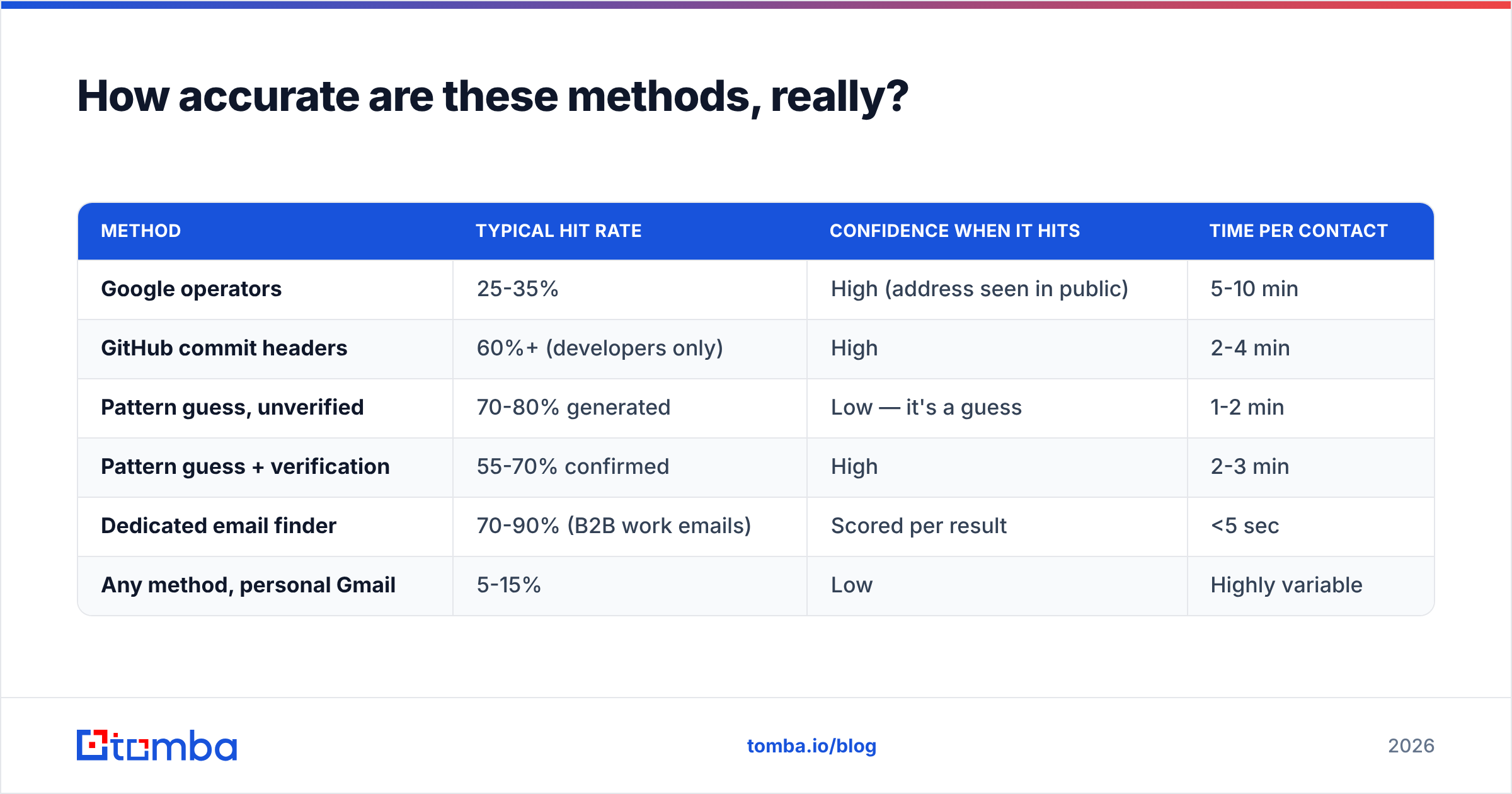
Accuracy is the whole ballgame. A method that finds an address 90% of the time but is right only 60% of the time is worse than useless — it fills your list with landmines.

Here's the realistic picture per method, based on typical B2B contact sets:
| Method | Typical hit rate | Confidence when it hits | Time per contact |
|---|---|---|---|
| Google operators | 25-35% | High (address seen in public) | 5-10 min |
| GitHub commit headers | 60%+ (developers only) | High | 2-4 min |
| Pattern guess, unverified | 70-80% generated | Low — it's a guess | 1-2 min |
| Pattern guess + verification | 55-70% confirmed | High | 2-3 min |
| Dedicated email finder | 70-90% (B2B work emails) | Scored per result | <5 sec |
| Any method, personal Gmail | 5-15% | Low | Highly variable |
Three things drive the variance more than tool choice does:
- Company size. Sub-20-person companies often have sparse public footprints, so pattern inference has less to work with. Enterprises are easier.
- Region. North American and Western European domains have far denser coverage than APAC and LATAM in most datasets. If your ICP is regional, run a sample before committing to an annual plan.
- Role seniority. VPs and above appear in press more often; individual contributors less. Junior technical roles are the exception thanks to code hosting.
Vendors quoting a single global accuracy number are quoting an average across a mix that probably doesn't match yours. Test on 50 of your own contacts. That's the only benchmark that counts. Tomba publishes its data sources so you can see what's actually behind the number.
How do you verify an address before you send?#
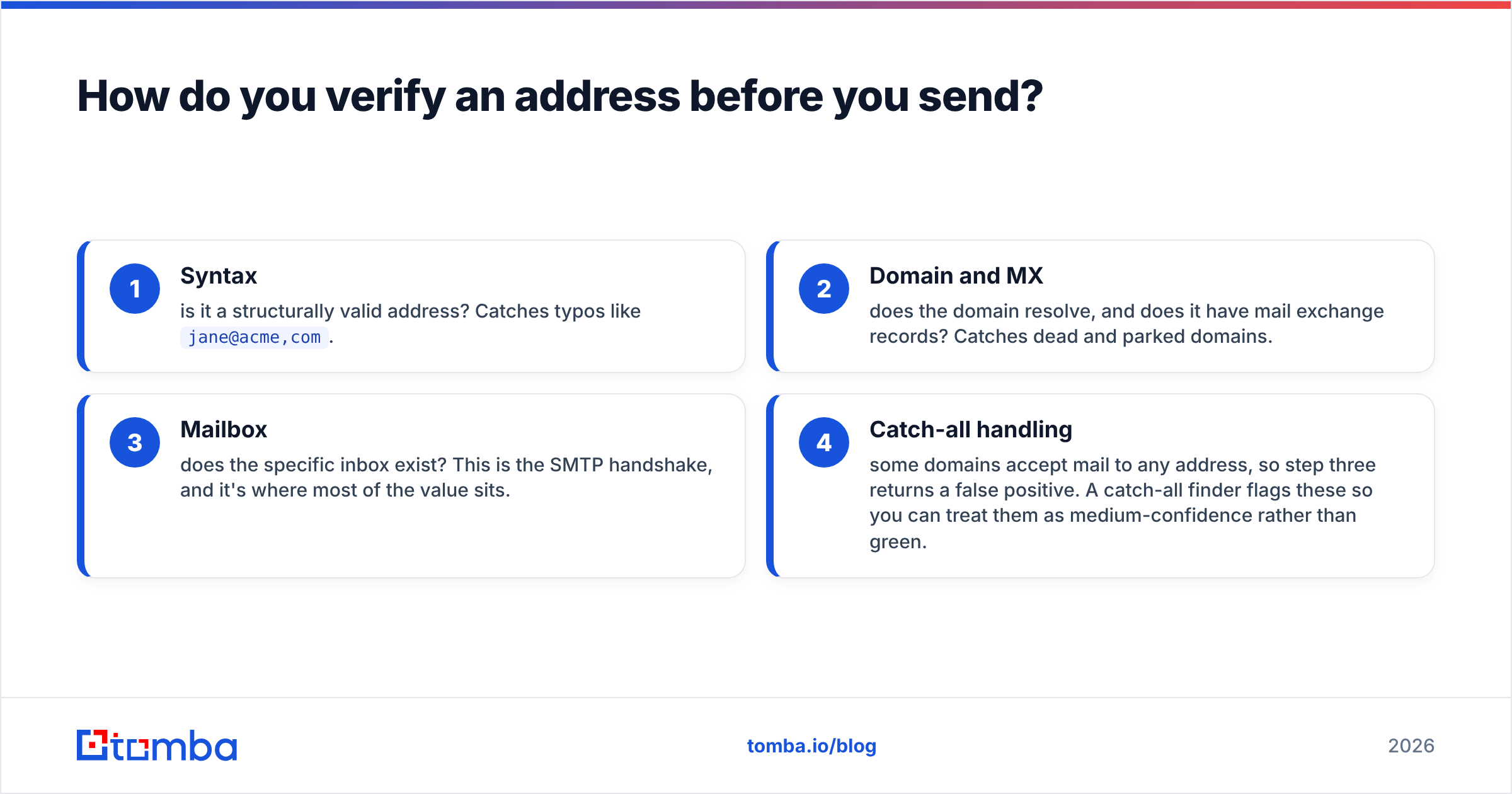
Verification is a four-layer check, and cheap tools skip the last two.
- Syntax — is it a structurally valid address? Catches typos like
jane@acme,com. - Domain and MX — does the domain resolve, and does it have mail exchange records? Catches dead and parked domains.
- Mailbox — does the specific inbox exist? This is the SMTP handshake, and it's where most of the value sits.
- Catch-all handling — some domains accept mail to any address, so step three returns a false positive. A catch-all finder flags these so you can treat them as medium-confidence rather than green.
Also filter role accounts (info@, sales@, support@) and known disposable domains. Role accounts inflate your list size and tank your reply rate; disposables inflate your bounce rate.
The threshold that matters: keep hard bounces under 2%. Above 5%, mailbox providers start throttling you, and recovering sender reputation takes weeks of reduced volume. HubSpot's guidance on list hygiene makes the same point from the marketing-automation side — the cost of a bad list is never just the bounced message.
Is it legal to look up someone's email address?#
Short answer: finding a business email address from public sources is legal in most jurisdictions. What you do next is where the rules bite.
Under GDPR, a work email tied to a named individual is personal data. You need a lawful basis — legitimate interest is the usual one for B2B outreach — plus a genuine balancing test, a clear identification of who you are, and a working opt-out in every message. You must also be able to say where the data came from if asked.
Under CAN-SPAM (US), cold B2B email is permitted. Requirements: accurate headers, no deceptive subject line, a valid physical postal address, and a functioning unsubscribe honored within 10 business days.
Under CASL (Canada), the bar is higher — you generally need express or implied consent, and implied consent has time limits.
Practical rules that keep you clean everywhere: only source from public or licensed data, never scrape behind a login in violation of terms of service, keep suppression lists permanent, and don't pursue personal addresses for business outreach when a work address exists. None of this is legal advice — check with counsel for your specific program.
What workflow should you use at scale?#
Once you're past a handful of contacts a week, stop doing this by hand. The pattern that holds up:
- Start from the domain, not the person. If you know the company but not the contact, a domain search returns every known address at that domain with roles attached. Often you find a better-fit contact than the one you started with.
- Enrich in bulk, not one at a time. Upload a CSV of names and domains to a bulk email finder and let it run. Ten minutes of setup beats four hours of tab-switching.
- Verify as a separate step. Even results from a finder should pass a verification run before they enter a sequence — data ages, and people change jobs at roughly 20% a year.
- Wire it into your stack. A Tomba API call at the point of lead creation means your CRM is never the place where stale addresses accumulate. Zapier, HubSpot, and Sheets integrations cover the no-code path.
- Re-verify quarterly. Anything older than 90 days in an active outbound list should be re-checked. This single habit does more for deliverability than any copy change.
What mistakes should you avoid?#
- Sending to unverified guesses. The permutator gave you eight candidates. Sending to all eight is how you get a spam trap hit.
- Trusting a single confidence score blindly. A 72% score on a catch-all domain means something very different from 72% on a domain with clean SMTP responses.
- Ignoring role accounts. They pass verification and never reply.
- Buying a list without a sample. Always request 50 records in your actual ICP and verify them yourself before paying.
- Optimizing the finder while neglecting the domain. Perfect data into a domain with a broken SPF record still lands in spam.
Where should you start?#
If you need one address right now, use Google operators plus a pattern guess, then verify. Five minutes, no cost.
If you need fifty a week, the manual route stops making sense — you'll spend more in hours than any plan costs. Start with the Tomba Email Finder free tier: 25 searches a month, no card, enough to test hit rate against contacts you already have addresses for. Run the comparison on your own ICP, check the confidence scores against what you know, and only then decide whether Starter at $49/mo or Growth at $99/mo fits your volume. Data quality is the one part of outbound you can't fix later with better copy — get it right at the top of the funnel.
Related guides#
// get started
Find, verify and enrich your first contacts today
Start on the free plan with 25 searches a month, then scale when your team is ready.
Free plan · No credit card required · GDPR & CCPA
// about the author