How to Make Business Email Accounts in 2026: Full Guide
A free @gmail.com address quietly kills reply rates. Here is how to make business email accounts on your own domain, which provider to pick at what price, and the DNS records that decide whether you land in the inbox or the spam folder.
Learning how to make business email accounts on your own domain takes about an hour. You buy a domain, pick a mail provider, and publish three DNS records. This guide walks each step, compares the providers by price, and flags the setup mistakes that land you in spam.
TL;DR
- A business email is any mailbox on a domain you control (
you@yourcompany.com). It takes a domain, a mail provider, and three DNS records — usually under an hour of work. - Cheapest credible route in 2026: Zoho Mail (roughly $1/user/month). Most compatible: Google Workspace. Best if you already pay for Office: Microsoft 365 Business Basic.
- "Free business email" exists, but only two honest versions: a free tier on a domain you bought, or a forwarding-only address. Neither gives you real deliverability at volume.
- SPF, DKIM and DMARC are not optional. Without all three, Gmail and Yahoo bulk-sender rules will filter you no matter how good your copy is.
- If you want a business email for outbound sales, budget the same attention for list quality. A clean domain sending to dead addresses still burns.
What is a business email address, and why does it matter?#
A business email address is a mailbox hosted on a domain you own — sara@northwind.io instead of sarahnorthwind1987@gmail.com. That's the entire technical definition. Everything else is consequence.
The consequences are bigger than most founders expect. Free-webmail addresses fail three separate filters at once:
- Human trust. Buyers pattern-match. A pitch from
@gmail.comreads as either a hobbyist or a scam, and the reply-rate gap shows up in every cold outbound dataset. - Procurement and compliance. Enterprise vendor forms, SSO provisioning, and most B2B tool signups either reject free-domain addresses outright or route them to a lower-trust queue.
- Machine trust. You cannot authenticate a domain you don't control. No SPF alignment, no DKIM signing, no DMARC policy. That means no way to build sender reputation that follows your brand.
The third one is the expensive one, and it's the one this guide spends the most time on.

What do you need before you make a business email?#
Four things. Have those ready and learning how to make business email accounts is mechanical, not technical.
- A domain name. Buy it from a registrar — Namecheap, Cloudflare Registrar, Porkbun, or your provider's built-in purchase flow. Expect $8–$15/year for a
.com. Buy the exact-match brand domain if you can; you'll use it for the website too. - DNS access. You need to be able to add MX, TXT and CNAME records. If an agency owns your DNS, get credentials now. This is the single most common place setups stall for a week.
- A mail provider. Google Workspace, Microsoft 365, Zoho Mail, Fastmail, Proton, or your host's built-in mail. Details below.
- A naming convention. Decide
first@,first.last@, orflast@before you create the first mailbox. Changing it after ten hires is a migration project.
That's it. No server, no Postfix, no static IP. Self-hosting mail in 2026 is a hobby, not a strategy. The reputation cost of a fresh, unknown IP is brutal.
How to make business email accounts step by step#
Here is the full sequence, provider-agnostic. Budget 30–60 minutes for setup, then 24–48 hours for DNS propagation and warmup.
Setup — about an hour:
- Register the domain. Use the shortest brand-accurate
.comyou can get. Skip hyphens and creative TLDs for your primary sending domain..biz,.infoand several new gTLDs carry measurably worse default reputation with filters. - Pick and pay for a mail provider. Start with one seat. You can add users any time. You cannot easily change providers after everyone has three years of mail in a mailbox.
- Verify domain ownership. The provider gives you a TXT record, or a specific CNAME. Paste it into DNS and click verify. It usually resolves in minutes.
- Point MX records at the provider. Delete any pre-existing MX records from your registrar's default "parking" setup. Two MX record sets on one domain is the classic reason mail silently disappears.
Mailboxes and deliverability — the part people skip:
- Create mailboxes and aliases. Real mailboxes for humans, free aliases for
support@,billing@andhello@. Aliases cost nothing. Do not buy a seat for a shared inbox you can alias. - Publish SPF, DKIM and DMARC. Covered in detail below. Do not skip this and "come back to it later." Later means after your first campaign has already been filtered.
- Warm the domain before volume. A brand-new domain sending 400 cold emails on day one is a guaranteed spam-folder result. Ramp over two to four weeks.
Which business email provider should you choose?#
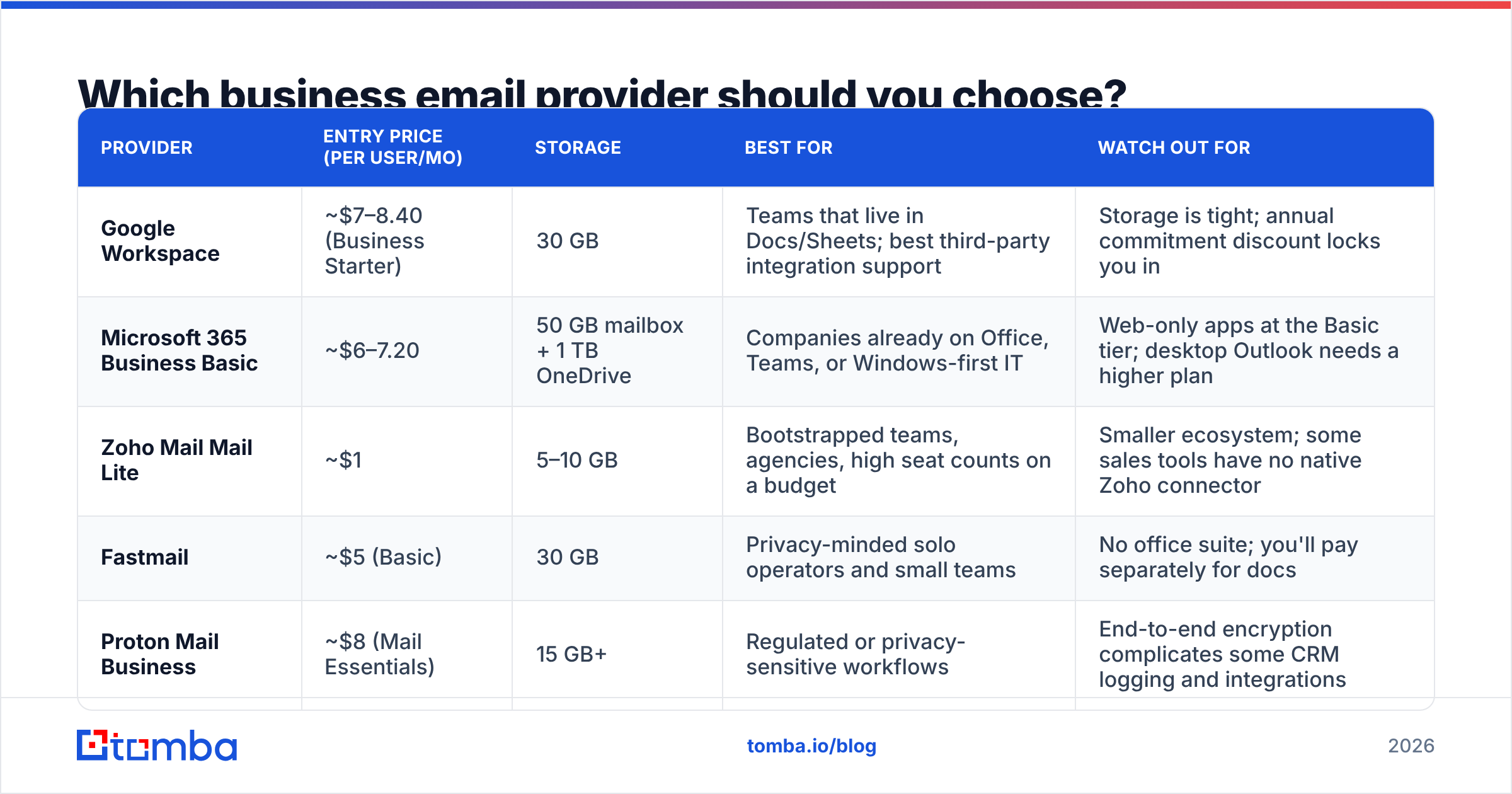
Prices below are list prices for the entry business tier at the time of writing. Vendors adjust them often, so check the linked pricing page before you commit.
| Provider | Entry price (per user/mo) | Storage | Best for | Watch out for |
|---|---|---|---|---|
| Google Workspace | ~$7–8.40 (Business Starter) | 30 GB | Teams that live in Docs/Sheets; best third-party integration support | Storage is tight; annual commitment discount locks you in |
| Microsoft 365 Business Basic | ~$6–7.20 | 50 GB mailbox + 1 TB OneDrive | Companies already on Office, Teams, or Windows-first IT | Web-only apps at the Basic tier; desktop Outlook needs a higher plan |
| Zoho Mail Mail Lite | ~$1 | 5–10 GB | Bootstrapped teams, agencies, high seat counts on a budget | Smaller ecosystem; some sales tools have no native Zoho connector |
| Fastmail | ~$5 (Basic) | 30 GB | Privacy-minded solo operators and small teams | No office suite; you'll pay separately for docs |
| Proton Mail Business | ~$8 (Mail Essentials) | 15 GB+ | Regulated or privacy-sensitive workflows | End-to-end encryption complicates some CRM logging and integrations |
The short version: if you're under five people and cost-sensitive, pick Zoho. If you plan to hire and integrate heavily, pick Google Workspace. If your team already opens Excel daily, pick Microsoft 365. The four are close on raw deliverability. Your DNS setup and list hygiene matter ten times more than the logo on the invoice.
Can you make a business email for free?#
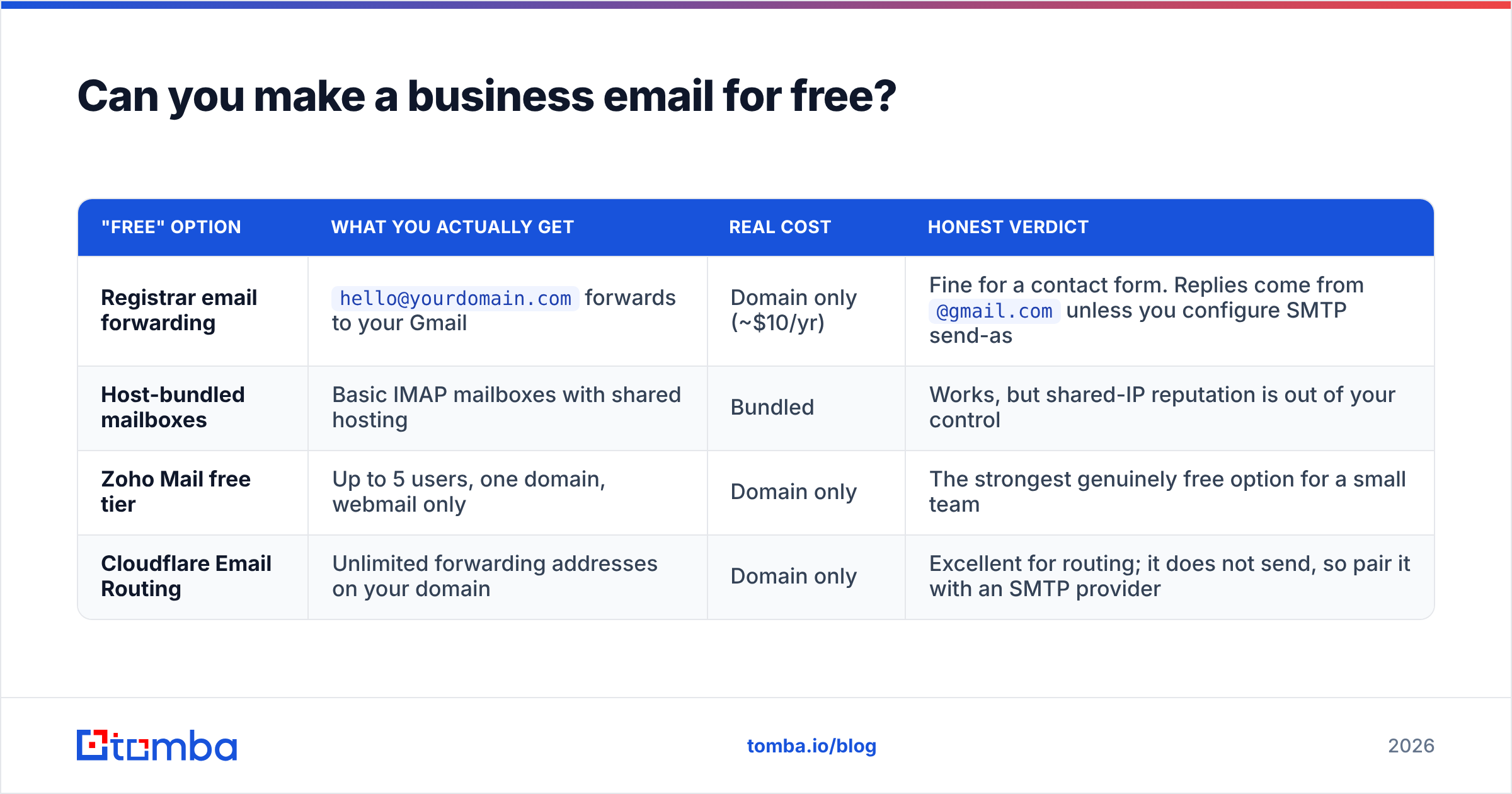
Partly. Be precise about what "free" means, because three different things get marketed under that word.
| "Free" option | What you actually get | Real cost | Honest verdict |
|---|---|---|---|
| Registrar email forwarding | hello@yourdomain.com forwards to your Gmail |
Domain only (~$10/yr) | Fine for a contact form. Replies come from @gmail.com unless you configure SMTP send-as |
| Host-bundled mailboxes | Basic IMAP mailboxes with shared hosting | Bundled | Works, but shared-IP reputation is out of your control |
| Zoho Mail free tier | Up to 5 users, one domain, webmail only | Domain only | The strongest genuinely free option for a small team |
| Cloudflare Email Routing | Unlimited forwarding addresses on your domain | Domain only | Excellent for routing; it does not send, so pair it with an SMTP provider |
There is no free path that also gives you high-volume outbound sending. If you're doing cold outreach, you're paying for mailboxes. That's the price of a reputation you control.
What email address format should you use?#
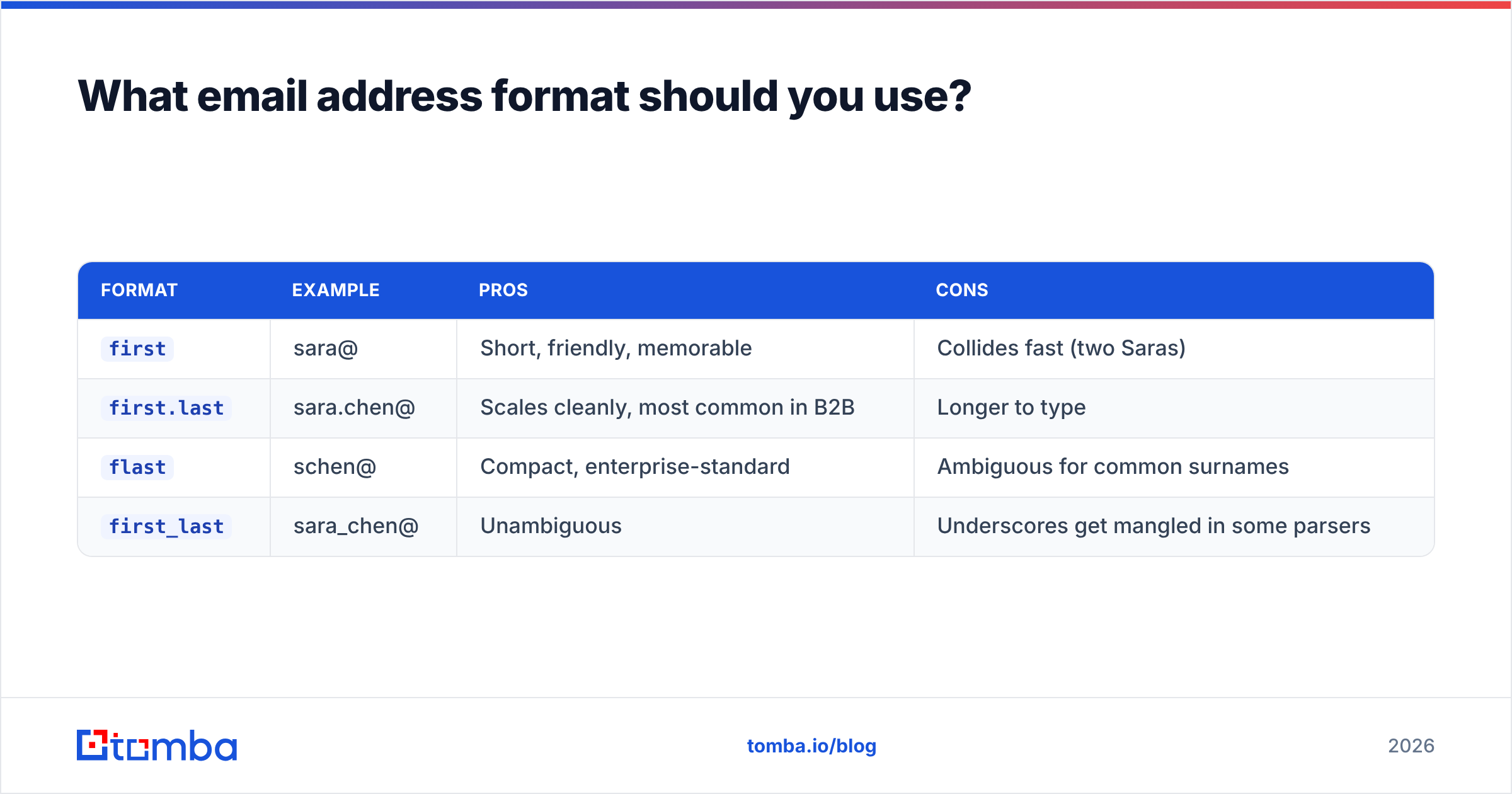
Pick one convention and enforce it. This matters more than it sounds. It decides whether people can guess your team's addresses, and whether tools can find them.
| Format | Example | Pros | Cons |
|---|---|---|---|
first |
sara@ | Short, friendly, memorable | Collides fast (two Saras) |
first.last |
sara.chen@ | Scales cleanly, most common in B2B | Longer to type |
flast |
schen@ | Compact, enterprise-standard | Ambiguous for common surnames |
first_last |
sara_chen@ | Unambiguous | Underscores get mangled in some parsers |
first.last@ is the safest default for anything above five people. Whatever you choose, document it. Keep role aliases (support@, sales@, careers@) separate from human mailboxes. Curious what convention a target company uses? A company email pattern check shows the dominant format on any domain in seconds.
How do you keep your new business email out of spam?#
This is where most new business domains fail. Three DNS records do the heavy lifting.
SPF (Sender Policy Framework) lists which servers may send on your behalf. Use one SPF record per domain, never two. Include every sending service: your mail provider, your marketing platform, your invoicing tool. Going over the 10-lookup limit breaks it silently, so audit yours with an SPF checker after every change. (Background on the standard.)
DKIM (DomainKeys Identified Mail) signs outgoing mail cryptographically. Your provider generates the key. You publish it as a TXT or CNAME record, then enable signing in the admin console. Publishing the record without flipping the toggle is a very common half-finished state.
DMARC tells receivers what to do when SPF and DKIM fail, and it sends you reports. Start at p=none with a reporting address. Read the reports for two weeks, then move to p=quarantine and eventually p=reject. Since the 2024 Gmail and Yahoo bulk-sender rules, any domain sending real volume without DMARC is on borrowed time.
Two more that take five minutes each:
- A custom tracking/return-path domain if your sending platform offers one, so bounces align to your domain.
- PTR / reverse DNS — handled for you on hosted providers, but verify if you use a dedicated IP.
How long should you warm up a new business email?#
Two to four weeks before any real campaign volume. A fresh domain has no history, and filters treat "no history plus sudden volume" exactly like a compromised account.
A workable ramp for a single mailbox:
- Week 1: 5–10 sends/day, mostly to colleagues and existing contacts who will reply.
- Week 2: 20–30/day, introduce a small number of genuine prospects.
- Week 3: 40–50/day, watch bounce rate obsessively.
- Week 4+: cap at 50 cold sends per mailbox per day. Need more? Add mailboxes, not volume per mailbox.
Replies matter more than sends during warmup. Engagement is the strongest positive signal you can generate. A warmup calculator maps the ramp against your target daily volume, so you know how many mailboxes to buy.
Then protect the reputation you just built. Bounce rate is the fastest way to undo four weeks of warmup. Above roughly 3%, providers start throttling you. Above 5%, you're in real trouble. Run every list through an email verifier before it touches your new domain. This is the single highest-leverage thing you can do after DNS setup.
What mistakes ruin a new business email setup?#
- Sending cold outbound from your primary domain. Buy a lookalike domain (
getnorthwind.com) for cold campaigns and keepnorthwind.iofor real correspondence. If a campaign domain gets burned, your invoices still deliver. - Leaving default registrar MX records in place. Silent mail loss, hard to diagnose, extremely common.
- Buying a seat for every alias.
support@,info@andpress@should be free aliases routed to a real mailbox. - Skipping DMARC reports. They tell you exactly who is sending as you, including the marketing tool someone connected without telling IT.
- No mailbox for departed staff. Convert to an alias or forwarding rule. Don't delete it and start bouncing customer mail.
- Scraping addresses instead of verifying them. Scraped lists carry spam traps. One trap hit on a two-week-old domain can cost you months.
How does a business email fit into an outbound motion?#
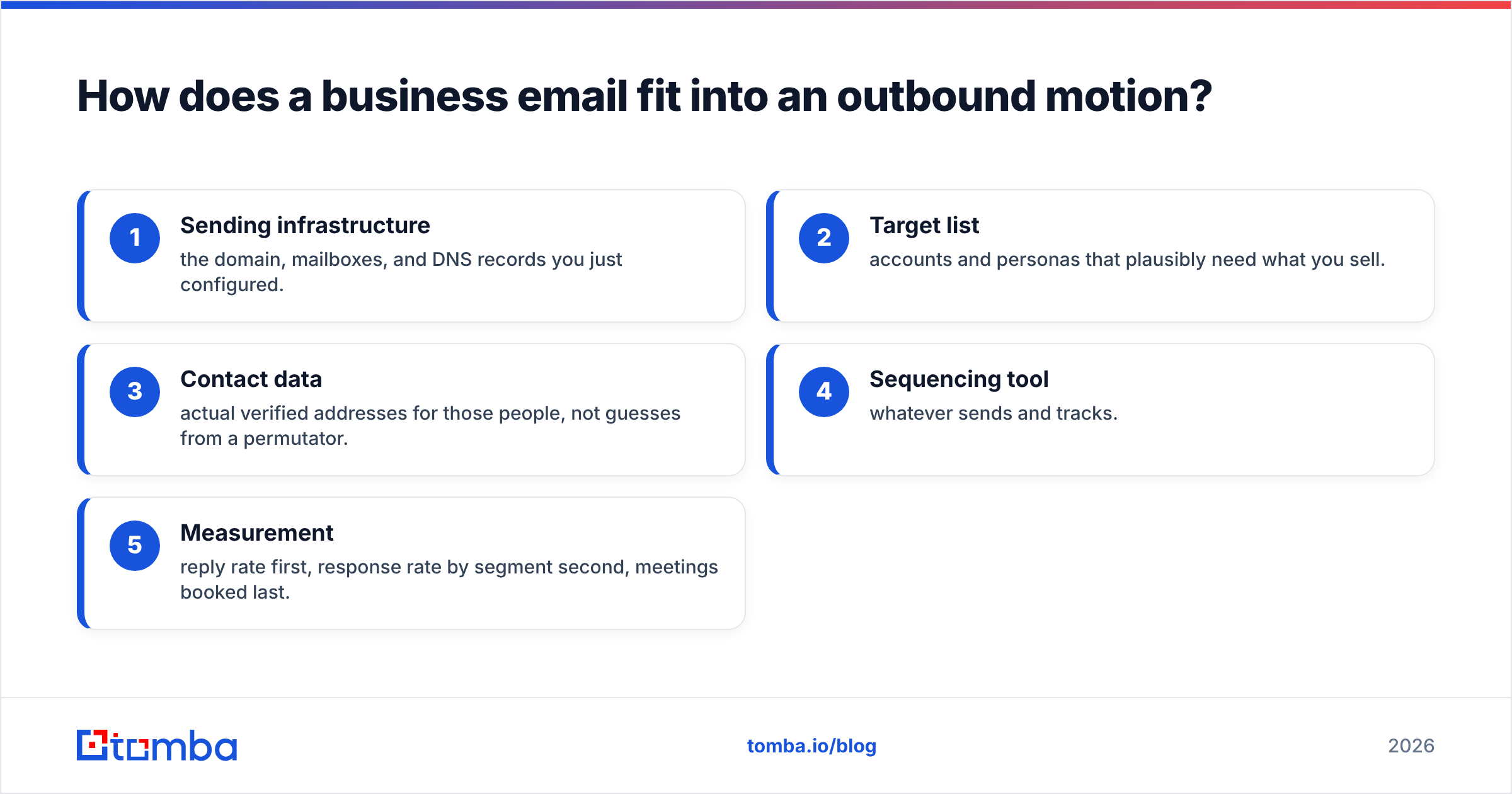
Setting up the mailbox is step one of maybe five. The full stack for outbound looks like this:
- Sending infrastructure — the domain, mailboxes, and DNS records you just configured.
- Target list — accounts and personas that plausibly need what you sell.
- Contact data — verified addresses for those people, not guesses from a permutator.
- Sequencing tool — whatever sends and tracks.
- Measurement — reply rate first, response rate by segment second, meetings booked last.
Step three is where most teams undo the careful work of steps one and two. A fully authenticated, four-week-warmed domain will still get filtered if it fires into a list of guessed addresses. Bounce rate is a reputation signal, and guessed addresses bounce. Pattern-generated emails ("it's probably first.last@") are guesses until something confirms them against a real mail server.
The workflow that holds up: find addresses from a source that scores confidence, verify them, then send. Skip either half and the mailbox you just built stops being an asset.
Ready to actually use your new business email?#
You've got the domain, the mailboxes, and the DNS records. The next constraint is who you send to.
Tomba Email Finder turns a name and a company domain into a verified, deliverable address. Each result carries a confidence score and the sources behind it, so you know what you're sending to before it counts against your reputation. Start on the free tier (25 searches/month) to test accuracy on companies you already know. Paid plans begin at $49/month on Tomba pricing, with bulk processing and API access for the rest of the stack.
Build the mailbox properly, then feed it clean data. That combination is what keeps you in the inbox.
Related guides#
// get started
Find, verify and enrich your first contacts today
Start on the free plan with 25 searches a month, then scale when your team is ready.
Free plan · No credit card required · GDPR & CCPA
// about the author