How to Prevent Emails Going to Spam: The 2026 Playbook
Spam placement is rarely about one bad word in your subject line. It is authentication, list quality, volume ramp, and engagement — in that order. Here is the fix list, ranked by impact.
TL;DR
- Spam placement is decided in this order: authentication → list quality → sending volume pattern → engagement → content. Fixing subject-line "spam words" before fixing SPF/DKIM/DMARC is wasted effort.
- Since Google and Yahoo's 2024 bulk-sender rules tightened, DMARC alignment and a spam-complaint rate under 0.30% are hard requirements, not best practices.
- Invalid addresses are the single fastest way to torch a domain. A 5% hard-bounce rate on a cold campaign is enough to move you to spam within two sends.
- New domains need 3-5 weeks of volume ramp. Sending 500 emails on day one from a fresh domain is a guaranteed filter.
- Diagnose before you rewrite: check SPF, DKIM, DMARC, blacklists, and bounce rate first. Content edits are the last 10% of the problem.
Why do your emails go to spam in the first place?#
Because mailbox providers do not read your email the way you think they do. Gmail, Outlook, and corporate filters like Proofpoint and Mimecast run a scoring pass on the sender long before they run one on the message. The sender score is built from things you control but rarely look at: whether your DNS records authenticate you, whether the addresses you send to actually exist, whether your volume looks organic, and whether the last 30 days of recipients opened, replied, or hit "report spam".
Content matters. It is just not the lever most people think it is. In practice the failure modes break down roughly like this across the cold-outbound and lifecycle campaigns we see reported publicly and in vendor postmortems:
| Root cause | Typical share of spam-placement cases | Time to fix | Time to recover |
|---|---|---|---|
| Missing or misaligned SPF/DKIM/DMARC | High — most common single cause | 1-2 hours | 24-72 hours |
| Invalid / stale recipient lists | High | Hours (bulk verification) | 2-4 weeks |
| Volume spike from a cold domain | Medium | Immediate (throttle) | 3-6 weeks |
| Low engagement, no replies | Medium | Weeks (targeting rework) | 4-8 weeks |
| Spammy copy, links, images | Low | Minutes | Immediate |
| Blacklisted IP or domain | Low but severe | Days (delisting) | 2-8 weeks |
Notice the asymmetry. The cheapest fixes — authentication and list hygiene — sit at the top. The expensive, slow fixes are the ones that come from ignoring the cheap ones for six months.
What actually decides inbox placement in 2026?#
Here is the ranked model to work from. Fix these in order; do not skip ahead.
- Authentication. SPF, DKIM, and DMARC must all pass, and DMARC must align with your visible From domain. If you send from
you@yourcompany.combut your DKIM signsmailer.sendingtool.comwith no alignment, you fail. Both Google and Yahoo require DMARC for bulk senders now. - List validity. Every address you send to should have been verified in the last 60-90 days. Hard bounces above 2% are a red flag to every major provider; above 5% you are being actively filtered.
- Volume and pattern. Providers model your normal. A domain that sent 40 emails/day for three months and suddenly sends 900 looks compromised. Ramp, don't jump.
- Engagement signals. Opens are noisy post-MPP, but replies, forwards, "not spam" clicks, and time-in-message are strong. Deletes-without-open and spam complaints are strong negatives. Keep complaints under 0.10% and never let them cross 0.30%.
- Infrastructure hygiene. Correct rDNS/PTR records, a valid MX on the sending domain, a real website at the domain, TLS on delivery, and no listings on Spamhaus or SURBL.
- Content and links. Plain-text-heavy body, one link maximum on cold sends, no link shorteners, no tracking domain that is itself blacklisted, no image-only emails, working unsubscribe (one-click for bulk).

How do you set up SPF, DKIM, and DMARC correctly?#
This is the 90-minute job that fixes more spam problems than anything else on this list. All three are DNS TXT records.
SPF publishes which servers may send for your domain. One record only — multiple SPF records is a permanent fail. Keep it under 10 DNS lookups.
v=spf1 include:_spf.google.com include:sendgrid.net ~allDKIM cryptographically signs each message. Your sending platform gives you a selector and a public key; you publish it at selector._domainkey.yourdomain.com. Use 2048-bit keys and rotate them annually.
DMARC tells receivers what to do when SPF and DKIM fail, and where to send reports. Start at p=none for two weeks so you can read the reports without breaking anything, then move to quarantine, then reject.
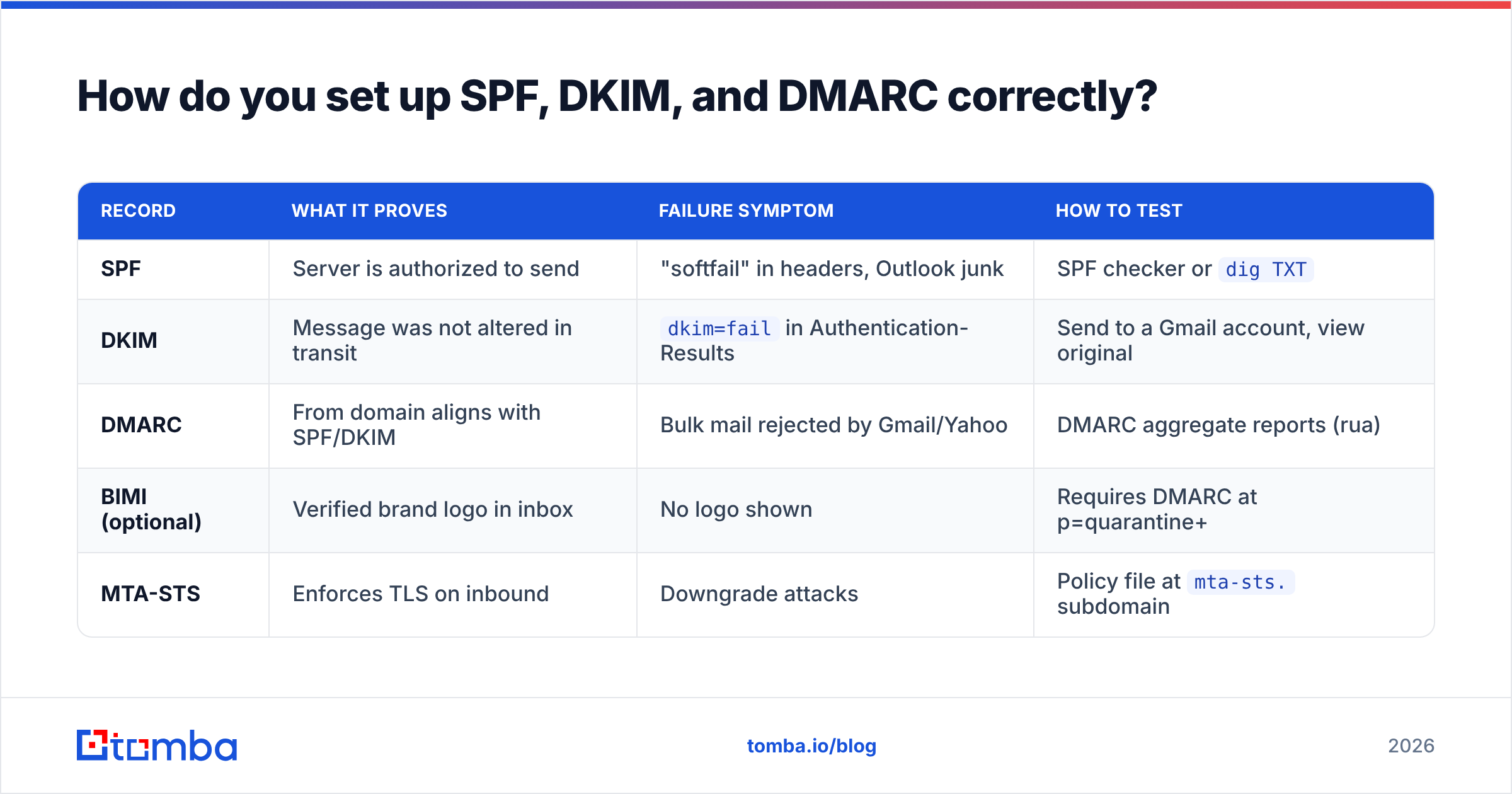
v=DMARC1; p=none; rua=mailto:dmarc@yourdomain.com; pct=100; adkim=s; aspf=s| Record | What it proves | Failure symptom | How to test |
|---|---|---|---|
| SPF | Server is authorized to send | "softfail" in headers, Outlook junk | SPF checker or dig TXT |
| DKIM | Message was not altered in transit | dkim=fail in Authentication-Results |
Send to a Gmail account, view original |
| DMARC | From domain aligns with SPF/DKIM | Bulk mail rejected by Gmail/Yahoo | DMARC aggregate reports (rua) |
| BIMI (optional) | Verified brand logo in inbox | No logo shown | Requires DMARC at p=quarantine+ |
| MTA-STS | Enforces TLS on inbound | Downgrade attacks | Policy file at mta-sts. subdomain |
Two details that trip people up. First, alignment mode: adkim=s and aspf=s are strict; if your ESP signs with a subdomain, use relaxed (r) or you will fail your own policy. Second, the rua mailbox needs to be one you actually read — DMARC reports are how you discover the third-party tool that has been sending unauthenticated mail as you for a year. The official DMARC specification overview is worth 15 minutes if you are configuring this yourself.
How much does list quality actually affect spam placement?#
More than any content change you will ever make. Every hard bounce is a signal to the receiving provider that you obtained the address without permission or without care. Providers correlate high-bounce senders with list-buyers, and list-buyers with spammers.
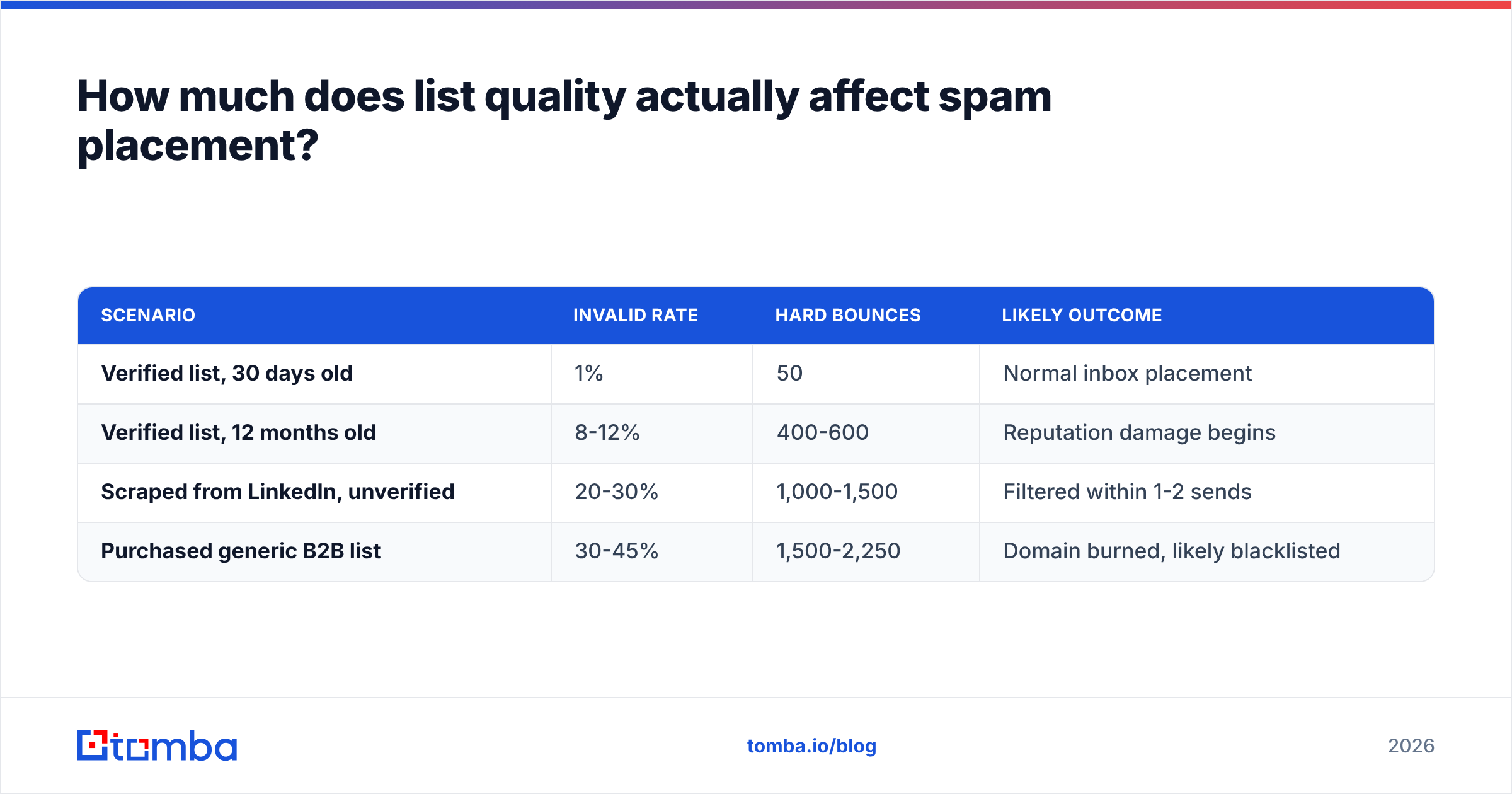
Run the math on a 5,000-contact cold campaign:
| Scenario | Invalid rate | Hard bounces | Likely outcome |
|---|---|---|---|
| Verified list, 30 days old | 1% | 50 | Normal inbox placement |
| Verified list, 12 months old | 8-12% | 400-600 | Reputation damage begins |
| Scraped from LinkedIn, unverified | 20-30% | 1,000-1,500 | Filtered within 1-2 sends |
| Purchased generic B2B list | 30-45% | 1,500-2,250 | Domain burned, likely blacklisted |
B2B data decays at roughly 22-30% per year because people change jobs. That is not a vendor problem; it is a physics problem. The fix is process, not a one-time cleanup:
- Verify at the point of collection, not at the point of send.
- Re-verify anything older than 90 days before it enters a sequence.
- Use a real-time email verifier in your form and CRM enrichment path so bad data never lands in the database.
- Treat catch-all domains as a separate risk bucket. They accept everything at SMTP time and bounce later, which is worse than an immediate rejection.
- Suppress role accounts (
info@,sales@,support@) on cold sends — they generate complaints at several times the rate of individual mailboxes.
Accuracy claims in this category should be read carefully. A verifier that returns "valid" for everything scores 100% on a happy-path test and destroys your domain in production. What matters is the combination of catch-all detection, unknown-rate honesty, and the bounce rate you observe downstream.
How should you warm up a new sending domain?#
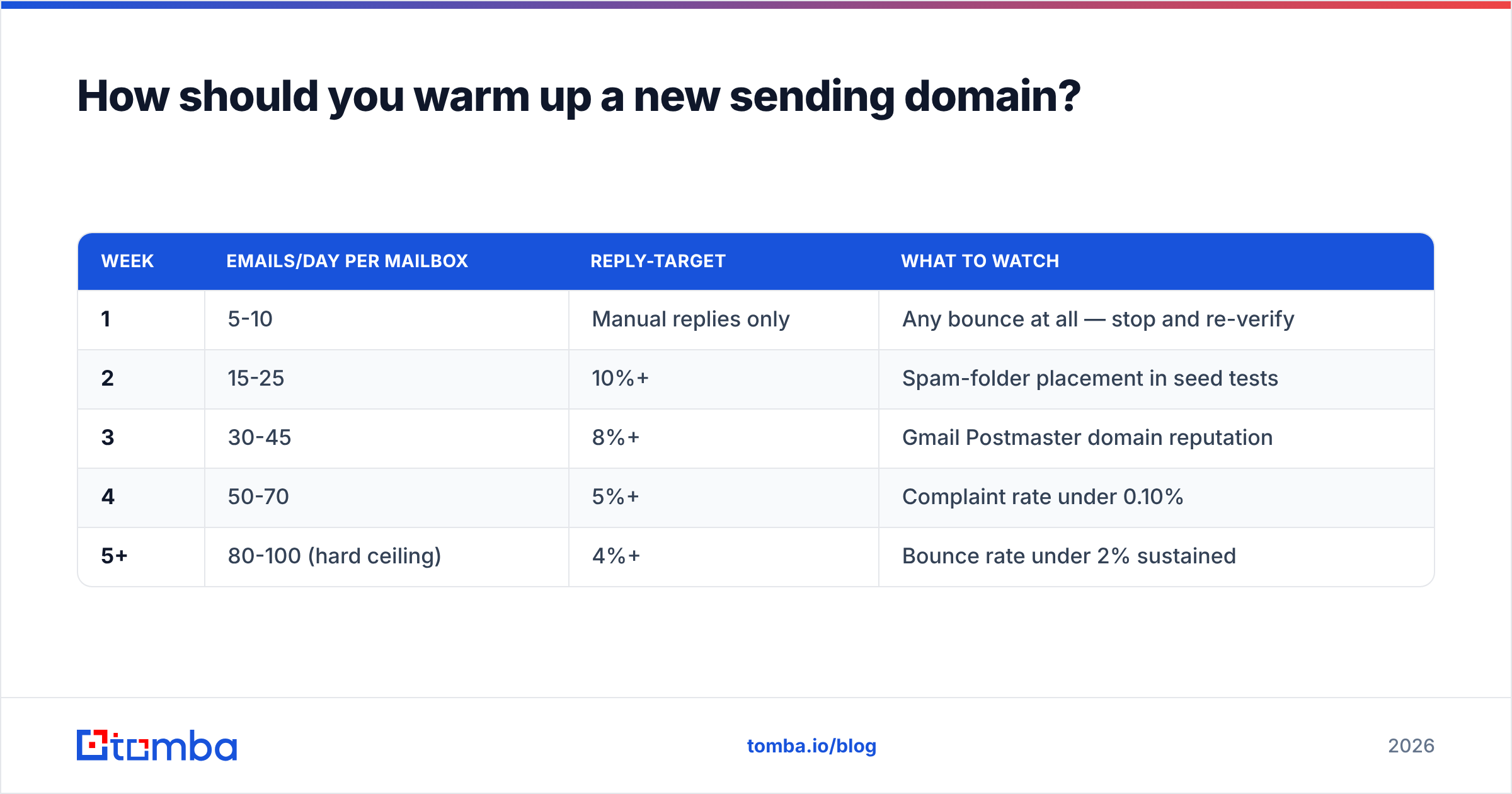
Assume 3-5 weeks minimum. A brand-new domain with no sending history has no reputation — and "no reputation" is treated as "suspicious" by default.
A workable ramp for a cold-outbound mailbox:
| Week | Emails/day per mailbox | Reply-target | What to watch |
|---|---|---|---|
| 1 | 5-10 | Manual replies only | Any bounce at all — stop and re-verify |
| 2 | 15-25 | 10%+ | Spam-folder placement in seed tests |
| 3 | 30-45 | 8%+ | Gmail Postmaster domain reputation |
| 4 | 50-70 | 5%+ | Complaint rate under 0.10% |
| 5+ | 80-100 (hard ceiling) | 4%+ | Bounce rate under 2% sustained |
Three rules that go with the ramp. Use a separate sending domain from your primary corporate domain (getyourcompany.com, not yourcompany.com) so a mistake never touches transactional mail. Cap each mailbox at 100/day regardless of what your tool allows — add mailboxes, not volume per mailbox. And run a warmup calculator against your actual target volume before you buy mailboxes, because most teams need two to three times the infrastructure they budgeted for.
Automated warmup networks are a partial tool. They generate engagement signals, but providers have gotten better at recognising reciprocal warmup pools, and artificial opens do not fix a list full of dead addresses. Warmup helps a good list; it cannot save a bad one.
Which content patterns still trigger filters?#
Content is the last 10%, but a few patterns genuinely hurt — especially on cold sends where you have no engagement history to buffer you.
- More than one link. Cold emails with 2+ links, or any link shortener (bit.ly, tinyurl), score badly. Tracking domains that are shared across thousands of senders are worse.
- Image-heavy or image-only bodies. Filters cannot read them, and spammers use them to hide text. Keep cold email plain-text or near-plain-text.
- Unsubscribe mismatch. Bulk senders need a working one-click unsubscribe header (RFC 8058) processed within two days. Missing it is now a compliance failure with Gmail, not a nicety.
- Attachment on first touch. PDFs and calendar invites on a cold first email are a strong negative signal.
- HTML bloat. Pasted-from-Word markup, nested tables, and hidden text all raise the spam score. Run drafts through a spam checker before a send if you are unsure.
What does not matter as much as folklore suggests: the words "free", "guarantee", or "act now" in isolation. Modern filters are statistical, not keyword lists. A trusted sender can write "free trial" all day. An untrusted sender with a clean subject line still lands in spam.
How do you diagnose emails that are already going to spam?#
Work the checklist in order and stop when you find the break.
- Send a seed test to Gmail, Outlook, Yahoo, and one corporate domain. Note where each lands. If only corporate filters junk you, it is likely content or link reputation. If Gmail junks you, it is usually authentication or reputation.
- Open the raw headers on the Gmail copy. Look at
Authentication-Results. You wantspf=pass dkim=pass dmarc=pass. Anything else is your answer. - Check Gmail Postmaster Tools. Domain reputation of Low or Bad, or a spam rate above 0.30%, tells you the problem is historical behaviour, not this message. Google's sender guidelines define the current thresholds.
- Check blacklists. Query your sending IP and domain against Spamhaus, SURBL, and Barracuda. A listing explains a sudden total collapse.
- Pull your bounce data for the last 30 days. Above 2% hard bounces means list hygiene is the root cause and nothing else will help until it is fixed.
- Audit engagement. If replies are near zero and deletes are near total, the targeting is wrong. No technical fix compensates for sending relevant-to-nobody email.
The order matters because each step is cheaper than the one after it. Rewriting copy when your DKIM is failing is like repainting a car with no engine.
What tools cover which part of the problem?#
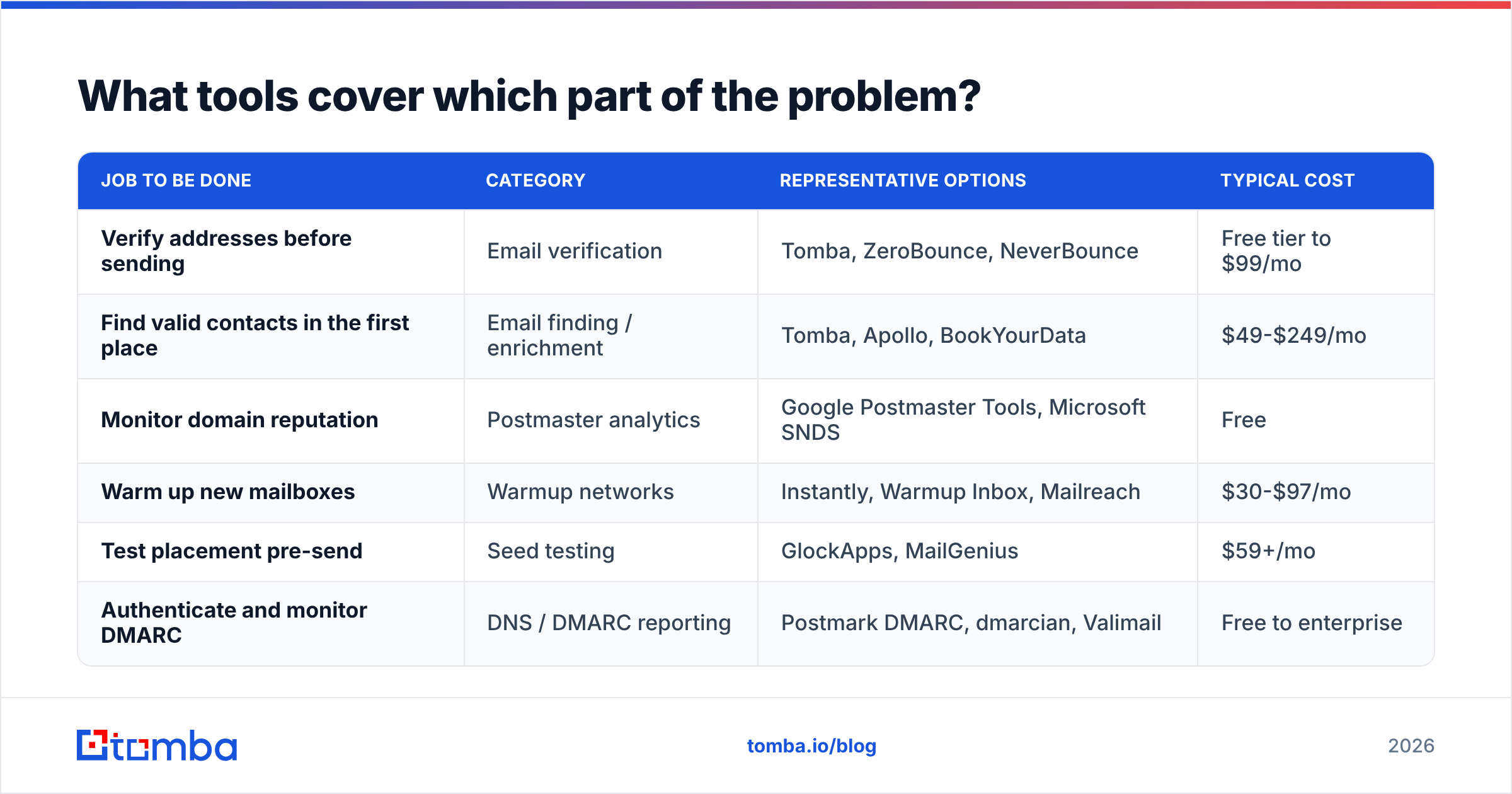
No single product solves deliverability. Here is how the categories divide up, with rough price anchors so you can budget honestly.
| Job to be done | Category | Representative options | Typical cost |
|---|---|---|---|
| Verify addresses before sending | Email verification | Tomba, ZeroBounce, NeverBounce | Free tier to $99/mo |
| Find valid contacts in the first place | Email finding / enrichment | Tomba, Apollo, BookYourData | $49-$249/mo |
| Monitor domain reputation | Postmaster analytics | Google Postmaster Tools, Microsoft SNDS | Free |
| Warm up new mailboxes | Warmup networks | Instantly, Warmup Inbox, Mailreach | $30-$97/mo |
| Test placement pre-send | Seed testing | GlockApps, MailGenius | $59+/mo |
| Authenticate and monitor DMARC | DNS / DMARC reporting | Postmark DMARC, dmarcian, Valimail | Free to enterprise |
For the two jobs at the top of the list — finding real contacts and confirming they are still real — Tomba's plans run Free (25 searches/month), Starter at $49/mo, Growth at $99/mo, and Pro at $249/mo, with verification, domain search, and bulk processing on the same credit pool. That matters operationally: splitting finding and verifying across two vendors is where stale-data workflows usually break, because the re-verification step gets skipped when it costs extra.
Everything else on that table is complementary. Postmaster Tools is free and non-optional. Warmup is worth paying for on a new domain and worth cancelling once your sender reputation is stable. Seed testing earns its keep for high-volume lifecycle marketing and is overkill for a 200-email/week outbound motion.
What is the shortest path to fixing this today?#
If you have one afternoon:
- Publish or repair SPF, DKIM, and DMARC. Verify with a seed send and read the headers.
- Bulk-verify your entire active list and delete everything that is not confirmed valid.
- Cut sending volume to a third of current levels for two weeks.
- Suppress role accounts and anything you have emailed three times with zero engagement.
- Remove the second link and any attachment from your first-touch template.
That sequence resolves the large majority of spam-placement problems without touching a word of your copy. The remainder — engagement, targeting, offer quality — is a longer project, and it is the part worth spending your actual thinking on.
Start where the data is. Deliverability collapses from the list up, not the copy down. Run your target accounts through the Tomba Email Finder to build a list of verified, current contacts before your next send — the free tier gives you 25 searches a month to test the difference in bounce rate for yourself, and Starter at $49/mo covers most small outbound teams' monthly volume.
Related guides#
// get started
Find, verify and enrich your first contacts today
Start on the free plan with 25 searches a month, then scale when your team is ready.
Free plan · No credit card required · GDPR & CCPA
// about the author