How to Reach B2B Customers in 2026: A Channel-by-Channel Playbook
Cold email, LinkedIn, phone, events, and intent data all claim to be the fastest route to B2B buyers. Here is what each channel actually costs, what it returns, and how to sequence them without burning your domain.
TL;DR
- There is no single best channel. The teams that reach B2B customers reliably run 3-4 channels against the same account list, not one channel against four lists.
- Cold email is still the cheapest way to open a conversation at roughly $15-$60 per booked meeting — but only if your contact data verifies above 95% and your domain is warmed.
- Phone outperforms every channel on connect-to-meeting rate and underperforms every channel on volume. Use it for your top 20% of accounts, not the whole list.
- LinkedIn is a warming layer, not a volume layer. Connection limits cap you around 100-200 touches per week per seat.
- Data quality, not creativity, is the variable most teams get wrong. A 25% bounce rate does not just waste sends — it drags every future send into spam.
Why is reaching B2B customers harder in 2026 than it was three years ago?#
Three things changed at once.
First, inbox providers tightened. Google and Yahoo's bulk sender requirements — SPF, DKIM, DMARC, one-click unsubscribe, and a spam complaint rate under 0.3% — moved from "recommended" to enforced. You can read the current thresholds in Google's own sender guidelines. Sloppy senders that used to land in Promotions now land nowhere.
Second, buying committees grew. Gartner's research on B2B buying has consistently put the typical enterprise purchase in front of six to ten decision makers, each doing independent research. Reaching "the customer" now means reaching a group.
Third, the tooling that made outbound cheap made it noisy. Every rep has an AI writer. Generic personalization ("Loved your post about growth!") is now a negative signal, because buyers have seen ten thousand of them.
The practical consequence: channel choice matters less than list quality and sequencing. A mediocre email to a verified, in-market contact beats a brilliant email to a guessed address at a company that just froze budget.
What are the actual channels for reaching B2B customers?#
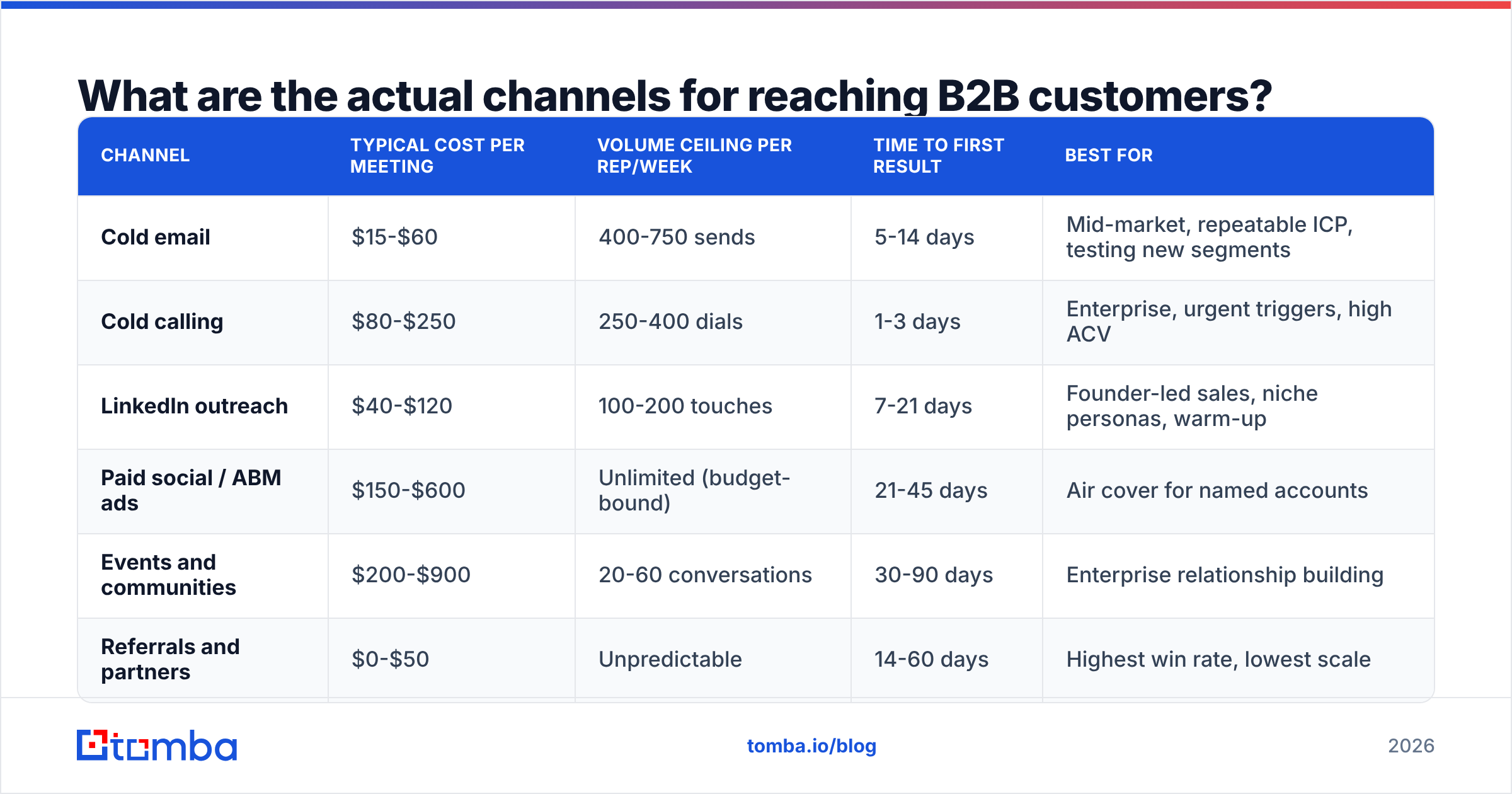
Six channels carry almost all B2B pipeline. Here is how they compare on the numbers that decide your budget.
| Channel | Typical cost per meeting | Volume ceiling per rep/week | Time to first result | Best for |
|---|---|---|---|---|
| Cold email | $15-$60 | 400-750 sends | 5-14 days | Mid-market, repeatable ICP, testing new segments |
| Cold calling | $80-$250 | 250-400 dials | 1-3 days | Enterprise, urgent triggers, high ACV |
| LinkedIn outreach | $40-$120 | 100-200 touches | 7-21 days | Founder-led sales, niche personas, warm-up |
| Paid social / ABM ads | $150-$600 | Unlimited (budget-bound) | 21-45 days | Air cover for named accounts |
| Events and communities | $200-$900 | 20-60 conversations | 30-90 days | Enterprise relationship building |
| Referrals and partners | $0-$50 | Unpredictable | 14-60 days | Highest win rate, lowest scale |
Two honest caveats about that table. The cost-per-meeting ranges assume a fully loaded SDR cost of roughly $6,000-$9,000 per month plus tooling; if you are a founder doing your own outreach, cold email and LinkedIn drop close to tool cost. And referral economics look unbeatable because nobody counts the years of relationship building that produced them.
How do you build the list before you pick a channel?#
Sequence matters. Most teams pick a channel, then scrape whatever list fits it. Reverse that.
- Define the account, not the persona, first. Firmographics (size, geography, funding stage) plus a technographic or behavioral trigger. "Series B SaaS in DACH running HubSpot" is a list. "VPs of Marketing" is not.
- Enumerate contacts per account. Aim for three to five per target account across the buying committee — economic buyer, user champion, and a blocker (usually security, finance, or legal). Use a domain search to pull everyone published under a company domain rather than guessing one name at a time.
- Find and verify addresses. Guessing patterns like
first.last@gets you roughly 60-70% accuracy on mid-market domains. Running the same names through a real email finder with source citations gets you into the 90s. - Verify again before send day. B2B contact data decays at roughly 25-30% per year — people change jobs constantly. A list built in March is meaningfully worse in September. Re-run it through an email verifier the week you send.
- Segment by trigger, not by alphabet. Hiring signals, funding, tech-stack changes, and leadership hires all justify a specific first line. No trigger means no message worth sending.
- Suppress aggressively. Current customers, open opportunities, churned accounts, and anyone who replied "no" in the last 90 days come out before the first send.
That five-contacts-per-account math matters more than it looks. If your ICP has 2,000 accounts and you need three contacts each, you need 6,000 verified addresses — not 6,000 rows in a CSV, 6,000 that actually resolve.
Is cold email still the best way to reach B2B customers?#
Cold email is still the highest-leverage opening channel for most B2B teams, with one condition: your infrastructure and data have to be clean before you scale volume.
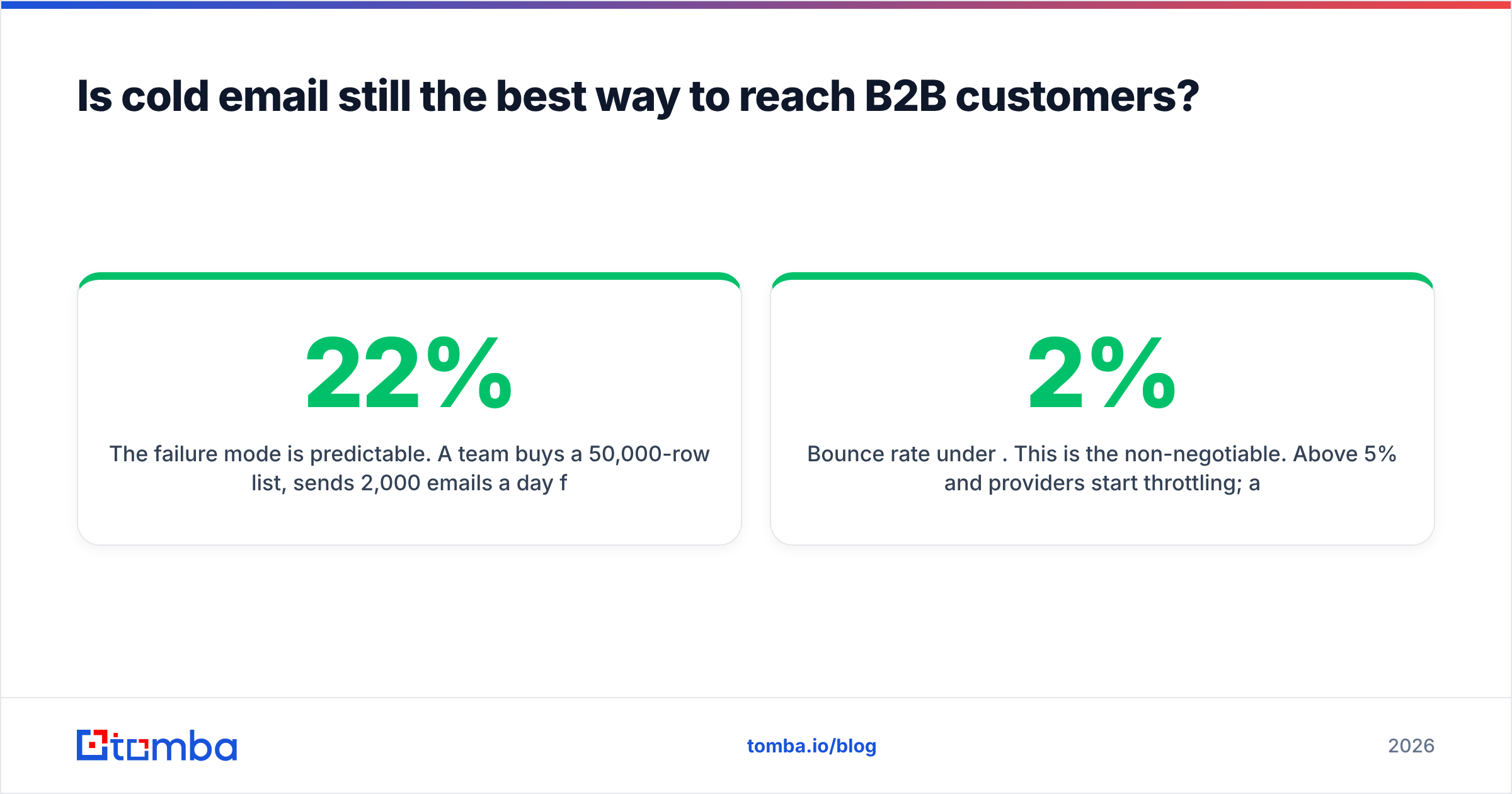
The failure mode is predictable. A team buys a 50,000-row list, sends 2,000 emails a day from their primary domain, sees a 22% bounce rate, and within two weeks their whole company is landing in spam — including invoices and support replies. Recovering a burned domain takes months.
The setup that works:
- Separate sending domains. Never send cold outbound from your primary domain. Buy lookalikes (
get-yourbrand.com,yourbrand-hq.com) and point them at your main site. - Two to three mailboxes per domain, each capped at 30-50 sends per day. Volume comes from more mailboxes, not more sends per mailbox.
- 14-21 days of warmup before the first real campaign. An email warmup calculator will tell you how long your specific ramp needs.
- Authentication before anything else. SPF, DKIM, DMARC — verify with an SPF checker rather than assuming your DNS is right.
- Bounce rate under 2%. This is the non-negotiable. Above 5% and providers start throttling; above 10% and you are actively damaging sender reputation.
On the message itself, the pattern that still works in 2026 is short and specific: one observed trigger, one claim tied to a number, one low-friction ask. Four sentences. No attachments, no images, one link at most. The "interest-based CTA" ("worth a look?") consistently outperforms the calendar-link CTA on first touch, because it asks for a reply rather than a commitment.
How should you use phone and LinkedIn alongside email?#
Treat these as different pressure levels on the same account, not as separate campaigns.
Phone gets you the highest conversion per contact and the lowest volume. Connect rates on B2B mobile numbers run roughly 8-15% depending on seniority and industry; of those connects, 15-25% will take a meeting if you have a real reason to call. That math means 400 dials produces roughly 40-60 connects and 8-12 meetings — good numbers, but only if you have direct dials. Switchboard numbers destroy the economics. This is why a phone finder that returns mobile numbers rather than main lines changes the entire channel's viability.
LinkedIn works as a warming layer. The sequence that outperforms cold email alone: view profile day 1, follow day 2, engage with a post day 4, connection request day 7, email day 8. By the time your email arrives, you are a name they have seen. Realistically you get 100-200 meaningful touches per seat per week before you hit platform limits — so reserve LinkedIn outreach for your priority tier.
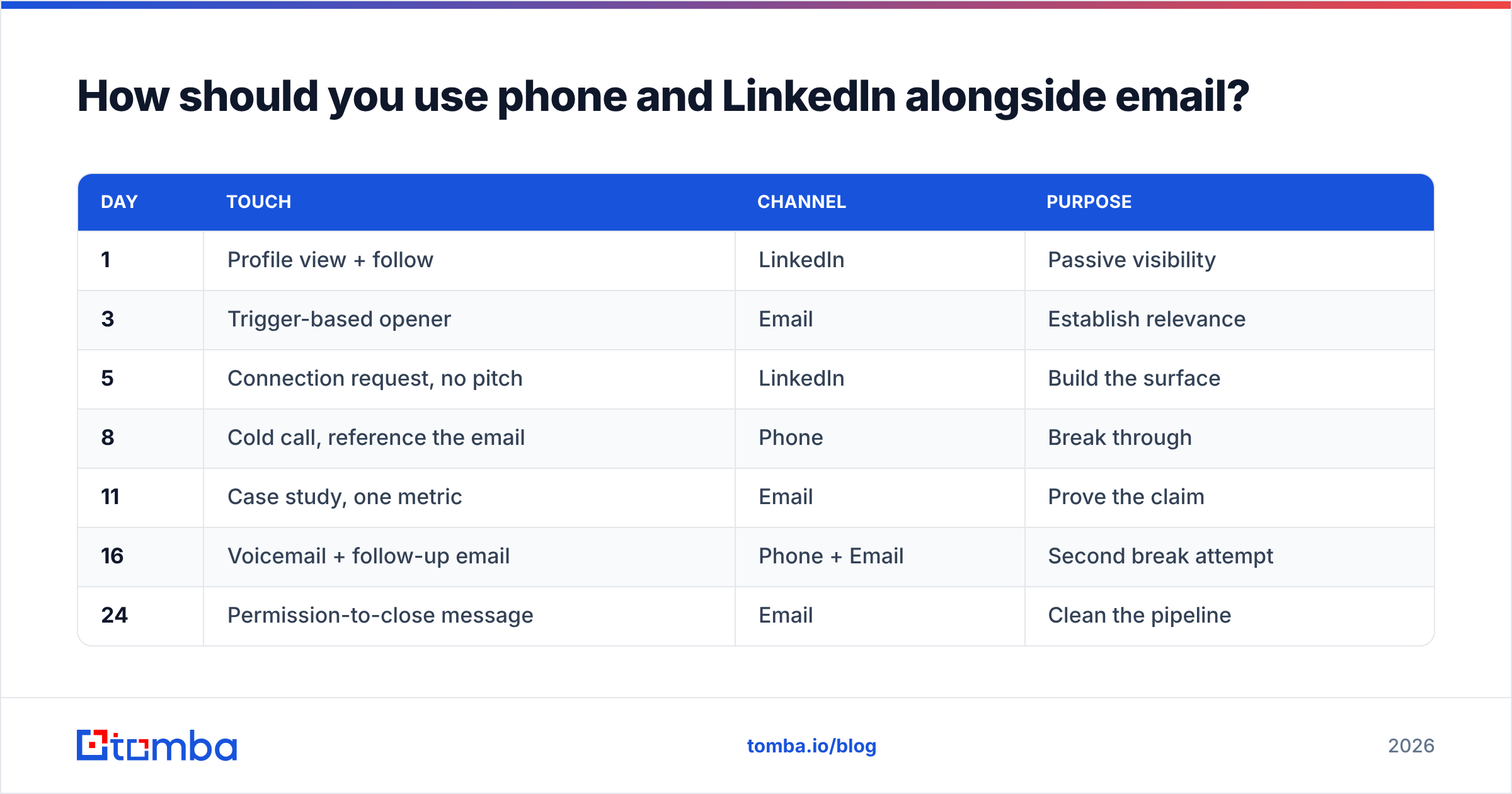
The multichannel sequence that most consistently works looks like this:
| Day | Touch | Channel | Purpose |
|---|---|---|---|
| 1 | Profile view + follow | Passive visibility | |
| 3 | Trigger-based opener | Establish relevance | |
| 5 | Connection request, no pitch | Build the surface | |
| 8 | Cold call, reference the email | Phone | Break through |
| 11 | Case study, one metric | Prove the claim | |
| 16 | Voicemail + follow-up email | Phone + Email | Second break attempt |
| 24 | Permission-to-close message | Clean the pipeline |
Seven touches over roughly three and a half weeks. Most teams quit at three, which is exactly where reply rates start compounding.
What about inbound, ABM, and intent data?#
Outbound reaches customers who do not know you exist. Inbound and ABM reach customers who are already looking. You want both, but they are not interchangeable.
Intent data flags accounts researching your category. Providers like G2 surface buyers comparing you against competitors — that is the highest-quality intent signal available because it happens at the bottom of the funnel. The limitation: intent tells you an account is in market, rarely which person. You still need to find and verify the humans.
Website visitor identification closes part of that gap. Roughly 95-98% of B2B site visitors never fill out a form. Reverse-IP tools including visitor identification resolve some of that anonymous traffic to companies, which you then map to contacts. Match rates vary widely by traffic geography and company size — expect meaningfully better results on North American enterprise traffic than on European SMB.
ABM advertising is air cover, not a pipeline source. Running display against 300 named accounts lifts the reply rate of the outbound you were going to run anyway. Judged on its own attributed pipeline, it almost always looks like a bad investment. Judged as a multiplier on outbound, it usually pays.
How do you compare data providers for B2B outreach?#
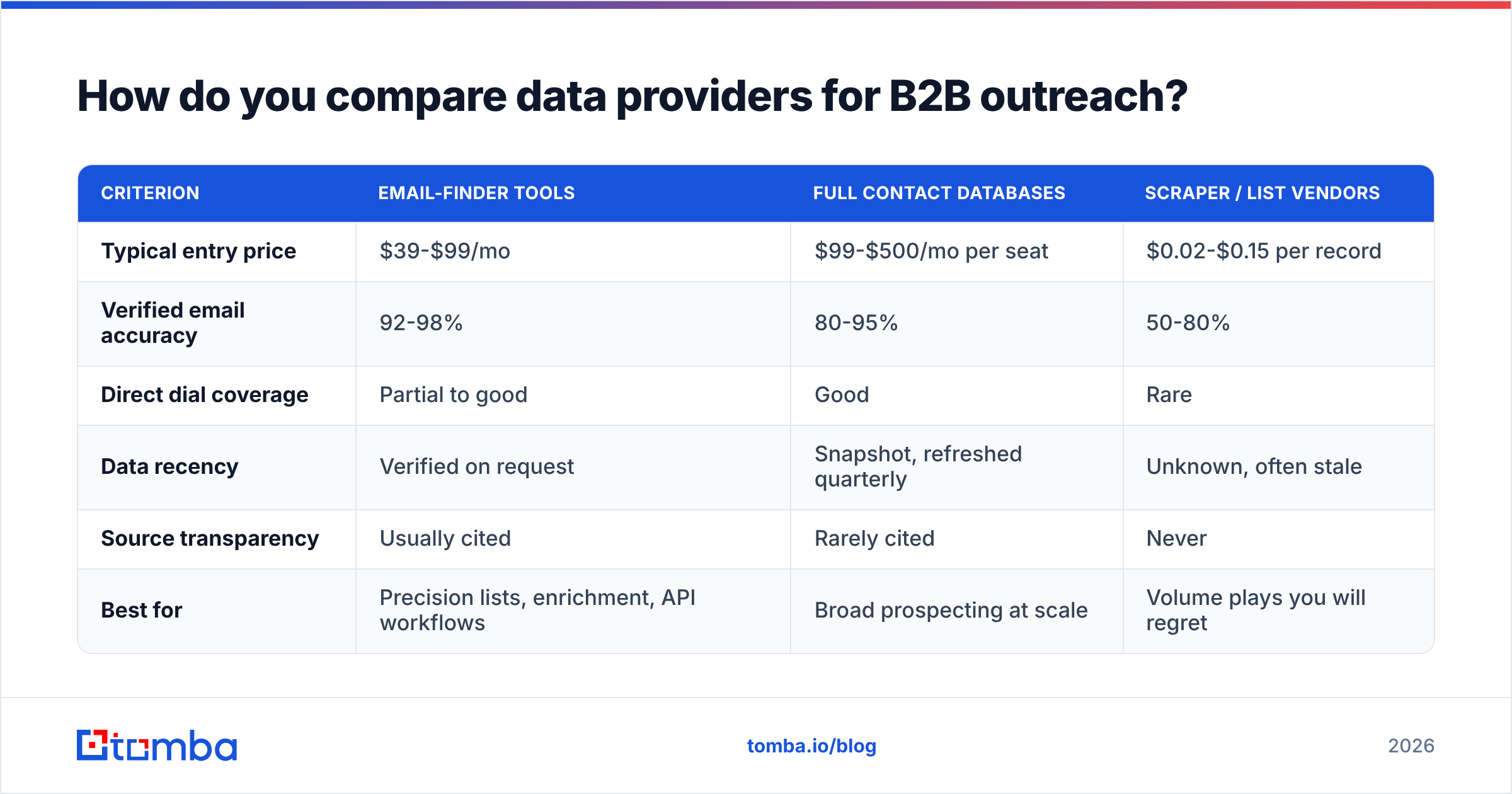
Your channel strategy is downstream of your data. Here is how the main categories differ.
| Criterion | Email-finder tools | Full contact databases | Scraper / list vendors |
|---|---|---|---|
| Typical entry price | $39-$99/mo | $99-$500/mo per seat | $0.02-$0.15 per record |
| Verified email accuracy | 92-98% | 80-95% | 50-80% |
| Direct dial coverage | Partial to good | Good | Rare |
| Data recency | Verified on request | Snapshot, refreshed quarterly | Unknown, often stale |
| Source transparency | Usually cited | Rarely cited | Never |
| Best for | Precision lists, enrichment, API workflows | Broad prospecting at scale | Volume plays you will regret |
The number worth interrogating with any vendor is not "database size" — it is what percentage of records they will verify at the moment you export them, and whether they cite where each address came from. A 700-million-record database that was last refreshed in 2024 is worse than a 40-million-record one that verifies on request. Tomba publishes its data sources for exactly this reason; when a vendor will not, treat the accuracy claim as marketing.
On pricing, the honest positioning: Tomba pricing starts with a free tier at 25 searches per month, then Starter at $49/mo, Growth at $99/mo, and Pro at $249/mo. That is competitive with dedicated finders and materially cheaper than seat-based platforms like Apollo or ZoomInfo once you pass two or three users. Peers worth evaluating alongside it include BookYourData for pay-as-you-go prebuilt lists, and Hunter or Findymail for domain-first workflows. Pick based on whether you need precision (finders) or breadth (databases) — most teams eventually run one of each.
What should you measure to know a channel is working?#
Track four numbers per channel, weekly:
- Deliverability proxy: bounce rate plus spam complaint rate. Anything above 2% bounce or 0.1% complaints stops the campaign, no exceptions.
- Reply rate, split positive and negative. A 12% reply rate that is 90% "unsubscribe" is worse than a 4% rate that is half positive. Track your response rate by segment, not in aggregate.
- Meeting-held rate, not meeting-booked. No-shows hide bad targeting.
- Cost per opportunity, fully loaded. Include tooling, data, and rep time. This is the only number that lets you compare a $600 conference conversation against a $30 cold email meeting.
Give a channel a minimum of 500 contacts and three full cycles before you judge it. Killing a channel on 80 sends tells you nothing except that your sample was too small.
One more discipline: keep a suppression and re-engagement calendar. Accounts that said "not now" six months ago are your warmest cold list. Most teams never go back.
Where should you start if you are starting from zero?#
Build one clean list of 300 accounts in your tightest ICP. Find three contacts per account and verify every address. Warm two sending domains for three weeks while you do it. Then run the seven-touch sequence above across email, LinkedIn, and phone, and measure everything.
That is roughly 900 verified contacts and about six weeks to first reliable data. It is slower than buying 50,000 rows, and it is the only version that compounds.
Getting the contact layer right is the part you cannot outsource to cleverness. If your addresses bounce, no subject line saves you. Start with Tomba Email Finder — the free tier gives you 25 searches a month to test accuracy against domains you already know, and the Tomba API plugs the same verification into whatever sequencer or CRM you already run. Build the list properly once, and every channel you layer on top gets cheaper.
Related guides#
// get started
Find, verify and enrich your first contacts today
Start on the free plan with 25 searches a month, then scale when your team is ready.
Free plan · No credit card required · GDPR & CCPA
// about the author