How to Reach Out to Customers in 2026: A Practical Playbook
Most outreach fails before the first line is written. Here is a channel-by-channel playbook for reaching customers in 2026 — with timing, sequencing, and the data hygiene that actually decides your reply rate.
TL;DR
- Reaching out to customers is a data problem before it is a copywriting problem. A brilliant email sent to a stale address earns nothing.
- Use a multi-channel sequence — email, phone, LinkedIn, and one warm referral path — spread across 14 to 21 days, not four emails in four days.
- Verify every address before send. Lists over six months old typically decay 20-30% per year, and bounces above 3% start damaging your sending domain.
- Personalize the first two lines and the ask. Everything else can be templated without hurting reply rates.
- Track reply rate and meeting rate, not open rate. Apple Mail Privacy Protection has made open tracking close to noise since 2021.
What does "reaching out to customers" actually mean in 2026?#
It means contacting a specific person, at a specific company, about a specific problem you have evidence they have — through whichever channel they actually check.
That definition rules out a lot of what people call outreach. Blasting 5,000 contacts from a purchased list is not reaching out; it is broadcasting. The distinction matters because the two activities have different failure modes. Broadcasting fails on volume economics and spam filters. Real outreach fails on relevance and timing.
Three shifts changed the game over the last few years:
- Inbox authentication got strict. Google and Yahoo's bulk sender rules (rolled out February 2024) made SPF, DKIM, and DMARC mandatory for anyone sending at volume, with a hard spam-complaint ceiling of 0.3%. Sloppy senders now get filtered before a human reads a word.
- Open rates stopped being a metric. Privacy proxies pre-fetch tracking pixels. If you are still optimizing subject lines against open rate, you are optimizing against a random number generator.
- Buyers self-educate first. Gartner's B2B buying research has consistently found buyers spend the majority of their journey away from any sales rep. By the time you reach out, they may already know your category — so lead with a point of view, not a product tour.
Which channels should you use to reach out to customers?#
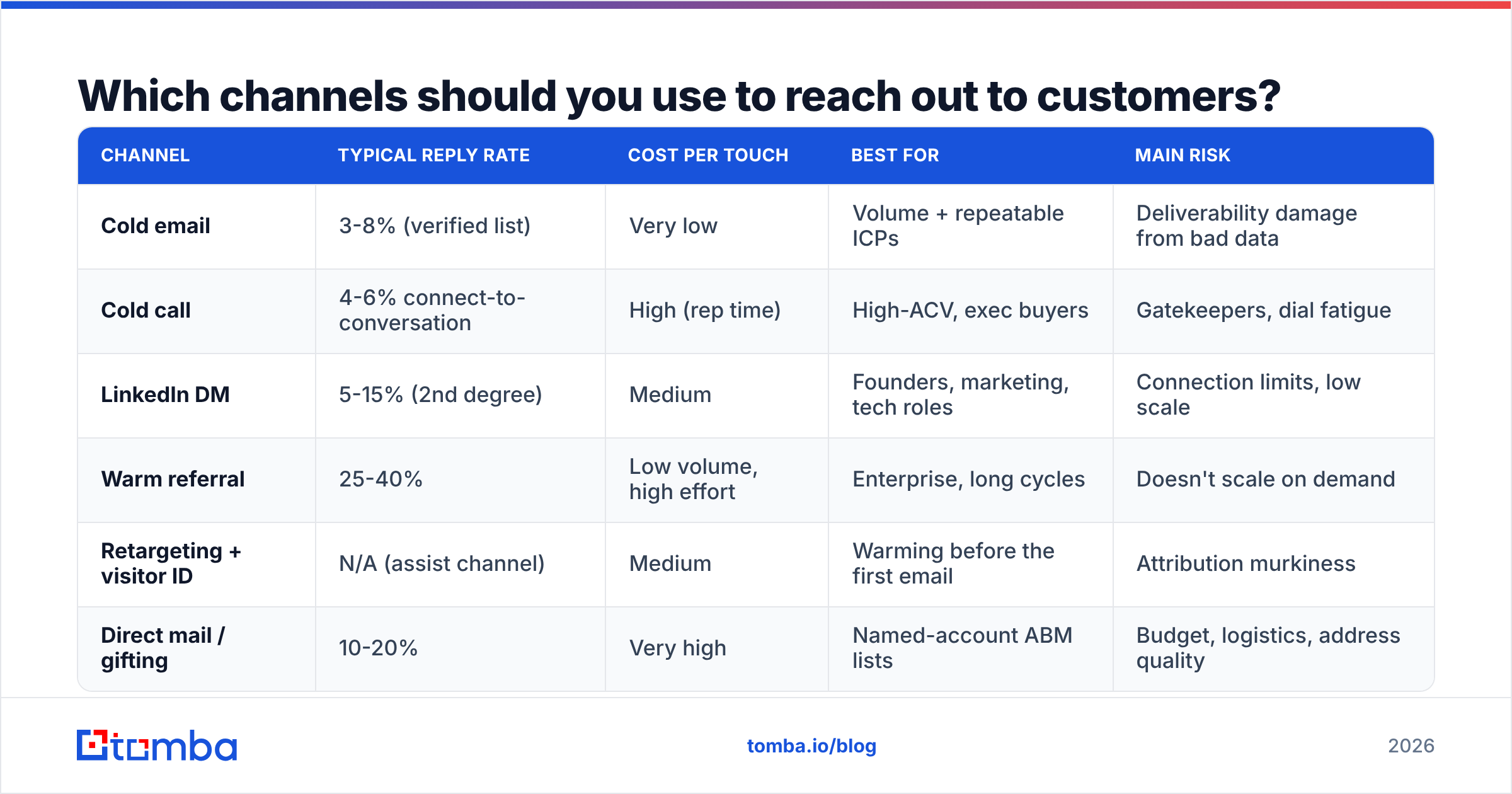
Pick channels by where your buyer's attention actually is, not by which tool you already pay for. Here is how the main options compare on the numbers that matter.
| Channel | Typical reply rate | Cost per touch | Best for | Main risk |
|---|---|---|---|---|
| Cold email | 3-8% (verified list) | Very low | Volume + repeatable ICPs | Deliverability damage from bad data |
| Cold call | 4-6% connect-to-conversation | High (rep time) | High-ACV, exec buyers | Gatekeepers, dial fatigue |
| LinkedIn DM | 5-15% (2nd degree) | Medium | Founders, marketing, tech roles | Connection limits, low scale |
| Warm referral | 25-40% | Low volume, high effort | Enterprise, long cycles | Doesn't scale on demand |
| Retargeting + visitor ID | N/A (assist channel) | Medium | Warming before the first email | Attribution murkiness |
| Direct mail / gifting | 10-20% | Very high | Named-account ABM lists | Budget, logistics, address quality |
The honest read: no single channel wins. Email gives you reach, phone gives you speed, LinkedIn gives you context, referrals give you conversion. A sequence that uses three of them beats a sequence that hammers one of them.
How do you build a contact list that does not bounce?#
Start from the account, not the person. You define the ideal customer profile, list the companies that fit, then find the right human inside each one. Working the other direction — grabbing whatever contacts a database hands you — is how teams end up emailing three job-hoppers and an intern at every account.
A workable four-step build:
- Define the account filter. Industry, headcount band, tech stack, funding stage, geography. Keep it to four or five criteria — more filters means fewer accounts and false precision.
- Identify the role, not the name. "Head of Demand Gen or equivalent" survives a reorg; "Sarah in marketing" does not.
- Find the address. Use a domain search to pull the pattern and public contacts for each company, then resolve the specific person with an email finder. A LinkedIn finder closes the gap when you have a profile but no address.
- Verify before you send. Run the whole list through an email verifier. Anything marked risky or unknown goes to a separate, slower-drip segment — not your main sequence.
- Enrich for personalization hooks. Job title, recent role change, funding round, tech stack. Data enrichment turns a bare address into a first line you can actually write.
- Deduplicate and suppress. Strip existing customers, open opportunities, unsubscribes, and competitors. This is boring and it is the step most teams skip.
Email lists decay. HubSpot has long cited roughly 22.5% annual database decay as a working benchmark — people change jobs, companies rebrand, aliases get retired. Treat a list older than 90 days as suspect and re-verify before reuse.
What does a good outreach sequence look like?#
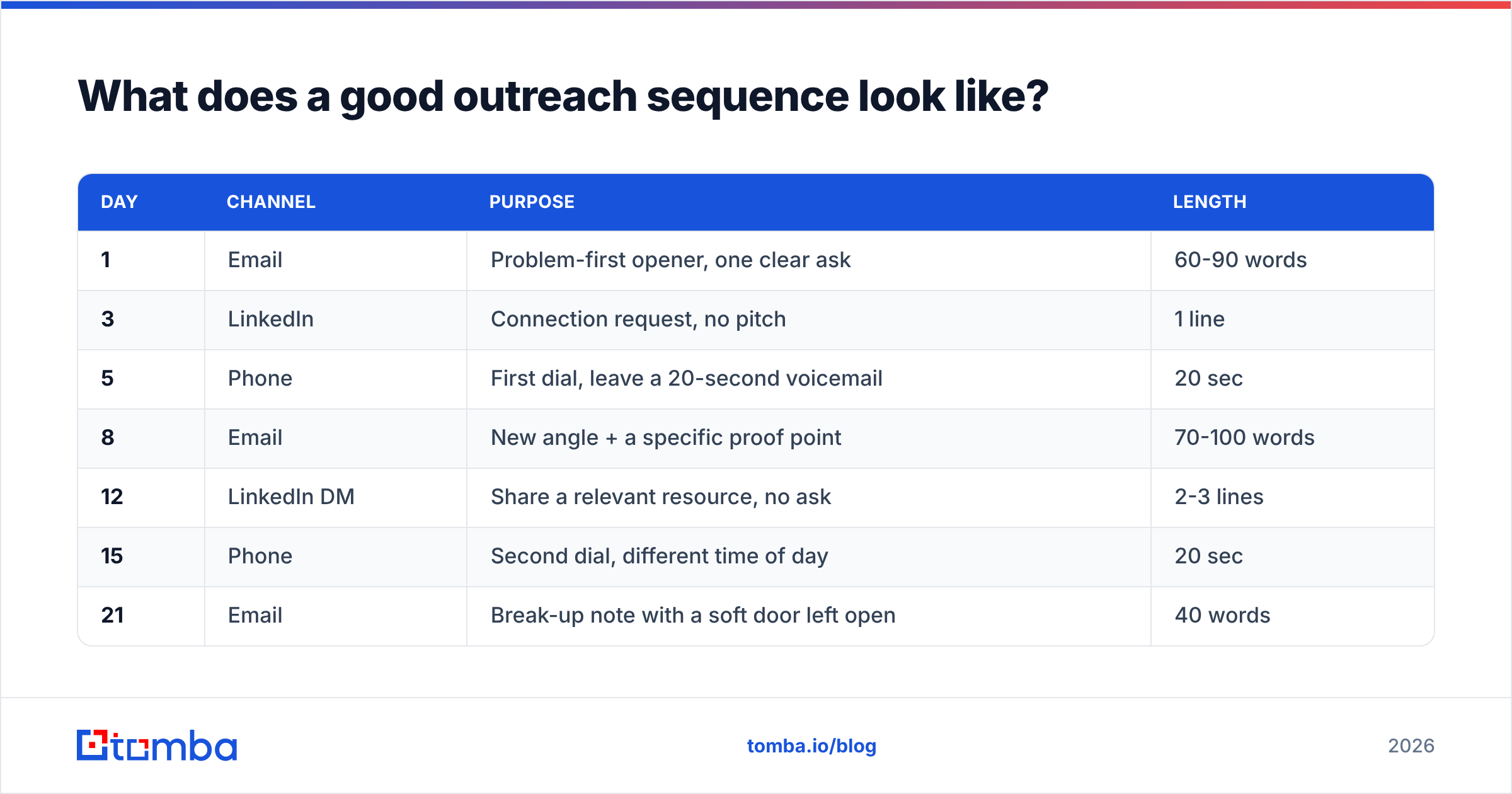
Length and spacing beat cleverness. Most reply volume arrives on touches two through five, and most teams quit at touch two.
Here is a 21-day multi-channel structure that works for mid-market B2B:
| Day | Channel | Purpose | Length |
|---|---|---|---|
| 1 | Problem-first opener, one clear ask | 60-90 words | |
| 3 | Connection request, no pitch | 1 line | |
| 5 | Phone | First dial, leave a 20-second voicemail | 20 sec |
| 8 | New angle + a specific proof point | 70-100 words | |
| 12 | LinkedIn DM | Share a relevant resource, no ask | 2-3 lines |
| 15 | Phone | Second dial, different time of day | 20 sec |
| 21 | Break-up note with a soft door left open | 40 words |
Three rules that govern the whole thing:
- One ask per touch. "Worth a 15-minute call Thursday?" converts better than a menu of options.
- Change the angle, not just the wording. Touch four should raise a different problem than touch one. Repeating yourself louder is not follow-up.
- Vary the time of day on dials. If two attempts both land at 2pm Tuesday, you have effectively made one attempt.
For the writing itself, the constraint is brutal: your reader decides in about three seconds. Open with the observation that made you reach out ("You just posted three SDR roles"), connect it to a consequence they feel, then ask. If you need a starting frame, cold email templates are a reasonable skeleton — just replace the first and last lines with something only you could have written.
Is cold email still better than cold calling?#
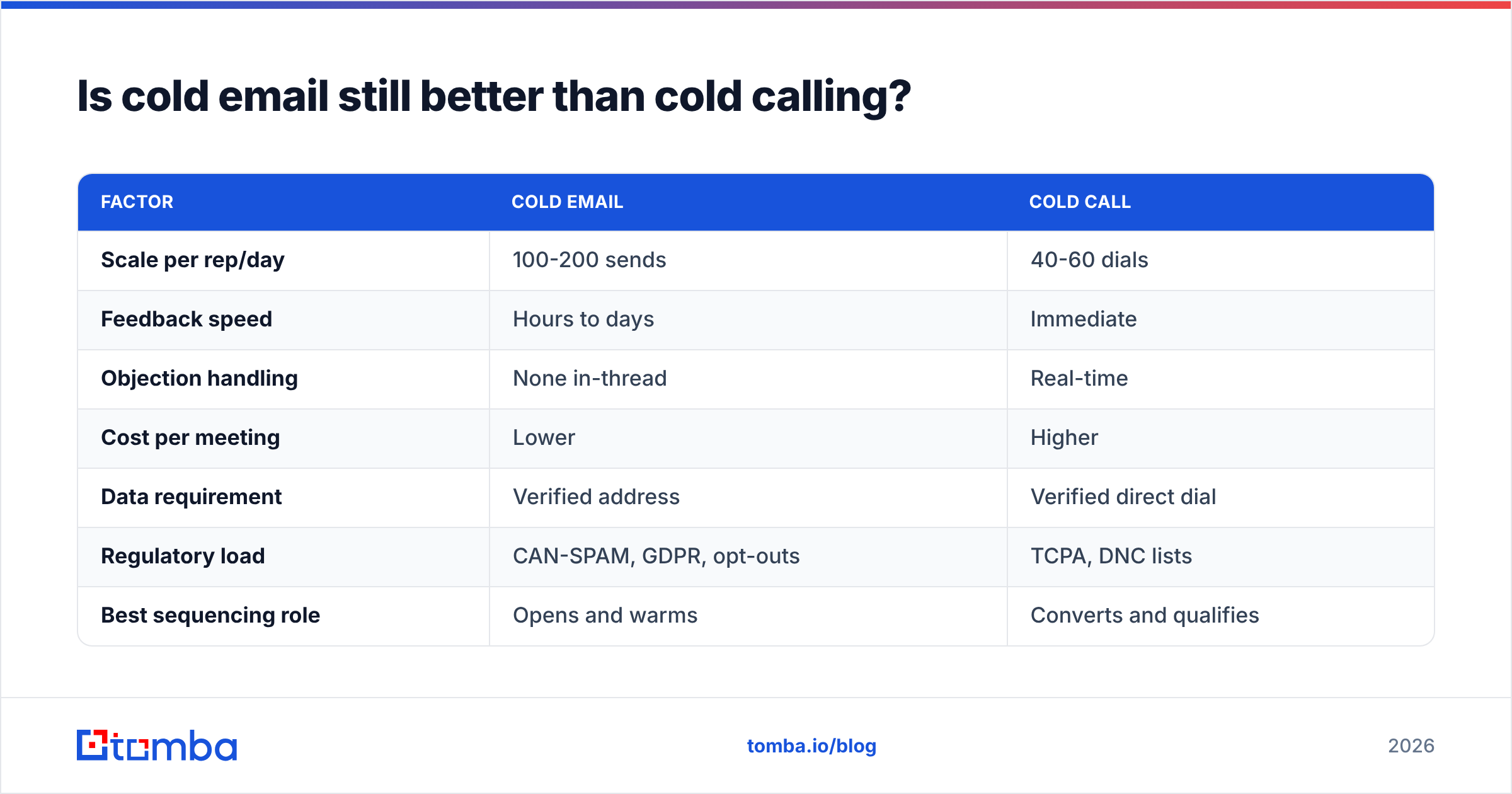
Neither wins outright. They fail at different points, which is exactly why you run both.
| Factor | Cold email | Cold call |
|---|---|---|
| Scale per rep/day | 100-200 sends | 40-60 dials |
| Feedback speed | Hours to days | Immediate |
| Objection handling | None in-thread | Real-time |
| Cost per meeting | Lower | Higher |
| Data requirement | Verified address | Verified direct dial |
| Regulatory load | CAN-SPAM, GDPR, opt-outs | TCPA, DNC lists |
| Best sequencing role | Opens and warms | Converts and qualifies |
The practical pattern: email creates recognition, the call converts it. A dial placed 48 hours after an email that was opened and clicked connects far more often than a cold dial to someone who has never seen your name. That is why direct dials matter as much as addresses — a phone finder plus a phone validator keeps the calling half of your sequence from dialing dead numbers.
One caveat on compliance: under GDPR, B2B cold email to EU contacts generally relies on legitimate interest, which requires relevance, a clear opt-out, and record-keeping. It is not a blanket permission slip. Read the ICO's direct marketing guidance rather than trusting a vendor blog's summary — including this one.
How do you protect deliverability while scaling outreach?#
Deliverability is the silent tax on outreach. You can write perfectly and still land in spam.
The non-negotiables:
- Authenticate everything. SPF, DKIM, and DMARC on every sending domain. Check yours with an SPF checker before your first campaign, not after your reply rate collapses.
- Send from a subdomain. Use
mail.yourcompany.comor a lookalike domain so a burned outbound reputation never contaminates your corporate mail. - Warm up gradually. New domains need four to eight weeks of ramping. A warmup calculator gives you a realistic daily ceiling instead of guesswork.
- Cap daily volume per mailbox. 30-50 cold sends per mailbox per day is the safe band. Scale by adding mailboxes, not by pushing one harder.
- Keep bounce rate under 2%. Above 3%, mailbox providers start throttling. This is entirely a data-quality outcome — verification is the fix.
- Watch complaints obsessively. Google's 0.3% spam-complaint threshold is a cliff, not a slope. One badly targeted campaign can undo months of good sender reputation.
Run a spam checker on your templates before launch. Common silent killers: three or more links in a first-touch email, tracked-link domains with no reputation, image-heavy HTML, and attachments.
How should you measure outreach performance?#
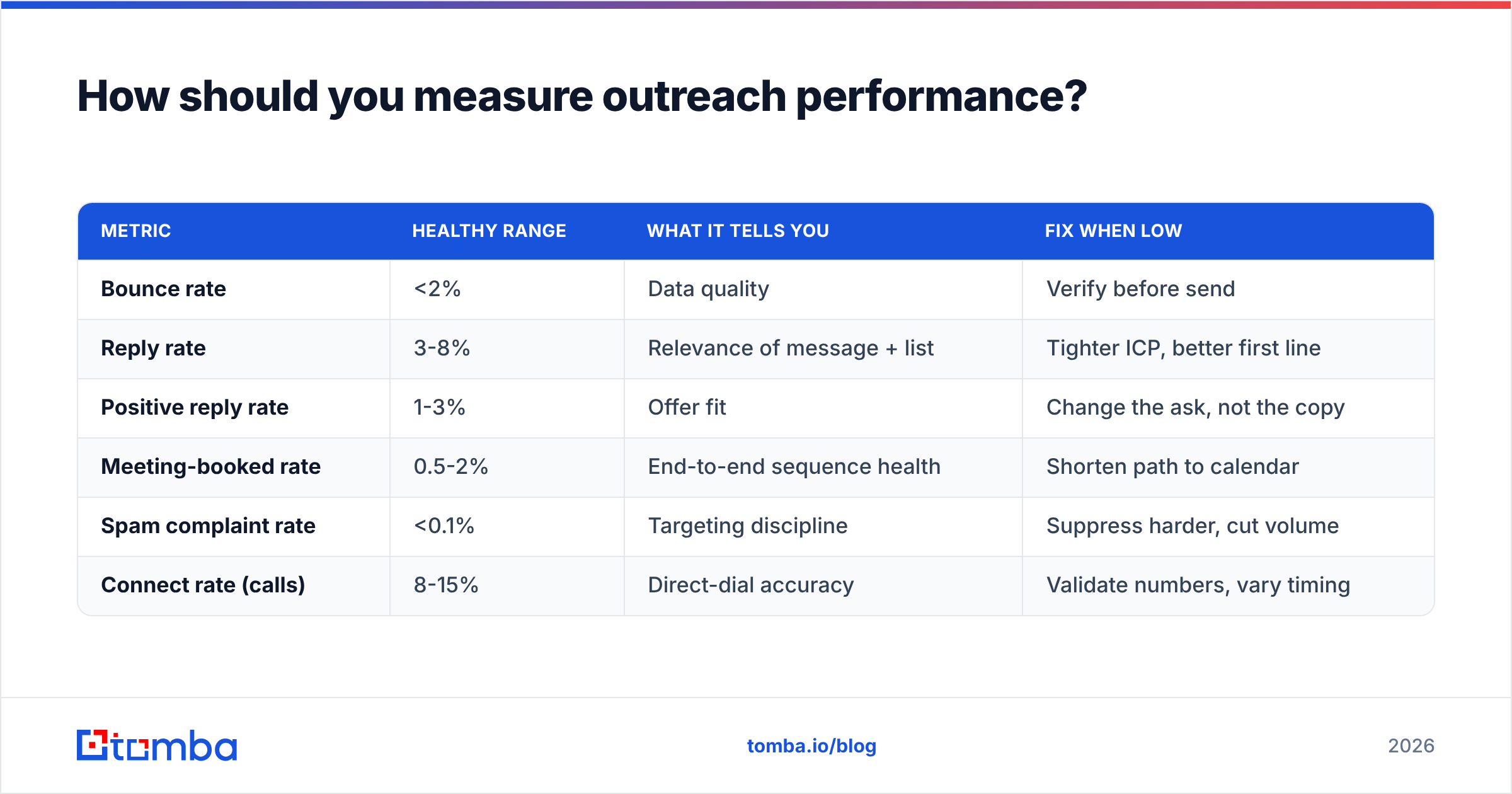
Measure the things a buyer actually does. Opens are not one of them.
| Metric | Healthy range | What it tells you | Fix when low |
|---|---|---|---|
| Bounce rate | <2% | Data quality | Verify before send |
| Reply rate | 3-8% | Relevance of message + list | Tighter ICP, better first line |
| Positive reply rate | 1-3% | Offer fit | Change the ask, not the copy |
| Meeting-booked rate | 0.5-2% | End-to-end sequence health | Shorten path to calendar |
| Spam complaint rate | <0.1% | Targeting discipline | Suppress harder, cut volume |
| Connect rate (calls) | 8-15% | Direct-dial accuracy | Validate numbers, vary timing |
Two diagnostic habits worth adopting. First, segment by list source — when reply rate drops, it is usually one bad source dragging the average, not a global copy problem. Second, read your negative replies weekly. "We already use X" and "wrong person" are two completely different failures, and only one of them is a targeting problem.
If you want the vocabulary standardized across your team, the B2B glossary and the response rate definition are a decent shared baseline. And when you are evaluating data vendors, third-party review sites like G2 are more useful than vendor-published accuracy claims — including the ones on vendor pricing pages.
What are the most common outreach mistakes?#
- Sending before verifying. The single most expensive mistake, because the damage outlives the campaign.
- Personalizing the wrong thing. Referencing someone's alma mater is a party trick. Referencing their open headcount is a business reason to talk.
- Quitting at touch two. Most replies come later in the sequence. Short sequences do not fail politely — they fail invisibly.
- Asking for 30 minutes. Ask for 15. You can always run long once they are on the call.
- Running one giant list. Segment by trigger — funding, hiring, tech change — and write per segment. Three tight segments outperform one broad blast almost every time.
- Ignoring the reply-to inbox. Nothing kills a sequence faster than a prospect replying "sure, when?" into a monitored-by-nobody mailbox.
There is a broader point here. Teams obsess over copy because copy is fun to argue about in a meeting. But when reply rates are diagnosed honestly, the causes stack up as data quality first, targeting second, timing third, and wording fourth. Fixing the last one first is why so much outreach effort produces so little pipeline. Compare your options — Tomba, BookYourData, Apollo, and others each have genuine strengths depending on whether you need verified-on-demand lookups, prebuilt lists, or an all-in-one sequencer — but pick on data freshness, not feature count.
How do you scale outreach without wrecking quality?#
Automate the mechanical steps and keep the judgment steps human.
Safe to automate: address discovery, verification, enrichment, deduplication, sequence timing, follow-up scheduling, CRM sync. A bulk email finder plus a HubSpot integration or Salesforce integration handles this end-to-end with no human in the loop.
Keep human: the ICP definition, the first line of touch one, the objection response, and the decision about which accounts deserve a phone call. Those four choices are where your reply rate is actually won.
If you are running this at engineering scale — enriching signups, refreshing a warehouse table, or triggering outreach from product events — the Tomba API does the same work programmatically, so verification happens at the point of data entry rather than as a cleanup job before each campaign. That is the version of this workflow that stays healthy at volume: no list ever goes stale, because no list ever sits still.
On budget, keep it proportional. Verification and discovery should cost a small fraction of a rep's time. Tomba's free tier covers 25 searches a month for testing the workflow; paid plans start at $49/mo (Starter), $99/mo (Growth), and $249/mo (Pro), with details on the Tomba pricing page. If verification costs more than a few percent of your outbound budget, you are overbuying.
Where should you start this week?#
Take your current list, run it through verification, and look at how much of it is dead. That number will tell you more about your reply-rate problem than another week of subject-line testing.
Then rebuild one segment properly: 100 accounts that genuinely fit, the right role at each, verified addresses, one enrichment hook per contact, and the 21-day sequence above. Send it. Compare the reply rate to your last blast. The gap is your data-quality tax, quantified.
The Tomba Email Finder is built for exactly that first step — find the right person at the right company by name or domain, verified at lookup time so bounces never reach your sending domain. Start on the free tier, run your 100-account segment through it, and let the reply rate decide whether it earns a place in your stack.
Related guides#
// get started
Find, verify and enrich your first contacts today
Start on the free plan with 25 searches a month, then scale when your team is ready.
Free plan · No credit card required · GDPR & CCPA
// about the author