How To Reach Out To Someone Professionally In 2026
A field-tested framework for reaching out to strangers who owe you nothing: which channel to pick, how to open, what to ask for, and when to follow up without becoming a nuisance.
TL;DR
- Reaching out professionally is three decisions, not one: the right person, the right channel, and one specific ask. Get those wrong and no amount of polish saves the message.
- Lead with the reason you're writing to this person. "I saw your team shipped X" beats any icebreaker template.
- Keep the first message under 120 words with exactly one question. Multi-ask emails get 0 answers, not 2.
- Verify the address before you send. A bounce doesn't just fail — it damages your sender reputation for every future message.
- Follow up two or three times, spaced 3-4-7 days, each with new information. Then stop.
Why do most professional outreach messages get ignored?#
Because they're about the sender. That's the whole diagnosis.
The average knowledge worker gets 120+ emails a day and reads maybe a third of them past the subject line. When your message opens with "I hope this email finds you well" followed by three sentences about your company's mission, you've spent the reader's entire attention budget before saying anything they can act on.
There are three failure modes, ranked by how often they kill a message:
- Wrong person. You emailed the VP of Marketing about an engineering tool. No message survives this.
- No specific reason. The recipient can tell within four seconds whether you wrote this to them or to a list of 4,000 people.
- Vague or oversized ask. "Would love to connect and explore synergies" asks the reader to do the work of figuring out what you want.
Everything below is a fix for one of those three.
How do you pick the right person to contact?#
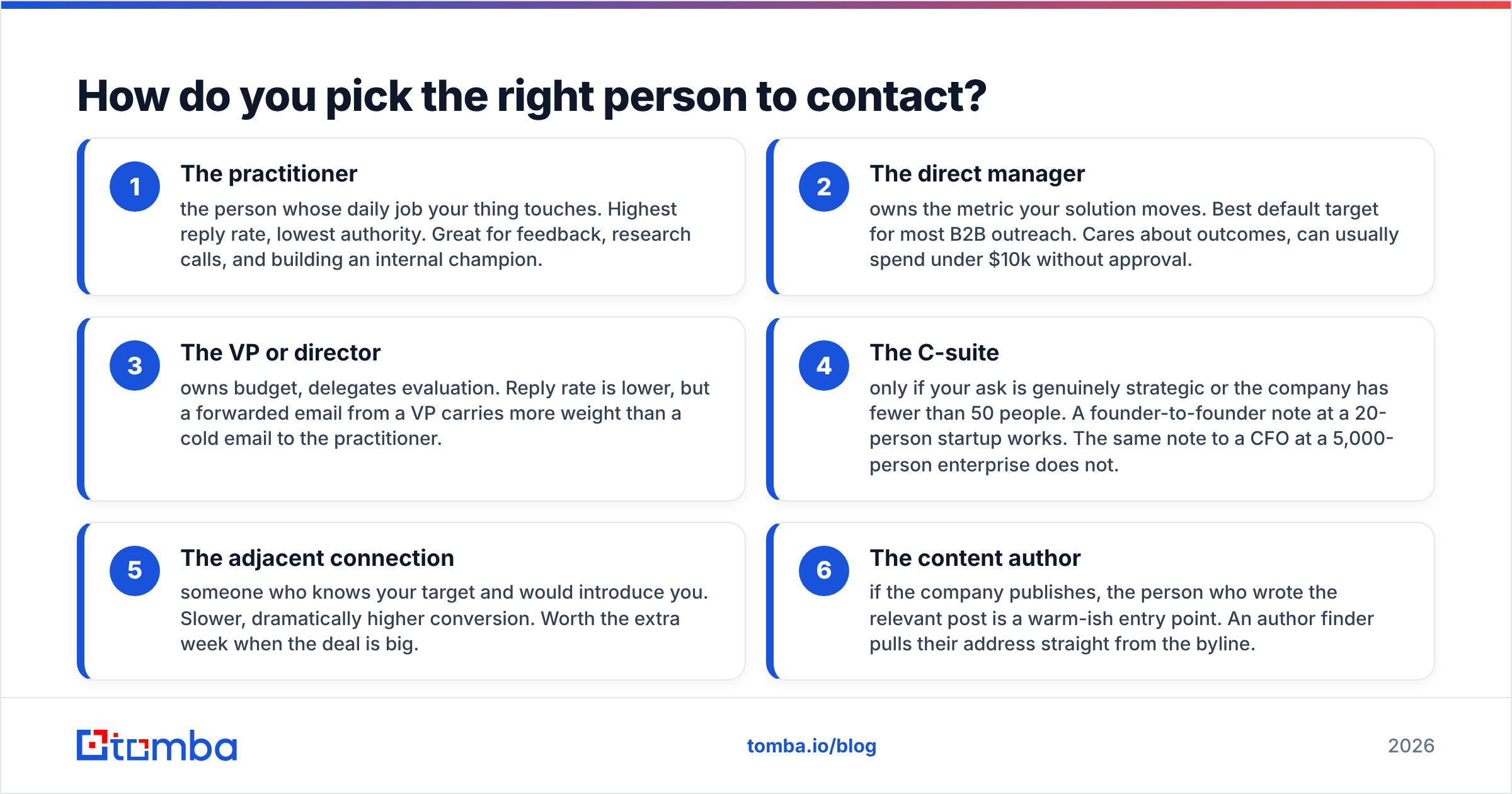
Start from the problem, not the org chart. Ask: who feels the pain you solve, and who has budget or influence over fixing it? Sometimes that's the same person. In companies over 200 people, it usually isn't.
A practical hierarchy for choosing a first contact:
- The practitioner — the person whose daily job your thing touches. Highest reply rate, lowest authority. Great for feedback, research calls, and building an internal champion.
- The direct manager — owns the metric your solution moves. Best default target for most B2B outreach. Cares about outcomes, can usually spend under $10k without approval.
- The VP or director — owns budget, delegates evaluation. Reply rate is lower, but a forwarded email from a VP carries more weight than a cold email to the practitioner.
- The C-suite — only if your ask is genuinely strategic or the company has fewer than 50 people. A founder-to-founder note at a 20-person startup works. The same note to a CFO at a 5,000-person enterprise does not.
- The adjacent connection — someone who knows your target and would introduce you. Slower, dramatically higher conversion. Worth the extra week when the deal is big.
- The content author — if the company publishes, the person who wrote the relevant post is a warm-ish entry point. An author finder pulls their address straight from the byline.
Once you've picked, you need a real address. Guessing at firstname@company.com is how you end up in a spam trap. Run the domain through a proper domain search to see the pattern the company actually uses, or find the individual with an email finder and confirm the format before you write a word.
Which channel should you use — email, LinkedIn, or phone?#
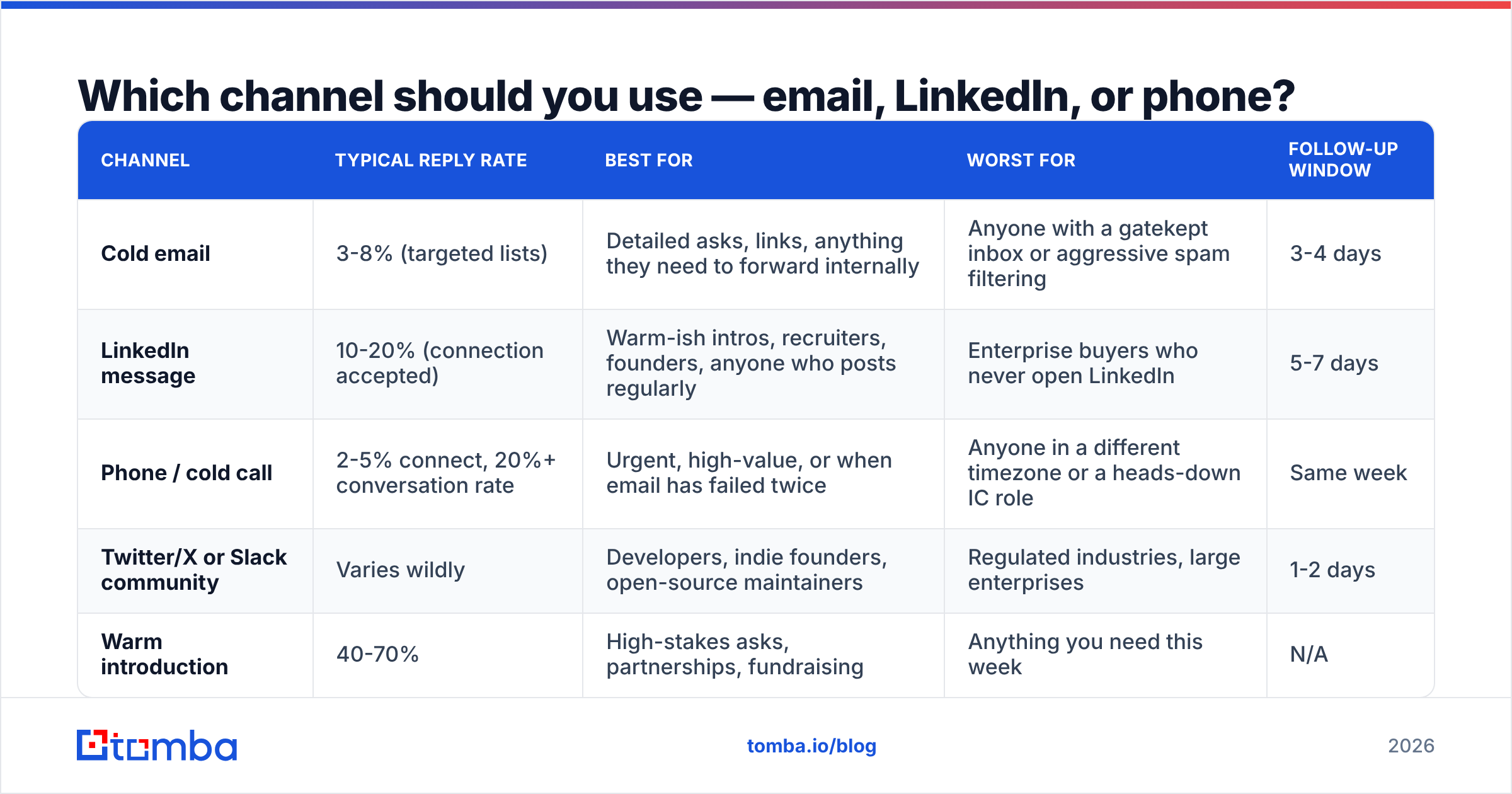
Channel choice is not a matter of taste. Each one carries different social permission, different response latency, and different failure costs.
| Channel | Typical reply rate | Best for | Worst for | Follow-up window |
|---|---|---|---|---|
| Cold email | 3-8% (targeted lists) | Detailed asks, links, anything they need to forward internally | Anyone with a gatekept inbox or aggressive spam filtering | 3-4 days |
| LinkedIn message | 10-20% (connection accepted) | Warm-ish intros, recruiters, founders, anyone who posts regularly | Enterprise buyers who never open LinkedIn | 5-7 days |
| Phone / cold call | 2-5% connect, 20%+ conversation rate | Urgent, high-value, or when email has failed twice | Anyone in a different timezone or a heads-down IC role | Same week |
| Twitter/X or Slack community | Varies wildly | Developers, indie founders, open-source maintainers | Regulated industries, large enterprises | 1-2 days |
| Warm introduction | 40-70% | High-stakes asks, partnerships, fundraising | Anything you need this week | N/A |
The practical rule: email is the default, LinkedIn is the amplifier, phone is the escalation. Sending the same message on two channels within 48 hours reads as coordinated persistence. Sending it on four channels in one day reads as harassment.
If you're layering channels, keep the sequencing honest. Send the email first, wait three days, then send a short LinkedIn note that references the email ("sent you a note Tuesday about X — happy to move here if that's easier"). Don't pretend the two are unrelated.
For LinkedIn-sourced prospects who don't accept connections, a LinkedIn finder converts a profile URL into a work email so you're not stuck waiting on an invite that never gets accepted. For high-value accounts where email has gone quiet twice, a phone finder gives you the escalation path.
What does a professional outreach message actually look like?#
Four parts. In order. No exceptions.
1. The reason (one sentence). Why this person, why now. "Saw you're hiring three SDRs this quarter" or "Read your post on catch-all domains — the section on SMTP timeouts matched what we measured."
2. The relevance (one or two sentences). Connect their situation to what you do. Not a feature list. A consequence: "Teams scaling SDR headcount usually hit a data quality wall around month two."
3. The ask (one sentence, one question). Specific, small, answerable with a yes or no. "Worth a 15-minute call Thursday?" not "Let me know if you'd like to learn more."
4. The exit. Make it easy to say no. "If this isn't a priority, no hard feelings — just tell me and I'll stop."
Here's the same message written badly and well:
Bad: Hi Sarah, I hope this email finds you well! My name is Alex and I'm reaching out from Acme, the leading platform for revenue intelligence. We help companies like yours drive growth and unlock efficiencies across the go-to-market motion. I'd love to hop on a quick call to share how we've helped similar organizations. Are you free sometime next week? Looking forward to hearing from you!
Good: Sarah — you posted about cutting your SDR ramp time from 90 to 45 days. The part about rep-built lists resonated; we found reps spent ~9 hours/week on list building before we automated it. Two questions, either one is a fine answer: (1) is list building still where your ramp bottleneck sits, or (2) did you solve it another way? Genuinely curious either way. If neither — just say "not now" and I'll leave you alone.
The second one is shorter, names a real thing the recipient said, offers a choice instead of a demand, and gives a clean exit. It's also harder to write, which is exactly why it works — the effort is legible.
Subject lines that don't get filtered#
Keep them 3-6 words, lowercase, and specific. "quick question about your SDR ramp" outperforms "Transform Your Sales Process Today" by a wide margin. Avoid RE: and FWD: prefixes on a first email — it's a trick, recipients recognize it, and it costs you credibility on message two. If you're stuck, run candidates through a subject line tester before you commit a whole campaign to one.
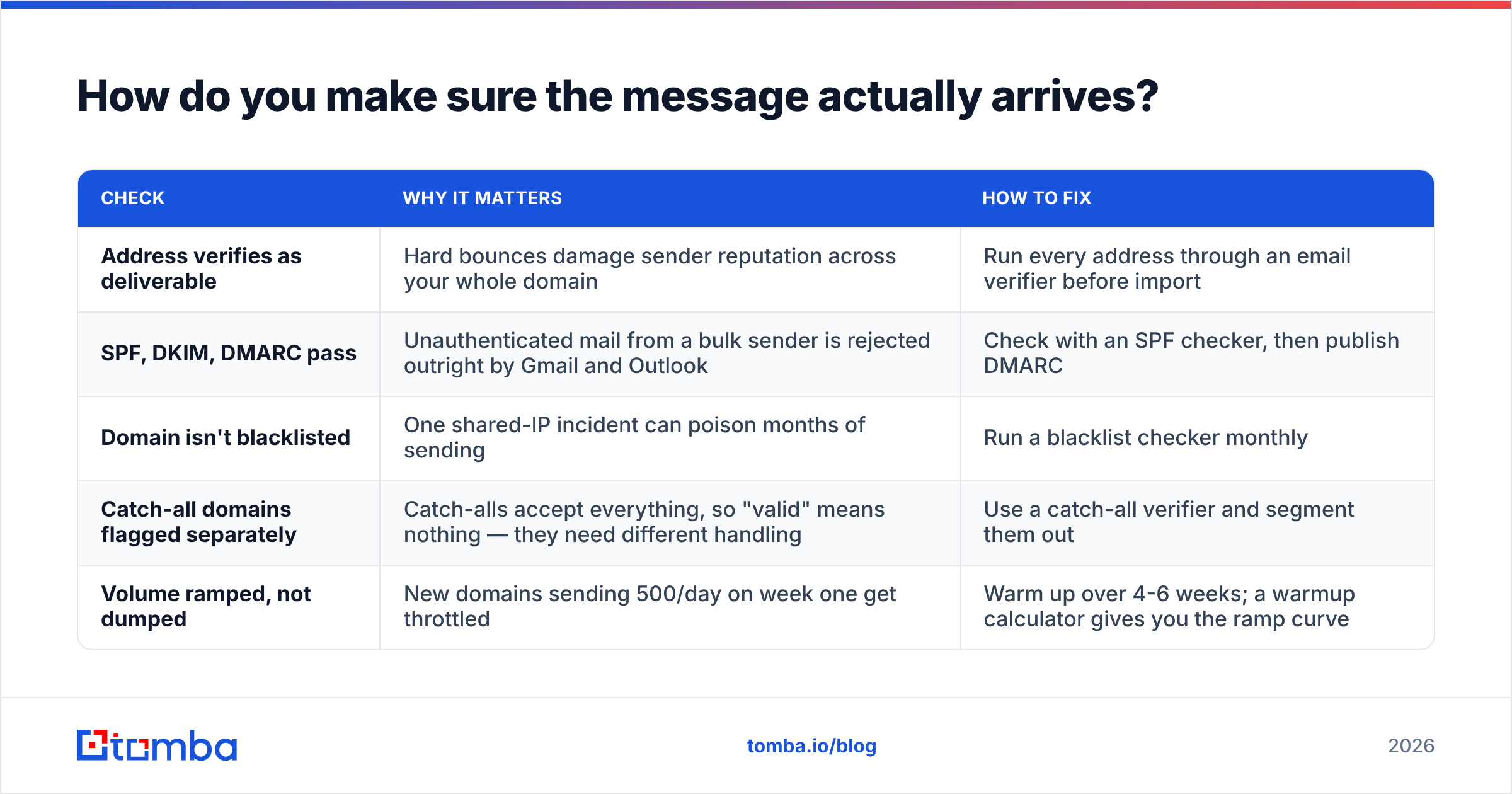
How do you make sure the message actually arrives?#
This is the part everyone skips, and it's the part that quietly kills 20-30% of outreach.
A message that bounces doesn't just fail to reach one person. Mailbox providers track your bounce rate as a signal of list hygiene. Push past roughly 2% hard bounces and Google and Microsoft start routing your good messages to spam too. Google's own bulk sender guidelines are explicit about keeping spam complaint rates under 0.3% and maintaining authenticated, low-bounce sending.
Your pre-send checklist:
| Check | Why it matters | How to fix |
|---|---|---|
| Address verifies as deliverable | Hard bounces damage sender reputation across your whole domain | Run every address through an email verifier before import |
| SPF, DKIM, DMARC pass | Unauthenticated mail from a bulk sender is rejected outright by Gmail and Outlook | Check with an SPF checker, then publish DMARC |
| Domain isn't blacklisted | One shared-IP incident can poison months of sending | Run a blacklist checker monthly |
| Catch-all domains flagged separately | Catch-alls accept everything, so "valid" means nothing — they need different handling | Use a catch-all verifier and segment them out |
| Volume ramped, not dumped | New domains sending 500/day on week one get throttled | Warm up over 4-6 weeks; a warmup calculator gives you the ramp curve |
None of this is optional if you're sending more than a handful of messages a week. Good email deliverability is infrastructure, and infrastructure gets built before the campaign, not after the first round of bounces.
How many times should you follow up?#
Two to three, then stop. The data on this is reasonably consistent across vendors: the second message adds meaningful reply volume, the third adds some, the fourth and beyond mostly generate unsubscribes and irritation.
A cadence that respects the recipient:
- Day 0 — Initial message. The four-part structure above.
- Day 3 — Follow-up one. Do NOT write "just bumping this." Add something: a relevant benchmark, a link to a case study from their industry, a one-line reframe of the ask. New information is the only justification for a second email.
- Day 7 — Follow-up two. Shorter. Change the ask to be smaller — instead of a call, ask a single yes/no question they can answer in five words.
- Day 14 — The breakup. "Closing the loop on this — I'll assume the timing isn't right. If that changes, my door's open." Breakup emails have a strange habit of getting replies, mostly because they release pressure.
- Day 90+ — Re-approach, if warranted. Only with a genuine new trigger: they raised a round, changed roles, shipped something relevant. Not "circling back!"
What kills follow-up sequences: identical messages sent four times, guilt framing ("I've reached out three times"), and fake urgency ("last chance"). All three tell the reader you're running a script, and once they know that, the response rate collapses to zero for good.
How do you scale professional outreach without sounding automated?#
The tension is real: personalization drives replies, but hand-writing 200 messages a week isn't a business model. The resolution is to automate research, not voice.
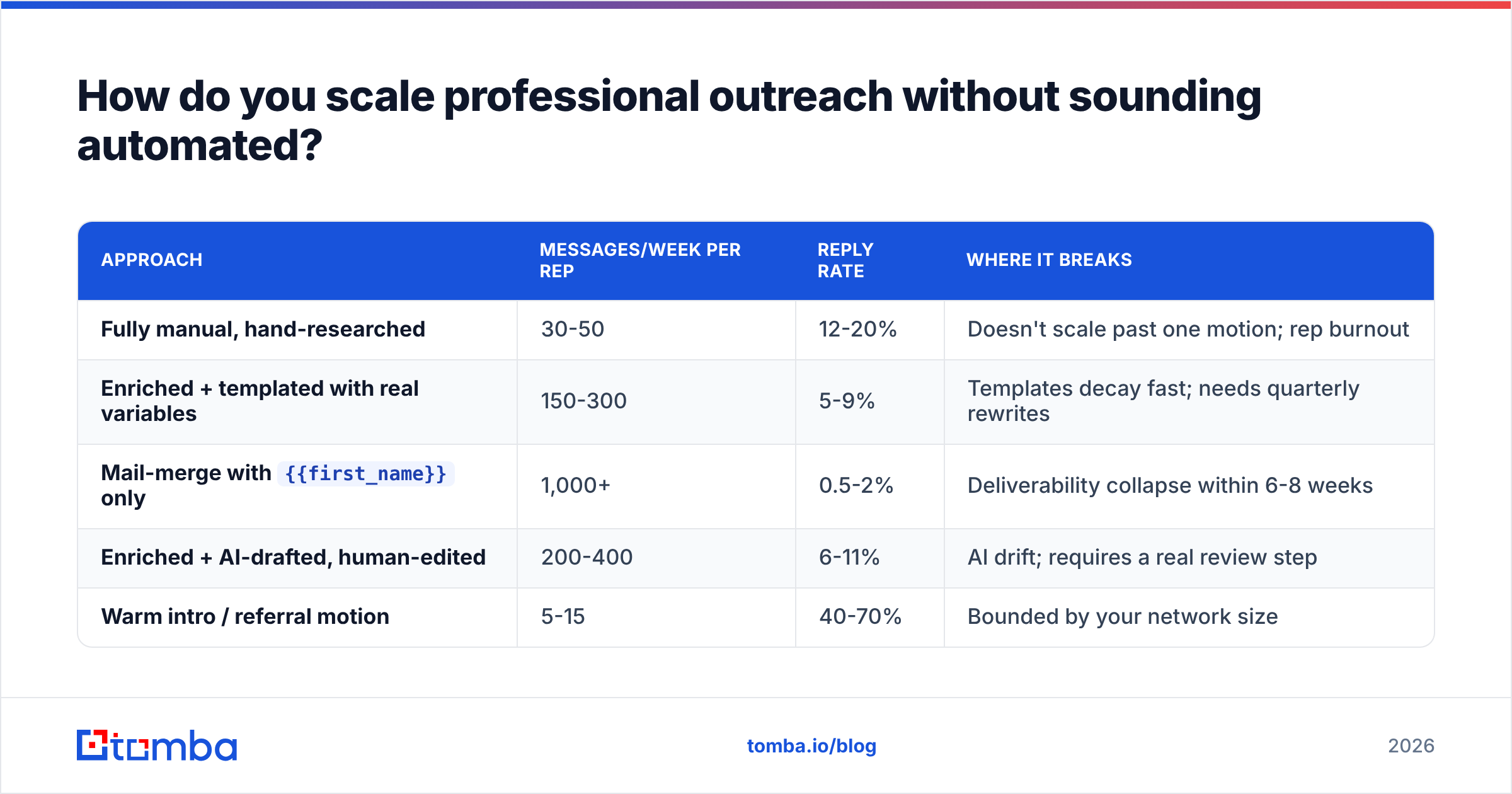
Here's how the tiers actually compare:
| Approach | Messages/week per rep | Reply rate | Where it breaks |
|---|---|---|---|
| Fully manual, hand-researched | 30-50 | 12-20% | Doesn't scale past one motion; rep burnout |
| Enriched + templated with real variables | 150-300 | 5-9% | Templates decay fast; needs quarterly rewrites |
Mail-merge with {{first_name}} only |
1,000+ | 0.5-2% | Deliverability collapse within 6-8 weeks |
| Enriched + AI-drafted, human-edited | 200-400 | 6-11% | AI drift; requires a real review step |
| Warm intro / referral motion | 5-15 | 40-70% | Bounded by your network size |
The sweet spot for most teams is tier two or four: pull real firmographic and role data via data enrichment, build templates with three or four substantive variables (recent hiring signal, tech stack, funding event, published content), and have a human read every message before it sends.
Three variables that actually earn a reply, versus three that don't:
- Works: a recent job posting, a technology on their stack, something they publicly wrote or said.
- Doesn't work: first name, company name, city. Everyone merges those; they signal nothing.
If you're building lists at volume, a bulk email finder plus verification in the same pass keeps enrichment and hygiene in one step instead of two. And if outreach is embedded in a product or workflow, the Tomba API handles find-and-verify programmatically so nobody's exporting CSVs by hand.
What should you never do in professional outreach?#
A short list of things that convert curiosity into a block:
- Don't fake familiarity. "Following up on our conversation" when there was no conversation is a lie, and it's the fastest way to lose a prospect permanently.
- Don't attach anything to a first email. Attachments trip spam filters and nobody opens a PDF from a stranger.
- Don't ask for an hour. Fifteen minutes, or better, a question they can answer in the reply itself.
- Don't send on Monday morning or Friday afternoon. Tuesday through Thursday, 7-9am local to the recipient, tends to land best.
- Don't ignore an explicit no. If someone says not interested, remove them. Legally in some jurisdictions, ethically everywhere, and practically because angry recipients mark you as spam.
- Don't scrape and blast. Beyond the deliverability damage, GDPR and CAN-SPAM both impose real obligations on B2B senders. The FTC's CAN-SPAM guidance is short and worth reading once.
One more, less obvious: don't over-optimize. Teams that A/B test their way to a 9% reply rate on a bad-fit list still lose to teams that send 40 careful messages to the right 40 people. Targeting beats copy, and it isn't close.
What's the fastest way to get started this week?#
Pick 25 companies where your thing is obviously relevant. For each, identify one person by role — not by whoever's easiest to find. Get their verified email. Write 25 messages using the four-part structure, each with one genuine detail you learned in under three minutes of research. Send Tuesday morning. Follow up Friday. Follow up the following Wednesday. Then measure.
Twenty-five messages done properly will teach you more than 2,500 sent through a merge field. And once the motion works at 25, the same process scales — you just need the data layer underneath it to keep up.
That's the piece worth automating first. Tomba Email Finder finds verified professional addresses by name, domain, or company, so the person you decided to contact is the person who actually receives your message — not a bounce that quietly erodes your sender reputation. The free tier includes 25 searches a month, which is exactly enough to run the experiment above, and paid plans start at $49/mo when it works. Check the Tomba pricing page for the full breakdown, or start with the free tier and see what a properly targeted 25 gets you.
Related guides#
// get started
Find, verify and enrich your first contacts today
Start on the free plan with 25 searches a month, then scale when your team is ready.
Free plan · No credit card required · GDPR & CCPA
// about the author