How to Reduce Spam Score: A 2026 Deliverability Playbook
Your spam score is a symptom, not the disease. Here is the exact order to fix authentication, list hygiene, copy, and sending volume so your cold email lands in the primary inbox.
TL;DR
- A spam score is a diagnostic output, not a ranking. SpamAssassin, Mail-Tester, and inbox providers all use different weights, so chasing a single number wastes time — fix the underlying signals instead.
- Authentication (SPF, DKIM, DMARC) and list quality account for most of the damage. Copy tweaks like removing the word "free" are the last 5%, not the first.
- Bounce rate above 3% and spam complaints above 0.3% will sink a domain faster than any subject line. Verify every address before it enters a sequence.
- Warm domains gradually, cap daily volume per mailbox, and keep a plain-text-first format with one link maximum in cold outreach.
- Run a fixed pre-send checklist: authenticate, verify, test, throttle, monitor. Skipping step two is the most common failure.
You checked your spam score, saw a number that made you wince, and now you want it lower. Fair. But the score itself is a proxy — a scanner's guess at what Gmail and Outlook will do with your message. Lower the score without fixing the causes, and you still land in Promotions or Junk.
This is the working order that actually changes placement, ranked by impact. Do them in sequence.
What Is a Spam Score and Who Actually Calculates It?#
A spam score is a numeric assessment of how likely an email is to be classified as unsolicited. The most cited version comes from Apache SpamAssassin, an open-source rules engine that assigns positive points for spammy signals and negative points for trustworthy ones. Above a threshold — typically 5.0 — the message gets flagged.
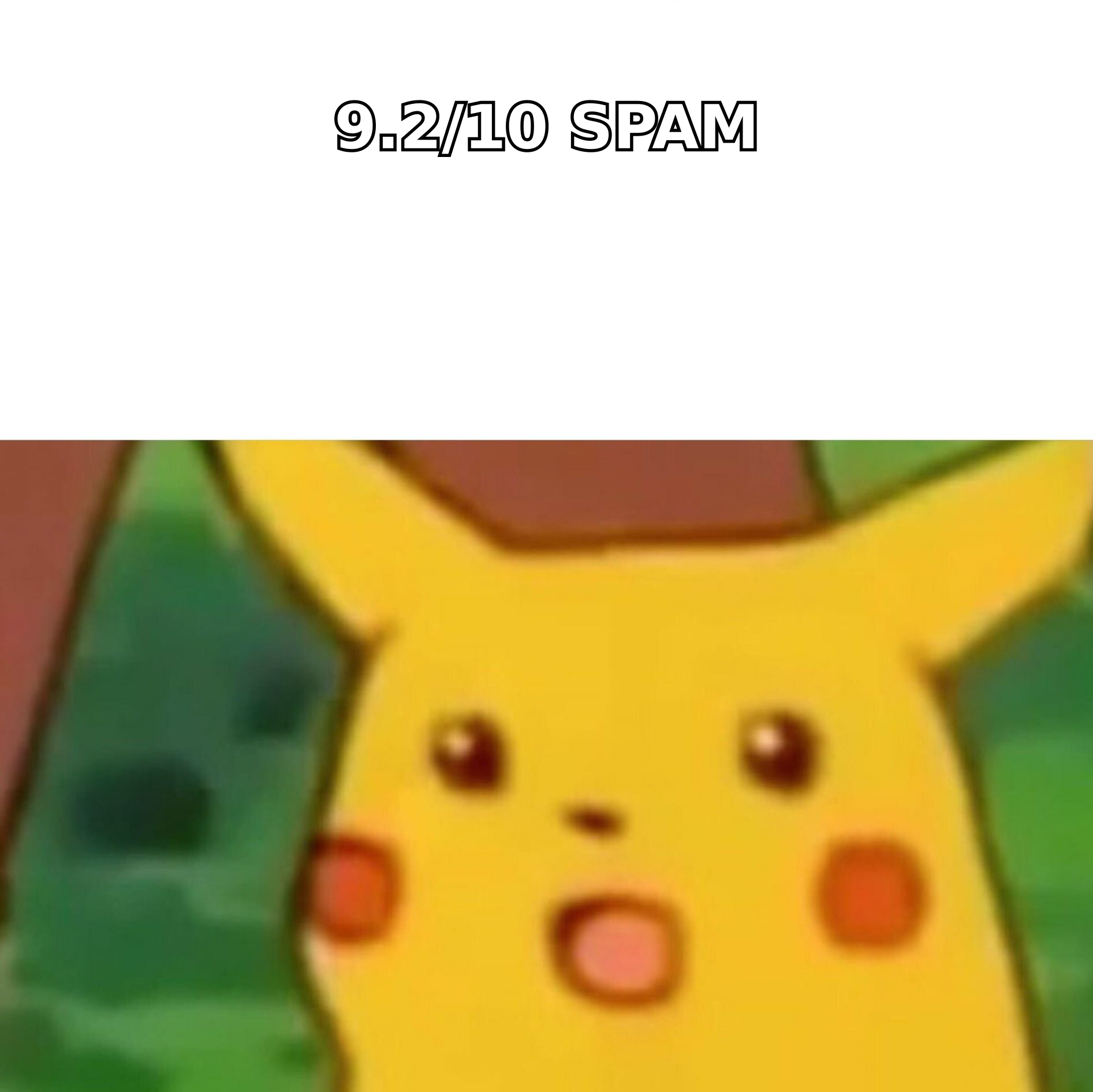
Tools like Mail-Tester wrap SpamAssassin in a friendlier 10-point scale where higher is better. That's why "my spam score is 9.2" can mean either excellent or catastrophic depending on which tool you used. Check the direction before you panic.
Here's the part most guides skip: Gmail and Microsoft do not use SpamAssassin. They run proprietary machine-learning classifiers weighted heavily toward recipient behavior — opens, replies, manual "report spam" clicks, and deletions without reading. A perfect SpamAssassin score with a 2% complaint rate still lands you in Junk.
So treat the score as a pre-flight checklist, not a verdict.
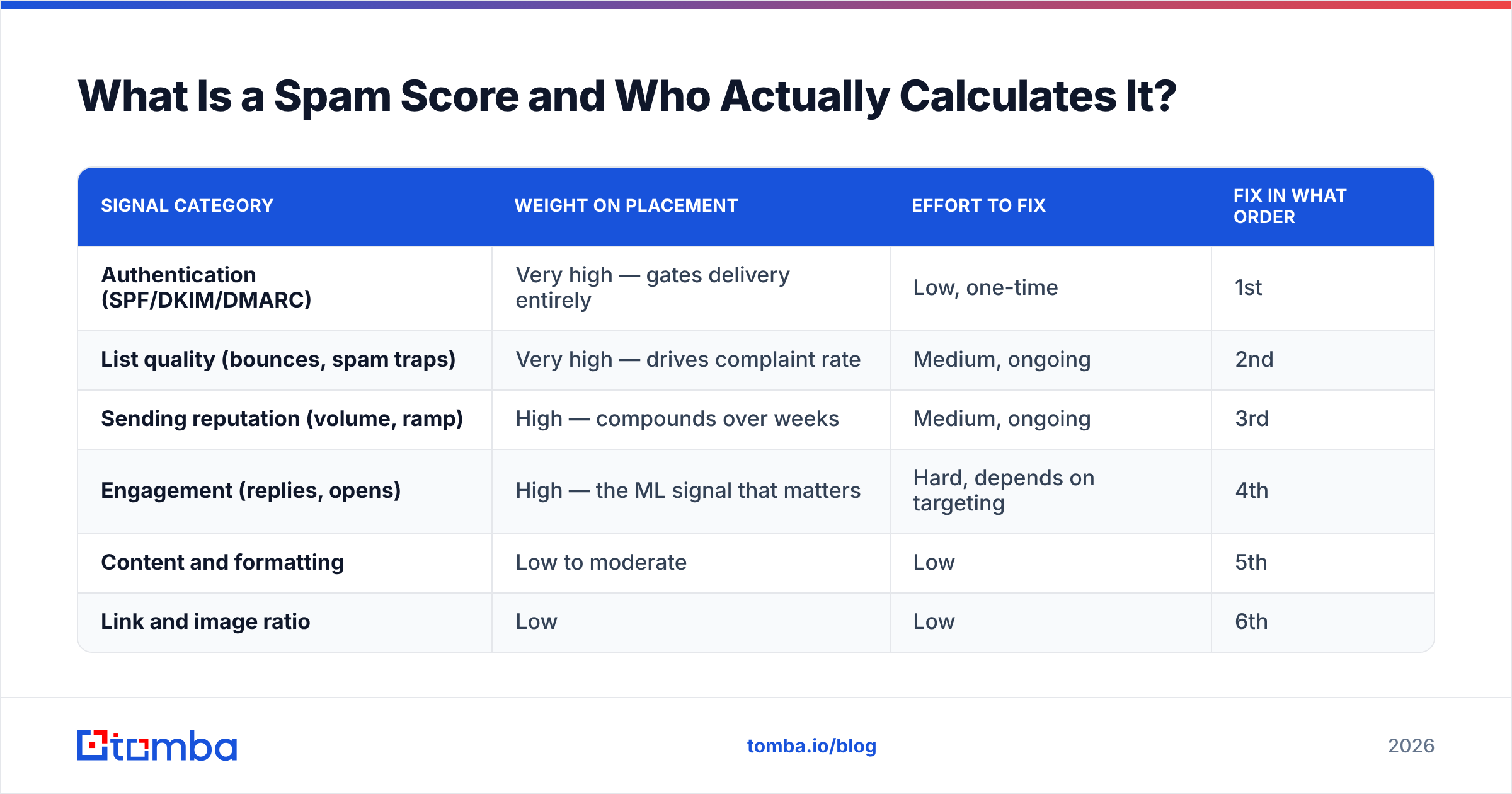
| Signal category | Weight on placement | Effort to fix | Fix in what order |
|---|---|---|---|
| Authentication (SPF/DKIM/DMARC) | Very high — gates delivery entirely | Low, one-time | 1st |
| List quality (bounces, spam traps) | Very high — drives complaint rate | Medium, ongoing | 2nd |
| Sending reputation (volume, ramp) | High — compounds over weeks | Medium, ongoing | 3rd |
| Engagement (replies, opens) | High — the ML signal that matters | Hard, depends on targeting | 4th |
| Content and formatting | Low to moderate | Low | 5th |
| Link and image ratio | Low | Low | 6th |
Why Does Authentication Come First?#
Because without it, nothing else you do gets evaluated. An unauthenticated message from an unknown domain is filtered before your carefully written subject line is ever read.
Since 2024, both Google and Yahoo have required bulk senders to publish SPF, DKIM, and DMARC records, keep spam complaint rates under 0.3%, and offer one-click unsubscribe on marketing mail. Google's Email sender guidelines remain the authoritative reference and are worth reading in full rather than paraphrased.
The three records, in plain terms:
- SPF is a guest list. It's a DNS record naming which servers are allowed to send mail claiming to be from your domain. If your sending platform isn't listed, receivers get suspicious. Use an SPF checker to confirm your record resolves and stays under the 10-lookup limit.
- DKIM is a wax seal. It cryptographically signs each outgoing message so the receiver can verify nothing was altered in transit and that your domain genuinely authorized it.
- DMARC is the instruction card. It tells receivers what to do when SPF or DKIM fails — nothing (
p=none), quarantine, or reject — and where to send reports.
Start DMARC at p=none for two weeks, read the aggregate reports to catch legitimate senders you forgot about (your CRM, your invoicing tool, your help desk), then move to p=quarantine. Jumping straight to p=reject is how teams accidentally block their own transactional mail.
Also check that your sending domain and IP aren't listed anywhere. A quick blacklist checker run against Spamhaus and the other major RBLs takes thirty seconds and occasionally explains everything.
How Much Does List Quality Really Affect Spam Score?#
More than any other controllable factor. This is where most cold outreach programs quietly die.
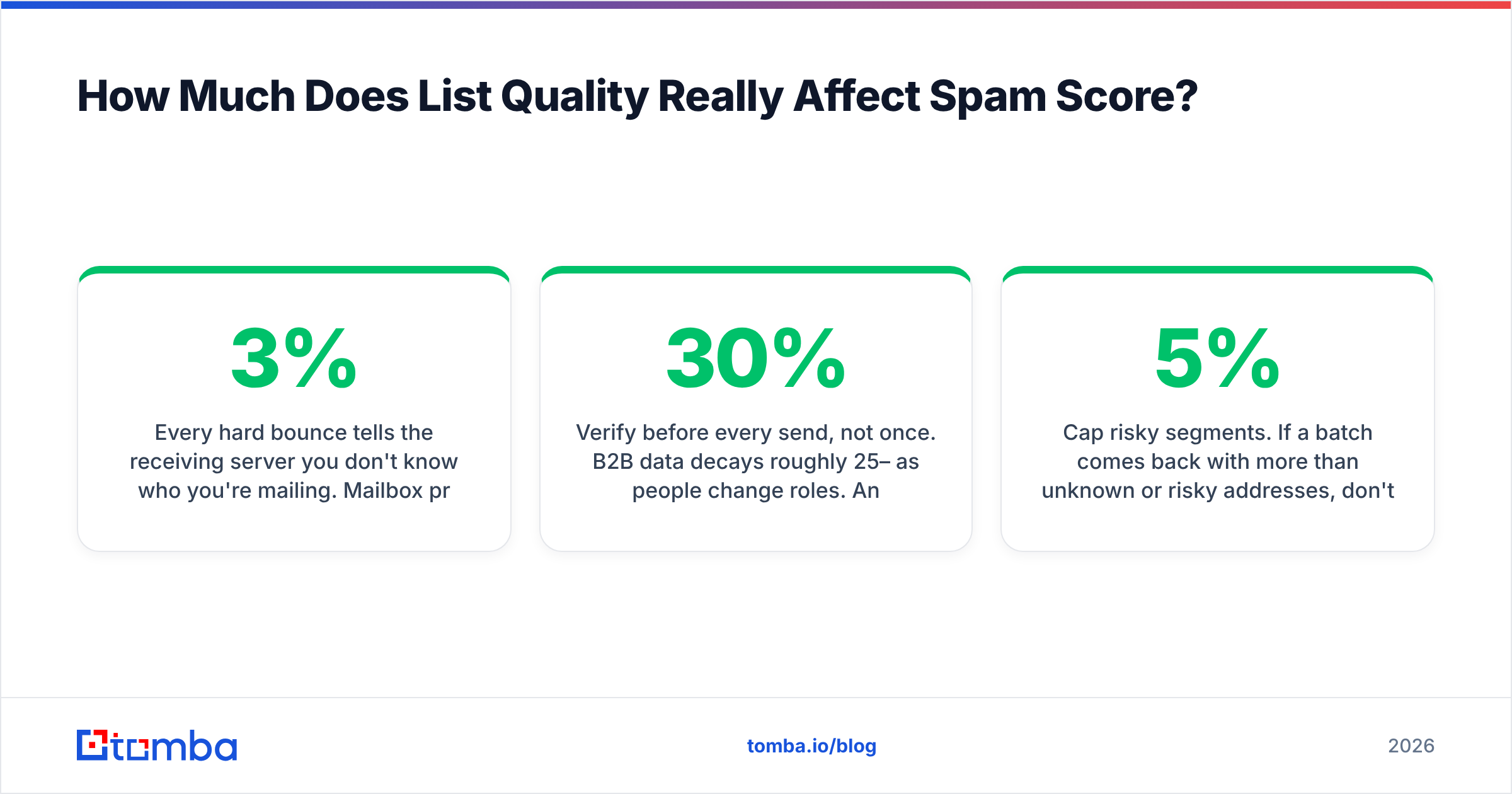
Every hard bounce tells the receiving server you don't know who you're mailing. Mailbox providers read a high bounce rate as the fingerprint of a scraped or purchased list, and they respond by throttling the domain. Industry consensus puts the danger line around 3% bounces; above 5%, some ESPs will suspend the account outright.
Worse are spam traps — addresses that were once real but got recycled, or addresses seeded purely to catch senders using stale data. Hitting one doesn't just hurt a campaign; on some networks it blacklists the sending domain immediately. You cannot detect traps by looking at an address. You detect them by not mailing addresses you can't verify.
The practical workflow:
- Source deliberately. Pull contacts from a maintained source rather than a five-year-old CSV. Tools like the Tomba Email Finder resolve addresses from a name and domain at the moment you need them, so the data is fresh at send time.
- Verify before every send, not once. B2B data decays roughly 25–30% per year as people change roles. An address verified in January is not verified in September. Run the list through an email verifier as a pre-send gate.
- Handle catch-all domains separately. A catch-all accepts every address at the domain, so a standard SMTP check returns "valid" for
asdfgh@company.com. Segment these into their own bucket and use a catch-all verifier rather than assuming they're safe. - Deduplicate and suppress. Remove duplicates, prior unsubscribes, and anyone who has already replied. Mailing the same person twice from two sequences is a complaint waiting to happen.
- Cap risky segments. If a batch comes back with more than 5% unknown or risky addresses, don't mail it. Rebuild it.
For teams working at volume, running the whole list through a bulk verify job before import into your sequencer is the single highest-return habit in this article.
What Sending Behavior Lowers Your Spam Score?#
Reputation is built by consistency, and destroyed by spikes.
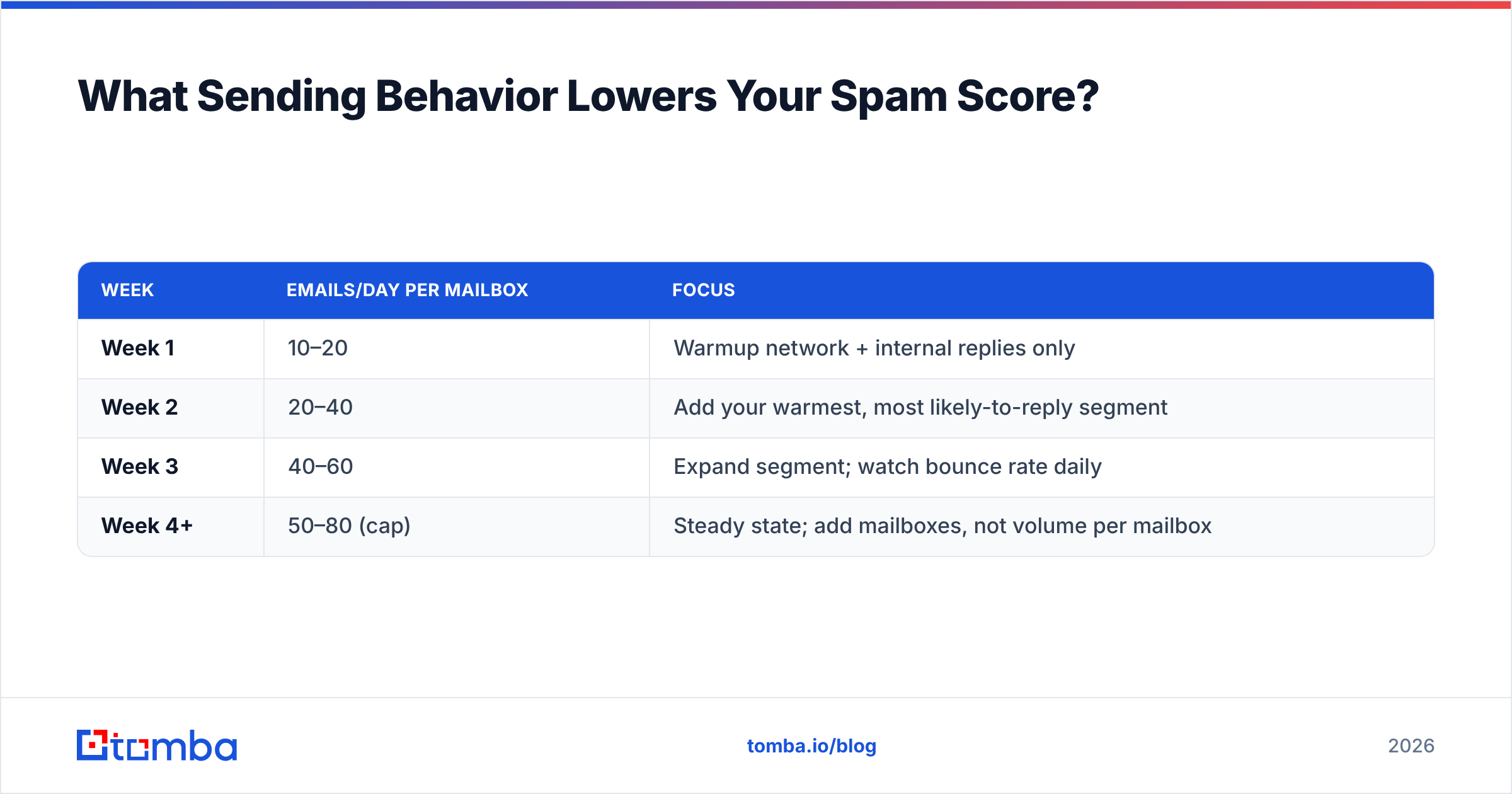
A brand-new domain that sends 500 emails on day one is behaving exactly like a throwaway spam domain, because that's what throwaway spam domains do. Ramp instead:
| Week | Emails/day per mailbox | Focus |
|---|---|---|
| Week 1 | 10–20 | Warmup network + internal replies only |
| Week 2 | 20–40 | Add your warmest, most likely-to-reply segment |
| Week 3 | 40–60 | Expand segment; watch bounce rate daily |
| Week 4+ | 50–80 (cap) | Steady state; add mailboxes, not volume per mailbox |
Three rules that matter more than the exact numbers:
- Scale horizontally. Need 500 sends a day? Use eight mailboxes at 60, not one at 500. Per-mailbox volume is what providers watch.
- Use a separate sending domain. Never run cold outreach from your primary corporate domain. Buy a lookalike (
get-yourcompany.com), authenticate it fully, and isolate the risk. - Keep the rhythm human. Sending in randomized intervals across business hours reads far better than 200 identical messages fired in ninety seconds.
If you want a concrete ramp schedule for your target volume, the warmup calculator will generate one. And because deliverability compounds, it's worth understanding sender reputation as a running balance rather than a state you achieve once.
Which Content Changes Actually Lower Spam Score?#
Fewer than the internet suggests. The "spam trigger word" lists circulating since 2010 are largely obsolete — modern classifiers evaluate whole-message context, not keyword bingo. Your bank sends you the word "free" constantly and it lands fine.
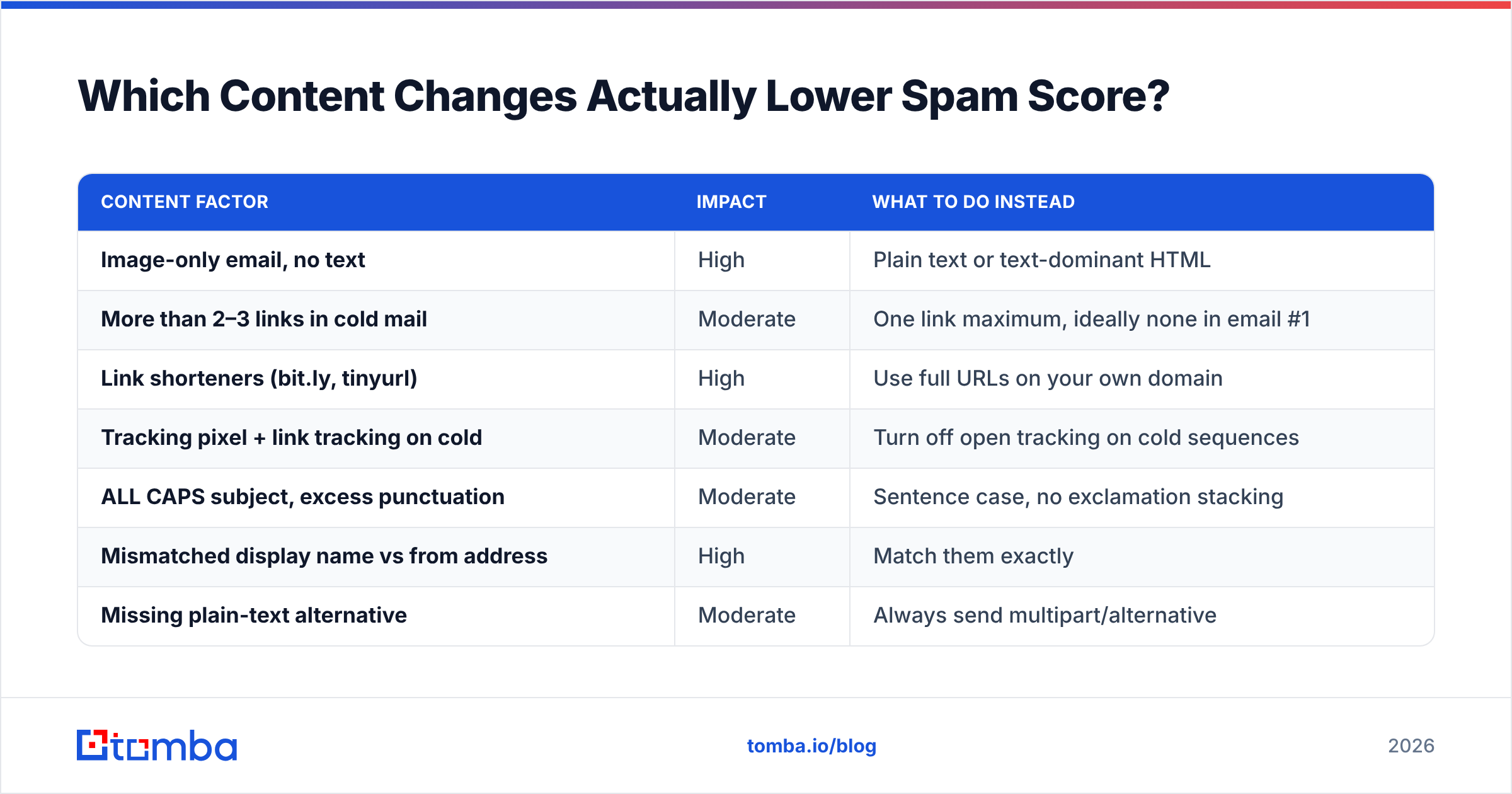
That said, a handful of content patterns still generate real SpamAssassin points and still correlate with poor placement:
| Content factor | Impact | What to do instead |
|---|---|---|
| Image-only email, no text | High | Plain text or text-dominant HTML |
| More than 2–3 links in cold mail | Moderate | One link maximum, ideally none in email #1 |
| Link shorteners (bit.ly, tinyurl) | High | Use full URLs on your own domain |
| Tracking pixel + link tracking on cold | Moderate | Turn off open tracking on cold sequences |
| ALL CAPS subject, excess punctuation | Moderate | Sentence case, no exclamation stacking |
| Mismatched display name vs from address | High | Match them exactly |
| Missing plain-text alternative | Moderate | Always send multipart/alternative |
| No unsubscribe path | High | Include a one-line opt-out in every cold email |
The most underrated item on that list is open tracking. Tracking pixels rewrite your links through a third-party domain, and if that domain has been abused by other users of your platform, you inherit its reputation. On cold sequences the data is barely useful anyway — Apple Mail Privacy Protection has made open rates fiction since 2021. Turn it off, measure replies instead.
Before a campaign goes out, run the draft through a spam checker and read the itemized findings rather than the summary number. The line items tell you what to change; the number doesn't.
How Do You Test and Monitor Placement?#
Testing spam score once and declaring victory is how programs regress. Build a loop:
- Seed test before launch. Send the actual sequence to a small set of seed accounts across Gmail, Outlook, Yahoo, and at least one corporate Microsoft 365 tenant. Note the folder each landed in — the tab matters as much as the folder.
- Check Google Postmaster Tools weekly. Google's Postmaster Tools reports domain reputation, spam complaint rate, and authentication pass rates directly from the receiver's side. It's free and it's the only place you see Gmail's actual opinion of you.
- Read your DMARC aggregate reports. They catch misconfigured senders before those senders damage the domain.
- Watch reply rate as the real metric. A response rate that drops while volume stays flat almost always means placement degraded, not that your copy got worse overnight.
- Re-verify quarterly. Standing lists rot. Re-run verification on any list older than 90 days before touching it.
Also verify your SMTP configuration hasn't drifted after any infrastructure change — an SMTP tester catches a surprising number of silent misconfigurations after a mail migration.
What Does a Complete Pre-Send Checklist Look Like?#
Run this before every campaign. It takes about fifteen minutes and prevents most of the damage:
- SPF record resolves, under 10 DNS lookups, includes current sender
- DKIM signing active and passing on a test send
- DMARC published, at minimum
p=nonewith reporting enabled - Domain and IP clear on Spamhaus and major RBLs
- Every address verified within the last 30 days
- Catch-all addresses segmented and separately assessed
- Duplicates, unsubscribes, and prior repliers suppressed
- Daily volume per mailbox within the ramp schedule
- One link maximum, no shorteners, full URL on your own domain
- Open tracking disabled, link tracking on your own subdomain if used
- Plain-text alternative present, display name matches from address
- Visible opt-out line in the message body
- Seed test sent and folder placement confirmed across four providers
If you cannot check the verification boxes, stop. Everything downstream is wasted effort on a list you can't trust.
What Should You Fix First If You Only Have an Hour?#
Authentication, then verification. In that order, no exceptions.
Publishing SPF, DKIM, and DMARC takes twenty minutes in your DNS panel and immediately removes the largest single reason cold email gets filtered at the gateway. Verifying your list takes another twenty and removes the bounces and traps that would have destroyed your domain reputation over the following two weeks.
Content edits — the ones most people start with — are worth maybe five percent of the outcome. Do them last, and do them lightly. A message that reads like a real person wrote it to one specific recipient outperforms any amount of keyword laundering.
The deeper truth about email deliverability is that mailbox providers are trying to answer one question: does the recipient want this? Every technical fix in this article is a way of proving you're the kind of sender whose mail people want. Relevance is the actual lever. The checklist just stops you from being filtered before relevance gets a chance.
Start with the list. Most spam-score problems trace back to addresses that were never valid in the first place. The Tomba Email Finder resolves verified professional addresses from a name and company domain, with confidence scoring and source attribution on every result — so you know what you're sending to before you send it. The free tier includes 25 searches per month; paid plans start at $49/mo. Check Tomba pricing to size it against your sending volume, then run your current list through verification and see how much of it you were about to burn your domain on.
Related guides#
// get started
Find, verify and enrich your first contacts today
Start on the free plan with 25 searches a month, then scale when your team is ready.
Free plan · No credit card required · GDPR & CCPA
// about the author