How to Source Candidates in 2026: A Recruiter's Playbook
Job boards give you applicants, not the best people. Here's a channel-by-channel playbook for sourcing candidates in 2026 — where to find them, how to get verified contact details, and what response rates to expect.
If you are working out how to source candidates in 2026, start here. This guide ranks the seven channels that still work. It shows you where to find people, how to get verified contact details, and what reply rates to expect.
TL;DR
- Sourcing is not recruiting. Sourcing means building a list of qualified people who are not applying to you. Recruiting is what happens after they reply.
- The best channels in 2026 are LinkedIn Boolean search, portfolio mining on GitHub, Dribbble and Behance, alumni and ex-employee lists, and referrals from your recent hires. That order holds for most roles.
- Passive candidates reply to email at roughly 2-4x the rate they reply to LinkedIn InMail. InMail inboxes are saturated. A verified personal or work email is the whole ballgame.
- A sourcing pipeline needs three stages: identify (find the person), enrich (find the contact detail), verify (confirm it is deliverable). Skipping stage three is why your bounce rate is 12%.
- Budget roughly 40-60 sourced profiles per hire for a mid-level role. Senior or niche technical roles take 150-250.
What does "sourcing candidates" actually mean?#
Sourcing is prospecting with a different job title. You build a targeted list of people who match a role profile. You find a way to reach them. Then you send a message that earns a reply — before any of them have shown interest in your company.
That last clause matters. Someone who applied through your careers page is an applicant. Handling them is applicant tracking, not sourcing. If you found a staff platform engineer on GitHub who has never heard of you, that is sourcing.
The distinction changes everything downstream. Applicants have already opted in, so a clumsy message still gets a response. Sourced candidates owe you nothing. Your message competes with eleven other recruiter messages from the same week. Most of them look the same.
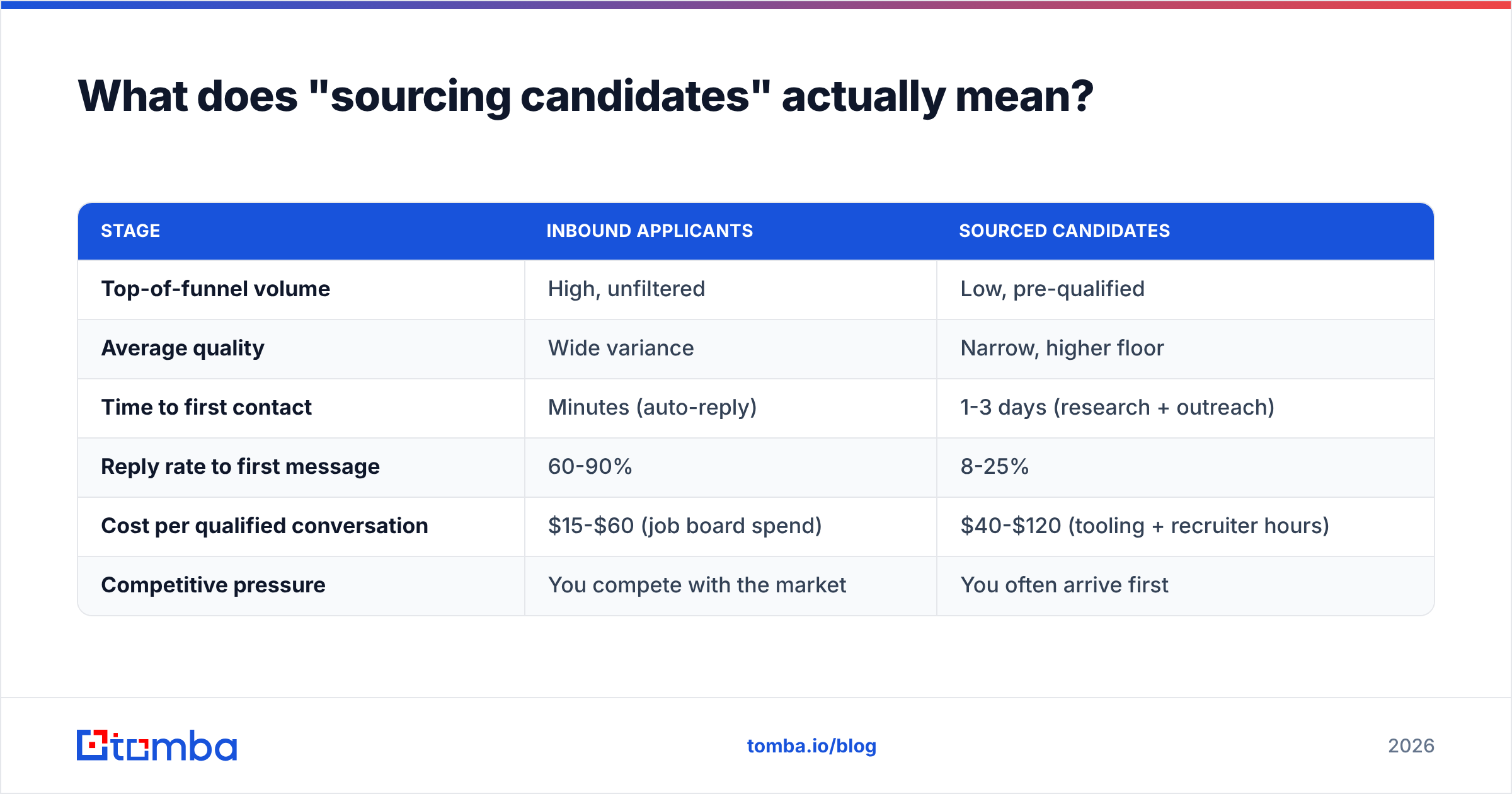
Here is how the two funnels differ in practice:
| Stage | Inbound applicants | Sourced candidates |
|---|---|---|
| Top-of-funnel volume | High, unfiltered | Low, pre-qualified |
| Average quality | Wide variance | Narrow, higher floor |
| Time to first contact | Minutes (auto-reply) | 1-3 days (research + outreach) |
| Reply rate to first message | 60-90% | 8-25% |
| Cost per qualified conversation | $15-$60 (job board spend) | $40-$120 (tooling + recruiter hours) |
| Competitive pressure | You compete with the market | You often arrive first |
Per contact, the economics look worse for sourcing. Per hire, they look better. The people you source are usually the ones you actually want.

How to source candidates: 7 channels that work in 2026#
Seven channels cover almost everything. Rank them by how well they fit the role. Do not rank them by which one you find comfortable.
- LinkedIn search (Boolean + filters) — Still the widest professional index there is. Best for sales, marketing, operations, finance, and mid-level engineering. Weakest for people who keep thin profiles, which skews toward senior ICs in security.
- Portfolio and code platforms — GitHub for engineers, Dribbble and Behance for designers, Kaggle for data scientists, Substack for writers. The signal beats a resume, because you read the work itself.
- Alumni and ex-employee lists — People who left a company you admire, in a cohort. Layoffs, acquisitions, and "open to work" waves create dense, well-matched pools. They expire fast.
- Conference and community rosters — Speaker lists, meetup organizers, Slack and Discord moderators, open-source maintainers. Small volume, high conversion. These people already chose to be visible.
The last three are lower volume. They are also cheap to run, so most teams should use all of them:
- Referrals from recent hires — Your last three hires know the most people who resemble your last three hires. This is the highest-conversion channel in almost every company, and the most underused.
- Niche job boards and newsletters — Role-specific boards still work as a passive net. Treat them as a supplement.
- Your own ATS silver medalists — Candidates who reached final rounds six to eighteen months ago and did not get the offer. They already know you, and their circumstances have changed.
Notice the pattern. The best channels all leave a public trace of the person's work. That trace is what lets you write a message that is clearly not a template.
How do you build a searchable candidate list?#
Start with the role profile, then turn it into search syntax. A Boolean string for a senior backend engineer might look like:
("senior software engineer" OR "staff engineer" OR "backend engineer") AND (Go OR Golang OR Rust) AND (Kubernetes OR "distributed systems") NOT (recruiter OR "talent acquisition")
Run that against LinkedIn. Then run an X-ray variant against Google to catch profiles that LinkedIn's own search buries:
site:linkedin.com/in "staff engineer" "Golang" "Berlin"
The output of this stage is a list of names, current employers, and profile URLs. It is not yet actionable. You cannot email a profile URL.
Three practical rules for list-building:
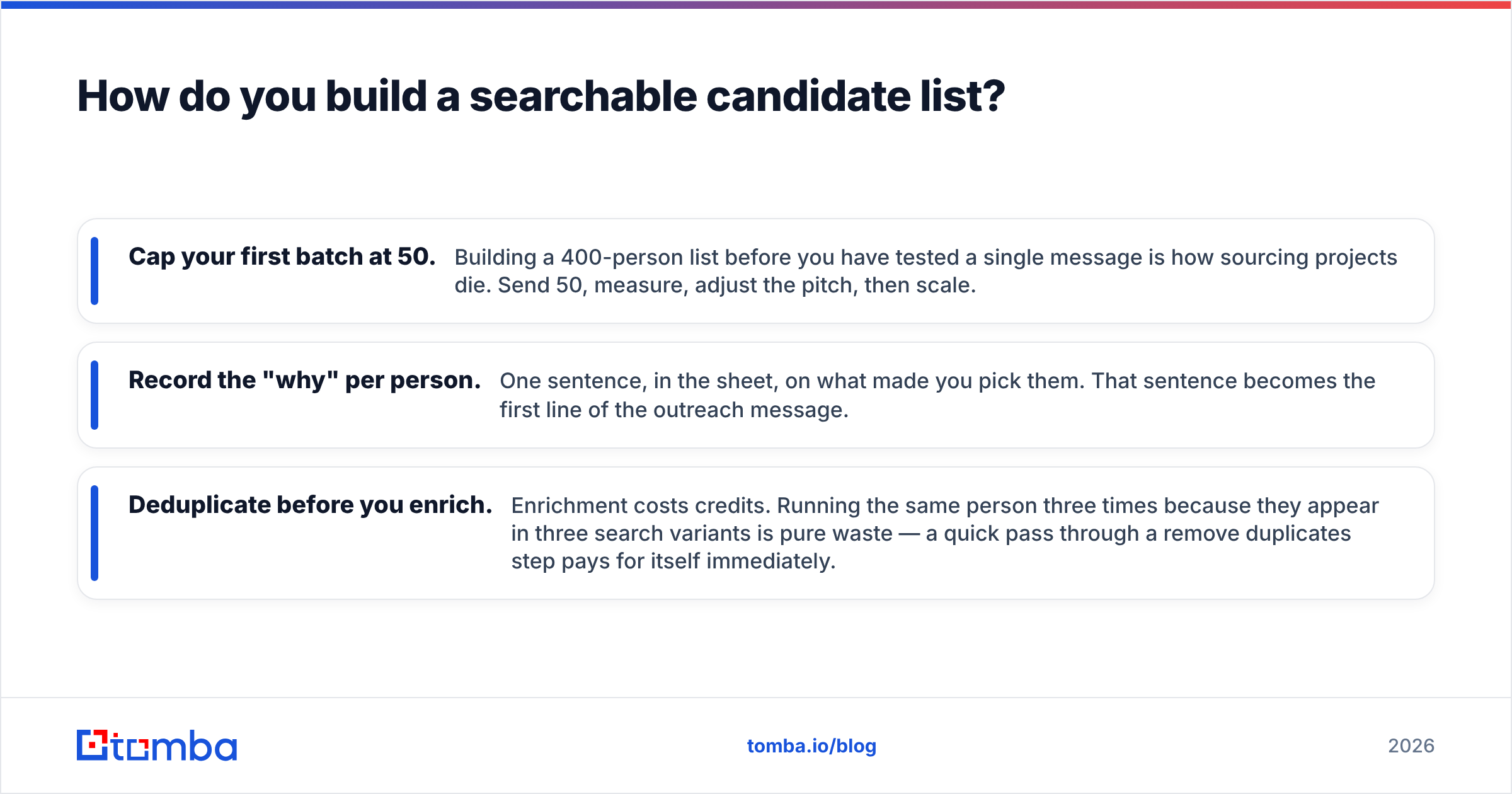
- Cap your first batch at 50. Building a 400-person list before you test a single message is how sourcing projects die. Send 50, measure, adjust the pitch, then scale.
- Record the "why" per person. One sentence, in the sheet, on what made you pick them. That sentence becomes the first line of the outreach message.
- Deduplicate before you enrich. Enrichment costs credits. The same person often shows up in three search variants, and paying to look them up three times is pure waste. A quick pass through a remove duplicates step pays for itself right away.
How do you find a candidate's email address?#
This is the stage where most sourcing pipelines break. You have a name and a company. You need a deliverable inbox.
There are four routes, in descending order of reliability.
Route 1 — Pattern inference plus verification. Most companies use one of about six email formats: first.last@, flast@, first@, firstl@, f.last@, or lastf@. Work out the company pattern once, then apply it to every candidate at that employer. Verify each result. A company email pattern lookup gets you the format. An email verifier confirms the address resolves before you send.
Route 2 — Direct lookup by name and domain. Query an email finder with the person's name and their employer's domain. This skips the inference step. It also returns a confidence score, which helps when you are deciding whether to burn a send on a maybe.
Route 3 — Domain-wide harvest. Sometimes you target several people at one company, such as a team you want to lift out. A domain search returns the addresses that exist at that domain, plus the known format. That is far faster than one-by-one lookups.
Route 4 — Personal email via reverse lookup. Some candidates are between roles, or their work email is monitored. A personal address is more appropriate there. A reverse email lookup confirms you matched the right person to an address you found elsewhere.
Whichever route you take, verify before you send. Corporate mail servers are getting harsher with unknown senders. A 10% bounce rate on a cold domain will tank your sender reputation within two campaigns. Verification is the cheapest insurance in the stack.

One ethical note that is also a practical one. In the EU and UK, contacting someone at their business address about a job generally falls under legitimate interest. You still owe them a clear identity, a real reason for the contact, and an easy opt-out. The GDPR guidance from the ICO is worth 20 minutes of any sourcer's time. Personal addresses face a stricter standard than work addresses, so treat them with more care.
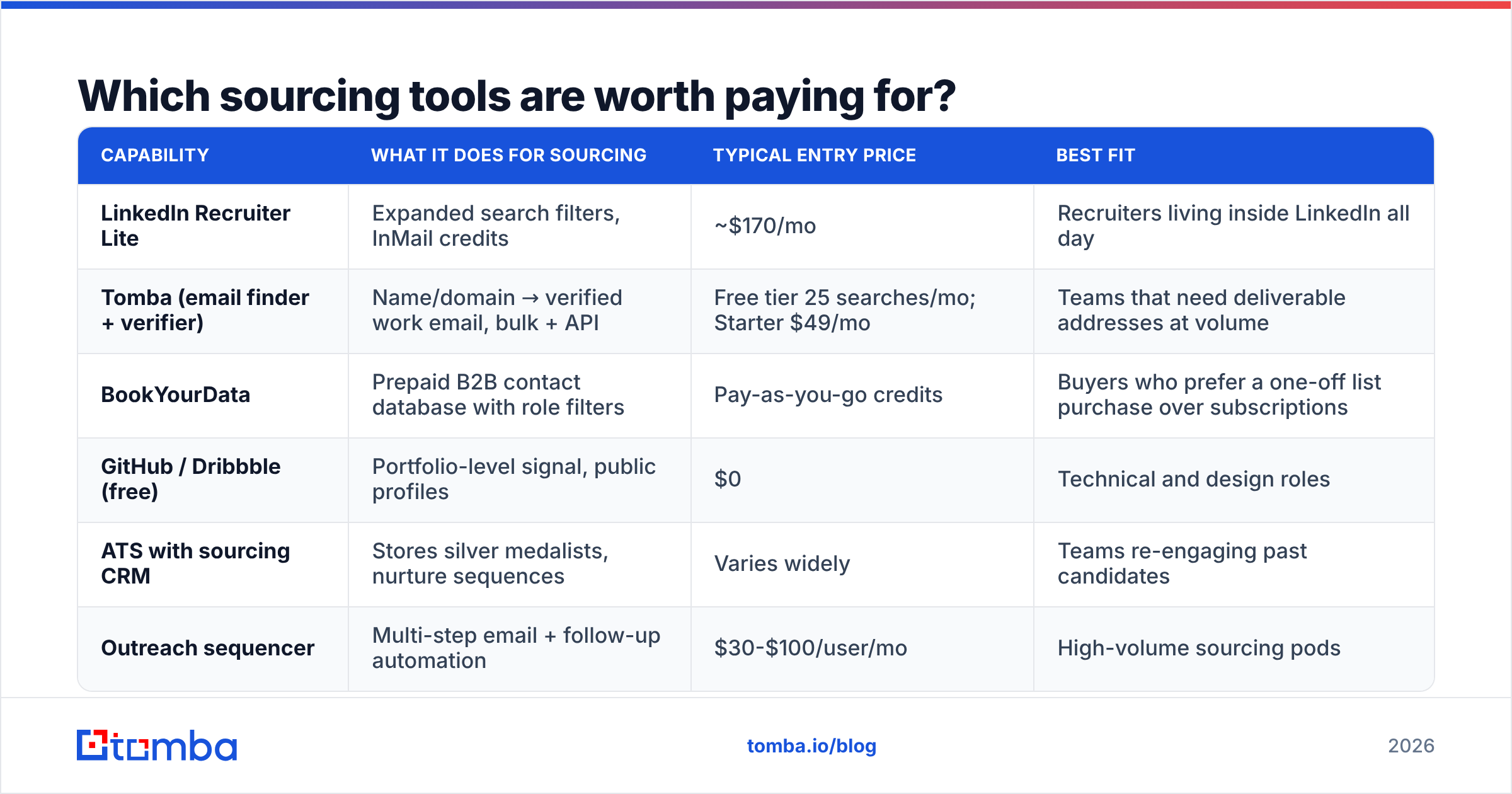
Which sourcing tools are worth paying for?#
Tooling splits into three buckets: search and discovery, contact enrichment, and outreach sequencing. Most teams overspend on bucket three and underspend on bucket two. That is backwards. A great sequence sent to a bad address is worth exactly zero.
| Capability | What it does for sourcing | Typical entry price | Best fit |
|---|---|---|---|
| LinkedIn Recruiter Lite | Expanded search filters, InMail credits | ~$170/mo | Recruiters living inside LinkedIn all day |
| Tomba (email finder + verifier) | Name/domain → verified work email, bulk + API | Free tier 25 searches/mo; Starter $49/mo | Teams that need deliverable addresses at volume |
| BookYourData | Prepaid B2B contact database with role filters | Pay-as-you-go credits | Buyers who prefer a one-off list purchase over subscriptions |
| GitHub / Dribbble (free) | Portfolio-level signal, public profiles | $0 | Technical and design roles |
| ATS with sourcing CRM | Stores silver medalists, nurture sequences | Varies widely | Teams re-engaging past candidates |
| Outreach sequencer | Multi-step email + follow-up automation | $30-$100/user/mo | High-volume sourcing pods |
A note on the stack you already own. Your candidate list lives in a spreadsheet — everyone's does. Enriching it in place beats exporting to a third system. A Google Sheets add-on or Excel add-in turns a column of names and domains into a column of verified emails, with no CSV round-trip. For larger runs, a bulk email finder handles a few thousand rows in one job. The Tomba API covers the case where your ATS should enrich each record on creation.

Most guides on how to source candidates skip the pricing math. Do not. Sourcing teams usually need 500 to 5,000 lookups a month. Model your real volume against the Tomba plans instead of buying the tier a salesperson suggests. The Free tier's 25 searches is enough to test accuracy on a role where you already know the answers.
What does a sourcing message that gets replies look like?#
Short, specific, and honest about being a cold approach. The structure that works:
Line 1 — the artifact. Name the specific thing that made you pick them. "Saw your talk on cutting Postgres p99s at PGConf" beats "Your profile stood out" by a mile. The second line is provably a template.
Line 2 — the role, compressed. Company, stage, team size, the actual problem. Not the job description. Not "an exciting opportunity."
Line 3 — the number. Give the compensation range, or at least the band. Withholding it is the top reason strong candidates never reply. They have been burned by four rounds of interviews ending in a lowball, and they screen for it now.
Line 4 — a low-commitment ask. "Worth 15 minutes?" converts better than "Can we schedule a call to discuss?" Same request, less ceremony.
Keep the whole thing under 120 words. Follow up twice, at four days and ten days, then stop. Research from LinkedIn's own talent blog shows personalized InMails beat templated ones by a wide margin. The same holds over email, and even more strongly. There you are not competing inside a purpose-built recruiting inbox.
Two mechanical things quietly decide whether any of this lands:
- Warm the sending domain. Sending from a new domain or a rarely used alias? Ramp volume over two to three weeks. An email warmup calculator will give you a realistic schedule.
- Check the message for spam triggers. Recruiting copy trips them often. "Opportunity," "compensation package," and heavy link use all raise your score. Run drafts through a spam checker before the first batch, not after the first bounce report.
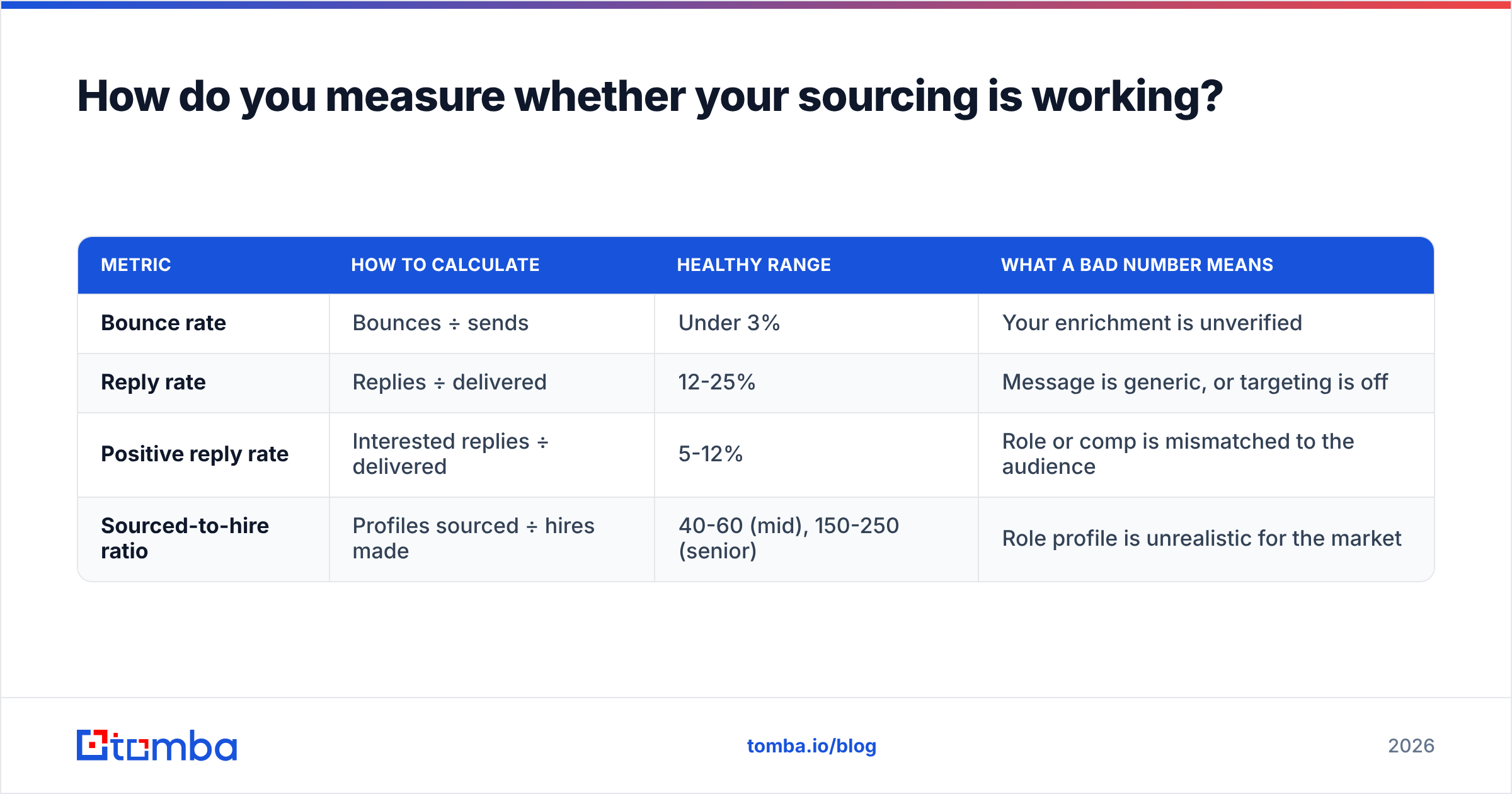
How do you measure whether your sourcing is working?#
Track four numbers. Anything more is a dashboard nobody reads.
| Metric | How to calculate | Healthy range | What a bad number means |
|---|---|---|---|
| Bounce rate | Bounces ÷ sends | Under 3% | Your enrichment is unverified |
| Reply rate | Replies ÷ delivered | 12-25% | Message is generic, or targeting is off |
| Positive reply rate | Interested replies ÷ delivered | 5-12% | Role or comp is mismatched to the audience |
| Sourced-to-hire ratio | Profiles sourced ÷ hires made | 40-60 (mid), 150-250 (senior) | Role profile is unrealistic for the market |
Diagnose in that order. A high bounce rate makes every later number meaningless, so fix deliverability first. Then reply rate, which is a message problem. Then positive reply rate. That one is usually a positioning or pay problem, not a sourcing problem. No amount of better sourcing fixes a role nobody wants.
Watch the ratio over quarters, not weeks. Sourcing volume is lumpy. One well-timed layoff at a competitor can distort a month, and you end up drawing the wrong conclusion about your process. Industry benchmarks from SHRM help with calibration. Read them with care, though: most published averages blend inbound and outbound, so they flatter sourcing metrics that should look worse.
What should you automate, and what should stay manual?#
Automate the mechanical steps: deduplication, enrichment, verification, sequence scheduling, and CRM logging. These are repeatable and high-volume. A script produces the same output a human would.
Keep four things manual: the search string, the shortlist decision, the first line of every message, and every reply. The moment personalization becomes a merge field, reply rates collapse. Candidates spot {{first_name}}, I was impressed by your work at {{company}} from across the room. The damage to your employer brand outlasts the campaign.
A reasonable division of labor for a two-person sourcing pod:
- Recruiter time: role intake, Boolean iteration, shortlisting, first lines, all replies, scheduling judgment calls.
- Automated: enrichment, verification, data enrichment of firmographic context, follow-up timing, bounce handling, list hygiene.
That split lets one recruiter run 200-300 active sourced conversations. The outreach still reads like a person wrote it.
Getting started#
Pick one open role. Build a 50-person list from LinkedIn plus one portfolio platform. Enrich and verify every address before you send a single message. Write 50 genuinely different first lines. It takes about 90 minutes, and it is the gap between a 6% reply rate and a 20% one. Measure, then scale what worked. That is how to source candidates without burning a month of budget on guesses.
The bottleneck is almost always step three. You can find candidates all day. Turning a name and an employer into an address that actually lands is where the pipeline stalls. The Tomba Email Finder is built for that step. Name plus domain in, verified work email with a confidence score out — through the web app, a spreadsheet add-on, or the API if your ATS should be doing it for you. Test the free tier's 25 searches against candidates whose emails you already know. That is the only benchmark worth trusting.
Related guides#
// get started
Find, verify and enrich your first contacts today
Start on the free plan with 25 searches a month, then scale when your team is ready.
Free plan · No credit card required · GDPR & CCPA
// about the author