How to Stop Emails From Going to Spam Gmail-Side (2026 Fix)
Gmail's 2024 bulk-sender rules quietly rewrote the deliverability playbook. Here are the eight fixes that actually move mail out of the spam folder — in the order that gets results fastest.
The short answer to how to stop emails from going to spam Gmail-side: fix authentication and list quality first. Subject lines barely matter. Gmail scores the sender before it reads a single word.
TL;DR
- Gmail's spam decision is roughly 60% reputation, 30% engagement, 10% content. Fix auth and list hygiene first.
- Since February 2024, senders pushing 5,000+ messages a day to Gmail need SPF, DKIM, DMARC, one-click unsubscribe, and a spam rate under 0.30%.
- The fastest win for most senders: verify your list and remove dead addresses. Bounces above 2–3% hit reputation directly.
- Google Postmaster Tools is the only free window into how Gmail scores your domain. Set it up first so you can measure.
- No DMARC record, no warmup history, and a purchased list? That combination lands in spam every time.
How to stop emails from going to spam Gmail-side: the three signals#
Gmail filters on three signals, weighted unevenly. Reputation — domain and IP history — carries the most weight. Engagement comes second: opens, replies, "not spam" clicks, and deletes without reading. Content matters least, despite being what most people worry about.
Think of it like a doorman at a members' club. He cares whether your name is on the list and whether the members know you. He barely glances at your outfit. Rewriting a subject line to avoid the word "free" is fixing your outfit while your name is still missing from the list.
The list, in Gmail's case, is your authentication record plus your complaint history. If those are broken, no amount of copy polish moves you to the primary tab.
What changed with Gmail's 2024 sender rules?#
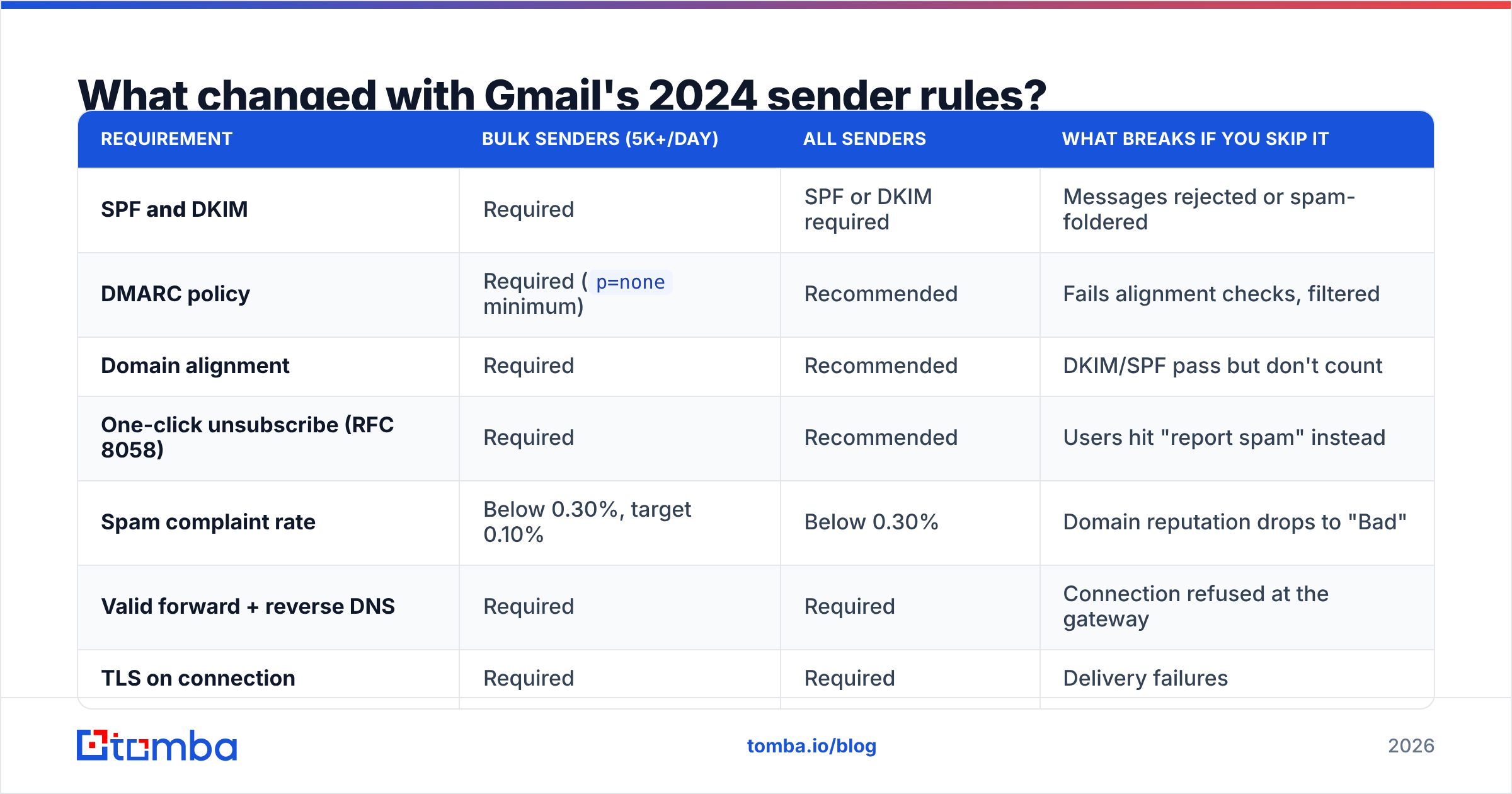
In October 2023, Google and Yahoo announced new requirements. They took effect in February 2024 and have been enforced progressively since. They hit bulk senders hardest — 5,000+ messages to Gmail addresses in any 24-hour window — but the scoring now touches everyone.
| Requirement | Bulk senders (5k+/day) | All senders | What breaks if you skip it |
|---|---|---|---|
| SPF and DKIM | Required | SPF or DKIM required | Messages rejected or spam-foldered |
| DMARC policy | Required (p=none minimum) |
Recommended | Fails alignment checks, filtered |
| Domain alignment | Required | Recommended | DKIM/SPF pass but don't count |
| One-click unsubscribe (RFC 8058) | Required | Recommended | Users hit "report spam" instead |
| Spam complaint rate | Below 0.30%, target 0.10% | Below 0.30% | Domain reputation drops to "Bad" |
| Valid forward + reverse DNS | Required | Required | Connection refused at the gateway |
| TLS on connection | Required | Required | Delivery failures |
The complaint threshold is the one that catches people. 0.30% sounds generous. In practice it means three complaints per thousand delivered messages. One badly targeted campaign to a stale list clears that in an afternoon, and Gmail's reputation memory runs for weeks.
Google's own bulk sender guidelines are the authoritative source. They get updated quietly, so bookmark them.

How do you fix authentication (SPF, DKIM, DMARC)?#
This is the non-negotiable layer. Start with the two records your ESP depends on:
- Publish an SPF record. One TXT record at your root domain, listing every service allowed to send as you. Keep it under 10 DNS lookups. Going over causes a permanent error and an automatic fail. Run it through an SPF checker after any change, because the lookup limit stays silent until it breaks.
- Enable DKIM with a 2048-bit key. Your ESP generates it. You publish the public key as a TXT record on a selector subdomain. 1024-bit keys still pass, but more filters now treat them as weak.
Then layer DMARC on top, slowly:
- Add DMARC at
p=nonewithruareporting. Start in monitor mode. Collect aggregate reports for two to four weeks. You will find at least one sending source you forgot about. - Move to
p=quarantine, thenp=reject. Only after the reports come back clean. Jumping straight to reject is how companies kill their own invoice emails.
Two details decide whether the work counts:
- Check alignment, not just pass/fail. SPF can pass while the visible From domain differs from the envelope domain. Gmail counts alignment, not the raw pass. This is the most common "but I have SPF" failure.
- Use a dedicated sending subdomain. Send campaigns from
mail.yourcompany.com, not the root domain that carries transactional and employee mail. Reputation damage stays contained.
Once those six are done, register the domain in Google Postmaster Tools. It shows domain reputation, spam rate, authentication pass rates, and delivery errors. That is the only first-party view of how Gmail scores you. Everything after this point is measurable.
Does list quality matter more than content?#
Yes, and it isn't close. A hard bounce tells Gmail you're sending to addresses you never confirmed exist. That pattern is the strongest single signal of spam-sending behavior. It's why bounce rate and reputation move together.
Keep hard bounces under 2%. Above 3%, expect visible placement damage within a week. Above 5%, your ESP may suspend the account before Gmail even weighs in.
Start with the list you already have:
- Remove hard bounces immediately — not at the end of the campaign. Any address returning a 550 is gone for good.
- Verify before sending, not after. Run the list through an email verifier so syntax errors, dead mailboxes, and role accounts get stripped pre-send.
- Handle catch-all domains separately. Catch-all servers accept everything, so normal SMTP checks can't confirm a mailbox exists. A dedicated catch-all verifier uses pattern and source signals instead of a binary accept.
Then deal with the contacts that quietly cost you reputation:
- Purge spam traps and role addresses.
info@,admin@, andsales@draw complaints at several times the rate of personal mailboxes. Recycled traps are silent reputation killers. - Sunset unengaged contacts. No open or click in 90–180 days? Move them to a re-engagement flow, then drop them. Gmail reads deletes-without-open as a negative signal.
- Never buy a scraped list. Purchased lists carry recycled traps by design. One trap hit can sink a domain that took months to build.
The cheapest version of this is to source clean contacts in the first place. Building from a verified B2B database or an email finder that returns a confidence score gives you a list that starts clean instead of one you repair.

How should you warm up a new domain or inbox?#
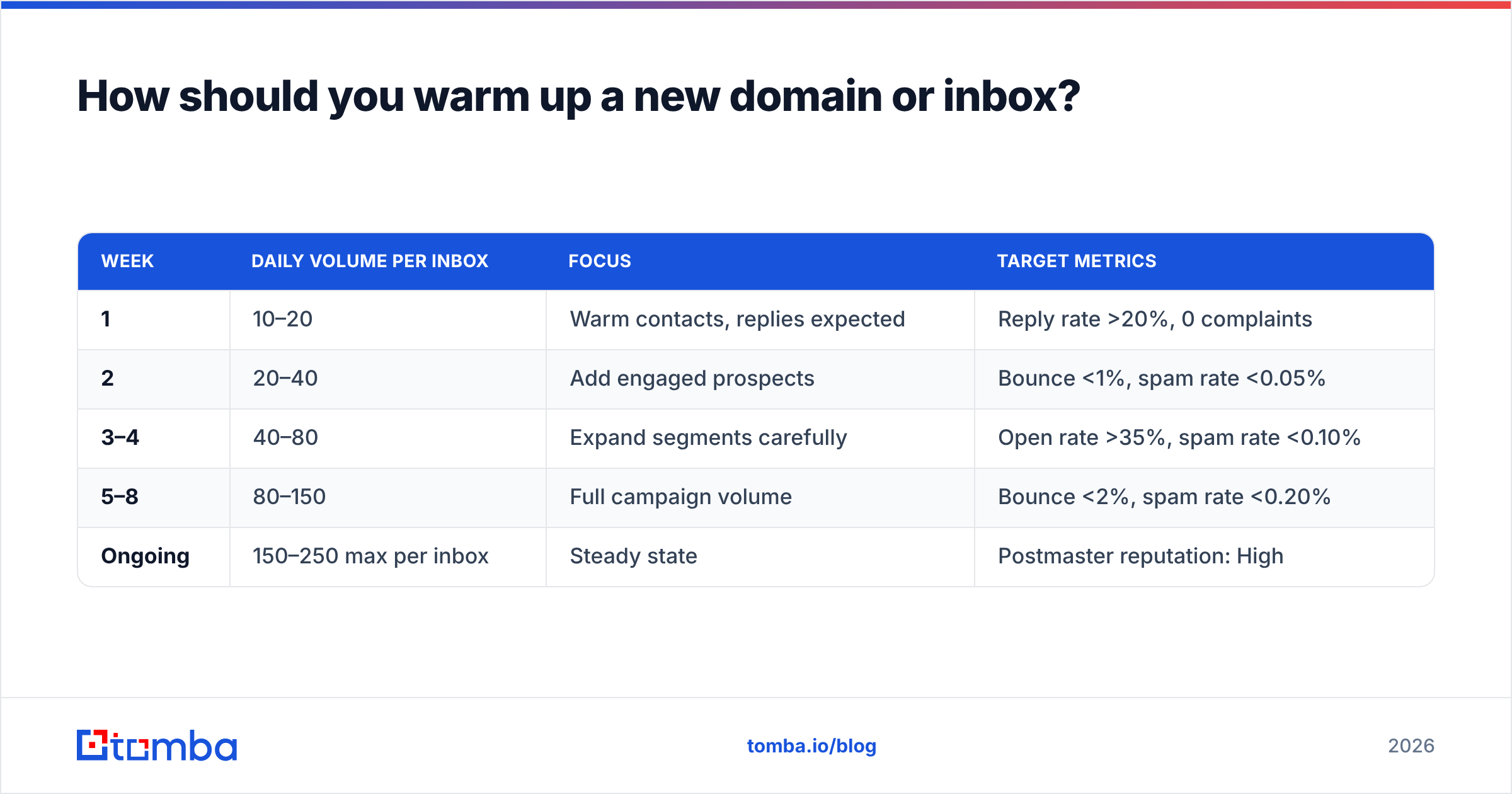
New domains have no reputation, and no reputation defaults to suspicion. Ramp volume gradually so Gmail can build a positive history.
| Week | Daily volume per inbox | Focus | Target metrics |
|---|---|---|---|
| 1 | 10–20 | Warm contacts, replies expected | Reply rate >20%, 0 complaints |
| 2 | 20–40 | Add engaged prospects | Bounce <1%, spam rate <0.05% |
| 3–4 | 40–80 | Expand segments carefully | Open rate >35%, spam rate <0.10% |
| 5–8 | 80–150 | Full campaign volume | Bounce <2%, spam rate <0.20% |
| Ongoing | 150–250 max per inbox | Steady state | Postmaster reputation: High |
Two rules override the table. First, replies matter more than volume. Twenty messages that earn five human replies build more reputation than two hundred that earn none. Second, never spike. Going from 30 sends to 300 in a day looks like a compromised account, and Gmail treats it as one.
Automated warmup networks help, but they are easier to detect now. Reciprocal replies between the same pool of seed accounts follow a recognizable pattern. Use them to supplement real conversations, not to replace them. A warmup calculator tells you how many days you need at your target volume before campaigns are safe.
[Suggested visual: Google Postmaster Tools domain reputation graph showing a ramp from "Low" to "High" over an 8-week warmup period]
What content changes actually move the needle?#
Content is the smallest lever. A few things still hurt:
- Link-to-text ratio. More than one or two links in a short cold email reads as promotional. Tracking links on an unauthenticated redirect domain are worse. Set up a custom tracking domain with its own CNAME.
- Image-heavy HTML. A single-image email with twelve words of text is a classic spam signature. Plain-text-heavy messages perform better for cold outreach anyway.
- Attachments in cold email. Don't. Link to a hosted document instead.
The rest comes down to links and how you let people leave:
- Shortened URLs. bit.ly and similar shorteners are shared reputation you don't control.
- Spam-trigger phrasing. The classic list ("guaranteed", "risk-free", "act now") matters far less than it did in 2015. Stacking five of them in one message still fires filters. Run a draft through a spam checker if you're unsure.
- Missing unsubscribe. Put RFC 8058 one-click unsubscribe in the header and a visible link in the footer. Making opt-out hard turns unsubscribes into spam complaints — the most expensive trade in email.
The best content change is relevance. A message that explains why this person is receiving it earns replies, and replies are the strongest positive signal Gmail measures. Personalization built on real data enrichment — actual role, actual company detail — beats mail-merge tokens by a wide margin.
How do you diagnose a domain that's already in spam?#
Work through this sequence instead of changing five things at once. Start by finding the cause:
- Check Postmaster Tools. Is domain reputation Bad, Low, Medium, or High? Is spam rate above 0.30%? This tells you whether the problem is reputation or delivery.
- Check blacklists. Spamhaus, Barracuda, SORBS. A blacklist checker covers the main ones in one pass. Delisting usually takes 24–72 hours once the cause is fixed.
- Verify auth headers on a real message. Send to a Gmail address you control and open "Show original". Confirm SPF, DKIM, and DMARC all read PASS, and that the DKIM domain matches your From domain.
- Audit the last 30 days of bounces. If bounce rate crossed 3%, you found your cause.
Then rebuild:
- Pause and re-warm. Drop to your most engaged 10% of contacts at low volume for two to three weeks. Reputation recovers on positive signal, not on time alone.
- Check for compromise. A sudden collapse with no campaign change often means someone else is sending as you. DMARC aggregate reports will show the unauthorized source.
Recovery takes three to six weeks of clean sending. There is no reset button. Any vendor selling one is selling you a new domain, which is a different thing.
Is a dedicated IP worth it?#
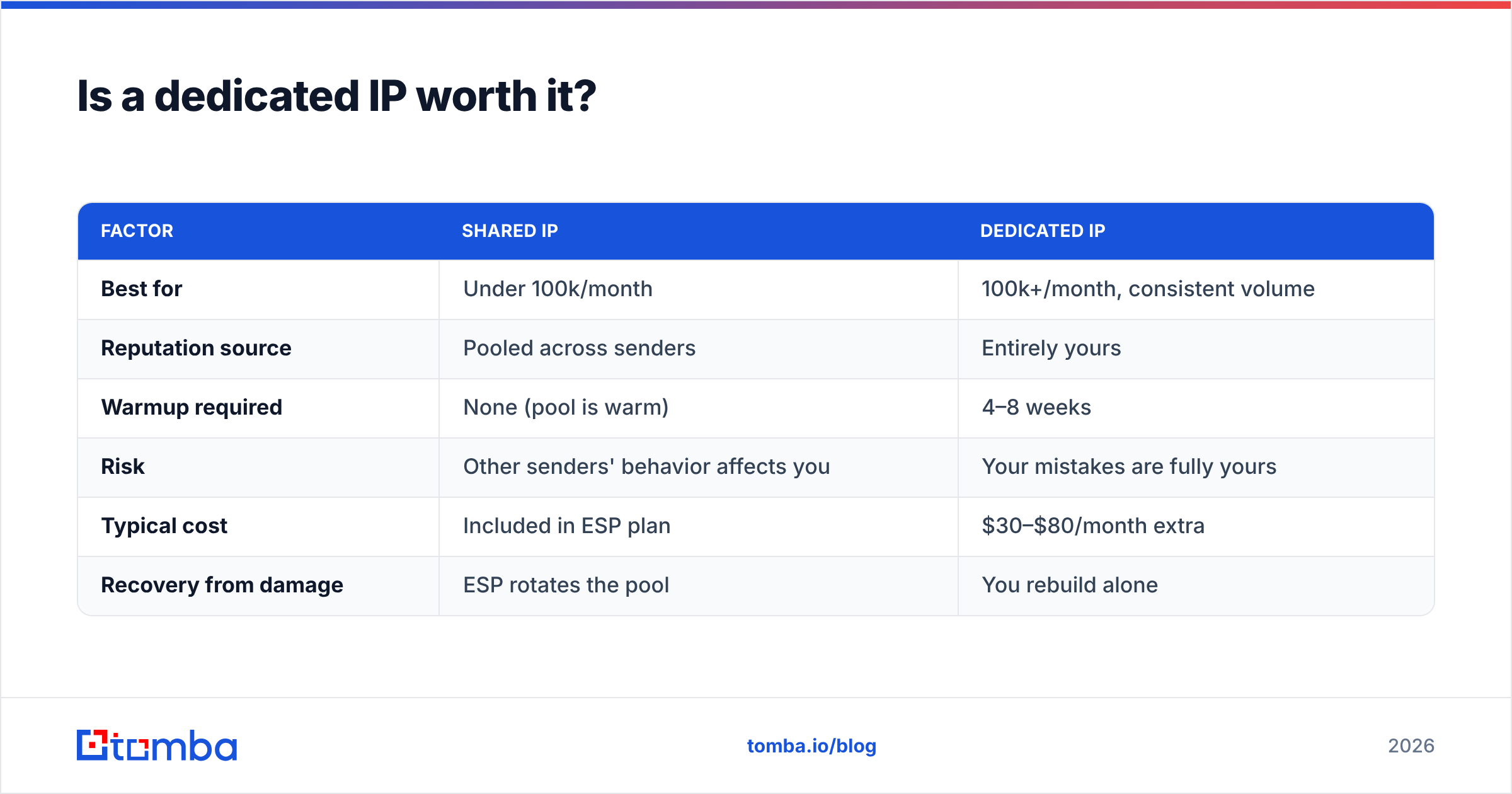
Only above roughly 100,000 messages a month. Below that, a dedicated IP is worse than shared. You don't send enough volume to hold a stable reputation, so every campaign looks like a cold start.
| Factor | Shared IP | Dedicated IP |
|---|---|---|
| Best for | Under 100k/month | 100k+/month, consistent volume |
| Reputation source | Pooled across senders | Entirely yours |
| Warmup required | None (pool is warm) | 4–8 weeks |
| Risk | Other senders' behavior affects you | Your mistakes are fully yours |
| Typical cost | Included in ESP plan | $30–$80/month extra |
| Recovery from damage | ESP rotates the pool | You rebuild alone |
For most B2B teams sending under 50,000 messages a month, the right answer is a reputable shared pool plus a dedicated sending subdomain. Domain reputation now outweighs IP reputation in Gmail's model. The subdomain gives you most of the isolation benefit at none of the warmup cost. Validity's deliverability research tracks this shift in detail if you want the data behind it.
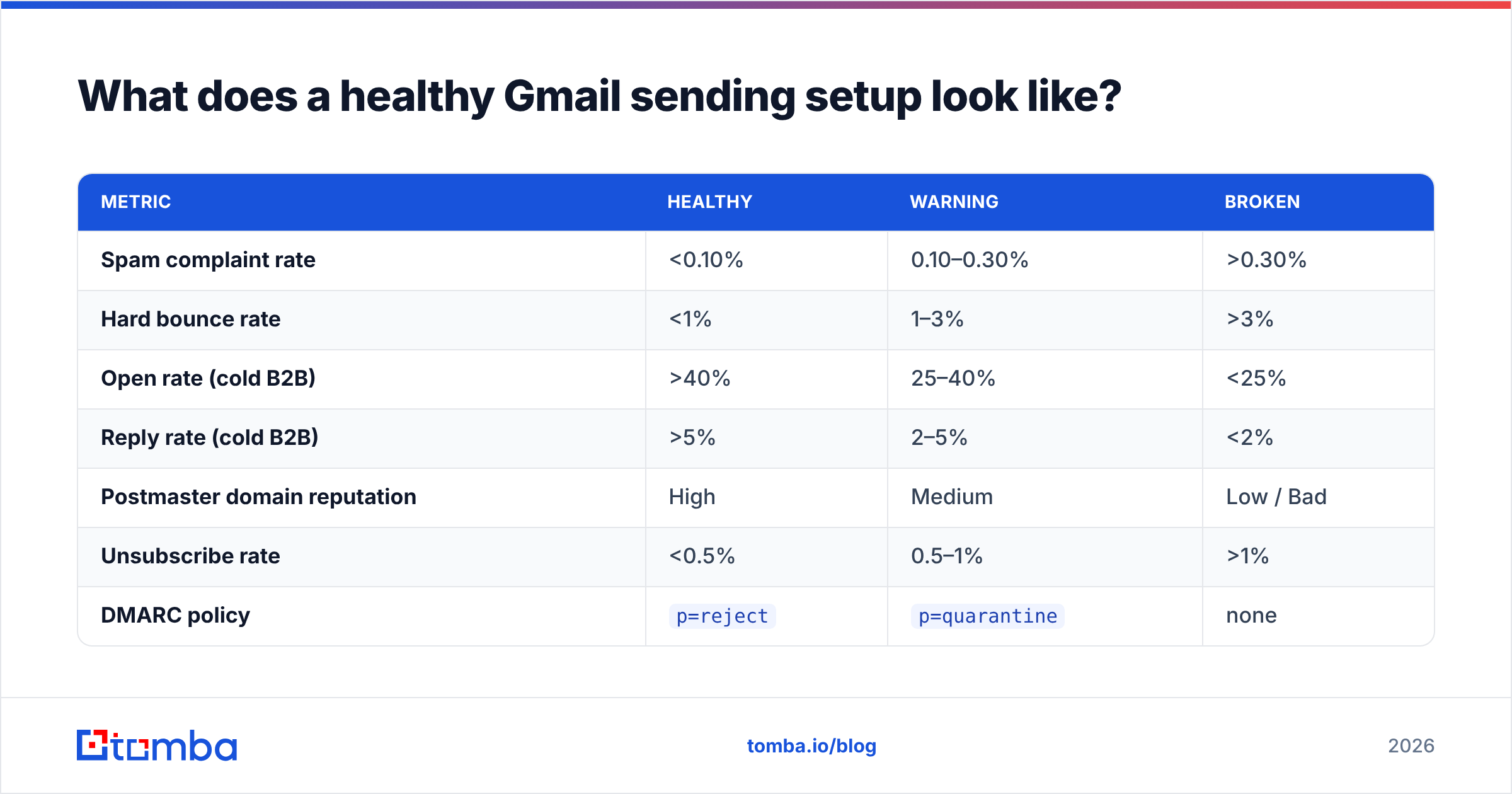
What does a healthy Gmail sending setup look like?#
Here's the target state, with the thresholds to hold yourself to:
| Metric | Healthy | Warning | Broken |
|---|---|---|---|
| Spam complaint rate | <0.10% | 0.10–0.30% | >0.30% |
| Hard bounce rate | <1% | 1–3% | >3% |
| Open rate (cold B2B) | >40% | 25–40% | <25% |
| Reply rate (cold B2B) | >5% | 2–5% | <2% |
| Postmaster domain reputation | High | Medium | Low / Bad |
| Unsubscribe rate | <0.5% | 0.5–1% | >1% |
| DMARC policy | p=reject |
p=quarantine |
none |
Audit these monthly. The pattern that predicts trouble isn't one bad number. It's bounce rate and complaint rate drifting up together over three or four campaigns while open rate slides. By the time reputation flips to Low, you're already six weeks from recovery.
One more habit worth building: check your sender reputation before a big send, not after. Two minutes of pre-flight beats a month of remediation.
Where should you start today?#
If you do nothing else this week, do three things in order. Publish DMARC at p=none with reporting enabled. Register in Google Postmaster Tools. Verify your entire active list. Together they take under two hours, and they account for most of the placement gain actually available to you.
Everything downstream — warmup schedules, copy tests, dedicated IPs — only pays off once the foundation holds. And the foundation is mostly about who you email, not what you say to them.
That's where sourcing matters. If much of your list is guessed addresses, permutated patterns, or scraped contacts of unknown age, no tactic saves you. You keep bouncing into the same wall. Tomba's Email Finder returns verified professional addresses with a confidence score attached, so the contacts entering your sequences actually exist. The free tier covers 25 searches a month if you want to test the accuracy against your current source. Paid plans start at $49/month, with full Tomba pricing if you need bulk volume or API access.
That is the whole answer to how to stop emails from going to spam Gmail-side: clean input, clean reputation, inbox placement — in that order.
Related guides#
// get started
Find, verify and enrich your first contacts today
Start on the free plan with 25 searches a month, then scale when your team is ready.
Free plan · No credit card required · GDPR & CCPA
// about the author