How To Stop Gmail From Blocking Emails: A 2026 Fix Guide
Gmail blocks mail for reasons it rarely spells out. Here are the exact authentication, list-hygiene, and volume fixes that get your cold email back into the inbox — with the error codes decoded.
TL;DR — how to stop Gmail from blocking emails
- Gmail rarely "blocks" you at random. Nine times out of ten it is one of four things: missing or broken authentication (SPF, DKIM, DMARC), a spam-complaint rate above 0.3%, a bounce rate above 2-3%, or a volume ramp that looks like a botnet.
- Since Google's February 2024 bulk-sender rules — tightened again through 2025 — anyone sending 5,000+ messages a day to Gmail addresses must pass all three auth checks and offer one-click unsubscribe. There is no grace period anymore.
- Read the actual SMTP error.
550 5.7.26means authentication failed.421 4.7.0means rate limiting.550 5.7.1means reputation. Each has a different fix, and guessing wastes weeks.
The last two items are habits rather than one-off fixes:
- List hygiene is the fastest lever most teams ignore. Verifying your list before send drops hard bounces below 1% within a single campaign.
- Warmup is not optional for a new domain. Ramp from 10-20 sends/day to 40-50 over 4-6 weeks, and keep per-inbox volume under ~50/day for cold outreach indefinitely.
Gmail handles roughly 1.8 billion mailboxes. When it decides your mail is a risk, you do not get a phone call — you get a bounce string, a silent spam-folder placement, or nothing at all. This guide covers how to stop Gmail from blocking emails: diagnose which of those is happening, then fix it in order of impact.
Why is Gmail blocking your emails in the first place?#
Gmail's filter is a reputation engine, not a rulebook. It scores your sending domain and IP against a running history of how recipients react to you. Three signals dominate:
- Identity — Can Gmail cryptographically confirm this mail came from who it claims? That is SPF, DKIM, and DMARC. Fail these and you are untrusted by default.
- Recipient reaction — Do people open, reply, and move you to a folder? Or do they mark you as spam and delete unread? Google's stated threshold is a spam complaint rate below 0.10%, and it treats 0.30% as a hard ceiling that triggers throttling.
- Pattern — Does your sending look human? A brand-new domain firing 400 messages on day one, all to addresses that bounce, reads as abuse regardless of content.
Content matters less than most people assume. You can write a perfectly clean email and still get blocked if your DMARC record is missing. Conversely, a mediocre email from a well-authenticated domain with a two-year history and real reply traffic lands fine.
What do Gmail's bounce codes actually mean?#
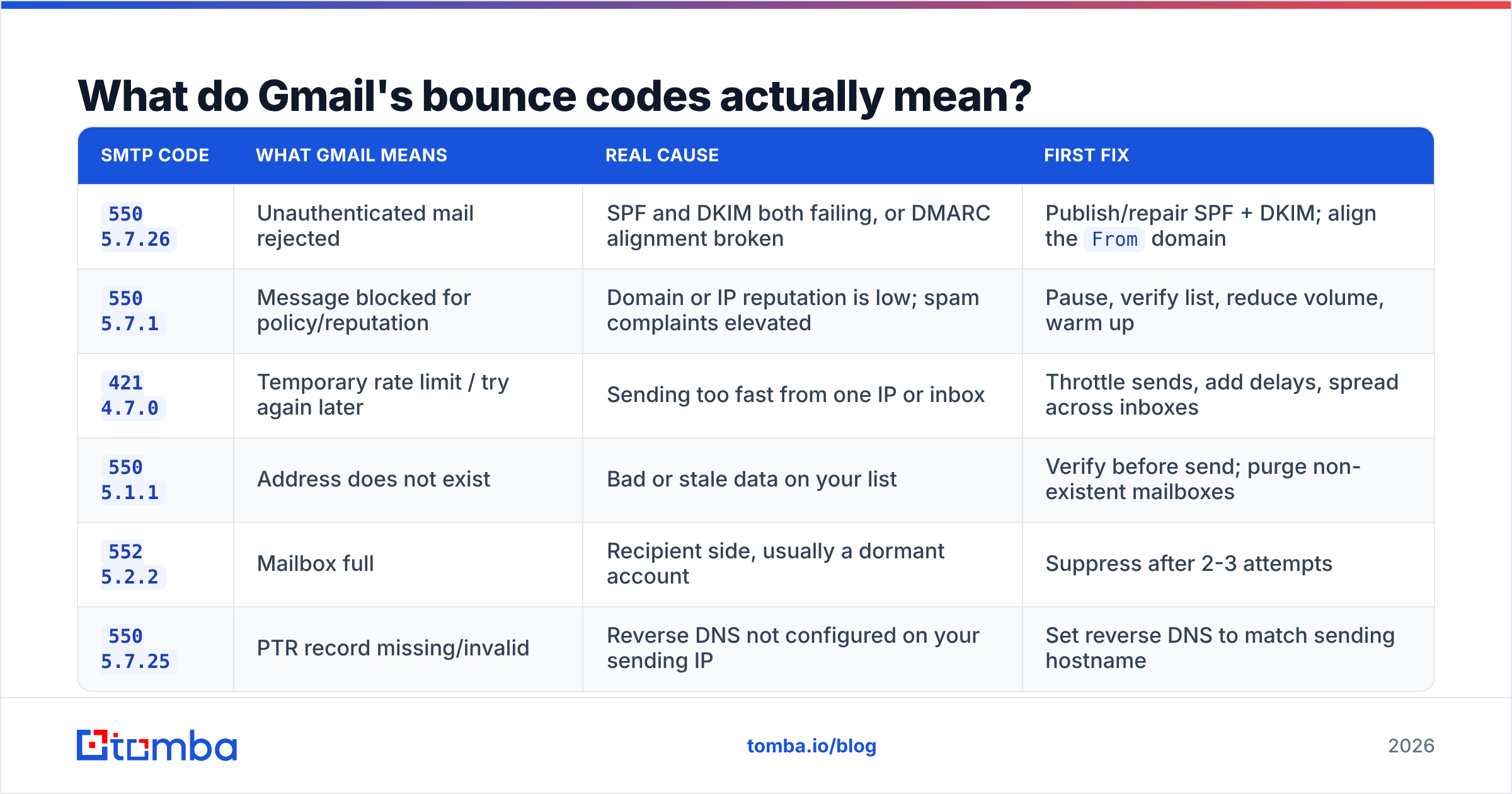
Stop guessing and read the rejection. Gmail returns specific enhanced status codes, and each maps to a different repair job.
| SMTP code | What Gmail means | Real cause | First fix |
|---|---|---|---|
550 5.7.26 |
Unauthenticated mail rejected | SPF and DKIM both failing, or DMARC alignment broken | Publish/repair SPF + DKIM; align the From domain |
550 5.7.1 |
Message blocked for policy/reputation | Domain or IP reputation is low; spam complaints elevated | Pause, verify list, reduce volume, warm up |
421 4.7.0 |
Temporary rate limit / try again later | Sending too fast from one IP or inbox | Throttle sends, add delays, spread across inboxes |
550 5.1.1 |
Address does not exist | Bad or stale data on your list | Verify before send; purge non-existent mailboxes |
552 5.2.2 |
Mailbox full | Recipient side, usually a dormant account | Suppress after 2-3 attempts |
550 5.7.25 |
PTR record missing/invalid | Reverse DNS not configured on your sending IP | Set reverse DNS to match sending hostname |
A 4.x.x code is temporary — the mail may still deliver on retry. A 5.x.x code is permanent and means your infrastructure or your data needs work before you send again. If you are seeing a mix of 550 5.1.1 and 550 5.7.1 in the same campaign, the bad data is almost certainly causing the reputation problem. Fix the list first.
How do you fix authentication (SPF, DKIM, DMARC)?#
This is the single highest-leverage step, and it is a one-afternoon job.
1. SPF. Publish a TXT record listing every service allowed to send as your domain. One record only — multiple SPF records invalidate each other. Keep DNS lookups under 10 or the record fails silently. Check yours with an SPF checker before you assume it works. If you need a refresher on what the record does, the SPF record definition covers it.
2. DKIM. Generate a key pair in your sending platform and publish the public key at the selector your provider gives you. Google Workspace defaults to a 1024-bit key — switch to 2048-bit. DKIM survives forwarding, which SPF often does not, so it carries more weight in DMARC alignment.
3. DMARC. Start at p=none with an rua= address so you collect reports without blocking your own mail. After two weeks of clean reports, move to p=quarantine, then p=reject. Google's own bulk sender guidelines treat a published DMARC record as table stakes, not a bonus.
4. Alignment. This is where most teams quietly fail. DMARC requires that the domain in your visible From: header matches the domain that passed SPF or DKIM. If you send from you@company.com but your ESP signs as mailer.esp.com with no custom domain configured, you pass DKIM and still fail DMARC. Configure a custom sending domain in your platform.
5. Reverse DNS. If you send from a dedicated IP, the PTR record must resolve back to your sending hostname. Missing rDNS is a straight 550 5.7.25.
Once these five are in place, resend a test to a Gmail address and open "Show original." You want to see SPF: PASS, DKIM: PASS, DMARC: PASS. Anything else is unfinished work. Broader background on how these signals roll up into email deliverability is worth reading if you own this long-term.
How does list quality cause Gmail blocks?#
Gmail watches your bounce rate as closely as your complaint rate, because high bounces are the fingerprint of a scraped or purchased list.
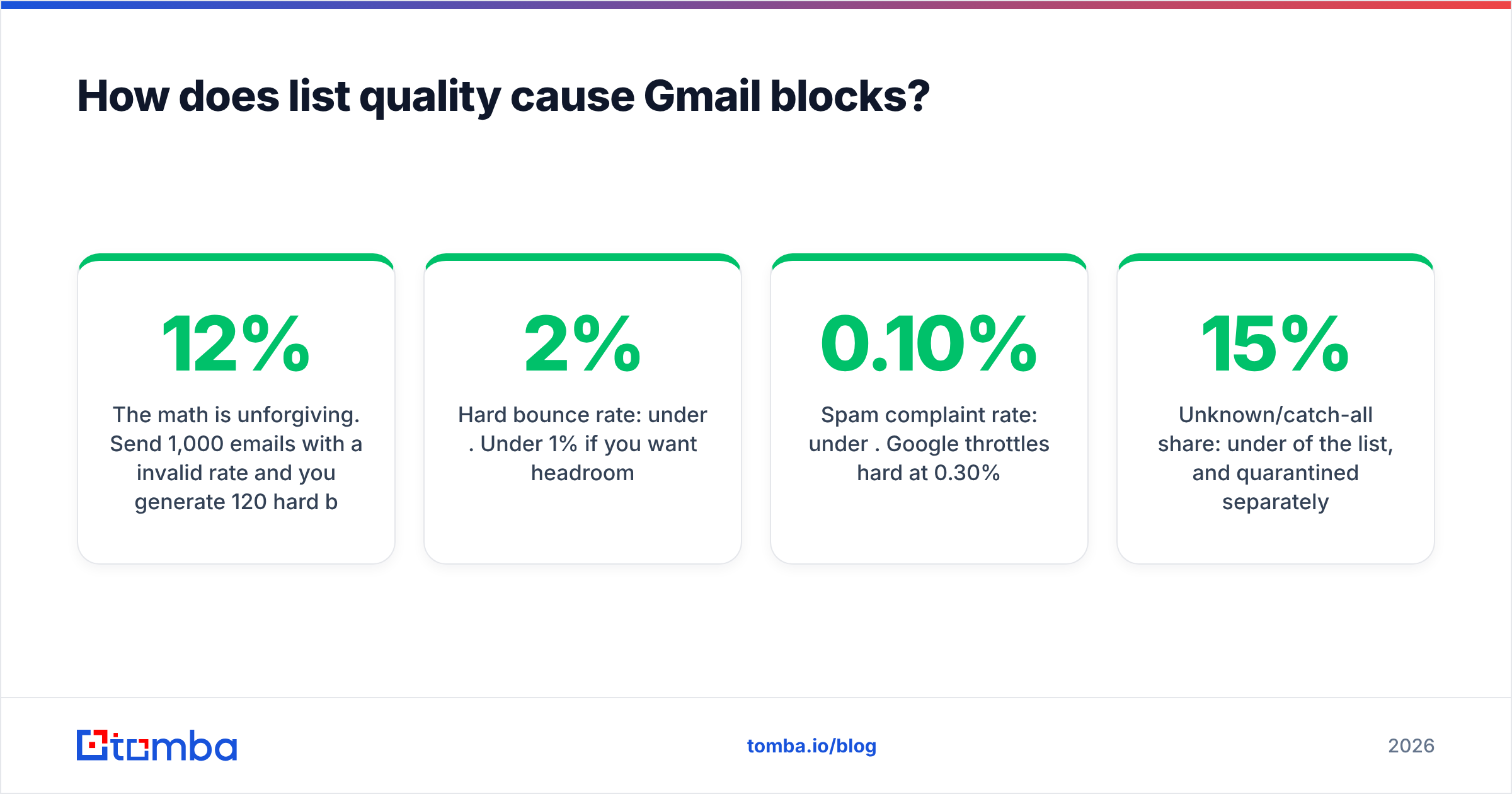
The math is unforgiving. Send 1,000 emails with a 12% invalid rate and you generate 120 hard bounces in one afternoon. Gmail's filters read that as someone dictionary-attacking mailboxes. Reputation drops, and your valid recipients start landing in spam — which then raises complaints, which drops reputation further. That loop is why a single bad list can poison a domain for months.
Target thresholds before any send:
- Hard bounce rate: under 2%. Under 1% if you want headroom.
- Spam complaint rate: under 0.10%. Google throttles hard at 0.30%.
- Unknown/catch-all share: under 15% of the list, and quarantined separately.
- Role addresses (
info@,sales@,admin@): suppress them. They complain at multiples of the rate of personal mailboxes.
Practical sequence: source contacts, run them through an email verifier to strip invalid and disposable addresses, then run the remaining ambiguous domains through a catch-all verifier so you know which "accept-all" servers genuinely deliver. Catch-all domains are not automatically bad — they are just unverifiable by simple SMTP handshake, so they need separate treatment and their own volume cap.
If you are building lists rather than buying them, sourcing accurate addresses at the point of discovery beats cleaning garbage later. A domain search that returns verified addresses with confidence scores keeps the invalid rate low from the start.
What sending volume keeps you under Gmail's radar?#
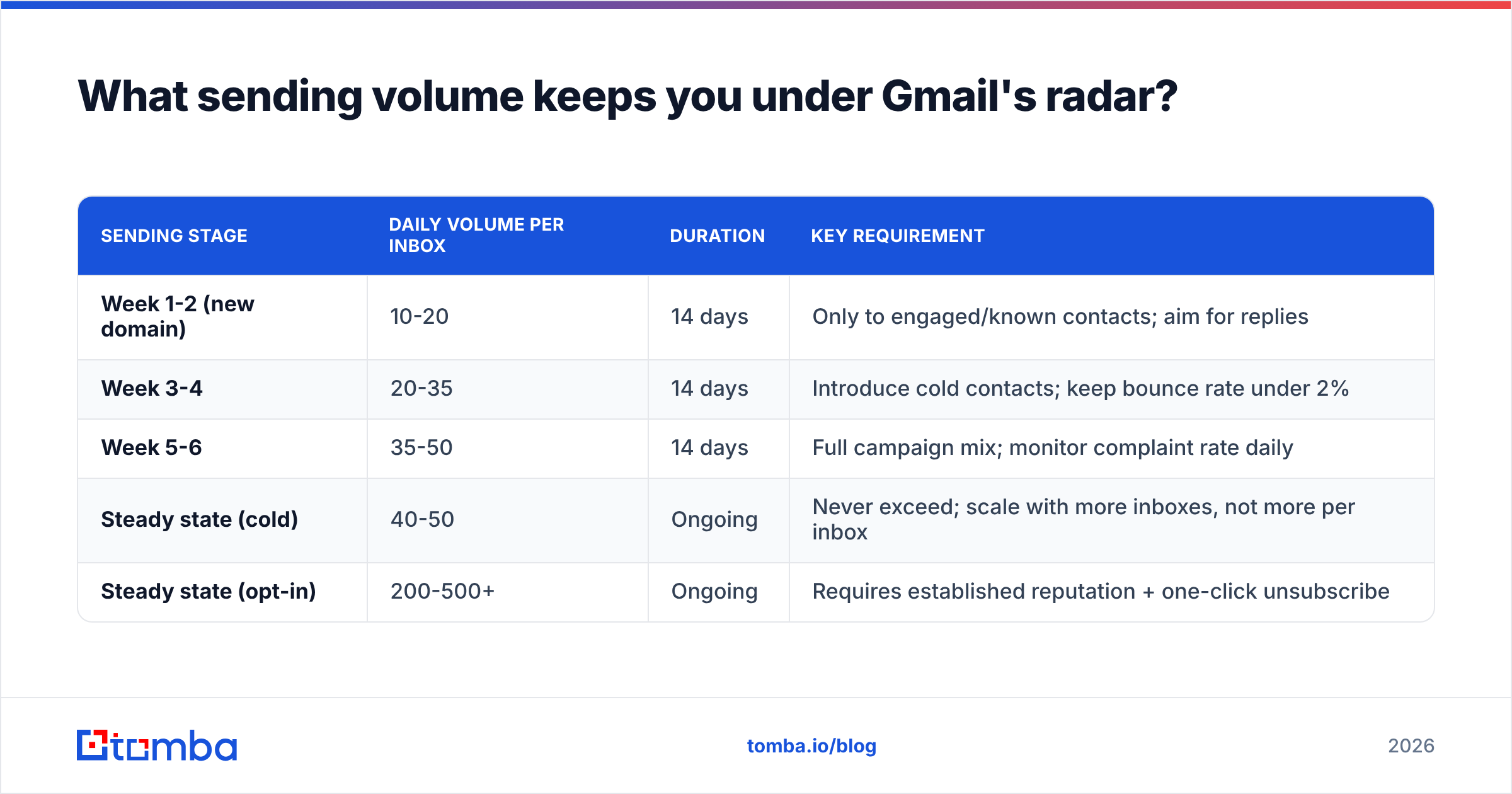
Volume patterns matter as much as volume itself. Gmail is modelling behaviour over time, so consistency beats bursts.
| Sending stage | Daily volume per inbox | Duration | Key requirement |
|---|---|---|---|
| Week 1-2 (new domain) | 10-20 | 14 days | Only to engaged/known contacts; aim for replies |
| Week 3-4 | 20-35 | 14 days | Introduce cold contacts; keep bounce rate under 2% |
| Week 5-6 | 35-50 | 14 days | Full campaign mix; monitor complaint rate daily |
| Steady state (cold) | 40-50 | Ongoing | Never exceed; scale with more inboxes, not more per inbox |
| Steady state (opt-in) | 200-500+ | Ongoing | Requires established reputation + one-click unsubscribe |
Three rules that keep this from breaking:
- Scale horizontally. Need 500 sends a day? Use 10 inboxes at 50, not 2 inboxes at 250. Per-inbox volume is what Gmail scores.
- Randomise intervals. Sending 50 messages at exactly 60-second intervals is a machine signature. Use variable delays of 3-10 minutes.
- Send on a schedule that looks like work. Business hours in the recipient's timezone, weekdays only. Volume at 3 a.m. Sunday reads as automated.
Use a warmup calculator to build the ramp schedule rather than eyeballing it, and keep an eye on your sender reputation as you climb.
How do you monitor Gmail's view of your domain?#
You cannot fix what you cannot see. Three tools give you Gmail's own read:
Google Postmaster Tools. Free, and the only place you get Gmail's actual spam-rate number for your domain. Verify your domain, then watch four dashboards: Spam Rate, IP Reputation, Domain Reputation, and Authentication. It needs a few hundred daily sends to Gmail before data appears. If Domain Reputation reads "Low" or "Bad", stop sending cold entirely and rehabilitate with engaged recipients only.
DMARC aggregate reports. Your rua= address collects XML reports from every major mailbox provider showing which sources are sending as you and whether they pass. This is how you find a shadow-IT tool spraying unauthenticated mail from your domain.
Blacklist monitoring. Check your sending IP and domain against the major RBLs — Spamhaus, SpamCop, Barracuda. A blacklist checker run weekly catches listings before they cost you a quarter of your pipeline. Delisting from Spamhaus is usually fast once the underlying cause is fixed; delisting repeatedly without fixing the cause is not.
Set a weekly cadence: Postmaster on Monday, blacklist scan and bounce-log review on Friday. Ten minutes each.
What content and structure changes reduce blocks?#
Content is the last 10%, but it is not zero.
- Kill the image-only email. A message that is one large image with three words of text is the classic spam shape. Keep a healthy text-to-image ratio and always include real HTML text.
- Limit links. One or two links in a cold email. Never use a public link shortener — bit.ly and its peers are heavily abused and carry their own reputation baggage.
- Match your link domain to your sending domain where possible. Cross-domain link farms trigger filters.
- Include a plain-text alternative to every HTML message. Multipart/alternative is expected; HTML-only is a small negative signal.
Two more matter specifically for bulk and cold senders:
- One-click unsubscribe (RFC 8058). Required for bulk senders since 2024. Add
List-UnsubscribeandList-Unsubscribe-Postheaders. For cold B2B outreach, a single-line plain-text opt-out at the bottom does the same job and cuts complaints materially. - Skip the spam-word paranoia, but check the score. Words like "free" will not sink you on their own. Structural problems — broken HTML, mismatched encoding, hidden text — will. Run drafts through a spam checker before a large send.
Also: reply-worthy emails outperform on deliverability, not just on conversion. Gmail heavily weights positive engagement. An email that earns a reply from 5% of recipients materially improves your domain reputation, which improves inbox placement for the next campaign. Optimising for replies and optimising for deliverability are the same project.
How do you recover a domain Gmail is already blocking?#
If you are in the hole, sequence matters. Do these in order — skipping to step 4 without doing 1-3 just reburns the domain.
- Stop all cold sending immediately. Every additional bounce or complaint deepens the hole. Pause for a minimum of 7 days.
- Fix authentication completely. SPF, DKIM, DMARC, alignment, rDNS. Verify with a live test to Gmail and read the headers.
- Purge and re-verify the entire list. Not a sample — everything. Remove hard bounces, role addresses, and anything unverifiable. Quarantine catch-alls.
Only once those three are done do you restart sending:
- Restart with engaged recipients only. Existing customers, people who have replied before, opt-in subscribers. 10-20 sends a day for two weeks. You are buying positive engagement signals.
- Reintroduce cold traffic slowly. Add 10 cold sends a day, increasing weekly, and watch Postmaster Tools daily. If spam rate creeps above 0.10%, pull back.
- Consider a secondary domain for cold outreach. Keep your primary domain — the one carrying transactional mail, invoices, and support — off cold campaigns entirely. Use lookalike domains (
getcompany.com,company-hq.com) for outbound so a mistake never threatens your core business mail.
Recovery from "Low" domain reputation typically takes 4-8 weeks with disciplined sending. Recovery from "Bad" often takes longer than buying a new domain and warming it correctly, which is why most experienced teams treat a burned domain as a sunk cost and move on — after fixing the process that burned it.
How to stop Gmail from blocking emails: the fastest fixes#
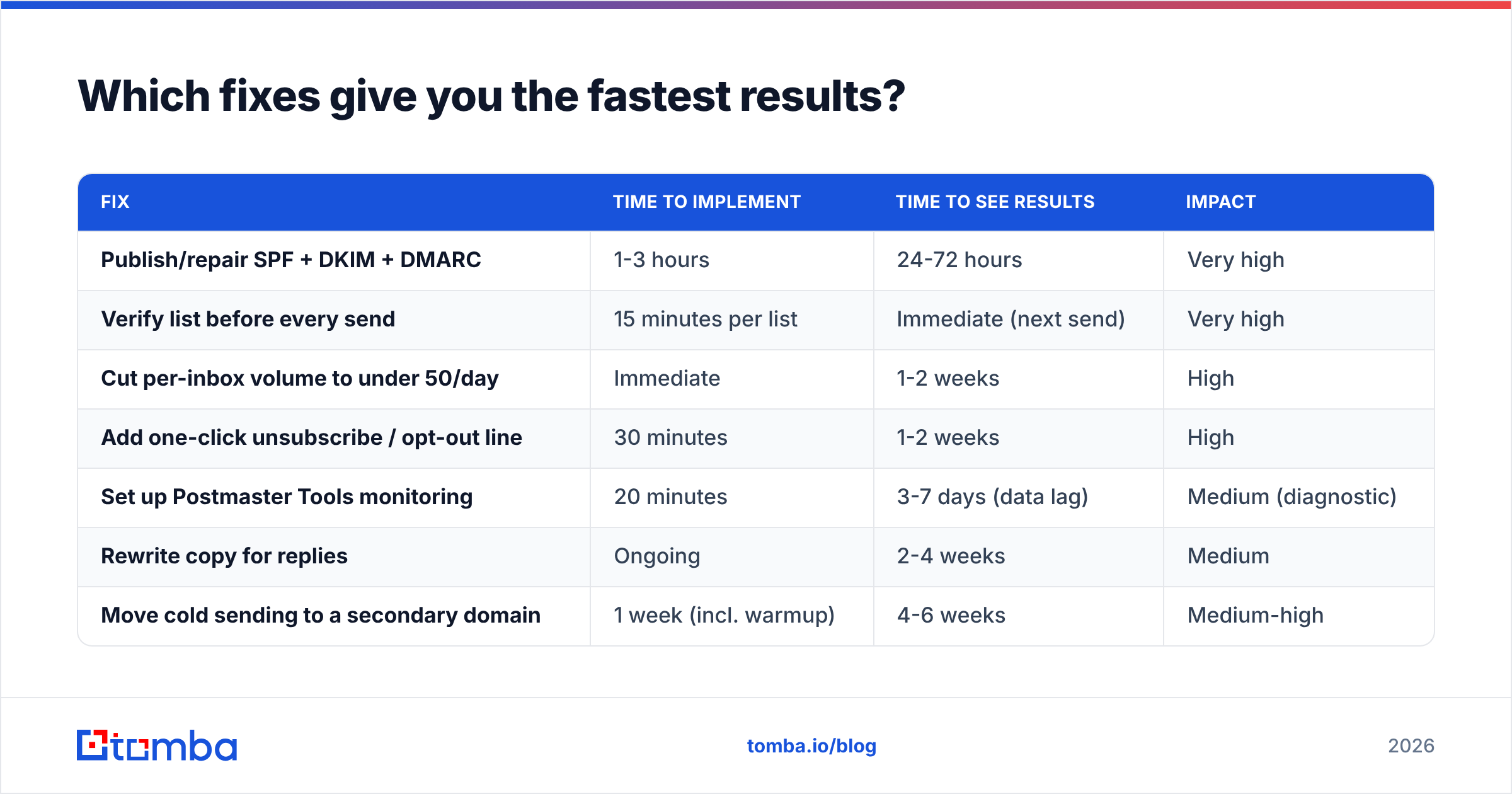
If you have limited time, this is how to stop Gmail from blocking emails in order of return on effort:
| Fix | Time to implement | Time to see results | Impact |
|---|---|---|---|
| Publish/repair SPF + DKIM + DMARC | 1-3 hours | 24-72 hours | Very high |
| Verify list before every send | 15 minutes per list | Immediate (next send) | Very high |
| Cut per-inbox volume to under 50/day | Immediate | 1-2 weeks | High |
| Add one-click unsubscribe / opt-out line | 30 minutes | 1-2 weeks | High |
| Set up Postmaster Tools monitoring | 20 minutes | 3-7 days (data lag) | Medium (diagnostic) |
| Rewrite copy for replies | Ongoing | 2-4 weeks | Medium |
| Move cold sending to a secondary domain | 1 week (incl. warmup) | 4-6 weeks | Medium-high |
The top two together solve the majority of Gmail block cases. Everything below them is maintenance.
Where do most teams still get it wrong?#
Four recurring mistakes, all avoidable:
- Treating warmup as a one-time event. Warmup is not a two-week task you finish. It is a permanent volume ceiling for cold sending. Teams that ramp to 50/day, hold for a month, then jump to 200/day get blocked again and blame the tool.
- Verifying once and reusing the list for six months. B2B email data decays at roughly 22-30% a year — people change jobs constantly. A list verified in January is meaningfully stale by July. Re-verify before every major campaign.
- Ignoring catch-all domains entirely. Roughly a fifth of B2B domains are catch-all. Excluding them all throws away real prospects; including them blindly inflates bounce risk. Segment them, send at lower volume, and measure separately.
- Blaming the sending tool. Switching from one sequencer to another does nothing if your DNS is broken and your list is 15% invalid. The infrastructure and the data are yours; the tool just transmits.
For a wider view of what "good" looks like across the industry, G2's email deliverability category and HubSpot's deliverability guidance are both reasonable neutral references when you need to make the case internally.
Fix the data layer first#
Authentication is a checklist you complete once. List quality is a discipline you maintain forever — and it is where most Gmail blocks actually originate. If your bounce rate is above 3%, no DMARC record in the world will save your reputation.
Start at the source: use the Tomba Email Finder to build lists from verified, confidence-scored addresses instead of scraping and hoping. The free tier gives you 25 searches a month to test the accuracy against a list you already have; paid plans start at $49/mo for Starter, $99/mo for Growth, and $249/mo for Pro if you need bulk volume and API access — full Tomba pricing is public. Clean data in, clean bounce rate out, and Gmail stops treating you like a threat.
Related guides#
// get started
Find, verify and enrich your first contacts today
Start on the free plan with 25 searches a month, then scale when your team is ready.
Free plan · No credit card required · GDPR & CCPA
// about the author