How to Tell if an Email Exists: 7 Checks That Work in 2026
Sending to a dead inbox costs you more than one bounce — it damages your sender reputation. Here are seven ways to confirm an email address exists before you hit send, from free manual checks to SMTP-level verification.
Knowing how to tell if an email exists comes down to three checks, not one: syntax, MX records, and the mailbox itself. Most tools stop at the first. Here is how each layer works, which free tricks still hold up, and where the catch-all trap hides.
TL;DR
- A valid-looking address proves nothing. Syntax, MX records, and mailbox existence are three separate checks — most people only run the first.
- The fastest reliable method is an SMTP-level verification through a tool like the email verifier, which pings the receiving server without sending mail.
- Free manual tricks (Gmail compose autocomplete, password reset probes, LinkedIn cross-reference) still work but are slow and inconsistent in 2026.
- Catch-all domains accept every address, so a "valid" result there is unreliable — you need a dedicated catch-all check to separate real inboxes from wildcards.
- Keep bounce rate under 2%. Above that, Google and Microsoft start throttling your sends regardless of content quality.
Why does it matter whether an email exists?#
Because mailbox providers score you on it. Every hard bounce tells Gmail and Outlook that you are sending to a list you did not clean. Google's own bulk sender guidelines put the spam complaint threshold at 0.3%. Google does not publish a bounce ceiling. But deliverability teams across the industry land on the same number: keep hard bounces under 2%, or expect throttling.
The math is unforgiving. Send 1,000 cold emails to a list with 12% dead addresses and you have burned 120 bounces in a single campaign. Your domain reputation drops, your next campaign lands in Promotions, and the leads who would have replied never see you. This is the quiet reason most outbound programs stall. Not bad copy — bad data feeding good copy.
There is a second cost people forget: sales rep time. Say one in eight addresses on your list is dead. Your rep then spends a chunk of every week writing to nobody.
What are the three layers of "does this email exist"?#
Most guides blur these together. They are distinct, and they fail for different reasons.
- Syntax validity — Does the string follow RFC 5322?
jane@@acme.comfails.jane.doe@acme.compasses. This catches typos and nothing else. It is free and takes microseconds. - Domain and MX validity — Does
acme.comresolve, and does it have MX records pointing to a mail server? A domain with no MX record cannot receive mail, period. This kills a surprising number of addresses harvested from old lists where the company folded. - Mailbox existence — Does the specific inbox
jane.doe@exist on that server? This requires an SMTP conversation with the receiving mail server: connect, issueRCPT TO, read the response code, disconnect before sending anything.
Two more layers sit on top. They decide whether a "valid" result means anything at all.
- Catch-all status — Is the domain set up to accept mail for any local part? If yes, step 3 returns "valid" for
asdfgh@acme.comtoo, and your result is meaningless without deeper checks. - Deliverability risk — Even a real mailbox can be a spam trap, a role account (
info@,sales@), or a disposable address. Real ones bounce less but complain more.
A tool that only does step 1 and calls itself a verifier is checking spelling. The gap between step 1 and step 4 is where most list-quality problems live.

How to tell if an email exists for free#
Five methods that cost nothing, ranked by how well they still work in 2026.
1. The Gmail compose autocomplete trick. Open Gmail, start a new message, paste the address into the To field, and hover over the chip. If Google has a profile tied to that address, you will sometimes see an avatar and name card. Reliability has dropped hard. Google now hides this for privacy on most non-contact addresses. Treat a positive as weak evidence and a negative as no evidence.
2. The password-reset probe. Go to the target's likely SaaS login (Slack, Notion, the company's own app) and start a password reset with the address. "We've sent a link to that email" versus "No account found" tells you whether that service knows the address. It does not prove the mailbox is live. And some services now return the same generic message either way, just to block this trick.
3. LinkedIn cross-reference. Find the person, confirm they still work at the company, and confirm the company domain has not changed. This validates the person, not the mailbox. But it catches the most common cause of bounces: the contact left the company eight months ago. Pair it with a LinkedIn finder to go straight from profile URL to a verified address.
4. Pattern confirmation. If you already know two real addresses at a domain follow first.last@, a third address in the same format is far more likely to exist. A company email pattern lookup gives you the dominant format for a domain in one query. Pattern matching gets you to a probable address; it does not verify it.
5. Free single-address checkers. A free email checker runs syntax, MX, and an SMTP handshake without a signup. This is the only free method that touches layer 3. Good for spot checks on a handful of addresses; impractical for a list of 5,000.
Manual telnet to port 25 used to be the classic engineer's answer. It is mostly dead now. Almost every major provider blocks residential and cloud IPs by default, so your handshake is refused before you learn anything about the mailbox.
Which verification method is most accurate?#
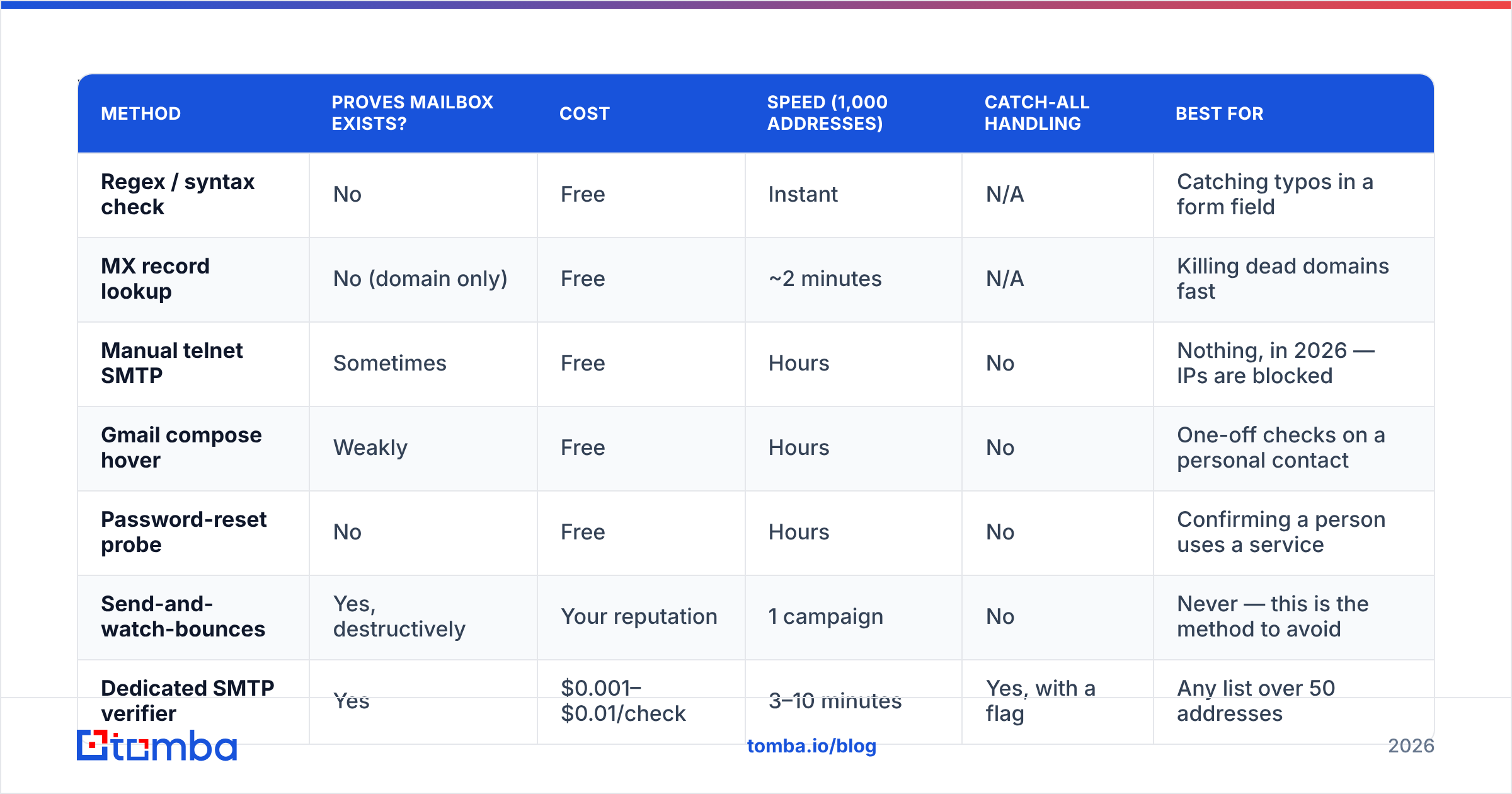
Here is the honest comparison. Each row answers how to tell if an email exists in a different way, at a different cost.
| Method | Proves mailbox exists? | Cost | Speed (1,000 addresses) | Catch-all handling | Best for |
|---|---|---|---|---|---|
| Regex / syntax check | No | Free | Instant | N/A | Catching typos in a form field |
| MX record lookup | No (domain only) | Free | ~2 minutes | N/A | Killing dead domains fast |
| Manual telnet SMTP | Sometimes | Free | Hours | No | Nothing, in 2026 — IPs are blocked |
| Gmail compose hover | Weakly | Free | Hours | No | One-off checks on a personal contact |
| Password-reset probe | No | Free | Hours | No | Confirming a person uses a service |
| Send-and-watch-bounces | Yes, destructively | Your reputation | 1 campaign | No | Never — this is the method to avoid |
| Dedicated SMTP verifier | Yes | $0.001–$0.01/check | 3–10 minutes | Yes, with a flag | Any list over 50 addresses |
| Catch-all verifier | Yes, on wildcard domains | Included in most paid tiers | 5–15 minutes | This is the point | ~15% of B2B domains |
The last two rows are where the accuracy difference lives. A generic verifier tells you a catch-all domain is "accept-all" and stops. A catch-all verifier goes further, using secondary signals — pattern data, historical sightings, engagement records — to say whether the specific mailbox is likely real.

Suggested visual: side-by-side screenshot of a verifier result card showing "valid" vs "accept-all" status flags.
What does an SMTP verification actually do?#
Think of it like calling a large office building's front desk and asking "does a Jane Doe work here?" without asking to be put through. You learn whether the person exists; nobody's phone rings.
Technically, the verifier:
- Resolves the domain's MX records to find the receiving mail server.
- Opens a TCP connection on port 25 and sends
HELO/EHLO. - Issues
MAIL FROMwith a neutral sender address. - Issues
RCPT TO: <jane.doe@acme.com>. - Reads the server's response code —
250means the server will accept mail for that recipient,550means no such user. - Sends
QUITand drops the connection. NoDATAcommand is ever issued, so no message is delivered and the recipient sees nothing.
Two things break this cleanly. Greylisting servers return a temporary 4xx deferral on first contact. A good verifier retries instead of marking the address invalid. Catch-all servers return 250 for everything, which is why catch-all detection is a separate step rather than a nice-to-have.
Be wary of any verifier that claims 99.9% accuracy with no "unknown" bucket. Some domains genuinely cannot be resolved to a yes or no. A tool that reports a confident answer for 100% of inputs is guessing on a slice of them. Tomba publishes its data sources. It also returns a confidence score instead of forcing every address into valid or invalid.

How do you verify a whole list without blowing your budget?#
Run it as a funnel, cheapest filter first.
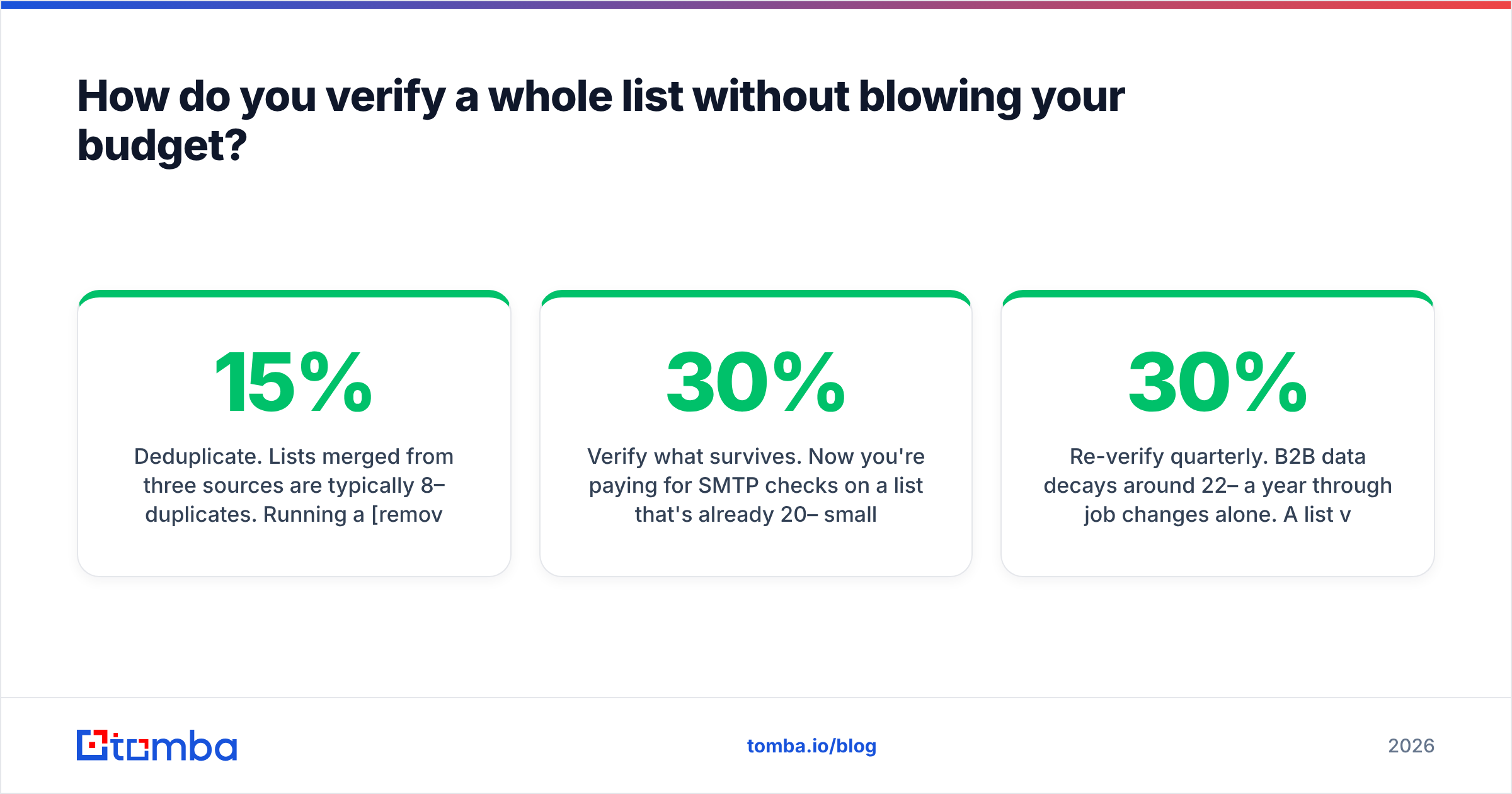
- Deduplicate. Lists merged from three sources are typically 8–15% duplicates. Running a remove duplicates pass before verification cuts your credit spend by that same percentage for zero effort.
- Strip syntax failures and free-mail domains. If you are selling B2B,
@gmail.comaddresses on a company list are usually scraped noise. Free filter, big cut. - Kill dead domains via MX. One DNS query per unique domain, not per address. A 5,000-address list might only have 900 unique domains.
- Verify what survives. Now you are paying for SMTP checks on a list that is already 20–30% smaller.
- Segment the catch-alls. Do not discard them — send to them last, at lower volume, on a secondary domain if you have one.
- Re-verify quarterly. B2B data decays around 22–30% a year through job changes alone. A list verified in January is measurably worse by July.
For lists over a few hundred, do this through a bulk verify upload rather than one-at-a-time API calls. And if the list lives in a spreadsheet, the Google Sheets add-on runs the whole funnel in place without a CSV round trip.
How much does email verification cost?#
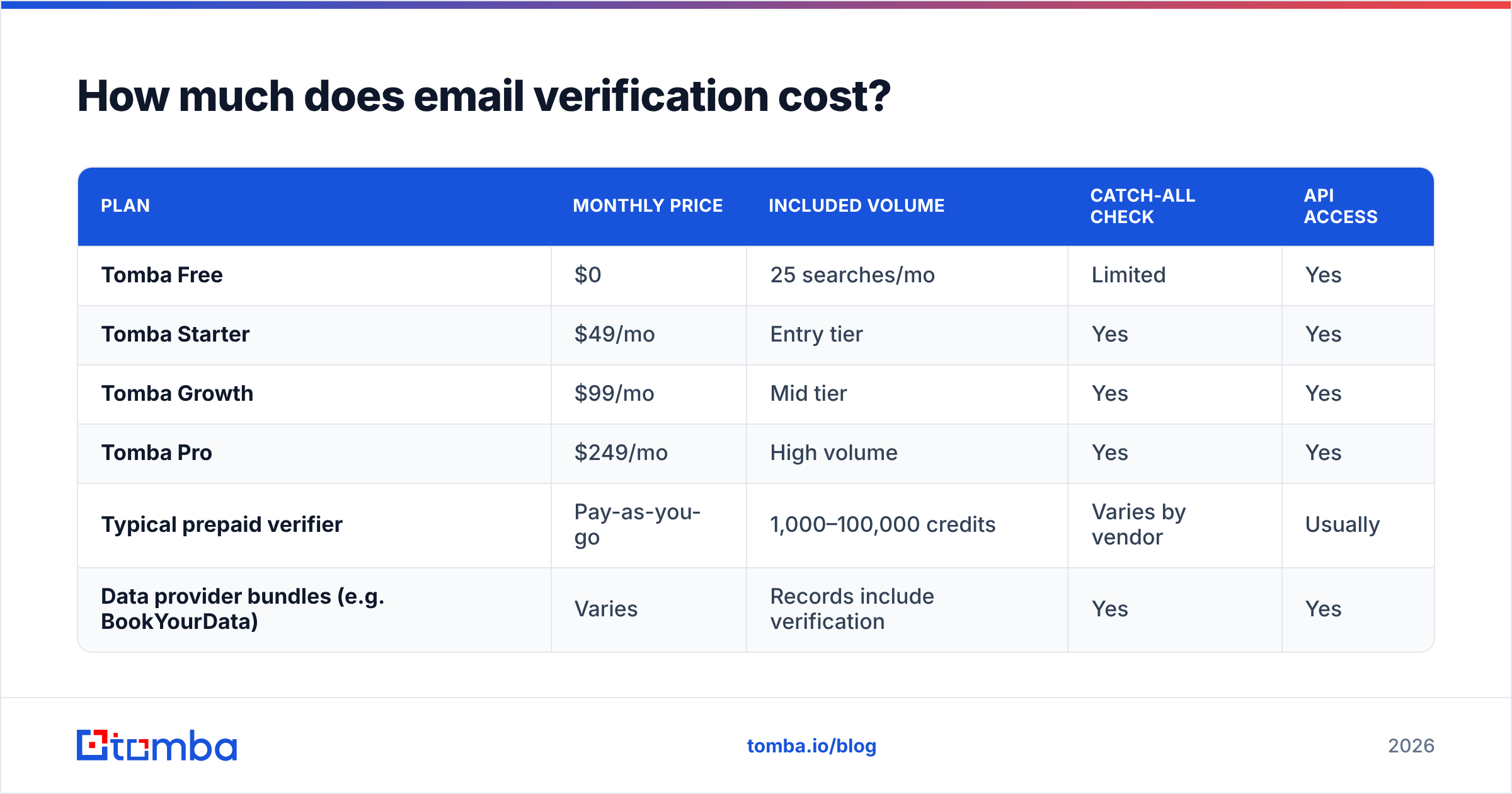
Pricing across the category clusters into two models: per-credit prepaid and monthly subscription with included volume.
| Plan | Monthly price | Included volume | Catch-all check | API access |
|---|---|---|---|---|
| Tomba Free | $0 | 25 searches/mo | Limited | Yes |
| Tomba Starter | $49/mo | Entry tier | Yes | Yes |
| Tomba Growth | $99/mo | Mid tier | Yes | Yes |
| Tomba Pro | $249/mo | High volume | Yes | Yes |
| Typical prepaid verifier | Pay-as-you-go | 1,000–100,000 credits | Varies by vendor | Usually |
| Data provider bundles (e.g. BookYourData) | Varies | Records include verification | Yes | Yes |
BookYourData takes a different but valid approach. Instead of verifying a list you bring, it sells pre-verified B2B records with a bounce guarantee. If your bottleneck is sourcing contacts rather than cleaning them, that model saves a step. If you already have a list from your CRM, webinar signups, or scraping, a standalone verifier is the cheaper path.
Check current Tomba pricing before budgeting. Tiers shift, and the free tier is genuinely usable for testing accuracy against a control list of addresses you already know are good.
What should you check before every campaign?#
Verification is one input to deliverability, not the whole thing. Run this list before a send:
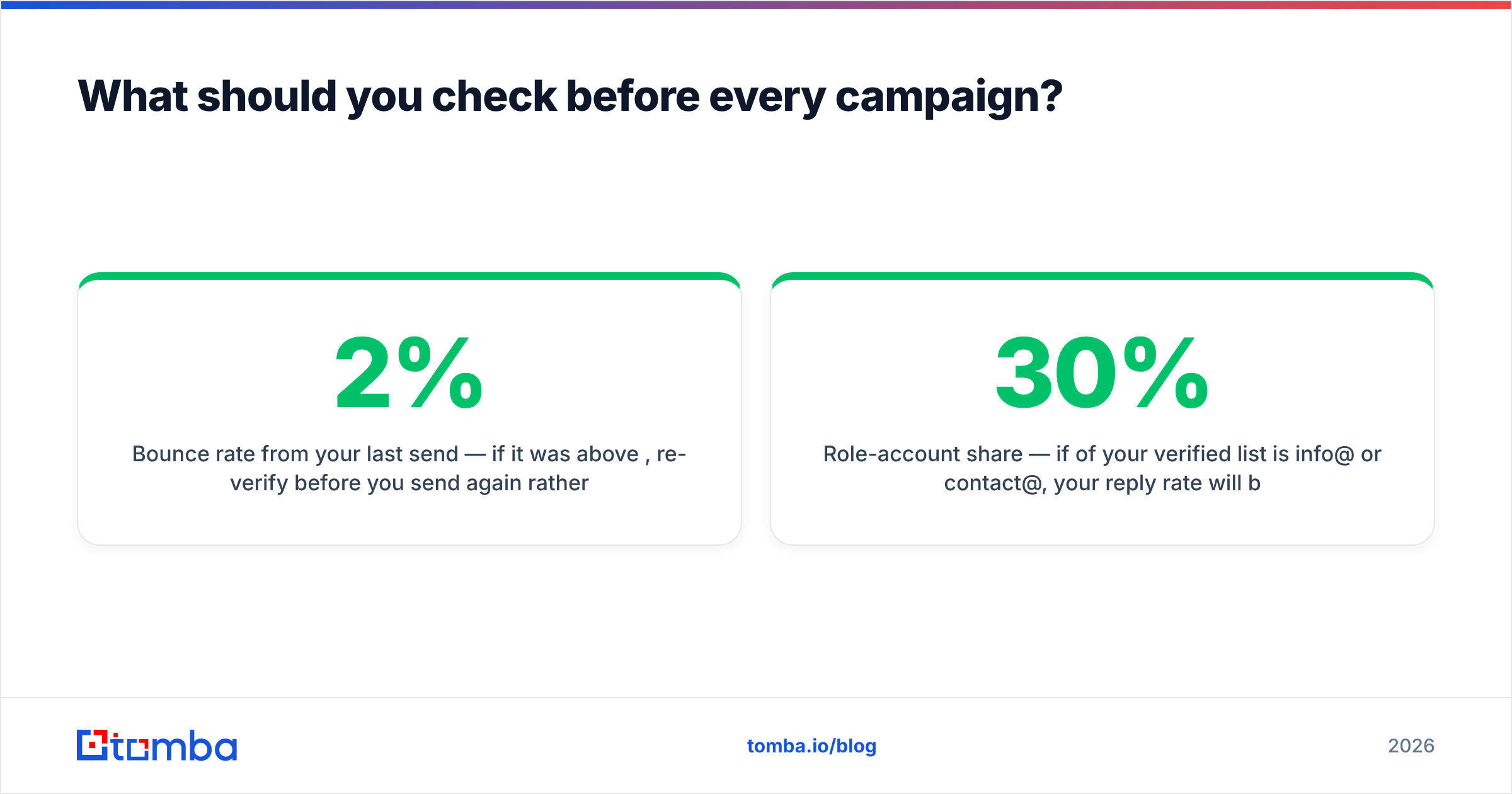
- Bounce rate from your last send — if it was above 2%, re-verify before you send again rather than after.
- SPF, DKIM, DMARC alignment — a SPF checker takes ten seconds and catches the most common misconfiguration. Both Google and Yahoo require authentication for bulk senders.
- Domain and IP blacklists — run a blacklist checker against your sending domain.
- Spam score of the message itself — a clean list will not save copy that trips filters. Run a spam checker on the actual template.
- Role-account share — if 30% of your verified list is
info@orcontact@, your reply rate will be low even at a 0% bounce rate.
The relationship runs one direction. Clean data enables good email deliverability, but it does not guarantee it. Bad data, however, reliably destroys it.
For the rules your sends are actually graded against, read Google's bulk sender guidelines directly rather than a third-party summary. Check how peer tools score on G2 if you are comparing vendors. The SMTP protocol itself is worth ten minutes if you want to know why some checks return "unknown."
What's the fastest path from name to verified address?#
If you do not have the address yet, how to tell if an email exists is the second question. Finding it comes first. The sequence that works:
- Get the company domain (from the website, LinkedIn, or a company lookup).
- Pull the domain's known addresses and email pattern with a domain search.
- Generate the target's likely address from the pattern plus their name.
- Verify it at the SMTP level before it enters your sequence.
Steps 2 through 4 collapse into one call with the Tomba API if you are wiring this into a CRM or an enrichment pipeline. For one-off prospecting inside the browser, the Tomba Chrome extension does the same thing from the company's own site.
Ready to stop guessing?#
Stop sending to addresses you hope exist. Run your next list through the Tomba Email Finder. It finds the address from a name and domain, then verifies it at the SMTP level before handing it back, with catch-all detection and a confidence score attached rather than a bare valid/invalid flag.
The free tier gives you 25 searches a month. That is enough to benchmark accuracy against a control list of addresses you already know are live, before you commit a dollar. Paid plans start at $49/mo, and every tier includes API access, so the same check that runs in the dashboard runs in your pipeline.
Related guides#
// get started
Find, verify and enrich your first contacts today
Start on the free plan with 25 searches a month, then scale when your team is ready.
Free plan · No credit card required · GDPR & CCPA
// about the author