How to Verify an Email Address in 2026: 6 Proven Methods
Bounces kill sender reputation before your copy ever gets read. Here are six ways to verify an email address — from free manual checks to bulk API validation — and when each one is worth your time.
TL;DR
- Verifying an email means confirming a mailbox actually exists and accepts mail — syntax, DNS, MX records, and an SMTP handshake, in that order.
- Free manual checks (regex, MX lookup, Gmail-alias trick) catch obvious junk but miss the expensive failures: role accounts, spam traps, and catch-all domains.
- Anything above ~50 addresses should go through a verification API. Manual SMTP pinging from your own IP is a fast way to get your server blacklisted.
- Catch-all domains are the hard case. Most verifiers return "unknown" — the good ones return a confidence score instead.
- Target under 2% bounce rate. Google and Yahoo start throttling well before 5%, and Microsoft is stricter than both.
What does it actually mean to verify an email?#
Verifying an email means answering one question: if I send a message to this address right now, will it land in a mailbox?
Think of it like checking whether a house exists before you mail a letter. First you confirm the address is written correctly (syntax). Then you confirm the street exists (domain + DNS). Then you confirm someone lives there (MX records + SMTP). Each layer is cheaper than the one after it, so you run them in order and stop as soon as something fails.
Here's the full stack, from cheapest to most expensive:
- Syntax validation — Does the string match RFC 5322? Catches
john@@acme, trailing spaces, missing TLDs. Costs nothing, runs in microseconds. - Domain + DNS resolution — Does
acme.comactually resolve? Dead startups and typo'd domains (gmial.com) die here. - MX record lookup — Does the domain publish mail servers? A domain with no MX record cannot receive email, full stop.
- SMTP handshake — Connect to the mail server, issue
RCPT TO, read the response code. A250means the mailbox exists; a550means it doesn't. - Risk classification — Is it a role account (
info@,sales@), a disposable address (mailinator.com), a known spam trap, or a catch-all domain that accepts everything?
Steps 1–3 you can do yourself in a terminal. Step 4 is where things get delicate, and step 5 is where you genuinely need a vendor with historical data.
Why does verification matter more in 2026 than it did in 2022?#
Because the mailbox providers changed the rules and never changed them back.
Google and Yahoo's bulk-sender requirements — rolled out in February 2024 and tightened since — put a hard spam-complaint ceiling of 0.3% on anyone sending 5,000+ messages a day to their users. Bounce rate isn't in the published spec, but it's a direct input to the reputation signals that decide whether you clear the ceiling. You can read the current requirements in Google's Email Sender Guidelines.
What that means practically: a 10% bounce rate used to cost you 10% of your sends. Now it costs you 10% of your sends plus the deliverability of every message you send for the next several weeks. The damage compounds. Rebuilding sender reputation after a bad blast takes 3–6 weeks of careful, low-volume warming.
There's a second reason: data decays faster now. B2B contact data goes stale at roughly 22–30% per year under normal conditions, and layoff-heavy years push that higher. A list you scraped in January is meaningfully wrong by June. Verification isn't a one-time cleanup — it's a recurring maintenance task.
How do you verify an email for free, by hand?#
Three methods, in increasing order of usefulness. All of them work on a single address; none of them scale.
Method 1 — MX record lookup. Open a terminal and run:
dig MX acme.com +shortIf you get nothing back, the domain cannot receive mail and every address on it is dead. This is a 2-second check that eliminates a surprising share of scraped lists. On Windows, nslookup -type=mx acme.com does the same job.
Method 2 — the Gmail alias trick. For Gmail-hosted addresses only, Google treats john.doe@gmail.com, johndoe@gmail.com, and john.doe+anything@gmail.com as the same mailbox. If you're deduping a list, normalizing dots and plus-tags collapses fake-looking duplicates into one real contact. A Gmail alias checker does this in bulk without regex gymnastics.
Method 3 — a free single-address checker. Paste the address into a free email checker and read the result. This runs syntax, DNS, MX, and an SMTP probe from a reputable IP — which is the important part, because the alternative is probing from your own.
Do not manually telnet into mail servers to test addresses. It works, technically. It also gets your IP rate-limited within a few dozen attempts and flagged as a directory-harvest attacker shortly after. Microsoft-hosted domains in particular respond to repeat probes from unknown IPs by returning identical responses for every address, which makes your results meaningless and your IP suspect.
Which verification method should you use for your volume?#
The honest answer depends almost entirely on how many addresses you have and how often the list changes.
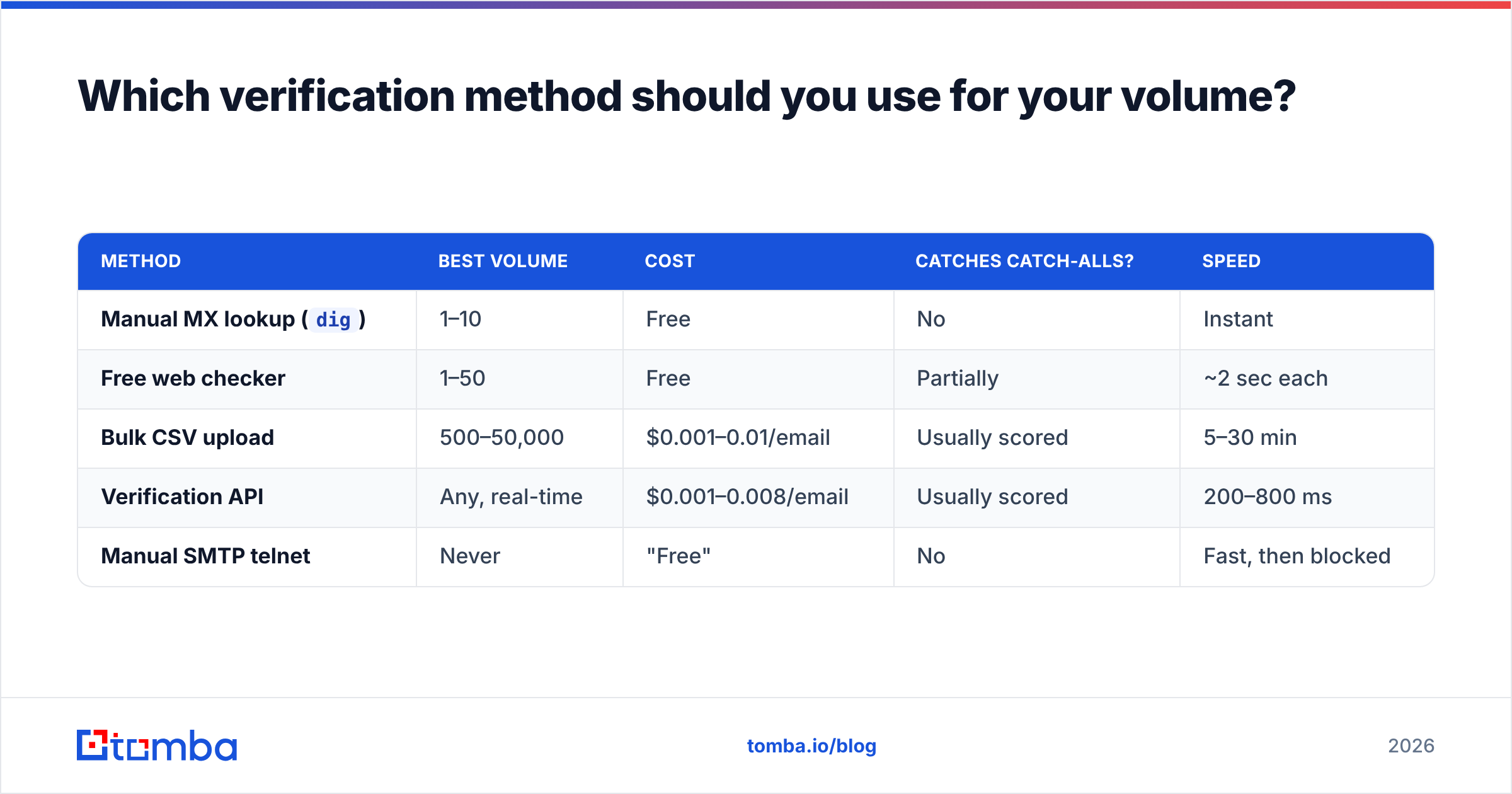
| Method | Best volume | Cost | Catches catch-alls? | Speed |
|---|---|---|---|---|
Manual MX lookup (dig) |
1–10 | Free | No | Instant |
| Free web checker | 1–50 | Free | Partially | ~2 sec each |
| Bulk CSV upload | 500–50,000 | $0.001–0.01/email | Usually scored | 5–30 min |
| Verification API | Any, real-time | $0.001–0.008/email | Usually scored | 200–800 ms |
| Manual SMTP telnet | Never | "Free" | No | Fast, then blocked |
The switchover point is lower than most people expect. If you're verifying more than roughly 50 addresses a week, the time cost of doing it manually already exceeds the subscription cost of a verifier — and manual checking has worse accuracy on the exact addresses that matter most.
For anything embedded in a product — signup forms, CRM enrichment, lead-capture — you want an API call at the point of entry, not a monthly cleanup. Bad data is far cheaper to reject at the door than to scrub out of a CRM six months later. The email verification API pattern here is a single POST per address with a sub-second response, which is fast enough to run inline on a form submit.
What is a catch-all domain and why does it break everything?#
A catch-all domain accepts mail addressed to any mailbox at that domain, real or not. Send to asdfghjkl@theircompany.com and the server happily returns 250 OK.
This is the single biggest source of "unknown" results in email verification, and it's common in mid-market B2B — somewhere in the range of 15–25% of business domains are configured this way, often because IT wanted to avoid losing mail to typos.
The SMTP handshake gives you no signal on these domains. So verifiers fall back on other evidence:
- Pattern matching — does the address match the company's known format (
first.last@,flast@,first@)? A company email pattern check tells you what the dominant format is. - Historical delivery data — has this exact address been observed receiving mail before, across the vendor's network?
- Source corroboration — does the address appear on the company website, in a press release, in a public repo commit, or on a conference speaker page?
- Employment signals — is the person still listed at the company, and does the domain match?
Vendors that return a hard "valid/invalid" binary on catch-all domains are guessing. Vendors that return a confidence score are being honest with you. Tomba's catch-all verifier sits in the second camp — it scores rather than pretends, which is less satisfying to look at and considerably more useful when you're deciding whether to send.
A practical rule: send to catch-all addresses scoring above ~80% confidence, hold the rest for a separate low-volume campaign on a secondary domain, and never mix them into your primary sending pool.
How do the main verification tools compare?#
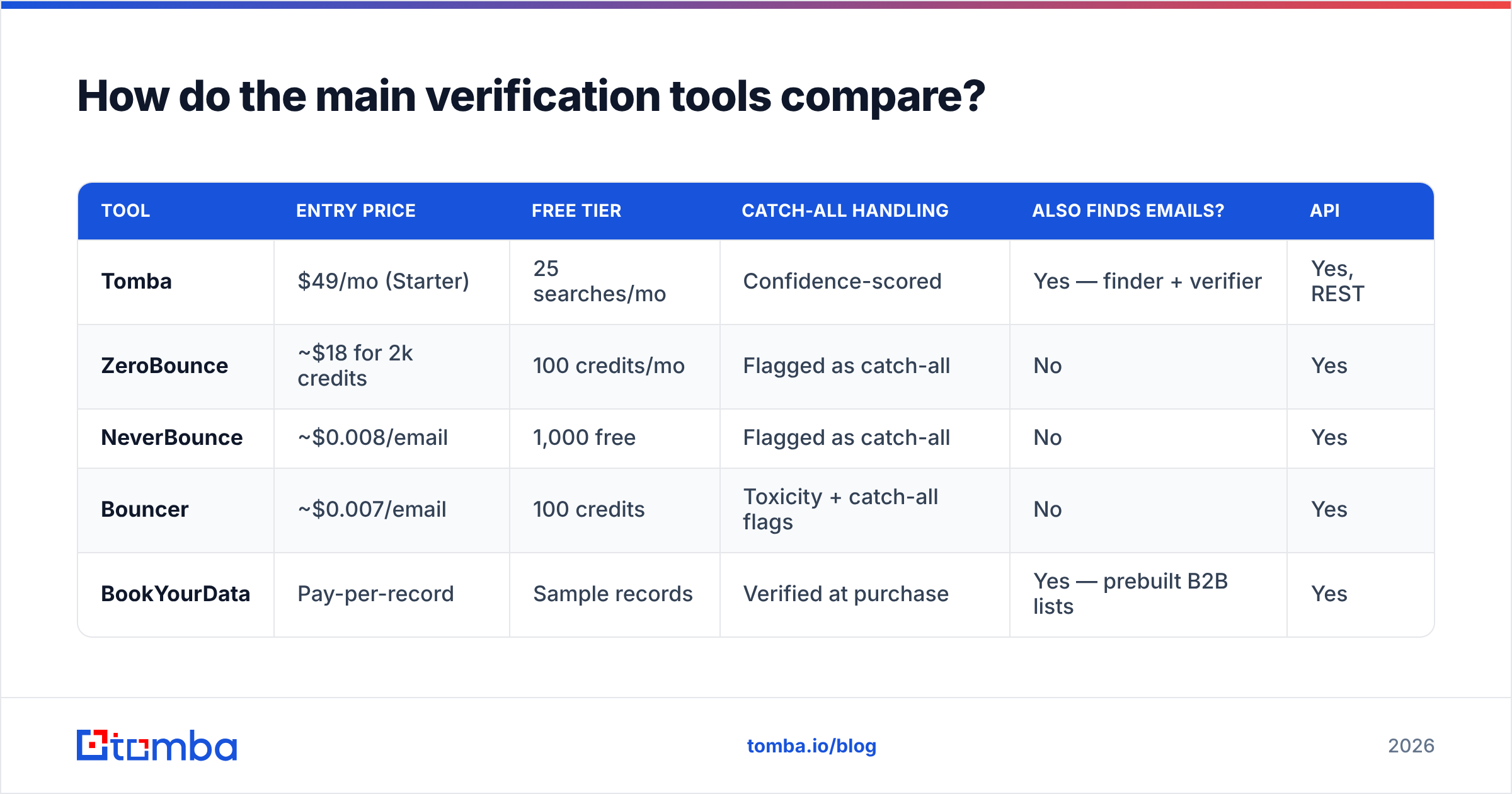
Pricing here is list price as of early 2026 and moves around; check the vendor sites before you commit. The point of the table is the shape of each offer, not the exact decimal.
| Tool | Entry price | Free tier | Catch-all handling | Also finds emails? | API |
|---|---|---|---|---|---|
| Tomba | $49/mo (Starter) | 25 searches/mo | Confidence-scored | Yes — finder + verifier | Yes, REST |
| ZeroBounce | ~$18 for 2k credits | 100 credits/mo | Flagged as catch-all | No | Yes |
| NeverBounce | ~$0.008/email | 1,000 free | Flagged as catch-all | No | Yes |
| Bouncer | ~$0.007/email | 100 credits | Toxicity + catch-all flags | No | Yes |
| BookYourData | Pay-per-record | Sample records | Verified at purchase | Yes — prebuilt B2B lists | Yes |
Three genuinely different jobs are hiding in that table.
If you only need to clean a list you already have, a pure verifier like ZeroBounce or Bouncer is the cheapest path. They do one thing well and their per-credit pricing beats a subscription if you verify once a quarter.
If you need to build the list and verify it, you want a combined tool. Running a separate finder and verifier means paying twice and reconciling two CSVs. Tomba pricing starts at $49/mo on Starter with $99/mo Growth and $249/mo Pro tiers, and the email verifier shares credits with the finder — so a found-and-verified contact is one workflow, not two.
If you'd rather buy verified data outright, BookYourData sells pre-verified B2B records on a pay-per-record basis with an accuracy guarantee. That's a legitimately different model — you're buying the outcome instead of the tooling, which suits teams without the ops capacity to run enrichment pipelines. It's more expensive per contact and less flexible on targeting, but it's fast.
For third-party sanity checks on any of these, G2's email verification category has volume-weighted review data that's more useful than vendor case studies.
What does a real verification workflow look like?#
Here's the sequence that holds up in production, whether you're running 500 contacts or 50,000.
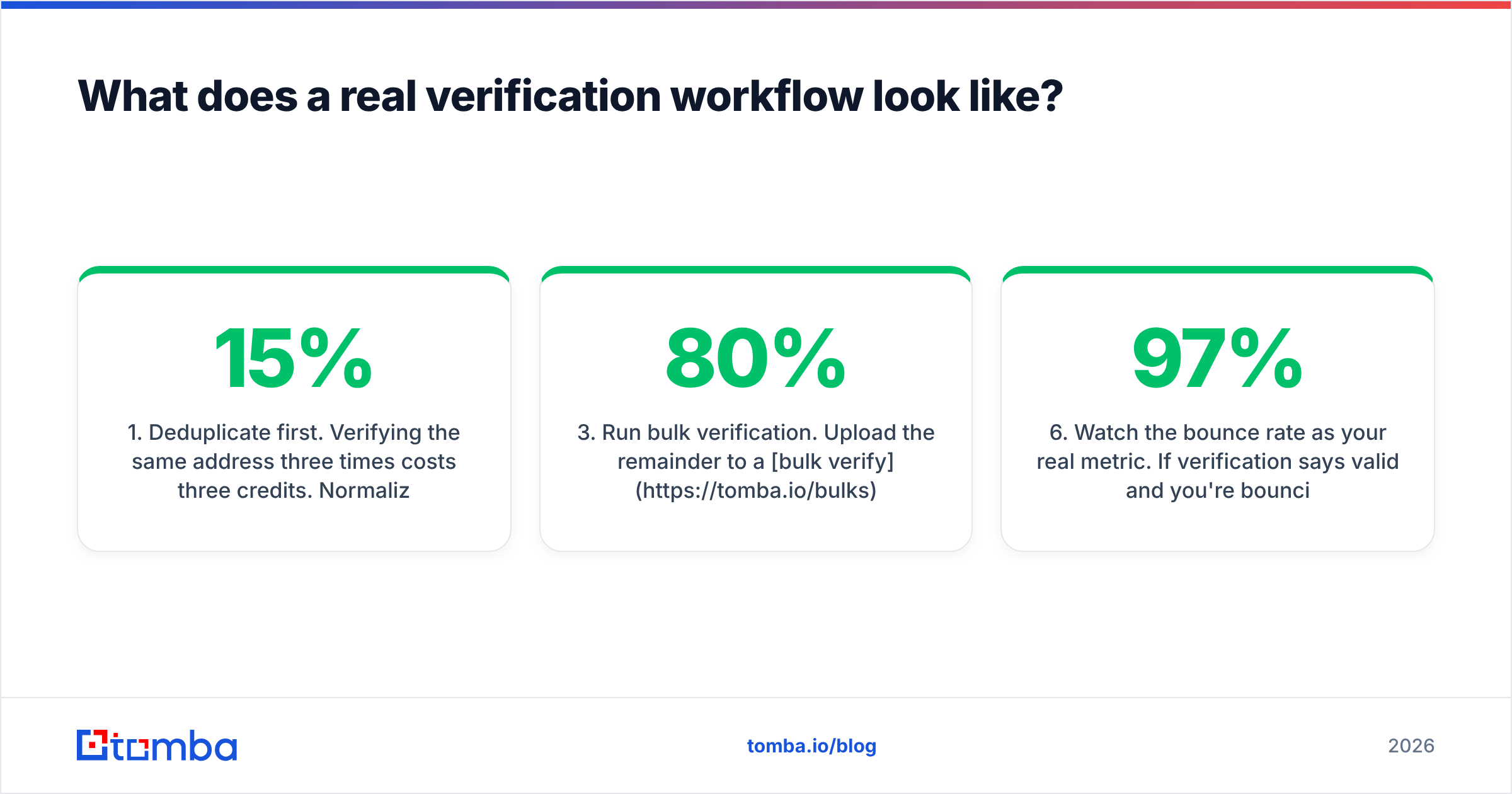
- Deduplicate first. Verifying the same address three times costs three credits. Normalize casing, strip Gmail dots and plus-tags, then remove duplicates. Typical scraped lists shrink 8–15% at this step alone, before you spend anything.
- Strip the obvious garbage. Drop role accounts (
info@,admin@,noreply@) unless your offer genuinely targets a shared inbox. Drop known disposable domains. Drop anything with a malformed local part. - Run bulk verification. Upload the remainder to a bulk verify job. Expect 60–80% clean on a scraped list, 85–95% on a list built by a decent finder.
- Segment by result, don't just delete. Valid goes to the main campaign. Catch-all above your confidence threshold goes to a secondary segment on a separate sending domain. Invalid gets deleted. Unknown gets re-verified in 30 days — some are temporary server failures, not dead mailboxes.
- Re-verify on a schedule. Quarterly for active outbound lists, monthly if you're sending high volume. Anything older than 6 months should be treated as unverified regardless of what the last check said.
- Watch the bounce rate as your real metric. If verification says 97% valid and you're bouncing at 6%, the problem isn't your list — it's your email deliverability setup. Check SPF, DKIM, DMARC, and domain age before blaming the data.
That last point catches a lot of teams. Verification fixes recipient-side problems. It does nothing for a misconfigured SPF record, a domain you registered nine days ago, or a shared IP with a bad neighbor. Run an SPF checker before you conclude your data vendor is lying to you.
What accuracy should you actually expect?#
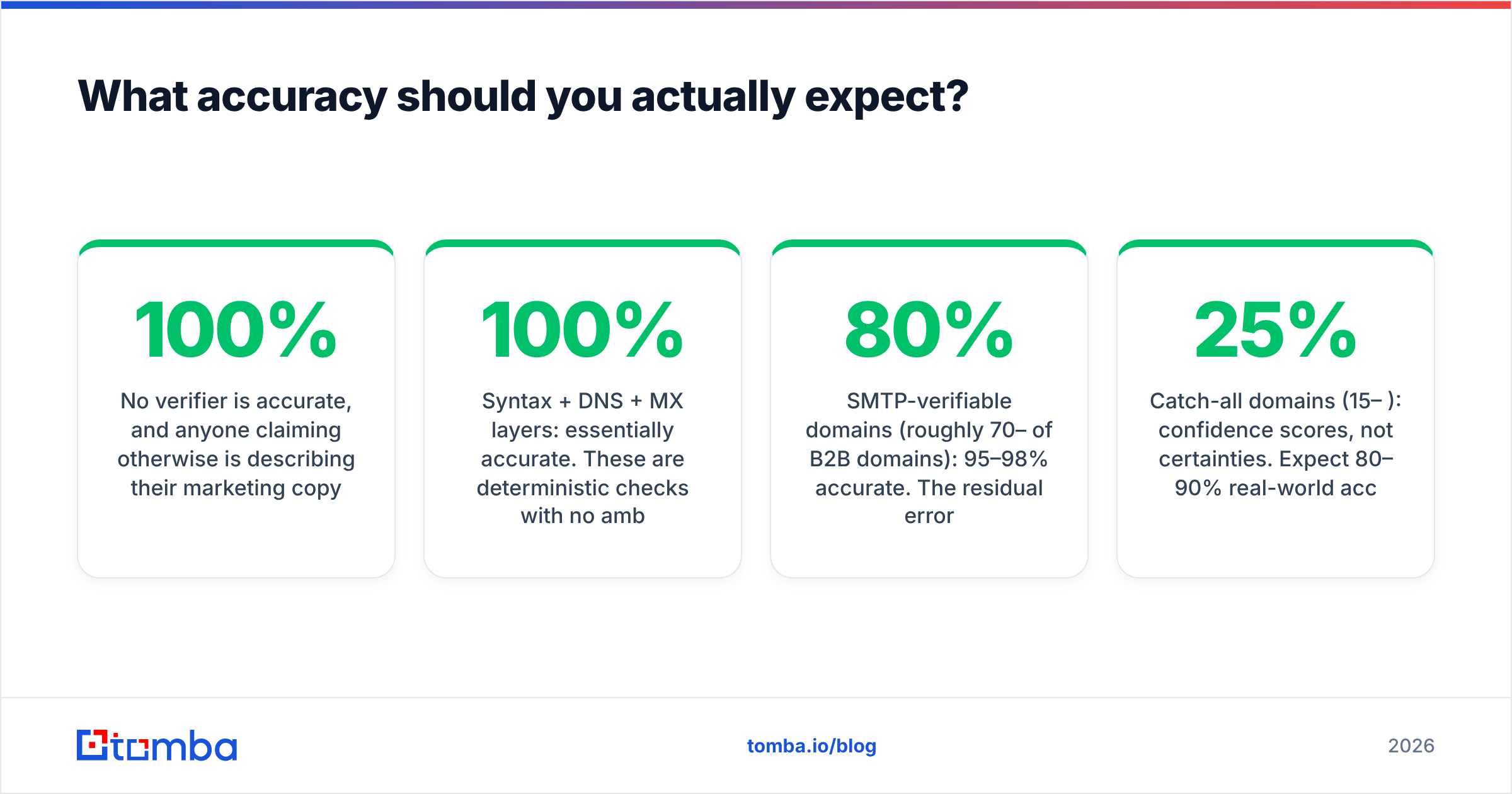
No verifier is 100% accurate, and anyone claiming otherwise is describing their marketing copy rather than their product.
Realistic numbers on a mixed B2B list:
- Syntax + DNS + MX layers: essentially 100% accurate. These are deterministic checks with no ambiguity.
- SMTP-verifiable domains (roughly 70–80% of B2B domains): 95–98% accurate. The residual error is mailboxes that exist but are full, disabled, or auto-forwarding into a void.
- Catch-all domains (15–25%): confidence scores, not certainties. Expect 80–90% real-world accuracy on high-confidence results and treat low-confidence ones as coin flips.
- Greylisting and rate-limited servers: produce "unknown" results that resolve on retry. A good verifier retries automatically; a cheap one returns the first failure and moves on.
Where does the underlying data come from? That question matters more than the accuracy number, because a verifier with no historical corpus can only tell you what SMTP tells you — and SMTP tells you nothing on a quarter of B2B domains. It's worth reading a vendor's data sources page before trusting their catch-all scores.
One more practical note: measure your own bounce rate against your verifier's claims and hold them to it. If a tool promises 98% and you're consistently seeing 4% bounces on their "valid" results, that's a 96% real accuracy rate and you should price the tool accordingly.
Frequently asked questions#
Does verifying an email send a message to the recipient?
No. A proper SMTP verification opens a connection, issues RCPT TO, reads the response code, and disconnects before DATA — nothing is delivered and the recipient sees nothing. Some corporate mail filters log the connection attempt, but no email arrives.
Can you verify an email address without a tool?
For a single address, yes — dig MX plus a manual SMTP session works. For more than a handful, no, because the mail servers will start rate-limiting your IP and returning unreliable responses.
What bounce rate is acceptable? Under 2% is healthy. 2–5% is a warning. Above 5% and you should pause sending and clean the list before you do further damage to your sending domain.
How often should you re-verify? Quarterly at minimum for outbound lists. B2B data decays at roughly 2% per month, so a year-old list is meaningfully degraded even if it was perfect when you built it.
Are role accounts always bad? No — they're bad for personalized cold outreach and fine for support, partnership, or vendor inquiries. Segment them; don't blanket-delete them.
Where should you start?#
Start by deduplicating what you have, then verify a 200-address sample before you buy anything. The sample tells you whether your problem is data quality or deliverability configuration — and those two problems have completely different fixes.
If the problem is that your list is stale or scraped, the fix isn't a better verifier — it's building the list correctly in the first place. The Tomba Email Finder returns addresses with a confidence score already attached, sourced from public web data and validated at retrieval, so verification becomes a confirmation step rather than a salvage operation. The free tier gives you 25 searches a month to test the accuracy against contacts you can independently confirm — which is exactly how you should evaluate any data vendor before handing over a credit card.
Related guides#
// get started
Find, verify and enrich your first contacts today
Start on the free plan with 25 searches a month, then scale when your team is ready.
Free plan · No credit card required · GDPR & CCPA
// about the author