How to Verify Email Domain: A Practical 2026 Guide
MX records, catch-all traps, and disposable domains decide whether your cold email lands or bounces. Here are five methods to verify an email domain — from free DNS lookups to bulk API checks.
TL;DR
- Verifying an email domain is different from verifying an email address. The domain check answers "can this domain receive mail at all?" — the address check answers "does this specific mailbox exist?"
- The fastest free method is a DNS lookup: confirm the domain resolves, has valid MX records, and isn't parked, disposable, or blacklisted.
- Catch-all domains (accept everything, bounce later) are the single biggest source of false positives. Treat them as a separate risk tier, not as "valid."
- SPF, DKIM, and DMARC records tell you whether the domain is professionally managed — a strong signal of a real, active company.
- For anything past ~50 domains, manual DNS checks stop scaling. A bulk API like Tomba or a comparable verifier turns hours into minutes.
What does it mean to verify an email domain?#
Verifying an email domain means checking the infrastructure behind the @ — not the name in front of it. Think of it like checking whether a street exists and has a mail carrier before you worry about apartment 4B. If the street doesn't exist, the apartment number is irrelevant.
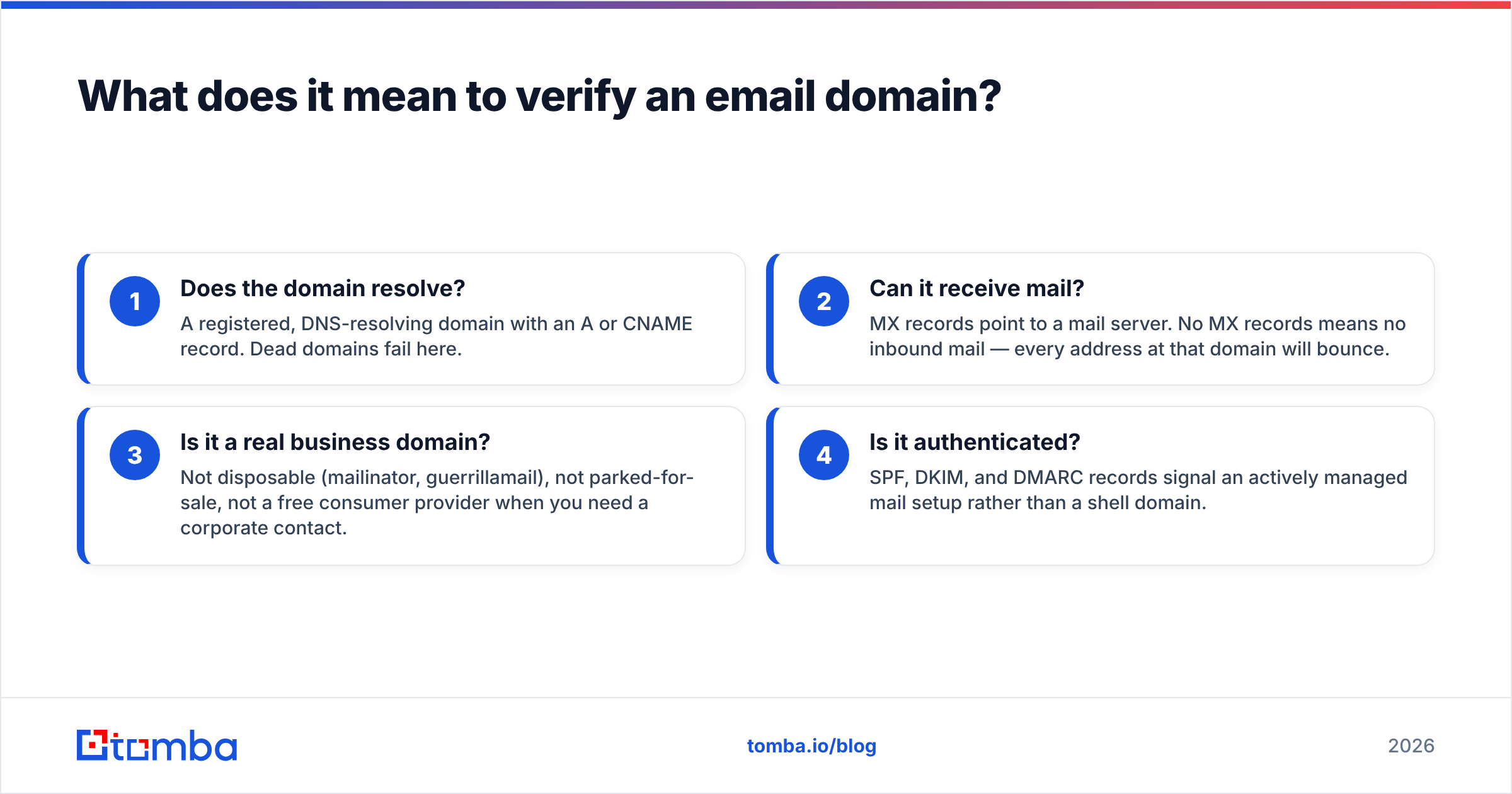
Domain-level verification answers four questions:
- Does the domain resolve? A registered, DNS-resolving domain with an A or CNAME record. Dead domains fail here.
- Can it receive mail? MX records point to a mail server. No MX records means no inbound mail — every address at that domain will bounce.
- Is it a real business domain? Not disposable (mailinator, guerrillamail), not parked-for-sale, not a free consumer provider when you need a corporate contact.
- Is it authenticated? SPF, DKIM, and DMARC records signal an actively managed mail setup rather than a shell domain.
Address-level verification comes after: SMTP handshake, mailbox existence, role-account detection, catch-all classification. If you skip domain checks and go straight to address verification, you burn credits on domains that could never have delivered mail in the first place.
The economics matter here. Most verification tools charge per address checked. If 8% of your list sits on dead or MX-less domains, and you have 20,000 rows, you just paid to verify 1,600 addresses whose fate was determined by a single DNS query per domain.

How do you verify an email domain manually with DNS?#
Five commands, no account required. Run these against any domain you're evaluating.
1. Check that the domain resolves
dig example.com A +shortEmpty output means the domain has no address record. It might still handle mail (rare but possible), so don't reject on this alone — move to the MX check.
2. Look up MX records — the critical one
dig example.com MX +short
# 10 mx1.example-mail.com.
# 20 mx2.example-mail.com.
No MX records returned? Nothing you send to that domain will be delivered. This one query eliminates the largest slice of bad data on most scraped lists. The numbers are priority values — lower is tried first.
The MX hostname also tells you the mail provider. aspmx.l.google.com means Google Workspace. *.protection.outlook.com means Microsoft 365. *.pphosted.com means Proofpoint sits in front — expect aggressive filtering and unreliable SMTP probe results.
3. Check SPF
dig example.com TXT +short | grep spf1
# "v=spf1 include:_spf.google.com ~all"
A published SPF record means someone configured this domain deliberately. Its absence on a company domain is a yellow flag — either the company is small and unmanaged, or the domain is a shell.
4. Check DMARC
dig _dmarc.example.com TXT +short
# "v=DMARC1; p=reject; rua=mailto:dmarc@example.com"
A p=reject or p=quarantine policy is a strong indicator of a professionally administered domain. Since Google and Yahoo's 2024 bulk-sender requirements, DMARC adoption has climbed sharply — its absence on a mid-size company domain in 2026 is unusual.
5. Check blacklist status
Query a DNSBL, or use a hosted checker. If the recipient domain's mail server is blacklisted, your mail may be rejected or heavily delayed even when the address is real. You can run this quickly with a blacklist checker.
If you'd rather not touch a terminal, an SPF checker and a company email pattern lookup cover the same ground in a browser.
Which verification method should you use?#
Different methods trade speed, cost, and confidence. Pick based on volume and how much a bounce costs you.
| Method | What it proves | Speed | Cost | Best for |
|---|---|---|---|---|
DNS/MX lookup (dig) |
Domain can receive mail | Instant | Free | Single-domain triage, list pre-filtering |
| SPF + DMARC check | Domain is actively managed | Instant | Free | Distinguishing real companies from shells |
| SMTP handshake | Mailbox likely exists | 1-5 sec | Free (rate-limited) | Small batches, technical users |
| Browser verification tool | Domain + address validity | Seconds | Free tier | Ad-hoc checks, non-technical users |
| Bulk verification API | Full stack: DNS, SMTP, catch-all, role, disposable | ~1000/min | $0.001-0.01/check | Lists over 500 rows, CRM hygiene |
| Manual test send | Absolute ground truth | Minutes + reply lag | Reputation risk | Never, for cold outreach |
The last row deserves a warning. "Just send and see what bounces" is the most expensive verification method that exists, because you pay in sender reputation rather than dollars. A bounce rate above 3% is where mailbox providers start throttling; above 5%, ESPs suspend accounts. Verification costs less than recovery.
What is a catch-all domain and why does it break verification?#
A catch-all domain accepts mail addressed to any mailbox — ceo@, xyzabc123@, all of it — and sorts out the mess internally. Picture a building with no name plates: the mail carrier drops everything at the front desk, and the front desk quietly bins whatever it doesn't recognize.
This is the hardest problem in email verification because SMTP gives you a false green light. The server replies 250 OK to every address you probe, so a naive verifier marks all of them "valid." You send 400 emails, 90 of them land nowhere, and you never see a bounce because the server already accepted delivery.
Catch-all rates are meaningful: depending on the segment, somewhere between 10% and 20% of business domains run catch-all configurations. Enterprise domains behind security gateways skew higher.
How to handle them:
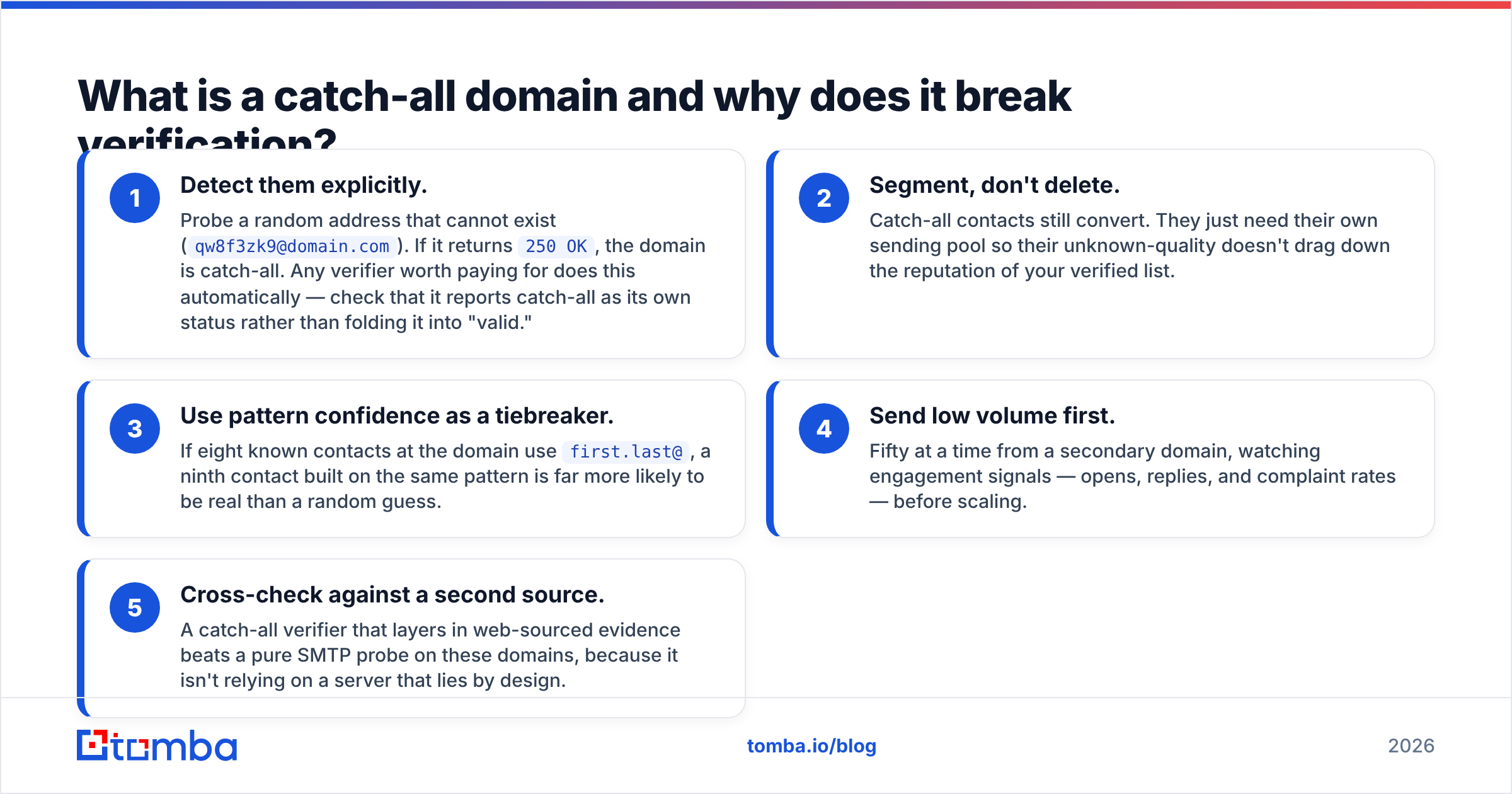
- Detect them explicitly. Probe a random address that cannot exist (
qw8f3zk9@domain.com). If it returns250 OK, the domain is catch-all. Any verifier worth paying for does this automatically — check that it reports catch-all as its own status rather than folding it into "valid." - Segment, don't delete. Catch-all contacts still convert. They just need their own sending pool so their unknown-quality doesn't drag down the reputation of your verified list.
- Use pattern confidence as a tiebreaker. If eight known contacts at the domain use
first.last@, a ninth contact built on the same pattern is far more likely to be real than a random guess. - Send low volume first. Fifty at a time from a secondary domain, watching engagement signals — opens, replies, and complaint rates — before scaling.
- Cross-check against a second source. A catch-all verifier that layers in web-sourced evidence beats a pure SMTP probe on these domains, because it isn't relying on a server that lies by design.
Any tool that reports a flat "valid" on a catch-all domain without flagging it is hiding risk from you. That single behavior is the best test of a verifier's honesty.
How do you verify email domains in bulk?#
Manual DNS lookups are fine for ten domains. At a thousand, you need automation. The practical workflow:
Step 1 — Deduplicate to unique domains. A 20,000-row list often contains only 2,000-4,000 distinct domains. Verify at the domain level once, then apply the result to every address on that domain. Strip duplicates first with a tool like remove duplicates.
Step 2 — Run domain-level checks. Resolve, MX, disposable-domain match, and blacklist status. This kills the obviously dead rows before you spend a cent on address verification.
Step 3 — Verify surviving addresses. SMTP-level checks on the addresses that sit on live domains, with catch-all flagged separately.
Step 4 — Fill gaps rather than deleting. When an address fails but the domain is healthy and the company is a fit, don't drop the contact — re-find the correct address. A domain search returns known addresses and the dominant email pattern for that company, which recovers contacts you'd otherwise lose.
Step 5 — Re-verify on a schedule. B2B contact data decays roughly 22-30% per year through job changes, rebrands, and domain migrations. A list verified in January is measurably worse by July. Quarterly re-verification of active segments is a reasonable default.
For programmatic pipelines, both the Tomba API and comparable vendor APIs expose domain and address verification as separate endpoints, so you can run step 2 cheaply and only escalate to step 3 where it's warranted.

Which tools verify email domains, and how do they compare?#
The market splits into three groups: pure verifiers (validate lists you already have), finder-plus-verifier platforms (find addresses and validate them), and full data platforms (contacts, intent, sequencing, with verification bundled).
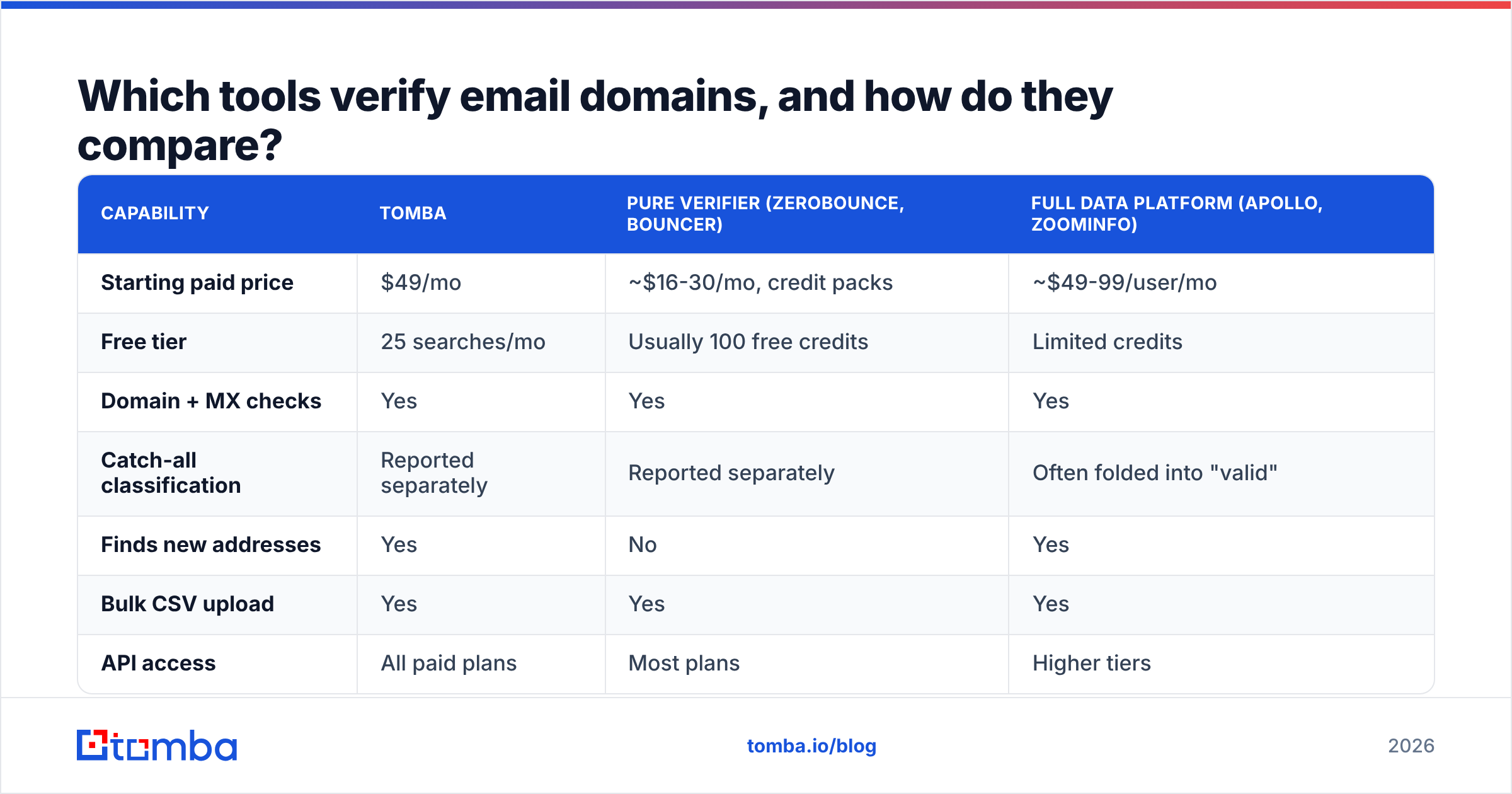
| Capability | Tomba | Pure verifier (ZeroBounce, Bouncer) | Full data platform (Apollo, ZoomInfo) |
|---|---|---|---|
| Starting paid price | $49/mo | ~$16-30/mo, credit packs | ~$49-99/user/mo |
| Free tier | 25 searches/mo | Usually 100 free credits | Limited credits |
| Domain + MX checks | Yes | Yes | Yes |
| Catch-all classification | Reported separately | Reported separately | Often folded into "valid" |
| Finds new addresses | Yes | No | Yes |
| Bulk CSV upload | Yes | Yes | Yes |
| API access | All paid plans | Most plans | Higher tiers |
| Spreadsheet add-ons | Sheets, Excel, Airtable | Varies | Native CRM sync |
| Best fit | Find + verify in one workflow | Cleaning an existing list | Full-stack GTM teams |
A few honest distinctions. If your only job is scrubbing a list you already own, a dedicated verifier is usually the cheaper per-check option — that's what they're built for. If you need to find the addresses as well as validate them, a combined platform avoids paying two vendors and reconciling two sets of statuses. And if you're buying verified contact records outright rather than sourcing them, providers like BookYourData ship pre-verified B2B lists with their own accuracy guarantees, which sidesteps the find-then-verify loop entirely.
Independent review data on G2 is a reasonable sanity check on vendor accuracy claims, since almost every vendor publishes a self-reported number in the high nineties. Treat those figures as marketing until you've run your own sample of 200 known-good and known-bad addresses through the tool.
Full Tomba pricing runs Free (25 searches/mo), Starter $49/mo, Growth $99/mo, Pro $249/mo, and Enterprise custom — with domain search, verification, and enrichment on the same credit pool rather than metered separately.
What mistakes should you avoid when verifying domains?#
Treating "no MX record" as "invalid contact." Some organizations route mail through a parent domain. Check the registrable parent before discarding.
Trusting a single SMTP probe. Greylisting, rate limits, and security gateways cause transient failures that look like hard rejections. Any verifier that doesn't retry is producing noise. Proofpoint, Mimecast, and Barracuda-fronted domains are especially prone to this.
Ignoring role accounts. info@, sales@, support@ are technically valid and often heavily filtered or shared. They belong in a separate segment, not your primary sequence.
Verifying once and never again. Covered above, but worth repeating — this is the most common failure in CRM hygiene. Contact records rot silently.
Confusing domain reputation with your own. Verifying the recipient's domain says nothing about your sending domain's health. Both matter. Run a sender reputation checker against your own domains too, and read up on email deliverability fundamentals if bounce rates are climbing despite clean lists.
Aiming for 100%. No verifier reaches it. Mailboxes disappear between verification and send. A realistic target is under 2% bounce, not zero.
How often should you re-verify?#
Match cadence to how fast the data moves:
- Active outbound lists: before every campaign. Non-negotiable if the list is older than 30 days.
- CRM contact records: quarterly for active accounts, twice a year for dormant ones.
- Purchased or scraped lists: immediately on import, then again before first send. Assume nothing about the vendor's claimed freshness.
- Newsletter subscribers: annually, plus continuous bounce and complaint processing. Engaged subscribers self-verify by opening.
- Enriched records from a data enrichment run: verify at write-time, since enrichment sources vary in recency.
Reference points worth knowing: HubSpot publishes ongoing benchmark data on bounce and engagement rates by industry, which helps you judge whether your numbers are a data problem or a targeting problem.
Verify the domain before you spend on the address#
Domain verification is the cheapest filter in your entire outbound stack. One DNS query eliminates contacts that could never have converted, before you pay to check the mailbox, before you write the sequence, and long before you risk your sending reputation on a list you never validated.
Start with the free checks — resolve, MX, SPF, DMARC. Flag catch-all domains as their own tier instead of pretending they're valid. Re-verify on a schedule that matches how fast your market moves.
When manual checks stop scaling, the Tomba Email Finder handles the whole loop in one place: domain search to surface the addresses that exist at a company, verification to confirm they're deliverable, and catch-all classification so you know exactly which contacts carry risk. The free tier gives you 25 searches a month to test it against a domain you already know the answer for — which is exactly how you should evaluate any verification tool.
Related guides#
// get started
Find, verify and enrich your first contacts today
Start on the free plan with 25 searches a month, then scale when your team is ready.
Free plan · No credit card required · GDPR & CCPA
// about the author