How to Verify If an Email Is Valid: 7 Proven Methods
Bounces kill your sender reputation before your copy ever gets read. Here are seven ways to verify if an email is valid — from free 10-second checks to SMTP-level bulk verification — and when each one actually works.
TL;DR
- Syntax and MX checks take one second and catch maybe 20% of bad addresses. They are necessary, not sufficient.
- SMTP-level verification (a handshake with the receiving mail server, without sending a message) is the only method that reliably confirms a mailbox exists.
- Catch-all domains — roughly 15-20% of B2B domains — accept every address at the SMTP layer, so they need a separate scoring method.
- Never "test" an address by sending a real email from your primary sending domain. One hard bounce on a cold list is a reputation event.
- For lists over ~200 addresses, use a bulk verifier. For one address, a free checker gets you an answer in 10 seconds.
You found an email address. Maybe you guessed the pattern, maybe it came off a conference badge, maybe a scraper handed you 4,000 of them. The question before you hit send is always the same: is this address real, and will a message to it land?
Getting that wrong is expensive in a way that compounds. Mailbox providers watch your bounce rate as a proxy for whether you have permission to be in the inbox. Push past roughly 2-3% hard bounces and Google and Microsoft start filtering your good mail too. This guide walks through every practical method for checking an address, from a 10-second free lookup to a full SMTP handshake, and tells you when each one is worth using.
What does "valid email address" actually mean?#
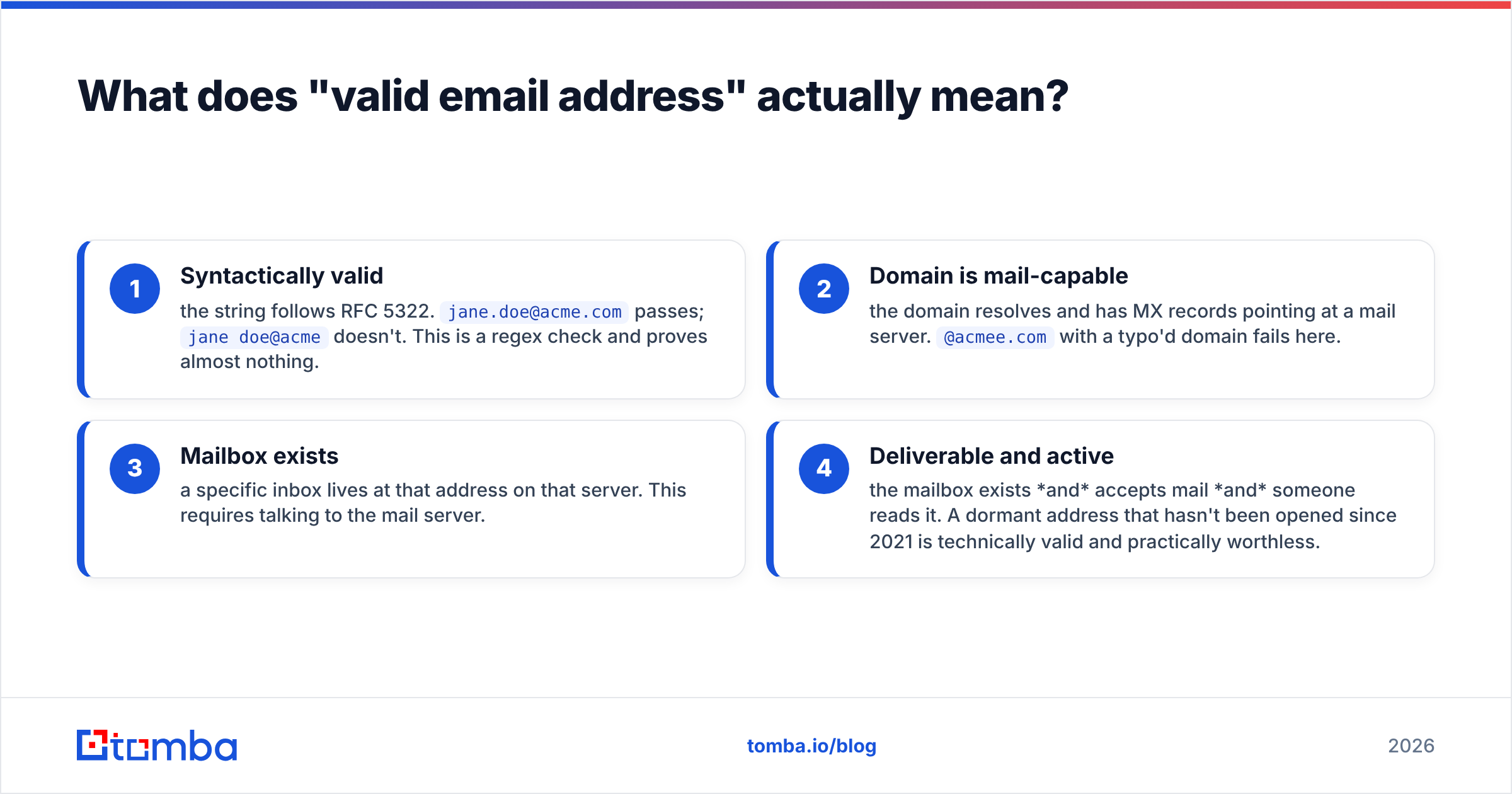
Four different things, and people conflate them constantly. An address can pass one test and fail the next.
- Syntactically valid — the string follows RFC 5322.
jane.doe@acme.compasses;jane doe@acmedoesn't. This is a regex check and proves almost nothing. - Domain is mail-capable — the domain resolves and has MX records pointing at a mail server.
@acmee.comwith a typo'd domain fails here. - Mailbox exists — a specific inbox lives at that address on that server. This requires talking to the mail server.
- Deliverable and active — the mailbox exists and accepts mail and someone reads it. A dormant address that hasn't been opened since 2021 is technically valid and practically worthless.
Most free tools stop at levels 1 and 2. The value in a paid verifier is levels 3 and 4.
How do you verify if an email is valid manually?#
Four checks you can run yourself with no tooling beyond a terminal and a browser. Useful when you have one or two addresses and no budget.
1. Read the syntax carefully. Look for double dots, a missing TLD, spaces, or a trailing period. Copy-paste errors from PDFs and LinkedIn bios are far more common than you'd guess — an invisible non-breaking space at the end of an address will hard-bounce every time.
2. Check the MX records. Run nslookup -type=mx acme.com (Windows) or dig MX acme.com (macOS/Linux). No MX records means no mail server means every address at that domain bounces. This also tells you who handles the mail — google.com in the MX record means Gmail/Workspace, outlook.com means Microsoft 365, and that shapes how the mailbox will treat your message.
3. Confirm the domain is alive. Does the website load? Is the company still in business? Domain churn is a huge source of dead B2B addresses — a person leaves, a company rebrands, a startup dies, and the address goes with it. If the site 404s, treat the whole domain as suspect.
4. Cross-reference the pattern. If you know first.last@acme.com is the house format from three confirmed contacts, an address in flast@acme.com format at the same domain is probably a bad guess. A company email pattern check surfaces the dominant format in seconds.

Manual checks are cheap and fast. They are also incomplete: they cannot tell you whether jane.doe@acme.com exists when john.smith@acme.com also exists. Both pass syntax, both share the same live MX record. Only the mail server knows which one is real.
How does SMTP verification work?#
An SMTP check opens a conversation with the recipient's mail server and asks about a specific mailbox — then hangs up before sending anything. It's the closest thing to a definitive answer.
The exchange looks roughly like this:
> HELO verifier.example.com
< 250 mx.acme.com
> MAIL FROM: <check@verifier.example.com>
< 250 OK
> RCPT TO: <jane.doe@acme.com>
< 250 OK              ← mailbox exists
> RCPT TO: <nope@acme.com>
< 550 No such user    ← mailbox does not exist
> QUIT
No DATA command is ever issued, so no message is delivered and nothing appears in the recipient's inbox. You can test the mechanics yourself with an SMTP tester.
Three things make this harder than the transcript suggests. First, many servers rate-limit or blacklist IPs that issue a lot of RCPT TO probes, which is why running SMTP checks at scale from your own IP is a good way to get that IP blocked. Second, some servers return 250 OK for everything (see catch-alls, below). Third, greylisting means a 450 temporary failure on the first attempt is meaningless — you have to retry.
This is the core of what commercial verifiers sell: a rotating pool of clean IPs, retry logic, per-provider heuristics, and a database of known behaviors so you don't have to build it.
What about catch-all domains?#
A catch-all domain accepts mail addressed to any local part — nonsense-string-9481@acme.com gets a 250 OK right alongside the CEO's real address. Roughly one in five B2B domains is configured this way, and they're the single biggest source of "verified" addresses that still bounce.
SMTP verification cannot resolve a catch-all. Anything that claims a hard "valid" verdict on a catch-all domain is guessing. What good tools do instead is score the address using other signals: whether it matches the domain's dominant naming pattern, whether the person appears in public sources at that company, whether the address has been seen in circulation, and how the domain has behaved historically. That's the job of a dedicated catch-all verifier — probability, honestly labeled, rather than a false binary.
Practically: segment catch-all addresses into their own list, send to them from a secondary domain, and watch the bounce rate before you scale volume.

Which verification method should you use?#
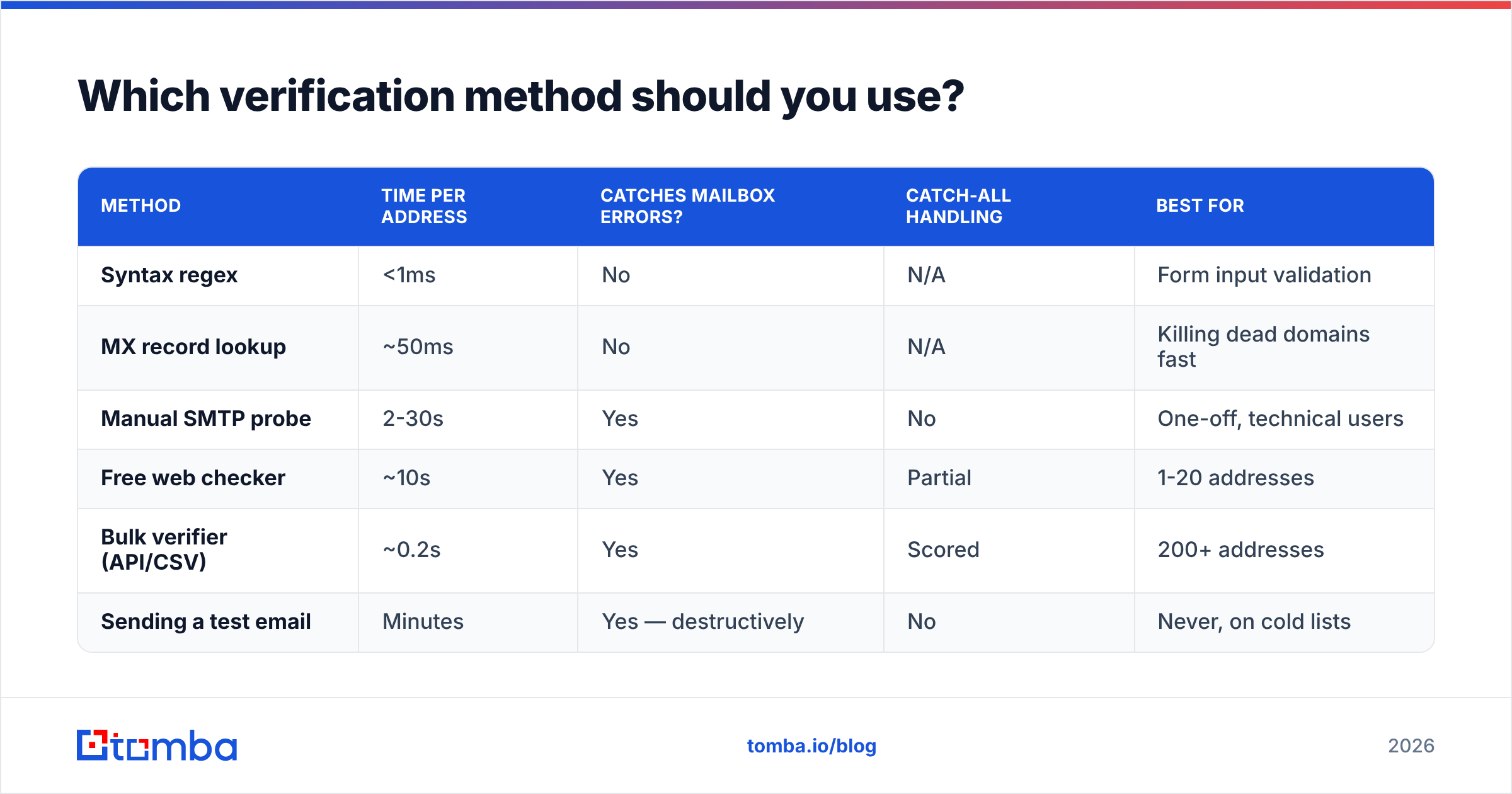
Depends entirely on volume and stakes. Here's the honest breakdown.
| Method | Time per address | Catches mailbox errors? | Catch-all handling | Best for |
|---|---|---|---|---|
| Syntax regex | <1ms | No | N/A | Form input validation |
| MX record lookup | ~50ms | No | N/A | Killing dead domains fast |
| Manual SMTP probe | 2-30s | Yes | No | One-off, technical users |
| Free web checker | ~10s | Yes | Partial | 1-20 addresses |
| Bulk verifier (API/CSV) | ~0.2s | Yes | Scored | 200+ addresses |
| Sending a test email | Minutes | Yes — destructively | No | Never, on cold lists |
The last row deserves emphasis. Sending a real message to check an address is the one method that damages you when it fails. A hard bounce is recorded against your sending domain, and Google's bulk sender guidelines are explicit that spam and bounce signals feed filtering decisions. Verify first, send second — never the other way around.
How do you verify a large list of emails?#
Volume changes the problem. At 5,000 addresses, per-address manual work is out and the failure modes shift from "is this one address real" to "what percentage of this list will hurt me."
Step 1 — Deduplicate. Scraped and merged lists routinely carry 5-15% duplicates, and you pay for each one twice. Run a remove duplicates pass before anything else. Normalize case and strip Gmail dot-aliases while you're there.
Step 2 — Strip role accounts. info@, support@, sales@, admin@, noreply@. These are valid addresses that route to shared inboxes or ticket queues. They inflate your bounce-free stats and tank your reply rate. Cut them unless your offer genuinely targets a shared mailbox.
Step 3 — Run bulk verification. Upload the CSV or hit the API. Expect a modern verifier to return a status per address (valid / invalid / catch-all / disposable / role) plus a confidence score. Bulk verify handles this in a single pass; the email verification API does the same thing inside your own pipeline if you're enriching records on write.
Step 4 — Segment by verdict. Send confidently to valid. Quarantine catch-all into a separate, lower-volume sequence off a secondary domain. Delete invalid and disposable — don't hoard them "just in case."
Step 5 — Re-verify on a schedule. B2B email data decays around 22-30% per year through job changes alone. A list verified in January is measurably worse by July. Re-run anything older than 90 days before a major campaign.

What do the verification tools actually cost?#
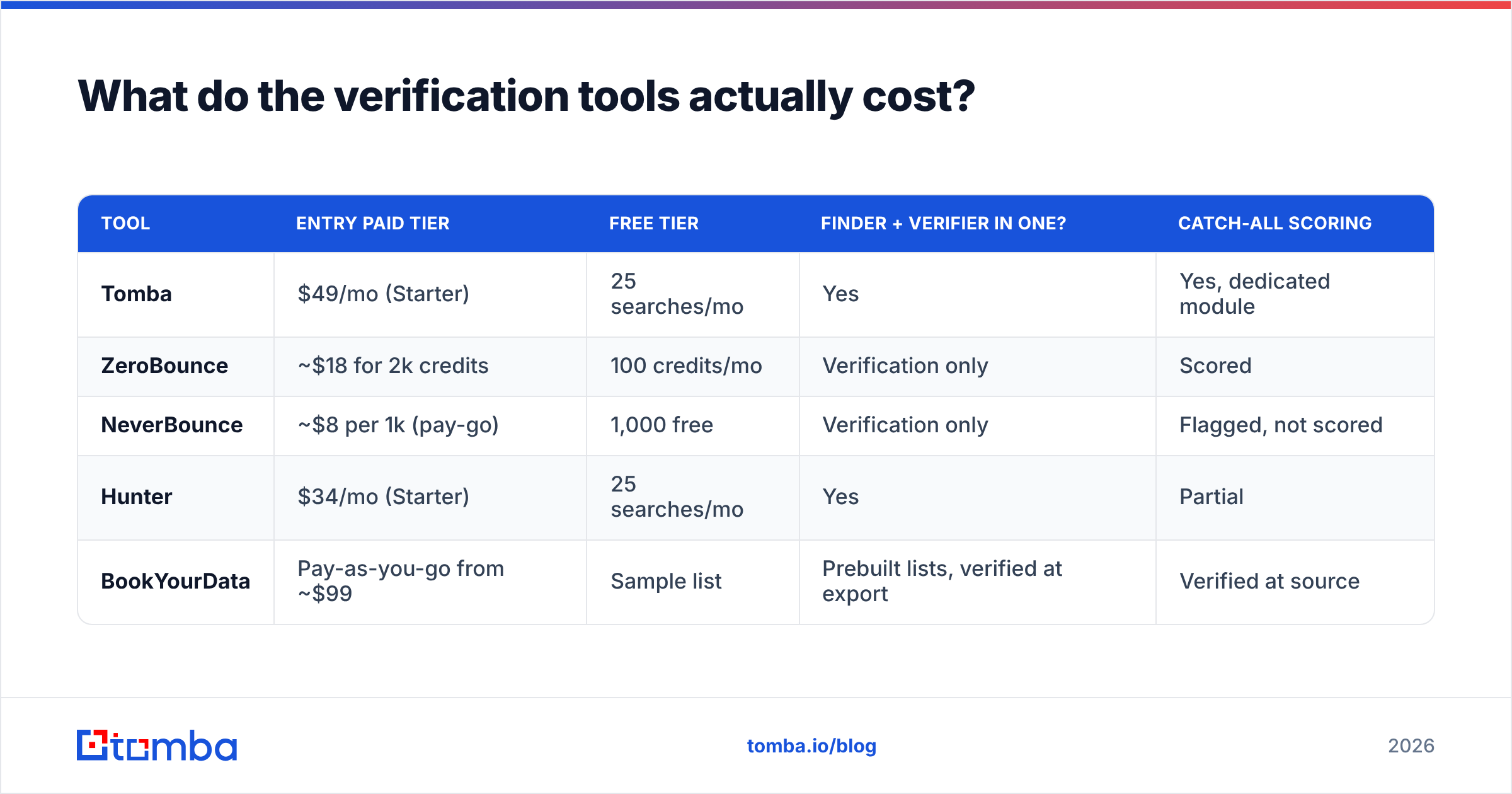
Pricing in this category is credit-based and looks similar across vendors until you read what a credit buys. Some charge for catch-all results that return no useful verdict; some charge only for resolved addresses.
| Tool | Entry paid tier | Free tier | Finder + verifier in one? | Catch-all scoring |
|---|---|---|---|---|
| Tomba | $49/mo (Starter) | 25 searches/mo | Yes | Yes, dedicated module |
| ZeroBounce | ~$18 for 2k credits | 100 credits/mo | Verification only | Scored |
| NeverBounce | ~$8 per 1k (pay-go) | 1,000 free | Verification only | Flagged, not scored |
| Hunter | $34/mo (Starter) | 25 searches/mo | Yes | Partial |
| BookYourData | Pay-as-you-go from ~$99 | Sample list | Prebuilt lists, verified at export | Verified at source |
The split worth understanding: pure verifiers (ZeroBounce, NeverBounce) clean lists you already have. Finder-plus-verifier platforms (Tomba, Hunter) find the address and verify it in one step, so you're not paying two vendors and reconciling two CSVs. Prebuilt-database vendors like BookYourData sell verified contacts outright — a good fit when you'd rather buy a clean list than build and clean one, and their export-time verification means less work on your end.
Check Tomba pricing for the full credit breakdown across Starter ($49/mo), Growth ($99/mo), and Pro ($249/mo). The free tier's 25 monthly searches are enough to test accuracy on a sample of your own known-good contacts before committing — which is the only benchmark that matters. Vendor-published accuracy numbers are marketing; your domains are the test set.

How accurate is email verification, really?#
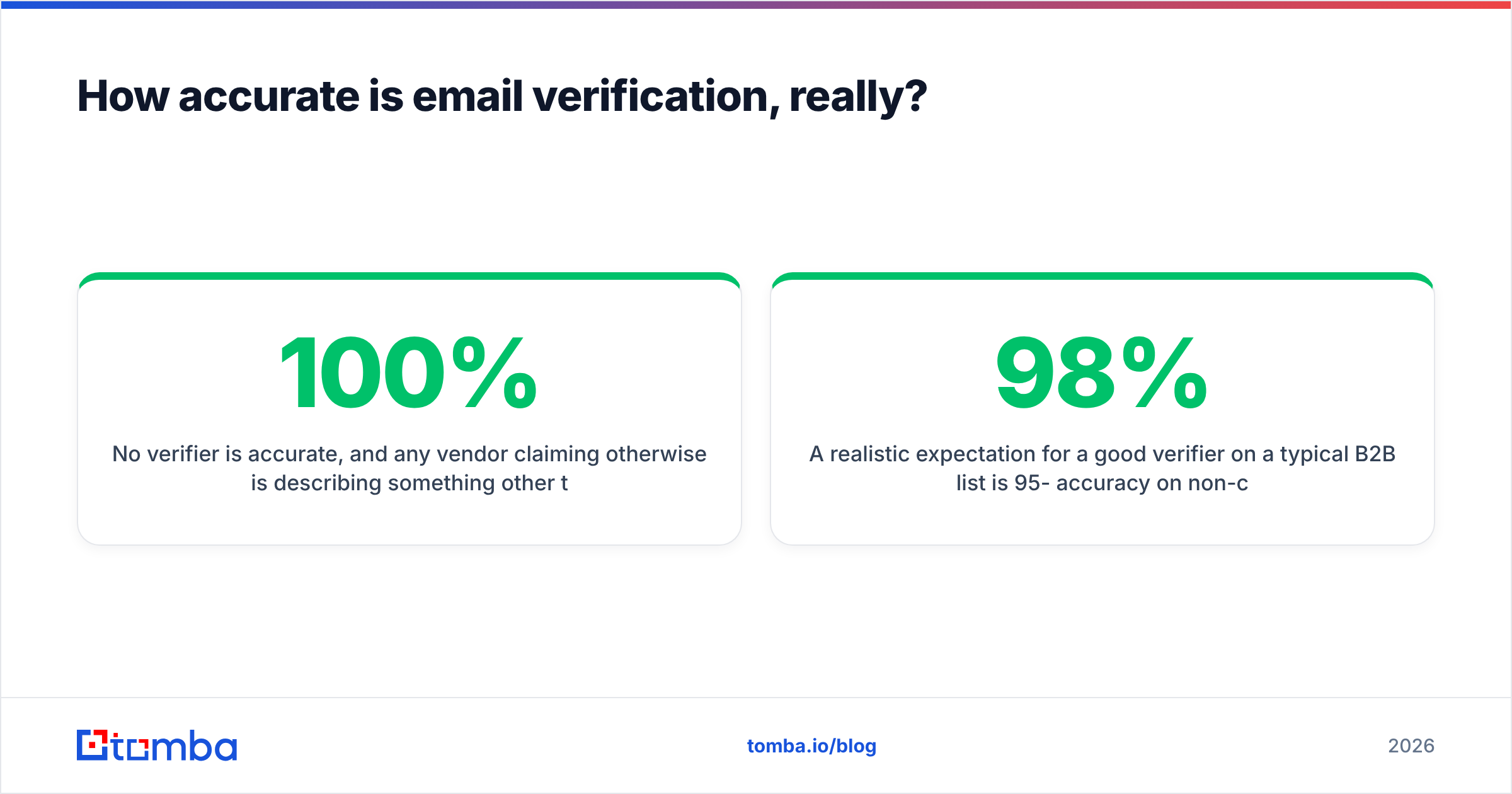
No verifier is 100% accurate, and any vendor claiming otherwise is describing something other than reality. Here's what limits accuracy:
- Catch-all domains — inherently unresolvable at the SMTP layer, as covered above. Best case is a well-calibrated probability.
- Microsoft 365 tenants — many are configured to return uniform responses regardless of mailbox existence, specifically to defeat enumeration. Accuracy on Microsoft-hosted domains is systematically lower than on Google Workspace domains.
- Greylisting and rate limits — a temporary defer that gets misread as a failure produces a false negative, and you delete a perfectly good lead.
- Data recency — an address verified accurately last quarter may belong to someone who left in March. Verification confirms the mailbox exists, not that the person still works there.
A realistic expectation for a good verifier on a typical B2B list is 95-98% accuracy on non-catch-all domains, and honest probability scores on the rest. If you're seeing bounce rates above 3% after verification, the problem is usually list age or catch-all handling rather than the verifier itself. Review G2's email verification category for buyer-reported accuracy across vendors — user reviews on this dimension are more useful than vendor claims.
Two other things that protect deliverability alongside verification: correct authentication records (run an SPF checker and confirm DKIM and DMARC are aligned) and warmed sending domains. Verification prevents bounces. It doesn't fix a domain with no sender reputation.
What's the fastest way to check a single address?#
Paste it into a free web checker. For one address, this is 10 seconds and free: the tool runs syntax, MX, and SMTP checks and returns a verdict without you touching a terminal. Tomba's free email checker does this with no signup, and the same engine powers the paid email verifier at volume.
If you don't have an address yet — only a name and a company domain — verification is the wrong first step. Use a finder, which searches for the address and verifies it in the same operation, rather than generating permutations and testing each one. That's more accurate and costs fewer credits.
Start verifying before you send, not after#
The pattern that separates outbound programs that scale from ones that flame out at month three is boring: verify before every send, re-verify quarterly, segment catch-alls, and never use a live campaign as a validity test. None of that is difficult. It's just a step people skip when they're in a hurry, and the cost shows up two months later as a filtered domain and a reply rate nobody can explain.
If you're finding addresses rather than just cleaning a list you already have, start with the Tomba Email Finder — it searches by name and domain, returns the address with a confidence score, and runs verification in the same call, so you're not stitching two tools together. The free tier gives you 25 searches a month to test it against contacts you already know are real. That's the benchmark worth running before you pay anyone, including us.
Related guides#
// get started
Find, verify and enrich your first contacts today
Start on the free plan with 25 searches a month, then scale when your team is ready.
Free plan · No credit card required · GDPR & CCPA
// about the author