How to Warm Up an IP Address: A 30-Day Sending Plan
A dedicated IP with no history is treated as a stranger by Gmail and Outlook. Here is the exact 30-day volume ramp, the metrics that gate each step, and when a shared IP beats warming your own.
TL;DR
- A new dedicated IP has zero reputation. Mailbox providers treat zero as "suspicious until proven otherwise," so your first sends get throttled, deferred, or foldered even if the content is perfect.
- The working pattern is a 30-day exponential ramp: start at roughly 50 messages per mailbox provider per day, then roughly double every two days while bounce rate stays under 2% and complaints stay under 0.1%.
- Volume is only half of it. Warmup is really reputation-building: send your most engaged recipients first, authenticate with SPF/DKIM/DMARC before day one, and segment by provider because Gmail, Microsoft, and Yahoo score you independently.
- Metrics gate the ramp, not the calendar. If bounces spike above 2% or Microsoft starts issuing 4.7.x deferrals, you hold volume flat until it clears — you do not push through.
- If you send under 50,000 emails a month, skip the dedicated IP. A reputable shared IP pool will outperform your cold IP for the first three months and cost you nothing to maintain.
What does it actually mean to warm up an IP address?#
Warming up an IP address means gradually increasing your sending volume from a new IP so mailbox providers can build a reputation profile for it, instead of flagging a sudden traffic spike as a spam attack.
Think of it like moving into a new apartment building. Nobody knows you. If you throw a 300-person party on your first night, the neighbors call the building manager. If you say hello in the hallway for two weeks first, the same party gets a shrug. Mailbox providers work the same way — they are pattern-matching on behavior over time, not judging any single message.
Technically, providers like Gmail and Microsoft maintain a reputation score keyed to the sending IP (and, increasingly, the sending domain). A brand-new IP has no history, which is functionally worse than a mediocre history because spammers rotate through fresh IPs constantly. The default posture for an unknown IP sending 40,000 messages on day one is aggressive throttling: SMTP 421 deferrals, silent spam-foldering, or outright 550 rejections.
The ramp is how you convert "unknown" into "known and boring." Boring is exactly what you want.
Do you even need a dedicated IP?#
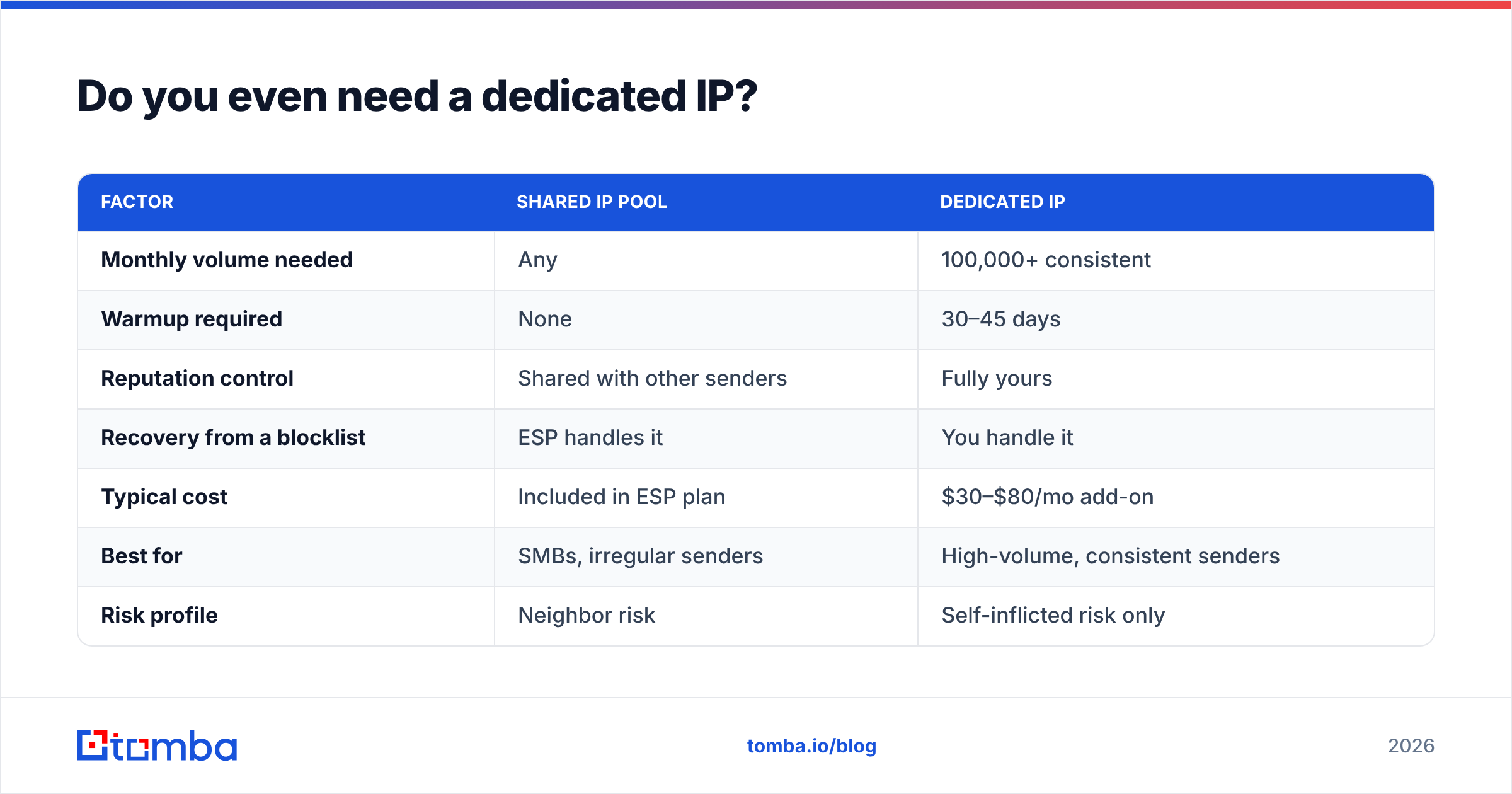
Most senders who ask how to warm up an IP address should not be warming one at all. Run this check first.
- Under 50,000 emails/month — Stay on your ESP's shared pool. You will never generate enough consistent volume to hold a dedicated IP's reputation warm, and reputation decays during quiet periods.
- 50,000–100,000 emails/month with irregular sending — Still shared. Sending 80,000 in one week and nothing for three weeks is the worst possible pattern for a dedicated IP.
- 100,000+/month, sent consistently every week — A dedicated IP starts to make sense. You have enough steady traffic to maintain a score.
- You have a compliance or brand-isolation requirement — Regulated industries, or you simply cannot afford another sender's mistakes affecting your delivery. Dedicated IP, warm it properly.
- You were told to by a deliverability consultant after a blocklist event — Migrating off a damaged IP is a legitimate reason, but fix the underlying list hygiene first or you will burn the new IP in six weeks.
| Factor | Shared IP pool | Dedicated IP |
|---|---|---|
| Monthly volume needed | Any | 100,000+ consistent |
| Warmup required | None | 30–45 days |
| Reputation control | Shared with other senders | Fully yours |
| Recovery from a blocklist | ESP handles it | You handle it |
| Typical cost | Included in ESP plan | $30–$80/mo add-on |
| Best for | SMBs, irregular senders | High-volume, consistent senders |
| Risk profile | Neighbor risk | Self-inflicted risk only |
The honest read: a dedicated IP is not a deliverability upgrade. It is a transfer of responsibility from your ESP to you. Take it only if you intend to do the work.
What do you set up before day one of warmup?#
Every hour spent on authentication saves a week of warmup. Get these done before you send a single message.
- SPF, DKIM, and DMARC published and passing. Run your domain through an SPF checker and confirm the record resolves in under 10 DNS lookups. DMARC should start at
p=nonewith an rua address so you can read reports, then tighten to quarantine once aligned. - Valid reverse DNS (PTR) on the IP. The PTR should resolve to a hostname on your sending domain, and that hostname should resolve back to the IP. Microsoft in particular treats a missing PTR as a hard negative.
- A clean seed list. Your first two weeks should go to your most engaged contacts — people who opened something in the last 30 days. Never warm an IP on a purchased list.
- List verification completed. Every bounce during warmup costs you disproportionately. Run the full file through an email verifier and drop anything risky, including unresolved catch-all domains you have not confirmed with a catch-all verifier.
- Blocklist baseline recorded. Check the IP against major blocklists before you start with a blacklist checker. Recycled IPs from a provider pool sometimes arrive pre-listed, and you want to know that on day zero, not day nine.
- Feedback loops registered. Sign up for Microsoft SNDS and Google Postmaster Tools. Without Postmaster Tools you are ramping into Gmail blind, and Gmail is probably 40–60% of your list.
What does the 30-day IP warmup schedule look like?#
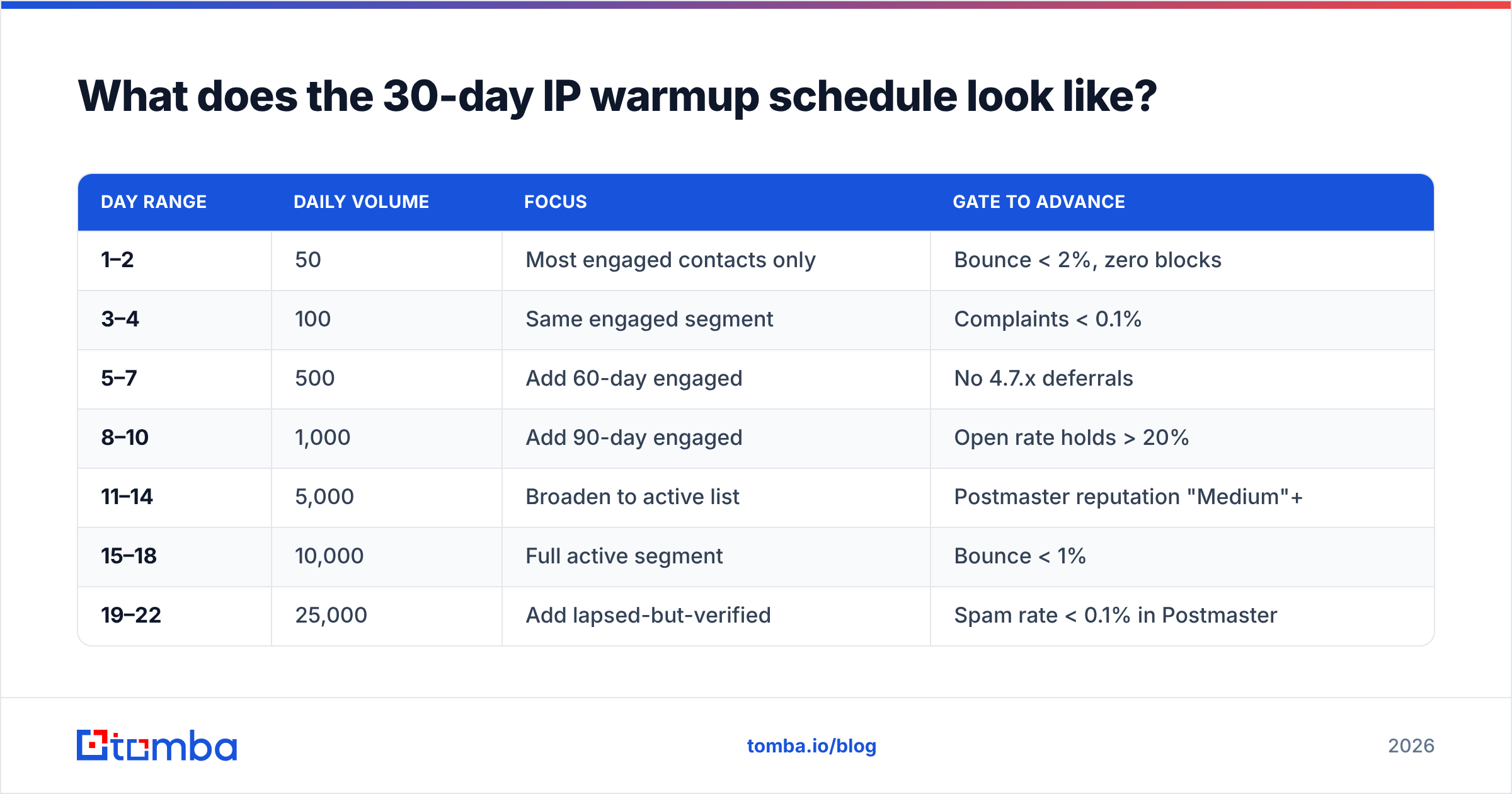
Here is the volume curve that works for most B2B senders. These are per-day totals; split them proportionally across mailbox providers based on your list composition.
| Day range | Daily volume | Focus | Gate to advance |
|---|---|---|---|
| 1–2 | 50 | Most engaged contacts only | Bounce < 2%, zero blocks |
| 3–4 | 100 | Same engaged segment | Complaints < 0.1% |
| 5–7 | 500 | Add 60-day engaged | No 4.7.x deferrals |
| 8–10 | 1,000 | Add 90-day engaged | Open rate holds > 20% |
| 11–14 | 5,000 | Broaden to active list | Postmaster reputation "Medium"+ |
| 15–18 | 10,000 | Full active segment | Bounce < 1% |
| 19–22 | 25,000 | Add lapsed-but-verified | Spam rate < 0.1% in Postmaster |
| 23–26 | 50,000 | Near-normal volume | No throttling events |
| 27–30 | 100,000+ | Full production volume | Reputation "High" |
Three rules that matter more than the exact numbers:
Never skip a rung. Doubling is fine. Jumping from 1,000 to 25,000 because you have a campaign deadline is how IPs get blocked. The provider's anomaly detection is watching the derivative, not the absolute number.
Send at the same time every day. Consistency is itself a reputation signal. A sender that delivers 5,000 messages every weekday at 09:00 UTC reads as legitimate infrastructure. A sender that fires 5,000 at random hours reads as a botnet.
Hold, don't retreat, when metrics wobble. If day 12 shows a bounce spike, repeat day 11's volume for two more days rather than dropping to day 8 levels. Retreating tells the provider your traffic is erratic.
How do you warm up for Gmail, Microsoft, and Yahoo separately?#
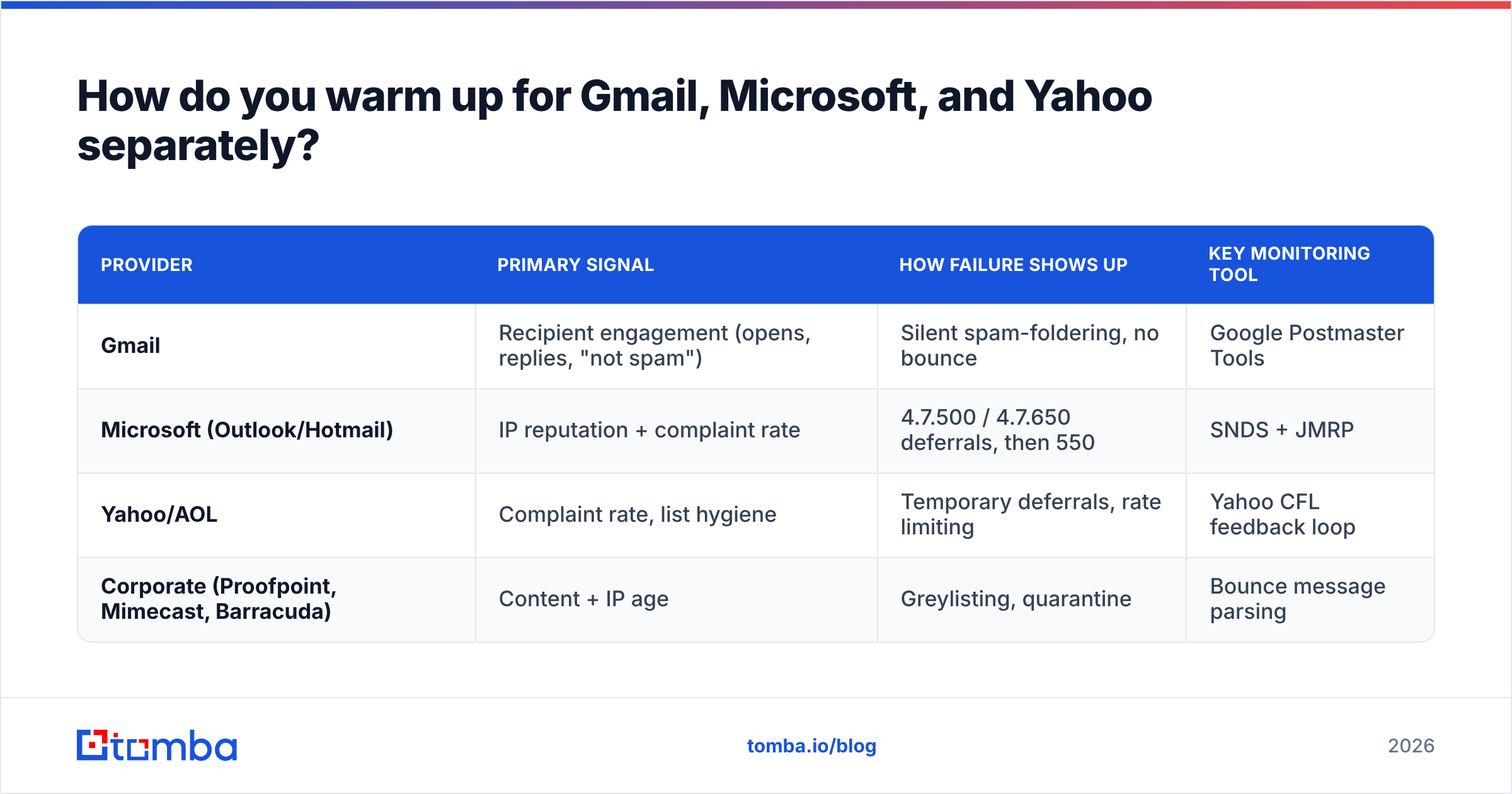
Each provider scores you independently, and they fail in different ways. Segment your ramp by provider domain or you will get an averaged view that hides a specific problem.
| Provider | Primary signal | How failure shows up | Key monitoring tool |
|---|---|---|---|
| Gmail | Recipient engagement (opens, replies, "not spam") | Silent spam-foldering, no bounce | Google Postmaster Tools |
| Microsoft (Outlook/Hotmail) | IP reputation + complaint rate | 4.7.500 / 4.7.650 deferrals, then 550 | SNDS + JMRP |
| Yahoo/AOL | Complaint rate, list hygiene | Temporary deferrals, rate limiting | Yahoo CFL feedback loop |
| Corporate (Proofpoint, Mimecast, Barracuda) | Content + IP age | Greylisting, quarantine | Bounce message parsing |
Microsoft is the strictest during warmup and the most likely to throw a 4.7.x deferral on a cold IP. Those are temporary — your MTA should retry, and the retry usually succeeds. Do not interpret deferrals as failure; interpret sustained deferrals across multiple days as failure.
Gmail is the opposite problem. It rarely rejects; it just quietly files you under Promotions or Spam. Without Google Postmaster Tools you have no visibility into this at all. Set it up before day one and watch the IP Reputation and Spam Rate dashboards daily.
Corporate mail gateways add a wrinkle for B2B senders specifically. Proofpoint and Mimecast weigh IP age heavily and often greylist new senders for 15–30 minutes on first contact. That is normal and self-resolving. What is not normal is a permanent quarantine, which usually points at content or link reputation rather than the IP.
Which metrics tell you the warmup is working?#
Watch five numbers. If all five stay in range, advance to the next volume rung on schedule.
- Bounce rate under 2% during weeks one and two, under 1% after. A hard bounce rate above 2% on a warmup send means your list quality is the problem, not the IP.
- Complaint rate under 0.1% — that is one complaint per thousand delivered. Google's Postmaster guidance treats 0.3% as the danger threshold; you want to be well clear of it during warmup.
- Open rate at or above your historical baseline. If you normally see 35% and warmup sends land at 12%, you are being foldered even though nothing bounced.
- Delivery latency. Rising time-to-delivery is the earliest signal of throttling. If messages that took 4 seconds now take 40, a provider is rate-limiting you.
- Postmaster IP reputation moving from "Low" toward "High." This lags by 24–48 hours. Judge it on a three-day trend, not a single day.
One number people over-weight: unsubscribes. A slightly elevated unsubscribe rate during warmup is fine and arguably healthy — it is list cleaning that costs you nothing in reputation, unlike a complaint.
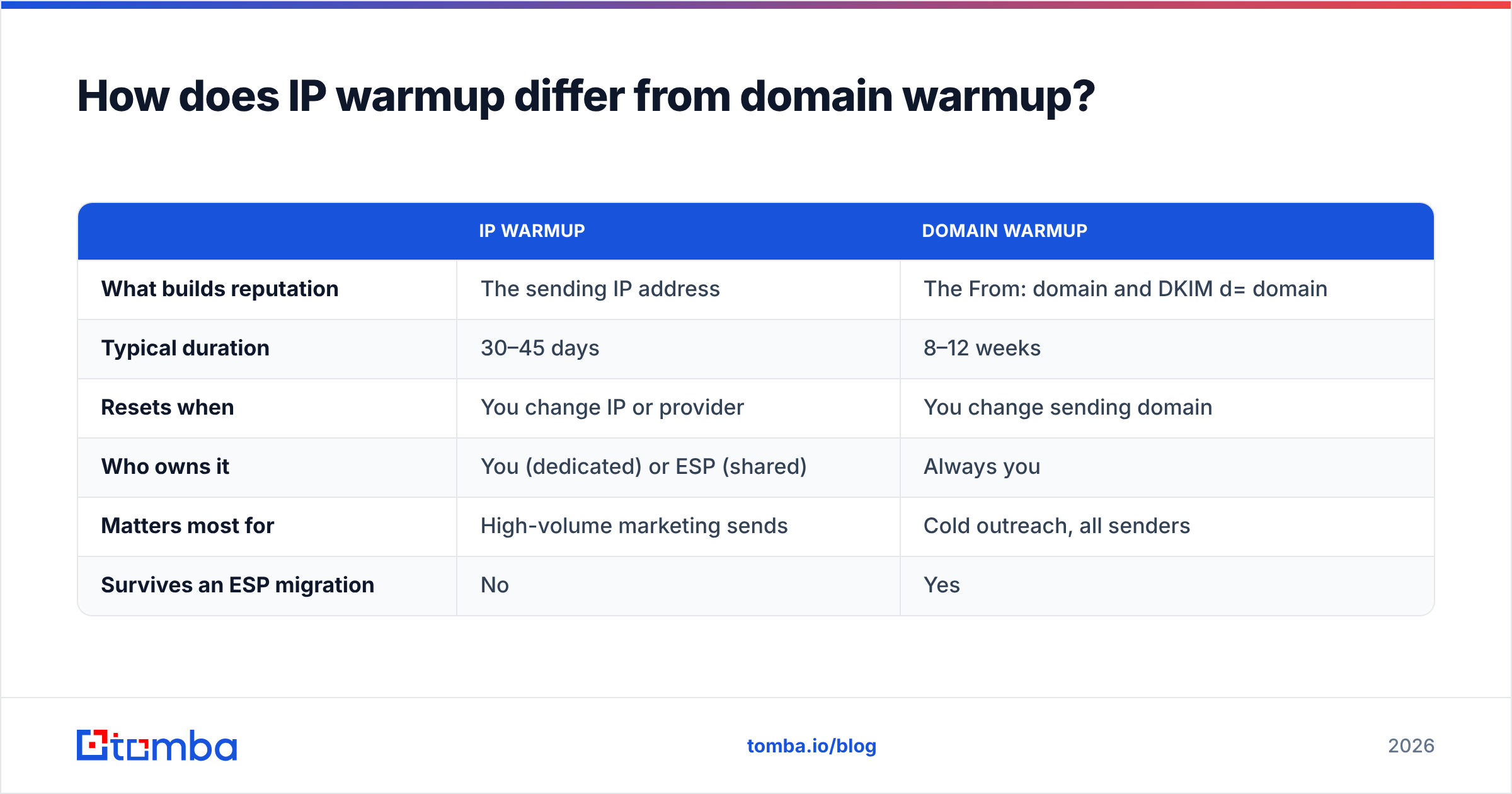
How does IP warmup differ from domain warmup?#
They are related but not the same, and mixing them up wastes weeks.
| IP warmup | Domain warmup | |
|---|---|---|
| What builds reputation | The sending IP address | The From: domain and DKIM d= domain |
| Typical duration | 30–45 days | 8–12 weeks |
| Resets when | You change IP or provider | You change sending domain |
| Who owns it | You (dedicated) or ESP (shared) | Always you |
| Matters most for | High-volume marketing sends | Cold outreach, all senders |
| Survives an ESP migration | No | Yes |
Domain reputation has become the heavier signal at Gmail over the last several years. That means moving to a fresh IP with an established domain is far less painful than moving to a fresh domain on an established IP. If you are running cold outreach, your domain warmup discipline matters more than your IP curve — plan the ramp with an email warmup calculator and treat the two tracks separately.
The practical implication: do not change both at once. Migrating to a new IP and a new sending domain in the same week gives you no baseline to diagnose against when something goes wrong.
What are the most common IP warmup mistakes?#
Warming on a stale or unverified list. This is the number one killer. A 6% bounce rate on day three tanks the IP before it has any positive history to offset the damage. Verify first, always.
Ramping on calendar instead of metrics. The schedule is a plan, not a contract. If Microsoft is deferring on day 14, day 15's volume does not increase regardless of what the table says.
Sending to your whole list in week one because a campaign is due. If you have a launch in two weeks, you do not have time to warm an IP. Send from your shared pool and start the warmup after.
Ignoring the weekend gap. Many B2B senders pause Saturday and Sunday during warmup, which creates a two-day reputation gap every week. Send a reduced volume — even 20% of weekday levels — to maintain continuity.
Warming multiple IPs simultaneously without splitting traffic properly. If you are warming a four-IP pool, each IP needs its own full ramp. Round-robin distribution across four cold IPs means each one gets a quarter of the volume and takes four times as long to establish.
Treating a purchased list as warmup fuel. Beyond the legal exposure, purchased lists carry spam traps. A single trap hit on a two-week-old IP can undo the entire ramp. Build prospect lists from verified sources instead — a domain search against companies you actually target produces contacts that exist, which is the entire point.
What tools should you have running during warmup?#
You need three categories covered: authentication checks, list hygiene, and reputation monitoring.
- Authentication — SPF/DKIM/DMARC validators, plus an SMTP tester to confirm your MTA is negotiating TLS and presenting the right HELO name.
- List hygiene — Bulk verification before every warmup send, deduplication, and catch-all resolution. Bad addresses cost more during warmup than at any other time.
- Reputation monitoring — Google Postmaster Tools, Microsoft SNDS, and a blocklist monitor with alerting. Check G2's deliverability category if you want a comparison of paid monitoring platforms; the free provider tools cover most of what you need for a single-IP warmup.
- Content checks — Run warmup sends through a spam checker before they go out. During warmup you have no reputation buffer to absorb a content penalty.
What is a realistic timeline to full production volume?#
Thirty days gets a typical B2B sender to 100,000/day if the list is clean and metrics stay green. Plan for 45 days. The extra fifteen absorb the two or three plateau days you will almost certainly need when Microsoft or Yahoo pushes back.
After the ramp, reputation maintenance is mostly about not doing anything stupid: keep volume within roughly 2x of your rolling weekly average, keep suppressing bounces and complainers immediately, and re-verify any list segment that has been dormant for more than 90 days.
If you inherit an IP that was previously burned, add two weeks. Damaged reputation recovers slower than no reputation builds, and you may need to work through an ESP's deliverability team for delisting requests along the way.
Where do clean contacts fit into all this?#
Every rung of the warmup ladder depends on the same input: addresses that actually exist and belong to people who might reply. No sending schedule fixes a list with 8% invalid addresses.
That is the part Tomba's Email Finder is built for — finding verified professional email addresses by domain, name, or company, so the contacts you feed into a fragile new IP are ones that resolve. The free tier gives you 25 searches a month to test the accuracy on your own target accounts; paid plans start at $49/mo on Starter and scale to $99/mo on Growth, with full Tomba pricing published up front. Verify before you ramp, and the schedule above does what it is supposed to.
Related guides#
// get started
Find, verify and enrich your first contacts today
Start on the free plan with 25 searches a month, then scale when your team is ready.
Free plan · No credit card required · GDPR & CCPA
// about the author