How to Warm Up Email Domains: A 2026 Step-by-Step Guide
A practical 4-week domain warmup schedule for 2026: DNS setup, volume ramps, reply-rate targets, and the mistakes that land new domains in spam before you send a single real campaign.
TL;DR
- Domain warmup is a reputation-building exercise, not a timer. Mailbox providers judge you on engagement (opens, replies, low complaints), not on how many days your domain has existed.
- A safe ramp for a new sending domain is roughly 4-6 weeks: 5-10 emails/day in week 1, doubling weekly, capping around 30-50/day per mailbox for cold outreach.
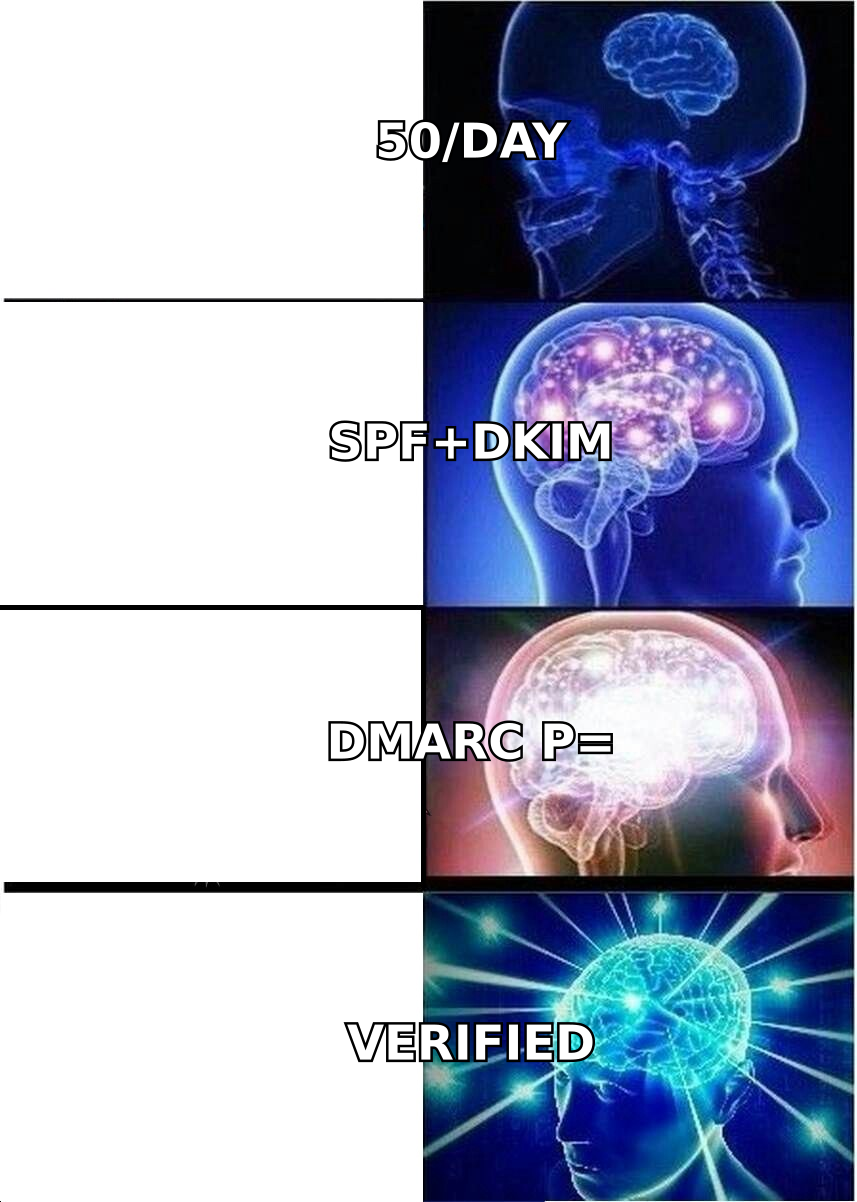
- Authentication comes first. SPF, DKIM, and a DMARC record must be live and passing before you send a single email — Google and Yahoo have required this for bulk senders since 2024.
- Warmup tools generate artificial engagement. They help, but they do not fix a bad list. Verified recipients matter more than warmup volume.
- The fastest way to burn a freshly warmed domain is a dirty list. Bounces above 3% will undo four weeks of careful ramping in two days.
What does it actually mean to warm up an email domain?#
Warming up a domain means gradually increasing your sending volume from a new domain so mailbox providers can build a reputation profile for it based on real engagement signals.
Think of it like a credit score. A brand-new domain has no credit history — Gmail, Outlook, and Yahoo have never seen mail from it. If it suddenly starts sending 2,000 messages on day one, that looks exactly like what a spammer does after registering a throwaway domain. The provider's filters have no positive history to weigh against the suspicious pattern, so they route you to spam or defer your connections entirely.
Warmup builds that history deliberately: small volumes, high engagement, few complaints, zero hard bounces. Over four to six weeks you accumulate enough positive signal that a 200-email day looks like normal behavior instead of an anomaly.
Two things people confuse constantly:
- Domain reputation vs. IP reputation. If you send through Google Workspace or Microsoft 365, you're on shared IPs with decent reputation already. Your domain is the new variable. Dedicated IPs (Amazon SES, dedicated ESP plans) require warming both.
- Warmup vs. list quality. Warmup manages the ramp. It does nothing about whether the addresses you're sending to actually exist. Those are separate problems and warmup cannot compensate for the second one.

What do you need to set up before day one of warmup?#
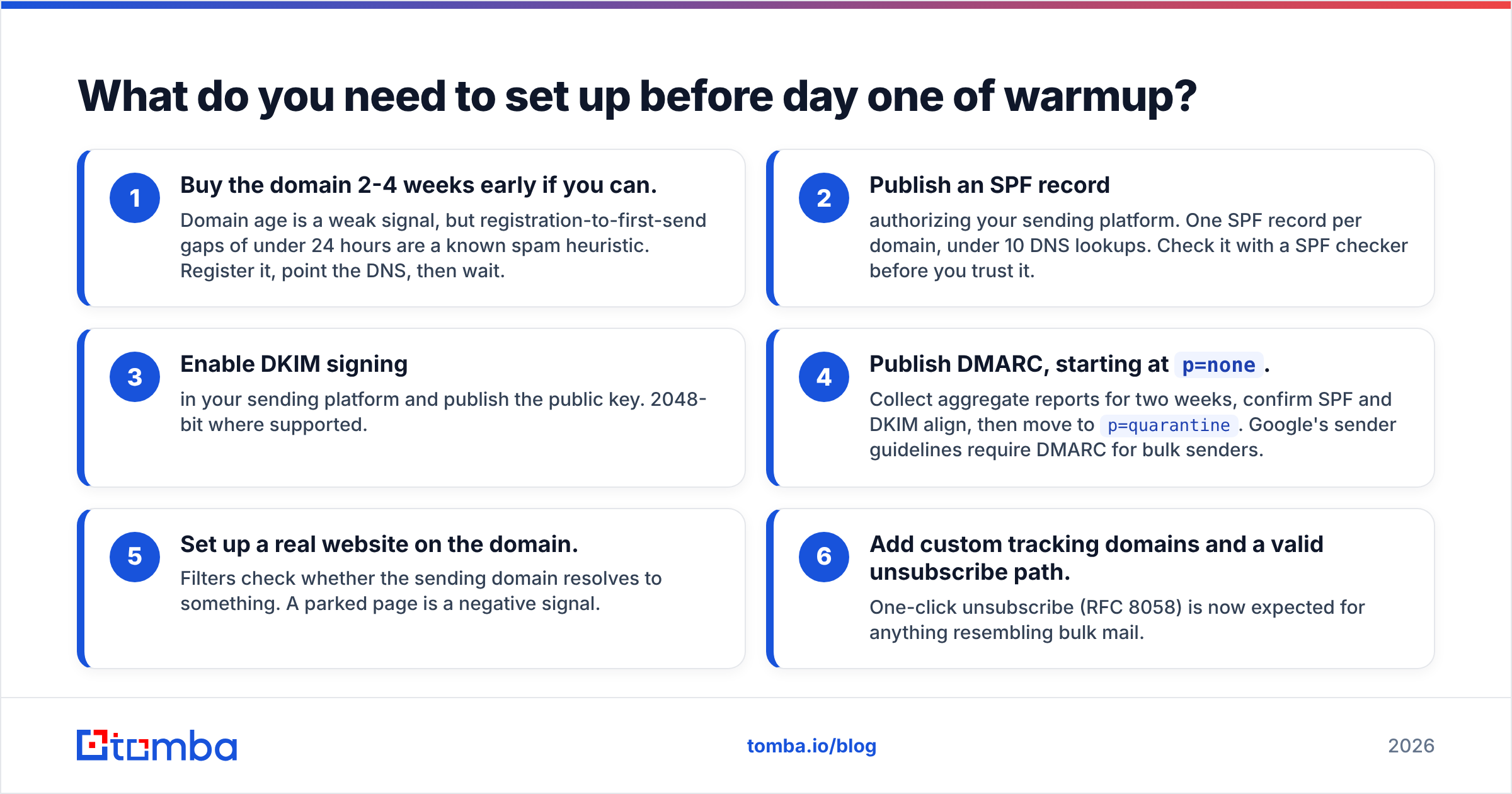
Everything below must be done before the first warmup email leaves your server. Sending from a domain with broken authentication during warmup teaches providers exactly the wrong lesson.
The pre-warmup checklist:
- Buy the domain 2-4 weeks early if you can. Domain age is a weak signal, but registration-to-first-send gaps of under 24 hours are a known spam heuristic. Register it, point the DNS, then wait.
- Publish an SPF record authorizing your sending platform. One SPF record per domain, under 10 DNS lookups. Check it with a SPF checker before you trust it.
- Enable DKIM signing in your sending platform and publish the public key. 2048-bit where supported.
- Publish DMARC, starting at
p=none. Collect aggregate reports for two weeks, confirm SPF and DKIM align, then move top=quarantine. Google's sender guidelines require DMARC for bulk senders. - Set up a real website on the domain. Filters check whether the sending domain resolves to something. A parked page is a negative signal.
- Add custom tracking domains and a valid unsubscribe path. One-click unsubscribe (RFC 8058) is now expected for anything resembling bulk mail.
Use separate domains for cold outreach and for transactional or marketing mail from your primary domain. If a cold-outreach domain gets blocklisted, you want that damage contained. A variant like getyourbrand.com or yourbrand-mail.com keeps your root domain clean.
What is a realistic domain warmup schedule?#
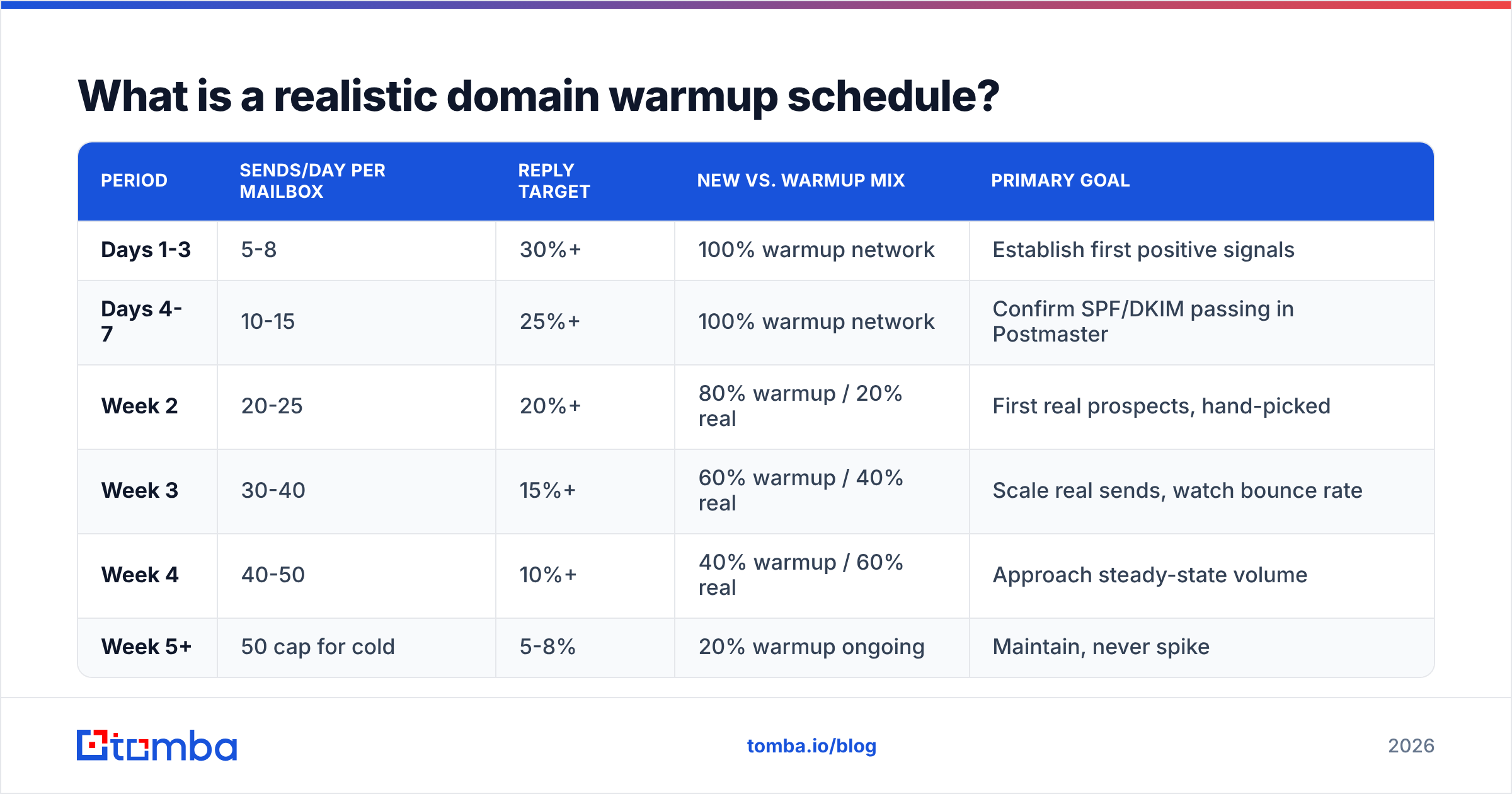
Here's the schedule that works for cold outreach in 2026. Volumes are per mailbox, not per domain — if you run three mailboxes on one domain, multiply accordingly, but do not exceed ~150 total sends/day per domain in the first two months.
| Period | Sends/day per mailbox | Reply target | New vs. warmup mix | Primary goal |
|---|---|---|---|---|
| Days 1-3 | 5-8 | 30%+ | 100% warmup network | Establish first positive signals |
| Days 4-7 | 10-15 | 25%+ | 100% warmup network | Confirm SPF/DKIM passing in Postmaster |
| Week 2 | 20-25 | 20%+ | 80% warmup / 20% real | First real prospects, hand-picked |
| Week 3 | 30-40 | 15%+ | 60% warmup / 40% real | Scale real sends, watch bounce rate |
| Week 4 | 40-50 | 10%+ | 40% warmup / 60% real | Approach steady-state volume |
| Week 5+ | 50 cap for cold | 5-8% | 20% warmup ongoing | Maintain, never spike |
Three rules that matter more than the exact numbers:
- Never jump more than 2x week over week. A domain doing 25/day that suddenly does 200/day is a red flag regardless of prior history.
- Keep warmup traffic running forever, at reduced volume. Reputation decays. A 20% warmup floor keeps the engagement ratio healthy during slow campaign weeks.
- Send on a human schedule. Business hours, weekdays, randomized intervals. Twelve identical sends at exactly 9:00:00 is a machine fingerprint.
If you want a volume plan tailored to your mailbox count and target daily volume, run the numbers through a warmup calculator rather than eyeballing it.
Do warmup tools actually work, and which one should you use?#
Warmup tools work, with a caveat worth understanding: they create synthetic engagement inside a network of participating mailboxes. Your emails get opened, replied to, and dragged out of spam by other users' accounts. Providers have gotten better at detecting these networks, so the tools are a floor, not a ceiling.
They matter most in weeks 1-3, when you have no real engagement to build on. By week 5, replies from actual prospects carry far more weight.
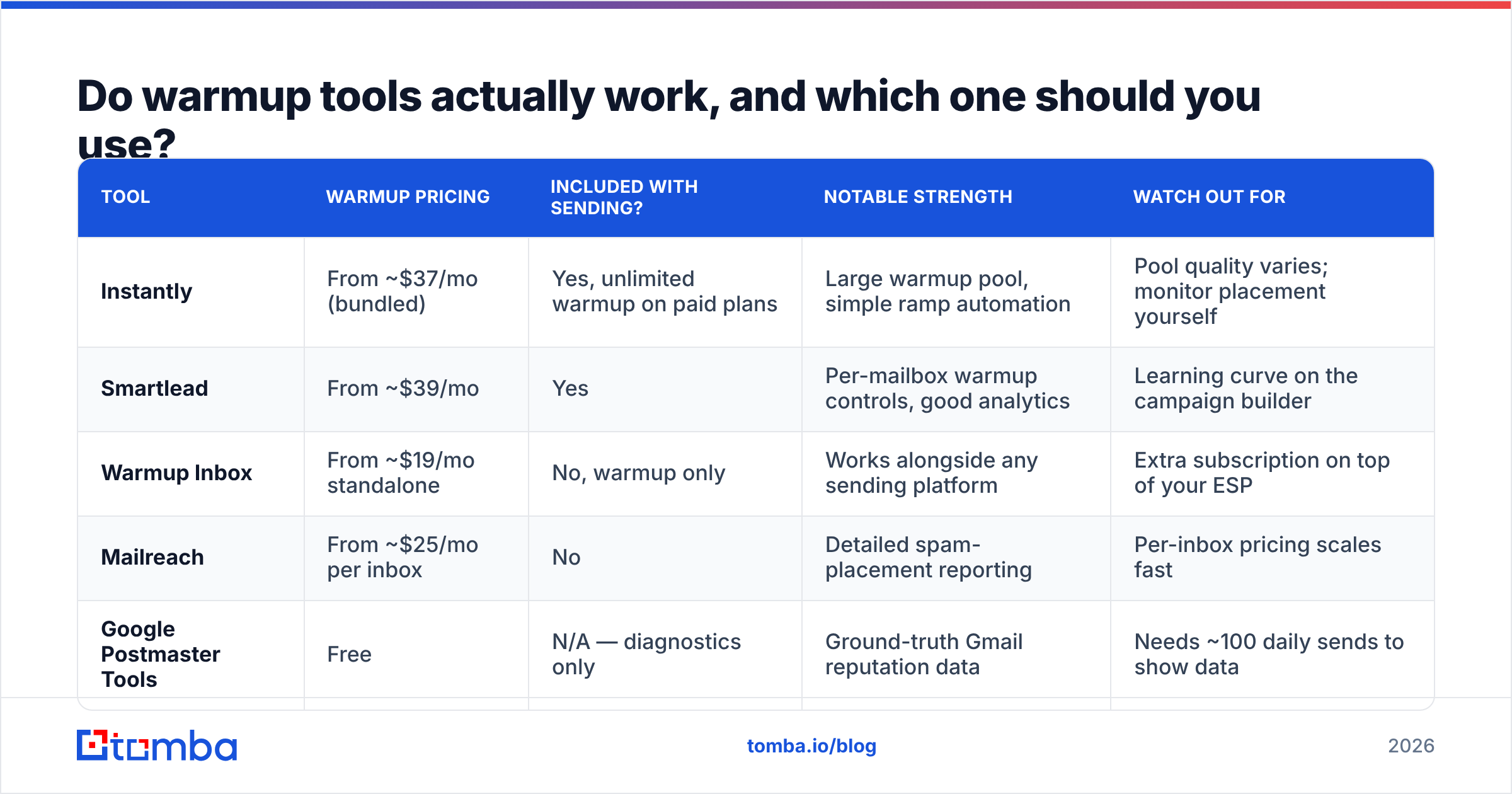
| Tool | Warmup pricing | Included with sending? | Notable strength | Watch out for |
|---|---|---|---|---|
| Instantly | From ~$37/mo (bundled) | Yes, unlimited warmup on paid plans | Large warmup pool, simple ramp automation | Pool quality varies; monitor placement yourself |
| Smartlead | From ~$39/mo | Yes | Per-mailbox warmup controls, good analytics | Learning curve on the campaign builder |
| Warmup Inbox | From ~$19/mo standalone | No, warmup only | Works alongside any sending platform | Extra subscription on top of your ESP |
| Mailreach | From ~$25/mo per inbox | No | Detailed spam-placement reporting | Per-inbox pricing scales fast |
| Google Postmaster Tools | Free | N/A — diagnostics only | Ground-truth Gmail reputation data | Needs ~100 daily sends to show data |
Whatever you pick, pair it with Google Postmaster Tools and Microsoft SNDS. The warmup vendor tells you what its own network sees. Postmaster tells you what Gmail actually thinks of your domain — and Gmail is where most of your B2B recipients are.
How do you know if the warmup is working?#
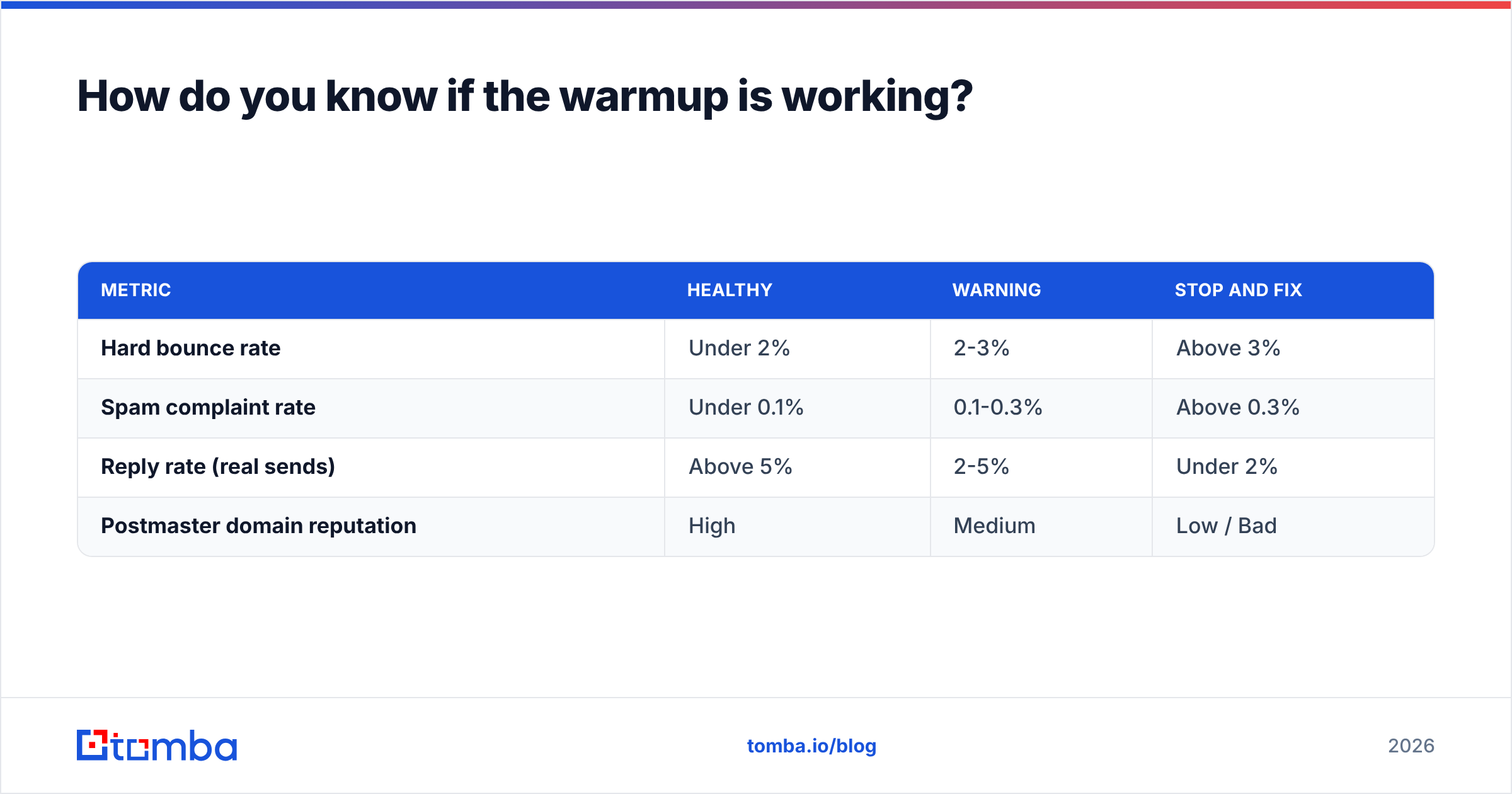
Track four numbers weekly. If any of them cross the threshold, pause the ramp and hold volume flat until it recovers.
| Metric | Healthy | Warning | Stop and fix |
|---|---|---|---|
| Hard bounce rate | Under 2% | 2-3% | Above 3% |
| Spam complaint rate | Under 0.1% | 0.1-0.3% | Above 0.3% |
| Reply rate (real sends) | Above 5% | 2-5% | Under 2% |
| Postmaster domain reputation | High | Medium | Low / Bad |
Gmail's complaint threshold is 0.3% and it is not negotiable — cross it consistently and your mail goes to spam wholesale. Practically, you want to stay under 0.1%, which means your list needs to be genuinely relevant, not just genuinely deliverable.
Test placement independently. Seed a handful of your own Gmail, Outlook, and Yahoo accounts into each campaign and check where the mail actually lands. A warmup dashboard showing 98% inbox placement inside its own network means very little if your real sends are landing in Promotions.
Why do warmed-up domains still land in spam?#
Because the list is bad. This is the single most common failure mode, and it is entirely preventable.
A perfect four-week warmup gives you a domain with clean authentication and positive engagement history. Then you load 5,000 scraped addresses, 12% of which don't exist, and send. The bounce spike tells every mailbox provider that you are sending to a purchased or scraped list — which is exactly what a spammer does. Reputation collapses in 48 hours.
The fix is boring and it works: verify before you send.
- Verify every address. A proper email verifier runs syntax, MX, and SMTP-level checks and separates deliverable from risky. Aim to send only to addresses that come back valid.
- Handle catch-all domains deliberately. Catch-all servers accept everything, so a standard check can't confirm the mailbox exists. Use a catch-all verifier to score them, and cap catch-all recipients at a small share of each send during warmup.
- Source addresses instead of guessing them. Permutator-style guessing produces bounces by design. Finding a verified address through domain search against a company's actual known patterns produces far fewer.
- Deduplicate ruthlessly. Sending the same person two sequences from two mailboxes is a complaint waiting to happen.
- Re-verify anything older than 90 days. B2B data decays at roughly 2-2.5% per month as people change jobs.
There's also the content side. Even a clean list won't save mail full of spam triggers, link shorteners, image-heavy HTML, or six tracked links in a 90-word email. Run drafts through a spam checker during warmup — the cost of finding out in week 2 is much lower than in month 3.
Should you warm up multiple domains at once?#
Yes, if you plan to scale outbound past roughly 150 emails/day. No, if you're a solo founder sending 30 a day.
The standard infrastructure pattern for scaled outbound looks like this:
- 1 primary domain — your real brand domain, used for replies, marketing, and transactional mail. Never used for cold sends.
- 2-4 sending domains — close variants (
try-brand.com,brand-hq.com), each warmed independently, each with its own DNS records. - 2-3 mailboxes per sending domain — different named senders, each capped at 50/day cold.
- Staggered warmup starts — begin each domain a week apart so you aren't blind if one pattern fails.
That gives you 300-600 daily cold sends across a spread of assets, with failure isolated to one domain at a time. It is also the point where warmup stops being a manual task and needs to be scheduled and monitored per mailbox.
One economic reality: this infrastructure costs real money — domains, mailboxes, warmup subscriptions, sending platform. Multiplying it only makes sense if your list quality justifies the volume. Two hundred sends/day to verified, well-researched prospects beats 600/day to a scraped export every time, and it protects the sender reputation you spent a month building.
How long until you can send at full volume?#
Four weeks to reach 50/day per mailbox. Eight to twelve weeks before a domain is genuinely stable at high volume with consistent inbox placement.
Anyone selling a three-day warmup is selling you a spam folder. The providers are measuring behavior over time, and there is no way to compress time.
What you can compress is everything around it: get DNS right on day one instead of debugging DKIM in week three, and start with a verified list so that week 4 — your first real volume week — doesn't produce a bounce spike. Those two decisions account for most of the difference between domains that reach steady state and domains that get abandoned.
A reasonable definition of "done": Postmaster shows High domain reputation, hard bounces are under 1%, complaints under 0.1%, and your seed accounts land in Primary across Gmail, Outlook, and Yahoo. Hold there for two weeks before pushing volume again.
Where should you start?#
Start with the list, not the ramp. The warmup schedule above is straightforward to execute — the part that actually determines whether your domain survives month two is whether the addresses you send to are real.
Use the Tomba Email Finder to source verified professional addresses by domain, name, or company before your warmup finishes, so week 4 sends to confirmed mailboxes rather than guesses. The free tier gives you 25 searches a month to test the data quality against companies you already know; paid plans start at $49/mo, with full Tomba pricing if you need bulk volume or API access. Build the clean list during warmup, and by the time your domain is ready, your pipeline is too.
Related guides#
// get started
Find, verify and enrich your first contacts today
Start on the free plan with 25 searches a month, then scale when your team is ready.
Free plan · No credit card required · GDPR & CCPA
// about the author