How to Write a Cold Email for Sales That Gets Replies
A line-by-line breakdown of how to write a cold email for sales in 2026 — subject lines, opening lines, CTAs, and the research step most reps skip. With real templates and reply-rate benchmarks.
TL;DR
- A cold email that works is six parts: a boring subject line, a first line about them, one problem statement, one proof point, one low-friction ask, and a signature that doesn't look like a billboard.
- Keep it under 125 words. Reply rates fall off a cliff past ~150 words, and mobile clients truncate anything longer than a phone screen.
- Your CTA should ask for an opinion or a yes/no, not a 30-minute call. "Worth a look?" outperforms "Do you have 30 minutes Thursday?" almost every time.
- Personalization only pays if it's specific. "I saw you're in SaaS" is worse than no personalization at all — it signals a template.
- None of it matters if the address bounces. Verify before you send; a 3%+ bounce rate on a cold domain will cost you the inbox entirely.
What actually makes a cold email work in 2026?#
Short answer: relevance you can prove in the first eight words, and a next step that costs the reader almost nothing.
Everything else — the frameworks, the AI personalization layers, the 14-touch sequences — is decoration on top of those two things. Buyers in 2026 get more cold email than ever, and Gmail and Outlook have gotten aggressive about filtering bulk senders. The email that lands is the one that reads like a human wrote it to one person after five minutes of actual thought.
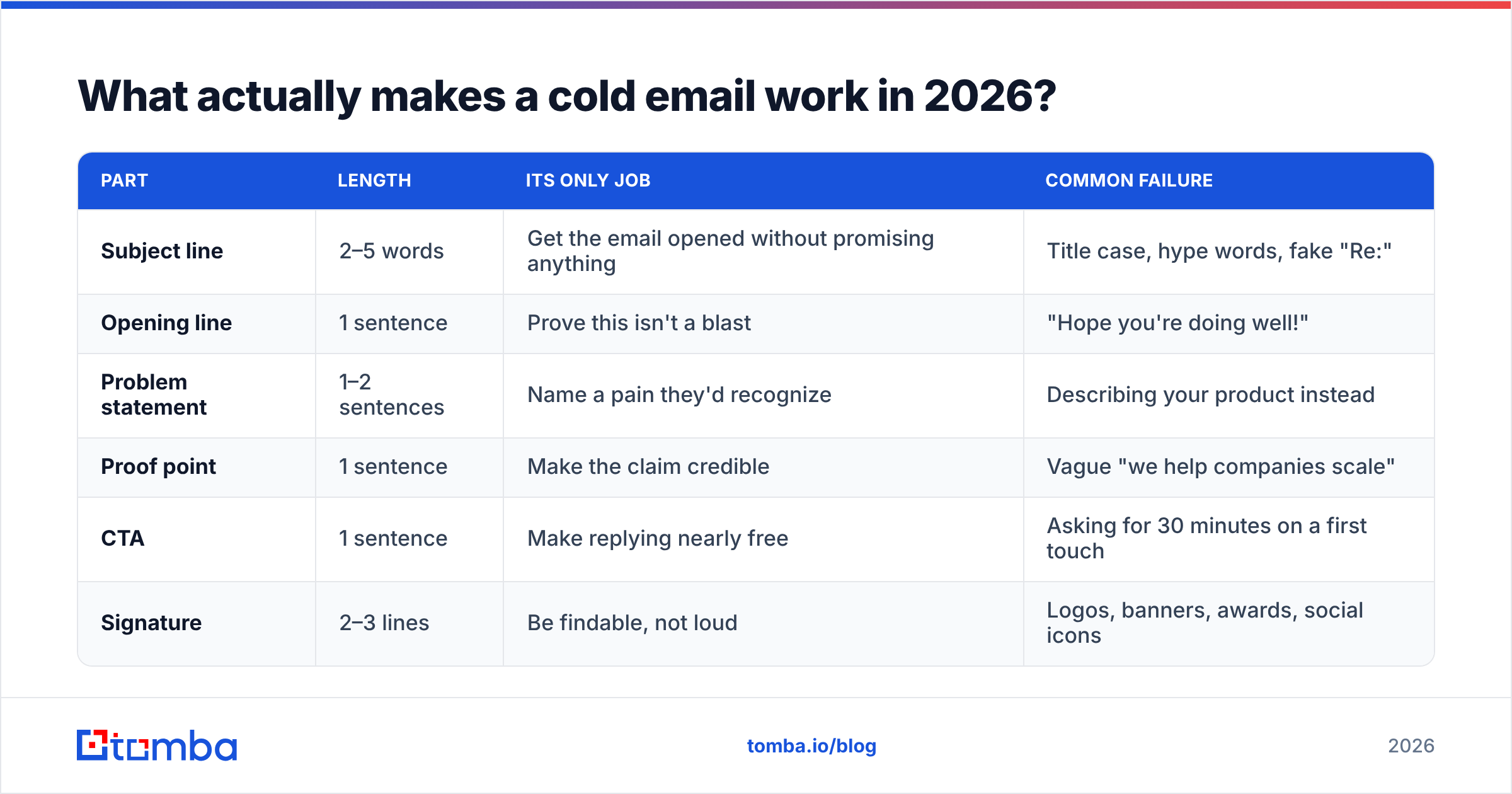
Here's the structural anatomy you're aiming for:
| Part | Length | Its only job | Common failure |
|---|---|---|---|
| Subject line | 2–5 words | Get the email opened without promising anything | Title case, hype words, fake "Re:" |
| Opening line | 1 sentence | Prove this isn't a blast | "Hope you're doing well!" |
| Problem statement | 1–2 sentences | Name a pain they'd recognize | Describing your product instead |
| Proof point | 1 sentence | Make the claim credible | Vague "we help companies scale" |
| CTA | 1 sentence | Make replying nearly free | Asking for 30 minutes on a first touch |
| Signature | 2–3 lines | Be findable, not loud | Logos, banners, awards, social icons |
Six parts. Under 125 words. That's the whole game.
How do you write a subject line that survives the inbox?#
Make it look like an internal email, not a campaign.
The subject lines that get opened in cold outbound are almost aggressively plain. Lowercase or sentence case. Two to five words. No punctuation gymnastics. They work because they mimic the emails your prospect already opens — the ones from colleagues.
Patterns that hold up:
- The topic label — "onboarding drop-off", "Q4 pipeline coverage". Reads like a thread subject.
- The question — "worth a look?", "wrong person?". Low commitment, high curiosity.
- The mutual reference — "via Sarah at Ramp". Only if it's true. This one converts hardest and burns you fastest if invented.
- The observation — "your careers page". Signals you looked at something specific.
- The name drop — "{Company} + {YourCompany}". Overused but still functional in enterprise.
What to avoid: ALL CAPS, emojis in cold outbound, "Quick question" (burned out), false urgency ("Last chance"), and anything with a dollar figure. Google's own bulk sender guidelines push hard on authentication and low spam-complaint rates — subject lines that trigger manual spam reports do compounding damage to your domain.
Test the line before you send at volume. A subject line tester will flag spam-trigger words and length issues in seconds, which is cheaper than learning from a burned domain.
What should the first line say?#
Anything except "I hope this email finds you well."
The opening line is the single highest-leverage sentence in the email, because it's the one previewed in the inbox next to the subject. If it's about you, the reader deletes. If it's about them, and it's specific, they read line two.
Three tiers of opener, ranked by how well they perform:
Tier 1 — trigger-based. Something that changed at their company in the last 90 days. New funding round, a job posting for a role that implies your problem, a product launch, a leadership hire, a tech-stack change. "Saw you're hiring three SDRs in Austin — usually that means the list-building is about to become someone's full-time job."
Tier 2 — role-based pattern. No trigger available, so you lead with what's true of people in their exact seat. "Most RevOps leads at 200-person SaaS companies I talk to are stitching together three data vendors and still eating a 20% bounce rate."
Tier 3 — company-level observation. Weakest of the three but still beats nothing. Reference something on their site, their pricing page, a recent blog post they published.
What kills you is fake Tier 1: "Love what you're doing at Acme!" You didn't. They know. That sentence tells the reader the rest of the email is a template, and now they're reading defensively.
If your target is someone who publishes, an author finder pulls the writer's address straight from the article URL — which gives you both a genuine Tier 1 opener and a verified contact in one step.
How long should a cold email be?#
Between 50 and 125 words. Aim for the low end.
The reason isn't attention span mythology — it's mechanics. A cold email is read on a phone, in a notification preview, between meetings. If it doesn't fit on one screen without scrolling, it gets triaged into "later," and "later" never comes.
| Word count | Typical reply rate behavior | Best use |
|---|---|---|
| Under 50 | High reply, low qualification | Follow-ups, breakup emails |
| 50–100 | Best overall reply rate | First-touch cold email |
| 100–150 | Solid if every line earns its place | Complex/technical sale |
| 150–250 | Sharp decline | Warm intros only |
| 250+ | Near-zero cold | Never for cold outbound |
Practical trims that cost you nothing:
- Delete every sentence starting with "I" that isn't the CTA.
- Cut adjectives from your proof point. "Cut bounce rate from 19% to 3%" needs no adjective.
- Replace your company boilerplate with one customer name.
- Remove the second CTA. There is only ever one.
What's the right call to action?#
Ask for a reply, not a meeting.
This is the most common fixable mistake in cold email. A calendar link on first touch asks a stranger to spend 30 minutes on something they haven't been convinced is worth 30 seconds. The ask is out of proportion to the trust, so they don't act — and non-action is indistinguishable from disinterest in your reporting.
CTAs that work on a first touch:
- The opinion ask — "Is bounce rate something you're actively fighting, or already solved?"
- The permission ask — "Want me to send the two-line version of how it works?"
- The routing ask — "Are you the right person for this, or should I be talking to someone else?"
- The interest check — "Worth a look?"
Each of these can be answered in under five words while walking. That's the bar. HubSpot's ongoing sales benchmark research has consistently found that lower-friction asks outperform meeting requests on cold first touches — and once someone has replied at all, the meeting ask becomes a warm ask.
Save the calendar link for email three, after a reply.
A cold email template you can actually steal#
Here's the six-part structure assembled, with a real scenario: selling a data-quality tool to a RevOps lead at a Series B SaaS company.
Subject: bounce rate on the Q1 list
Hi Dana — saw the two SDR roles you posted last week. Usually when a team doubles outbound headcount, list hygiene is the first thing that breaks.
Most RevOps leads I talk to at this stage are running lists through one vendor and finding out about the bad addresses when the bounce report lands. It's a domain-reputation problem before it's a data problem.
We got Ramp's cold-domain bounce rate from 19% to under 3% by verifying pre-send instead of post-bounce.
Is that a live problem for you right now, or already handled?
— Marcus
Tomba · marcus@tomba.io
That's 108 words. Note what isn't in it: no feature list, no "revolutionary," no calendar link, no "circling back," no company boilerplate. The proof point is one sentence with a number. The CTA can be answered with "already handled."
If you'd rather start from a library than a blank page, Tomba's cold email templates cover the standard sequences — first touch, follow-up, breakup, re-engagement — and the cold email AI writer will draft variants from a prospect URL if you're batching.
How many follow-ups should you send?#
Three to four total touches, spaced 3–4 days apart, then stop.
Most replies to cold sequences come after the first email — but a meaningful share arrive on touches two and three, which is why single-send campaigns underperform. The mistake is what goes in the follow-up. "Just bumping this up" adds nothing and trains the reader to ignore your name.
Each follow-up should carry one new thing:
- Touch 2 (day 3): A different angle on the same problem. Not a restatement — a new symptom.
- Touch 3 (day 7): Social proof. A named customer in their segment, one line, plus the same low-friction ask.
- Touch 4 (day 12): The breakup. "Sounds like this isn't a priority — I'll stop here. If it changes, reply and I'll pick it back up." Breakups pull surprisingly well because they remove the pressure.
Then stop. A fifth, sixth, and seventh touch generate spam complaints far faster than they generate meetings, and spam complaints are the metric that decides whether your next campaign reaches the inbox at all.
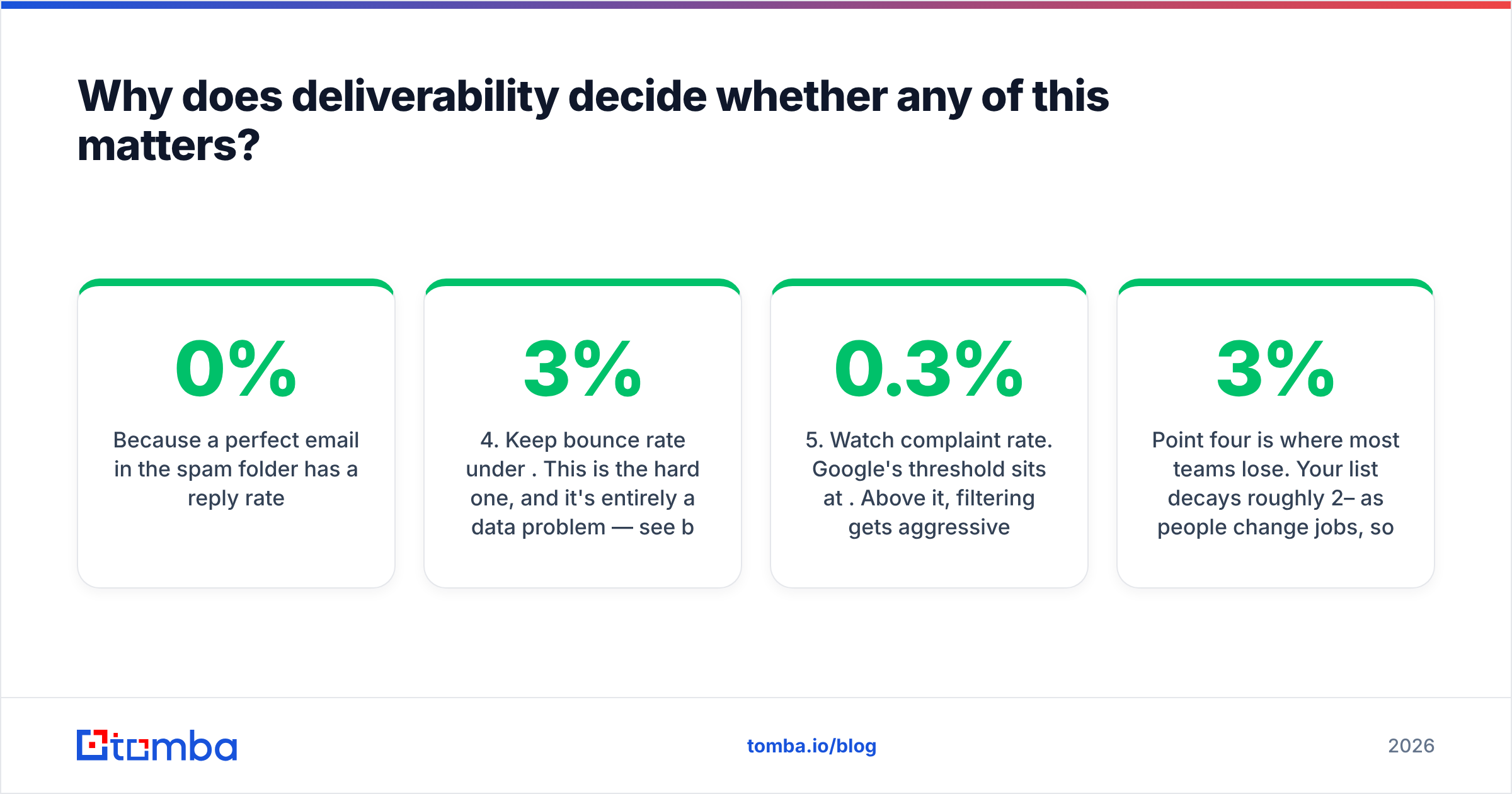
Why does deliverability decide whether any of this matters?#
Because a perfect email in the spam folder has a 0% reply rate.
You can execute every rule above and still see nothing if the plumbing is wrong. The non-negotiables:
- Authenticate the domain. SPF, DKIM, and DMARC all passing. Run an SPF checker before your first send — a missing record is the single most common cause of a campaign that silently vanishes.
- Send from a subdomain. Use a separate sending domain so a bad campaign can't take your primary corporate mail down with it.
- Warm up gradually. New domains need weeks of ramp, not days. An email warmup calculator will give you a realistic volume schedule.
- Keep bounce rate under 3%. This is the hard one, and it's entirely a data problem — see below.
- Watch complaint rate. Google's threshold sits at 0.3%. Above it, filtering gets aggressive and recovery is slow.
Point four is where most teams lose. Your list decays roughly 2–3% per month as people change jobs, so a list you scraped in January is materially wrong by April. Run every address through an email verifier before send, and use a catch-all verifier for the domains that accept everything and tell you nothing — those are the ones that quietly wreck a bounce rate you thought was clean. If you're working at volume, bulk verify the whole list in one pass rather than checking addresses one at a time.
Where do you get the addresses in the first place?#
From a finder that returns a confidence score, not a guessed pattern.
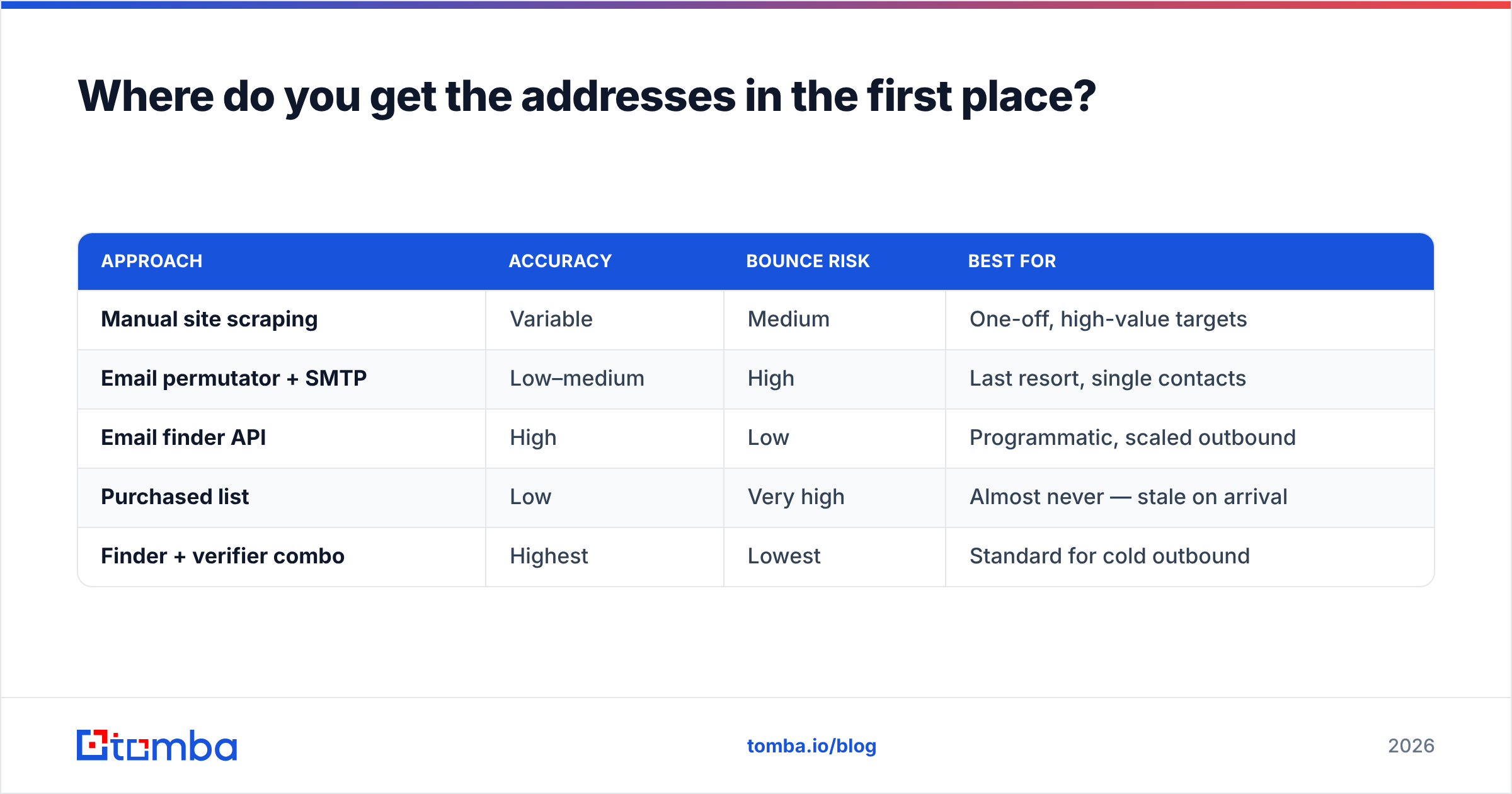
Email permutators — the tools that generate first.last@, flast@, first@ and let SMTP sort it out — still have a niche, but they produce bounces at exactly the moment you can least afford them. A proper finder cross-references public sources and returns both the address and how confident it is.
| Approach | Accuracy | Bounce risk | Best for |
|---|---|---|---|
| Manual site scraping | Variable | Medium | One-off, high-value targets |
| Email permutator + SMTP | Low–medium | High | Last resort, single contacts |
| Email finder API | High | Low | Programmatic, scaled outbound |
| Purchased list | Low | Very high | Almost never — stale on arrival |
| Finder + verifier combo | Highest | Lowest | Standard for cold outbound |
For finding contacts at a target account, domain search returns everyone publicly associated with a company domain along with departments and confidence scores — useful when you don't know who owns the problem yet. For a named person, the email finder takes a name plus a domain. If you're prospecting off LinkedIn, the LinkedIn finder resolves a profile URL to a work address.
Worth noting: several tools in this space are genuinely good at different jobs. BookYourData is strong when you want a pre-built, pay-as-you-go list for a defined segment rather than finding contacts one at a time — a different workflow from finder-plus-verifier, and a reasonable choice depending on how you prospect. Check G2's category listings if you want side-by-side user reviews before committing.
What should you measure?#
Four numbers, in this order:
- Bounce rate — under 3%. Above that, fix data before touching copy. Nothing else you measure is trustworthy until this is clean.
- Open rate — 40–60% is healthy in 2026, but treat it as directional only; privacy features make open tracking noisy.
- Reply rate — 5–10% is solid for a well-targeted cold sequence. Under 2% means your targeting is wrong, not your subject line.
- Positive reply rate — the only one that pays. Track it separately; a high reply rate made of "unsubscribe" is a warning, not a win.
Debug in that order. Teams burn weeks A/B testing subject lines when the actual problem is that they're emailing the wrong 400 people. Copy is the last variable to optimize, not the first.
Ready to send emails that actually land?#
Great copy on a bad list is wasted work. Start with contacts you can trust: the Tomba Email Finder returns verified work addresses by name, domain, or company, each with a confidence score, so your bounce rate stays low enough that your carefully written six-part email actually reaches an inbox.
The free tier gives you 25 searches per month to test the workflow on a real list. Paid plans start at $49/month for Starter, $99/month for Growth, and $249/month for Pro — full Tomba pricing is public, and everything is available through the Tomba API if you'd rather wire finding and verification directly into your sequencer.
Write fewer emails. Write them to the right people. Verify before you send.
Related guides#
// get started
Find, verify and enrich your first contacts today
Start on the free plan with 25 searches a month, then scale when your team is ready.
Free plan · No credit card required · GDPR & CCPA
// about the author