How to Write a Follow Up Email After an Event (2026 Guide)
Most event follow-ups fail because they arrive too late and say nothing specific. Here are the timing windows, five templates, and the exact structure that turns badge scans into booked meetings.
TL;DR
- Send within 24-48 hours. Reply rates drop sharply after day three because the person no longer remembers your face, only your logo.
- Reference one specific thing from the conversation in the first sentence — the session, the objection they raised, the joke about the coffee line. Generic "great to meet you" emails get ignored.
- Segment your list before you write. A booth badge scan, a hallway conversation, and a scheduled demo need three different emails, not one blast.
- Badge exports and conference attendee lists are dirty. Verify addresses before sending or your post-event blast will torch your sender reputation.
- One clear ask per email. "Worth 20 minutes next Tuesday?" beats "let me know if you'd like to learn more."
You spent $12,000 on a booth, three days of travel, and a stack of swag. You came home with 240 badge scans. Then you sent one email to all 240 people that started with "It was great meeting you at TechCon!" and got 4 replies.
The problem was never the event. It was the 72 hours after it.
Why do most event follow-up emails fail?#
They fail for three reasons, and all three are fixable before you write a single word.
1. They arrive too late. Trade show memory decays fast. Someone who talked to 30 vendors in two days can name maybe five of them by the following Monday. By Thursday, you're an unfamiliar sender with a subject line that looks like every other unfamiliar sender.
2. They're written to a segment of one thousand. A badge scan is not a conversation. Someone who let you scan their badge to enter a raffle has near-zero intent. Someone who asked how your API handles rate limits has real intent. Sending both the same email means writing to the average of the two, which serves neither.
3. They ask for nothing, or everything. "Let me know if you'd like to learn more" gives the reader no decision to make, so they make none. "Book a 45-minute discovery call with our solutions team and I'll send over the security questionnaire" gives them too many, so they defer.
There's a fourth quiet killer: list hygiene. Conference organizers hand you a CSV that includes typos from handwritten badge forms, people who mistyped their own domain, and role accounts that route nowhere. Blasting it unverified produces bounces, and bounce rates above roughly 2% start degrading your email deliverability for every future campaign — including the ones that had nothing to do with the event.
What is the right timing for an event follow-up?#
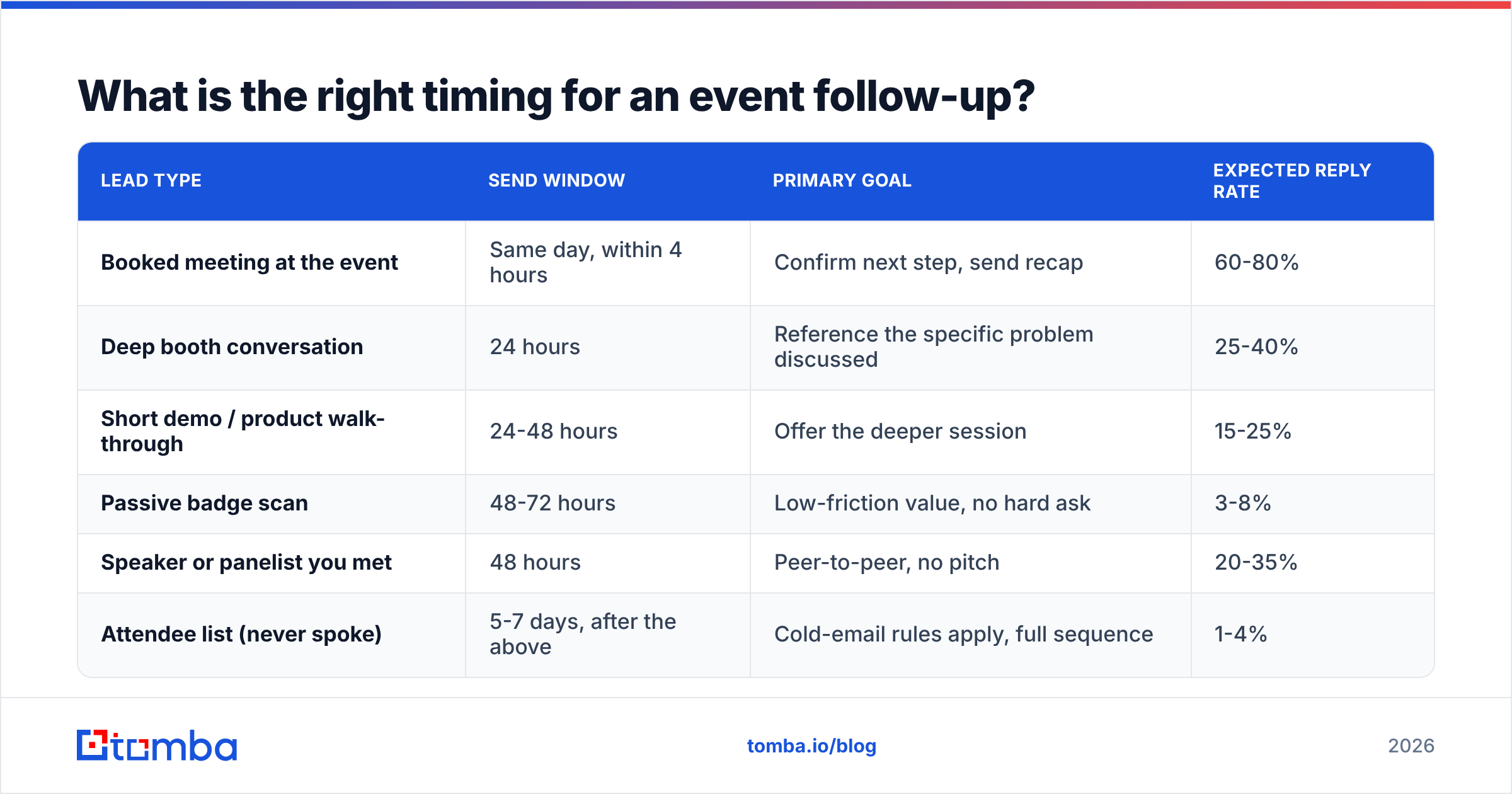
There is no single "best time." There is a best window per lead type, and it's driven by how much of the conversation the person actually remembers.
| Lead type | Send window | Primary goal | Expected reply rate |
|---|---|---|---|
| Booked meeting at the event | Same day, within 4 hours | Confirm next step, send recap | 60-80% |
| Deep booth conversation | 24 hours | Reference the specific problem discussed | 25-40% |
| Short demo / product walk-through | 24-48 hours | Offer the deeper session | 15-25% |
| Passive badge scan | 48-72 hours | Low-friction value, no hard ask | 3-8% |
| Speaker or panelist you met | 48 hours | Peer-to-peer, no pitch | 20-35% |
| Attendee list (never spoke) | 5-7 days, after the above | Cold-email rules apply, full sequence | 1-4% |
Two rules make this table work:
- Never batch across tiers. Send the same-day tier before you leave the venue if you can. The passive-scan tier can wait, and should — sending it too early wastes the one shot you get at a lukewarm contact.
- Respect the recovery week. Everyone is buried in the Monday after a conference. If your event ends Thursday, the passive tier lands Tuesday, not Monday morning at 8am when their inbox has 400 unread messages.
How do you structure a follow up email after an event?#
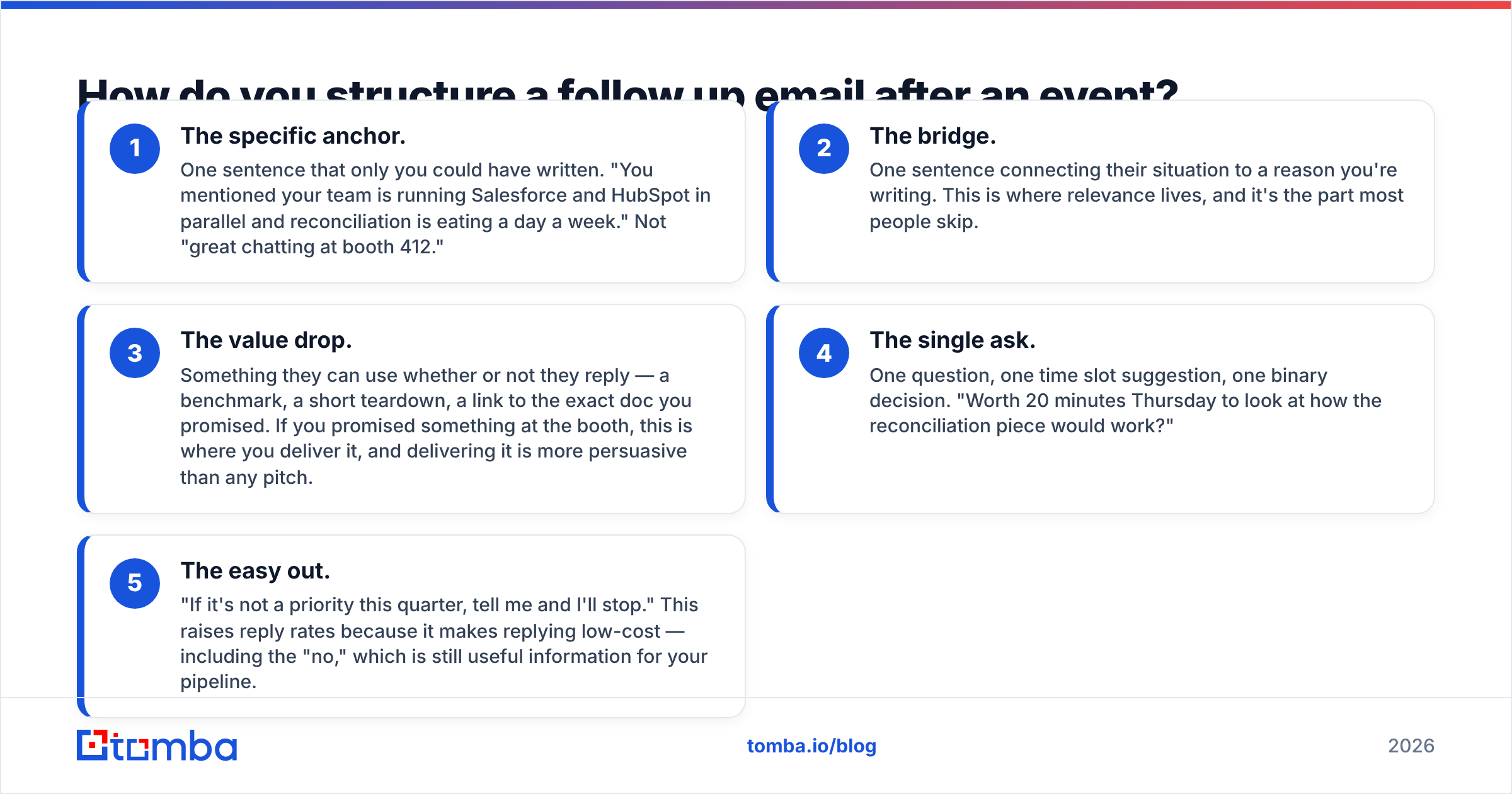
The structure that works is five parts, in this order, and it fits in under 120 words.
- The specific anchor. One sentence that only you could have written. "You mentioned your team is running Salesforce and HubSpot in parallel and reconciliation is eating a day a week." Not "great chatting at booth 412."
- The bridge. One sentence connecting their situation to a reason you're writing. This is where relevance lives, and it's the part most people skip.
- The value drop. Something they can use whether or not they reply — a benchmark, a short teardown, a link to the exact doc you promised. If you promised something at the booth, this is where you deliver it, and delivering it is more persuasive than any pitch.
- The single ask. One question, one time slot suggestion, one binary decision. "Worth 20 minutes Thursday to look at how the reconciliation piece would work?"
- The easy out. "If it's not a priority this quarter, tell me and I'll stop." This raises reply rates because it makes replying low-cost — including the "no," which is still useful information for your pipeline.
Subject lines follow one rule: reference the event or the specific topic, never both, and never more than six words. "Re: your Salesforce/HubSpot sync" outperforms "Following up from TechCon 2026 — great to connect!" every time.
What does this look like in practice?#
Tier 1 — deep booth conversation, sent 24 hours later:
Subject: the reconciliation problem you mentioned
Hi Dana — you said your ops team loses about a day a week reconciling Salesforce against HubSpot after every campaign import.
I pulled the mapping doc I mentioned; it's the approach two of our customers with the same dual-CRM setup use. Link here.
Worth 20 minutes Thursday to walk through where the record matching usually breaks? If it's not a Q4 priority, say so and I'll drop it.
— Marc
Tier 4 — passive badge scan, sent 72 hours later:
Subject: the RevOps benchmark from TechCon
Hi Sam — you stopped by our booth at TechCon on Wednesday.
Rather than pitch you, here's the thing most people came to the booth asking about: the 2026 outbound benchmark data, including reply rates by industry and list-hygiene thresholds. No form.
If pipeline data quality is on your list this year, I'm happy to compare notes. If not, no follow-up from me.
— Marc
The second email has a lower expected reply rate and that's correct. Its job is to earn the right to a second touch, not to book a meeting from a raffle entry.
Which follow-up sequence should you run?#
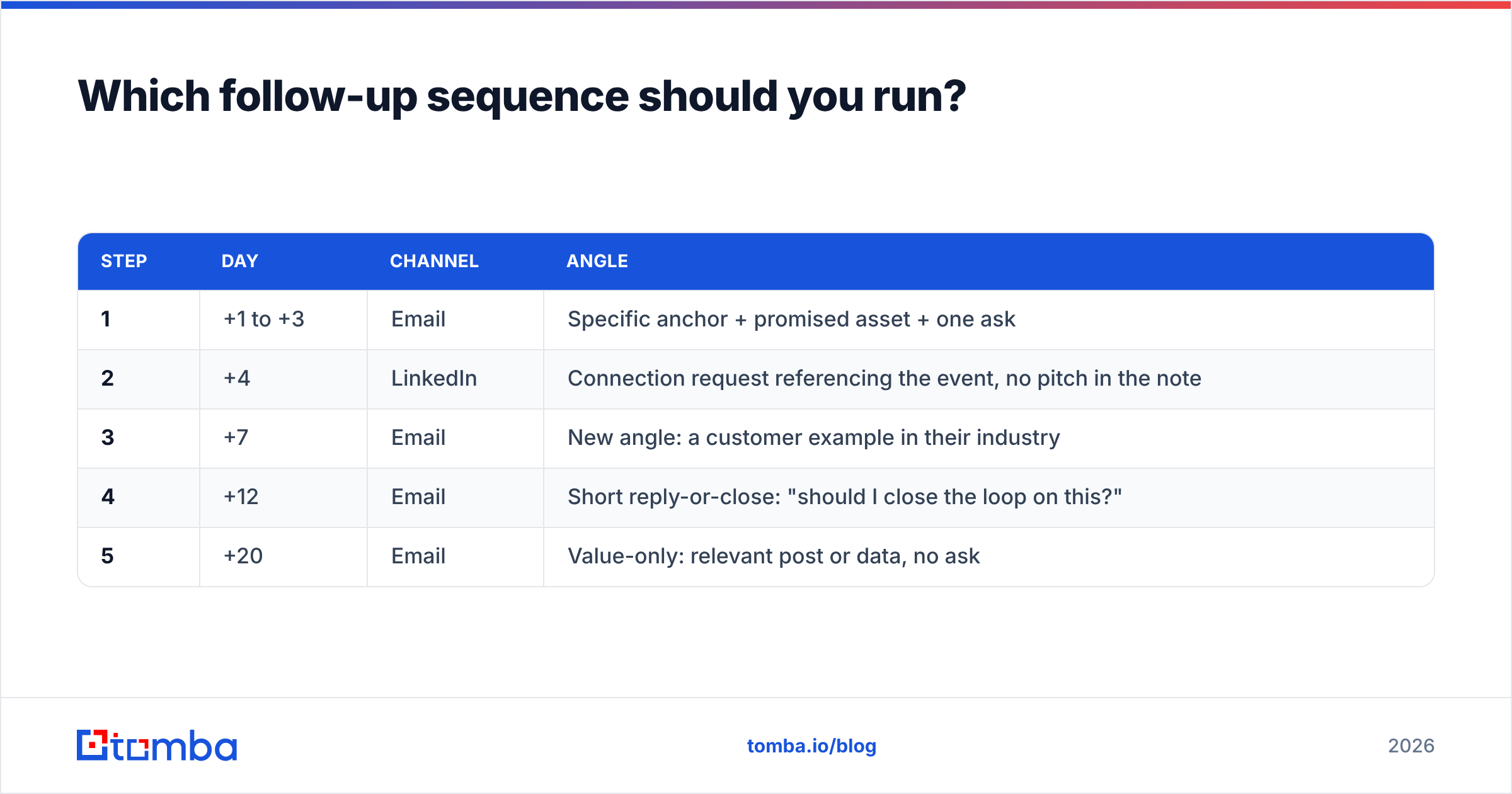
One email is not a follow-up strategy. But the sequence for event leads is shorter and softer than a cold sequence, because you already spent your credibility budget in person.
| Step | Day | Channel | Angle |
|---|---|---|---|
| 1 | +1 to +3 | Specific anchor + promised asset + one ask | |
| 2 | +4 | Connection request referencing the event, no pitch in the note | |
| 3 | +7 | New angle: a customer example in their industry | |
| 4 | +12 | Short reply-or-close: "should I close the loop on this?" | |
| 5 | +20 | Value-only: relevant post or data, no ask |
Four to five touches over three weeks is the ceiling for event leads. Beyond that you're not following up, you're a cold sequence with worse targeting — and the person will remember your brand for the wrong reason. HubSpot's own sales follow-up research has consistently found that most closed deals require multiple touches, but event leads front-load their intent: if there's nothing by touch five, move them to nurture and stop burning your domain on them.
Pair the email steps with LinkedIn outreach rather than replacing them. A connection request that references the specific session you both attended converts far better than a cold one, and it keeps you visible in the weeks where you're deliberately not emailing.
How do you clean an event list before sending?#
This is the step that separates a campaign that lands from one that gets you filtered. Do it in this order:
1. Deduplicate. The same person often appears in the badge export, the session attendee list, and your rep's phone notes with three different spellings. Merge before anything else — sending the same person three copies of your follow-up is a reply-rate disaster and a trust one. A quick pass through a deduplicate email list step takes minutes.
2. Fix broken and missing addresses. Handwritten badge forms produce @gmial.com and @compnay.co. Some scans capture a name and company but no email at all. That second group is usually your best group — the people who talked longest often skipped the form. Run name + company through an email finder to recover them rather than writing them off.
3. Verify everything that survives. Run the full list through an email verifier before the first send. You're looking for hard bounces, role accounts (info@, sales@), and catch-all domains. Catch-alls accept everything at the SMTP layer and tell you nothing, so treat them as a separate low-priority segment or run them through a catch-all verifier for a real signal.
4. Enrich what's thin. A badge scan that gives you a name and a company but no title makes personalization impossible. Contact enrichment fills in the title, seniority, and company size you need to decide which tier the lead belongs in.
5. Segment, then write. Only now do you split into the four tiers from the timing table. Writing before segmenting is how you end up with one generic email for 240 people.
If your event volume is high — multiple shows a quarter, thousands of scans — this whole cleanup runs faster in bulk. A bulk verify pass on the badge CSV, or the Tomba API wired into wherever the export lands, turns a two-day manual cleanup into a job that finishes before your flight home.
What kills reply rates in event follow-ups?#
Ranked by how often we see them, and how much damage each does:
- The recap dump. Four paragraphs summarizing your product because you're worried they forgot. They didn't read past line two. Cut it.
- "Just following up." It signals you have nothing new to say. Every touch after the first needs a new angle — a customer example, a data point, a relevant question — not a nudge.
- The calendar link with no context. Dropping a Calendly URL in email one asks for a 30-minute commitment from someone who spent 90 seconds at your booth.
- Attachments in the first email. PDFs in a first-contact email are a spam-filter signal. Link instead, and host it somewhere you control.
- Sending 240 emails from a cold domain. If your sending domain hasn't been warmed, a post-event burst looks exactly like a spam run to Gmail and Outlook filters. Check your email warmup volume before the show, not after. G2's buyer behavior research repeatedly shows that inbox placement, not copy quality, is the first gate — you can't out-write a spam folder.
- No CRM record. If the follow-up lives only in your rep's sent folder, the second touch never happens and nobody learns which tier converts. Push everything into your CRM the same week.
How do you measure whether it worked?#
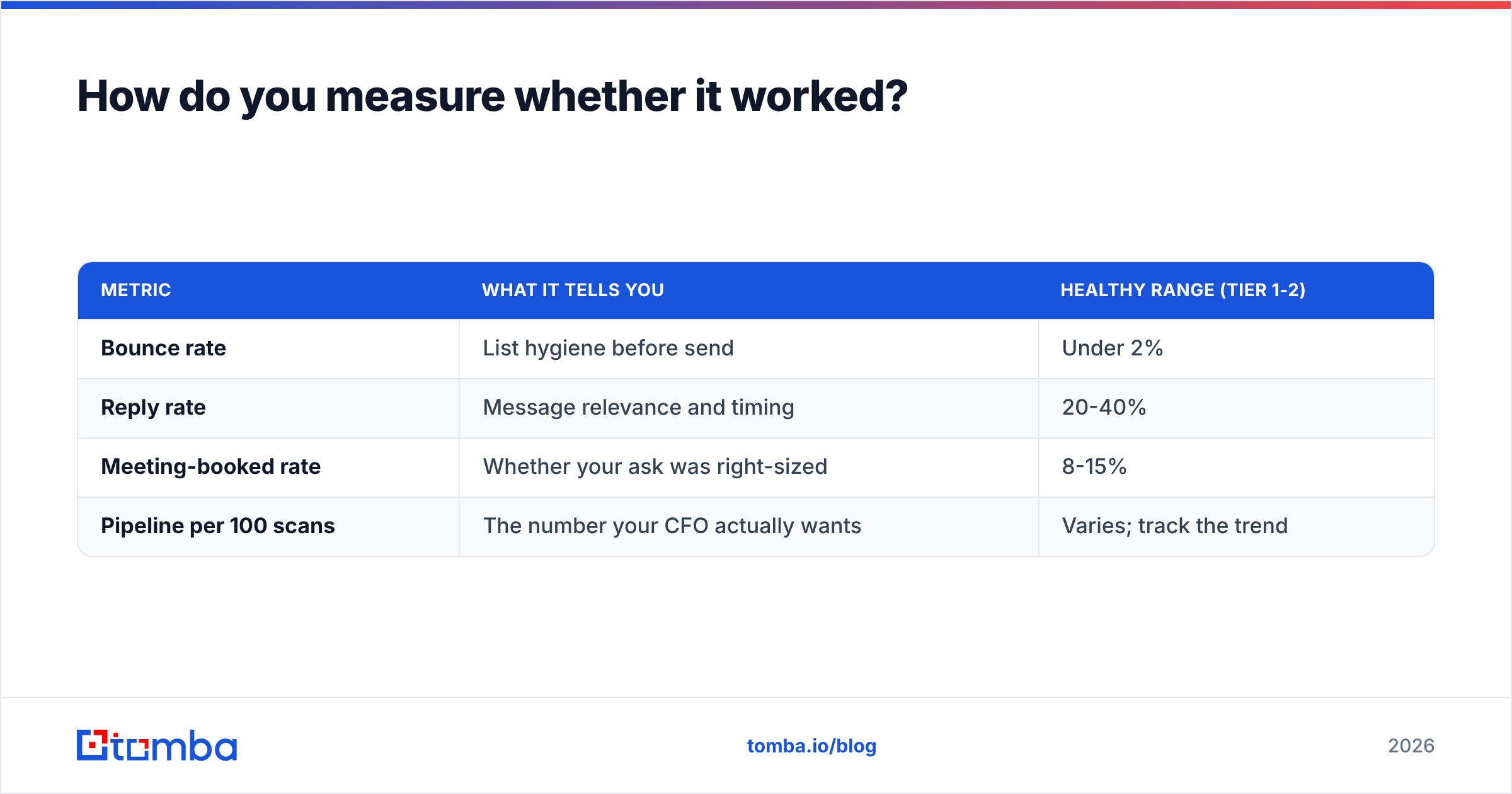
Event ROI conversations usually stall because nobody agrees on the denominator. Fix that by tracking four numbers per tier, not per event:
| Metric | What it tells you | Healthy range (tier 1-2) |
|---|---|---|
| Bounce rate | List hygiene before send | Under 2% |
| Reply rate | Message relevance and timing | 20-40% |
| Meeting-booked rate | Whether your ask was right-sized | 8-15% |
| Pipeline per 100 scans | The number your CFO actually wants | Varies; track the trend |
Measure per tier and the picture gets useful fast. If tier 1 converts at 30% and tier 4 at 1%, the answer isn't better copy for tier 4 — it's fewer raffle scans and more real conversations at the next show. That single insight has cut booth budgets in half at companies that started tracking it, and improved response rate at the same time.
Compare it against your baseline cold-email numbers too. If your event follow-up performs no better than cold outreach, the in-person conversation added nothing, and either the qualification at the booth or the anchor sentence in the email is broken.
Should you follow up with people you never met?#
Yes, but treat it as cold outreach with a warm hook, not as event follow-up.
Attendee lists, speaker rosters, and the LinkedIn "attending" list are legitimate prospecting sources. What they're not is permission to imply a conversation happened. "Great connecting at TechCon" to someone you never spoke to is the fastest way to be marked as spam, and people talk.
The honest version works better anyway: "I was at TechCon too but didn't get to your session — the summary someone posted said you're rebuilding your data stack. That's the exact problem I spend my days on." That's a cold email with a real, verifiable reason for being sent, which is the only thing that separates good cold email from bad.
Before you send it, find the address properly. A domain search on the companies from the attendee list gives you verified contacts and the company's email pattern, which is far more reliable than guessing firstname.lastname@ and hoping.
What's the fastest workflow for the week after an event?#
If you have one day and 240 scans, do it in this order:
- Hour 1: Export everything — badge scans, rep notes, session lists. Dedupe into one sheet.
- Hour 2: Recover missing emails and verify the rest in bulk. Kill anything risky.
- Hour 3: Enrich for title and company size. Tag each contact tier 1-4.
- Hours 4-5: Write four emails, one per tier. Personalize only tier 1 and 2 individually; tiers 3 and 4 use the template with one merge field that actually matters.
- Hour 6: Load into your sequencer with the send windows from the timing table. Schedule, don't blast.
- Day 2 onward: Reply within one hour during business hours. Speed of reply beats every other variable once the conversation restarts.
The whole thing is unglamorous, and that's the point. The competitive edge at an event isn't the booth design — it's that you sent a specific, verified, correctly-timed email while three other vendors were still exporting their CSV.
Get the addresses right before you write a word#
The best-written follow-up in the world bounces if the address came off a handwritten badge form. Before your next event, run the badge export through the Tomba Email Finder to recover the contacts your scanner missed and confirm the ones it caught. The free tier covers 25 searches a month if you want to test it on a single session's list; Tomba plans start at $49/mo for Starter and $99/mo on Growth when you're processing full show exports.
Clean list, tiered segments, 48-hour window, one specific ask. That's the whole method.
Related guides#
// get started
Find, verify and enrich your first contacts today
Start on the free plan with 25 searches a month, then scale when your team is ready.
Free plan · No credit card required · GDPR & CCPA
// about the author