How to Write Outreach Emails That Actually Get Replies
Most outreach emails fail before the first sentence lands. Here is the exact structure, research process, and word-count math behind cold emails that pull 8-15% reply rates in 2026.
TL;DR
- Outreach emails that work are short (50-125 words), single-ask, and built around one specific observation about the recipient — not a value proposition paragraph.
- The structure that consistently converts: relevance line → observation → one-sentence value claim → soft, low-friction ask → signature. Everything else is optional.
- Personalization scales in tiers. Tier 1 (fully manual) is for your top 50 accounts; Tier 2 (variable-driven) covers the next 500; Tier 3 (segment-level) covers the rest.
- Your reply rate ceiling is set by data quality before a single word is written. A brilliant email to a bounced address scores zero.
- Subject lines should be 2-5 words, lowercase, and read like an internal note — not a campaign.
Why Do Most Outreach Emails Get Ignored?#
Because they are written from the sender's point of view.
Open almost any failed outreach email and you find the same skeleton: a greeting, a paragraph about who the sender is, a paragraph about what their company does, a bulleted list of benefits, and a request for a 30-minute call. The recipient's name appears once, in the salutation. Nothing in the message could not have been sent to 10,000 other people.
The math is unforgiving. A busy VP gets 40-120 unsolicited emails a week. They triage on the preview pane in under two seconds using three signals: does the subject look like a campaign, does the first line mention me or you, and how long is this thing. Fail any one of those and you are deleted before your value proposition is read.
So "how to write outreach emails" is really two problems stacked on top of each other. The first is deliverability and data — can this email reach a real human's primary inbox. The second is copy — once it lands, does it earn a reply. Most guides only cover the second. Skipping the first is why well-written campaigns still flatline.
Actually, let me place that properly:
What Are the 5 Parts of an Outreach Email That Converts?#
Every high-performing cold email in B2B reduces to five components. Cut anything that does not belong to one of them.
- The subject line (2-5 words). Lowercase, specific, no punctuation gimmicks. "quick question re: onboarding" beats "Transform Your Onboarding With AI-Powered Automation." You are imitating the format of internal email, because that is the format people actually open. Test variants with a subject line tester before you commit a whole list to one line.
- The relevance line (1 sentence). Why this person, right now. Reference a hiring post, a funding round, a product launch, a podcast appearance, a competitor migration, a job change. This is the sentence that proves a human sent the email. It must be checkable — if the recipient could not verify you actually looked, it does not count.
- The observation or hypothesis (1-2 sentences). Connect that trigger to a problem they plausibly have. "Teams that add three AEs in a quarter usually break their handoff process before they break their pipeline." You are not claiming to know their business. You are demonstrating pattern recognition in their category.
- The value claim (1 sentence, with a number). One outcome, quantified, attributed. "We got Fintech Co from 4% to 11% reply rate in six weeks." Not a feature list. Not "we help companies like yours."
- The ask (1 sentence, low friction). The highest-converting asks in 2026 are not calendar links. They are questions that can be answered in five words: "Worth a look?" "Is handoff on your roadmap this quarter?" "Should I send the two-line version?" You are optimizing for a reply, not a booking — the booking comes in the reply thread.
Total: 50-125 words. If you are over 150, you have added a paragraph nobody asked for.
How Long Should an Outreach Email Be?#
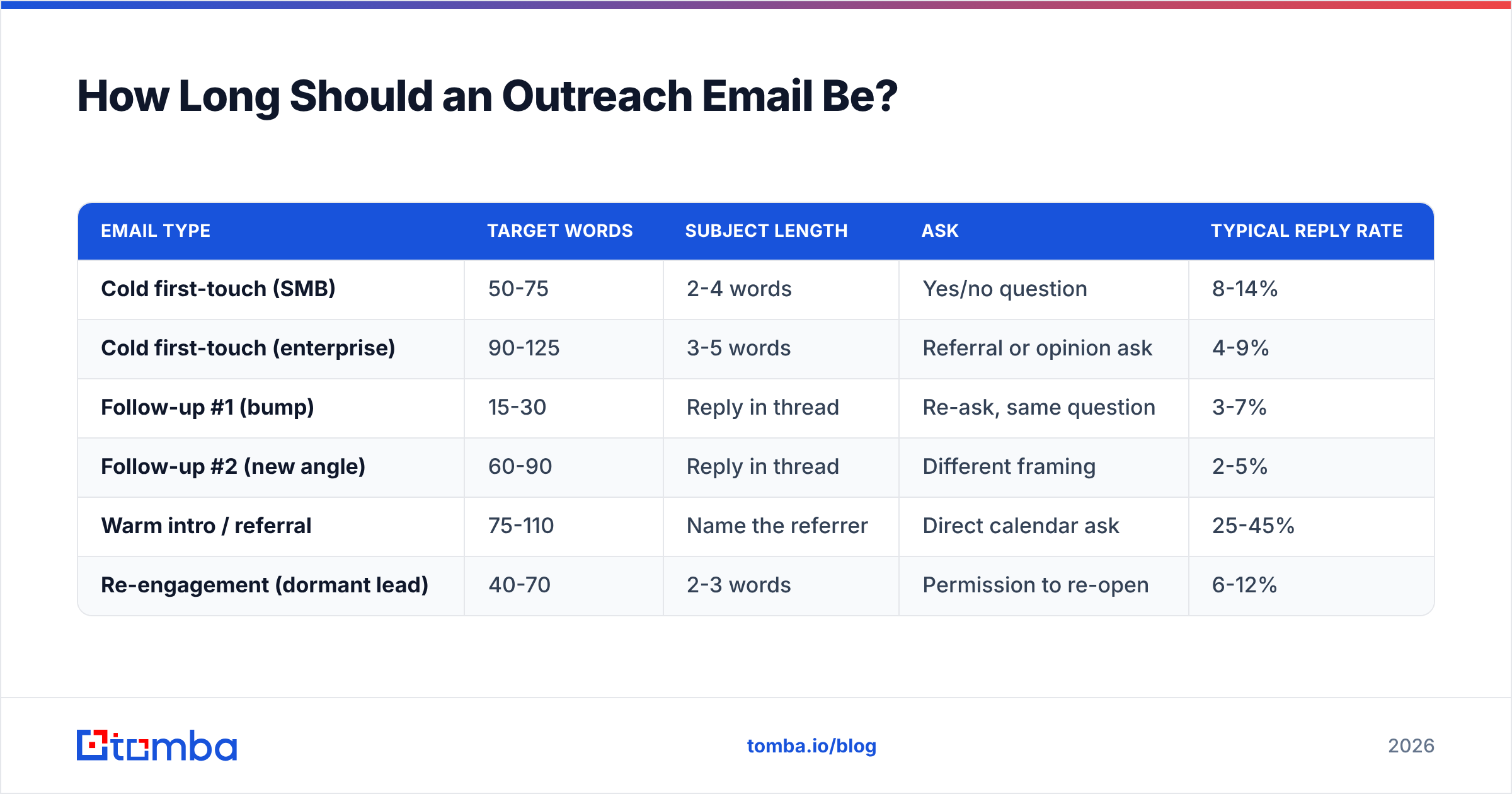
Short, but not artificially clipped. Here is how length maps to outcome across the campaign types most B2B teams run.
| Email type | Target words | Subject length | Ask | Typical reply rate |
|---|---|---|---|---|
| Cold first-touch (SMB) | 50-75 | 2-4 words | Yes/no question | 8-14% |
| Cold first-touch (enterprise) | 90-125 | 3-5 words | Referral or opinion ask | 4-9% |
| Follow-up #1 (bump) | 15-30 | Reply in thread | Re-ask, same question | 3-7% |
| Follow-up #2 (new angle) | 60-90 | Reply in thread | Different framing | 2-5% |
| Warm intro / referral | 75-110 | Name the referrer | Direct calendar ask | 25-45% |
| Re-engagement (dormant lead) | 40-70 | 2-3 words | Permission to re-open | 6-12% |
Two things stand out in that table. First, the bump email — 15-30 words, sent in the same thread — regularly out-earns the beautifully crafted original relative to its effort. Second, the warm intro column is a different sport entirely. If you can convert cold outreach into referral outreach, do that instead of optimizing subject lines.
How Do You Research a Prospect Fast Enough to Scale?#
You budget research time per tier and you never exceed it.
Tier 1 — Named accounts (5-8 minutes each, ~50 contacts/month). Read the last two quarters of company news, the prospect's last five LinkedIn posts, and one earnings call or blog post if they publish. Write the email from scratch. Your relevance line comes from something only a reader would know.
Tier 2 — Segment plus variables (60-90 seconds each, ~500 contacts/month). You have a template with three or four dynamic slots: trigger event, tool in their stack, headcount change, competitor name. You fill those slots from a data source, not from reading. A website tech stack checker fills the "tool in their stack" slot in seconds; a hiring page fills the headcount slot.
Tier 3 — Segment only (0 seconds each, the long tail). No individual research. The email is personalized to the segment — industry, company size, role — and it says so honestly. These emails work when the segment is narrow enough that the reader thinks "this is about my exact situation" even though nothing names them.
The mistake teams make is running Tier 1 effort at Tier 3 volume, burning out, and then dropping to Tier 3 effort at Tier 1 accounts. Decide the tier before you write.
Where do the trigger events come from?#
- Hiring pages and job boards — a new role posted is the cleanest signal of a new initiative.
- Funding announcements — Crunchbase, TechCrunch, or the company's own newsroom. A round means budget and a mandate.
- Job changes — someone 30-90 days into a new role is rebuilding their stack and is unusually responsive.
- Product launches and changelogs — proof you follow the company, and a natural hook.
- Website visitors — anonymous traffic you can resolve to companies with visitor identification is warm intent hiding in plain sight.
- Content and podcasts — quoting something a person actually said is the single highest-signal relevance line available.
Does Personalization Actually Increase Reply Rates?#
Yes, but not the way most tools sell it.
Inserting {{first_name}} and {{company}} does almost nothing in 2026 — every recipient has seen ten thousand of those and reads them as automation markers. What moves reply rate is evidence of attention: a detail that could only appear if a human (or a very well-configured system) looked at this specific account.
Research from HubSpot's sales benchmarking consistently shows personalized, relevant subject lines and opening lines outperform generic ones by a wide margin, and vendor-neutral reviews on G2 tell the same story from the buyer side — the complaint is never "too personal," it's always "obviously a blast."
A useful test: delete the recipient's name and company from your draft. If the email still makes sense sent to anyone in that job title, you have not personalized it. You have merge-tagged it.
What Should You Do Before You Write a Single Word?#
Fix the pipes. Copy sits on top of infrastructure, and infrastructure fails silently.
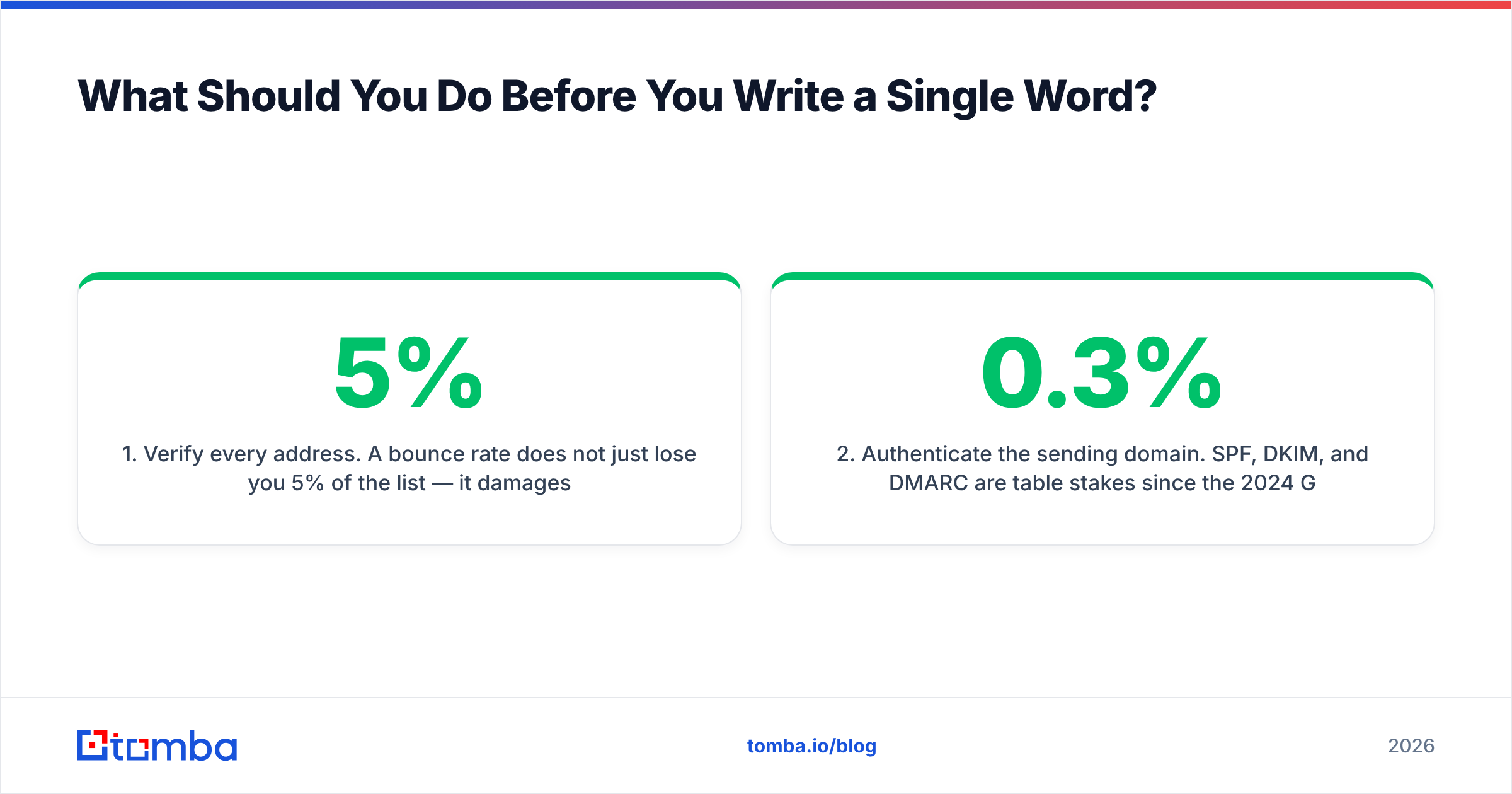
1. Verify every address. A 5% bounce rate does not just lose you 5% of the list — it damages sender reputation and drags the surviving 95% toward spam. Run your list through an email verifier before send, not after. Catch-all domains need separate handling; a plain SMTP check returns "unknown" on them, which is why a dedicated catch-all verifier matters for enterprise lists where catch-all configs are common.
2. Authenticate the sending domain. SPF, DKIM, and DMARC are table stakes since the 2024 Google and Yahoo bulk-sender requirements. Google's own sender guidelines spell out the thresholds — including keeping spam complaints under 0.3%. Check your records with an SPF checker and confirm the domain isn't listed anywhere with a blacklist checker.
3. Warm the mailbox. A brand-new domain sending 300 emails on day one is a spam filter's easiest decision of the day. Ramp over 3-4 weeks; a warmup calculator gives you the daily volume schedule.
4. Cap daily volume per mailbox. 30-50 cold sends per mailbox per day, maximum. Scale by adding mailboxes and domains, not by raising per-mailbox volume.
5. Strip the campaign markers. No tracking pixels on cold first-touch. No link shorteners. No images. No HTML signature with three social icons. Plain text, one link at most, and only if it earns its place.
Skip these and your copy never gets graded. It gets filtered.
How Do You Structure the Follow-Up Sequence?#
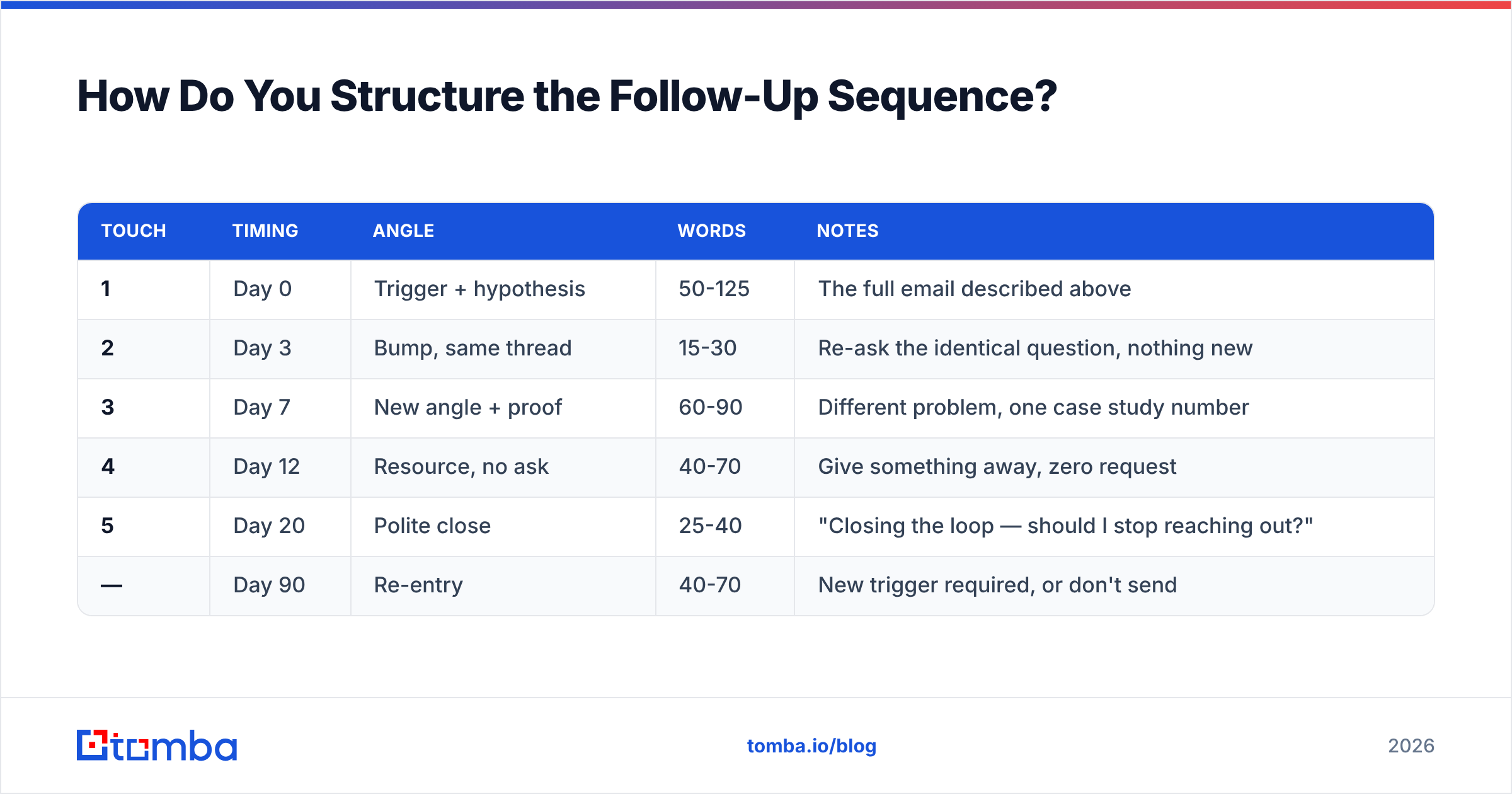
Most replies do not come from email one. Across B2B sequences, cumulative reply rate roughly doubles between touch one and touch four — then flattens hard.
| Touch | Timing | Angle | Words | Notes |
|---|---|---|---|---|
| 1 | Day 0 | Trigger + hypothesis | 50-125 | The full email described above |
| 2 | Day 3 | Bump, same thread | 15-30 | Re-ask the identical question, nothing new |
| 3 | Day 7 | New angle + proof | 60-90 | Different problem, one case study number |
| 4 | Day 12 | Resource, no ask | 40-70 | Give something away, zero request |
| 5 | Day 20 | Polite close | 25-40 | "Closing the loop — should I stop reaching out?" |
| — | Day 90 | Re-entry | 40-70 | New trigger required, or don't send |
Two rules that matter more than the schedule. First, always reply in the original thread for touches 2-5 — a new thread resets the recipient's context and reads as a fresh campaign. Second, the day-20 close email routinely gets the highest single-touch reply rate in the sequence, because "should I stop" is the easiest question in the world to answer. Do not skip it to save a send.
If you want a starting point for each of those angles, the cold email templates library covers the common ones by scenario.
What Are the Most Common Outreach Email Mistakes?#
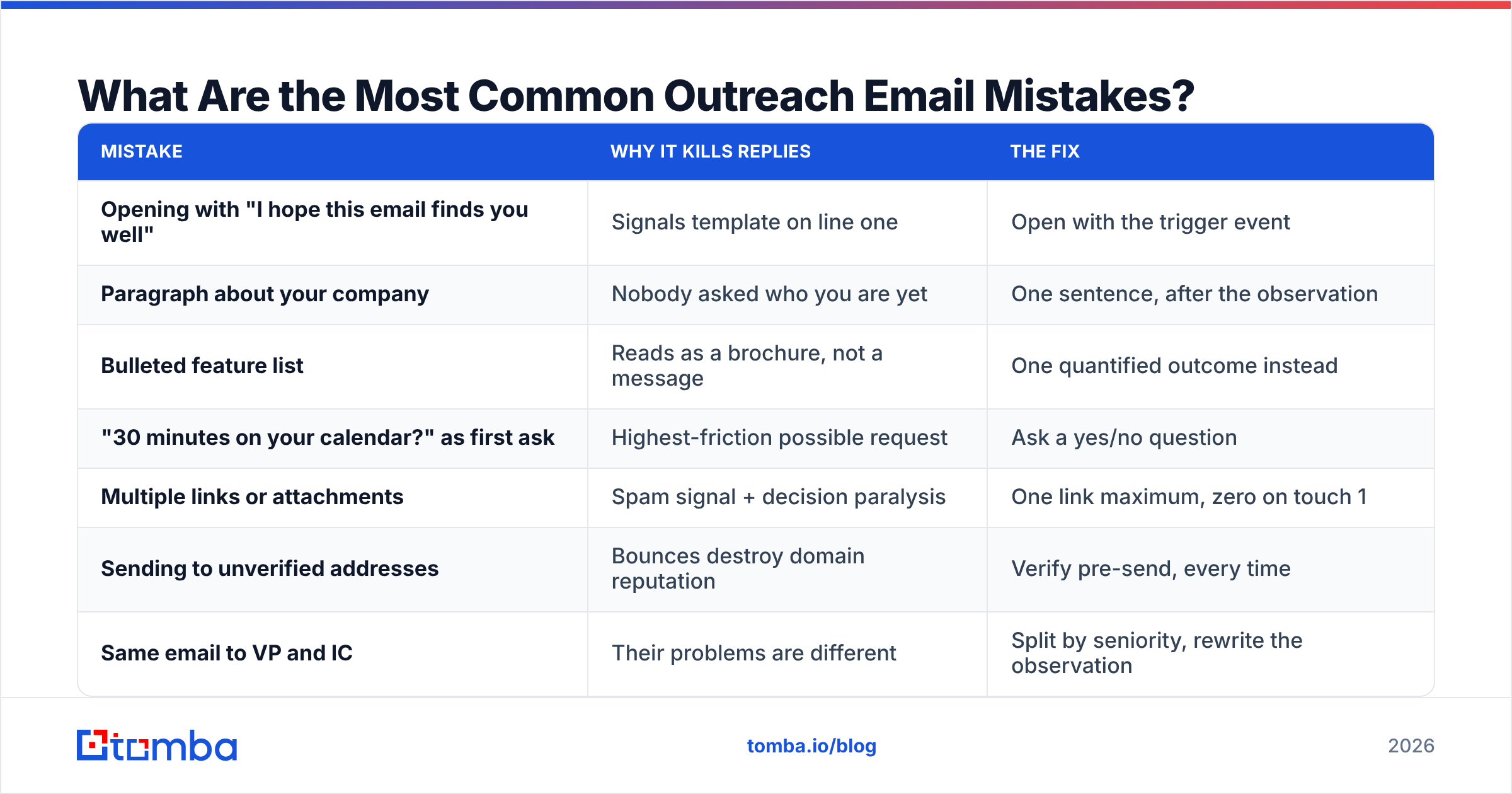
| Mistake | Why it kills replies | The fix |
|---|---|---|
| Opening with "I hope this email finds you well" | Signals template on line one | Open with the trigger event |
| Paragraph about your company | Nobody asked who you are yet | One sentence, after the observation |
| Bulleted feature list | Reads as a brochure, not a message | One quantified outcome instead |
| "30 minutes on your calendar?" as first ask | Highest-friction possible request | Ask a yes/no question |
| Multiple links or attachments | Spam signal + decision paralysis | One link maximum, zero on touch 1 |
| Sending to unverified addresses | Bounces destroy domain reputation | Verify pre-send, every time |
| Same email to VP and IC | Their problems are different | Split by seniority, rewrite the observation |
| Formal tone and long sentences | Reads like a vendor, not a peer | Second person, short sentences, contractions |
The tone point deserves emphasis. Read your draft aloud. If you would not say the sentence to a colleague standing in a hallway, rewrite it. "I wanted to reach out regarding your organization's current approach to pipeline generation" is not something a human says. "Saw you're hiring two AEs — is handoff already a problem?" is.
How Do You Measure Whether Your Outreach Emails Are Working?#
Track four numbers, in this order, and diagnose top-down.
Bounce rate (target: under 2%). Above that, your data source or verification step is broken. Fix this before touching copy — nothing downstream is measurable while bounces are high.
Reply rate (target: 8-15% on Tier 1-2). This is your copy grade. Note that reply means any human response, including "not interested" — those are data, not failures. Open rate is not on this list because Apple Mail Privacy Protection and similar features have made it noise since 2021.
Positive reply rate (target: 30-50% of replies). If replies are high but positive replies are low, your targeting is off, not your writing. You are reaching people who answer but do not have the problem.
Meetings booked per 100 sends (target: 2-5). The number that actually maps to pipeline. Everything above is a leading indicator of this one.
Change one variable per test — subject line, or opening line, or ask, never all three. And run at least 200 sends per variant before you believe a difference; below that you are reading noise. For definitions and benchmarks on the metrics side, the response rate glossary entry is a quick reference.
What Does a Finished Outreach Email Look Like?#
Here is a Tier 2 email hitting all five components in 71 words.
Subject: two new AEs
Hi Dana — saw the two AE roles on your careers page this month.
Every team I've watched add reps that fast hits the same wall: leads get worked twice or not at all in the first 60 days, and nobody notices until the quarter closes.
We fixed exactly that for Northlake — their duplicate-touch rate went from 18% to 3% in five weeks.
Is handoff already on your list for Q4, or is it not a problem yet?
— Sam
Notice what is absent. No company boilerplate. No feature list. No calendar link. No "circling back." One verifiable observation, one pattern, one number, one question a busy person can answer in four words while walking to a meeting.
That last line matters more than it looks. "Or is it not a problem yet?" gives the recipient a graceful way to say no — which paradoxically raises the odds they say yes, because answering costs them nothing.
Where Should You Start?#
Pick 50 accounts. Write Tier 1 emails by hand for all of them, one at a time, no template. You will hate it and you will learn more about your buyers in those 50 emails than in six months of A/B testing subject lines. Then codify what worked into your Tier 2 variables.
The one thing you should not hand-do is finding and validating the addresses. Every minute spent guessing first.last@ patterns is a minute not spent on the sentence that earns the reply — and a guessed address that bounces costs you reputation you cannot buy back.
Start with the Tomba Email Finder: search by name and domain, get a verified professional address with a confidence score and sources, and push it straight into your sequence or CRM. The free tier gives you 25 searches a month to test the workflow, and paid plans start at $49/mo on Tomba pricing when your list outgrows it. Get the data layer right, then let your copy do the job it was written to do.
Related guides#
// get started
Find, verify and enrich your first contacts today
Start on the free plan with 25 searches a month, then scale when your team is ready.
Free plan · No credit card required · GDPR & CCPA
// about the author