HTML Emails in 2026: What Still Works and What Breaks
HTML emails still win on brand and click tracking, but they cost you inbox placement in cold outbound. Here is where each format wins, backed by rendering limits, spam-filter behavior, and real client support.
TL;DR
- HTML emails still win for newsletters, transactional receipts, and lifecycle marketing — anywhere brand consistency and layout matter more than raw inbox placement.
- For cold outbound, plain-text-styled email wins. Heavy HTML raises spam-filter scrutiny, and image-only emails are one of the fastest ways to get filtered.
- Email HTML is not web HTML. You are writing for a rendering engine set that includes Microsoft Word (Outlook on Windows), and that constraint drives every technical decision.
- Multipart/alternative — HTML plus a real plain-text part — is the correct default. Sending HTML-only is a deliverability tax you do not need to pay.
- Your format matters far less than your list quality. A perfectly coded email to a stale, unverified list still bounces.
What are HTML emails, and how do they differ from web pages?#
An HTML email is an email whose body is marked up with HTML and CSS so it can render styled text, images, buttons, and multi-column layouts instead of raw characters.
Here is the useful analogy: building a web page is like building a house on land you own — you control the foundation, you know the building codes, and everyone visiting sees the same structure. Building an HTML email is like shipping flat-pack furniture to fifty different countries, each with its own assembly rules, some of which were written in 2007 and never updated. You cannot control the assembly. You can only ship parts that survive the worst assembler.
Technically, an email is an RFC 5322 message with a MIME structure. A well-formed marketing or outbound email uses multipart/alternative with two parts: text/plain and text/html. The receiving client picks the one it can render. That is why "HTML vs plain text" is a slightly false binary — a properly built message contains both, and the question is really which one gets seen and what it costs you.
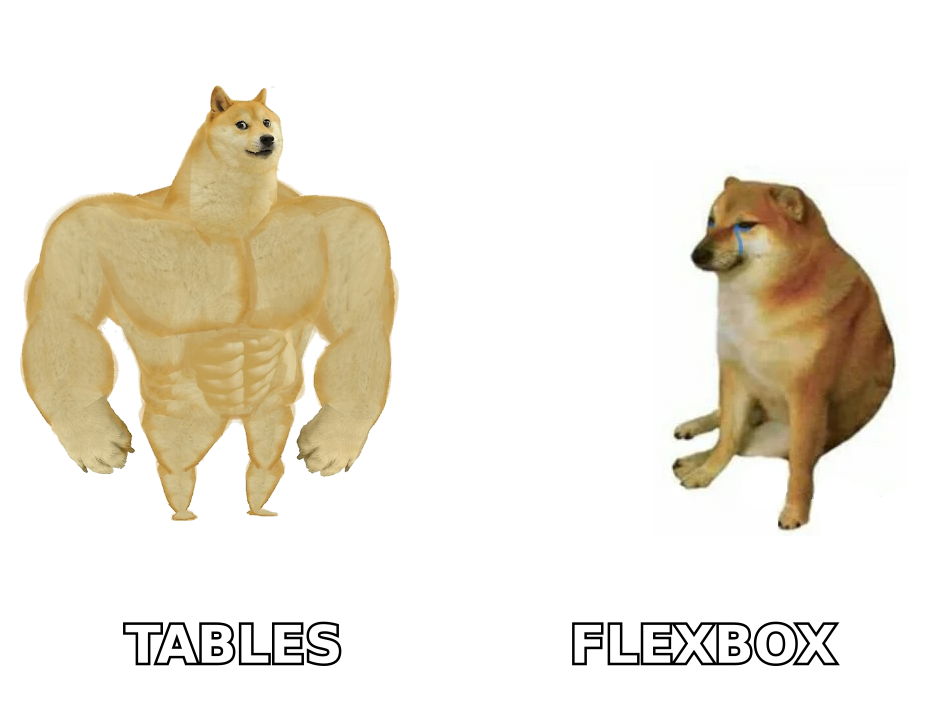
The critical difference from web development: modern CSS is unreliable. Outlook on Windows renders email through Microsoft Word's HTML engine, not a browser engine. Flexbox and CSS Grid do not work there. Neither does float in a predictable way. This is why professional email templates in 2026 still use nested <table> elements for layout — not because email developers enjoy it, but because tables are the only layout primitive with near-universal support.
Which email clients actually support what?#
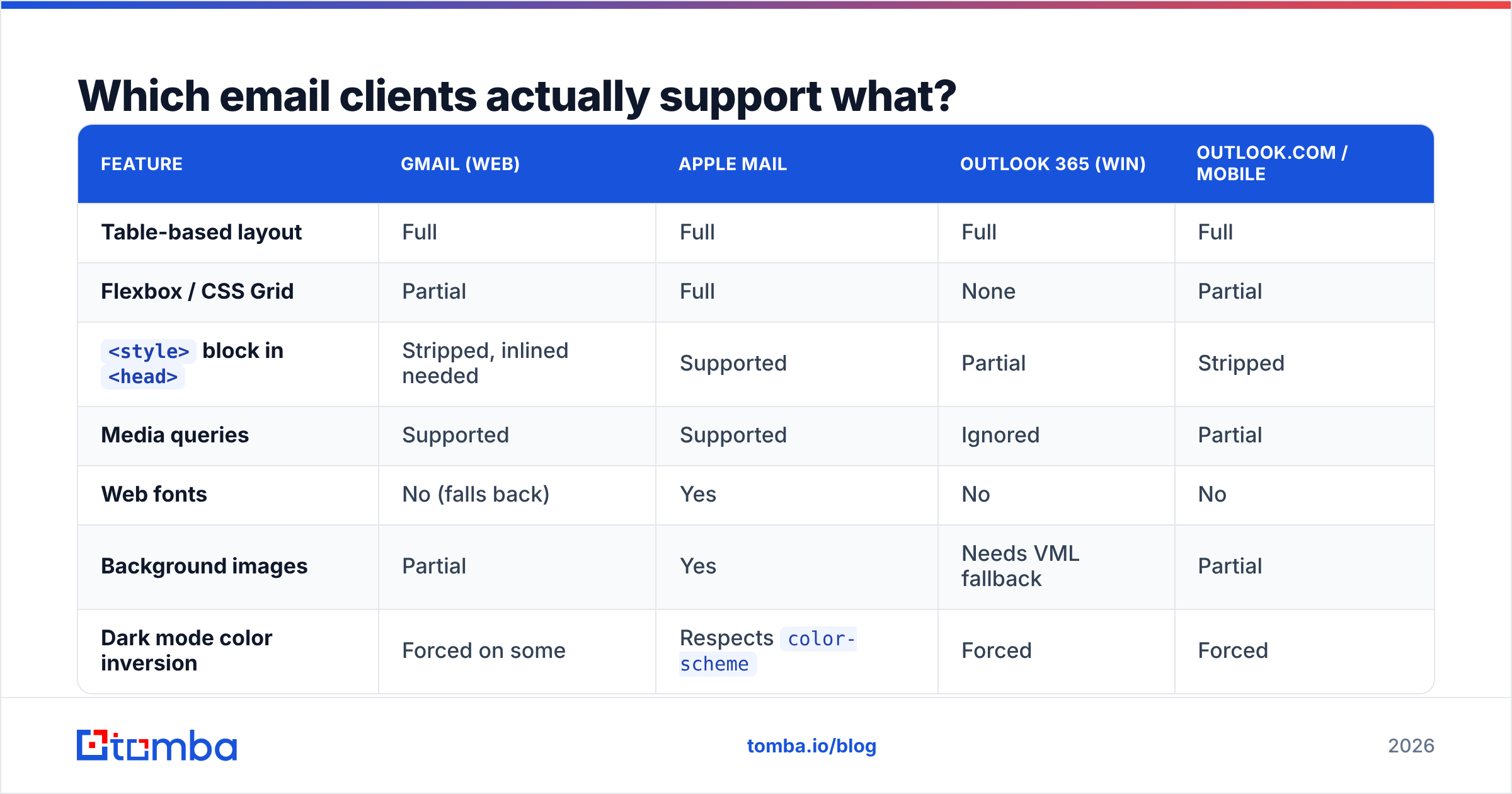
Support fragmentation is the reason HTML emails break. Here is what you can and cannot rely on across the clients that carry most B2B volume:
| Feature | Gmail (web) | Apple Mail | Outlook 365 (Win) | Outlook.com / mobile |
|---|---|---|---|---|
| Table-based layout | Full | Full | Full | Full |
| Flexbox / CSS Grid | Partial | Full | None | Partial |
<style> block in <head> |
Stripped, inlined needed | Supported | Partial | Stripped |
| Media queries | Supported | Supported | Ignored | Partial |
| Web fonts | No (falls back) | Yes | No | No |
| Background images | Partial | Yes | Needs VML fallback | Partial |
| Dark mode color inversion | Forced on some | Respects color-scheme |
Forced | Forced |
| Animated GIF | Plays | Plays | First frame only | Plays |
Two entries deserve emphasis. First, Outlook on Windows renders only the first frame of an animated GIF — so if your call to action appears in frame 12, a large slice of your enterprise audience never sees it. Second, dark mode is the newest reliability problem. Several clients forcibly invert colors, which turns a dark logo on a white background into an unreadable smear. Test with prefers-color-scheme and use transparent PNGs with a light stroke where possible.
Gmail also has a hard limit: messages over roughly 102 KB get clipped, with a "View entire message" link appended. Clipping breaks tracking pixels placed at the bottom, which silently corrupts your open-rate data. Keep the HTML under 100 KB.
Do HTML emails hurt deliverability?#
Yes, in a specific and measurable way — but not for the reason most people assume.
HTML itself is not a spam signal. Every legitimate newsletter on earth is HTML. What triggers filtering is the pattern that heavy HTML correlates with: high image-to-text ratio, many outbound links, tracking pixels, link redirect domains, and hidden preheader text. Filters at Google and Microsoft weigh those together with your sender reputation and engagement history.
The practical ranking, worst to best for cold outbound:
- Image-only email — a single sliced JPEG with no real text. Almost guaranteed filtering. Filters cannot read it, so they assume the worst.
- Heavy templated HTML — multi-column, hero image, branded footer, three CTAs. Fine for opt-in newsletters, wrong for a first-touch cold email because it looks like bulk marketing to both the filter and the human.
- Light HTML — a plain-looking message with one hyperlink and a signature. Reads as a personal email. This is what most good cold sequences actually send.
- True plain text with a plain-text part — cleanest, but you lose click tracking and any styling.
The rule that follows: match format to intent. A person receiving a first cold email expects something a human typed. A person who subscribed to your newsletter expects design. Sending the wrong one is a mismatch the recipient feels before they consciously register it.
Also relevant: authentication carries far more weight than markup. If your SPF record, DKIM, and DMARC are not aligned, no amount of clean HTML rescues you. Google and Yahoo's bulk-sender requirements — in force since 2024 and tightened since — make DMARC alignment and a one-click unsubscribe header mandatory above 5,000 messages per day. Google's own sender guidelines are the canonical reference here, not third-party blog summaries.
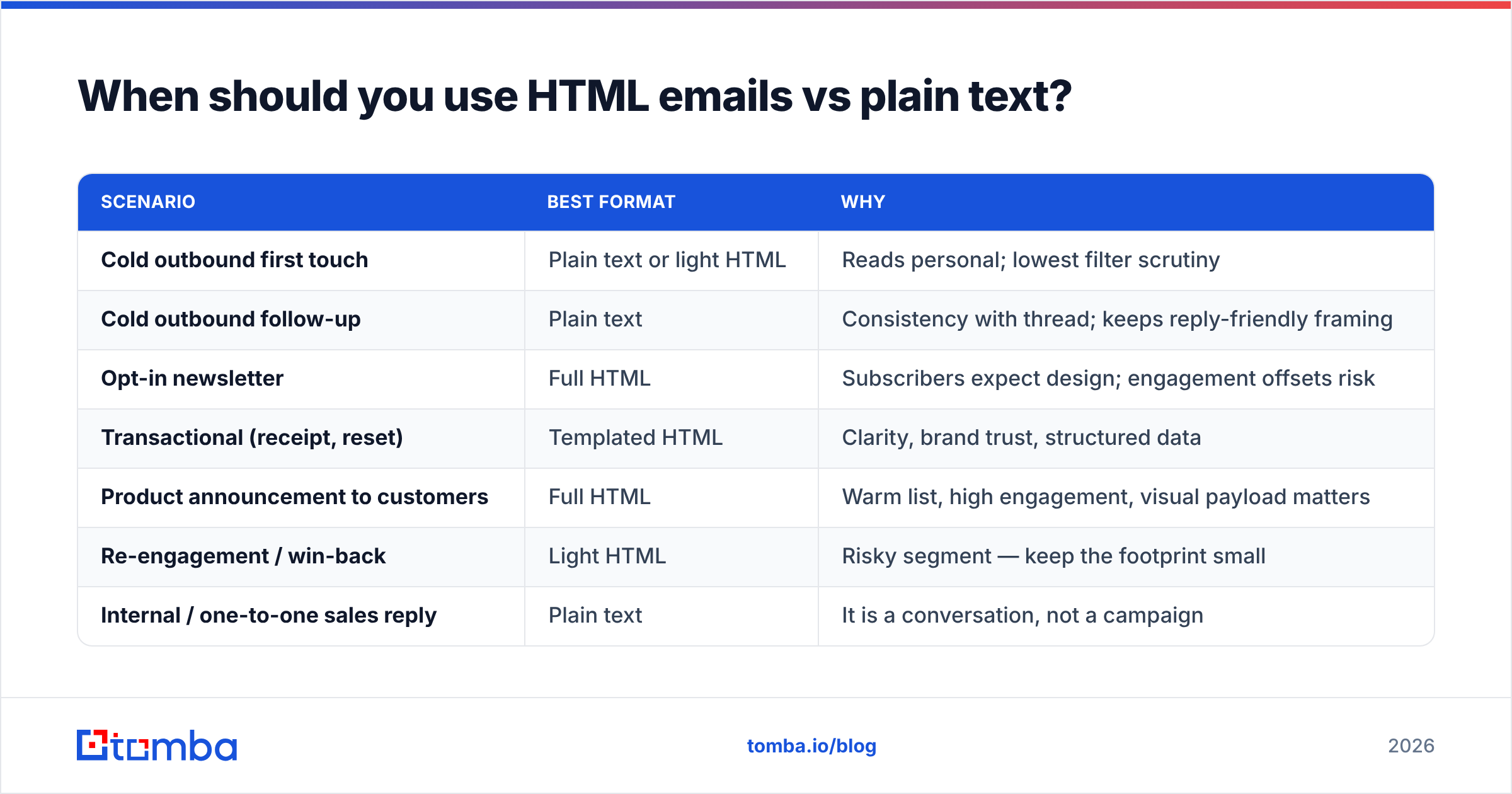
When should you use HTML emails vs plain text?#
| Scenario | Best format | Why |
|---|---|---|
| Cold outbound first touch | Plain text or light HTML | Reads personal; lowest filter scrutiny |
| Cold outbound follow-up | Plain text | Consistency with thread; keeps reply-friendly framing |
| Opt-in newsletter | Full HTML | Subscribers expect design; engagement offsets risk |
| Transactional (receipt, reset) | Templated HTML | Clarity, brand trust, structured data |
| Product announcement to customers | Full HTML | Warm list, high engagement, visual payload matters |
| Re-engagement / win-back | Light HTML | Risky segment — keep the footprint small |
| Internal / one-to-one sales reply | Plain text | It is a conversation, not a campaign |
The pattern across every row: the colder the relationship, the lighter the markup. Design is a signal of institutional sending. Institutional sending is fine when the recipient asked for it and actively harmful when they did not.
How do you build HTML emails that do not break?#
Six rules cover roughly 90% of real-world breakage:
- Use table-based layout with a fixed 600px container. 600px is the durable width — it fits Outlook's reading pane and scales down on mobile. Nest tables rather than positioning with CSS.
- Inline every CSS declaration. Gmail strips
<head>styles in some contexts, notably forwarded messages and the Gmail app for some account types. Author in a<style>block for sanity, then run an inliner as a build step. - Keep the image-to-text ratio below roughly 40%. Images off by default in Outlook means your message must be comprehensible with zero images loaded. Write real alt text — it is the fallback copy, not an accessibility checkbox.
- Build bulletproof buttons. A styled
<a>with padding fails in Outlook. Use a table-cell button with a VML fallback, or accept that your CTA renders as an unstyled link for a chunk of your audience. - Always send a real plain-text part. Not a stripped-tag auto-generation full of navigation junk — an actual readable alternative. Some filters compare the two parts and penalize mismatches.
- Test on real clients, not just a preview render. Litmus and Email on Acid both do this. A spam checker catches content-level issues before send, and an SPF checker confirms your authentication chain resolves.
For the HTML itself, MDN's HTML reference is still the right source for element semantics, even though email support lags web support by roughly a decade. When you need to convert an existing block of markup for a plain-text part, an HTML to text converter handles the mechanical stripping.
What about dark mode, accessibility, and mobile?#
Roughly 60% of email opens happen on mobile, and that number has been stable for several years. That single fact makes three decisions non-negotiable:
- Single-column below 600px. Multi-column layouts on a phone become unreadable slivers. Use media queries where supported and stack by default where they are not.
- Minimum 14px body text, 16px preferred. iOS auto-zooms text below 13px, which breaks your layout in unpredictable ways.
- Tap targets at least 44×44px. A button that a thumb misses is a click you lost to physics, not persuasion.
Accessibility overlaps almost entirely with deliverability here. Semantic markup, real alt text, sufficient contrast, and a logical reading order help screen readers and help filters parse your message as legitimate content. Set role="presentation" on layout tables so screen readers skip them instead of announcing "table with 4 rows."
For dark mode, declare <meta name="color-scheme" content="light dark"> and <meta name="supported-color-schemes" content="light dark">, then test. Clients that respect the declaration will leave your palette alone. Clients that force inversion will not, and your job is to make sure the inverted version is still legible rather than fighting a battle you cannot win.
Does HTML change how you track opens and clicks?#
Yes, and the reliability of that tracking has degraded sharply.
Open tracking works by embedding a 1×1 tracking pixel that fires when images load. Apple's Mail Privacy Protection, on by default since iOS 15, pre-loads that pixel on Apple's proxy servers regardless of whether the human opened anything. If a meaningful share of your list uses Apple Mail — and in B2B it usually is — your open rate is partly fiction. Treat it as a directional trend, never as a metric to optimize against.
Click tracking is more durable because it requires a real action, but it introduces its own cost: rewriting links to a tracking domain. If that domain is shared with other senders, you inherit their reputation. Use a custom tracking domain, warm it, and check it against a blacklist checker before you scale volume through it.
Plain-text sending forfeits open tracking entirely and usually click tracking too. Many experienced outbound teams accept that trade — they measure by response rate and meetings booked, which are the metrics that actually connect to revenue anyway.
What matters more than your email format?#
Whether the address exists.
This is the unglamorous conclusion. You can spend two weeks perfecting a responsive template with VML fallbacks and dark-mode-safe assets, and it will not matter if 18% of your list bounces. Hard bounces above roughly 2% signal to mailbox providers that you are sending to a list you did not earn, and that reputation damage outlasts any single campaign.
The sequence that actually protects deliverability:
- Source accurate contacts. Find verified professional addresses rather than guessing at patterns. A company email pattern check tells you the format an organization uses; a real lookup tells you whether a specific mailbox exists.
- Verify before every send. Lists decay at roughly 22–30% per year as people change jobs. Run your list through an email verifier before each campaign, not once at import.
- Handle catch-all domains deliberately. Catch-all servers accept everything, so standard SMTP verification returns "unknown." A dedicated catch-all verifier resolves a share of these instead of forcing you to either risk them or discard them.
- Warm and pace your sending. New domains need weeks of ramping. A warmup calculator sets a realistic schedule instead of a guess.
- Authenticate completely. SPF, DKIM, DMARC, and a custom tracking domain. This is table stakes, not optimization.
Get those five right and the HTML-versus-plain-text question shrinks to what it actually is: a formatting preference matched to audience temperature, not a deliverability strategy.
Final verdict: are HTML emails worth it in 2026?#
For warm, opted-in audiences: yes, unambiguously. Newsletters, product announcements, and transactional messages benefit from structure and brand consistency, and your engagement metrics on those segments give you the reputation headroom to send them.
For cold outbound: no. Light HTML at most — a hyperlink and a signature. Every additional design element moves your message from "an email a person sent me" toward "a campaign that found me," and that shift costs you more in replies than it gains you in polish.
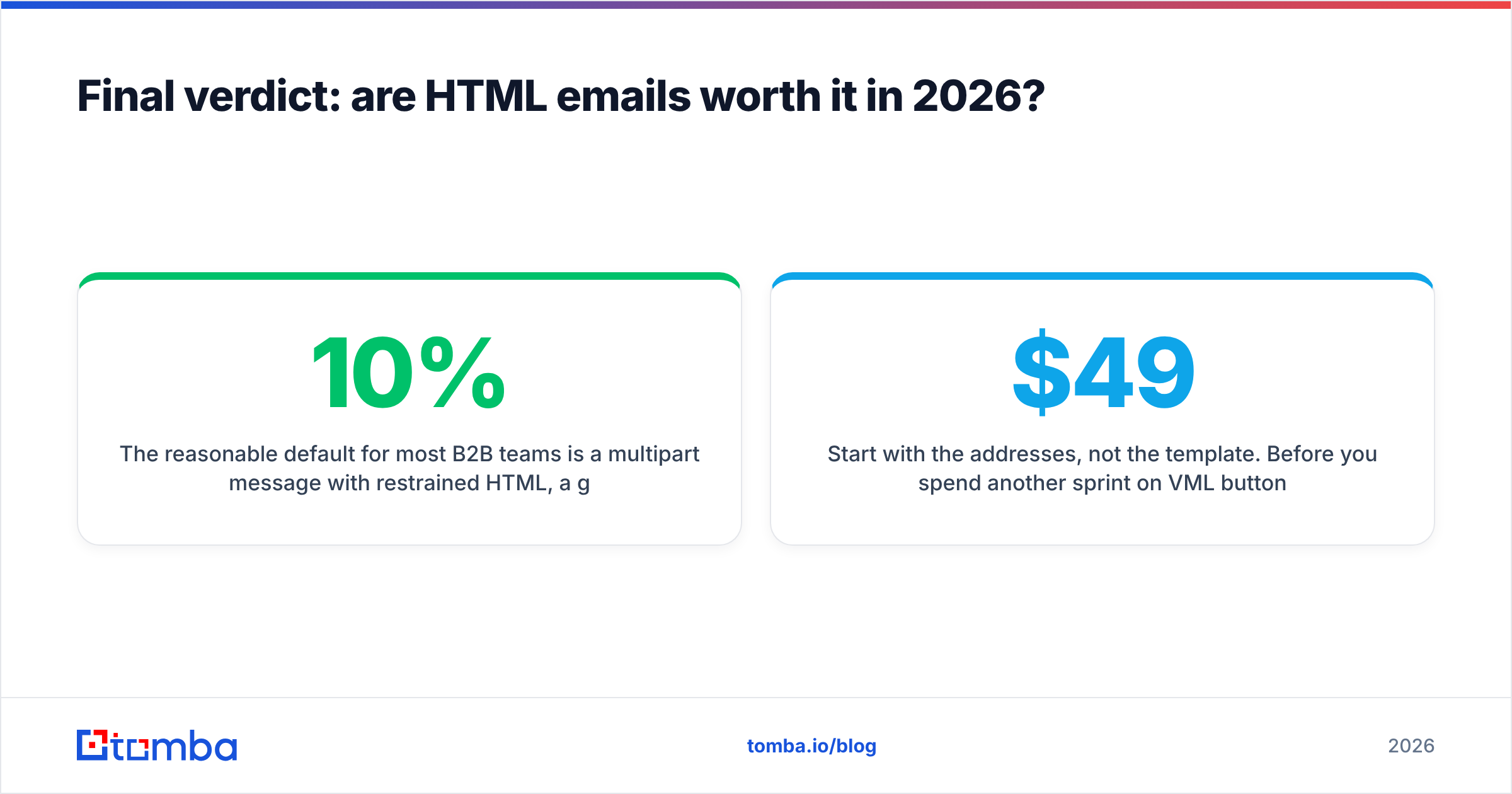
The reasonable default for most B2B teams is a multipart message with restrained HTML, a genuine plain-text alternative, and rigorous list hygiene underneath. Format is the last 10% of the outcome. The first 90% is sending to real people at real addresses who have a real reason to hear from you.
Start with the addresses, not the template. Before you spend another sprint on VML button fallbacks, make sure the messages are reaching live mailboxes. Tomba's Email Finder locates verified professional email addresses by name, domain, or company, with confidence scoring on every result — and the free tier gives you 25 searches a month to test accuracy against your own known-good contacts before committing. Paid plans start at $49/mo; see Tomba pricing for the full breakdown. Clean data first, clean HTML second.
Related guides#
// get started
Find, verify and enrich your first contacts today
Start on the free plan with 25 searches a month, then scale when your team is ready.
Free plan · No credit card required · GDPR & CCPA
// about the author