How to Import Leads Into Your CRM Without Wrecking Your Data
Most failed CRM rollouts start with one bad CSV. Here's the field-tested process for importing leads: dedupe first, map deliberately, verify before send, and keep your sender reputation intact.

TL;DR
- Importing leads is a data operation, not a file upload. The five minutes you spend on mapping and dedupe decide whether the next 5,000 emails land or bounce.
- Verify before you import, not after. Once bad addresses are inside your CRM they get synced to your sequencer, your ads audience, and your reporting — and they never fully leave.
- Pick the import method by volume and frequency: CSV for one-offs, native integration for recurring, API for anything that runs daily.
- A 12% bounce rate on a first send is almost always an import problem, not a copy problem.
- Deduplicate on email, not on name. Names are not unique, not stable, and not machine-friendly.
What Does "Import Leads" Actually Mean?#
Importing leads is the process of moving contact records from an external source — a list you bought, a scrape you ran, a conference badge export, a prospecting tool — into the system where your team actually works: a CRM, a sequencer, or a marketing automation platform.
The word "import" makes it sound like a file transfer. It isn't. Every import is really four operations stacked on top of each other:
- Normalization — making 4,000 rows from three sources agree on what a phone number, a job title, and a company name look like.
- Deduplication — deciding what happens when a record you're importing already exists, and which version wins.
- Validation — confirming the email addresses are real and the domains accept mail before you send anything.
- Mapping — assigning each source column to a destination field so the data lands somewhere your filters and workflows can see it.
Skip any one of those and you get the classic symptoms: contacts with "N/A" as a first name, three records for the same person, a sequence that bounces hard on day one, and a rep who stops trusting the CRM entirely.
Why Do So Many Lead Imports Go Wrong?#
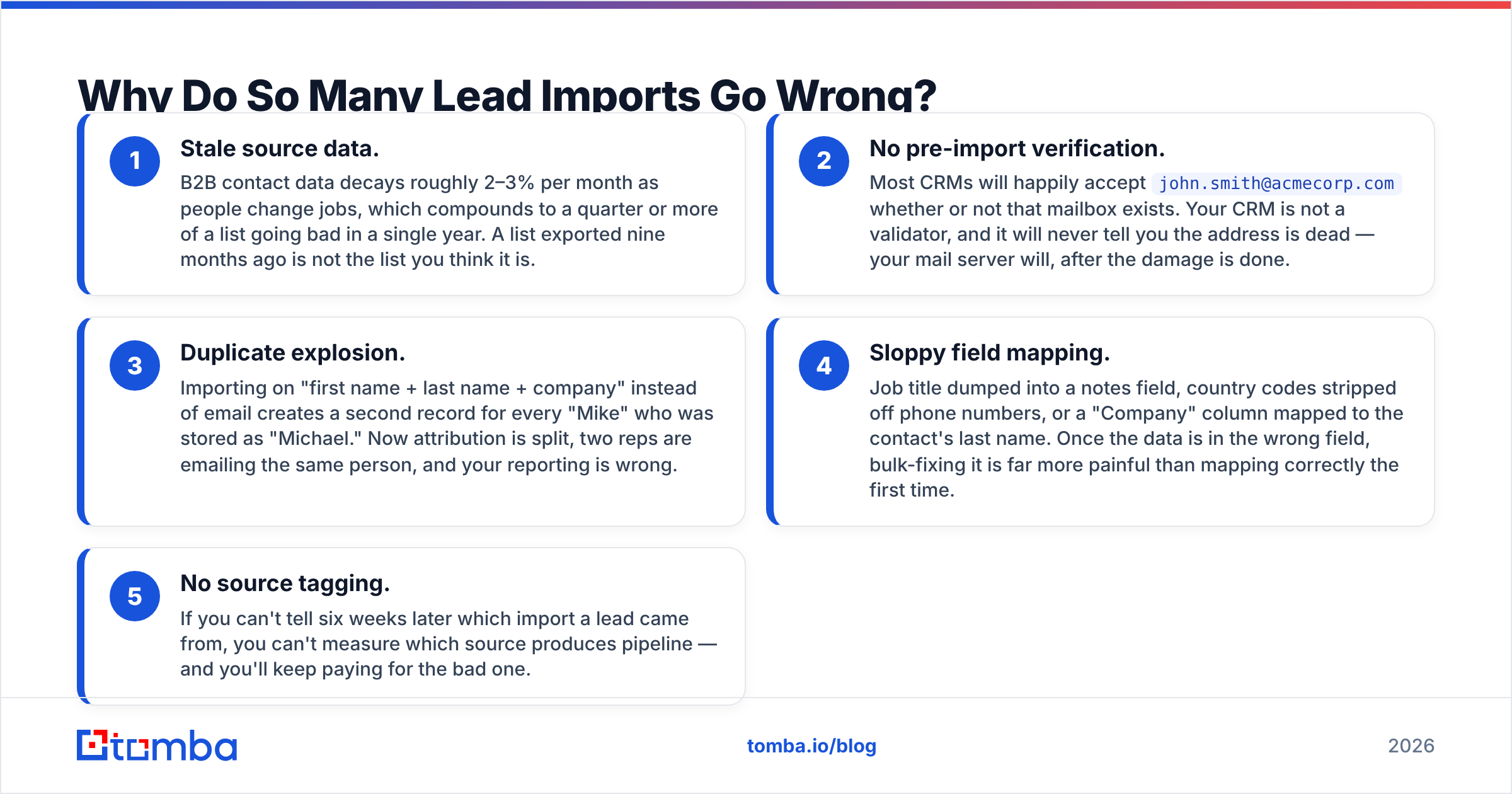
The failure modes are boringly consistent across teams and tools. Here are the five that cause the most damage:
- Stale source data. B2B contact data decays roughly 2–3% per month as people change jobs, which compounds to a quarter or more of a list going bad in a single year. A list exported nine months ago is not the list you think it is.
- No pre-import verification. Most CRMs will happily accept
john.smith@acmecorp.comwhether or not that mailbox exists. Your CRM is not a validator, and it will never tell you the address is dead — your mail server will, after the damage is done. - Duplicate explosion. Importing on "first name + last name + company" instead of email creates a second record for every "Mike" who was stored as "Michael." Now attribution is split, two reps are emailing the same person, and your reporting is wrong.
- Sloppy field mapping. Job title dumped into a notes field, country codes stripped off phone numbers, or a "Company" column mapped to the contact's last name. Once the data is in the wrong field, bulk-fixing it is far more painful than mapping correctly the first time.
- No source tagging. If you can't tell six weeks later which import a lead came from, you can't measure which source produces pipeline — and you'll keep paying for the bad one.
Fixing the first two problems eliminates roughly 80% of import pain. That's why the order of operations below puts verification before upload, not after.
What Should You Do Before You Import Leads?#
Run this checklist on every list before it touches your CRM. It takes fifteen minutes on a 5,000-row file and saves days of cleanup.
1. Standardize the file format. Export or convert to UTF-8 CSV. Excel's default encoding mangles accented characters and non-Latin names, which is how you end up with "José" in your greeting line. One header row, no merged cells, no blank rows at the top.
2. Split full-name columns. If your source gives you Full Name, split it into first and last before import. Personalization tokens break loudly when a first-name field contains "Dr. Maria Consuelo Fernandez-Lopez."
3. Normalize company and domain. Strip www., http://, and trailing slashes from domains. Keep the root domain in its own column — it's the single most useful join key you have for enrichment and account matching later.
4. Remove obvious junk. Role addresses (info@, sales@, support@), free-mail addresses if you're selling B2B, competitor domains, existing customers, and anyone on your suppression list. This is also where you remove duplicates inside the file itself, before the CRM ever sees it.
5. Verify every address. Run the whole file through an email verifier and drop anything that returns invalid. Catch-all domains are the tricky middle case — they accept everything at the SMTP layer, so a plain verifier can't confirm the mailbox. A dedicated catch-all verifier resolves a meaningful share of those instead of forcing you to guess.
6. Enrich the gaps. If half your rows have a name and company but no email, fill them rather than importing empty records. Bulk lookup against a domain and a name is exactly what a bulk email finder is for, and it costs less than the deliverability hit from sending to guessed patterns.
7. Tag the import. Add a source column and a import_date column to every file. Every row. No exceptions. Future you will be grateful.
Which Import Method Should You Use?#
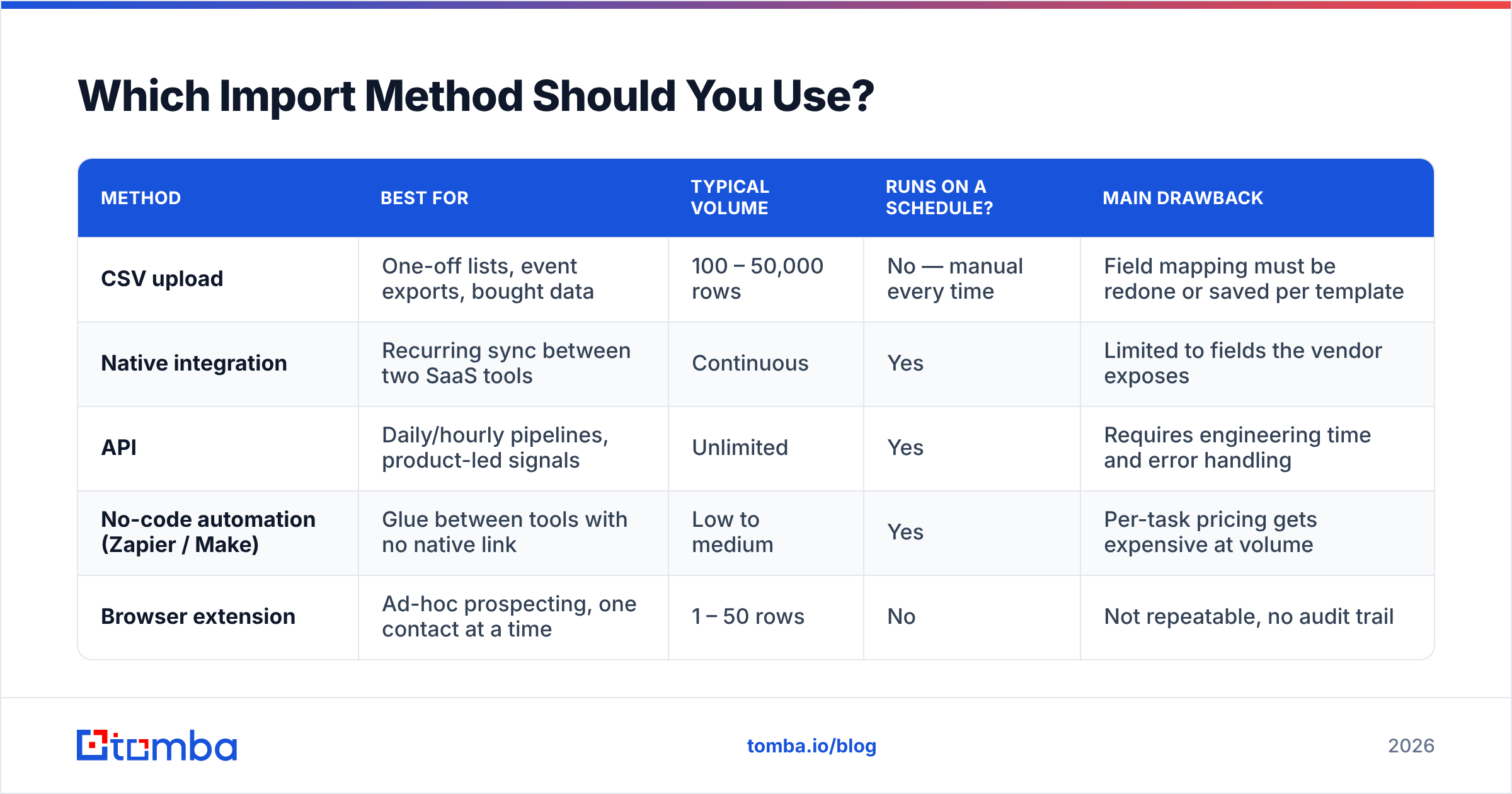
There are four realistic ways to get leads into a system, and choosing wrong is why some teams spend an afternoon a week on manual uploads.
| Method | Best for | Typical volume | Runs on a schedule? | Main drawback |
|---|---|---|---|---|
| CSV upload | One-off lists, event exports, bought data | 100 – 50,000 rows | No — manual every time | Field mapping must be redone or saved per template |
| Native integration | Recurring sync between two SaaS tools | Continuous | Yes | Limited to fields the vendor exposes |
| API | Daily/hourly pipelines, product-led signals | Unlimited | Yes | Requires engineering time and error handling |
| No-code automation (Zapier / Make) | Glue between tools with no native link | Low to medium | Yes | Per-task pricing gets expensive at volume |
| Browser extension | Ad-hoc prospecting, one contact at a time | 1 – 50 rows | No | Not repeatable, no audit trail |
The practical rule: if you're doing the same import more than twice a month, stop using CSV. Move it to a native integration or the Tomba API and let it run unattended. If you're on HubSpot or Salesforce, the HubSpot integration pushes verified contacts straight into the right object without a file round-trip.
How Do You Map Fields Without Creating Junk Records?#
Field mapping is where most of the silent damage happens, because nothing errors — the data just lands in the wrong place.
Three rules keep it clean:
Map to fields that already exist in your filter logic. If your sales team segments on Industry and Employee Count, those fields need real values on import day. A field nobody filters on is a field nobody maintains.
Never map into free-text notes. Notes fields are write-only in practice. If a piece of data matters — funding stage, tech stack, lead source — it needs a structured property with a controlled picklist.
Create missing properties before the import, not during. Both HubSpot and Salesforce let you create a field mid-import, and both will let you create it with the wrong type. A "Employee Count" field created on the fly as text instead of number can't be used in a range filter, and changing the type later usually means re-importing.
One more thing worth building into your template: keep the raw source columns you didn't map in a separate archive file. When someone asks in March where a data point came from, you'll have it.
How Should You Handle Duplicates?#
Deduplicate on email address. That's the whole answer, with two refinements.
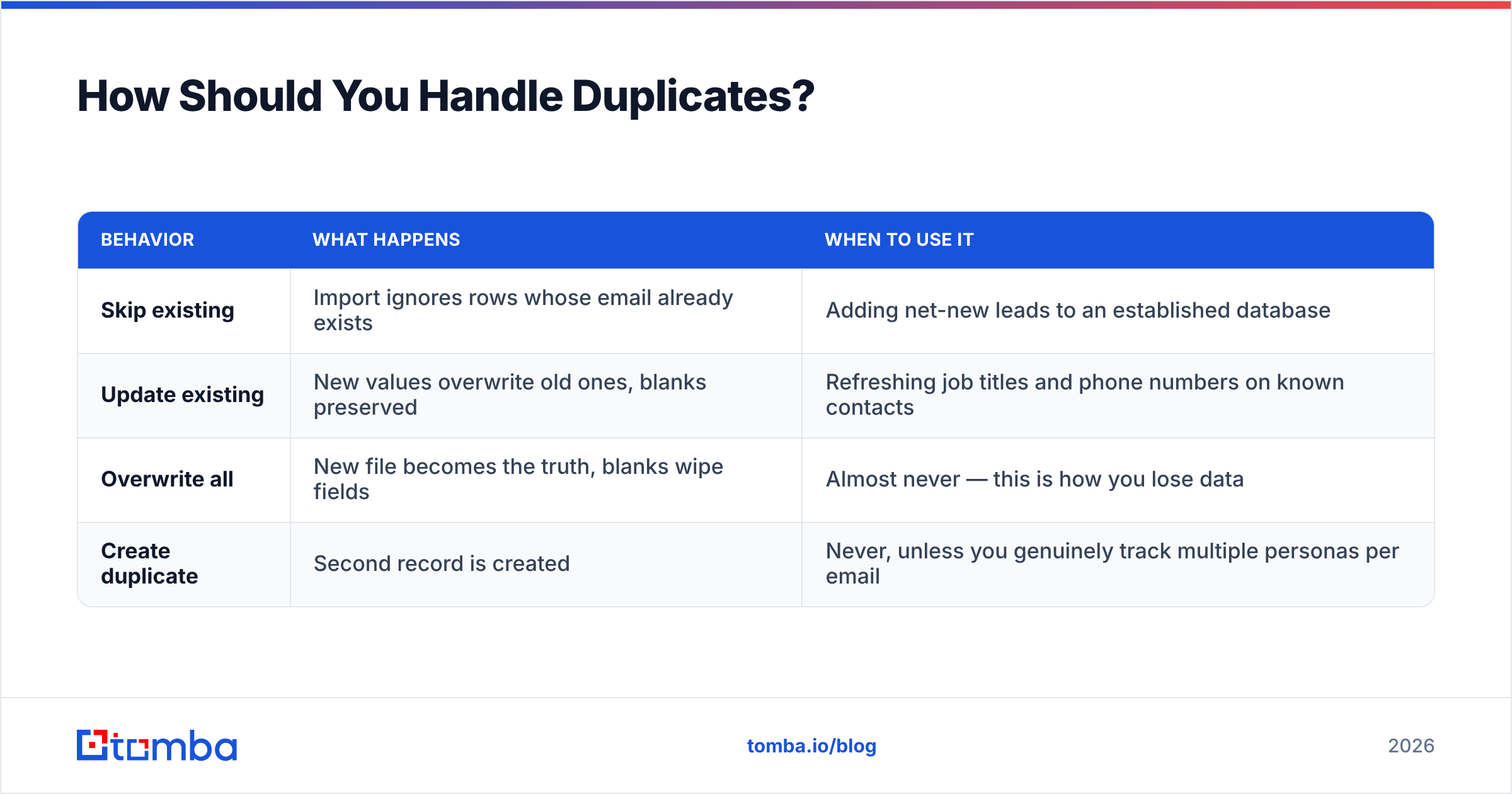
Refinement one: define your merge rule before you import. Most systems offer three behaviors, and the default is rarely what you want:
| Behavior | What happens | When to use it |
|---|---|---|
| Skip existing | Import ignores rows whose email already exists | Adding net-new leads to an established database |
| Update existing | New values overwrite old ones, blanks preserved | Refreshing job titles and phone numbers on known contacts |
| Overwrite all | New file becomes the truth, blanks wipe fields | Almost never — this is how you lose data |
| Create duplicate | Second record is created | Never, unless you genuinely track multiple personas per email |
Refinement two: dedupe across sources, not just within the file. A row can be unique inside your CSV and still be the fourth copy of someone already in your CRM under a different email (personal vs. work, old domain vs. new). A reverse email lookup on ambiguous records catches a portion of these before they multiply.
For accounts rather than contacts, dedupe on root domain. Company names are a nightmare — "Acme Inc.", "Acme, Inc", "ACME Incorporated", and "Acme" are one company and four records.
What Does a Clean Import Actually Cost You?#
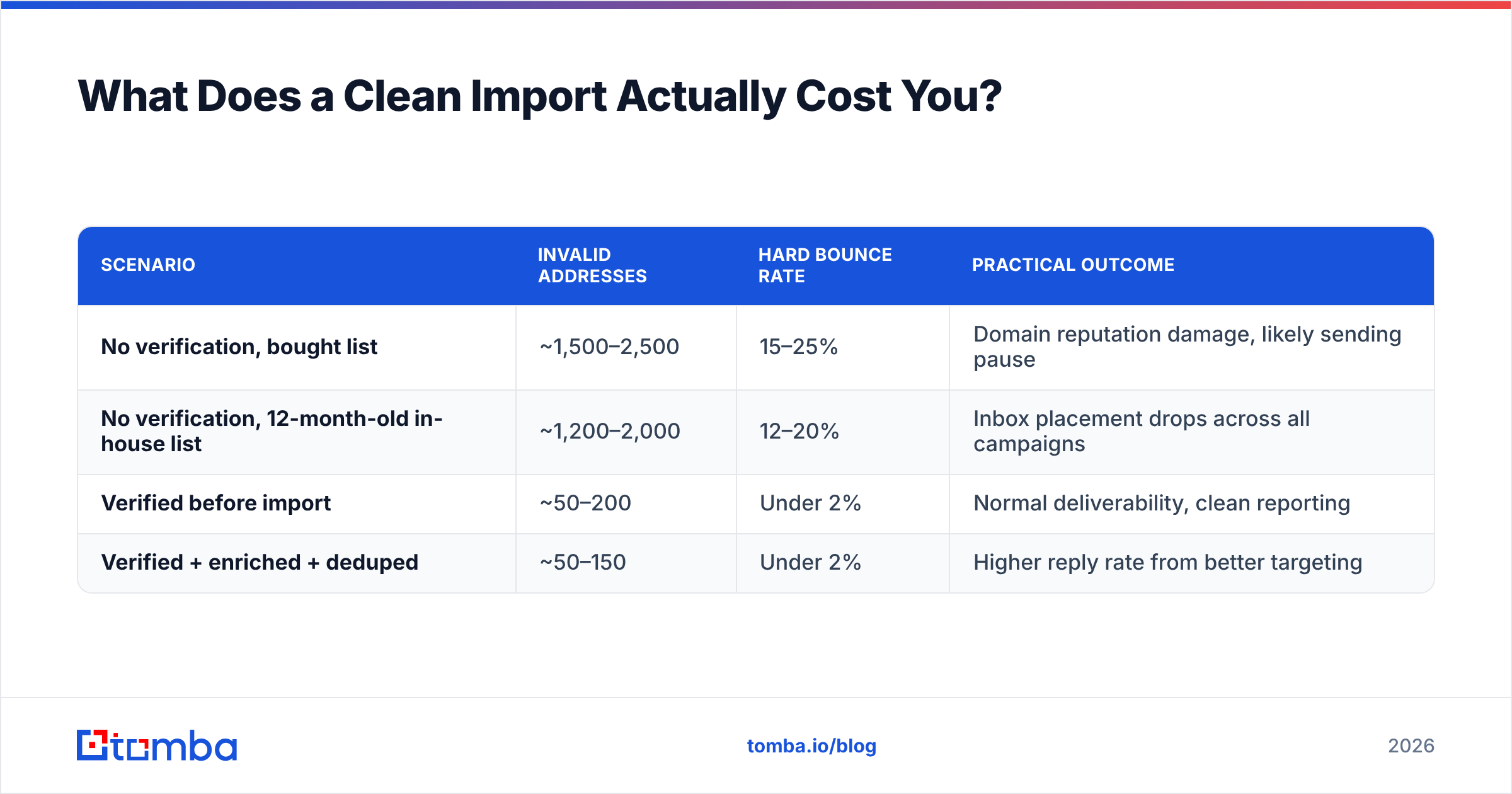
Here's the arithmetic that convinces skeptical managers. Take a 10,000-row list going into a cold sequence:
| Scenario | Invalid addresses | Hard bounce rate | Practical outcome |
|---|---|---|---|
| No verification, bought list | ~1,500–2,500 | 15–25% | Domain reputation damage, likely sending pause |
| No verification, 12-month-old in-house list | ~1,200–2,000 | 12–20% | Inbox placement drops across all campaigns |
| Verified before import | ~50–200 | Under 2% | Normal deliverability, clean reporting |
| Verified + enriched + deduped | ~50–150 | Under 2% | Higher reply rate from better targeting |
Mailbox providers treat a sustained bounce rate above roughly 2–3% as a spam signal. Cross that line and the penalty doesn't apply only to the bad list — it applies to your domain, which means your renewals emails and your warm intros suffer too. That asymmetry is why verification is worth doing even when the list "looks fine."
On cost: verification and lookup credits are cheap relative to the downside. Tomba pricing starts with a free tier at 25 searches per month for testing the workflow, then Starter at $49/mo, Growth at $99/mo, and Pro at $249/mo for teams running continuous imports. Compare that to the cost of a two-week deliverability recovery and the math is not close.
How Do You Keep Imported Leads Clean Over Time?#
An import isn't a one-time event — it's the start of a decay curve. Three habits keep the database healthy:
- Re-verify on a schedule. Quarterly for active segments, semi-annually for the long tail. Anyone you're about to sequence gets re-verified regardless of when they were last checked.
- Enrich on write, not in batches. When a new lead enters through a form or an integration, fire enrichment immediately so the record is complete while the intent is fresh. Data enrichment on entry beats a quarterly cleanup project every time.
- Audit source performance. Because you tagged every import with a source (step 7 above), you can pull reply rate and pipeline by source after 90 days. Kill the sources that don't convert. Most teams discover one supplier is quietly responsible for most of their bounces.
Also worth doing once: read the vendor reviews for whatever tool you're feeding data into. Categories on G2 list the actual complaints users have about import limits and field caps, which are rarely documented on the pricing page.
What About Compliance?#
Two practical notes, neither of which is legal advice.
Under GDPR and similar regimes, having someone's email address in a CSV is not a lawful basis for emailing them. You need a defensible basis — legitimate interest for B2B in many jurisdictions, with a documented assessment — and you need to honor opt-outs across every system, not just the one that sent the message. That's another argument for centralizing imports: suppression lists only work if there's one place they're enforced.
Second, keep provenance. Store where each record came from and when. If a regulator or a prospect asks, "how did you get my details," the answer needs to exist in a field, not in someone's memory.
Start With Data You Can Trust#
Every downstream metric — reply rate, meetings booked, cost per opportunity — inherits the quality of the list you imported. You cannot A/B test your way out of a file where one in five addresses doesn't exist.
Build the habit in this order: find, verify, dedupe, map, import. If your bottleneck is the first step — you have companies and names but not addresses — the Tomba Email Finder resolves them by domain and name at bulk scale, with verification built into the same pass so the file you upload is already clean. Start on the free tier, run one list through the full checklist, and compare the bounce rate to your last import. The difference usually settles the argument.
Related guides#
// get started
Find, verify and enrich your first contacts today
Start on the free plan with 25 searches a month, then scale when your team is ready.
Free plan · No credit card required · GDPR & CCPA
// about the author