How to Improve Email Open Rate in 2026: A Complete Guide
Open rates broke when Apple started pre-fetching pixels and Google tightened bulk sender rules. Here is what still moves the number in 2026 — and what to measure instead when it lies to you.
TL;DR
- Open rate is now a deliverability metric first and a copywriting metric second. If you land in spam, no subject line saves you.
- Apple Mail Privacy Protection and Gmail image proxying inflate and distort opens. Treat open rate as a directional signal, not truth.
- The three changes with the biggest measured lift: authenticate properly (SPF, DKIM, DMARC), clean the list before you send, and keep complaint rate under 0.10%.
- Subject lines still matter — but the gains are 2-5 percentage points, not 20. Fix the plumbing first.
- Track reply rate and bounce rate alongside opens. Those two cannot be faked by a privacy proxy.
Why did open rates suddenly stop making sense?#
Because the measurement broke before your copy did.
Open tracking works by embedding a 1x1 transparent pixel. When the recipient's client loads that image, your platform logs an open. That system worked reasonably well until two things happened.
First, Apple shipped Mail Privacy Protection. Apple Mail pre-loads and caches remote images through a proxy for users who enable it, which means the pixel fires whether or not a human ever looked at the message. Apple's own documentation describes this as protecting Mail activity — good for users, terrible for your dashboard. Depending on your audience mix, 25-45% of your "opens" may be machines.
Second, Google and Yahoo tightened bulk sender enforcement. Their bulk sender requirements now mandate authentication, one-click unsubscribe on marketing mail, and a spam complaint rate below 0.30% (with 0.10% as the practical target). Senders who ignored this saw open rates collapse — not because their subject lines got worse, but because their mail stopped reaching the inbox.
So when someone tells you their open rate went from 22% to 9%, the first question is never "what did you write?" It's "where did the mail land?"
What counts as a good email open rate in 2026?#
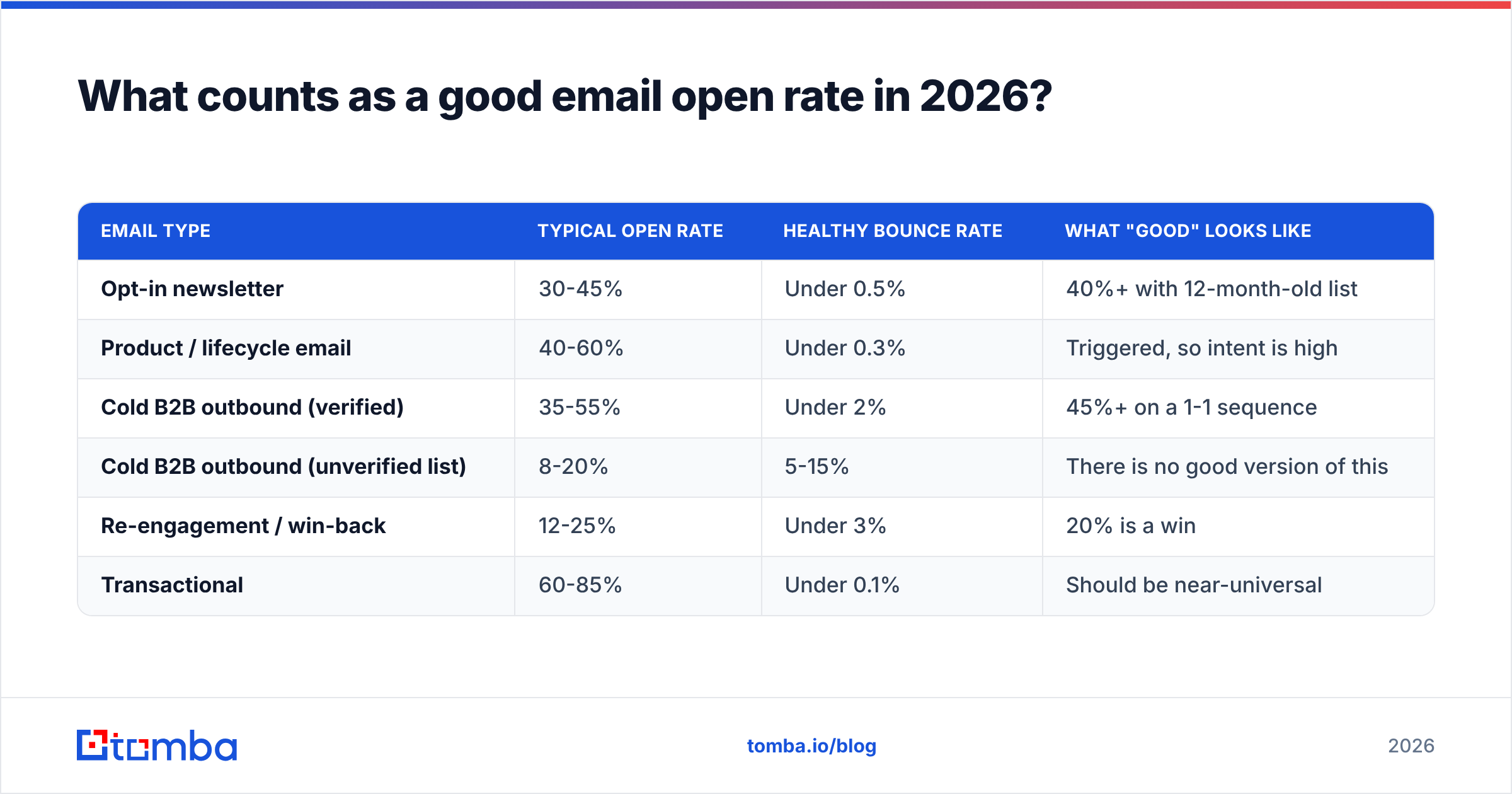
Benchmarks vary wildly by list type, and anyone quoting a single universal number is selling something. Here is the honest range based on aggregated industry reporting, including HubSpot's marketing statistics roundups:
| Email type | Typical open rate | Healthy bounce rate | What "good" looks like |
|---|---|---|---|
| Opt-in newsletter | 30-45% | Under 0.5% | 40%+ with 12-month-old list |
| Product / lifecycle email | 40-60% | Under 0.3% | Triggered, so intent is high |
| Cold B2B outbound (verified) | 35-55% | Under 2% | 45%+ on a 1-1 sequence |
| Cold B2B outbound (unverified list) | 8-20% | 5-15% | There is no good version of this |
| Re-engagement / win-back | 12-25% | Under 3% | 20% is a win |
| Transactional | 60-85% | Under 0.1% | Should be near-universal |
Two things stand out. Cold outbound on a verified list can beat a newsletter, and cold outbound on a scraped list performs about a third as well. The list is the variable, not the copy.
Also note the bounce column. Bounce rate is the leading indicator: it moves before your open rate does. A campaign bouncing at 8% is already damaging the sender reputation that determines whether next week's send gets seen at all.
What actually drives whether your email gets opened?#
In rough order of impact — and this order surprises people who have spent years A/B testing subject lines:
- Inbox placement. If the message lands in Spam or Promotions, nothing else on this list matters. Placement is driven by authentication, complaint history, engagement history, and content signals.
- List validity. Every invalid address is a hard bounce, and hard bounces are the fastest way to tank a domain's reputation. A list at 15% invalid will suppress opens across the entire send, including the valid addresses.
- Sender name recognition. Recipients scan the "from" field before the subject line. A real human name at a company they recognize outperforms "Team" or "Marketing" almost universally.
- Subject line and preview text. Real but smaller than the folklore suggests. Expect 2-5 points of lift from good testing, not 20.
- Send timing and cadence. Matters more for consistency (training the recipient to expect you) than for the specific hour you hit send.
- Volume ramp. New domains and new IPs that jump from 0 to 2,000 sends a day get filtered. Warmup is not optional.
Notice that items 1, 2, 3, and 6 are infrastructure and data problems. Only item 4 is a writing problem. Most teams invert this priority list and then wonder why their tenth subject line test produced nothing.
Is deliverability more important than subject lines?#
Yes, and the math is not close.
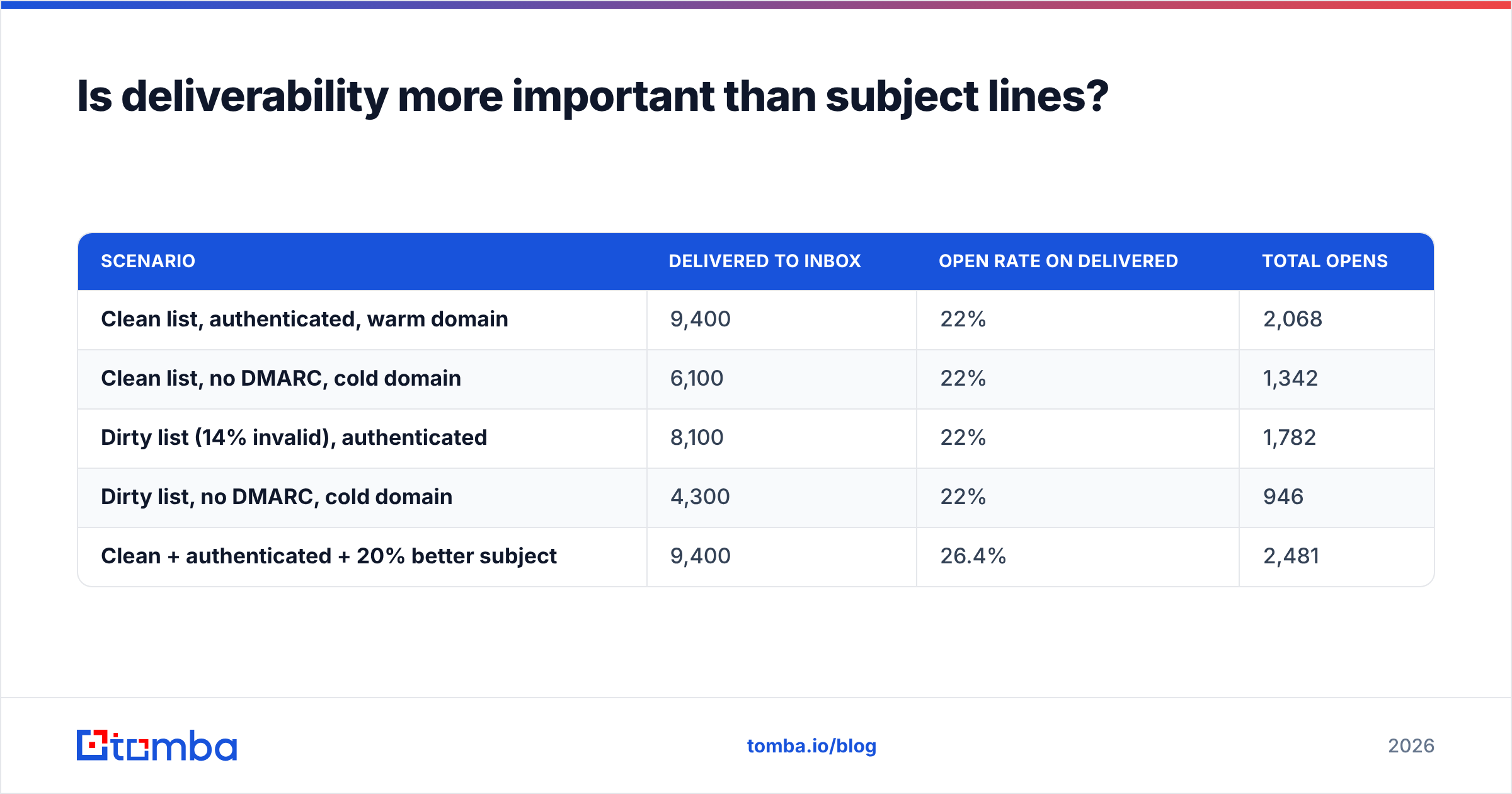
Take a 10,000-contact send. Suppose your subject line converts 22% of delivered mail into opens. Now compare two scenarios:
| Scenario | Delivered to inbox | Open rate on delivered | Total opens |
|---|---|---|---|
| Clean list, authenticated, warm domain | 9,400 | 22% | 2,068 |
| Clean list, no DMARC, cold domain | 6,100 | 22% | 1,342 |
| Dirty list (14% invalid), authenticated | 8,100 | 22% | 1,782 |
| Dirty list, no DMARC, cold domain | 4,300 | 22% | 946 |
| Clean + authenticated + 20% better subject | 9,400 | 26.4% | 2,481 |
The best subject line improvement in that table adds 413 opens. Fixing authentication and list hygiene adds 1,122. And a "20% better subject line" is a very good result — most tests deliver a fraction of that.
This is why email deliverability work has a better return than copy work for almost every team that hasn't done it yet. It's also why the fix is durable: a properly authenticated domain keeps paying off on every future send, while a subject line win decays as your audience habituates.
How do you fix authentication and sender reputation?#
Work through this in order. Each step is a prerequisite for the next one mattering.
Step 1 — Publish SPF, DKIM, and DMARC. SPF lists which servers may send for your domain. DKIM cryptographically signs the message. DMARC tells receivers what to do when the first two fail, and gives you reporting. Start DMARC at p=none to collect reports, then move to p=quarantine and eventually p=reject once you've confirmed every legitimate sending source is aligned. Verify your record with an SPF checker before you trust it — a syntax error in an SPF record fails silently.
Step 2 — Watch Postmaster Tools. Google Postmaster Tools gives you domain reputation, spam rate, and authentication pass rates for Gmail traffic. If your spam rate line crosses 0.10%, stop and diagnose before your next send. This is the single most useful free dashboard in email.
Step 3 — Check blacklists and reputation. A single shared-IP incident can quietly cost you 20 points of open rate. Run your domain and IP through a blacklist checker and an email reputation checker monthly, not just when something breaks.
Step 4 — Warm up deliberately. A new sending domain should ramp over 3-4 weeks: tens of emails per day, then low hundreds, prioritising recipients most likely to engage. Aged domains that have been dormant need the same treatment. Model the ramp with a warmup calculator rather than guessing.
Step 5 — Make unsubscribing trivial. One-click unsubscribe (RFC 8058 headers) is now required for bulk marketing mail at the major providers. Counterintuitively, an easy unsubscribe raises long-run open rate: people who would have hit "report spam" hit "unsubscribe" instead, and your complaint rate stays clean.
How much does list quality really change your open rate?#
More than any other single lever, and it's the cheapest one to pull.
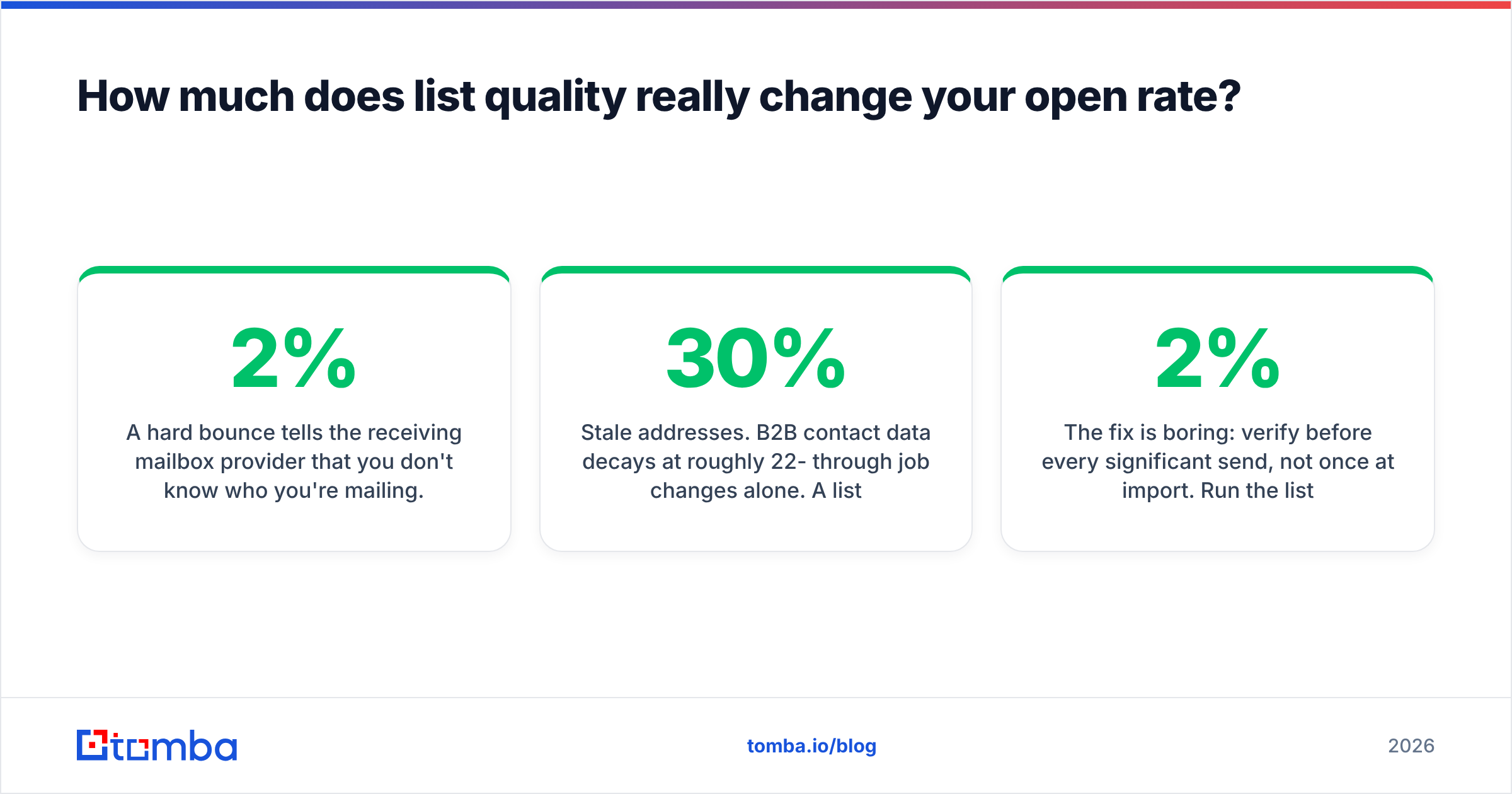
A hard bounce tells the receiving mailbox provider that you don't know who you're mailing. Providers read that as a spam signal, because legitimate senders generally have permission-based lists with low invalid rates. Cross roughly 2% hard bounces on a send and you start seeing placement degrade; cross 5% and some providers throttle you outright.
The failure modes are specific:
- Stale addresses. B2B contact data decays at roughly 22-30% per year through job changes alone. A list you bought or built 18 months ago is substantially fiction.
- Role accounts.
info@,sales@,support@— these accept mail, rarely get opened by a decision-maker, and are frequently monitored by filtering tools that generate complaints. - Spam traps. Addresses that exist only to catch senders who don't practice permission. One hit can move you onto a blocklist.
- Catch-all domains. These accept everything, so a naive verifier marks them "valid." Then half of them bounce. A dedicated catch-all verifier resolves whether the specific mailbox exists rather than whether the domain shrugs and accepts.
The fix is boring: verify before every significant send, not once at import. Run the list through an email verifier, suppress anything that isn't a confirmed deliverable mailbox, and re-verify contacts older than 90 days. Teams that adopt this typically see bounce rates drop from double digits to under 2% and open rates recover 10-20 points within two or three sends — with no change to the copy at all.
Do subject lines still matter, and what tests actually work?#
They matter. They just aren't the emergency.
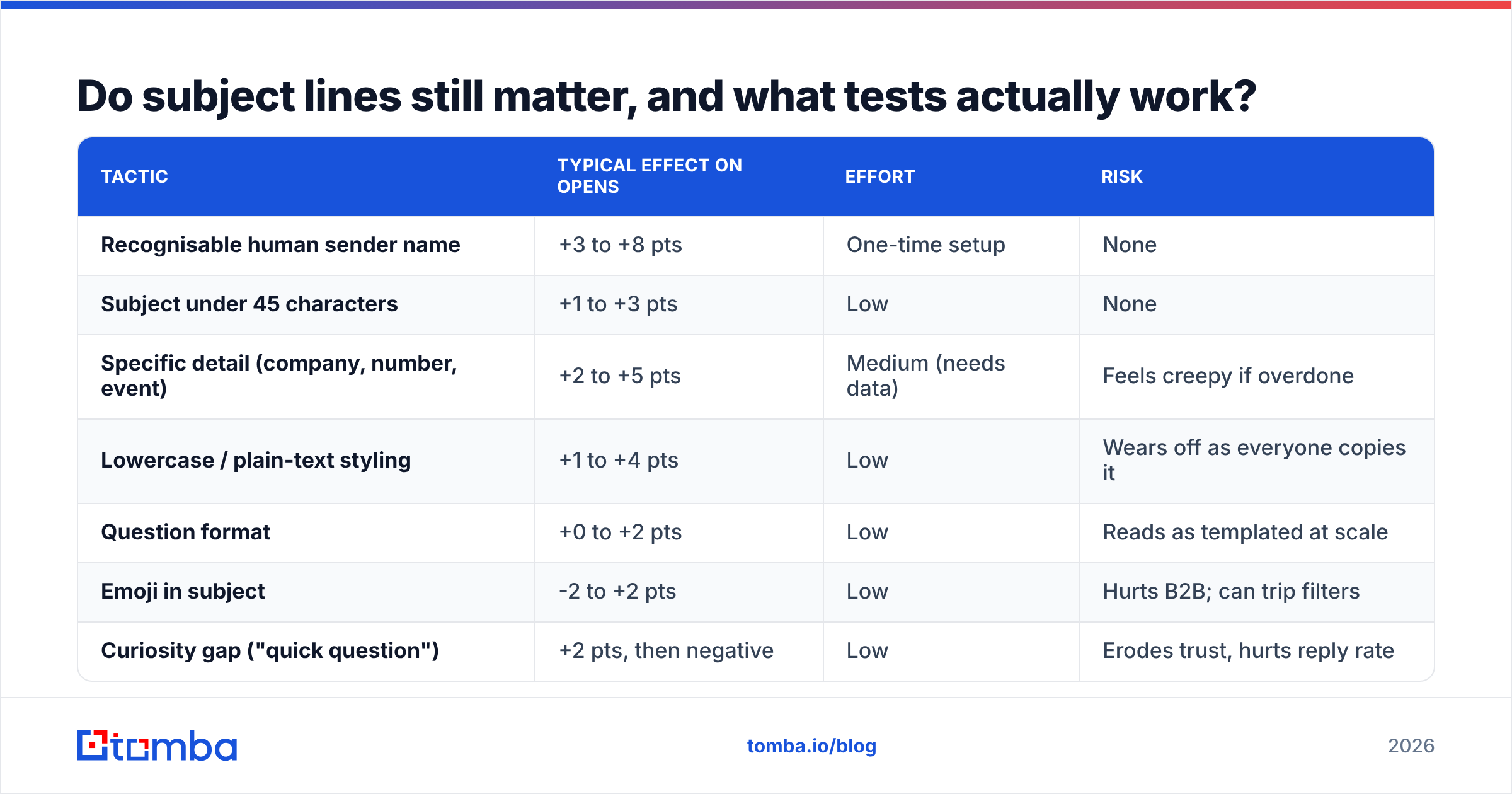
Once your plumbing is sound, subject line testing produces reliable if modest gains. What holds up across tests:
| Tactic | Typical effect on opens | Effort | Risk |
|---|---|---|---|
| Recognisable human sender name | +3 to +8 pts | One-time setup | None |
| Subject under 45 characters | +1 to +3 pts | Low | None |
| Specific detail (company, number, event) | +2 to +5 pts | Medium (needs data) | Feels creepy if overdone |
| Lowercase / plain-text styling | +1 to +4 pts | Low | Wears off as everyone copies it |
| Question format | +0 to +2 pts | Low | Reads as templated at scale |
| Emoji in subject | -2 to +2 pts | Low | Hurts B2B; can trip filters |
| Curiosity gap ("quick question") | +2 pts, then negative | Low | Erodes trust, hurts reply rate |
| "Re:" or "Fwd:" fake-thread prefix | +5 pts on opens | Low | High — damages trust and complaint rate |
The last two rows deserve a warning. Both inflate opens and depress everything downstream. If you optimise for the metric a proxy server can fake, you will find tactics that fake it. A fake "Re:" gets the open and loses the deal.
Practical testing rules: change one variable, run to at least 1,000 recipients per arm before believing a result, and use a subject line tester to catch length and spam-trigger issues before you burn a send on them. Also write the preview text deliberately — most platforms default to your first line, which is often "Hi {{first_name}}," and wastes 90 characters of prime real estate.
How should you measure open rate now that it's unreliable?#
Demote it. Keep it, but stop treating it as the goal.
Build your reporting around three tiers:
- Deliverability tier (trust these): hard bounce rate, soft bounce rate, spam complaint rate, authentication pass rate, Postmaster domain reputation. These are reported by receiving infrastructure and cannot be inflated by image pre-fetching.
- Engagement tier (trust these): reply rate, click rate on unique recipients, unsubscribe rate, meetings booked. A reply requires a human.
- Directional tier (trust the trend, not the level): open rate. Useful for comparing this week's send to last week's same audience, same platform mix. Useless as an absolute benchmark or across audiences.
A practical approach: segment your reporting by mailbox provider. Gmail and Outlook opens are relatively comparable to each other; Apple Mail opens are largely noise. If you can't split by provider, watch the ratio of clicks to opens — a sudden drop in that ratio usually means more proxy inflation, not worse content.
One more habit worth building: keep a change log. Every domain change, DNS edit, platform migration, and list import gets a dated line. When open rate moves 12 points, the cause is almost always in that log, and you'll find it in two minutes instead of two weeks.
What does a 30-day plan to improve email open rate look like?#
Week 1 — Diagnose. Pull 90 days of bounce, complaint, and open data. Check SPF, DKIM, DMARC. Set up Postmaster Tools if it isn't already collecting. Run a blacklist check. Do not send anything new to a cold segment.
Week 2 — Clean. Verify the whole list. Suppress invalids, role accounts, and anything unverifiable. Separate catch-all domains into their own segment and verify them properly rather than guessing. Expect to remove 10-25% of a list that has never been cleaned — that removal is the point.
Week 3 — Rebuild the sending setup. Fix authentication gaps. Add one-click unsubscribe. If you're on a cold or damaged domain, start a warmup ramp. Switch the sender name to a real person.
Week 4 — Then optimise copy. Now subject line testing is worth your time, because the results will be signal instead of noise. Test one variable per send, measure reply rate alongside opens, and keep the tests you can sustain.
Most teams that follow this order see the majority of their gain in weeks 2 and 3 — before they've written a single new subject line.
Where should you start?#
Start with the list, because it's the input to everything else. Authentication is a one-time fix; a decaying contact list is a permanent tax on every send you make.
If you're building or refreshing B2B outbound data, Tomba's Email Finder finds verified professional addresses by name, domain, or company, with the verification step built into the lookup rather than bolted on afterwards — so contacts arrive deliverable instead of arriving hopeful. The free tier includes 25 searches a month if you want to test accuracy against a list you already trust, and paid plans start at $49/mo on Starter with Growth at $99/mo; full Tomba pricing is public. Verify first, authenticate second, and write the subject line third. That order is the whole trick.
Related guides#
// get started
Find, verify and enrich your first contacts today
Start on the free plan with 25 searches a month, then scale when your team is ready.
Free plan · No credit card required · GDPR & CCPA
// about the author