How to Improve Sender Reputation: The 2026 Playbook
Sender reputation decides whether your cold email lands in the inbox or the spam folder. Here is the diagnostic order, the metrics that actually move the needle, and how long each fix takes.
TL;DR — how to improve sender reputation
- Sender reputation is not one score. Gmail, Yahoo and Outlook each keep their own. They track your domain, your IP, and the shape of your content. For low-volume B2B mail, the domain counts most.
- Three signals move your score fast. Keep bounces under 2%. Keep spam gripes under 0.10%, which is Google's own line. Get real replies from real people.
- SPF, DKIM and DMARC are the price of entry. They keep you out of trouble. They do not win you trust.
- Clean lists are the cheapest way to improve sender reputation. A list check costs a few dollars. One bounce spike costs six weeks.
- A hurt domain takes 4 to 8 weeks to heal. Send slow, send small, send to people who reply. Buying a fresh domain is the worse trade.
What is sender reputation, actually?#
Sender reputation works like a credit score for your mail. A bank looks at how you paid past loans before it grants a mortgage. In the same way, a mail host looks at how people dealt with your past mail. Then it picks a spot: inbox, Promotions tab, or spam.
Sender reputation is a set of private scores. Each mail host keeps its own — Google, Microsoft, Yahoo, Proofpoint, Mimecast. Each score guesses one thing: is your next mail wanted? You cannot read those scores. They are not published, and they do not travel with you. You can only read proxies. Google Postmaster Tools shows domain health. Microsoft SNDS shows IP data. Blocklists, bounce rates and spam rates fill in the rest.
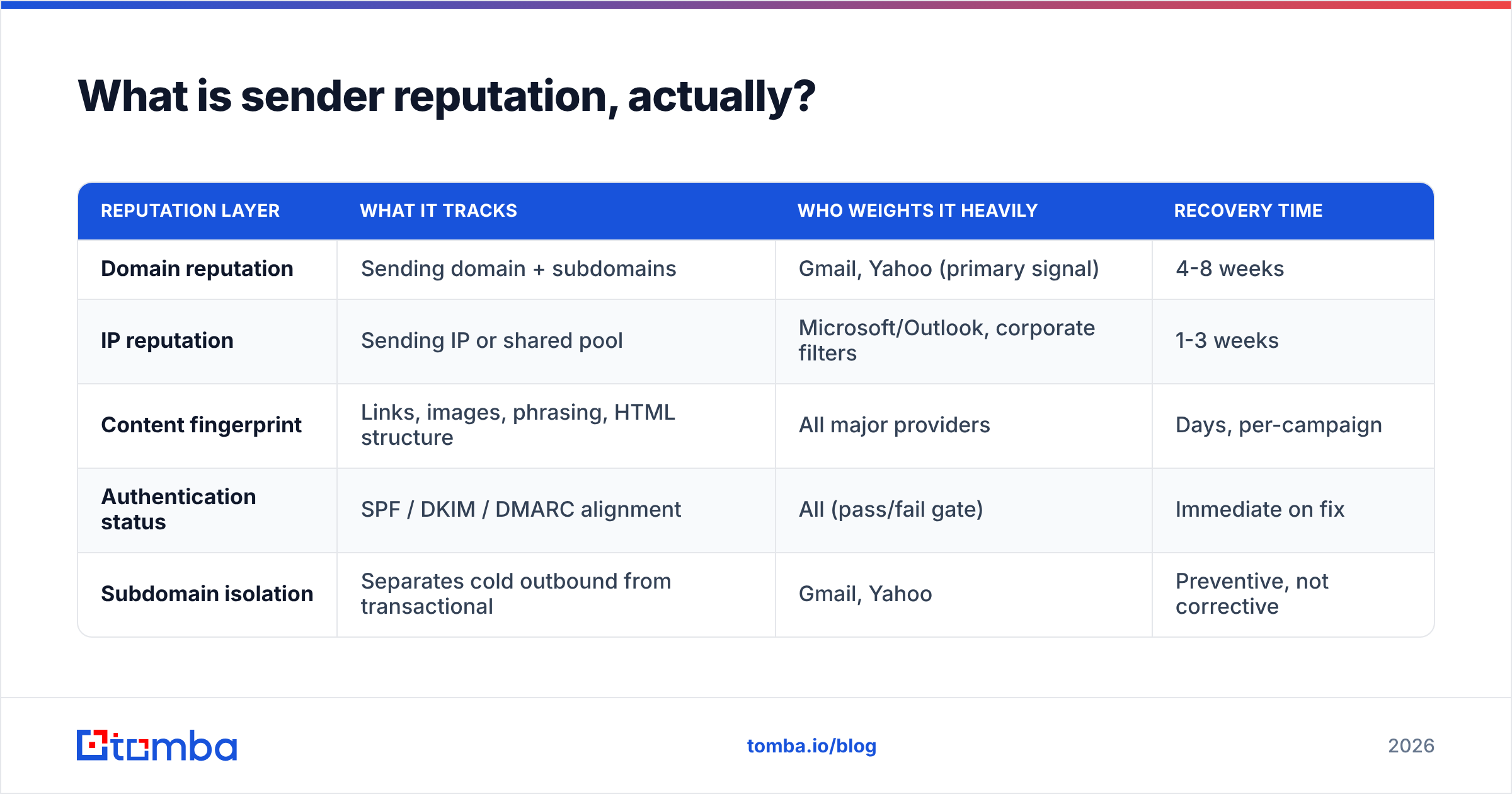
Here is the part most people miss. You do not have one score. You have several. And they heal at very different speeds.
| Layer | What it tracks | Who leans on it | Time to heal |
|---|---|---|---|
| Domain score | Your sending domain and subdomains | Gmail, Yahoo (main signal) | 4-8 weeks |
| IP score | Your IP or shared pool | Outlook, work filters | 1-3 weeks |
| Content print | Links, images, wording, HTML | All the big hosts | Days, per send |
| SPF / DKIM / DMARC | Do you pass or fail | All (a gate, not a grade) | Fixed at once |
| Subdomain split | Cold mail kept off your main domain | Gmail, Yahoo | Guards, does not heal |
Say you send 300 cold emails a day from a shared pool. Your IP score is spread across hundreds of senders. Most of it is out of your hands. Your domain score is all yours. Spend your time there. It is the fastest way to improve sender reputation.
Why does sender reputation drop in the first place?#
Scores almost never fall for strange reasons. They fall for five plain ones. Here they are, most common first. Fix these before you try to improve sender reputation any other way.
Bounce spikes from raw lists. You scraped or bought 4,000 contacts. You sent to all of them. Then 22% hard-bounced. Gmail reads that as a sender who does not know who his readers are. It is the clearest spam signal there is.
Spam gripes above 0.10%. Google's Email Sender Guidelines set 0.10% as the line to stay under. At 0.30% you get filtered. On a 1,000-mail send, that is one gripe before the danger zone.
No replies for weeks on end. Mail that is never opened, never answered, never dragged out of spam is mail the host learns to bury. Silence is a bad sign, not a neutral one.
Volume jumps that look like a bot. You go from 40 a day to 900 a day on a six-week-old domain. That reads as a burner. Burners do exactly that.
Spam traps. Old dead addresses get turned back on as traps. Pure traps were never used by a human at all. Both sit inside old scraped lists. One trap hit at a big host can cost you weeks.
Look at that list again. Four of the five are list problems in a new hat. That is why deliverability folks ask about your data source first and your DNS second.
How do you diagnose a reputation problem in the right order?#
Work from cheap checks to costly fixes. Run them in this order and you will improve sender reputation sooner. Do not rewrite your copy while your DMARC record is broken.
Step 1 — Confirm you pass the basics. SPF must resolve inside the 10-lookup cap. DKIM must sign with a 2048-bit key. DMARC must be live, at least at p=none, with reports on. Run your domain through an SPF checker and make sure the record is valid. Since February 2024, Google and Yahoo want all three from bulk senders. The bar has only gone up since.
Step 2 — Check the blocklists. Spamhaus, SURBL, Barracuda, SpamCop. A listing explains a total drop in delivery. No amount of copy work will fix one. Run a blacklist checker on both your domain and your IP. They can be listed apart.
Step 3 — Read Google Postmaster Tools. Domain health shows as High, Medium, Low or Bad. Below High means you are being filtered right now. Watch the spam rate graph. If it crossed 0.3% in the last 30 days, that is your problem.
Step 4 — Pull the bounce rate on your last three sends. Over 3% means the list is at fault. Over 8% and you have a fire to put out.
Step 5 — Only now look at the copy. Count the links. Check the image-to-text mix. Check the wording and the tracking domain. Run one mail through a spam checker to catch the obvious stuff. But copy is the last 10% of this job, not the first.

Which metrics actually predict inbox placement?#
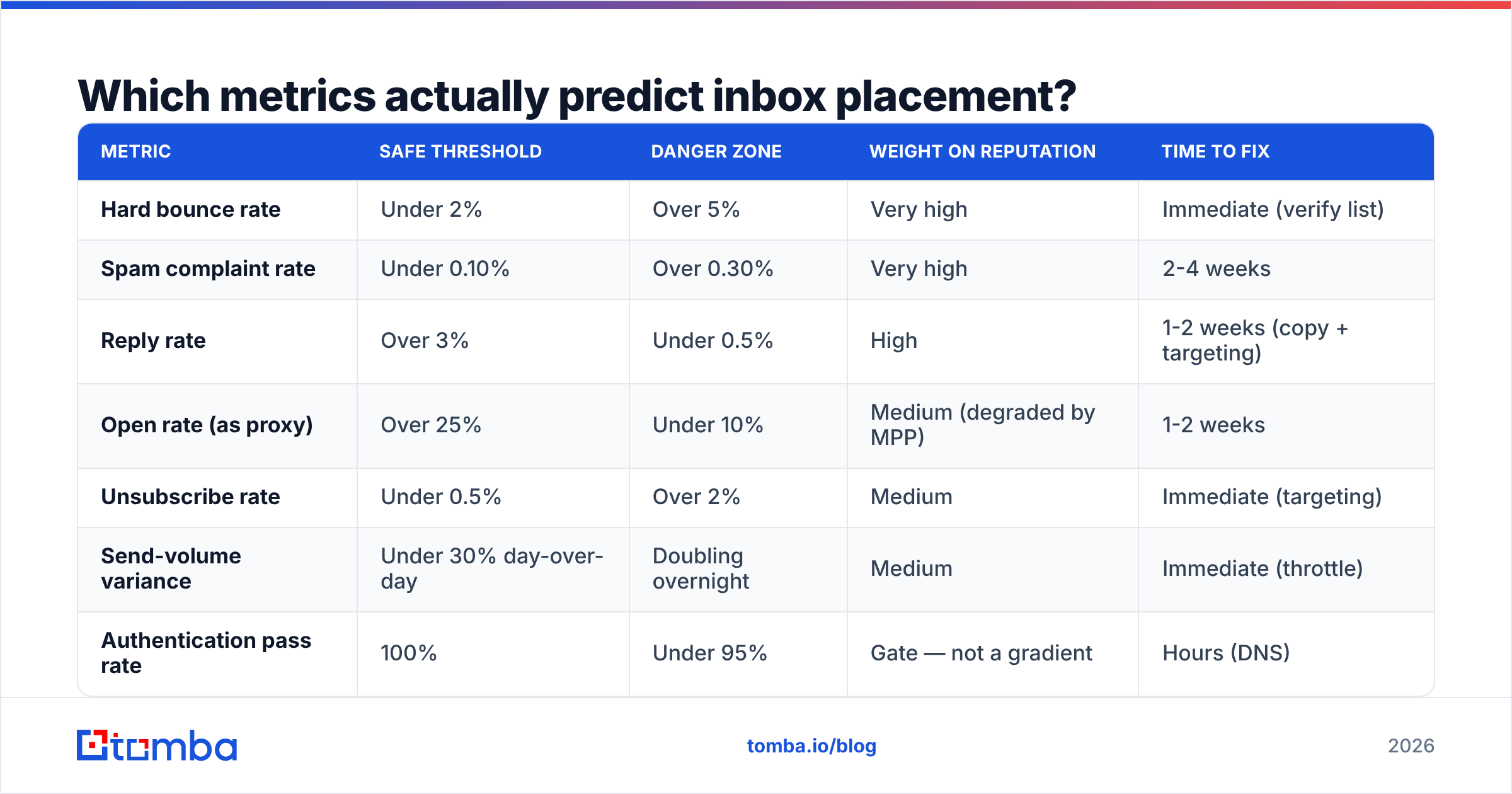
Not every metric counts the same. Here is the honest rank order. The cut-offs are the ones mail hosts act on.
| Metric | Safe | Danger | Weight | Time to fix |
|---|---|---|---|---|
| Hard bounce rate | Under 2% | Over 5% | Very high | At once (clean the list) |
| Spam gripe rate | Under 0.10% | Over 0.30% | Very high | 2-4 weeks |
| Reply rate | Over 3% | Under 0.5% | High | 1-2 weeks (copy, targets) |
| Open rate | Over 25% | Under 10% | Medium (weak now) | 1-2 weeks |
| Opt-out rate | Under 0.5% | Over 2% | Medium | At once (targets) |
| Volume swing | Under 30% a day | Double overnight | Medium | At once (slow down) |
| Pass rate on SPF, DKIM, DMARC | 100% | Under 95% | A gate, not a grade | Hours (DNS) |
Two notes on that table. First, open rate has been a weak signal since Apple started pre-fetching images in 2021. Treat it as a hint, not proof. Second, response rate now tracks long-term domain health best. Replies are the hardest thing to fake, so hosts trust them most.
How do you actually improve sender reputation?#
Six moves, ranked by payback.
Check every address before it enters a sequence. This is not optional in 2026. A bulk email verifier run takes minutes. It strips hard bounces, role accounts and known traps before they touch your score. On a 5,000-row scraped list, expect it to cut 15-25%. Each one of those would have been a bounce.
Move cold mail onto a subdomain. Send from
mail.yourcompany.comoroutreach.yourcompany.com. Never send it from your root domain. If the subdomain gets hurt, your invoices, resets and support mail stay clean. Trust flows down from root to subdomain, but far less on the way back up.Warm up, then hold the ramp. A new domain needs 3 to 4 weeks before real volume. Try 10 a day in week one, 25 in week two, 50 in week three, 100 in week four. After that, add no more than 30% a week. A warmup calculator takes out the guesswork. Fake reply networks help less than they once did. Hosts have learned to spot them.
Cut the list to people who might care. A 400-name list of the right buyers beats a 4,000-name list of loose matches. It also lifts your score instead of eating it. Good targeting is a delivery lever, not just a sales one.
Make opting out easier than hitting spam. One-click unsubscribe headers (RFC 8058) are a must at Gmail and Yahoo. A clear opt-out line turns a spam gripe, which is costly, into an opt-out, which is nearly free.
Treat catch-all domains with care. Roughly 15-20% of B2B domains accept all mail, so a check comes back "unknown". Do not blast them as if they were good. Use a catch-all verifier to score the odds. Then park the low-confidence names in a slower list, so one bad batch cannot poison the main domain.
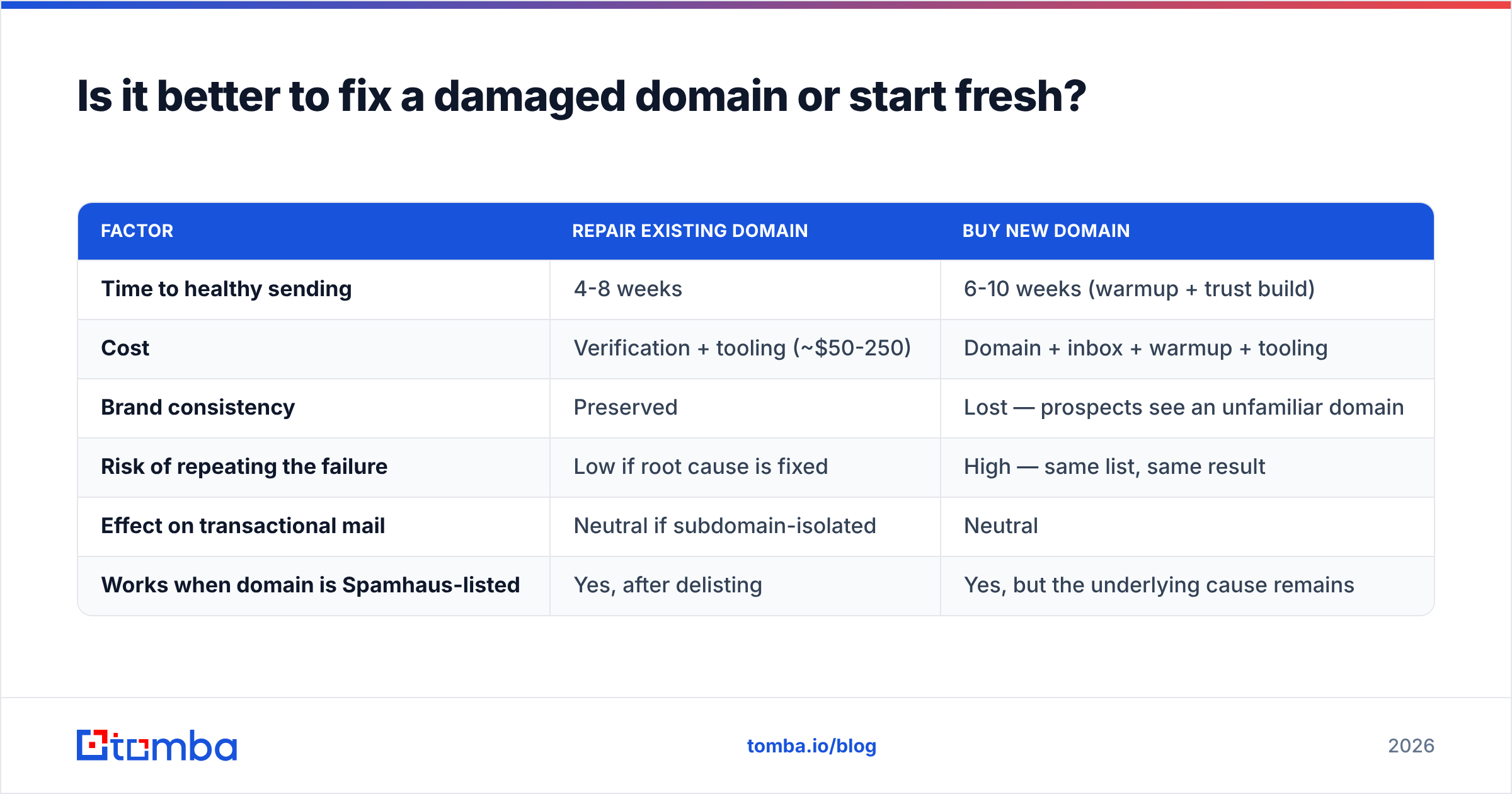
Is it better to fix a damaged domain or start fresh?#
Fix it, in almost every case. A new domain feels like a reset. It is really a demotion. You go from "known sender with a problem" to "stranger with no track record". And strangers get filtered hard by default.
Here is the math on the two paths.
| Factor | Repair the domain | Buy a new one |
|---|---|---|
| Time to healthy sending | 4-8 weeks | 6-10 weeks (warm up, build trust) |
| Cost | Checks plus tools (~$50-250) | Domain, inbox, warmup, tools |
| Brand | Kept | Lost — buyers see a strange domain |
| Odds of a repeat | Low, if you fix the cause | High — same list, same result |
| Effect on billing mail | None, if you split subdomains | None |
| Works when Spamhaus lists you | Yes, after you get removed | Yes, but the cause is still there |
There is one exception. Your root domain sits on the Spamhaus SBL. You have a poor delisting record. You have sent bought data for a year. In that spot, a clean start is fair — but only if you change the data too. A fresh domain with the same old list just buys you six more weeks.
What repair timeline should you expect?#
Recovery is not a straight line. Hosts look back over a window. For Gmail, that window is about 30 days, and recent sends count for more.
- Week 1: Stop all mail to lists you have not checked. Fix SPF, DKIM and DMARC. Ask to be removed from any blocklist. Send only to your warmest 50 to 100 contacts — people who have written back before.
- Weeks 2-3: Go back to 20-30% of your old volume. Checked addresses only. Write for replies, not clicks. Read Postmaster every day.
- Weeks 4-6: Hold spam rate under 0.10% and reply rate over 3%. Then add 30% a week. Domain health should move from Low to Medium here.
- Weeks 7-8: Medium moves to High, as long as no new bounce spike lands. Go back to normal volume.
Still stuck on "Bad" by week six with clean sending? Then something deeper is wrong. Usually it is a shared IP pool spoiled by another tenant. Sometimes it is a tracking domain that is itself on a blocklist.
How do data sources affect reputation before you ever hit send?#
Most guides skip this part. Your problem usually starts at the data, weeks before the first send. Where you get names shapes how hard it is to improve sender reputation later.
Scraped lists, old LinkedIn dumps and cheap bulk files carry three known hazards. Addresses go stale fast at firms with churn. Role accounts like info@ and sales@ draw gripes. And recycled traps hide inside them. Sources that refresh their data, and check each address when you pull it, hand you a much better start.
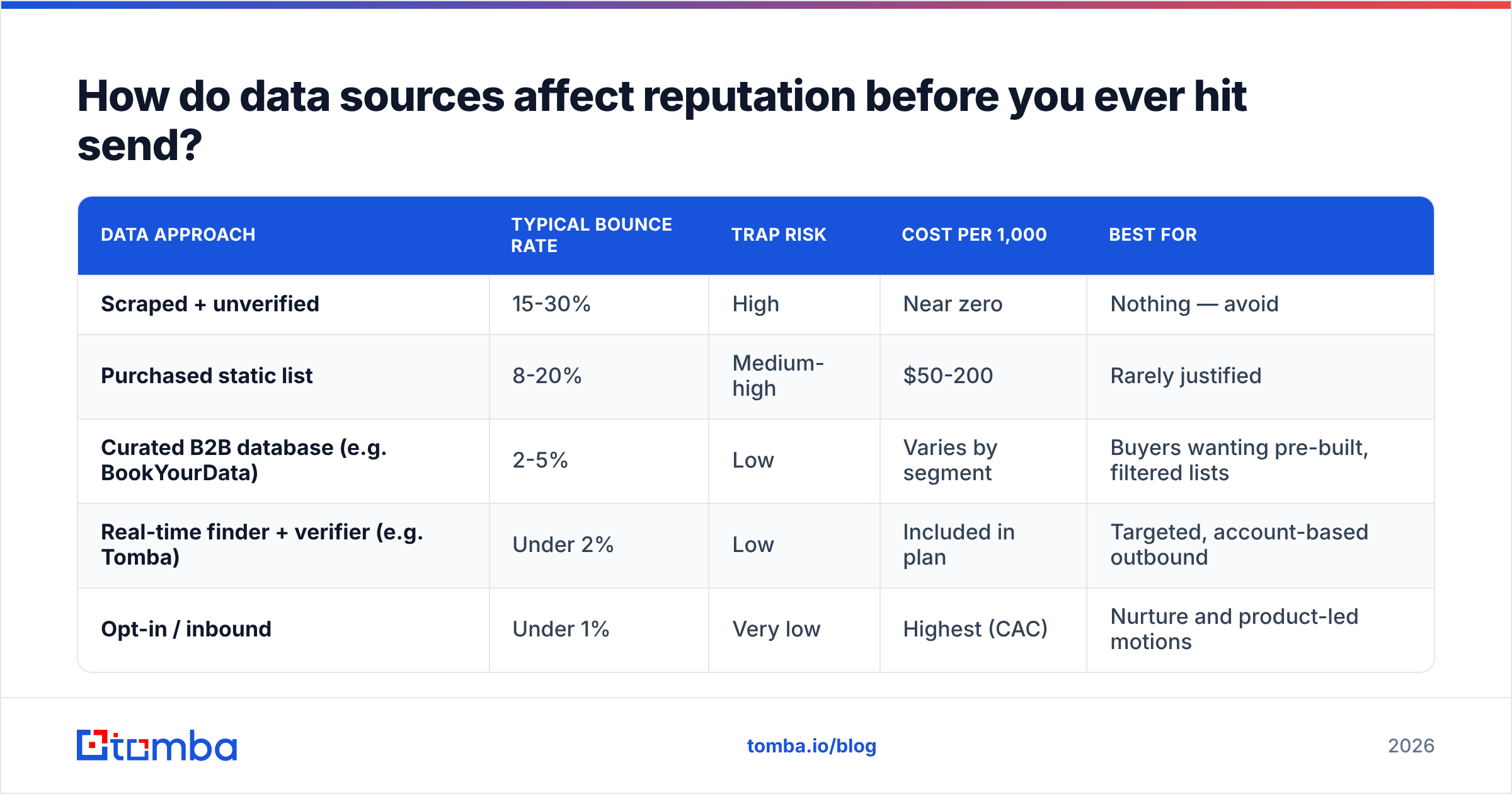
Compare the paths honestly.
| Data path | Bounce rate | Trap risk | Cost per 1,000 | Best for |
|---|---|---|---|---|
| Scraped, not checked | 15-30% | High | Near zero | Nothing — avoid |
| Bought static list | 8-20% | Medium-high | $50-200 | Rarely worth it |
| Curated B2B database (e.g. BookYourData) | 2-5% | Low | Varies by segment | Ready-made, filtered lists |
| Live finder plus checker (e.g. Tomba) | Under 2% | Low | In the plan | Named account outbound |
| Opt-in or inbound | Under 1% | Very low | Highest | Nurture and product-led |
Both paths are fair. They just solve different jobs. A database is faster when you want volume in one segment. A finder plus a checker is better when you work a named account list and need current addresses for real people. Neither one is a scrape.
Want a wider view of how buyers rate data claims? G2's email deliverability category is a decent place to look. Building your own pipeline instead? Tomba's data sources page shows where records come from and how often they refresh. Read it before you commit to any vendor, this one included.
What should you monitor once reputation is healthy?#
Book a 15-minute review each week. It beats a panic each quarter. It is also the cheapest way to hold on to the gains once you improve sender reputation.
- Google Postmaster Tools — domain health, spam rate, pass rate. Free, and the closest thing to truth for Gmail.
- Microsoft SNDS — IP-level data for Outlook and Hotmail.
- Blocklist alerts — automatic alerts beat manual checks.
- Seed lists — send to real inboxes at Gmail, Outlook and a work filter before each big push.
- Reply rate trend — a slow slide here is the first warning. It shows up two or three weeks before Postmaster does.
Track email deliverability by segment, not just as one big number. One bad slice — one trade, one old import, one country — can drag a healthy average into the filter. Meanwhile the top-line number still looks fine.
Common myths worth discarding#
"Dodge spam words and you are safe." Trigger-word lists are a relic from 2010. Hosts score how you send and how people react. They do not score your word choice. "Free" in a subject line from a good sender lands just fine.
"More warmup mail means a better score." Fake reply rings get spotted and marked down. Warmup buys you a ramp. It does not buy you goodwill.
"Plain text always beats HTML." The gap is tiny. Link count and link target matter far more than markup.
"Each campaign starts fresh." It does not. You improve sender reputation over months, not in one good send. Your domain score adds up over a rolling window. A great send does not erase last month's bounce spike. It only starts the clock.
Where to start today#
Pull the bounce rate on your last three sends. Is any of them over 3%? Then the list is your problem, and no copy tweak will save it. Check before you send. Split cold mail onto a subdomain. Ramp with patience. Treat replies as the metric that counts. Do those four things and you will improve sender reputation faster than any copy edit can.
The cheapest insurance is simple: know an address is real before you use it. Tomba's Email Finder returns scored, checked work addresses by name or domain. Bounces get caught up front, not six weeks later. The free tier gives you 25 searches a month. Paid plans start at $49/mo, and Growth is $99/mo — the full Tomba pricing is public. Start with one small batch. Watch the bounce rate fall under 2%. Then let the gains stack up.
Related guides#
// get started
Find, verify and enrich your first contacts today
Start on the free plan with 25 searches a month, then scale when your team is ready.
Free plan · No credit card required · GDPR & CCPA
// about the author