Inbox Checker: How to Test Where Your Cold Emails Land
An inbox checker tells you whether your email hit the inbox, the promotions tab, or spam — before your prospects ever see it. Here is how these tools work, where their seed lists lie to you, and what to fix first.
TL;DR
- An inbox checker answers one question: did this message land in the inbox, the promotions tab, or spam — at Gmail, Outlook, Yahoo, and corporate filters?
- The term gets used for two different products: inbox placement testers (seed-list tools like GlockApps, MailReach, Mail-tester) and email address checkers (validity tools that confirm a mailbox exists before you send).
- You need both. A perfect placement score means nothing if 18% of your list bounces, and a clean list means nothing if your domain is on a blocklist.
- Seed-list results are directional, not literal. They tell you something changed; they do not tell you what a specific prospect at a specific company saw.
- Fix the cheap causes first — authentication, list hygiene, volume ramp, link reputation — before you pay for a monitoring subscription.
What is an inbox checker?#
An inbox checker is a tool that sends or receives a copy of your email at a set of monitored mailboxes, then reports which folder it landed in.
Think of it like a smoke detector you deliberately set off. You do not wait for a real fire to find out whether the alarm works — you hold a match under it in a controlled room and watch what happens. An inbox checker is the same idea: you fire a test message at mailboxes you control, and you read the result before you burn a real prospect list.
The output is usually a folder breakdown per provider: Inbox / Promotions / Spam / Missing. Most tools add a diagnostic layer on top — SPF, DKIM, and DMARC results, blocklist status, spam-filter score (SpamAssassin or similar), and sometimes a content critique.
That is the whole product. Everything else — dashboards, trend lines, alerting, warmup pools — is packaging around that one measurement.
What are the two things people call an "inbox checker"?#
Search intent for this phrase splits cleanly, and buying the wrong category is the most common mistake. Here is the actual landscape:
- Inbox placement testers. You send to a generated seed list; the tool reports folder placement per mailbox provider. Examples: GlockApps, MailReach, Mailtrap, Inbox Insight-style features inside sending platforms.
- Single-message spam scorers. You send one email to one address, and get a score plus a list of technical problems. Mail-tester is the archetype. Free, fast, shallow — useful for catching a broken DKIM record in 30 seconds.
- Email address checkers (verification). These confirm a mailbox actually accepts mail before you send anything. This is what an email verifier does: syntax, domain, MX records, SMTP handshake, disposable and role-account detection.
- Reputation monitors. Google Postmaster Tools, Microsoft SNDS, and paid equivalents show your domain and IP reputation from the mailbox provider's own point of view — the only data source that is not a simulation.
- Blocklist checkers. Query Spamhaus, SORBS, Barracuda and friends for your sending IP and domain. A blacklist checker takes seconds and explains an overnight collapse more often than any content rewrite will.
If your problem is "my open rate dropped from 45% to 6% last Tuesday," you want #1, #4, and #5. If your problem is "my bounce rate is 14%," you want #3 and nothing else.

How does inbox placement testing actually work?#
The mechanics are simpler than the pricing pages suggest.
The tool maintains a pool of real mailboxes — Gmail, Outlook.com, Yahoo, AOL, GMX, plus regional providers and sometimes corporate-filtered domains behind Proofpoint or Mimecast. It hands you a fresh subset of those addresses as a seed list. You add them to your campaign or paste them into your sending tool. After delivery, the platform logs into each mailbox, finds your message by a unique identifier, and records the folder.
Three details determine whether the result is worth anything:
- Seed freshness. Reused seed addresses accumulate a history. A Gmail seed that has received 4,000 cold emails from 4,000 different domains behaves nothing like a real prospect's mailbox.
- Corporate coverage. Most B2B mail does not go to gmail.com — it goes to a Google Workspace or Microsoft 365 tenant with its own filtering layer, custom rules, and a security gateway. Consumer-only seed lists miss that entirely.
- Engagement simulation. Some tools open, reply to, and move messages out of spam to train the filter. That is warmup, not measurement. Running both from the same vendor makes the placement number partly self-fulfilling.
That last point matters more than any feature comparison. A warmup service that also grades your placement is grading its own homework.
Which inbox checker should you use?#
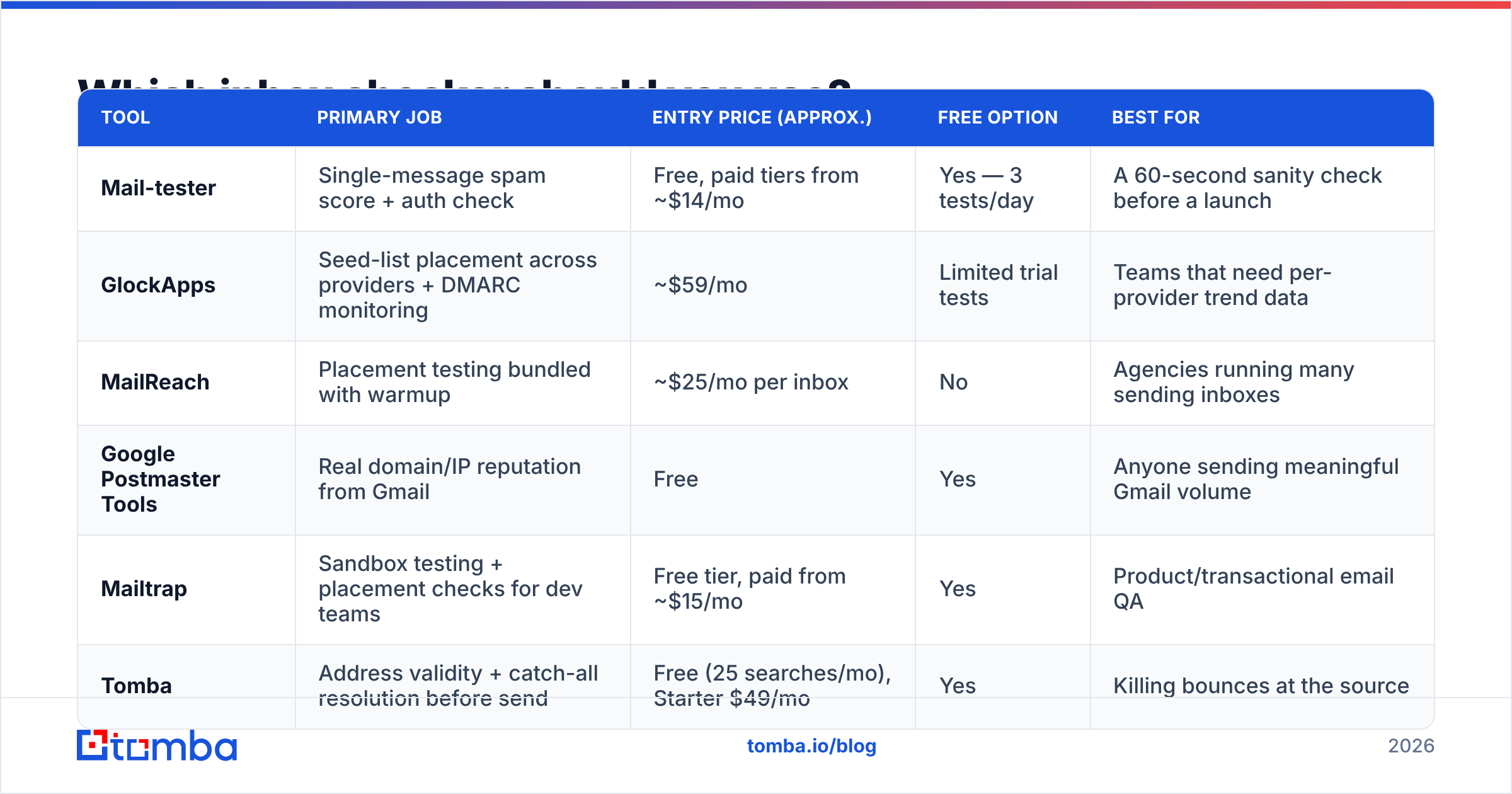
There is no single winner, because these tools solve different halves of the problem. Prices below are approximate list prices at the time of writing — check the vendor page before you buy, since deliverability tooling repriced heavily through 2025.
| Tool | Primary job | Entry price (approx.) | Free option | Best for |
|---|---|---|---|---|
| Mail-tester | Single-message spam score + auth check | Free, paid tiers from ~$14/mo | Yes — 3 tests/day | A 60-second sanity check before a launch |
| GlockApps | Seed-list placement across providers + DMARC monitoring | ~$59/mo | Limited trial tests | Teams that need per-provider trend data |
| MailReach | Placement testing bundled with warmup | ~$25/mo per inbox | No | Agencies running many sending inboxes |
| Google Postmaster Tools | Real domain/IP reputation from Gmail | Free | Yes | Anyone sending meaningful Gmail volume |
| Mailtrap | Sandbox testing + placement checks for dev teams | Free tier, paid from ~$15/mo | Yes | Product/transactional email QA |
| Tomba | Address validity + catch-all resolution before send | Free (25 searches/mo), Starter $49/mo | Yes | Killing bounces at the source |
The honest read: pair one placement tester with one verification layer and one free reputation feed. Buying three overlapping placement tools is a common way to spend $200/month to watch the same graph from three angles.
Independent review volume on G2 is a reasonable tiebreaker between placement vendors, since the category churns fast and last year's leader is often this year's abandoned product.
How accurate are inbox checker results?#
Directionally useful, literally unreliable. Treat the number as a thermometer, not a diagnosis.
Here is why. A seed mailbox has no relationship with you. Real recipients do — they have replied to you, added you to contacts, or ignored you eleven times. Gmail weighs that individual engagement history heavily, which means the same message can hit the inbox for a warm contact and spam for a cold one on the same domain, at the same second. No seed list can represent that spread.
Three failure modes to watch for:
- False green. Your seed test shows 92% inbox, but your reply rate is flat. Usually means your seeds are consumer mailboxes and your prospects sit behind a corporate gateway that quarantines silently.
- False red. The test shows spam at Outlook, and you rewrite the whole sequence. The actual cause was a shared IP in your sending pool getting listed for four hours.
- Silent drift. Placement looks stable while your delivered volume drops, because invalid addresses are being rejected before placement is ever measured. That is a list problem masquerading as a deliverability problem.
The fix for all three is triangulation. Compare seed results against Google Postmaster Tools reputation, your own bounce and complaint rates, and reply rate by domain type. When three independent signals agree, act. When one moves alone, investigate before you rewrite anything.
For the underlying concepts — reputation, feedback loops, throttling — the email deliverability glossary entry is a faster read than most vendor whitepapers.
What should you check before you blame the inbox checker?#
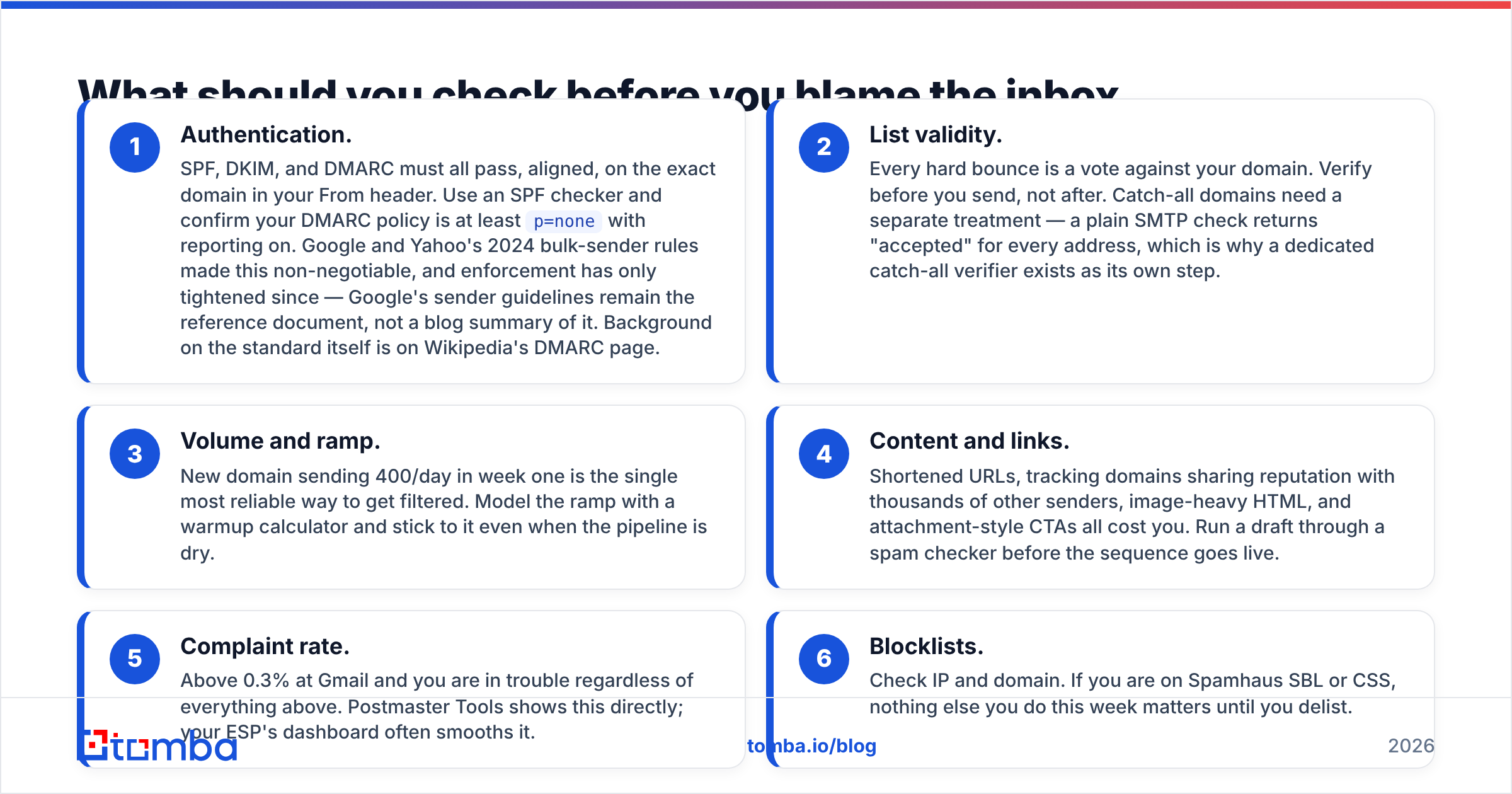
Run this in order. Each step is cheaper than the one after it, and roughly 70% of placement problems die at step two or three.
- Authentication. SPF, DKIM, and DMARC must all pass, aligned, on the exact domain in your From header. Use an SPF checker and confirm your DMARC policy is at least
p=nonewith reporting on. Google and Yahoo's 2024 bulk-sender rules made this non-negotiable, and enforcement has only tightened since — Google's sender guidelines remain the reference document, not a blog summary of it. Background on the standard itself is on Wikipedia's DMARC page. - List validity. Every hard bounce is a vote against your domain. Verify before you send, not after. Catch-all domains need a separate treatment — a plain SMTP check returns "accepted" for every address, which is why a dedicated catch-all verifier exists as its own step.
- Volume and ramp. New domain sending 400/day in week one is the single most reliable way to get filtered. Model the ramp with a warmup calculator and stick to it even when the pipeline is dry.
- Content and links. Shortened URLs, tracking domains sharing reputation with thousands of other senders, image-heavy HTML, and attachment-style CTAs all cost you. Run a draft through a spam checker before the sequence goes live.
- Complaint rate. Above 0.3% at Gmail and you are in trouble regardless of everything above. Postmaster Tools shows this directly; your ESP's dashboard often smooths it.
- Blocklists. Check IP and domain. If you are on Spamhaus SBL or CSS, nothing else you do this week matters until you delist.

Is an inbox checker worth paying for?#
Yes, if you send at volume and can act on the data. No, if you are going to look at the dashboard once a quarter.
The economics are straightforward. A monitoring subscription at $59/month is worth it when a two-day placement drop costs you more than $59 in lost pipeline — which is true for almost any team running outbound at 2,000+ sends per week. Below that, the free stack does 80% of the job: Postmaster Tools for reputation, Mail-tester for pre-launch checks, a blocklist lookup when something breaks.
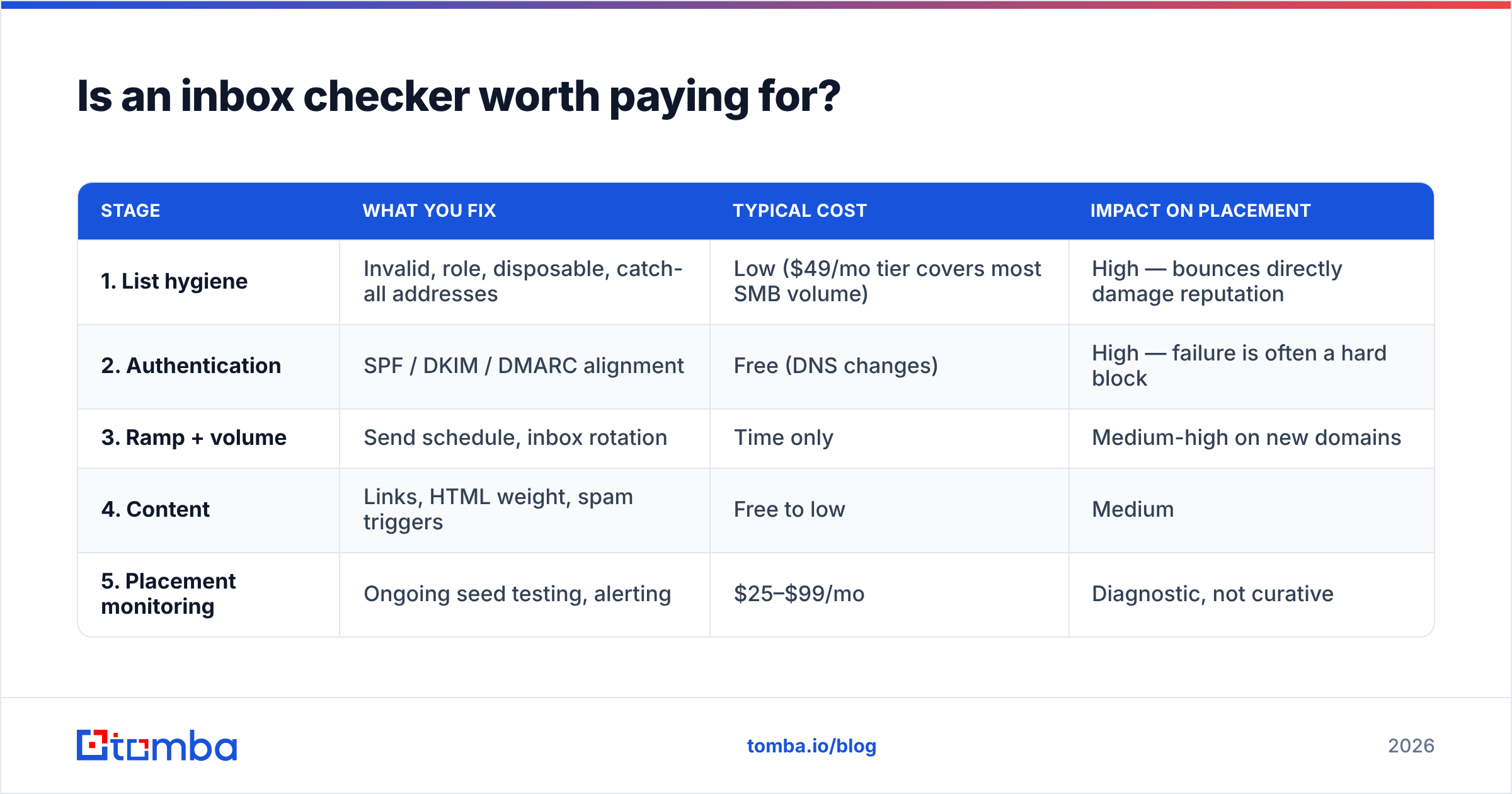
What you should not do is buy placement monitoring while sending to an unverified list. The order of operations is fixed:
| Stage | What you fix | Typical cost | Impact on placement |
|---|---|---|---|
| 1. List hygiene | Invalid, role, disposable, catch-all addresses | Low ($49/mo tier covers most SMB volume) | High — bounces directly damage reputation |
| 2. Authentication | SPF / DKIM / DMARC alignment | Free (DNS changes) | High — failure is often a hard block |
| 3. Ramp + volume | Send schedule, inbox rotation | Time only | Medium-high on new domains |
| 4. Content | Links, HTML weight, spam triggers | Free to low | Medium |
| 5. Placement monitoring | Ongoing seed testing, alerting | $25–$99/mo | Diagnostic, not curative |
Stage 5 tells you whether stages 1–4 worked. It does not substitute for them. Teams that skip to stage 5 end up with a beautiful graph of a problem they never fix.
How do you keep placement high once it is fixed?#
Placement is not a project with an end date; it is a maintenance routine. A workable cadence:
- Weekly: glance at Postmaster Tools reputation and your bounce/complaint rates. Two minutes.
- Before every new campaign: re-verify the list. Data decays roughly 2–3% per month as people change jobs, so a list you cleaned in March is measurably worse in July. Sourcing matters too — reputable providers such as BookYourData and other vetted B2B vendors ship cleaner records than scraped exports, but even good data needs a verification pass at send time.
- Monthly: run a seed placement test on each sending domain, and log the result so you have a baseline to compare against when something breaks.
- After any infrastructure change: new domain, new ESP, new tracking domain, new signature — retest immediately. Most sudden drops trace back to a change someone forgot to mention.
- Quarterly: prune non-engagers. Sending to people who never open is a slow reputation leak that no inbox checker will flag as a technical error.
If you run outbound at scale, wire verification into the pipeline rather than doing it by hand. The Tomba API and bulk verify flows let you validate a list as part of the import step, so an unverified address never reaches a sending queue in the first place.
The bottom line#
An inbox checker is a measuring instrument, and instruments do not fix anything. Use one to detect change, confirm the fix, and catch drift early — then spend your actual effort on the two inputs that move placement most: authentication that passes cleanly, and a list where every address belongs to a real person at a real company.
Start with the list. If you are sourcing prospects by company or domain, the Tomba Email Finder returns verified professional addresses with a confidence score, so the addresses entering your sequence are ones a mail server will actually accept. The free tier gives you 25 searches per month to test the difference on a real segment; Starter is $49/mo when you are ready to run volume. Clean input, clean placement — in that order.
Related guides#
// get started
Find, verify and enrich your first contacts today
Start on the free plan with 25 searches a month, then scale when your team is ready.
Free plan · No credit card required · GDPR & CCPA
// about the author