Inbox Deliverability in 2026: The Complete Sender's Guide
Delivered is not delivered to the inbox. Here's how inbox deliverability actually works in 2026 — authentication, reputation, list hygiene, and the numbers that decide whether your cold email gets seen.

TL;DR
"Delivered" and "in the inbox" are two different numbers. Your ESP reports the first and has no idea about the second.
Inbox deliverability in 2026 is decided by four things in order: authentication (SPF/DKIM/DMARC), sender reputation, recipient engagement, and list quality. Content matters far less than most people assume.
Google and Yahoo's bulk-sender rules made DMARC, one-click unsubscribe, and a spam rate under 0.30% table stakes — not best practice.
The single highest-leverage fix for most outbound teams is upstream: stop sending to addresses that were never valid. A 12% bounce rate destroys reputation faster than any subject line can save it.
Fixing deliverability is a sequence, not a checklist. Authenticate, clean the list, warm the domain, throttle volume, then optimize copy.
What is inbox deliverability, and how is it different from delivery rate?#
Delivery rate tells you an email was accepted by a receiving mail server. Inbox deliverability tells you it landed where a human will actually see it.
Think of it like a package courier. "Delivered" means the truck reached the building and someone at the loading dock signed for it. Inbox placement means the package made it to the right desk on the right floor instead of sitting in a basement bin marked "probably junk." Your sending platform can only ever report the loading dock.
That gap is where campaigns die quietly. A sequence can post a 99.1% delivery rate and a 0.4% reply rate at the same time, and the dashboard will show you nothing wrong. Industry benchmarks consistently put average inbox placement for commercial mail somewhere in the low-to-mid 80s percent, which means roughly one in six technically "delivered" messages is never seen.
Here's the practical definition: inbox deliverability is the percentage of your sent volume that reaches the primary inbox of a real, engaged human. Everything else — spam folder, Promotions tab, quarantine, silent drop — is a miss, even when your ESP calls it a win.
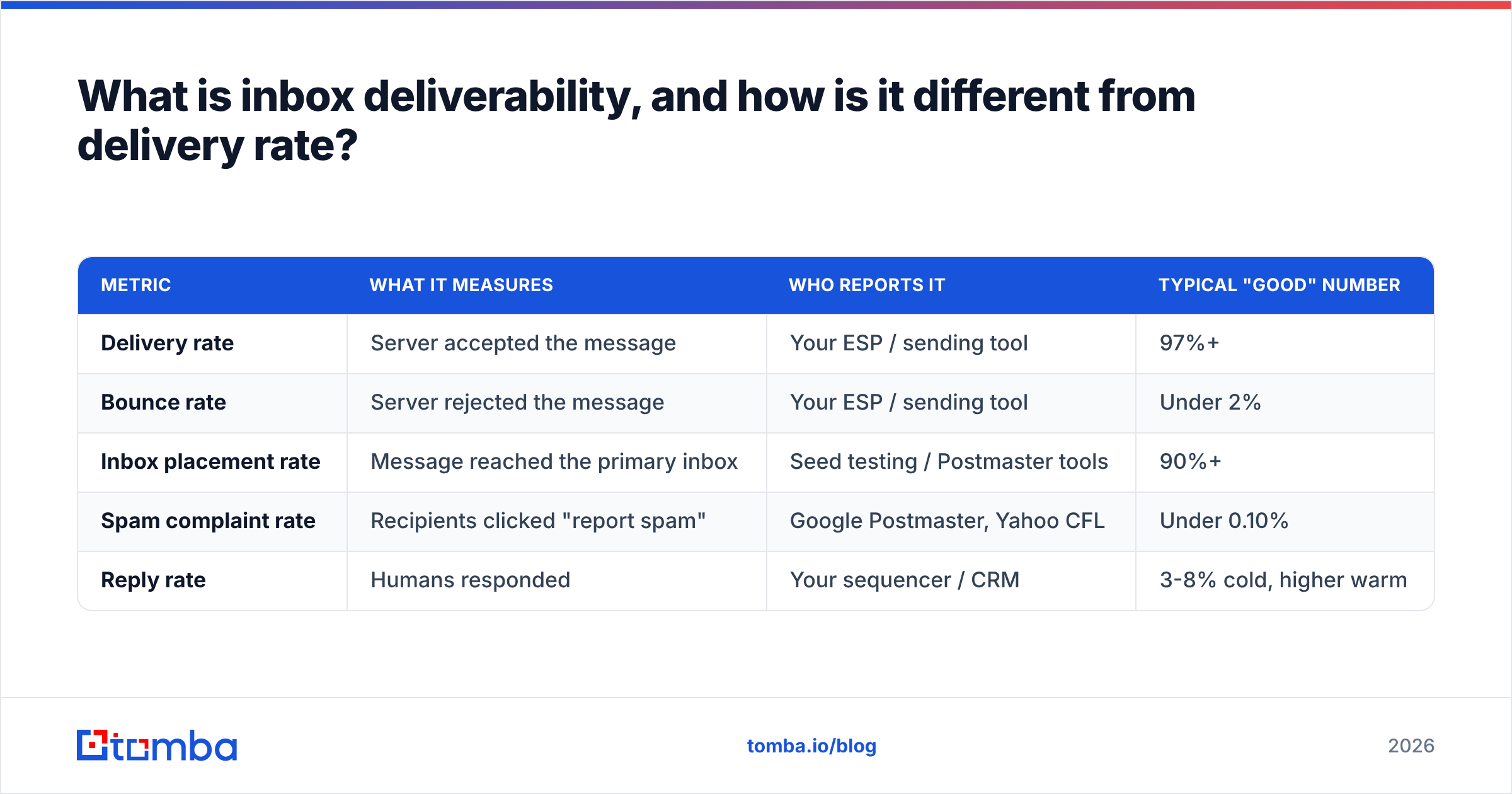
Metric
What it measures
Who reports it
Typical "good" number
Delivery rate
Server accepted the message
Your ESP / sending tool
97%+
Bounce rate
Server rejected the message
Your ESP / sending tool
Under 2%
Inbox placement rate
Message reached the primary inbox
Seed testing / Postmaster tools
90%+
Spam complaint rate
Recipients clicked "report spam"
Google Postmaster, Yahoo CFL
Under 0.10%
Reply rate
Humans responded
Your sequencer / CRM
3-8% cold, higher warm
If you only track the first two rows, you are grading your own homework.
Why did inbox deliverability get harder in 2026?#
Because the mailbox providers stopped negotiating.
The February 2024 Google and Yahoo bulk-sender requirements were the inflection point, and every subsequent policy update has tightened the same screws. Microsoft followed with its own enforcement for high-volume senders into Outlook and Hotmail domains. The current baseline for anyone sending meaningful volume looks like this:
SPF and DKIM must both pass. Not one. Both, aligned to your visible From domain.
DMARC must exist on the sending domain, at minimum
p=nonewith a reporting address you actually read.One-click unsubscribe (RFC 8058 List-Unsubscribe headers) on bulk commercial mail, honored within two days.
Spam complaint rate below 0.30%, with 0.10% as the real-world target. Cross the line and filtering degrades within days.
Valid forward and reverse DNS on your sending IPs, and TLS in transit.
Layered on top of that: filtering itself became behavioral. Modern spam filters weigh how recipients at that specific domain have historically treated mail from you — opens, replies, archives, deletes-without-reading, moves to spam. Two senders with identical infrastructure and identical copy get different placement because one has a reply history and the other doesn't.
The strategic consequence is uncomfortable but simple. You cannot out-write bad targeting. Sending relevant mail to people who might genuinely respond is the deliverability tactic, because engagement is the input the filters care about most.
What actually determines whether you land in the inbox?#
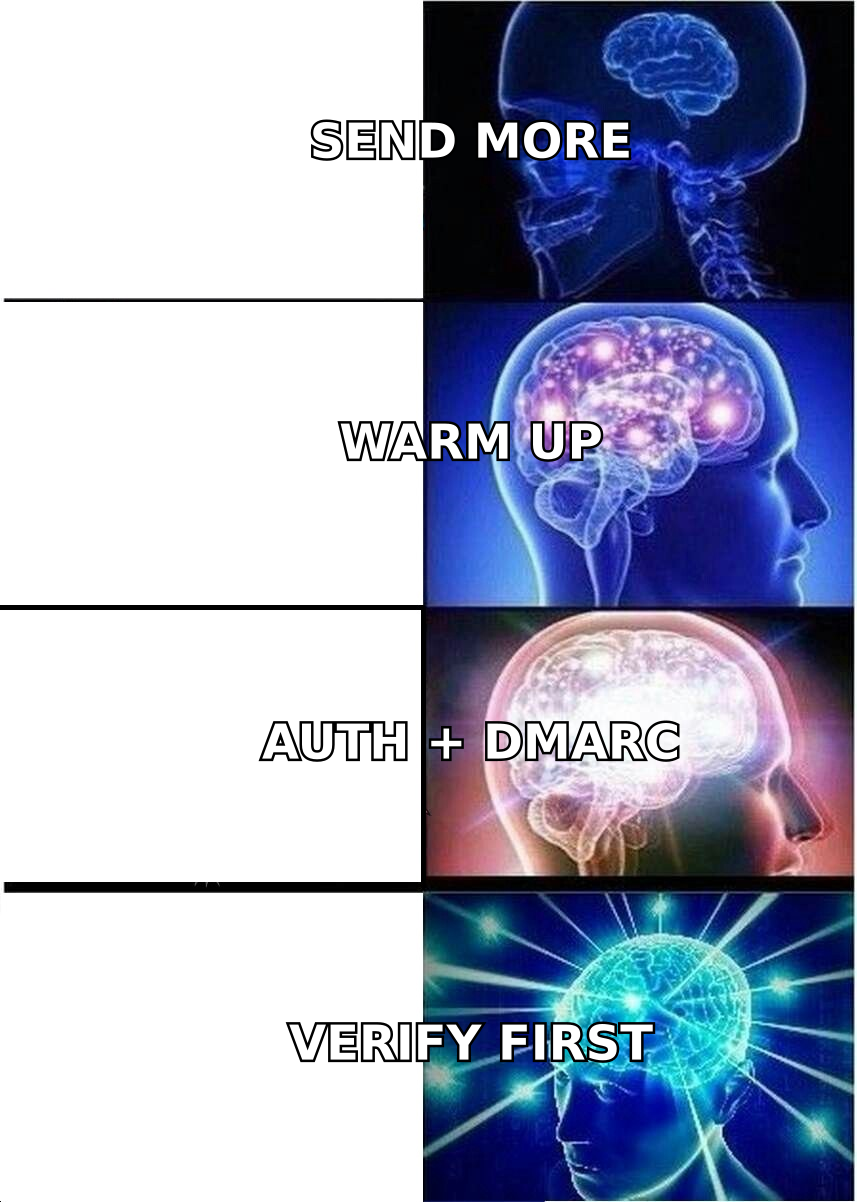
Four factors, roughly in order of weight. Fixing them out of order wastes months.
Authentication — SPF, DKIM, and DMARC alignment. This is binary and cheap to fix. Failing here caps everything downstream; no amount of warmup rescues an unauthenticated domain. Check yours with an SPF checker before you touch anything else.
Sender reputation — a rolling score per domain and per IP, built from complaint rate, bounce rate, spam-trap hits, and volume consistency. It decays slowly and recovers slowly. Your sender reputation is the asset; everything else is maintenance on it.
Recipient engagement — replies weigh most, then opens and manual moves out of spam. Deletes-without-opening and "report spam" clicks weigh negatively. Gmail in particular models this per-recipient-domain.
List quality — hard bounces, role accounts, spam traps, and stale addresses. This is upstream of reputation: bad lists cause bad reputation, which is why list hygiene is a deliverability lever, not a data-ops chore.
Content and infrastructure hygiene — link shorteners, image-only emails, mismatched reply-to domains, tracking-pixel domains with poor reputation, spammy phrasing. Real, but a distant fifth. Run a spam checker as a final pass, not a first resort.
Volume patterns — sudden spikes, erratic sending times, and zero-to-thousands ramps read as compromised-account behavior regardless of content.
Notice what is not on this list: subject-line word choice above position five, and "sending from Gmail instead of a sequencer." Those are folklore-tier optimizations that people reach for because they are easy, while the bounce rate quietly sits at 11%.
How does list quality wreck inbox deliverability?#
Faster and more permanently than anything else you can do.
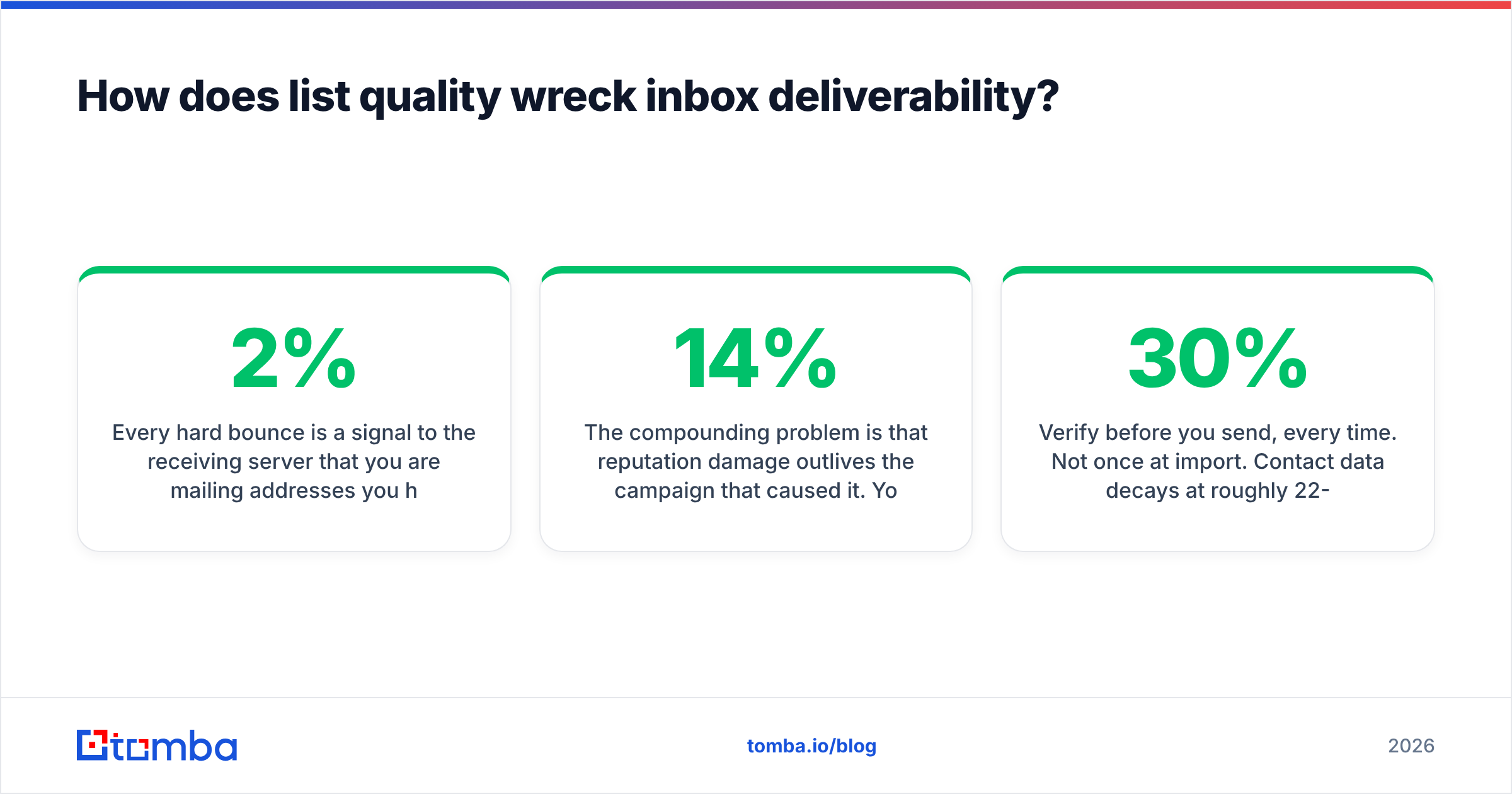
Every hard bounce is a signal to the receiving server that you are mailing addresses you have no relationship with — the exact behavioral fingerprint of a purchased list. Cross roughly 2% bounce rate and most providers begin throttling. Cross 5% and you are being actively filtered. Hit a recycled spam trap — an abandoned address a provider reactivated specifically to catch careless senders — and you can be blocklisted from a single send.
The compounding problem is that reputation damage outlives the campaign that caused it. You send one 5,000-address list with a 14% bounce rate on Monday; your carefully-built follow-up sequence to good prospects underperforms for the next six weeks.
The fix is unglamorous and mechanical:
Verify before you send, every time. Not once at import. Contact data decays at roughly 22-30% per year as people change jobs, so a list validated in January is materially worse by June. Run it through an email verifier as a step in the send workflow, not as an occasional cleanup project.
Source addresses that were real to begin with. Pattern-guessed addresses (
first.last@company.comgenerated by a permutator and never checked) are the single biggest source of bounces in outbound. Finding a verified address with a proper email finder costs a credit; guessing costs your domain.Handle catch-all domains deliberately. Catch-all servers accept everything, so standard verification returns "unknown." Either segment them into a separate, lower-volume send or resolve them with a catch-all verifier rather than dumping them into the main campaign.
Suppress aggressively. Hard bounces, complaints, and unsubscribes go on a permanent suppression list that every tool in your stack reads from.
Drop role accounts by default.
info@,sales@,support@,admin@— high complaint rates, low reply rates, frequently monitored by abuse teams.
What does a deliverability repair sequence look like?#
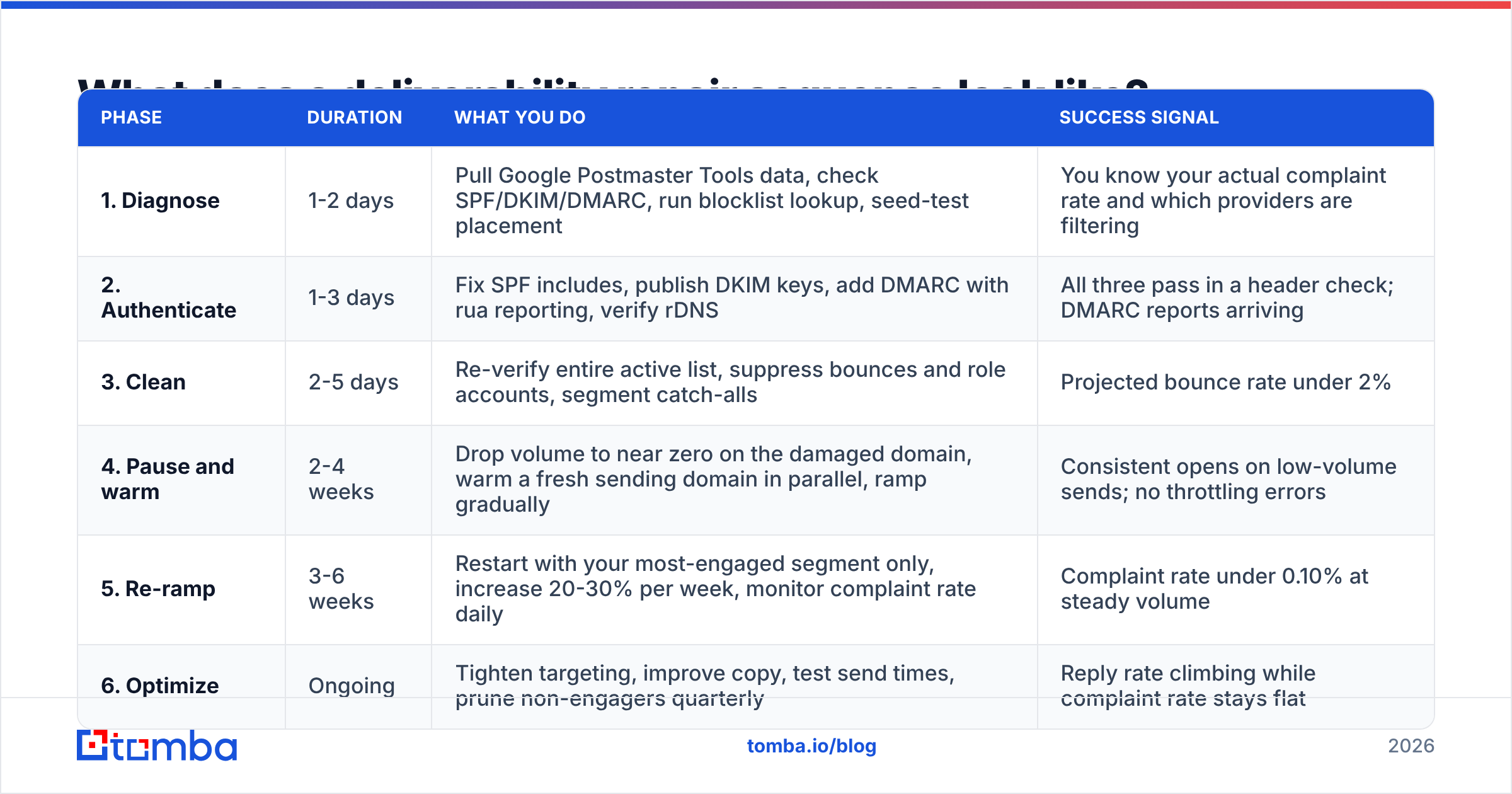
If placement has already degraded, work in this order. Skipping ahead is why most "we fixed deliverability" projects fail.
Phase
Duration
What you do
Success signal
1. Diagnose
1-2 days
Pull Google Postmaster Tools data, check SPF/DKIM/DMARC, run blocklist lookup, seed-test placement
You know your actual complaint rate and which providers are filtering
2. Authenticate
1-3 days
Fix SPF includes, publish DKIM keys, add DMARC with rua reporting, verify rDNS
All three pass in a header check; DMARC reports arriving
3. Clean
2-5 days
Re-verify entire active list, suppress bounces and role accounts, segment catch-alls
Projected bounce rate under 2%
4. Pause and warm
2-4 weeks
Drop volume to near zero on the damaged domain, warm a fresh sending domain in parallel, ramp gradually
Consistent opens on low-volume sends; no throttling errors
5. Re-ramp
3-6 weeks
Restart with your most-engaged segment only, increase 20-30% per week, monitor complaint rate daily
Complaint rate under 0.10% at steady volume
6. Optimize
Ongoing
Tighten targeting, improve copy, test send times, prune non-engagers quarterly
Reply rate climbing while complaint rate stays flat
Two notes on Phase 4. First, warming a new domain does not mean warming a new brand — use a subdomain or a close variant of your primary domain so the reply-to remains credible. Second, if you are ramping from zero, a warmup calculator will keep you from the classic mistake of jumping from 20 sends a day to 400 in week three.

Which tools do you actually need for inbox deliverability?#
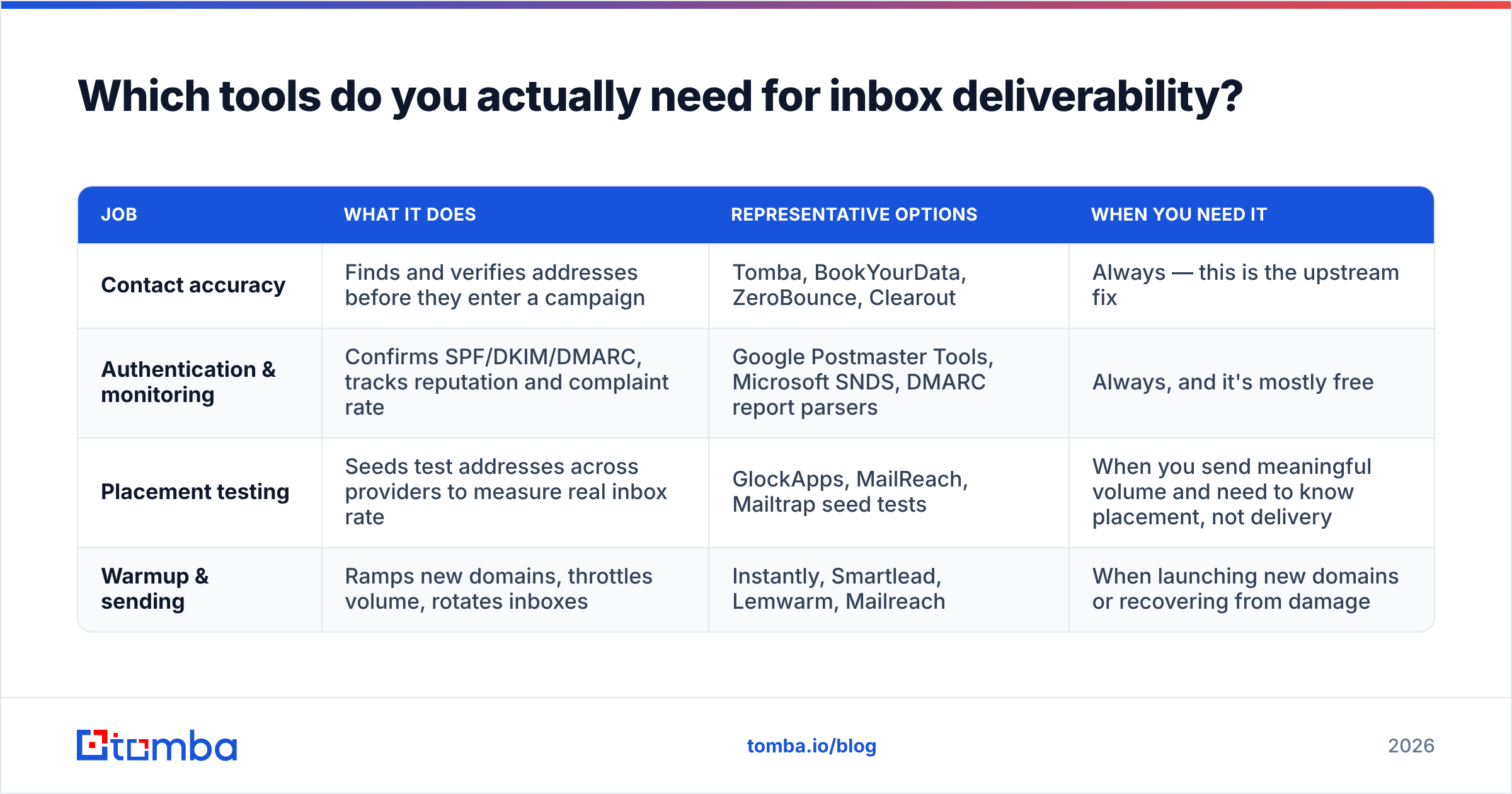
Fewer than the market wants to sell you. The stack breaks into four jobs, and most teams over-buy on the last one while ignoring the first.
Job
What it does
Representative options
When you need it
Contact accuracy
Finds and verifies addresses before they enter a campaign
Tomba, BookYourData, ZeroBounce, Clearout
Always — this is the upstream fix
Authentication & monitoring
Confirms SPF/DKIM/DMARC, tracks reputation and complaint rate
Google Postmaster Tools, Microsoft SNDS, DMARC report parsers
Always, and it's mostly free
Placement testing
Seeds test addresses across providers to measure real inbox rate
GlockApps, MailReach, Mailtrap seed tests
When you send meaningful volume and need to know placement, not delivery
Warmup & sending
Ramps new domains, throttles volume, rotates inboxes
Instantly, Smartlead, Lemwarm, Mailreach
When launching new domains or recovering from damage
A few honest observations on that table. Google Postmaster Tools is free, gives you the complaint rate that actually matters, and most teams have never opened it — start there before buying anything. Seed testing is genuinely useful but noisy at low volume; don't make panicked changes off a single 12-seed test. And warmup tools have real diminishing returns once your domain is established; running warmup traffic forever on a healthy domain is spending money to send mail to robots.
On the data side, the useful comparison is not "which vendor claims higher accuracy" but "which vendor tells you when it isn't sure." A provider that returns a confident guess on a catch-all domain is handing you a bounce with extra steps. Tomba's data sources approach and providers like BookYourData both publish how their records are built and refreshed, which is the transparency you should demand before you trust a list with your domain reputation. For a fuller picture of how independent buyers rate these tools, G2's email verification category is a reasonable starting point.
For authentication specifics, go to the source rather than a blog summary: Google's sender guidelines and the DMARC specification overview cover the requirements precisely, and both are updated when the rules change.
How do you measure inbox deliverability honestly?#
Pick metrics your sending tool cannot flatter.
Track weekly, per sending domain:
Complaint rate from Google Postmaster Tools, not from your ESP. Target under 0.10%; treat 0.30% as a fire.
Bounce rate split by hard and soft. Hard bounces are a data problem. Soft bounces trending up are a reputation problem.
Reply rate by segment. This is your best available proxy for real inbox placement, because a message in spam almost never gets a reply.
Open rate as a trend, not a level. Apple Mail Privacy Protection inflates absolute opens, but a sudden 40% drop in a segment that previously opened is a genuine placement signal.
Seed placement test, monthly. Enough to catch drift, infrequent enough to avoid over-reacting.
A useful diagnostic split: compare reply rates for Google Workspace recipients versus Microsoft 365 recipients. If one is healthy and the other has collapsed, you have a provider-specific reputation problem — usually authentication alignment or a blocklist — rather than a content or targeting problem. That single comparison saves weeks of guessing.
Finally, set a floor you will not cross. Ours: if projected bounce rate on a list exceeds 3%, the send does not go out until the list is re-verified. No exceptions for urgent campaigns, because the campaign is not more valuable than the domain.
Where should you start this week?#
Three moves, in order, and none of them require new budget.
First, open Google Postmaster Tools and look at your actual spam complaint rate. If you have never done this, it will take twenty minutes and may change your priorities entirely.
Second, run a header check on a live send and confirm SPF, DKIM, and DMARC all pass with alignment. If any fail, stop everything else and fix them — nothing downstream matters until they pass.
Third, take your next campaign list and verify it before it sends. Not a sample. All of it. Then look at how many addresses would have bounced, and multiply that by every campaign you've sent this year. That number is your deliverability problem in one figure.
Inbox deliverability is not a dark art. It is authentication you can verify in an afternoon, a list you can clean in a day, and a volume ramp that requires nothing but patience. The teams that struggle are almost always the ones optimizing step five while step three is on fire.
Start upstream. The cheapest deliverability fix is never sending to an address that was never real. Tomba's Email Finder returns verified, source-attributed business emails with a confidence score — so guessed addresses never reach your sequencer in the first place. The free tier includes 25 searches a month to test it against your own list, and paid plans start at $49/mo; full Tomba pricing is on the site. Pair it with the email verifier as a pre-send gate and you remove the single largest cause of reputation damage in outbound.
Related guides#
// get started
Find, verify and enrich your first contacts today
Start on the free plan with 25 searches a month, then scale when your team is ready.
Free plan · No credit card required · GDPR & CCPA
// about the author