Inbox Placement in 2026: How to Land in the Primary Inbox
A 99% delivery rate can still mean zero replies. Here's what inbox placement actually measures, how to test it without guessing, and the fixes that move cold email out of spam and into the primary tab.

TL;DR
- Delivery rate is not inbox placement. "Delivered" only means the receiving server accepted the message. It says nothing about whether it landed in Primary, Promotions, or Junk.
- Inbox placement is the percentage of accepted mail that reaches the main inbox folder. For most cold outbound programs, it sits 20-40 points below the delivery rate nobody bothers to check.
- You cannot see placement from your sending tool alone. You need a combination of seed testing, Google Postmaster Tools, Microsoft SNDS, and reply-rate-per-domain analysis.
- The three biggest placement killers in 2026 are unverified lists, missing or misaligned authentication, and engagement collapse from sending to people who never asked.
- Fixing placement is a 30-day operation, not a settings toggle. Clean the list, fix alignment, cut volume, rebuild engagement, then scale.
What is inbox placement, and how is it different from delivery rate?#
Inbox placement is the share of your accepted emails that land in the recipient's primary inbox rather than spam, junk, quarantine, or a secondary tab.
Think of it like a package delivery. Your delivery rate says the courier handed the box to the building. Inbox placement says whether it reached the apartment door or got dumped in a mailroom bin nobody checks. Both can be "delivered." Only one gets opened.
Technically, delivery rate = (emails sent − hard bounces) / emails sent. Mailbox providers accept the SMTP transaction, return a 250 OK, and then make the placement decision downstream, after the handshake, based on reputation and content signals. Your ESP never sees that second decision. It reports 99% and moves on.
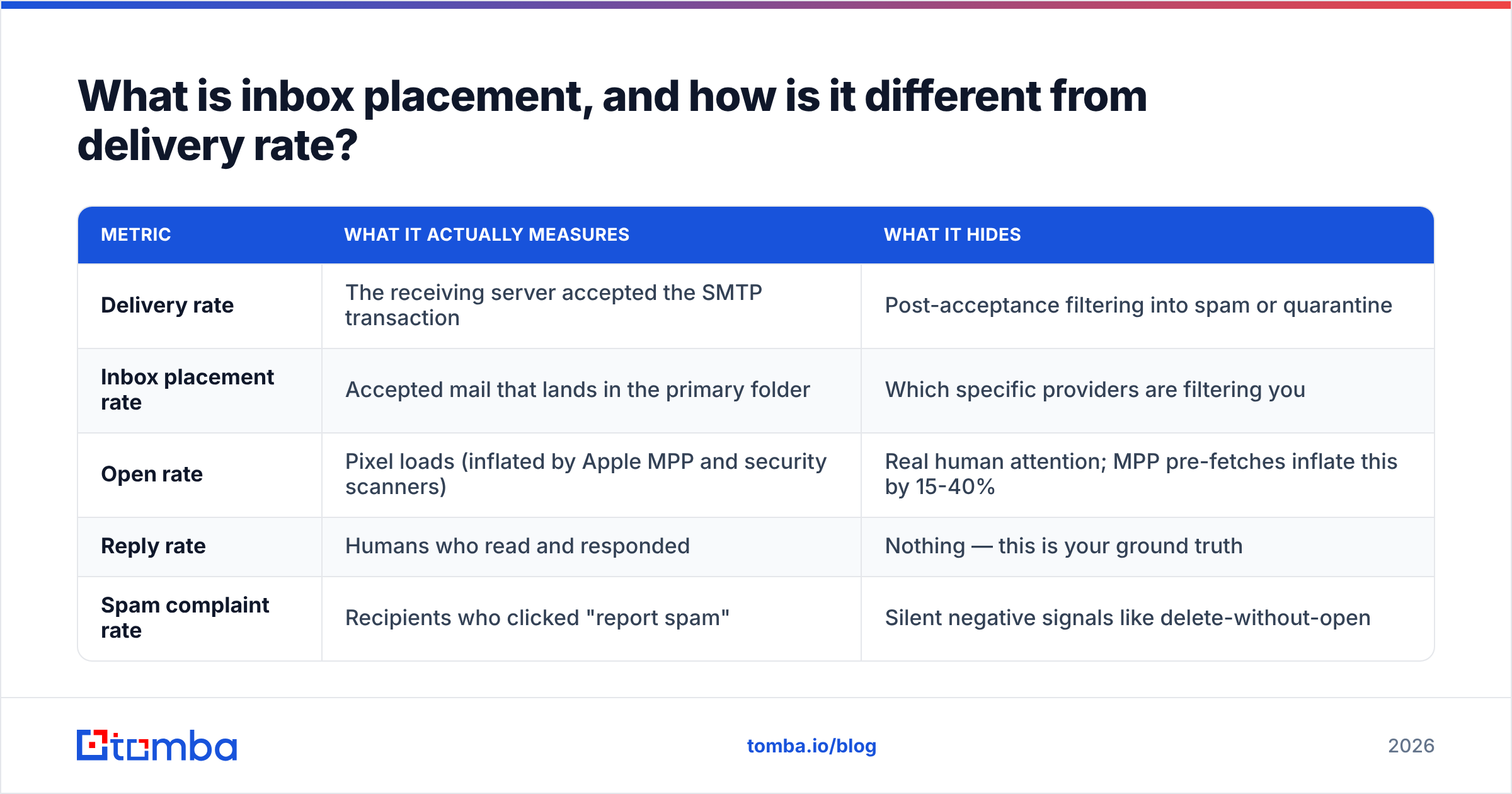
Here is the split most teams never look at:
| Metric | What it actually measures | What it hides |
|---|---|---|
| Delivery rate | The receiving server accepted the SMTP transaction | Post-acceptance filtering into spam or quarantine |
| Inbox placement rate | Accepted mail that lands in the primary folder | Which specific providers are filtering you |
| Open rate | Pixel loads (inflated by Apple MPP and security scanners) | Real human attention; MPP pre-fetches inflate this by 15-40% |
| Reply rate | Humans who read and responded | Nothing — this is your ground truth |
| Spam complaint rate | Recipients who clicked "report spam" | Silent negative signals like delete-without-open |
If your delivery rate is 98% and your reply rate is 0.2% on a well-targeted list with decent copy, you do not have a copy problem. You have a placement problem.
Why does a 99% delivery rate still produce zero replies?#
Because acceptance and filtering are two separate decisions made at two separate moments.
Gmail, Outlook, and the major providers accept almost everything at the gateway. Rejecting mail at SMTP time costs them CPU and tells spammers exactly which addresses are invalid — useful reconnaissance they would rather not hand out. So they accept, then sort. Your sending platform logs a success. The recipient sees nothing.
Five things drive that post-acceptance sort in 2026:
- Domain and IP reputation. Accumulated history of complaints, spam-trap hits, bounces, and engagement tied to your sending domain. Domain reputation now carries far more weight than IP reputation for small senders on shared infrastructure. Read the fundamentals in this email deliverability primer if you need the background.
- Authentication alignment. SPF, DKIM, and DMARC must all pass and align with the visible From domain. Google and Yahoo made DMARC mandatory for bulk senders in 2024, and enforcement has only tightened since. See Google's sender guidelines for the current requirements.
- Engagement history at the recipient level. Providers score the individual relationship, not just your domain. If a specific recipient has never opened, replied, or moved your mail out of spam, subsequent sends to that person get filtered harder even when your domain reputation is fine.
- List quality signals. Invalid addresses, role accounts, recycled spam traps, and catch-all guesses all leak into your bounce and complaint profile. One recycled trap can flip a warm domain to filtered in a single campaign.
- Content and infrastructure fingerprints. Link shorteners, tracking domains sharing reputation with thousands of other senders, image-heavy HTML, mismatched reply-to addresses, and unbranded sending domains all add friction.

Notice what is not on that list: subject line cleverness and spam-word lists. Writing "free" in a subject line has not meaningfully triggered filters in years. Sending 4,000 cold emails a day from a three-week-old domain to a scraped list absolutely does.
How do you actually measure inbox placement?#
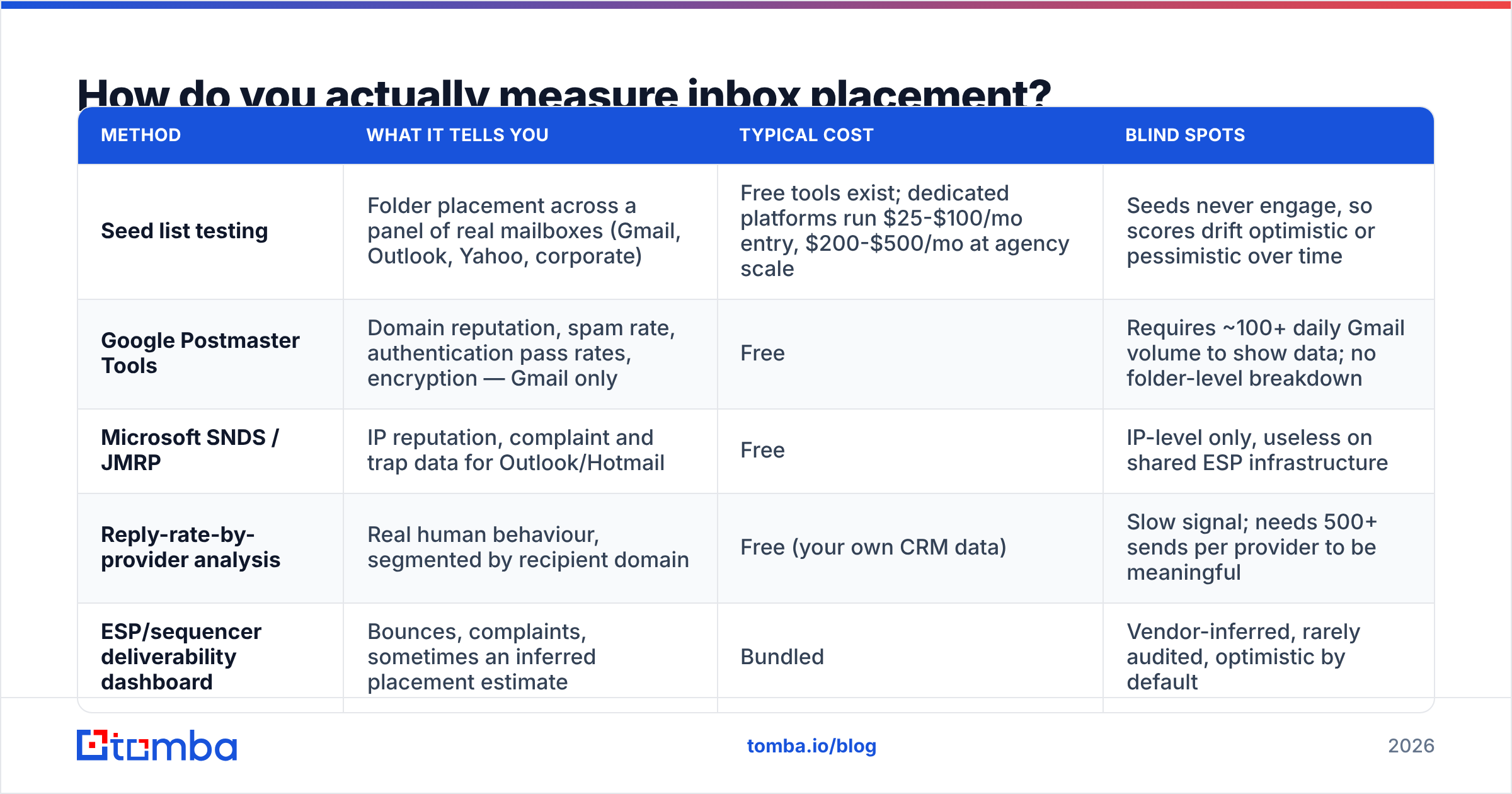
You triangulate. No single method gives you a trustworthy number, so use three and look for agreement.
| Method | What it tells you | Typical cost | Blind spots |
|---|---|---|---|
| Seed list testing | Folder placement across a panel of real mailboxes (Gmail, Outlook, Yahoo, corporate) | Free tools exist; dedicated platforms run $25-$100/mo entry, $200-$500/mo at agency scale | Seeds never engage, so scores drift optimistic or pessimistic over time |
| Google Postmaster Tools | Domain reputation, spam rate, authentication pass rates, encryption — Gmail only | Free | Requires ~100+ daily Gmail volume to show data; no folder-level breakdown |
| Microsoft SNDS / JMRP | IP reputation, complaint and trap data for Outlook/Hotmail | Free | IP-level only, useless on shared ESP infrastructure |
| Reply-rate-by-provider analysis | Real human behaviour, segmented by recipient domain | Free (your own CRM data) | Slow signal; needs 500+ sends per provider to be meaningful |
| ESP/sequencer deliverability dashboard | Bounces, complaints, sometimes an inferred placement estimate | Bundled | Vendor-inferred, rarely audited, optimistic by default |
The practical setup: run a seed test before every new campaign and after every infrastructure change, keep Postmaster Tools open weekly, and — this is the one people skip — pivot your reply data by recipient domain in your CRM.
That last one is the strongest signal you own. If gmail.com replies at 3.1% and outlook.com replies at 0.3% across a thousand sends each, Microsoft is filtering you. No seed test needed to know something is broken.
The reply-rate-by-provider check, step by step#
- Export the last 90 days of sent contacts with recipient domain, send date, and reply flag.
- Group by mailbox provider, not company domain — resolve MX records to bucket contacts into Google Workspace, Microsoft 365, and everything else.
- Compare reply rates across buckets. A gap wider than 2x on similar-quality segments points at provider-specific filtering.
- Cross-check against send volume per day per provider. Spikes usually precede the drop by 3-7 days.
- Isolate by sending domain if you run multiple. One burned domain will drag a blended number and hide the culprit.
What is the fastest way to damage inbox placement?#
Send to addresses that do not exist.
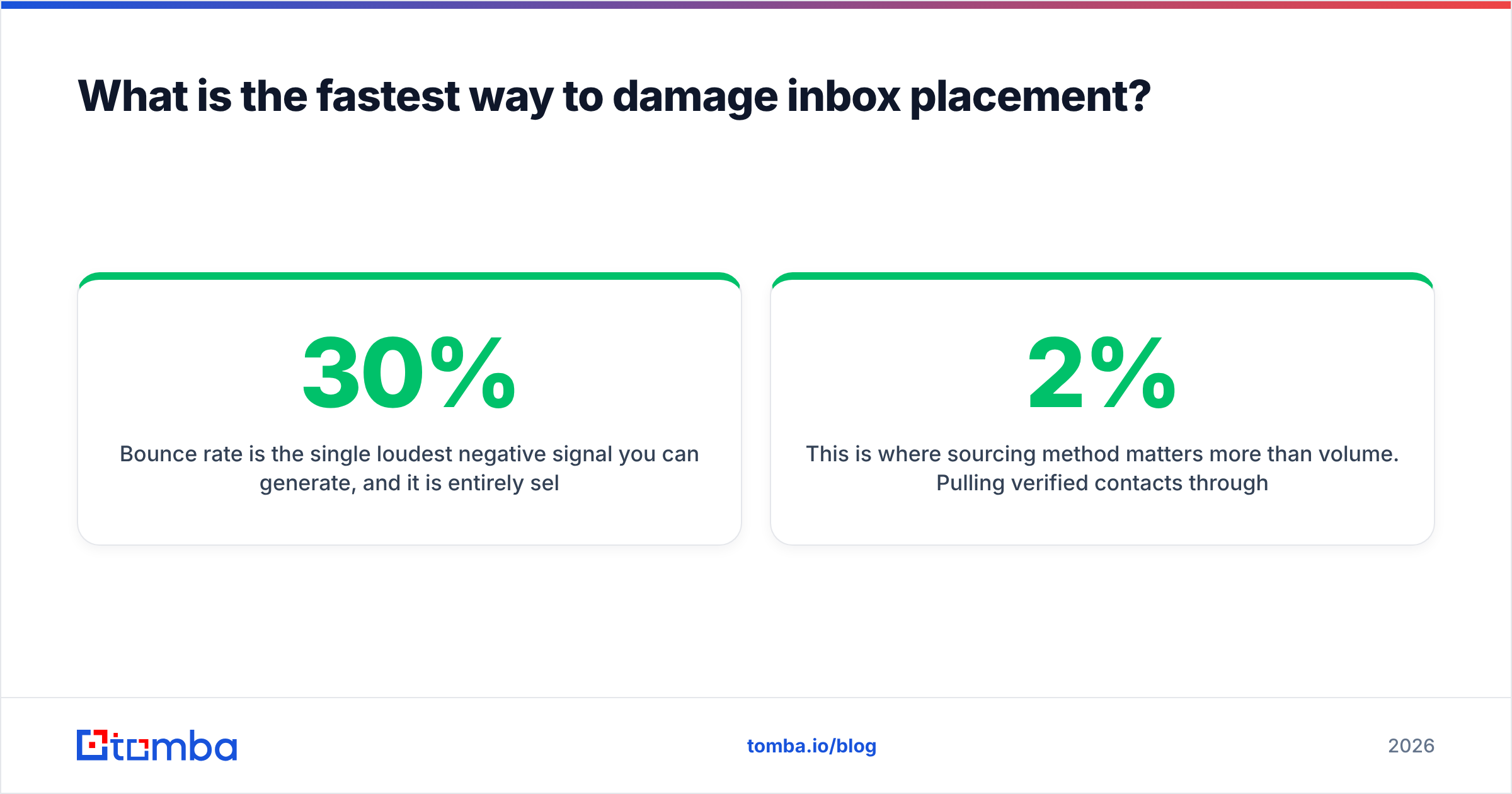
Bounce rate is the single loudest negative signal you can generate, and it is entirely self-inflicted. A list pulled from a scraper or bought from an unvetted broker typically carries 15-30% invalid addresses. At that rate, one campaign is enough to move a domain from "good" to "bad" in Postmaster Tools and take weeks to recover.
Spam traps are worse. Recycled traps are real addresses that were abandoned and later reactivated by providers as detection nets. They accept mail, so they never bounce, and they never engage — they just quietly poison your reputation. The only defence is list hygiene: verify before you send, and never mail an address that has been silent for 12+ months.
This is where sourcing method matters more than volume. Pulling verified contacts through an email verifier before a sequence goes out — rather than after bounces have already registered — keeps the bounce rate under 2% where it belongs. Tomba's free tier covers 25 searches a month for testing the workflow, and paid plans start at $49/mo on Starter if you need the volume.

Two more common self-inflicted wounds:
- Catch-all domains treated as valid. A catch-all server accepts everything, including addresses that route nowhere. Treating those as verified inflates your list and your bounce rate. A dedicated catch-all verifier resolves what standard SMTP checks cannot.
- Broken authentication after a DNS change. Someone adds a new sending tool, the SPF record exceeds the 10-lookup limit, and every message starts failing silently. Run an SPF checker after any DNS edit, and confirm DMARC alignment against RFC 7489 rather than assuming your ESP handled it.
How do you fix inbox placement once it has dropped?#
Assume 30 days. Reputation is a rolling average, so there is no way to shortcut the clock — you can only stop adding negative signal and start adding positive signal.
Week 1 — Stop the bleeding. Cut sending volume on the affected domain by 70-80%. Pause every sequence targeting cold, unverified, or 90-day-stale contacts. Run the full list through verification and delete everything that is not a confirmed valid mailbox. Audit SPF, DKIM, and DMARC alignment. Remove link shorteners and switch off open tracking on the affected domain, since shared tracking domains are a known reputation liability.
Week 2 — Rebuild engagement signal. Send only to your highest-engagement segment: people who have replied, clicked, or converted in the last 90 days. Volume stays low, quality stays high. Plain-text formatting, one link maximum, a real signature. The goal is to teach the filters that your mail gets opened and answered.
Week 3 — Reintroduce cold volume slowly. Ramp back at roughly 20-30% per week, not more. Segment by provider so you can see Gmail and Microsoft recover at different rates — they will. Use a warmup calculator to plan the ramp instead of guessing.
Week 4 — Verify and lock in. Re-run seed tests. Check Postmaster reputation has moved from Low/Bad to Medium/High. Compare reply rates by provider against your Week 1 baseline. If Microsoft is still lagging, register for SNDS and JMRP feedback loops before adding more volume.
If placement does not recover after 45 days of clean sending, the domain may be genuinely burned. Moving to a fresh subdomain is an option, but only after the underlying behaviour changed — a new domain running the same bad list burns in half the time, because filters now pattern-match on infrastructure, list overlap, and content fingerprints across domains.
What does good inbox placement look like in 2026?#
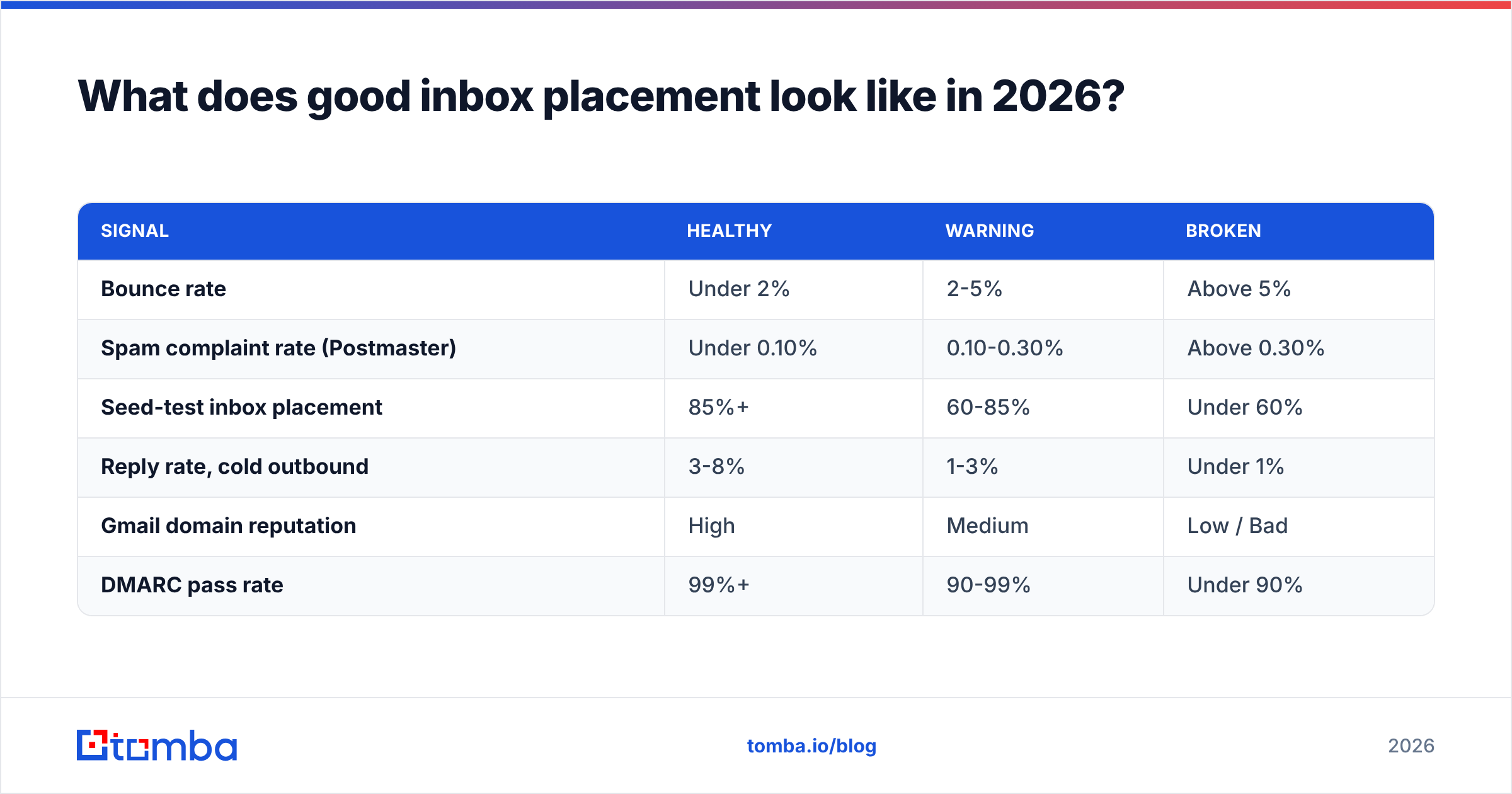
Benchmarks vary by industry and list type, but these are the thresholds worth holding yourself to:
| Signal | Healthy | Warning | Broken |
|---|---|---|---|
| Bounce rate | Under 2% | 2-5% | Above 5% |
| Spam complaint rate (Postmaster) | Under 0.10% | 0.10-0.30% | Above 0.30% |
| Seed-test inbox placement | 85%+ | 60-85% | Under 60% |
| Reply rate, cold outbound | 3-8% | 1-3% | Under 1% |
| Gmail domain reputation | High | Medium | Low / Bad |
| DMARC pass rate | 99%+ | 90-99% | Under 90% |
The 0.30% complaint threshold is not arbitrary — it is the line Google publishes for bulk senders, and crossing it triggers active filtering rather than gradual reputation decay. Treat 0.10% as your real ceiling and you will never get close.
One caveat on seed tests: a score of 85% across a seed panel does not guarantee 85% placement for your actual recipients. Seeds do not open, reply, or archive. They measure your reputation and content, not the recipient-level engagement history that increasingly drives filtering. Use seeds as a directional smoke alarm, and treat reply rate by provider as the number that pays your bills.
Which fix has the highest return on effort?#
List quality, by a wide margin.
Authentication is table stakes — an afternoon of DNS work, done once. Warmup is a scheduling problem. Content hygiene is a checklist. But list quality is the input that compounds: every invalid address you remove prevents a bounce, every disengaged contact you exclude prevents a silent negative signal, and every verified, correctly-targeted contact you add produces the engagement that filters reward.
Teams that fix placement permanently tend to share one habit. They verify at the point of collection, not the point of send. The contact enters the CRM already validated, already enriched, already attached to a real person at a real company — so the sequence never has the chance to generate a bounce in the first place.
If you are rebuilding a list after a placement drop, start at the source: use the Tomba Email Finder to build prospect lists from verified, source-attributed data instead of scraped exports, and run every address through verification before the first send. Free tier covers 25 searches a month to test the workflow; Starter is $49/mo when you are ready to scale. A clean list will not fix bad targeting or bad copy — but it removes the one variable that quietly caps every other improvement you make.
Sources: Google Sender Guidelines, RFC 7489 (DMARC), Google Postmaster Tools
Related guides#
// get started
Find, verify and enrich your first contacts today
Start on the free plan with 25 searches a month, then scale when your team is ready.
Free plan · No credit card required · GDPR & CCPA
// about the author