Inbox Placement Tools in 2026: The Complete No-Fluff Guide
Seed-list scores are not inbox placement. Here's what the major inbox placement tools actually measure, where their numbers break down, and how to build a check that reflects your real recipients.

TL;DR
- Inbox placement tools estimate where your email lands — primary tab, promotions, spam, or nowhere — by sending to seed mailboxes you control or the vendor controls.
- Seed lists are a proxy, not the truth. Gmail and Outlook personalize filtering per recipient, so a 96% seed score can coexist with a 40% real-world inbox rate.
- The useful split: panel/seed tools (GlockApps, MailReach, Inbox Monster) for pre-send diagnostics, provider dashboards (Google Postmaster Tools, Microsoft SNDS) for post-send truth, and list hygiene upstream of both.
- Expect roughly $15–$100/month for SMB-grade tooling and custom enterprise pricing for panel-data platforms like Validity Everest.
- No placement tool fixes a bad list. Bounces and spam traps from unverified addresses are the single most common cause of a spam-folder score — clean the list first, then measure.
What are inbox placement tools?#
An inbox placement tool answers one question: when you press send, does the message land in the inbox, the promotions tab, the spam folder, or get dropped entirely?
Think of it like a taste test before a restaurant opening. You cannot ask every future diner what they think, so you invite a panel, serve the dish, and record the reactions. Inbox placement tools do the same thing with mailboxes: they hand you a list of seed addresses across Gmail, Outlook, Yahoo, Apple Mail, corporate Microsoft 365 tenants, and regional providers. You add those seeds to your send. Minutes later the tool reports where each copy landed.
That is fundamentally different from what your email service provider tells you. Your ESP reports delivered, which only means the receiving server accepted the message with a 250 response. A message routed straight to the junk folder is still "delivered." Inbox placement is the layer underneath that number, and it is the layer that decides whether anyone reads you.
How do inbox placement tools actually work?#
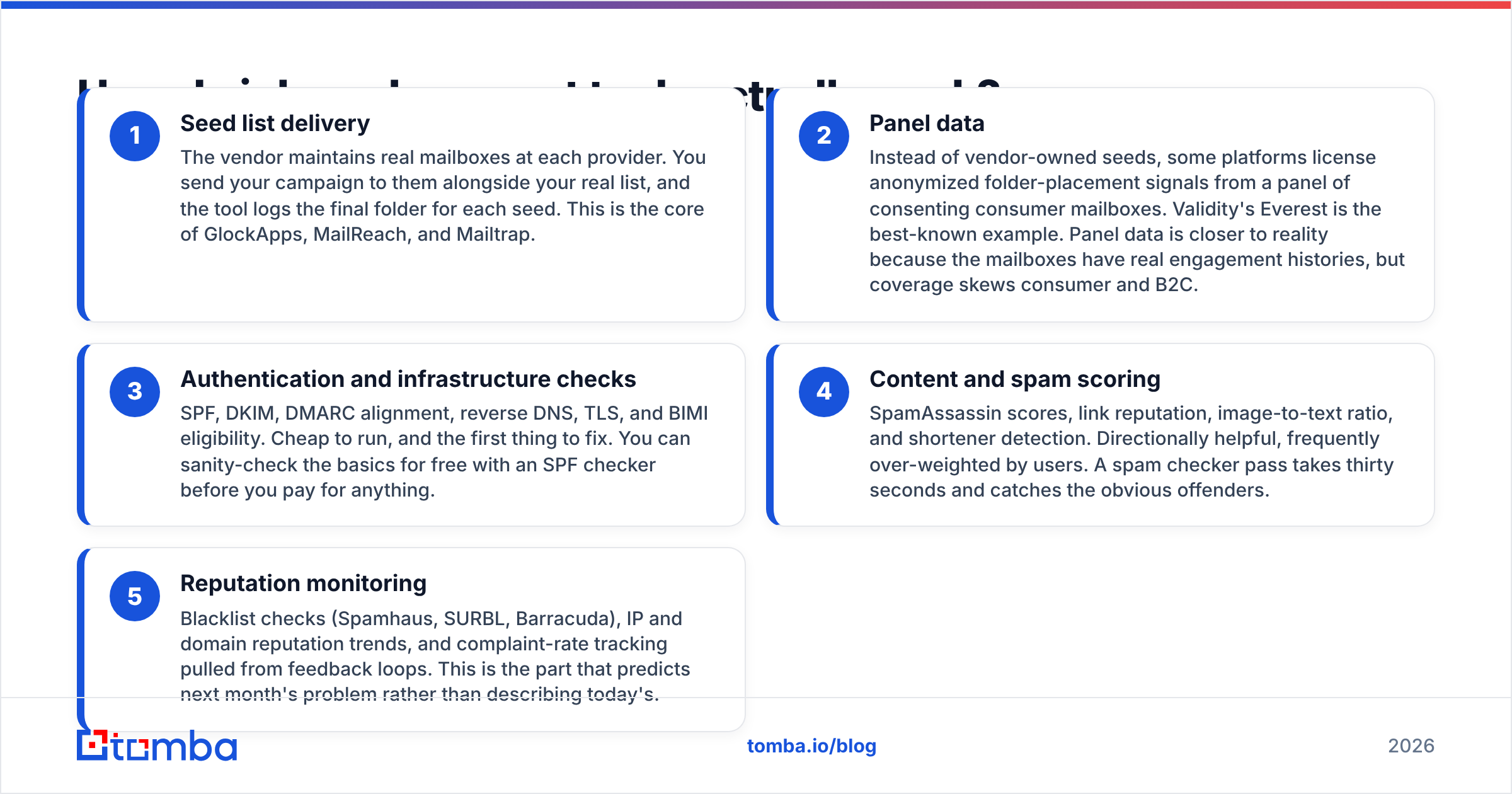
Every tool in this category is built from the same five components. Knowing which ones a vendor is strong at tells you more than any feature grid.
- Seed list delivery — The vendor maintains real mailboxes at each provider. You send your campaign to them alongside your real list, and the tool logs the final folder for each seed. This is the core of GlockApps, MailReach, and Mailtrap.
- Panel data — Instead of vendor-owned seeds, some platforms license anonymized folder-placement signals from a panel of consenting consumer mailboxes. Validity's Everest is the best-known example. Panel data is closer to reality because the mailboxes have real engagement histories, but coverage skews consumer and B2C.
- Authentication and infrastructure checks — SPF, DKIM, DMARC alignment, reverse DNS, TLS, and BIMI eligibility. Cheap to run, and the first thing to fix. You can sanity-check the basics for free with an SPF checker before you pay for anything.
- Content and spam scoring — SpamAssassin scores, link reputation, image-to-text ratio, and shortener detection. Directionally helpful, frequently over-weighted by users. A spam checker pass takes thirty seconds and catches the obvious offenders.
- Reputation monitoring — Blacklist checks (Spamhaus, SURBL, Barracuda), IP and domain reputation trends, and complaint-rate tracking pulled from feedback loops. This is the part that predicts next month's problem rather than describing today's.
Most vendors bundle all five and market the bundle as "deliverability." The prices diverge because component 2 — real panel data — is genuinely expensive to source, and components 3 and 4 are nearly free.

Which inbox placement tools are worth paying for in 2026?#
Here is the honest layout of the market. Prices are approximate entry-level list prices and move often — treat them as a range, not a quote, and confirm on the vendor's own pricing page.
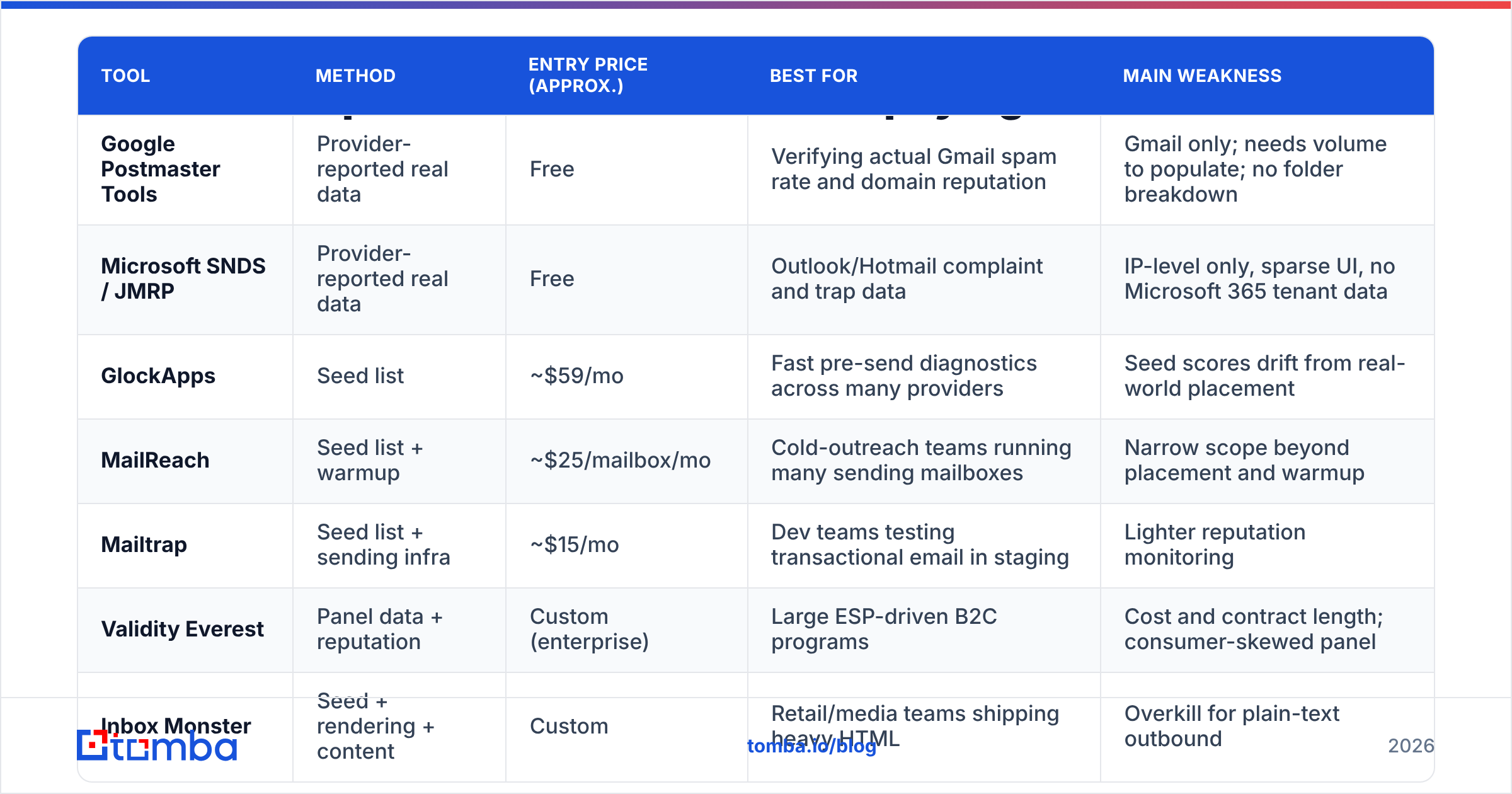
| Tool | Method | Entry price (approx.) | Best for | Main weakness |
|---|---|---|---|---|
| Google Postmaster Tools | Provider-reported real data | Free | Verifying actual Gmail spam rate and domain reputation | Gmail only; needs volume to populate; no folder breakdown |
| Microsoft SNDS / JMRP | Provider-reported real data | Free | Outlook/Hotmail complaint and trap data | IP-level only, sparse UI, no Microsoft 365 tenant data |
| GlockApps | Seed list | ~$59/mo | Fast pre-send diagnostics across many providers | Seed scores drift from real-world placement |
| MailReach | Seed list + warmup | ~$25/mailbox/mo | Cold-outreach teams running many sending mailboxes | Narrow scope beyond placement and warmup |
| Mailtrap | Seed list + sending infra | ~$15/mo | Dev teams testing transactional email in staging | Lighter reputation monitoring |
| Validity Everest | Panel data + reputation | Custom (enterprise) | Large ESP-driven B2C programs | Cost and contract length; consumer-skewed panel |
| Inbox Monster | Seed + rendering + content | Custom | Retail/media teams shipping heavy HTML | Overkill for plain-text outbound |
The pattern: free provider dashboards give you what happened, paid seed tools give you what might happen, and only panel platforms attempt both at scale. Most teams need one from column A and one from column B, not three from column B.
Why do seed tests disagree with reality?#
Because Gmail does not filter your domain — it filters your domain for one specific recipient.
Modern filtering at Gmail, Outlook, and Yahoo weights per-user engagement history heavily. Whether a given recipient has previously opened your mail, replied, moved you out of spam, or archived you unread is a stronger signal than anything a seed mailbox can simulate. A vendor seed inbox has no purchase history with you, no reply thread, and often no organic activity at all — which is why some seed accounts get filtered aggressively regardless of your content.
Three specific failure modes to watch:
- Seed accounts are known. Providers can and do recognize clusters of low-engagement mailboxes that receive test traffic. Results become non-representative over time.
- B2B coverage is thin. Your real recipients sit behind Microsoft 365 tenants with Defender policies, Mimecast, Proofpoint, or Barracuda. Vendor seeds rarely replicate those tenant-specific rules.
- Tab classification is unstable. Promotions vs primary in Gmail can flip between sends of near-identical content depending on recipient behavior.
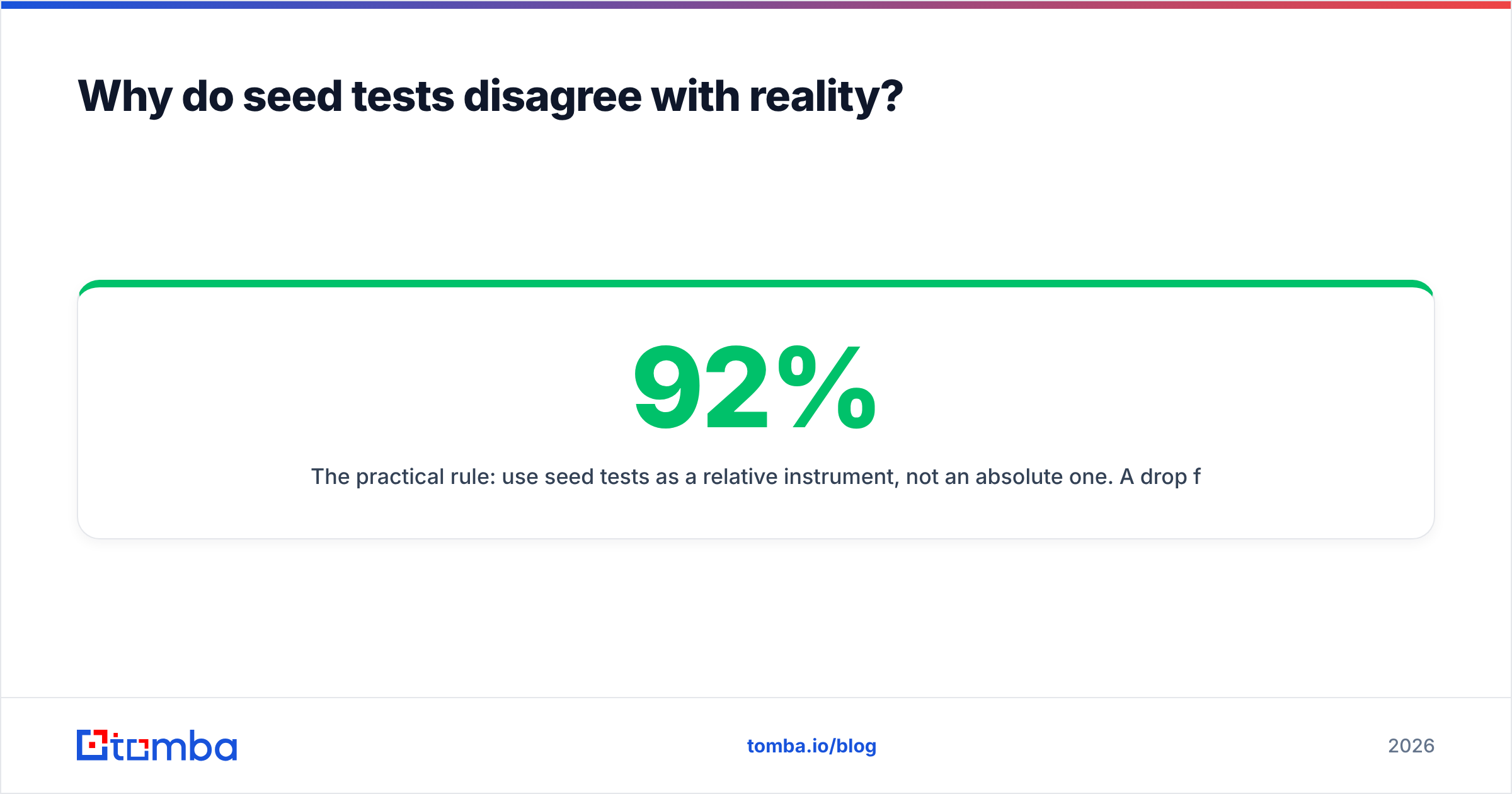
The practical rule: use seed tests as a relative instrument, not an absolute one. A drop from 92% to 61% between two sends is a real signal worth investigating. The literal number 92% is not a promise about your audience.
Is Google Postmaster Tools enough on its own?#
For Gmail-heavy lists, it is the single most valuable free tool you can wire up — and it is chronically underused. Google Postmaster Tools reports your actual user-reported spam rate, domain and IP reputation, authentication pass rates, and encryption coverage, straight from the source that decides your fate.
The constraints are real, though. You need meaningful daily volume to the provider before charts populate, you only see Gmail, and there is no inbox-vs-promotions breakdown. Microsoft's SNDS covers consumer Outlook at the IP level and tells you nothing about the corporate Microsoft 365 tenants where most B2B mail actually lands.
Google's bulk sender guidelines set the hard floor everyone now operates under: authenticate with SPF and DKIM, publish DMARC, keep one-click unsubscribe on marketing mail, and keep the user-reported spam rate under 0.3% — ideally under 0.1%. Every placement tool on the market is, in practice, a dashboard for those same numbers plus some guesswork on top.
What actually moves inbox placement?#
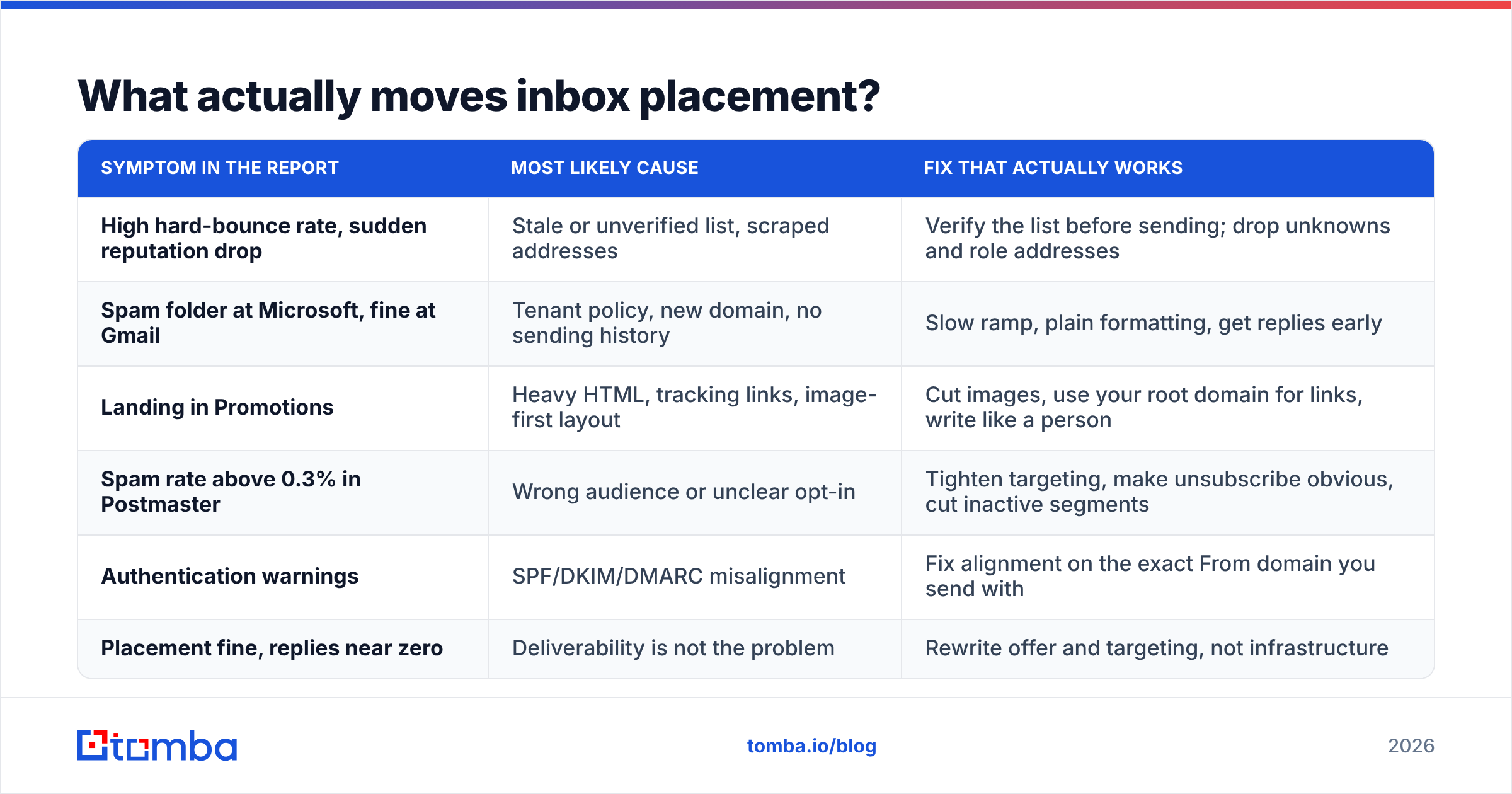
Placement problems have a boring hierarchy of causes. The tools tell you the symptom; this table tells you what to fix.
| Symptom in the report | Most likely cause | Fix that actually works |
|---|---|---|
| High hard-bounce rate, sudden reputation drop | Stale or unverified list, scraped addresses | Verify the list before sending; drop unknowns and role addresses |
| Spam folder at Microsoft, fine at Gmail | Tenant policy, new domain, no sending history | Slow ramp, plain formatting, get replies early |
| Landing in Promotions | Heavy HTML, tracking links, image-first layout | Cut images, use your root domain for links, write like a person |
| Spam rate above 0.3% in Postmaster | Wrong audience or unclear opt-in | Tighten targeting, make unsubscribe obvious, cut inactive segments |
| Authentication warnings | SPF/DKIM/DMARC misalignment | Fix alignment on the exact From domain you send with |
| Placement fine, replies near zero | Deliverability is not the problem | Rewrite offer and targeting, not infrastructure |
That last row matters more than teams admit. A significant share of "deliverability crises" are actually relevance crises. Before buying a placement tool, confirm with Postmaster Tools that your spam rate is genuinely elevated.

How should you sequence your deliverability stack?#
Order of operations beats tool selection every time. Run it like this:
- Clean the list. Every bounce is a direct hit to sender reputation, and spam traps sitting in an old list will sink an otherwise perfect setup. Run addresses through an email verifier and remove invalid, risky, and role-based entries before they ever touch your sending domain.
- Fix authentication. SPF, DKIM, DMARC — aligned to the From domain, not a subdomain you forgot about.
- Warm the domain. New domains and new mailboxes need weeks, not days. Model the ramp with a warmup calculator rather than guessing a daily cap.
- Baseline with a seed test. Now — and only now — is a seed score meaningful, because you have removed the noise that would have dominated it.
- Monitor with provider data. Postmaster Tools and SNDS become your ongoing instrument; the seed tool becomes your pre-launch check for new templates and new domains.
- Segment by engagement. Suppress non-openers on a rolling window. Nothing raises placement faster than sending less mail to people who ignore you.
Teams that do steps 1 through 3 properly often discover they never needed a paid placement tool. Teams that skip them buy one and then argue with its output for a quarter.
Where does list quality fit in?#
It is upstream of everything, and it is the part no placement dashboard can repair.
If you build lists by scraping or buying, expect bounce rates that trigger throttling on the first send. Providers who sell verified B2B data — BookYourData is a solid example in the purchased-data category, with bounce guarantees attached — are a legitimate route if you need volume fast. If you are building lists yourself from company domains and named prospects, find the address and confirm it in the same pass rather than exporting a guess.
The measurable difference shows up immediately: a list at 2% invalid behaves completely differently from a list at 15% invalid, on identical infrastructure with identical copy. Email deliverability is mostly a data-quality discipline wearing a technical costume.
Do you actually need a paid inbox placement tool?#
A quick decision rule:
- Sending under ~5,000 emails/month from one domain? Free provider dashboards plus disciplined list hygiene are enough. Skip the subscription.
- Running cold outbound across multiple mailboxes? A per-mailbox tool like MailReach earns its cost, mainly through warmup and early failure detection.
- Running marketing volume above ~100k/month? Panel-based monitoring pays for itself the first time it catches a reputation slide two weeks early.
- Shipping transactional email? Test in staging with a dev-oriented tool; your placement risk is template and infrastructure regressions, not audience quality.
Whatever you buy, judge it on one axis: does it change what you do next? A dashboard that produces a number nobody acts on is an expensive screensaver. Cross-check anything you buy against real reviews on G2 rather than vendor case studies, and insist on a trial with your own sending domain.
Start where the leverage is#
Inbox placement tools measure a problem that usually starts one step earlier — in the list. Before you compare seed scores, make sure every address you send to is real, deliverable, and attached to a person who might plausibly care.
That is what Tomba's Email Finder is built for: find verified professional addresses by domain, name, or company, with verification built into the same workflow so nothing unconfirmed reaches your sending domain. The free tier includes 25 searches per month, and paid plans start at $49/month — see Tomba pricing for the full breakdown. Clean the input, and most of your placement problems stop being problems.
Related guides#
// get started
Find, verify and enrich your first contacts today
Start on the free plan with 25 searches a month, then scale when your team is ready.
Free plan · No credit card required · GDPR & CCPA
// about the author