Inbox Radar Pricing 2026: Reviews, Pros, Cons & Real Cost
A neutral breakdown of Inbox Radar pricing in 2026 — what the per-mailbox model actually costs at scale, where the limits bite, and when a cheaper data-first stack beats monitoring alone.
TL;DR
- Inbox Radar is priced per connected mailbox per month, which means your bill scales with your sending infrastructure, not with your results. Budget accordingly before you spin up 40 inboxes.
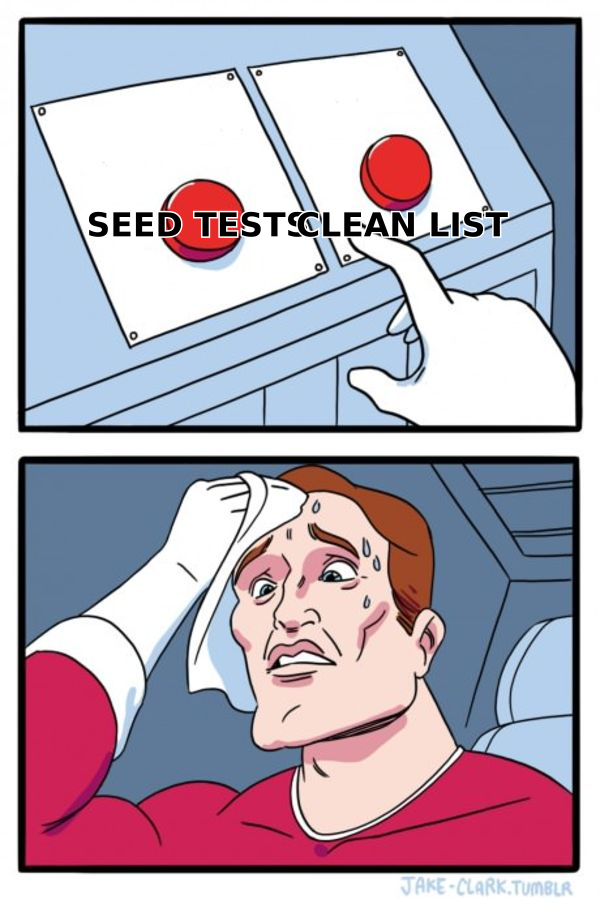
- Deliverability monitoring tools tell you that you landed in spam. They rarely tell you why. In most audits I run, the "why" is list quality, not DNS.
- The honest verdict: monitoring is worth paying for once you send 50k+ emails/month across 10+ mailboxes. Below that, the same money buys better data and fixes the root cause.
- Always price the full stack — monitoring plus sending plus data. A $30/mailbox monitor on top of an $80 sending tool and a bad list is the most expensive way to get filtered.
- Cheapest reliable order of operations: verify the list, fix authentication, warm properly, then buy inbox placement monitoring.
What is Inbox Radar and who is it actually for?#
Inbox Radar sits in the inbox placement monitoring category — the class of tools that seed test emails into a network of real mailboxes (Gmail, Outlook, Yahoo, corporate Microsoft 365 tenants), then report back where your message landed: primary inbox, promotions, spam, or nowhere at all.
Think of it like a smoke detector for your cold email program. It does not put out fires and it does not tell you which appliance is faulty. It tells you there is smoke, roughly which room, and how bad. That is genuinely useful — most teams discover a deliverability collapse three weeks late, from a reply-rate chart, after they have already burned 20,000 contacts.
The typical buyer is an outbound team running multiple sending domains and a fleet of mailboxes, usually through a sequencer like Instantly, Smartlead, or Lemlist. Agencies are the heaviest users because they carry deliverability risk on behalf of clients and need a report to point at when open rates drop.
The typical buyer who regrets it is a founder-led team with two mailboxes and a 4,000-row list scraped from a conference site. They buy monitoring, confirm they are in spam, and are no closer to a fix.
How does Inbox Radar pricing actually work?#
Almost every tool in this category prices on one of three meters, and Inbox Radar follows the dominant one: per connected mailbox, per month, with the number of automated placement tests per mailbox scaling by tier.
That matters more than the headline number. Here is why:
- Your bill is coupled to infrastructure, not usage. Adding ten mailboxes for a new campaign adds ten line items whether or not those mailboxes send a single message that month.
- Test frequency is the real upsell. Entry tiers usually cap you at a handful of placement tests per mailbox per week. Daily testing — the frequency you actually want during a warmup ramp — usually sits a tier up.
- Seed network quality varies wildly. Cheaper monitors lean on free-provider seeds (Gmail, Yahoo, Outlook.com). Corporate Microsoft 365 seeds, which are what B2B senders care about, are the premium feature.
- Annual billing is where the discount lives. Expect roughly 20% off for annual commitment, which is the standard in this category. That is a real saving and a real lock-in.
- Overage behavior is the fine print to read. Some vendors soft-cap (tests just stop), some hard-charge. Check which before you connect 30 inboxes.
Because vendors in this space change tiers frequently, treat any dollar figure you read in a blog post — including this one — as a starting point and confirm on the live pricing page before you commit. What is stable is the shape of the pricing, and the shape is what determines your real cost.
What does the full deliverability stack really cost?#
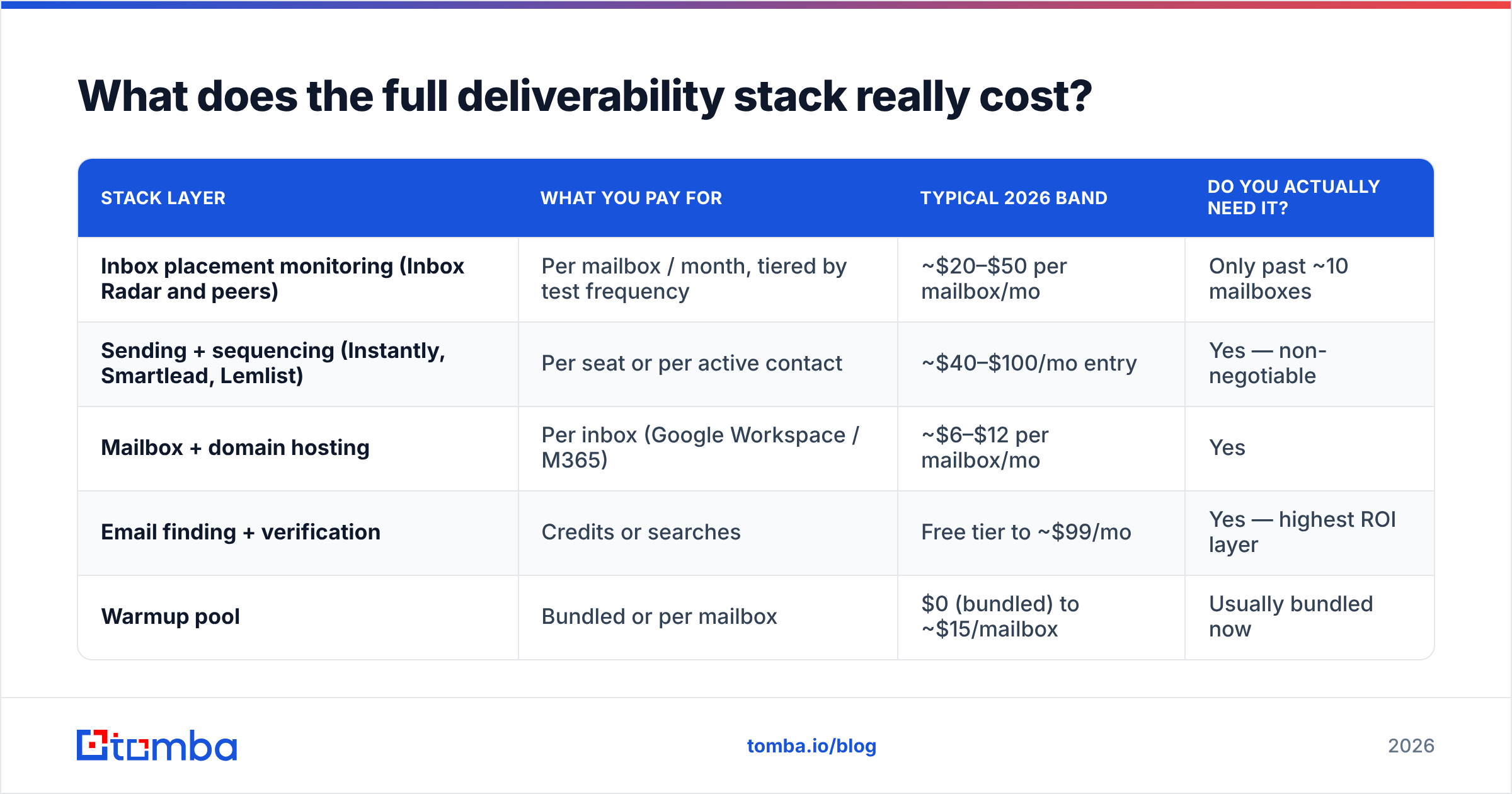
This is where most budgets break. Monitoring is never bought alone. Here is the realistic 2026 cost band for a small outbound team running 10 mailboxes and about 15,000 sends per month, priced by category rather than by any single vendor's promo page.
| Stack layer | What you pay for | Typical 2026 band | Do you actually need it? |
|---|---|---|---|
| Inbox placement monitoring (Inbox Radar and peers) | Per mailbox / month, tiered by test frequency | ~$20–$50 per mailbox/mo | Only past ~10 mailboxes |
| Sending + sequencing (Instantly, Smartlead, Lemlist) | Per seat or per active contact | ~$40–$100/mo entry | Yes — non-negotiable |
| Mailbox + domain hosting | Per inbox (Google Workspace / M365) | ~$6–$12 per mailbox/mo | Yes |
| Email finding + verification | Credits or searches | Free tier to ~$99/mo | Yes — highest ROI layer |
| Warmup pool | Bundled or per mailbox | $0 (bundled) to ~$15/mailbox | Usually bundled now |
Run the arithmetic for those 10 mailboxes: mailbox hosting lands near $90/mo, sequencing near $97/mo, and monitoring at the middle of the band adds roughly $300/mo. Monitoring becomes the single largest line item in a stack where it is the only layer that cannot send an email or find a contact.
That is not an argument against buying it. It is an argument against buying it first.
Is Inbox Radar worth it compared to the alternatives?#
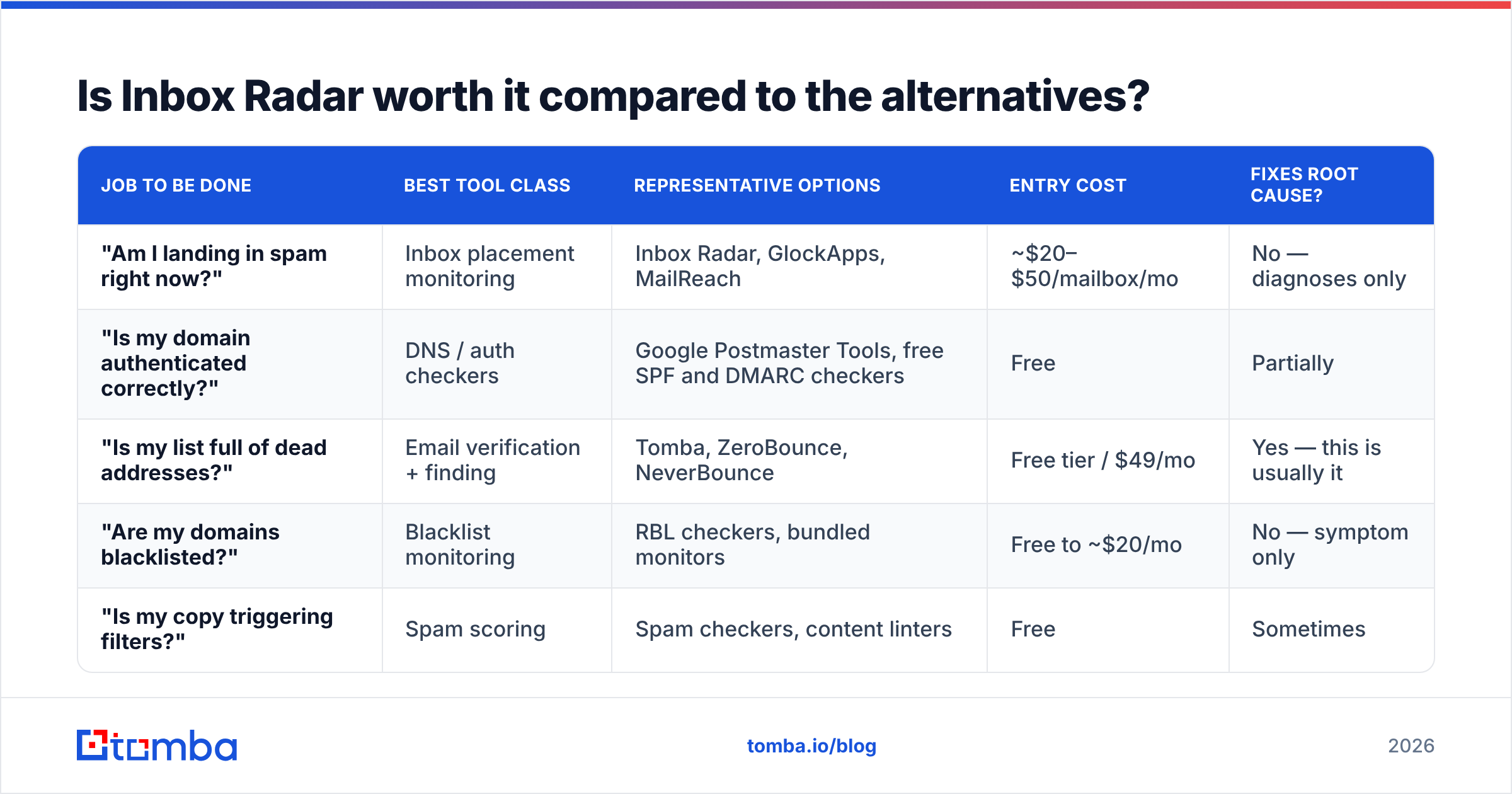
Depends on which problem you are actually solving. There are three distinct jobs people hire a "deliverability tool" for, and only one of them is inbox placement monitoring.
| Job to be done | Best tool class | Representative options | Entry cost | Fixes root cause? |
|---|---|---|---|---|
| "Am I landing in spam right now?" | Inbox placement monitoring | Inbox Radar, GlockApps, MailReach | ~$20–$50/mailbox/mo | No — diagnoses only |
| "Is my domain authenticated correctly?" | DNS / auth checkers | Google Postmaster Tools, free SPF and DMARC checkers | Free | Partially |
| "Is my list full of dead addresses?" | Email verification + finding | Tomba, ZeroBounce, NeverBounce | Free tier / $49/mo | Yes — this is usually it |
| "Are my domains blacklisted?" | Blacklist monitoring | RBL checkers, bundled monitors | Free to ~$20/mo | No — symptom only |
| "Is my copy triggering filters?" | Spam scoring | Spam checkers, content linters | Free | Sometimes |
Notice the asymmetry. The two layers that actually change your placement — clean data and correct authentication — are the two cheapest layers on the board. Google Postmaster Tools is free and gives you domain reputation, spam rate, and authentication pass rates straight from the source that is filtering you. A free email checker and an SPF checker cost nothing and catch the two most common causes of a placement collapse.
Monitoring earns its keep at scale, when you have too many mailboxes to inspect manually and you need an alert before the damage compounds. That threshold is real, and most teams hit it around 10–15 mailboxes.
What are the pros and cons of Inbox Radar?#
Pros
- Early warning that is genuinely early. A daily placement test catches a reputation slide days before reply rate does. On a 40-mailbox fleet that is worth hundreds of wasted contacts saved per week.
- Per-mailbox granularity. You can isolate the one domain that went bad instead of pausing the whole program.
- Agency-friendly reporting. Client-facing placement reports are hard to fake and easy to sell. This is the single strongest use case in the category.
- Provider-level breakdown. Knowing you are fine at Gmail but filtered at Microsoft 365 changes which segment you pause.
Cons
- Cost scales with infrastructure, not revenue. Twenty parked mailboxes cost the same as twenty active ones on most per-mailbox plans.
- Diagnosis without prescription. "You are in spam at Outlook" is where the tool stops and your afternoon starts.
- Seed-list drift. Seed mailboxes are not your prospects. Placement against a seed network correlates with real placement; it does not equal it. Treat the number as a trend line, not a measurement.
- Redundant at low volume. Under ~5,000 sends/month you can eyeball reply rates and check Postmaster Tools for free.
- Tier gates on test frequency. The frequency you want during warmup is usually not the frequency on the entry plan.

Why does list quality beat monitoring almost every time?#
Because bounce rate is the input mailbox providers weight most heavily, and it is the input you control most directly.
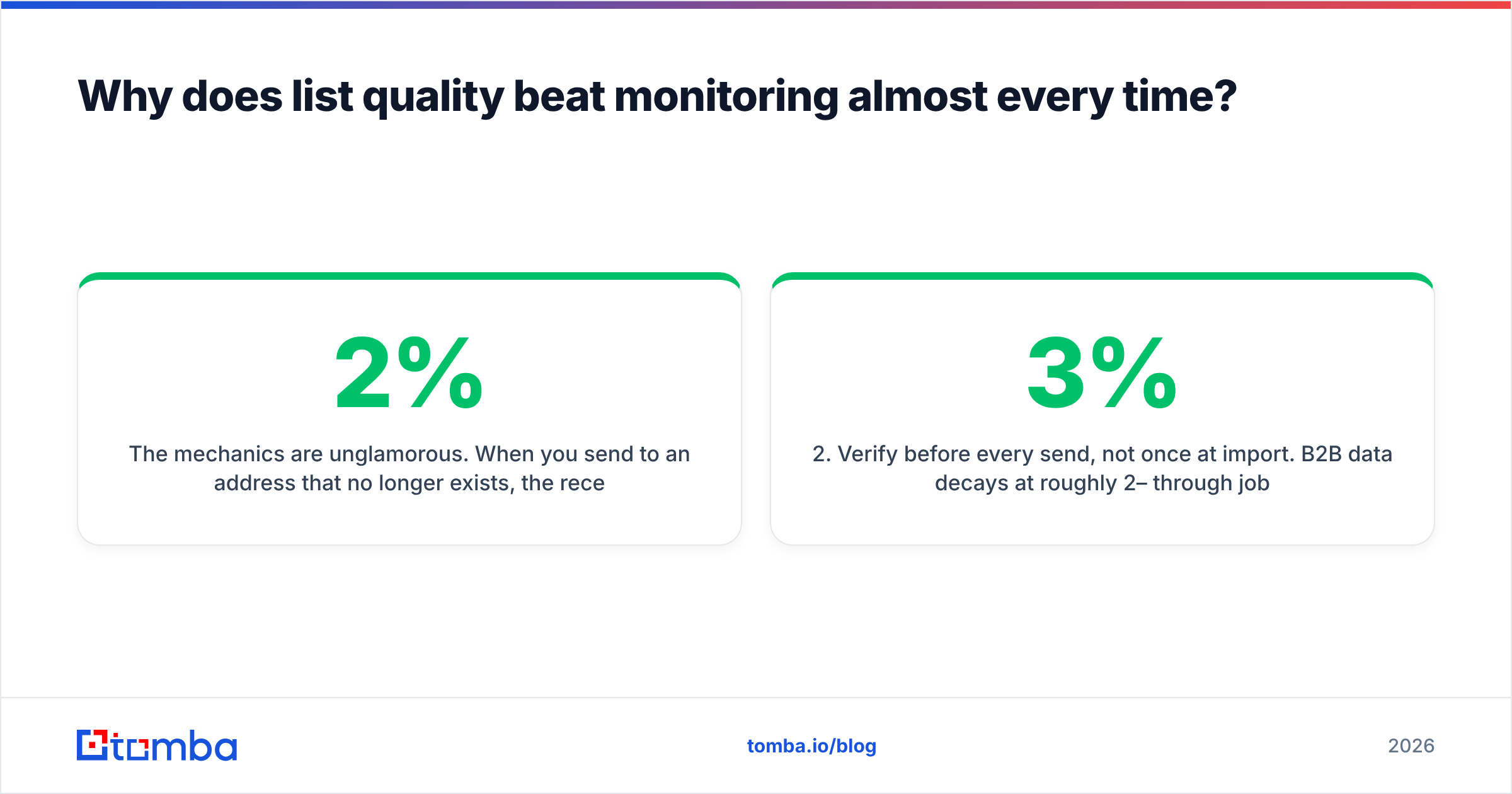
The mechanics are unglamorous. When you send to an address that no longer exists, the receiving server returns a hard bounce. Providers read a rising hard-bounce rate as a signal that you did not obtain your list legitimately, because legitimate senders have current data. Cross roughly 2% and you are in trouble; cross 5% and your domain reputation degrades in ways that take weeks of reduced volume to repair. DMARC alignment and a clean SPF record protect you from spoofing-related failures, but neither one saves a domain that is spraying dead addresses.
So the sequence that actually works:
- Source contacts from a maintained dataset, not a scrape. Providers that refresh continuously — Tomba, or a licensed B2B list vendor like BookYourData when you need pre-built segments — start you far below the bounce threshold.
- Verify before every send, not once at import. B2B data decays at roughly 2–3% per month through job changes alone. A list verified in January is materially worse by April. Run it through an email verifier as a pre-send step.
- Handle catch-all domains explicitly. A large share of enterprise domains accept everything at the SMTP layer, so a naive verifier marks them "valid" and you find out the truth from your bounce log. A catch-all verifier resolves these separately instead of guessing.
- Deduplicate across campaigns. Hitting the same person from three domains in a month is a complaint generator, and complaints hurt more than bounces.
- Fix authentication once, properly. SPF, DKIM, DMARC, custom tracking domain. It is an afternoon of work and it never needs redoing.
- Then, and only then, buy monitoring. With clean inputs, placement alerts become signal instead of noise.
Teams that run this order rarely need to escalate to premium monitoring tiers, because their placement problems are infrequent enough to debug manually when they happen.
How should you decide whether to buy?#
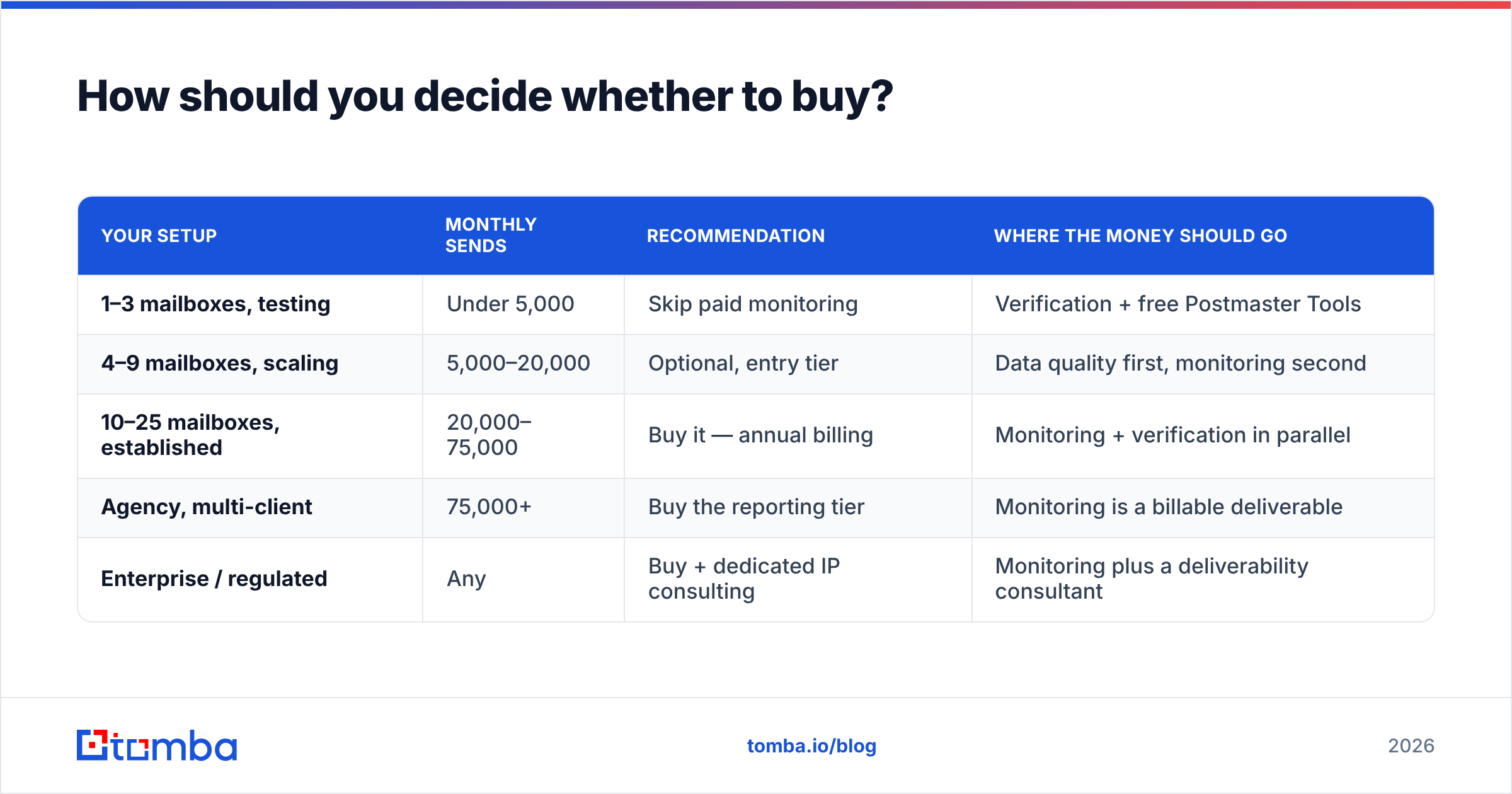
Use volume and fleet size as the gate, not enthusiasm.
| Your setup | Monthly sends | Recommendation | Where the money should go |
|---|---|---|---|
| 1–3 mailboxes, testing | Under 5,000 | Skip paid monitoring | Verification + free Postmaster Tools |
| 4–9 mailboxes, scaling | 5,000–20,000 | Optional, entry tier | Data quality first, monitoring second |
| 10–25 mailboxes, established | 20,000–75,000 | Buy it — annual billing | Monitoring + verification in parallel |
| Agency, multi-client | 75,000+ | Buy the reporting tier | Monitoring is a billable deliverable |
| Enterprise / regulated | Any | Buy + dedicated IP consulting | Monitoring plus a deliverability consultant |
Two practical notes. First, negotiate. Per-mailbox pricing is soft above 25 mailboxes at nearly every vendor in this category, and agencies routinely land 25–40% off list by asking. Second, run a paid month before committing annually, and run it during a period when you know something is wrong — a tool that cannot detect a problem you have already confirmed is not worth the annual discount.
If you want independent signal on any vendor here, G2 reviews for the deliverability category are reasonably candid about support quality and seed-network reliability, which are the two things a pricing page will never tell you.
What is the cheapest stack that actually works?#
For most teams under 20 mailboxes, this configuration outperforms a monitoring-heavy stack at a fraction of the cost:
- Data layer: a maintained email source with verification built in, so bounces never reach your sequencer.
- Auth layer: SPF, DKIM, DMARC configured once, verified with free checkers.
- Warmup layer: whatever your sequencer bundles, ramped over 3–4 weeks rather than 3–4 days. An email warmup calculator will keep you honest about the ramp.
- Observability layer: Google Postmaster Tools (free) until fleet size forces the upgrade.
The total additional spend over your sequencer is often under $100/month, and it addresses causes rather than symptoms. When you outgrow it, buy Inbox Radar or a peer — but buy it as an alerting layer on a healthy program, not as a diagnosis for a sick one.
The bottom line#
Inbox Radar's pricing is fair for what it is: a per-mailbox monitoring subscription that scales with your sending infrastructure. It is not overpriced. It is frequently mistimed — bought as a fix when it is an instrument.
Get the inputs right first. Most deliverability emergencies I have seen trace back to a list nobody re-verified, not to a DNS record or a subject line.
Start there: run your next campaign list through Tomba's Email Finder to source current, verified addresses, and check the bounce rate against your last campaign. The free tier gives you 25 searches a month to test the difference, Starter is $49/mo, and Growth is $99/mo — less than what four mailboxes of premium monitoring would cost, spent on the layer that actually moves placement. See full Tomba pricing for where your volume lands.
Related guides#
// get started
Find, verify and enrich your first contacts today
Start on the free plan with 25 searches a month, then scale when your team is ready.
Free plan · No credit card required · GDPR & CCPA
// about the author